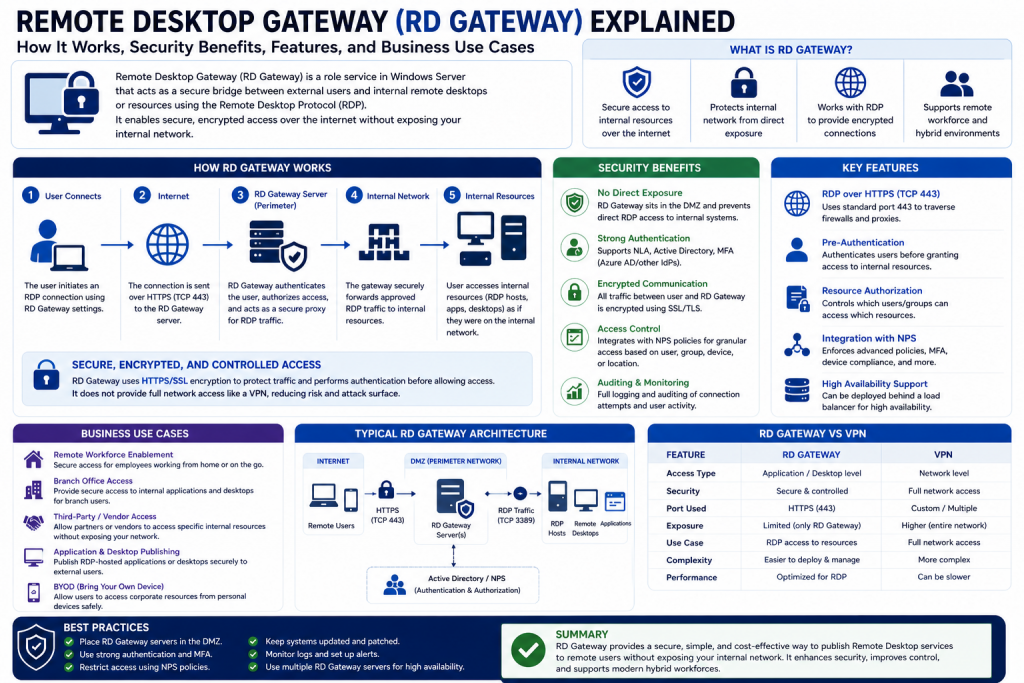
Remote work has transformed from a temporary convenience into a permanent operational model for businesses around the world. Organizations of every size now depend on employees, contractors, and IT administrators accessing internal systems from outside the office. While this shift has created flexibility, productivity, and global connectivity, it has also introduced significant security concerns. The challenge is no longer simply allowing remote access—it is ensuring that remote access is secure, controlled, and resistant to cyber threats.
Traditional remote connectivity methods often expose organizations to unnecessary risks. Open ports, unsecured Remote Desktop Protocol (RDP) sessions, poorly configured VPNs, and weak authentication systems can create opportunities for attackers to infiltrate networks. This is where Remote Desktop Gateway (RD Gateway) becomes essential. RD Gateway acts as a secure intermediary between external users and internal systems, allowing authorized individuals to connect safely without directly exposing critical infrastructure to the public internet.
A Remote Desktop Gateway is more than just a remote access tool. It is a security-focused architecture designed to encrypt traffic, enforce authentication policies, centralize access control, and protect sensitive corporate resources. For businesses operating in hybrid or remote environments, RD Gateway provides a strategic balance between usability and security.
This guide explores what Remote Desktop Gateway is, how it works, why it matters, and how it supports secure remote access in modern enterprise environments.
The Growing Need for Secure Remote Access
Modern organizations no longer operate exclusively from centralized offices. Employees work from homes, airports, client locations, co-working spaces, and branch offices. IT teams manage servers from remote consoles. Support professionals troubleshoot user devices from across the globe. This decentralized work model creates a clear need: users must connect to organizational systems securely from virtually anywhere.
However, providing remote access is not as simple as opening network access to outside users. Every external connection creates a potential entry point for cybercriminals. Attackers commonly target exposed RDP ports, weak passwords, stolen credentials, and vulnerable remote services to gain unauthorized access.
Without proper controls, remote connectivity can lead to:
- Brute-force login attempts
- Credential theft
- Ransomware deployment
- Unauthorized lateral movement across networks
- Data theft
- Compliance violations
Organizations need solutions that reduce these risks while maintaining operational efficiency. Remote Desktop Gateway was designed specifically for this purpose.
What Is Remote Desktop Gateway?
Remote Desktop Gateway is a Windows Server role service that enables authorized remote users to connect to internal network resources using Remote Desktop Protocol over HTTPS. Instead of exposing internal machines directly to the internet through standard RDP ports, RD Gateway encapsulates RDP traffic inside encrypted HTTPS sessions.
In practical terms, this means users can securely connect to office desktops, servers, or applications from external networks without requiring direct access to internal infrastructure.
RD Gateway serves as a secure tunnel that:
- Encrypts remote desktop traffic
- Uses SSL/TLS for secure communication
- Authenticates users before granting access
- Applies access control policies
- Reduces direct exposure of internal systems
- Centralizes remote access management
By routing RDP traffic through HTTPS (typically port 443), RD Gateway also simplifies firewall configuration and improves compatibility with external networks that may block traditional RDP ports.
Why RD Gateway Matters in Modern IT Infrastructure
Security teams increasingly prioritize minimizing attack surfaces. Directly exposing RDP over port 3389 has become widely recognized as a major security risk. Attackers continuously scan the internet for open RDP ports, attempting password attacks or exploiting vulnerabilities.
RD Gateway significantly reduces this exposure by acting as a broker. Instead of users connecting directly to internal devices, all traffic passes through the gateway where policies, authentication, and encryption are enforced.
This architecture delivers several strategic advantages:
- Protects internal endpoints from direct internet exposure
- Supports centralized logging and monitoring
- Enables role-based access controls
- Works with Multi-Factor Authentication
- Simplifies compliance management
- Supports secure remote work without full VPN dependency
For organizations balancing convenience and cybersecurity, RD Gateway often becomes a foundational component of secure access strategy.
Understanding Remote Access Methods
To appreciate the value of RD Gateway, it helps to compare it with other common remote access methods.
Virtual Private Networks (VPNs) are widely used and create encrypted tunnels into corporate networks. While effective, VPNs often grant broader network access than necessary. If a user device is compromised, attackers may gain wider internal access.
Direct RDP connections are convenient but highly risky if exposed publicly.
DirectAccess provides seamless connectivity but requires specialized infrastructure and enterprise-level deployment.
Cloud-hosted virtual desktop platforms offer flexibility but may involve higher recurring costs and external platform dependencies.
RD Gateway offers a middle-ground approach. It allows remote desktop access to specific systems without exposing the entire internal network. This targeted design improves security while preserving user productivity.
Core Functions of Remote Desktop Gateway
RD Gateway performs several essential functions that collectively strengthen remote access security.
Secure Tunneling
RD Gateway wraps RDP sessions inside HTTPS traffic. This protects communication from interception and shields internal systems from direct internet exposure.
Authentication Enforcement
Before access is granted, RD Gateway verifies user identity through Active Directory, Network Policy Server, smart cards, or MFA solutions.
Authorization Controls
Not every authenticated user should access every system. RD Gateway uses Connection Authorization Policies (CAP) and Resource Authorization Policies (RAP) to define who can connect, from where, and to which systems.
Traffic Encryption
SSL/TLS encryption ensures confidentiality and integrity during remote sessions.
Centralized Management
Administrators can configure policies, monitor sessions, and review logs from centralized consoles.
How RD Gateway Works Step by Step
Behind the scenes, RD Gateway follows a structured process to establish secure access.
First, the remote user launches Remote Desktop Connection and specifies the RD Gateway server.
Second, the connection request is sent over HTTPS rather than standard RDP.
Third, the RD Gateway server validates credentials through configured authentication systems.
Fourth, authorization policies determine whether the user is allowed to connect to requested resources.
Fifth, once approved, the gateway securely forwards the RDP session to the internal machine.
Finally, the user gains remote desktop access while all traffic remains encrypted.
This process ensures that authentication and policy enforcement occur before access to internal resources is established.
Key Components of RD Gateway Architecture
A Remote Desktop Gateway environment includes multiple integrated components.
RD Gateway Server
This is the external-facing secure access point that handles HTTPS tunneling, authentication, and session routing.
Remote Desktop Client
The user device initiates the connection.
Network Policy Server (NPS)
NPS validates credentials and enforces policy controls.
Active Directory
Provides identity verification and user account management.
SSL Certificates
Certificates establish encrypted trust between users and the gateway.
CAP and RAP Policies
These policies define access permissions.
Together, these components create a layered security framework.
Benefits of Using Remote Desktop Gateway
Organizations implementing RD Gateway gain numerous advantages.
Enhanced Security
RDP traffic is protected by HTTPS encryption, significantly reducing interception risks.
Reduced Attack Surface
Internal machines remain hidden from direct public exposure.
Granular Access Management
Admins can control who accesses what resources.
Improved User Experience
Users connect through familiar Remote Desktop tools without requiring full VPN complexity.
Compliance Support
Encrypted access and policy controls help meet security frameworks.
Scalability
RD Gateway can support organizations ranging from small businesses to large enterprises.
Common Business Use Cases
RD Gateway supports multiple operational scenarios.
Remote employees securely accessing office desktops.
IT administrators managing servers remotely.
Third-party vendors accessing approved systems.
Helpdesk professionals troubleshooting devices.
Branch office users connecting to centralized resources.
In each case, security controls remain consistent.
Challenges Organizations Must Consider
While RD Gateway offers major benefits, deployment requires planning.
SSL certificates must be configured correctly.
Firewall rules must be precise.
Capacity planning is important for performance.
Authentication systems should be modernized with MFA.
Patch management is essential.
Improper deployment can reduce security effectiveness.
RD Gateway vs VPN: Security Perspective
Many businesses ask whether RD Gateway can replace VPNs.
The answer depends on use case.
VPNs provide broad network-level access.
RD Gateway focuses specifically on remote desktop/application access.
For organizations seeking least-privilege access, RD Gateway often offers better security because users only reach approved systems rather than entire networks.
In high-security environments, some organizations combine VPN and RD Gateway for layered protection.
The Role of HTTPS in RD Gateway Security
HTTPS is central to RD Gateway’s security model. By leveraging port 443, RD Gateway benefits from:
- Encrypted sessions
- Firewall compatibility
- Reduced network blocking
- Trusted certificate validation
This makes remote access both secure and practical.
Why Multi-Factor Authentication Matters
Passwords alone are no longer sufficient. Credential theft remains a top attack vector.
Integrating MFA with RD Gateway adds another verification step such as:
- Mobile app approval
- SMS code
- Hardware token
- Biometric verification
This significantly reduces unauthorized access risks even if passwords are compromised.
Remote Desktop Gateway in Zero Trust Strategies
Zero Trust security assumes no user or device is automatically trusted.
RD Gateway supports Zero Trust by:
- Verifying identity
- Enforcing policies
- Restricting resource access
- Logging activity
- Supporting conditional controls
This alignment makes RD Gateway valuable in modern cybersecurity strategies.
Why Businesses Continue Adopting RD Gateway
As organizations expand remote capabilities, secure access remains mission-critical. RD Gateway addresses the balance between accessibility and protection by delivering encrypted, policy-driven remote desktop access without exposing internal systems.
Its ability to reduce risk, improve compliance, simplify administration, and support modern work environments makes it a strategic security solution rather than just a convenience tool.
Conclusion
Remote Desktop Gateway has become an essential component of secure remote access architecture. In a world where remote connectivity is fundamental to productivity, organizations cannot afford to rely on outdated or insecure access methods.
By encrypting traffic, centralizing authentication, enforcing authorization, and minimizing attack surfaces, RD Gateway provides businesses with a practical and secure framework for remote work.
For IT leaders, system administrators, and cybersecurity professionals, understanding RD Gateway is no longer optional. It is a critical step in building secure, resilient, and scalable remote access infrastructure that supports productivity without sacrificing protection.
Authentication, Encryption, Threat Protection, and Access Control
Remote access has become one of the most critical functions in modern IT operations, but it also represents one of the largest attack surfaces organizations must defend. As businesses continue supporting hybrid workforces, distributed teams, third-party contractors, and remote IT management, the security of external connections is no longer a secondary concern—it is a frontline cybersecurity priority.
While Remote Desktop Gateway (RD Gateway) provides secure remote connectivity, its true value lies in the security architecture that protects users, systems, and organizational data from evolving cyber threats. RD Gateway is not simply a convenience tool for accessing desktops remotely. It acts as a strategic security layer that controls authentication, enforces authorization, encrypts communications, and limits unnecessary exposure of internal resources. By serving as an intermediary between external users and private network assets, RD Gateway significantly reduces the risks associated with direct Remote Desktop Protocol (RDP) exposure, which has long been a common target for brute-force attacks, credential theft, and ransomware campaigns.
Its architecture is designed to ensure that every remote connection passes through structured verification processes before access is granted. This includes validating user identities, enforcing policy restrictions, and ensuring secure encrypted channels through SSL/TLS protocols. In enterprise environments, this means administrators gain far more than secure connectivity—they gain centralized oversight, policy consistency, and the ability to implement layered security controls that align with broader cybersecurity frameworks.
As threat actors increasingly target remote infrastructure, RD Gateway becomes an important defensive measure in reducing attack surfaces while preserving business flexibility. It supports modern security priorities such as least-privilege access, multi-factor authentication, segmentation, and compliance readiness. In this way, RD Gateway helps transform remote access from a potential vulnerability into a controlled, monitored, and strategically protected component of enterprise IT security.
Without strong security controls, remote desktop environments can quickly become vulnerable to brute-force attacks, credential theft, ransomware, unauthorized lateral movement, and regulatory violations. RD Gateway addresses these risks through layered protections that strengthen enterprise defenses while maintaining usability.
This section explores how Remote Desktop Gateway secures remote access through authentication systems, encryption protocols, policy enforcement, network protections, and cyber risk reduction strategies.
Why Remote Access Security Is a Major Cybersecurity Concern
Every time a user connects from outside the corporate network, security teams face an unavoidable challenge: how to grant access without creating dangerous vulnerabilities.
Traditional remote access methods often increase organizational risk because they may:
- Expose internal systems directly to the internet
- Depend solely on password-based authentication
- Lack encryption safeguards
- Provide excessive network access
- Fail to log or monitor user activity effectively
Cybercriminals actively scan public IP ranges for exposed RDP services, particularly systems using TCP port 3389. Once identified, attackers frequently attempt credential stuffing, brute-force attacks, exploit vulnerabilities, or deploy malware.
Remote access security failures can result in:
- Data breaches
- Intellectual property theft
- Compliance penalties
- Operational disruption
- Financial losses
- Reputation damage
RD Gateway was designed specifically to minimize these threats by functioning as a secure broker between external users and internal resources.
The Security Foundation of Remote Desktop Gateway
At its core, RD Gateway protects organizations by introducing multiple layers of security between remote users and internal systems.
Rather than allowing users to connect directly to desktops or servers, RD Gateway requires all sessions to pass through controlled checkpoints.
Its security framework includes:
- User authentication
- Resource authorization
- SSL/TLS encryption
- Policy enforcement
- Network segmentation
- Session monitoring
- Certificate validation
This layered design reduces attack surfaces and strengthens access governance.
Authentication: The First Line of Defense
Authentication determines whether a user is genuinely who they claim to be. Because stolen credentials remain one of the most common attack vectors, authentication is one of the most critical security components in RD Gateway.
Active Directory Integration
RD Gateway commonly integrates with Active Directory (AD), allowing organizations to centralize user identity management. This ensures users must authenticate using approved domain credentials before access is granted.
Benefits include:
- Centralized account management
- Password policy enforcement
- Account lockout policies
- Group-based access control
- Identity consistency across environments
AD integration allows administrators to align remote access controls with broader identity security strategies.
Multi-Factor Authentication (MFA)
Password-only security is increasingly insufficient. Attackers frequently compromise passwords through phishing, keylogging, credential reuse, and data breaches.
MFA adds an additional verification layer, such as:
- One-time passcodes
- Mobile authenticator apps
- Push notifications
- Hardware tokens
- Biometric checks
With MFA enabled, even if a password is stolen, unauthorized users are significantly less likely to gain access.
For RD Gateway deployments, MFA solutions can integrate through:
- Azure MFA
- Duo Security
- RADIUS systems
- Smart cards
This dramatically improves resistance against account compromise.
Network Policy Server (NPS): Policy-Based Authentication
NPS acts as a centralized policy engine for RD Gateway. It validates credentials while also enforcing conditions before access is approved.
NPS can evaluate:
- User identity
- Group membership
- Device type
- Time-of-day restrictions
- Location requirements
- Authentication method
This transforms authentication from simple login verification into dynamic policy enforcement.
Authorization: Controlling What Users Can Access
Authentication confirms identity, but authorization determines permissions.
An authenticated user should not automatically access every resource. RD Gateway uses authorization controls to enforce least-privilege principles.
Connection Authorization Policies (CAP)
CAP policies define who can connect to the RD Gateway server itself.
These policies can restrict access based on:
- User groups
- Authentication methods
- Device conditions
- Smart card requirements
Resource Authorization Policies (RAP)
RAP policies define which internal systems or resources users can access after authentication.
For example:
- Finance staff can access accounting servers
- IT admins can access infrastructure systems
- Contractors can access only designated support machines
This segmentation limits unnecessary access and reduces insider threat risks.
Encryption: Protecting Data in Transit
Remote sessions often involve highly sensitive information, including business data, administrative credentials, and customer records. Without encryption, intercepted traffic could expose critical assets.
RD Gateway protects data through SSL/TLS encryption.
SSL/TLS Tunneling
RD Gateway encapsulates RDP traffic inside HTTPS, usually over TCP port 443.
This approach provides:
- Confidentiality
- Integrity
- Session security
- Firewall compatibility
Encryption protects against packet sniffing, session hijacking, and man-in-the-middle attacks.
TLS 1.2 and TLS 1.3
Modern RD Gateway deployments should prioritize updated TLS versions to avoid weaknesses in outdated protocols.
Benefits include:
- Stronger cipher suites
- Better forward secrecy
- Reduced cryptographic vulnerabilities
- Enhanced compliance alignment
Disabling older protocols like SSL 3.0 and TLS 1.0 is essential.
Perfect Forward Secrecy (PFS)
PFS ensures that if one session key is compromised, previous sessions remain protected.
This limits long-term damage from encryption key exposure.
SSL Certificates: Establishing Trust
Certificates validate server identity and encrypt communication.
Proper certificate management includes:
- Trusted Certificate Authority issuance
- Regular renewal
- Correct hostname matching
- Revocation monitoring
Misconfigured certificates can undermine security and trust.
Reducing Public Exposure of Internal Systems
One of RD Gateway’s greatest strengths is minimizing direct internet exposure.
Instead of exposing each internal desktop or server, organizations expose only the gateway.
This design:
- Hides internal IP addresses
- Eliminates direct RDP exposure
- Centralizes external entry points
- Simplifies monitoring
- Reduces scanning visibility
Attackers see the gateway—not internal infrastructure.
Firewall Security and Port Management
Direct RDP often requires port 3389 exposure, which is heavily targeted.
RD Gateway instead routes traffic over HTTPS, allowing organizations to:
- Close public RDP ports
- Restrict inbound traffic
- Use web-friendly port 443
- Improve compatibility with restrictive networks
Firewall best practices include:
- Allowing only required ports
- IP whitelisting where possible
- Geo-blocking suspicious regions
- Logging denied traffic
Network Segmentation for Risk Reduction
Even secure gateways should not provide unrestricted internal access.
Network segmentation isolates RD Gateway from sensitive infrastructure.
Examples include:
- DMZ deployment
- VLAN separation
- Internal firewall zoning
- Resource-specific subnet controls
Segmentation ensures that even if a gateway is compromised, attackers face additional barriers.
Threats RD Gateway Helps Mitigate
Properly configured RD Gateway reduces multiple major threats.
Brute-Force Attacks
MFA, account lockouts, and policy restrictions make password attacks less effective.
Credential Theft
Additional authentication layers reduce stolen credential usefulness.
Man-in-the-Middle Attacks
SSL/TLS encryption protects session confidentiality.
Unauthorized Lateral Movement
RAP policies limit accessible resources.
Ransomware Delivery
Restricted remote entry points reduce direct compromise opportunities.
Compliance Violations
Logging, encryption, and access controls support regulatory alignment.
Monitoring and Logging: Visibility for Security Teams
Security without visibility creates blind spots.
RD Gateway supports logging for:
- Successful logins
- Failed login attempts
- Policy violations
- Session durations
- User identities
- Resource destinations
Logs can integrate with:
- SIEM platforms
- Security analytics tools
- Threat detection systems
This supports incident response, anomaly detection, and audit readiness.
Zero Trust Alignment
Modern security strategies increasingly embrace Zero Trust principles.
RD Gateway supports Zero Trust through:
- Identity verification
- Least privilege
- Conditional access
- Continuous monitoring
- Segmented access
Rather than assuming trust based on network location, every connection is verified.
Common Security Misconfigurations to Avoid
RD Gateway can still become vulnerable if poorly implemented.
Common mistakes include:
- Weak passwords
- Missing MFA
- Outdated TLS versions
- Poor certificate hygiene
- Overly broad RAP permissions
- Insufficient patching
- Inadequate logging
Security architecture is only as strong as its implementation.
Best Practices for Maximum Security
To maximize protection:
- Enforce MFA for all users
- Use TLS 1.2 or newer
- Deploy trusted SSL certificates
- Apply least privilege policies
- Patch Windows Server regularly
- Monitor logs continuously
- Restrict by IP where practical
- Separate gateway from critical systems
- Conduct security reviews regularly
Balancing Security with User Experience
Security controls should not become so restrictive that users bypass them.
RD Gateway succeeds partly because it provides:
- Familiar Remote Desktop interfaces
- No need for broad VPN access
- HTTPS compatibility
- Centralized controls without excessive complexity
The goal is secure productivity.
The Strategic Value of RD Gateway Security
RD Gateway is not merely about enabling remote work—it is about controlling it responsibly.
For organizations facing increasing cyber threats, secure remote access is foundational to:
- Business continuity
- Compliance
- Cyber resilience
- Operational scalability
When combined with layered defenses, RD Gateway becomes a powerful part of enterprise security architecture.
Compliance, Layered Security, Enterprise Deployment, and Long-Term Remote Access Strategy
Remote Desktop Gateway (RD Gateway) plays a critical role in modern remote connectivity, but deploying it successfully requires more than basic installation. As organizations scale remote work, manage hybrid teams, and defend against increasingly sophisticated cyber threats, RD Gateway must evolve from a simple remote access solution into a strategic component of enterprise security architecture. Its value extends beyond providing users with access to internal desktops or applications from outside the office. In reality, RD Gateway functions as a controlled security checkpoint that helps organizations regulate who can connect, what resources they can access, and under what conditions those connections are permitted.
As digital transformation accelerates, businesses are increasingly dependent on distributed workforces, cloud-connected environments, and third-party collaboration. This shift creates a larger attack surface, making unsecured remote access one of the most dangerous vulnerabilities in modern IT infrastructure. RD Gateway addresses this challenge by integrating encrypted communication, centralized policy enforcement, authentication controls, and access segmentation into one framework. Rather than simply opening a door to remote systems, it creates a monitored, policy-driven entry point designed to align with Zero Trust principles and compliance requirements.
For organizations focused on resilience, scalability, and governance, RD Gateway can no longer be treated as an optional convenience. It must be deployed as part of a broader long-term strategy that supports business continuity, minimizes cyber risk, strengthens operational oversight, and ensures secure remote productivity across evolving enterprise environments.
A properly configured RD Gateway can strengthen compliance, reduce cyber risk, improve operational continuity, and support secure workforce mobility. A poorly planned deployment, however, can introduce vulnerabilities, operational bottlenecks, and audit failures.
Long-term success depends on combining RD Gateway with layered security principles, compliance frameworks, infrastructure planning, user governance, and continuous improvement. Organizations that approach RD Gateway strategically gain not only secure access but also resilience, visibility, and adaptability.
This section explores enterprise deployment strategies, regulatory considerations, security integration, maintenance practices, and future-focused approaches that maximize the value of RD Gateway in modern IT environments.
Why Deployment Strategy Matters More Than Installation
Installing RD Gateway is relatively straightforward for experienced administrators, but secure deployment requires broader planning. The gateway becomes a critical entry point into internal systems, which means configuration mistakes can have significant consequences.
A successful deployment strategy must consider:
- Security architecture
- Authentication systems
- Certificate management
- User segmentation
- Network placement
- Logging and monitoring
- Regulatory requirements
- Performance scalability
- Business continuity
Organizations that treat RD Gateway as a strategic infrastructure component rather than a convenience tool are better positioned to maintain security over time.
Building RD Gateway Into a Layered Security Model
No single security solution can defend against all threats. Cybersecurity depends on layered defense, often referred to as defense in depth.
RD Gateway works best when integrated into broader security architecture that includes:
- Firewalls
- Multi-Factor Authentication
- Endpoint Detection and Response (EDR)
- Intrusion Detection and Prevention Systems (IDS/IPS)
- Security Information and Event Management (SIEM)
- Network segmentation
- Vulnerability management
- Zero Trust frameworks
In this model, RD Gateway serves as one checkpoint among multiple protective layers.
For example:
A user attempting remote access may first pass through firewall filtering, then MFA verification, then NPS policy checks, then endpoint compliance validation, and finally resource authorization controls.
This layered process dramatically reduces the likelihood of unauthorized access.
The Principle of Least Privilege in RD Gateway Deployment
One of the most important enterprise security principles is least privilege: users should only access the systems necessary for their roles.
RD Gateway supports least privilege through Connection Authorization Policies (CAP) and Resource Authorization Policies (RAP), but organizations must design these carefully.
Best practices include:
- Separate access by department
- Restrict contractors to designated resources
- Prevent broad administrative access where unnecessary
- Segment privileged users from standard users
- Regularly review access rights
For example, HR staff should not access server management consoles, and external vendors should not reach finance systems.
Granular controls reduce insider risk and limit damage from compromised accounts.
Network Placement: Where RD Gateway Should Live
RD Gateway should never be treated as just another internal server. Because it acts as an internet-facing access broker, network placement matters significantly.
Many organizations place RD Gateway within a demilitarized zone (DMZ), which creates a buffer between public internet traffic and internal systems.
Benefits of DMZ placement include:
- Reduced internal exposure
- Better segmentation
- Improved threat containment
- Controlled traffic flow
- Enhanced firewall policy design
Additional internal firewalls between RD Gateway and critical resources further strengthen protection.
SSL Certificates and PKI Strategy
SSL certificates are foundational to RD Gateway trust and encryption.
Enterprise certificate best practices include:
- Use certificates from trusted Certificate Authorities
- Avoid self-signed certificates in production
- Monitor expiration dates proactively
- Use strong key lengths
- Align certificate names with gateway FQDNs
- Implement certificate lifecycle management
Certificate failures can disrupt access and create security warnings that erode trust.
For larger organizations, Public Key Infrastructure (PKI) governance becomes essential.
Compliance and Regulatory Responsibilities
Remote access security is increasingly scrutinized by auditors and regulators. Organizations operating in healthcare, finance, retail, legal, or government sectors often face mandatory compliance obligations.
RD Gateway can support these frameworks when properly configured.
HIPAA
Healthcare organizations must secure patient data, encrypt communications, and restrict unauthorized access.
RD Gateway supports HIPAA through:
- Encrypted sessions
- MFA integration
- Access logging
- Role-based restrictions
GDPR
Organizations handling personal data must ensure secure processing and access control.
RD Gateway contributes through:
- User authentication
- Controlled data access
- Audit trails
- Encryption
PCI DSS
Payment environments require strict remote access protections.
RD Gateway can support PCI DSS by:
- Restricting payment system access
- Logging administrative sessions
- Using strong encryption
- Enforcing MFA
ISO 27001
As a broader information security standard, ISO 27001 emphasizes policy, governance, and risk management—all areas RD Gateway can support.
Documentation: The Often Overlooked Compliance Requirement
Technical security alone is not enough. Compliance often requires proof.
Organizations should document:
- Gateway architecture
- Access policies
- Certificate inventories
- Patch schedules
- Incident response plans
- User role mappings
- MFA enforcement
- Log retention policies
Detailed documentation supports:
- Security audits
- Regulatory reviews
- Incident investigations
- Operational continuity
Without documentation, even secure systems may fail audits.
Patch Management and Lifecycle Maintenance
Cyber threats evolve continuously. RD Gateway security depends heavily on keeping systems updated.
Maintenance priorities include:
- Windows Server security patches
- TLS configuration updates
- Certificate renewals
- Authentication platform updates
- Firewall policy reviews
- Vulnerability scans
Unpatched gateway systems can become prime targets.
A maintenance schedule should include:
- Monthly patch reviews
- Quarterly security audits
- Annual architecture reassessment
Performance Planning and Scalability
As remote work expands, RD Gateway performance becomes increasingly important.
Common performance considerations include:
- Concurrent user capacity
- Session throughput
- CPU and memory utilization
- Bandwidth demands
- Redundancy needs
Larger organizations may require:
- Load balancing
- High availability clustering
- Multiple gateway servers
- Geographic redundancy
Performance bottlenecks can degrade user productivity and increase support burdens.
Business Continuity and Disaster Recovery
Remote access often becomes even more critical during crises such as:
- Natural disasters
- Office closures
- Public health emergencies
- Cyber incidents
RD Gateway should be part of business continuity planning.
Best practices include:
- Backup gateway configurations
- Redundant gateways
- Secondary certificate storage
- Failover infrastructure
- Emergency access policies
A resilient RD Gateway strategy ensures operational continuity when physical access becomes impossible.
Endpoint Security Integration
The security of remote sessions depends partly on the security of endpoint devices.
A secure gateway cannot fully protect against compromised user devices.
Integration with endpoint security can include:
- Antivirus validation
- EDR platforms
- Device compliance policies
- OS patch verification
- Zero Trust device posture checks
Conditional access policies can deny entry to risky devices.
SIEM and Threat Intelligence Integration
Monitoring RD Gateway logs in isolation limits security potential.
Integrating logs into SIEM platforms allows organizations to:
- Detect brute-force attempts
- Identify unusual login patterns
- Correlate suspicious events
- Trigger automated responses
- Support forensics
Examples of suspicious indicators include:
- Geographic anomalies
- Multiple failed logins
- After-hours privileged access
- Unexpected resource targeting
Threat visibility transforms RD Gateway from passive access tool to active security intelligence source.
Training Users for Secure RD Gateway Use
Technology alone cannot eliminate risk.
Users should understand:
- MFA processes
- Phishing risks
- Password hygiene
- Device security
- Safe network practices
Human error remains a major security factor.
Organizations that combine technical controls with user awareness achieve stronger outcomes.
RD Gateway in Zero Trust Architecture
Zero Trust assumes no connection should be inherently trusted.
RD Gateway aligns well with Zero Trust through:
- Identity-first authentication
- Conditional access
- Least privilege
- Continuous validation
- Segmented resources
As organizations modernize, RD Gateway can serve as a transitional or complementary Zero Trust component.
Common Enterprise Mistakes to Avoid
Even mature organizations can weaken RD Gateway effectiveness through poor decisions.
Frequent mistakes include:
- Exposing RDP directly alongside RD Gateway
- Overly broad access permissions
- Weak password policies
- Missing MFA
- Ignoring certificate health
- Poor logging
- Flat network access
- Neglecting endpoint security
Security failures often stem from operational shortcuts rather than technology limitations.
Future Trends in Remote Access Security
Remote access continues evolving.
Emerging trends include:
- Passwordless authentication
- Biometric integration
- AI-driven anomaly detection
- Device trust scoring
- Conditional adaptive access
- Cloud-delivered secure access service edge (SASE)
While technologies advance, the principles behind RD Gateway—controlled access, encryption, identity verification—remain highly relevant.
Organizations may eventually integrate RD Gateway with broader secure access ecosystems rather than replacing it outright.
Long-Term Strategic Value of RD Gateway
When deployed thoughtfully, RD Gateway provides more than remote connectivity.
It becomes a strategic business asset by enabling:
- Secure workforce flexibility
- Compliance alignment
- Centralized governance
- Operational resilience
- Security modernization
For many organizations, especially those in Microsoft-centric environments, RD Gateway remains a practical and effective component of enterprise remote access strategy.
Creating a Sustainable Governance Model
To maintain RD Gateway effectiveness long term, organizations should establish governance frameworks covering:
- Access approvals
- Policy reviews
- Audit schedules
- Security ownership
- User lifecycle management
- Incident response
Governance ensures RD Gateway remains aligned with business, compliance, and threat realities over time.
Conclusion
Remote Desktop Gateway is far more than a technical solution for remote desktop access—it is a foundational security platform that can support enterprise mobility, compliance, and cyber resilience when deployed strategically.
Its true effectiveness depends on how well organizations integrate it into broader security frameworks, maintain strong governance, enforce least privilege, support compliance, and adapt to evolving threats.
By combining RD Gateway with layered defenses, endpoint security, monitoring systems, user education, and Zero Trust principles, businesses can create secure remote access environments that balance productivity with protection.
In a world where remote work, cybersecurity threats, and regulatory expectations continue to expand, organizations must move beyond basic remote access and embrace strategic remote access security.
RD Gateway, when properly configured and continuously managed, offers exactly that—a scalable, secure, and future-ready framework for protecting remote connectivity in the modern enterprise.
Continue exploring the technologies and certification concepts that matter most to you.