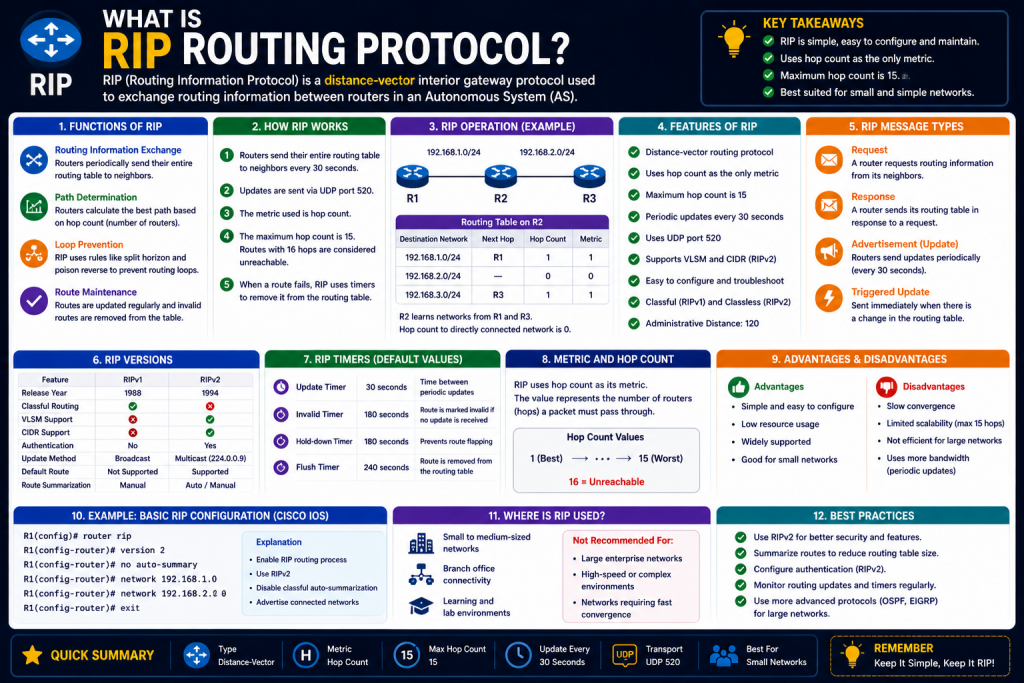
Modern computer networks rely on routers to move data from one location to another. Whether a user sends an email, opens a website, accesses a cloud application, or streams a video, routers work behind the scenes to ensure packets travel through the correct paths to reach their destination. Without routing, even well-connected networks would struggle to deliver data efficiently because devices would only know about directly connected systems. As networks expanded beyond small local segments, the need for intelligent communication between routers became essential.
Routing protocols were developed to solve this challenge by allowing routers to exchange information about destinations they know, the paths available to those destinations, and the best route for traffic. Among the earliest and most influential of these protocols was RIP, or Routing Information Protocol. RIP introduced a simple but powerful way for routers to share route information automatically, reducing the burden of manual configuration and enabling larger, more scalable networks.
RIP is often considered one of the foundational routing protocols in networking history. While many newer protocols now dominate enterprise environments, RIP remains important for understanding routing fundamentals because it demonstrates the basic principles behind route sharing, path calculation, and dynamic network awareness. Learning RIP also provides insight into how more advanced protocols evolved.
What is Routing Information Protocol (RIP)?
Routing Information Protocol is a dynamic routing protocol used by routers to share information about reachable networks and determine the most efficient route to those destinations based on hop count. A hop represents each router a packet passes through on its way to a destination. RIP chooses the route with the fewest hops as the best path.
For example, if Router A can reach a destination network through Router B in two hops or through Router C in four hops, RIP selects the two-hop path because it considers it more efficient. This method is straightforward and easy to implement, which helped RIP become one of the first widely adopted routing protocols.
RIP operates as a distance-vector routing protocol. The term distance refers to the metric used to measure route cost, which in RIP is hop count, while vector refers to the direction or next-hop router used to reach the destination. Each router periodically shares its routing table with neighboring routers, allowing all devices to build a broader picture of the network.
This process helps routers learn about networks they are not directly connected to. Instead of only knowing immediate interfaces, routers can discover distant destinations through advertisements from their neighbors. In this way, RIP transformed routers from isolated devices into cooperative participants in larger internetworks.
The Historical Importance of RIP
RIP emerged during the early growth of TCP/IP networking when networks were significantly smaller and less complex than modern infrastructures. At that time, organizations needed a simple method to automate route sharing without requiring expensive hardware or advanced processing capabilities.
RIP’s simplicity was its greatest strength. It required relatively low CPU and memory resources, making it practical for older networking hardware. Because of this, RIP was adopted across multiple vendors and became a standard feature in routers for many years.
Its origins are linked to the Xerox Network Systems protocol suite, where similar routing concepts first appeared. RIP was later standardized for IP networks and became widely used in educational environments, branch offices, and smaller enterprise networks.
As networking needs expanded, RIP’s limitations became more noticeable, particularly in large-scale environments. However, RIP’s contribution to networking remains significant because it established many concepts still relevant today, such as route advertisement, convergence, timers, and loop prevention.
How RIP Solves the Router Awareness Problem
A router without dynamic routing behaves like someone who only knows their immediate neighborhood streets. It can communicate with directly connected networks but lacks awareness of destinations beyond those connections unless manually configured.
Imagine three routers connected in a triangle. Router A knows its direct links, Router B knows its own, and Router C knows its own. Without a routing protocol, Router A may not know how to reach a subnet connected only to Router C. RIP solves this by allowing Router C to advertise its networks to Router B, which then shares that information with Router A.
Through this process, Router A gradually builds awareness of destinations beyond its immediate physical interfaces, even though it has no direct connection to Router C’s subnet. This exchange of route information is what transforms isolated routers into cooperative network devices capable of supporting larger interconnected systems. Each router periodically communicates the networks it knows about, including the number of hops required to reach them, allowing neighboring routers to compare and store the best available paths. In this example, Router B acts as an intermediary, extending Router C’s reachability information to Router A while also potentially sharing Router A’s routes back to Router C.
Over time, all three routers develop broader routing tables that include both local and remote destinations. This dynamic learning process eliminates the need for administrators to manually configure every possible remote network path, greatly improving scalability. It also demonstrates RIP’s role as an automated communication system for routers, enabling traffic to move efficiently across multiple devices and helping networks function as unified environments rather than disconnected segments.
Through periodic updates, each router gradually learns:
- Which networks exist
- How far away they are
- Which neighboring router leads there
This automatic exchange dramatically improves scalability and reduces administrative complexity.
Distance-Vector Routing Explained
RIP belongs to the distance-vector family of routing protocols. Distance-vector protocols are characterized by routers sharing their entire routing tables with neighbors at regular intervals.
Each RIP-enabled router maintains a list of:
- Destination networks
- Hop count to each destination
- Next-hop router
- Route timers
When updates are exchanged, routers compare received routes to their current entries. If a shorter path is discovered, the routing table is updated accordingly.
This model is simple but can become slower in adapting to topology changes compared to more advanced protocols. Still, its conceptual clarity makes it highly valuable for learning.
Understanding Hop Count as RIP’s Metric
Hop count is RIP’s sole metric for path selection. Every router between source and destination adds one hop.
For example:
- Directly connected network = 0 hops
- One router away = 1 hop
- Two routers away = 2 hops
RIP’s maximum hop count is 15. Any route requiring 16 hops is considered unreachable. This design prevents endless routing loops but also limits RIP to smaller networks.
The hop-count-only model creates simplicity but ignores other performance factors such as:
- Bandwidth
- Delay
- Reliability
- Congestion
This means RIP may sometimes choose a slower low-hop path over a faster higher-bandwidth route simply because it has fewer routers.
Key Benefits of RIP
RIP gained popularity because it offered several practical advantages:
Simple Configuration
RIP is easy to deploy compared to more advanced protocols. Basic setup often requires minimal commands, making it suitable for training labs and small businesses.
Low Resource Usage
Because RIP uses straightforward calculations, it consumes less processing power and memory than protocols like OSPF.
Vendor Compatibility
RIP has broad support across networking hardware manufacturers, improving interoperability.
Educational Value
RIP remains one of the best tools for understanding routing fundamentals.
Predictable Behavior
Its simple metric makes route decisions easy to interpret.
Limitations of RIP
Despite its usefulness, RIP has significant weaknesses.
Maximum Hop Count Restriction
Networks larger than 15 hops are unsupported.
Slow Convergence
RIP may take time to update routing tables after failures, which can temporarily create inefficient paths.
Periodic Full Updates
Sending complete routing tables every 30 seconds can waste bandwidth.
Limited Metric Intelligence
Hop count alone does not account for path quality.
Scalability Challenges
Large enterprise or ISP environments generally require more advanced protocols.
Security Weaknesses in Early RIP Versions
Early RIP implementations lacked authentication, meaning malicious devices could send false routing updates. This created vulnerabilities such as:
- Route poisoning
- Spoofed advertisements
- Traffic redirection
RIPv2 introduced authentication improvements, but security remained less robust than many modern alternatives.
RIP Versions and Evolution
RIP evolved over time to address shortcomings.
RIPv1
The original version was classful, meaning it did not support subnet mask transmission. This limited flexibility and compatibility with CIDR.
RIPv2
Added:
- Classless Inter-Domain Routing support
- Authentication
- Multicast updates
These improvements made RIP more practical but did not solve scalability limitations.
RIPng (RIP Next Generation)
Developed for IPv6, RIPng adapted RIP concepts for the larger address space and architecture of IPv6. RIPng supports:
- IPv6 addressing
- Multicast communication
- Modernized interface configuration
RIPng preserved RIP’s simplicity while enabling IPv6 routing.
Why RIP Still Matters Today
Although OSPF, EIGRP, and BGP are more common in modern enterprise and internet-scale networks, RIP remains relevant in several ways.
Training and Certification
RIP is frequently taught because it clearly illustrates routing concepts.
Small Networks
Some branch offices or isolated environments may still benefit from RIP’s simplicity.
Legacy Systems
Older infrastructure may continue using RIP.
Protocol Comparison
Understanding RIP makes it easier to appreciate why newer protocols improved upon it.
RIP as a Networking Learning Tool
RIP serves as a gateway to understanding broader networking concepts:
- Dynamic vs static routing
- Route advertisement
- Metrics
- Convergence
- Redundancy
- Loop prevention
By studying RIP, network engineers build foundational knowledge applicable to all routing technologies.
Real-World Perspective on RIP’s Role
In modern production environments, RIP is rarely the first choice for large organizations because scalability, convergence speed, and security demands often exceed its design. However, dismissing RIP entirely would overlook its historical and educational significance.
RIP helped shape the development of dynamic routing and remains one of the clearest examples of how routers share path information. It demonstrates how networks transitioned from isolated segments into interconnected systems capable of automatic adaptation.
For beginners, RIP offers an accessible introduction before moving to more sophisticated protocols. For experienced professionals, it remains a reminder of networking’s evolution from simplicity toward complexity.
Introduction to RIP’s Operational Design
Understanding Routing Information Protocol requires more than knowing that it shares routes between routers. To truly appreciate RIP’s place in networking, it is essential to understand how it operates internally, how routers process updates, how route calculations are made, how network stability is preserved, and why RIP eventually evolved into newer versions such as RIPv2 and RIPng. RIP is not simply a tool for exchanging destination information; it is an early framework that introduced the foundational logic of dynamic routing to modern networks.
Its internal behavior reveals how routers communicate, maintain awareness of changing topologies, and make forwarding decisions based on limited but structured information. By studying RIP’s mechanisms—such as periodic routing updates, hop count metrics, timer systems, route invalidation, and loop prevention techniques like Split Horizon and Poison Reverse—network professionals gain insight into both the strengths and weaknesses of distance-vector routing. This deeper understanding also explains why RIP was highly effective for smaller early networks but became less practical as enterprise environments demanded faster convergence, greater scalability, and improved security.
Examining RIP’s evolution into RIPv2 highlights advancements like classless routing and authentication, while RIPng demonstrates adaptation to IPv6. Together, these developments show how networking protocols must evolve alongside technological growth. Learning RIP at this deeper level provides not only historical perspective but also essential knowledge that strengthens understanding of all routing technologies.
RIP was designed during a time when simplicity and interoperability were more important than advanced optimization. Its internal logic reflects that priority. RIP does not analyze bandwidth, latency, packet loss, or link reliability. Instead, it relies on a straightforward exchange of routing information between neighboring routers and calculates the best path based on hop count alone. This simplicity made RIP practical for early networks but also introduced several technical limitations that shaped the development of future routing protocols.
To understand RIP deeply, network professionals must examine its routing table structure, periodic updates, route timers, route advertisement process, distance-vector mechanics, convergence patterns, and loop prevention strategies.
The Routing Information Base (RIB): RIP’s Core Knowledge Center
At the center of every RIP-enabled router is the Routing Information Base, commonly called the routing table. This table acts as the router’s knowledge repository, containing all known destinations and the information required to reach them.
Each entry in the routing table generally includes:
- Destination network address
- Subnet mask or prefix
- Next-hop router
- Metric (hop count)
- Route source
- Administrative distance
- Timer values
For directly connected interfaces, the router automatically knows those routes because they are physically attached. However, RIP’s true value appears when routers begin learning about remote networks through neighboring routers.
For example, if Router A connects directly to Router B, and Router B connects to Router C, Router A can learn about Router C’s networks through Router B’s advertisements. Router A then adds those destinations to its routing table, along with the next-hop information pointing to Router B.
This process transforms routers from isolated devices into informed participants in a larger network ecosystem.
How RIP Exchanges Routing Updates
RIP’s route-sharing mechanism depends on periodic updates. By default, RIP routers send their full routing table to neighboring routers every 30 seconds. These updates ensure that routers continuously maintain awareness of network topology. This scheduled exchange is one of RIP’s defining operational characteristics because it allows routers to share their knowledge consistently, even when no major network changes occur. Each update contains information about known destination networks, associated hop counts, and route status, giving neighboring routers the data they need to compare paths and make routing decisions. Through this repetitive communication cycle, routers gradually build a broader understanding of remote networks beyond their directly connected interfaces.
If a router learns of a better path with fewer hops, it can update its routing table accordingly and advertise that improved route to others. Periodic updates also help routers detect unreachable destinations when expected advertisements stop arriving, triggering route invalidation timers and convergence processes. However, this design comes with trade-offs. Sending full routing tables every 30 seconds can consume bandwidth, particularly in larger networks, even if no topology changes have occurred.
This makes RIP less efficient than more modern protocols that send incremental updates only when necessary. Despite this inefficiency, RIP’s regular update process offers simplicity and predictability, making it easier to configure, troubleshoot, and understand, especially in educational environments where foundational routing behavior is being studied.
The update process works as follows:
- Router gathers its known routes
- Router packages routing information into RIP update messages
- Router sends updates to neighboring routers
- Neighbors compare received routes with existing entries
- Better routes are added or existing routes are modified
In RIPv1, updates were broadcast to all devices on the subnet, which was inefficient because even non-router devices received unnecessary traffic. RIPv2 improved this by using multicast, specifically address 224.0.0.9, allowing updates to reach only RIP-aware devices.
RIPng for IPv6 uses multicast address FF02::9, modernizing RIP for IPv6 environments.
Distance Vector Algorithm and Route Selection
RIP is categorized as a distance-vector protocol because routers advertise:
- Distance: hop count
- Vector: direction or next hop
When a router receives a route advertisement, it increments the advertised hop count by one before evaluating it. This additional hop reflects the cost of reaching that network through the advertising neighbor.
For example:
- Router B advertises Network X with metric 2
- Router A receives the advertisement
- Router A adds one hop
- Router A records Network X as metric 3
If Router A already knows a path to Network X with metric 4, it replaces that route with the better metric 3 path.
This process continues dynamically as routers exchange updates.
Timers That Control RIP Behavior
RIP depends heavily on timers to maintain network accuracy and prevent stale routes from persisting.
Update Timer
Every 30 seconds, RIP sends the full routing table.
Invalid Timer
If no update is received for a route within 180 seconds, the route is marked invalid.
Hold-Down Timer
Prevents unstable routes from rapidly changing during network disruptions, reducing route flapping.
Flush Timer
Typically after 240 seconds, invalid routes are removed from the routing table.
These timers help RIP balance route persistence with adaptability.
RIP Convergence: How Networks Adapt to Change
Convergence refers to how quickly all routers in a network update their routing tables after a topology change.
If a link fails:
- Directly connected router detects failure
- Route becomes invalid
- Updated information propagates to neighbors
- Neighbors adjust their routing tables
- Entire network eventually stabilizes
RIP’s convergence is slower than protocols like OSPF because updates are periodic rather than immediate by default. This delay can temporarily cause routers to use outdated paths.
In modern networking, slow convergence can be problematic, especially in large or mission-critical environments.
Routing Loops: A Major Challenge in Distance-Vector Routing
One of RIP’s most famous technical problems is the routing loop. A routing loop occurs when routers continuously pass incorrect route information to each other, creating endless traffic cycles.
For example:
- Router A loses access to Network X
- Router B still believes Router A has Network X
- Router B advertises outdated information
- Router A mistakenly believes Router B knows the route
- Packets loop endlessly
This issue can waste bandwidth and destabilize networks.
Split Horizon: Preventing Reverse Advertisement
Split Horizon prevents a router from advertising a route back through the same interface from which it learned the route.
If Router A learns about Network X from Router B, Router A will not advertise Network X back to Router B.
This simple rule reduces loop potential significantly.
Poison Reverse: Explicitly Marking Failed Routes
Poison Reverse strengthens Split Horizon by actively advertising failed routes with metric 16, RIP’s unreachable value.
Instead of remaining silent, the router informs neighbors:
“This route is unreachable.”
This proactive communication speeds route invalidation.
Route Poisoning
Route poisoning occurs when a failed route is deliberately advertised with the maximum hop count of 16.
This immediately signals route failure across the network.
Triggered Updates
Triggered updates improve RIP responsiveness by sending immediate updates when topology changes occur, rather than waiting for the next 30-second interval.
For example:
- Link failure detected
- Route poisoned
- Immediate update sent
Triggered updates reduce convergence delays.
Count-to-Infinity Problem
RIP’s maximum hop count of 15 exists partly to prevent count-to-infinity issues, where routers continuously increase route metrics without recognizing complete failure.
Without a limit:
- Router A says metric 3
- Router B says metric 4
- Router A says metric 5
- Continues indefinitely
RIP defines metric 16 as unreachable, creating a hard ceiling.
RIPv1: Original Implementation and Limitations
RIPv1 was the first standardized version of RIP and worked well in early homogeneous environments.
Key characteristics:
- Classful routing only
- No subnet mask transmission
- Broadcast updates
- No authentication
These limitations became serious as subnetting and CIDR became common.
RIPv2: Major Improvements
RIPv2 addressed many weaknesses.
Enhancements included:
- Classless routing support
- Variable Length Subnet Masking (VLSM)
- Authentication
- Multicast updates
- Route tags
These changes improved flexibility and security but did not eliminate RIP’s scalability limitations.
RIPng: RIP for IPv6
As IPv6 adoption expanded, RIPng was developed to support the new protocol.
RIPng preserved RIP’s core logic while adapting for IPv6.
Key RIPng features:
- IPv6-only operation
- Multicast updates using FF02::9
- Prefix-based route exchange
- Interface-based configuration
- Link-local next-hop addressing
RIPng does not simply replicate IPv4 RIP syntax. Configuration often focuses more directly on interfaces rather than network statements.
IPv4 RIP vs IPv6 RIPng
While conceptually similar, RIPng introduces several practical differences.
Addressing
IPv4 uses 32-bit addresses; IPv6 uses 128-bit addresses.
Communication
RIPv2 uses 224.0.0.9; RIPng uses FF02::9.
Configuration Style
RIPng often enables RIP directly on interfaces.
Next-Hop Handling
RIPng commonly uses link-local addresses.
Despite these changes, hop count remains the primary metric.
Administrative Distance
Administrative distance measures route trustworthiness when multiple routing sources exist.
RIP’s administrative distance is 120, meaning:
- Static routes are preferred
- OSPF is usually preferred
- EIGRP often preferred
This relatively high value reflects RIP’s lower sophistication.
Resource Efficiency
RIP’s operational simplicity keeps hardware demands low.
Benefits:
- Minimal CPU overhead
- Low memory usage
- Broad compatibility
This makes RIP useful in:
- Small offices
- Labs
- Educational settings
- Legacy systems
Practical Network Use Cases for RIP
Although RIP is uncommon in modern enterprise cores, it can still be practical for:
- Small branch networks
- Training labs
- Legacy hardware
- Simple IPv6 demonstrations with RIPng
Its predictability and simplicity remain valuable.
Why RIP Declined in Large Networks
RIP became less popular because:
- 15-hop limit
- Slow convergence
- Limited metrics
- Periodic full-table updates
- Reduced scalability
As organizations demanded larger, faster, and more resilient infrastructures, OSPF, EIGRP, and BGP became dominant.
Educational Importance of RIP Internal Mechanics
Studying RIP teaches foundational networking concepts:
- Dynamic routing
- Route advertisement
- Metric comparison
- Timer management
- Loop prevention
- Convergence
These principles apply broadly across networking technologies.
Introduction to Practical RIPng Deployment
After understanding the purpose of Routing Information Protocol, its internal mechanics, and how RIP evolved into RIPng for IPv6, the next step is practical implementation. Theory explains how routers exchange routes, but configuration demonstrates how those principles create full network connectivity in real environments. Practical deployment transforms abstract concepts like hop count, route advertisement, convergence, and neighbor communication into observable operational behavior.
When administrators configure RIP or RIPng on actual routers—whether physical hardware or virtual lab environments—they gain direct insight into how routing tables are built, how updates are propagated, and how routers dynamically adapt to topology changes. This hands-on process is essential because networking rarely functions perfectly on theory alone; successful implementation requires understanding interface states, addressing plans, protocol activation, route verification, and troubleshooting techniques. By applying RIPng in IPv6 networks, learners can observe how routers discover remote prefixes, calculate next hops, and maintain connectivity across multiple paths. They also develop practical skills in identifying configuration mistakes, diagnosing failed adjacencies, and validating route propagation using operational commands. Real-world practice bridges the gap between conceptual networking knowledge and deployable technical skill, helping engineers move beyond memorization into genuine competence. Ultimately, implementation reveals how routing protocols operate under real conditions, making practical configuration one of the most important steps in mastering both IPv4 and IPv6 dynamic routing.
RIPng, or RIP Next Generation, is the IPv6-compatible version of RIP. While it preserves the core distance-vector behavior and hop-count metric of earlier RIP versions, RIPng adapts to IPv6’s addressing model and routing architecture. This makes it an excellent learning tool for IPv6 routing fundamentals, particularly in labs, classrooms, and small test networks.
Deploying RIPng requires more than simply enabling a protocol. Administrators must understand IPv6 addressing plans, interface roles, route advertisements, verification commands, and troubleshooting methodology. In practical networking, success depends not just on turning RIPng on, but on validating that routers are exchanging accurate information and forwarding traffic correctly.
This section explores how to build a sample RIPng network, configure routers, verify operation, diagnose problems, and understand when RIPng still has value in modern networking.
Designing a Basic IPv6 RIPng Topology
A practical RIPng lab often begins with three routers connected in a triangular or linear topology. For example:
- Router R1 connected to Router R2
- Router R2 connected to Router R3
- Router R1 connected directly to Router R3
- Each router connected to its own local subnet or loopback network
This design allows testing of:
- Directly connected routes
- Remote routes
- Redundant paths
- Equal-cost load balancing
- Route advertisements
- Failure recovery
A common IPv6 addressing scheme for educational environments uses documentation prefix 2001:db8::/32. This prefix is reserved for examples and avoids conflicts with public addressing.
Example:
- R1 to R2: 2001:db8:12::/64
- R1 to R3: 2001:db8:13::/64
- R2 to R3: 2001:db8:23::/64
- LANs:
- R1 LAN: 2001:db8:1::/64
- R2 LAN: 2001:db8:2::/64
- R3 LAN: 2001:db8:3::/64
This structure provides a realistic environment for route learning.
Preparing Router Interfaces for IPv6
Before RIPng can function, IPv6 routing must be enabled and interfaces must be assigned addresses.
Typical preparation includes:
- Enabling IPv6 unicast routing
- Assigning IPv6 addresses
- Ensuring interfaces are active
- Confirming link-local addresses
Each IPv6-enabled interface automatically generates a link-local address unless manually configured. Link-local addresses are especially important because RIPng often uses them as next-hop references.
For example, a router interface may use:
- Global unicast: 2001:db8:12::1/64
- Link-local: FE80::1
Without functional interfaces, RIPng cannot exchange routes.
Enabling IPv6 Routing Globally
Routers generally require global IPv6 forwarding activation before routing protocols can exchange routes properly.
This step ensures:
- IPv6 packet forwarding
- Route table support
- Neighbor discovery participation
Without enabling IPv6 routing globally, interfaces may hold addresses but fail to route traffic.
Configuring RIPng on Interfaces
Unlike older IPv4 RIP implementations that often used network statements, RIPng commonly enables routing directly on participating interfaces.
For each relevant interface:
- Access interface configuration mode
- Enable RIPng process
- Apply consistent process naming
This interface-centric model improves precision by clearly defining which interfaces participate in route advertisement.
For example:
- Gigabit interfaces for LAN advertisement
- Serial interfaces for router interconnection
Every participating router must have RIPng enabled on the appropriate interfaces. If one router is excluded, route propagation becomes incomplete.
Naming the RIPng Process
RIPng process names are locally significant identifiers used to group interfaces into the same RIP process.
For example:
- RIP_TEST
- IPv6_RIP
- LAB_RIP
The exact name does not need to match between routers, unlike authentication keys. However, consistency improves administrative clarity.
Understanding RIPng Route Advertisement
Once enabled, RIPng begins:
- Sending advertisements
- Receiving advertisements
- Updating route tables
- Learning remote prefixes
For example:
- R2 advertises 2001:db8:2::/64
- R1 receives route
- R1 installs route with hop count incremented
- R1 can now forward traffic toward R2 LAN
This process occurs automatically every update cycle.
Verifying Direct Connectivity Before RIPng
Before troubleshooting routing, verify basic Layer 3 connectivity:
- Ping adjacent interfaces
- Confirm IPv6 addresses
- Verify interface state
- Check cable or virtual links
Example:
If R1 cannot ping R2 directly, RIPng will not function correctly.
Verification tools include:
- Interface summary commands
- IPv6 neighbor tables
- Ping tests
This baseline prevents confusion between routing failures and physical connectivity problems.
Testing RIPng Route Learning
After configuration, routers should begin learning remote routes.
Verification methods:
- Display RIPng routes only
- Display full IPv6 routing table
- Check next-hop addresses
- Verify metrics
A successful routing table should show:
- Directly connected routes
- RIP-learned routes
- Hop counts
- Link-local next hops
For example, R1 should learn:
- R2 LAN
- R3 LAN
- R2-R3 transit network
Interpreting RIPng Metrics
RIPng maintains RIP’s traditional metric:
- 1 hop for directly advertised remote route
- Increment by 1 per router traversed
Thus:
- R2 advertises network with metric 1
- R1 receives and records metric 2
This sometimes surprises administrators transitioning from other protocols.
Testing End-to-End Reachability
Once routes are learned, routers should reach non-directly connected networks.
Examples:
- R1 pinging R3 LAN
- R2 pinging R1 loopback
- R3 pinging R2 subnet
Successful responses confirm:
- Route advertisement
- Route selection
- Forwarding logic
- Neighbor reachability
If pings fail despite visible routes, issues may involve:
- Interface state
- ACLs
- Incorrect prefixes
- Missing return routes
Troubleshooting RIPng Problems
Even simple protocols can fail due to misconfiguration.
Common issues include:
RIPng Not Enabled on All Interfaces
If one transit link lacks RIPng, route sharing becomes incomplete.
Incorrect IPv6 Addressing
Wrong prefixes prevent proper adjacency.
Shutdown Interfaces
Administrative shutdown blocks communication.
Missing IPv6 Unicast Routing
Interfaces may function locally but not forward.
Link-Local Problems
Because RIPng relies heavily on link-local addresses, corruption here can disrupt next-hop logic.
Authentication or Filtering Issues
Though less common in labs, route filtering can block advertisements.
Administrative Distance Conflicts
Other protocols may override RIPng routes.
Using Show Commands for Troubleshooting
Useful operational checks include:
- IPv6 interface brief
- IPv6 route tables
- RIPng database
- Debug updates
- Neighbor discovery tables
These commands reveal:
- Route presence
- Metrics
- Advertisement frequency
- Learned neighbors
Equal-Cost Multi-Path (ECMP) in RIPng
If two routes to the same destination have identical hop counts, RIPng can install both.
Benefits:
- Redundancy
- Load sharing
- Fault tolerance
Example:
R1 reaching network 23 through:
- R2 path
- R3 path
If both are metric 2, both may appear.
Failure Recovery and Convergence
If a link fails:
- Route invalidated
- Metric raised
- Triggered update sent
- Alternate path selected
RIPng’s slower convergence remains a limitation, but redundancy can reduce downtime.
Comparing RIPng to OSPFv3
OSPFv3 often replaces RIPng in enterprise IPv6 deployments because:
- Faster convergence
- Link-state intelligence
- Better scalability
- Hierarchical design
However, RIPng remains simpler.
Comparing RIPng to EIGRP for IPv6
EIGRP offers:
- Faster updates
- Composite metrics
- Better optimization
But RIPng may still be preferred for basic labs.
Comparing RIPng to BGP
BGP handles:
- Interdomain routing
- Massive scalability
- Policy control
RIPng is not designed for internet-scale routing.
Where RIPng Still Makes Sense
RIPng remains useful for:
- Educational labs
- IPv6 training
- Small internal deployments
- Legacy simplicity
- Low-resource environments
Its clarity makes it excellent for learning IPv6 dynamic routing.
Security Considerations in RIPng
Like earlier RIP versions, administrators should consider:
- Route injection
- Unauthorized advertisements
- Misconfiguration
Security strategies include:
- Access controls
- Interface restrictions
- Route filtering
While RIPng is more modern, it still lacks the advanced security architecture of some newer protocols.
Best Practices for RIPng Deployment
To maximize success:
- Use clear addressing plans
- Verify physical connectivity first
- Enable only required interfaces
- Monitor routing tables regularly
- Use route summarization when possible
- Test failover scenarios
- Document topology carefully
Educational Benefits of RIPng
For students, RIPng provides:
- IPv6 addressing practice
- Dynamic routing experience
- Troubleshooting discipline
- Understanding of route metrics
- Migration awareness from IPv4 to IPv6
The Broader Lesson of RIP and RIPng
RIP’s true long-term value lies in foundational understanding. It teaches:
- How routers learn
- How paths are chosen
- Why loops happen
- Why scalability matters
- How protocol evolution responds to network growth
RIPng extends these lessons into IPv6.
Conclusion
RIPng represents both continuity and evolution in networking. It preserves the simplicity that made RIP historically important while adapting those principles to the modern IPv6 environment. Through straightforward interface-based configuration, periodic route advertisements, hop-count metrics, and familiar distance-vector behavior, RIPng remains one of the clearest ways to understand dynamic IPv6 routing.
Although more advanced protocols like OSPFv3, EIGRP, and BGP dominate large-scale deployments, RIPng continues to hold educational and practical value in smaller networks and training environments. It offers an accessible bridge between classic routing concepts and contemporary IPv6 networking.
By configuring RIPng, verifying route propagation, interpreting routing tables, and troubleshooting topology changes, network professionals gain practical experience that extends far beyond one protocol. They learn how routing itself functions.
In the end, RIPng is not merely an old idea adapted for a new protocol version—it is a
teaching framework, a foundational technology, and a reminder that even in a world of increasingly sophisticated networks, simplicity remains one of the most powerful ways to learn.
Continue exploring the technologies and certification concepts that matter most to you.