In today’s interconnected world, network communication happens almost instantly and often without any visible configuration from the user. When you connect your smartphone to a wireless network, plug your laptop into an office Ethernet port, or even power on a smart device at home, it becomes part of a network within seconds. Behind this convenience lies a powerful system that ensures every device can communicate efficiently and without conflict. One of the most important components of this system is the Dynamic Host Configuration Protocol, commonly known as DHCP.
DHCP is responsible for automating the process of assigning IP addresses and other critical network settings to devices. Without it, network administrators would need to manually configure every device, which would be both time-consuming and prone to errors. DHCP simplifies this process and ensures that devices can connect quickly and reliably.
Understanding DHCP begins with understanding how devices communicate on a network and why unique identification is essential. Every device must have a distinct identity so that data can be sent and received accurately. This identity is provided through IP addresses, which are managed efficiently by DHCP.
What is an IP Address and Why It Matters
An IP address is a numerical label assigned to each device connected to a network. It serves two primary purposes: identifying the device and providing its location within the network. Without IP addresses, devices would not know where to send or receive data, making communication impossible.
To better understand this, consider how postal systems work. When you send a letter, you include both a sender’s address and a recipient’s address. These addresses ensure that the letter reaches the correct destination. Similarly, when data is transmitted over a network, it includes the IP addresses of both the sender and the receiver.
However, unlike physical addresses, IP addresses do not indicate a real-world location. Instead, they define a logical position within a network. Routers and other networking devices use these addresses to determine how data should travel from one device to another.
There are different types of IP addresses, including IPv4 and IPv6. IPv4 addresses are the most commonly used and consist of four sets of numbers separated by periods. IPv6 addresses were introduced to address the limitations of IPv4, particularly the shortage of available addresses, and they use a more complex format.
Regardless of the type, every device on a network must have an IP address to function properly. Assigning these addresses manually would be highly inefficient, especially in large networks, which is why DHCP plays such a crucial role.
The Purpose and Function of DHCP
Dynamic Host Configuration Protocol is designed to automate the assignment of IP addresses and other network configuration details. It eliminates the need for manual setup and ensures that devices can connect to a network with minimal effort.
At its core, DHCP operates through a client-server model. The DHCP server is responsible for managing a pool of IP addresses and distributing them to devices, which are known as DHCP clients. When a client connects to the network, it communicates with the server to obtain the necessary configuration.
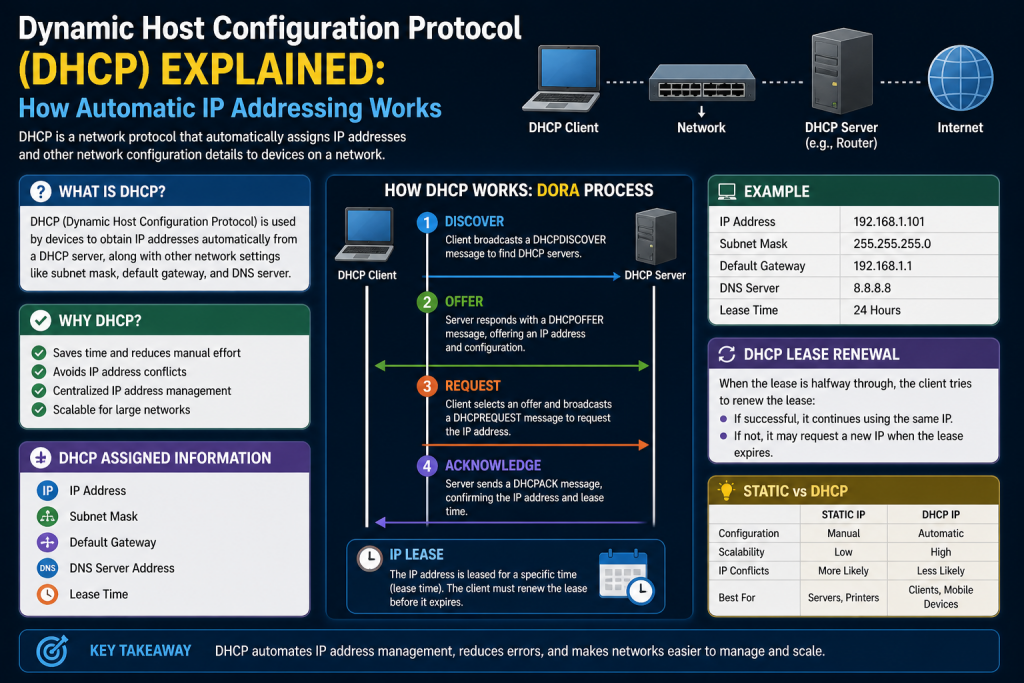
In addition to IP addresses, DHCP provides other important information, such as the subnet mask, default gateway, and DNS server addresses. These settings are essential for proper network communication and ensure that devices can access resources both within the local network and on the internet.
The automation provided by DHCP not only simplifies network management but also reduces the risk of errors. Manual configuration can lead to issues such as duplicate IP addresses, incorrect settings, and network conflicts. DHCP eliminates these problems by centralizing the management of network configurations.
How DHCP Works: The Basic Process
When a device connects to a network that uses DHCP, it follows a specific sequence of steps to obtain an IP address. This process is often referred to as the DHCP handshake and involves four main stages.
The first stage occurs when the device sends out a broadcast message to discover available DHCP servers. Since the device does not yet have an IP address, it cannot communicate directly with a specific server. Instead, it broadcasts a request to the entire network, asking for assistance.
In the second stage, any DHCP server that receives the request responds with an offer. This offer includes an available IP address and other configuration details. The device may receive multiple offers if there are multiple DHCP servers on the network.
The third stage involves the device selecting one of the offers and sending a request back to the chosen server. This request indicates that the device intends to use the provided configuration.
Finally, the DHCP server sends an acknowledgment to confirm the assignment. At this point, the device is fully configured and can begin communicating on the network.
This entire process happens very quickly, often within a matter of seconds, and requires no user intervention. It is one of the key reasons why network connectivity is so seamless in modern environments.
The Role of MAC Addresses in DHCP Communication
While IP addresses are used for communication within a network, another type of address plays an important role during the DHCP process: the MAC address. A MAC address is a unique identifier assigned to a network interface by its manufacturer.
Unlike IP addresses, which can change over time, MAC addresses are typically permanent and remain associated with the hardware. When a device communicates with a DHCP server, it includes its MAC address in the request. This allows the server to identify the device and manage its IP address assignment.
The use of MAC addresses enables the DHCP server to keep track of devices and ensure that each one receives an appropriate configuration. In some cases, administrators can configure the DHCP server to assign a specific IP address to a device based on its MAC address. This is known as a reservation and is useful for devices that require a consistent IP address.
By combining IP addresses and MAC addresses, DHCP provides a reliable and efficient system for managing network configurations.
Understanding DHCP Lease Time
One of the key features of DHCP is the concept of a lease. When a device is assigned an IP address, it does not own that address permanently. Instead, it is granted a lease for a specific period of time.
The lease duration is determined by the DHCP server and can vary depending on the network’s requirements. In environments where devices frequently connect and disconnect, shorter lease times may be used to ensure that IP addresses are quickly returned to the pool when they are no longer needed. In more stable environments, longer lease times may be preferred to reduce the frequency of renewals.
During the lease period, the device can use the assigned IP address without interruption. Before the lease expires, the device attempts to renew it by contacting the DHCP server. If the renewal is successful, the lease is extended, and the device continues using the same IP address.
If the device fails to renew the lease, the IP address eventually becomes available for reassignment. This ensures that unused addresses are not wasted and can be allocated to other devices.
The leasing mechanism is essential for efficient IP address management, particularly in large or dynamic networks.
Why DHCP is Important for Network Administrators
Before the introduction of DHCP, network administrators had to assign IP addresses manually to every device. This process was not only time-consuming but also highly error-prone. Mistakes such as duplicate IP addresses or incorrect configurations could lead to network disruptions and connectivity issues.
DHCP addresses these challenges by automating the configuration process. Administrators can define a range of IP addresses and other settings on the DHCP server, and the server takes care of distributing them to devices as needed.
This centralized approach simplifies network management and makes it easier to maintain consistency across devices. It also allows administrators to make changes more efficiently. For example, if a network setting needs to be updated, it can be modified on the DHCP server and automatically applied to all connected devices.
In addition, DHCP provides better visibility into network activity. Administrators can monitor which devices are connected, which IP addresses are in use, and how resources are being allocated. This information is valuable for troubleshooting and optimizing network performance.
DHCP in Home and Enterprise Networks
DHCP is used in a wide range of environments, from small home networks to large enterprise infrastructures. In a home network, the router typically acts as the DHCP server. It assigns IP addresses to devices such as smartphones, laptops, and smart home devices, allowing them to connect to the internet بسهولة.
In enterprise environments, DHCP servers are often more sophisticated and may be integrated with other network services. These servers can handle thousands of devices and provide advanced features such as IP address reservations, failover support, and detailed logging.
Despite the differences in scale, the fundamental principles of DHCP remain the same. It provides a reliable and efficient way to manage network configurations and ensure that devices can communicate effectively.
The Growing Importance of DHCP in Modern Technology
As technology continues to evolve, the number of connected devices is increasing rapidly. From Internet of Things devices to cloud-based services, networks are becoming more complex and dynamic. In this environment, the need for automated configuration and efficient resource management is greater than ever.
DHCP plays a critical role in meeting these demands. It enables devices to connect quickly and seamlessly, supports scalability, and ensures that network resources are used efficiently. Without DHCP, managing modern networks would be significantly more challenging.
Its importance extends beyond convenience. By reducing manual intervention and minimizing errors, DHCP contributes to the stability and reliability of networks. This makes it an essential component of any network infrastructure, regardless of size or complexity.
After understanding the basic purpose and functionality of Dynamic Host Configuration Protocol, it is important to explore how DHCP is structured internally. The architecture of DHCP is built around a client-server model, where different components work together to ensure seamless IP address allocation and network configuration.
In this model, the DHCP server acts as the central authority that manages and distributes IP configuration details. The DHCP client is any device that requests this information, such as a laptop, smartphone, printer, or server. Between these two entities, communication occurs using defined message formats and processes that ensure reliable and efficient configuration.
DHCP architecture is designed to be scalable and flexible, allowing it to function effectively in both small home networks and large enterprise environments. It supports multiple servers, redundancy mechanisms, and integration with other networking services, making it a robust solution for modern networking needs.
Core Components of DHCP
To understand how DHCP operates in detail, it is necessary to examine its core components. These components form the backbone of the protocol and define how it interacts with devices on a network.
The DHCP server is the most critical component. It maintains a pool of IP addresses and configuration parameters that can be assigned to clients. The server is responsible for tracking which addresses are in use, which are available, and how long each lease lasts.
The DHCP client is any device that requires network configuration. When a client connects to a network, it initiates communication with the DHCP server to obtain an IP address and other settings.
Another important component is the DHCP relay agent. In larger networks, clients and servers may not be located on the same subnet. Since DHCP messages are broadcast-based, they cannot cross routers by default. A relay agent solves this problem by forwarding DHCP messages between clients and servers across different subnets.
These components work together to ensure that devices can obtain the necessary configuration regardless of their location within the network.
The DHCP Address Allocation Methods
DHCP supports different methods for assigning IP addresses, each designed to meet specific networking requirements. Understanding these methods provides insight into how networks can be customized for various use cases.
Dynamic allocation is the most common method. In this approach, the DHCP server assigns an IP address to a client from a pool for a limited period, known as a lease. Once the lease expires, the address can be reassigned to another device.
Automatic allocation is similar to dynamic allocation but with a key difference. Once an IP address is assigned to a client, it is permanently reserved for that device. The server remembers the assignment and always provides the same address to that client.
Manual allocation, also known as reservation, allows administrators to assign a specific IP address to a device based on its MAC address. This method is useful for devices that require consistent IP addresses, such as servers, printers, and network infrastructure components.
Each allocation method offers different levels of flexibility and control, allowing administrators to tailor DHCP behavior to their specific needs.
DHCP Message Types and Communication Flow
DHCP communication relies on a series of message types that facilitate interaction between clients and servers. These messages ensure that configuration data is exchanged accurately and efficiently.
The process begins with a DHCP Discover message, which is broadcast by the client to locate available DHCP servers. This message is essential because the client does not yet have an IP address and cannot communicate directly.
The DHCP Offer message is sent by the server in response to the Discover message. It contains an available IP address and configuration details that the client can use.
Next, the client sends a DHCP Request message to indicate its acceptance of the offered configuration. This message is also broadcast, allowing other servers to withdraw their offers.
Finally, the DHCP Acknowledgment message is sent by the server to confirm the assignment. This message finalizes the process and allows the client to begin using the assigned IP address.
In addition to these primary messages, DHCP also includes other message types such as DHCP Decline, DHCP Release, and DHCP Inform, which handle specific scenarios and provide additional functionality.
DHCP Lease Renewal and Rebinding Process
The lease mechanism in DHCP is more than just a timer. It involves a structured process that ensures devices maintain connectivity without interruption.
When a client receives an IP address, it also receives information about the lease duration. As the lease progresses, the client enters the renewal phase, typically when half of the lease time has elapsed. During this phase, the client attempts to renew the lease by sending a request directly to the DHCP server.
If the server responds, the lease is extended, and the client continues using the same IP address. This process is seamless and does not disrupt network communication.
If the server does not respond during the renewal phase, the client enters the rebinding phase. In this phase, the client broadcasts a request to any available DHCP server, seeking to renew the lease.
If no server responds before the lease expires, the client must stop using the IP address and restart the DHCP process. This ensures that IP addresses are not used beyond their valid lease period.
DHCP Scopes and Address Pools
A DHCP scope is a defined range of IP addresses that the server can assign to clients. Scopes are essential for organizing and managing IP address allocation within a network.
Each scope includes not only the range of IP addresses but also configuration settings such as subnet mask, default gateway, and DNS servers. These settings ensure that clients receive all the necessary information for proper network communication.
Administrators can create multiple scopes on a single DHCP server to support different subnets. This allows for efficient management of large and complex networks.
Address pools within a scope define the specific range of IP addresses available for allocation. Administrators can also exclude certain addresses from the pool to reserve them for manual use or specific purposes.
Proper configuration of scopes and address pools is critical for avoiding conflicts and ensuring optimal use of available IP addresses.
DHCP Options and Configuration Parameters
DHCP is not limited to assigning IP addresses. It can also provide a wide range of configuration parameters, known as DHCP options. These options allow administrators to customize network settings and provide additional information to clients.
Common DHCP options include the default gateway, which defines the path for traffic leaving the local network, and DNS servers, which are used for resolving domain names into IP addresses.
Other options may include time servers, domain names, and network boot parameters. These settings can be tailored to meet the specific requirements of different environments.
By using DHCP options, administrators can ensure that all devices on the network are configured consistently and correctly.
DHCP Relay Agents and Cross-Subnet Communication
In many networks, clients and DHCP servers are located on different subnets. Since DHCP messages are broadcast-based, they cannot cross routers without assistance. This is where DHCP relay agents come into play.
A relay agent is typically configured on a router or a Layer 3 switch. It listens for DHCP broadcast messages from clients and forwards them to the DHCP server as unicast messages. The server then responds to the relay agent, which in turn forwards the response back to the client.
This mechanism allows a single DHCP server to serve multiple subnets, reducing the need for multiple servers and simplifying network management.
Relay agents also provide additional information to the DHCP server, such as the subnet from which the request originated. This helps the server determine which scope to use when assigning an IP address.
High Availability and Redundancy in DHCP
In critical environments, ensuring the availability of DHCP services is essential. If the DHCP server becomes unavailable, new devices may not be able to obtain IP addresses, leading to connectivity issues.
To address this, DHCP supports high availability and redundancy mechanisms. One common approach is to use multiple DHCP servers configured in a failover arrangement. In this setup, servers share information about leases and can take over if one server fails.
Another approach is load balancing, where multiple servers share the responsibility of handling client requests. This improves performance and ensures that no single server becomes a bottleneck.
These mechanisms enhance the reliability of DHCP and ensure continuous network operation.
Security Considerations in DHCP
While DHCP provides many benefits, it also introduces certain security challenges. Since DHCP relies on broadcast communication, it can be vulnerable to attacks such as rogue DHCP servers and DHCP spoofing.
A rogue DHCP server is an unauthorized server that provides incorrect configuration information to clients. This can lead to network disruptions or redirect traffic to malicious destinations.
To mitigate these risks, network administrators can implement security measures such as DHCP snooping. This feature, available on many switches, monitors DHCP traffic and ensures that only trusted servers can provide configuration information.
Other security practices include using network segmentation, access controls, and monitoring tools to detect and prevent unauthorized activity.
DHCP in Virtualized and Cloud Environments
As technology evolves, DHCP continues to adapt to new networking paradigms, including virtualization and cloud computing. In virtualized environments, DHCP is often integrated into hypervisors and virtual network infrastructure.
Virtual machines rely on DHCP to obtain IP addresses and connect to virtual networks. This allows for dynamic scaling and efficient resource utilization.
In cloud environments, DHCP is typically managed by the cloud provider. It enables instances to receive network configuration automatically, supporting rapid deployment and scalability.
These modern implementations demonstrate the flexibility and continued relevance of DHCP in evolving network architectures.
Introduction to Practical DHCP Usage
After exploring the fundamentals and internal workings of Dynamic Host Configuration Protocol, it is essential to understand how DHCP operates in real-world environments. While the theory provides a strong foundation, practical implementation reveals how DHCP supports everyday connectivity across different types of networks.
From small home setups to complex enterprise infrastructures, DHCP plays a central role in ensuring devices can connect efficiently and without manual intervention. Its flexibility allows it to adapt to a wide range of scenarios, making it one of the most widely used protocols in networking.
Understanding how DHCP is applied in real-world situations helps bridge the gap between theory and practice. It also provides valuable insight into how network administrators design, manage, and optimize networks for performance and reliability.
DHCP in Home Networking Environments
In a typical home network, DHCP is usually enabled by default on the router. When you connect a device to your home WiFi or plug it into an Ethernet port, the router automatically assigns an IP address using DHCP.
This process happens almost instantly and requires no configuration from the user. Devices such as smartphones, laptops, gaming consoles, and smart home appliances all rely on DHCP to obtain network settings.
Home routers maintain a small pool of IP addresses, often within a private address range. As devices connect and disconnect, the router dynamically assigns and reclaims addresses, ensuring efficient use of available resources.
DHCP also simplifies troubleshooting in home environments. Since configuration is automatic, users do not need to worry about manually setting IP addresses or dealing with conflicts. If a device encounters connectivity issues, restarting the router or renewing the IP lease often resolves the problem.
DHCP in Enterprise Networks
In enterprise environments, DHCP is significantly more complex but also more powerful. Organizations may have thousands of devices spread across multiple locations, all requiring reliable network connectivity.
To support this scale, DHCP systems are carefully designed with redundancy and high availability in mind, often using failover configurations or clustered servers to prevent downtime. This ensures that even if one DHCP server fails, another can immediately take over without disrupting network services.
Enterprises also divide their networks into multiple subnets or VLANs to improve performance and security. DHCP works alongside relay agents to deliver IP configurations across these segmented networks efficiently, eliminating the need for a dedicated server in every subnet. Administrators can create detailed scopes and policies that assign specific settings based on device type, location, or user role, making network management more organized and flexible.
Security is another critical aspect in enterprise DHCP deployments. Features like DHCP snooping help prevent unauthorized or rogue DHCP servers from distributing incorrect network information. Logging and monitoring tools allow IT teams to track IP usage, detect unusual activity, and troubleshoot issues quickly. Additionally, integration with DNS and directory services further enhances network control and automation.
Overall, DHCP in enterprise environments provides a scalable, secure, and efficient solution for managing large and complex network infrastructures.
Enterprise DHCP servers are typically configured with multiple scopes to support different subnets. They may also integrate with directory services, monitoring tools, and security systems to provide enhanced functionality.
Administrators often use DHCP reservations for critical devices such as servers, printers, and network equipment. This ensures that these devices always receive the same IP address, which is important for consistent access and management.
Redundancy and failover configurations are also common in enterprise networks. These setups ensure that DHCP services remain available even if one server fails, preventing disruptions to network connectivity.
DHCP in Wireless and Mobile Networks
Wireless networks rely heavily on DHCP due to the dynamic nature of connected devices. In environments such as offices, airports, and public hotspots, devices frequently join and leave the network.
DHCP allows these devices to obtain IP addresses quickly and efficiently, enabling seamless connectivity. Shorter lease times are often used in such environments to ensure that IP addresses are quickly reclaimed when devices disconnect.
Mobile devices, in particular, benefit from DHCP’s flexibility. As users move between different networks, their devices automatically obtain new IP addresses and configuration settings without requiring manual intervention.
This adaptability is essential for maintaining connectivity in a world where mobility is a key aspect of technology usage.
Troubleshooting Common DHCP Issues
Despite its reliability, DHCP can sometimes encounter issues that affect network connectivity. Understanding common problems and their solutions is an important skill for network administrators.
One common issue is the inability of a device to obtain an IP address. This may occur if the DHCP server is unavailable, the address pool is exhausted, or there is a network connectivity problem. In such cases, devices may assign themselves an automatic private IP address, indicating a failure to communicate with the DHCP server.
Another issue is IP address conflicts, which occur when two devices are assigned the same IP address. While DHCP is designed to prevent this, conflicts can arise due to misconfiguration or the presence of manually assigned addresses within the DHCP range.
Lease renewal problems can also cause connectivity issues. If a device is unable to renew its lease, it may lose its IP address and be unable to communicate on the network.
Troubleshooting these issues typically involves checking the DHCP server status, verifying network connectivity, and reviewing configuration settings. Tools such as network analyzers and system logs can provide valuable insights into the root cause of problems.
Best Practices for DHCP Configuration
Effective DHCP management requires careful planning and adherence to best practices. Proper configuration ensures optimal performance, reliability, and security.
One important practice is to define appropriate address ranges and exclude addresses that are reserved for specific purposes. This helps prevent conflicts and ensures efficient use of available IP addresses.
Setting appropriate lease durations is also crucial. Shorter leases are suitable for dynamic environments with frequent device turnover, while longer leases are better for stable networks.
Implementing DHCP reservations for critical devices ensures consistent IP addressing and simplifies management. This is particularly important for servers and network infrastructure components.
Regular monitoring and maintenance of DHCP servers help identify potential issues before they become serious problems. Keeping logs and reviewing usage patterns can provide valuable insights into network behavior.
Security measures such as DHCP snooping and network segmentation should also be implemented to protect against unauthorized access and malicious activity.
Integration of DHCP with Other Network Services
DHCP does not operate in isolation. It works closely with other network services to provide a complete networking solution.
One of the most important integrations is with the Domain Name System. While DHCP assigns IP addresses, DNS translates domain names into those addresses. Together, they enable users to access resources using human-readable names instead of numerical addresses.
DHCP can also integrate with network access control systems to enforce security policies. For example, devices may be required to meet certain criteria before being assigned an IP address.
In enterprise environments, DHCP often works alongside directory services to provide centralized management and authentication. This integration enhances security and simplifies administration.
These interactions demonstrate how DHCP fits into the broader network ecosystem and contributes to overall functionality.
DHCP in Virtualization and Cloud Computing
As organizations adopt virtualization and cloud technologies, DHCP continues to play a vital role. Virtual machines rely on DHCP to obtain network configuration, allowing them to be deployed quickly and efficiently.
In modern data centers, where environments are highly dynamic and resources are constantly being created and destroyed, DHCP ensures that each virtual instance can seamlessly join the network without manual intervention. This automation significantly reduces administrative overhead and minimizes the risk of configuration errors that could lead to connectivity issues.
In cloud platforms, DHCP is often integrated into the underlying infrastructure, enabling automatic IP address assignment across large-scale deployments. Whether using private, public, or hybrid cloud models, DHCP supports rapid scalability by handling thousands of requests in real time. It also works in conjunction with other network services such as DNS to ensure proper name resolution, further enhancing usability and accessibility.
Additionally, DHCP contributes to efficient IP address management by reclaiming and reassigning unused addresses through lease mechanisms. This is particularly important in virtualized environments where workloads frequently change. Security features, such as DHCP snooping, can also be implemented to prevent unauthorized devices from receiving network access. Overall, DHCP remains an essential component that supports flexibility, scalability, and operational efficiency in virtualized and cloud-based infrastructures.
In virtualized environments, DHCP may be managed by the hypervisor or a dedicated virtual appliance. This allows administrators to create and manage virtual networks with ease.
Cloud providers typically offer built-in DHCP services as part of their infrastructure. When a new instance is launched, it automatically receives an IP address and configuration settings, enabling immediate connectivity.
These capabilities support scalability and flexibility, which are essential for modern computing environments.
Future Trends in DHCP and Networking
As networking technology continues to evolve, DHCP is expected to adapt to new challenges and opportunities. One of the key trends is the increasing adoption of IPv6, which provides a vastly larger address space compared to IPv4.
While DHCP is still used in IPv6 networks, new mechanisms such as Stateless Address Autoconfiguration also play a role. These technologies complement DHCP and provide additional options for address assignment.
The growth of the Internet of Things is another factor influencing DHCP. With billions of devices connecting to networks, efficient address management is more important than ever.
Automation and artificial intelligence are also being integrated into network management. These technologies can enhance DHCP by optimizing address allocation, detecting anomalies, and improving overall performance.
As networks become more complex, DHCP will continue to evolve to meet the demands of modern connectivity.
The Role of DHCP in Network Reliability and Efficiency
DHCP is a cornerstone of network reliability. By automating configuration and managing resources efficiently, it ensures that devices can connect and communicate without interruption.
It eliminates the need for manual IP address assignment, reducing human error and saving significant administrative time, especially in large and dynamic environments. Through its leasing mechanism, DHCP optimizes the use of limited IP address space by reallocating unused addresses, ensuring that resources are not wasted. It also supports seamless mobility, allowing devices to move between networks and automatically receive appropriate configurations without user intervention. Additionally, DHCP enhances consistency by centrally managing network settings such as default gateways, DNS servers, and subnet masks, ensuring uniform connectivity across all devices. Its integration with other network services further strengthens overall performance and stability. In modern networks, where thousands of devices may connect and disconnect frequently, DHCP plays a vital role in maintaining order, preventing conflicts, and enabling scalable growth without compromising efficiency or reliability.
Its ability to adapt to changing network conditions makes it a versatile and dependable solution. Whether in a small home network or a large enterprise environment, DHCP provides the foundation for seamless connectivity.
The efficiency gained through DHCP reduces administrative overhead and minimizes the risk of errors. This allows network professionals to focus on more strategic tasks and improvements.
In addition, DHCP contributes to better user experiences by enabling quick and reliable connections. This is particularly important in environments where connectivity is critical to productivity and communication.
Conclusion
Dynamic Host Configuration Protocol is an essential component of modern networking, providing the automation and efficiency needed to manage IP address allocation and network configuration. From its role in home networks to its implementation in large-scale enterprise and cloud environments, DHCP enables seamless connectivity and simplifies network management.
Throughout this discussion, we have explored not only how DHCP works but also how it is applied in real-world scenarios, how to troubleshoot common issues, and how to implement best practices for optimal performance. Its integration with other network services and its adaptability to emerging technologies highlight its continued relevance in an ever-evolving digital landscape.
As networks grow in complexity and the number of connected devices continues to rise, the importance of DHCP will only increase. By understanding its principles and applications, network professionals can build more reliable, secure, and efficient systems that meet the demands of modern communication.
Continue exploring the technologies and certification concepts that matter most to you.