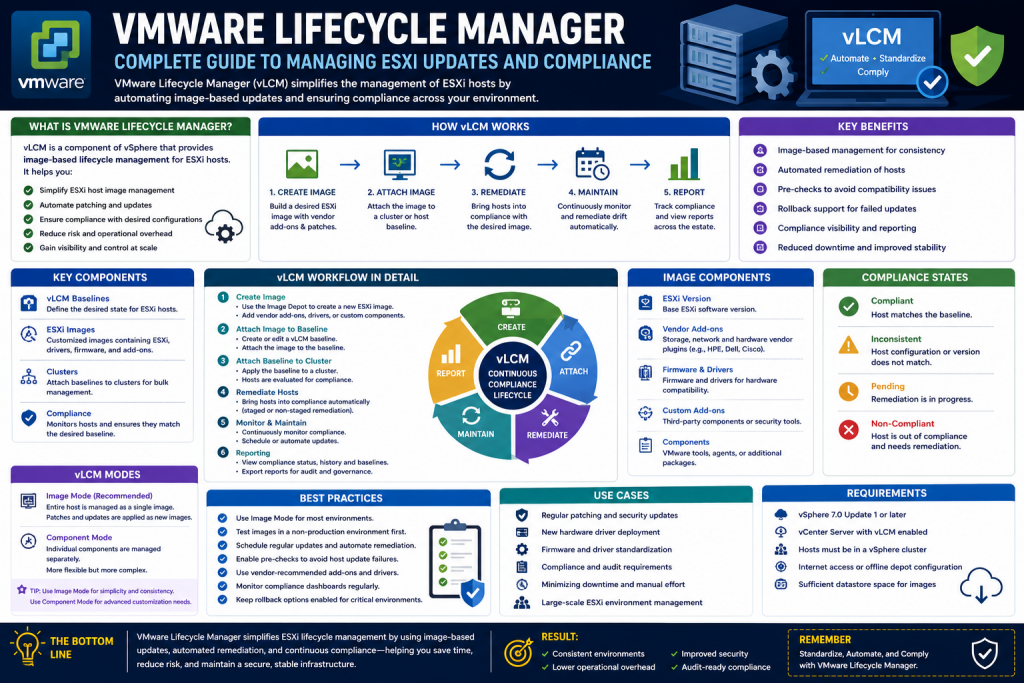
VMware Lifecycle Manager is a built-in feature of modern vSphere environments designed to simplify and automate the process of managing ESXi host updates, patches, drivers, and system consistency. It replaces older update management methods with a more centralized and intelligent approach, allowing administrators to define desired system states and ensure that all hosts remain compliant over time.
It also improves operational efficiency by reducing the need for manual intervention during patching and upgrade cycles. Administrators can create standardized configurations and apply them across multiple hosts or clusters, ensuring uniformity in large-scale environments. This consistency helps minimize configuration drift, which is a common issue in manually managed infrastructures where different hosts may end up running slightly different software versions.
Another important advantage of Lifecycle Manager is its ability to integrate with compliance and security requirements. Organizations can define baseline policies that enforce specific patch levels or driver versions, helping ensure that critical vulnerabilities are addressed quickly. This makes it easier to maintain regulatory compliance in industries with strict IT governance standards.
Additionally, Lifecycle Manager supports automated remediation workflows, meaning it can detect non-compliant hosts and automatically bring them back into compliance with minimal administrative effort. This reduces downtime and improves system reliability. Overall, it plays a key role in simplifying infrastructure lifecycle management while improving stability, security, and scalability across virtual environments.
In virtualized environments, maintaining consistency across multiple ESXi hosts is essential for stability, performance, and security. Without a structured update management system, administrators often face challenges such as version mismatches, manual patching errors, and time-consuming maintenance windows. Lifecycle Manager addresses these challenges by offering a unified framework for lifecycle management.
Understanding the Core Components of Lifecycle Management
Lifecycle Manager operates using several key software components that work together to define, distribute, and enforce system updates across ESXi hosts.
The foundation of this system is built on installable packages used by ESXi. These packages include drivers, updates, and system enhancements that ensure hosts remain functional and up to date. Updates are grouped and organized into structured collections that make deployment easier and more reliable.
A critical concept in this system is grouping updates into logical bundles. These bundles can contain multiple fixes, enhancements, or driver updates that are applied together to ensure compatibility and reduce deployment complexity. This grouping approach allows administrators to avoid installing updates individually, reducing the risk of inconsistency.
Patches represent individual fixes or improvements applied to ESXi hosts. They may address security vulnerabilities, performance issues, or known bugs. Roll-up packages combine multiple patches into a single update, simplifying maintenance by allowing administrators to apply a set of fixes at once.
Extensions are another important component, typically provided by third-party vendors. These add additional functionality to ESXi hosts, such as specialized storage drivers or hardware integration tools. Extensions are especially useful in enterprise environments where specialized hardware is in use.
The Lifecycle Manager Repository System
At the core of update management is the Lifecycle Manager repository, which acts as the storage location for all updates, patches, and extensions. This repository can automatically download updates from official sources over the internet, ensuring that the environment stays current without manual intervention.
In environments where direct internet access is restricted, updates can be downloaded externally and imported manually into the repository. This ensures that even isolated systems can benefit from centralized lifecycle management.
Some organizations choose to use a shared update distribution model where a central repository server is used to distribute updates to multiple environments. This reduces bandwidth usage and simplifies update control across large infrastructures. Administrators can configure download settings, scheduling, and notification preferences to automate update synchronization based on operational needs.
Understanding Baselines and Their Role
Baselines are one of the most important concepts in Lifecycle Manager. A baseline is a predefined or custom collection of updates that defines the desired state of an ESXi host or group of hosts.
Once a baseline is created, it can be attached to a single host, a cluster, or an entire data center. The system then continuously compares the current state of hosts against the baseline to determine compliance.
Predefined baselines are provided by the system and typically include critical updates, security patches, and non-critical enhancements. These are updated regularly and ensure that environments remain protected against known issues.
Custom baselines allow administrators to create their own update groups based on specific requirements. This is especially useful when integrating third-party drivers or vendor-specific software into the environment.
Checking Compliance and Preparing for Updates
Before applying updates, Lifecycle Manager performs a compliance check to determine whether hosts match the defined baseline. This step identifies missing patches, outdated drivers, or mismatched system versions.
Once compliance issues are identified, a pre-check process can be run to evaluate potential risks or conflicts before applying updates. This helps ensure that updates do not disrupt running workloads or cause system instability.
One of the key strengths of Lifecycle Manager is its integration with advanced cluster management features. When properly configured, virtual machines can be automatically moved between hosts during updates, allowing maintenance to occur without downtime. This process relies on workload balancing capabilities to ensure that applications remain available while hosts are being updated.
Remediation Process and Host Updates
Remediation is the process of applying updates to bring ESXi hosts into compliance with the defined baseline. During remediation, Lifecycle Manager automatically installs missing updates, applies patches, and reboots hosts if necessary.
The process typically begins by selecting the target host or cluster and initiating a compliance review. Once confirmed, the remediation task is executed, and the system handles each host sequentially to minimize disruption.
If virtual machines are running on a host being updated, they are automatically migrated to other available hosts before maintenance begins. After updates are applied, the host is returned to service and rejoined to the cluster.
Administrators also have the option to schedule remediation tasks for a later time. This is particularly useful for environments that require maintenance during off-peak hours.
Creating and Using Custom Baselines
Custom baselines provide flexibility for environments that require specialized configurations. These baselines can include vendor-specific drivers, hardware integration tools, or optional performance enhancements.
To create a custom baseline, administrators first import the required update packages into the repository. Once imported, these packages can be selected and grouped into a baseline based on operational requirements.
When defining a custom baseline, administrators can choose to manually select updates rather than relying on automatic selection. This allows for precise control over what is included in the update group.
After creation, custom baselines can be attached to specific hosts or clusters and used in the same way as predefined baselines. When remediation is performed, only the updates included in the custom baseline are applied.
Managing Hardware and Firmware Updates
Lifecycle Manager also supports firmware management in environments that use compatible hardware integration modules. This allows firmware updates to be coordinated alongside ESXi updates, ensuring full system consistency.
This capability is especially important in enterprise data centers where hardware and software must remain tightly aligned. When firmware and hypervisor versions are managed separately, there is a higher risk of compatibility issues, unexpected behavior, or performance degradation. By integrating firmware updates into the same lifecycle process, administrators can ensure that storage controllers, network adapters, and system BIOS versions are always validated against the ESXi version in use.
Another advantage of this integration is reduced maintenance complexity. Instead of scheduling separate maintenance windows for firmware upgrades and hypervisor patching, both can be performed in a single, controlled workflow. This minimizes system downtime and helps IT teams maintain predictable maintenance schedules. It also reduces the chance of forgetting critical firmware updates, which can sometimes lead to long-term stability issues.
In addition, Lifecycle Manager relies on hardware support managers provided by hardware vendors. These modules act as intermediaries between VMware and the physical hardware, enabling accurate detection of firmware versions and compatible updates. This ensures that only tested and certified firmware packages are applied to systems.
Overall, firmware management through Lifecycle Manager improves reliability, simplifies operations, and strengthens infrastructure stability across virtualized environments.
Firmware management is particularly important in enterprise environments where hardware and software compatibility must be tightly controlled. By synchronizing firmware updates with system updates, administrators can reduce compatibility issues and improve system stability.
Virtual Machine Upgrade Management
In addition to host management, Lifecycle Manager also provides tools for managing virtual machine components. This includes upgrading VMware Tools and virtual hardware versions.
VMware Tools upgrades improve performance, compatibility, and communication between the guest operating system and the host environment. Virtual hardware upgrades enhance the capabilities of virtual machines, allowing them to use newer features and improved system resources.
Lifecycle Manager can also create snapshots before performing upgrades. These snapshots act as recovery points in case a rollback is required, providing an additional layer of safety during maintenance operations.
Operational Benefits of Lifecycle Manager
The primary advantage of Lifecycle Manager is automation. By defining a desired state for ESXi hosts, administrators can eliminate manual patching processes and reduce human error.
It also improves consistency across environments, ensuring that all hosts are running compatible software versions. This reduces troubleshooting complexity and enhances overall system reliability.
Another important benefit is reduced downtime. With integrated migration capabilities, virtual machines can remain operational during maintenance windows, improving service availability.
Lifecycle Manager also simplifies compliance reporting. Administrators can quickly identify non-compliant hosts and take corrective action without extensive manual investigation.
Conclusion
VMware Lifecycle Manager provides a powerful and centralized approach to managing ESXi host updates, patches, drivers, and virtual machine upgrades. By introducing structured baselines, automated compliance checks, and streamlined remediation processes, it significantly reduces the operational burden on system administrators.
Its ability to integrate host updates, firmware management, and virtual machine lifecycle tasks into a single framework makes it an essential tool for modern virtualized environments. Organizations that adopt Lifecycle Manager benefit from improved consistency, reduced downtime, and stronger security posture across their infrastructure.
Continue exploring the technologies and certification concepts that matter most to you.