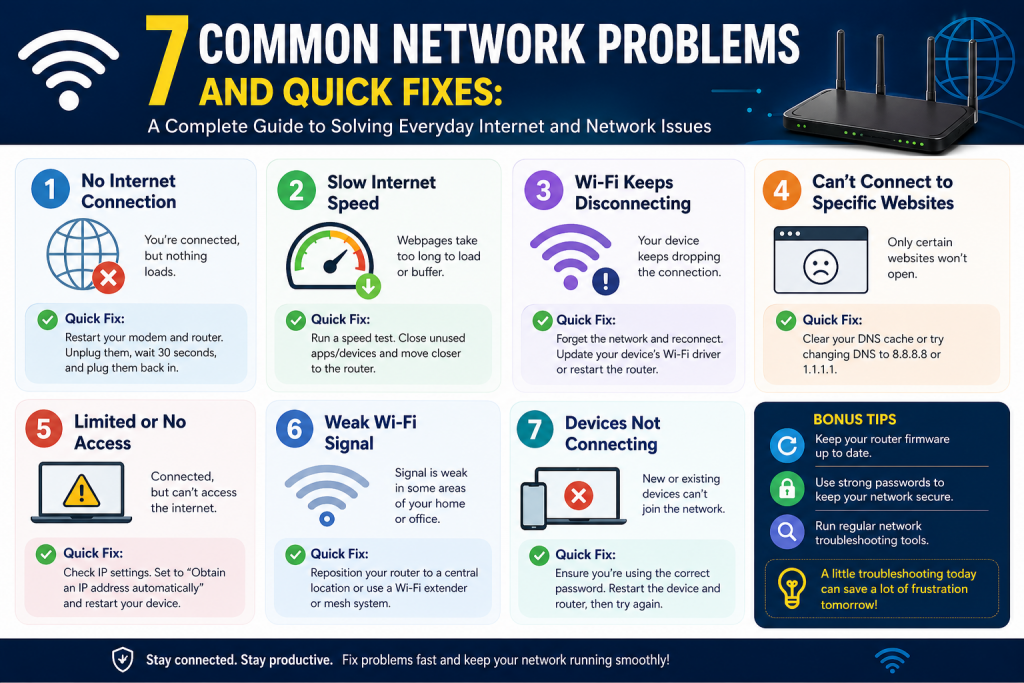
Modern networks are expected to run continuously without interruption, supporting everything from communication and business operations to entertainment and cloud services. Despite advancements in networking technology, issues still arise regularly. These problems can range from minor inconveniences, such as a slow-loading webpage, to major disruptions that bring entire systems to a standstill.
Understanding common network problems is essential for both professionals and everyday users. When something goes wrong, having a clear idea of where to look and what steps to take can significantly reduce downtime. Many network issues may seem complex at first, but they often have straightforward causes and solutions.
Networks rely on several components working together, including routers, switches, cables, wireless signals, and software configurations. A failure in any one of these areas can create noticeable problems. In many cases, the challenge lies not in fixing the issue, but in identifying its source.
This section explores some of the most common network-related problems, beginning with addressing conflicts and configuration errors. Each issue is explained in detail, along with practical methods for resolving and preventing it.
Duplicate IP Address Conflicts
One of the most frequent and disruptive network issues occurs when two devices are assigned the same IP address. Since an IP address serves as a unique identifier for each device on a network, duplication leads to communication failure. When this happens, one or both devices may lose access to the network entirely.
Users often encounter warning messages indicating that an IP address conflict has been detected. In some cases, the issue may not be immediately obvious, but symptoms such as intermittent connectivity or sudden disconnections can point to the same problem.
Duplicate IP conflicts typically arise due to improper coordination between automatic and manual IP assignments. Most networks use DHCP to assign IP addresses dynamically. However, when a device is configured with a static IP address that falls within the DHCP range, the DHCP server may assign the same address to another device.
Another common cause is the presence of multiple DHCP servers on the same network. This situation can occur when new hardware is added, such as a router or access point, without disabling its built-in DHCP service. As a result, devices receive conflicting instructions about which IP addresses to use.
To resolve a duplicate IP issue, start by identifying the affected devices. Disconnect one device and check whether the network stabilizes. If the issue disappears, reconnect the device and assign it a different IP address that does not conflict with others.
If multiple DHCP servers are present, access their settings and ensure that only one is active. Disabling additional DHCP services prevents further conflicts and restores proper network operation.
Restarting devices after making changes can also help, as it forces them to request new IP addresses from the DHCP server. This step often resolves lingering conflicts without additional intervention.
Preventing duplicate IP issues requires careful planning and consistent configuration. One effective approach is to separate the IP address space into distinct ranges. For example, lower addresses can be reserved for static assignments, while higher addresses are used for DHCP.
Maintaining a record of assigned static IP addresses is also beneficial. This practice helps administrators avoid accidental duplication, especially in larger networks where multiple people may be managing configurations.
By ensuring that each device has a unique and properly assigned IP address, you can eliminate one of the most common sources of network disruption.
IP Address Exhaustion
As the number of connected devices increases, networks can run out of available IP addresses. This issue, known as IP address exhaustion, prevents new devices from joining the network and can disrupt existing connections.
When a device cannot obtain a valid IP address from the DHCP server, it may assign itself an address in the 169 range. This type of address indicates that the device is unable to communicate with the rest of the network, effectively isolating it.
IP exhaustion is particularly common in environments where the DHCP pool is too small. For example, a network configured to support only a limited number of devices may struggle when additional devices attempt to connect. This situation is increasingly common as more smart devices, mobile phones, and laptops are introduced into everyday use.
Another cause of IP exhaustion is the absence of a local router. In some setups, devices connect directly to an internet service provider, which may limit the number of available IP addresses. Without a router to manage internal addressing, the network quickly reaches its capacity.
To fix this problem, begin by accessing the router’s DHCP settings. Expanding the range of available IP addresses allows more devices to connect. This adjustment is usually simple and can be done through the router’s configuration interface.
If no router is present, installing one is essential. A router creates a private internal network and uses NAT to allow multiple devices to share a single public IP address. This not only prevents IP exhaustion but also improves security by shielding internal devices from direct exposure.
In some cases, reducing the DHCP lease time can help. This setting determines how long a device retains its assigned IP address. Shorter lease times allow addresses to be recycled more quickly, making them available for other devices.
Preventing IP exhaustion involves planning for growth. Networks should always be configured with enough capacity to accommodate both current and future devices. Regularly reviewing usage patterns can help identify when adjustments are needed.
Using modern networking equipment that supports larger address pools is also important. As the number of connected devices continues to rise, having scalable infrastructure ensures that the network remains reliable and efficient.
DNS Configuration Issues
The Domain Name System is a critical component of any network, translating human-readable domain names into IP addresses. Without it, users would need to remember complex numerical addresses to access websites and services.
When DNS problems occur, users may be unable to reach websites even though their internet connection appears to be working. Error messages may indicate that a domain cannot be found or that the server is not responding.
DNS issues can be caused by incorrect settings, outdated configurations, or overloaded network devices. In some cases, a device may be manually configured to use a specific DNS server that is no longer available. In others, the router may struggle to handle DNS requests efficiently.
To resolve DNS problems, start by checking the network settings on the affected device. Ensure that DNS servers are correctly configured or set to be obtained automatically. This allows the device to receive valid DNS information from the DHCP server.
Testing DNS functionality using built-in tools can also help identify the issue. If the system cannot resolve domain names, the problem likely lies in the DNS configuration rather than the overall connection.
Switching to a different DNS server can sometimes improve performance and reliability. If the current server is slow or unresponsive, using an alternative may resolve the issue.
Preventing DNS problems involves maintaining consistent and accurate settings across all devices. Avoid unnecessary manual configurations unless there is a clear reason to use custom DNS servers.
It is also important to monitor network performance. If the router is acting as a DNS intermediary and becomes overloaded, configuring devices to query external DNS servers directly can improve response times.
By ensuring that DNS settings are properly configured and regularly reviewed, you can avoid many common connectivity issues.
Single Device Unable to Connect
When only one device on a network is unable to connect, the issue is usually isolated to that device. This can make troubleshooting both easier and more challenging, as the problem is not immediately obvious.
Common symptoms include an inability to access the internet, failure to connect to local resources, or error messages indicating limited connectivity. Since other devices are working normally, the network itself is unlikely to be the cause.
The first step in resolving this issue is to check the physical connection. For wired devices, ensure that cables are securely connected and not damaged. For wireless devices, verify that the signal is strong and that the correct network is selected.
Next, review the device’s network configuration. It should have a valid IP address, subnet mask, gateway, and DNS settings. Incorrect values can prevent proper communication.
Driver issues are another potential cause. Network adapters rely on software drivers to function correctly. If these drivers are outdated or corrupted, connectivity problems may occur. Updating or reinstalling the drivers can often resolve the issue.
Security software, such as firewalls and antivirus programs, may also block network access. Checking these settings and ensuring that necessary traffic is allowed is an important step.
Resetting the network settings on the device can help clear any incorrect configurations. This process restores default settings and allows the device to reconnect properly.
Preventing this type of issue involves maintaining consistency across devices. Using automatic configuration through DHCP ensures that all systems receive the correct settings.
Regular updates and maintenance also play a key role. Keeping software and drivers up to date reduces the likelihood of unexpected problems.
By focusing on the specific device and systematically checking each component, most connectivity issues can be resolved quickly and effectively.
File and Printer Sharing Problems
Sharing files and printers across a network is essential for collaboration and efficiency. However, configuring sharing correctly can be challenging due to the number of factors involved.
When sharing fails, users may be unable to access resources, connect to printers, or even see other devices on the network. These problems often result from configuration mismatches or security restrictions.
To resolve sharing issues, start by ensuring that all necessary services are running on each device. Without these services, sharing cannot function properly.
Firewalls should also be checked. Many systems block sharing traffic by default, especially when the network is set to a public profile. Adjusting firewall settings to allow sharing is essential.
Network configuration is another important factor. Devices must be on the same subnet to communicate effectively. Incorrect settings can isolate a device from the rest of the network.
Permissions are often the most complex aspect of sharing. Access depends on multiple layers of configuration, including network settings and file-level permissions. Incorrect permissions can prevent access even when everything else is configured correctly.
Preventing sharing problems involves standardizing configurations across all devices. Consistent settings and protocols reduce the likelihood of conflicts.
Planning permissions carefully also helps. Clearly defining access rights ensures that users can reach the resources they need without unnecessary restrictions.
By taking a structured approach to configuration and maintenance, you can create a network environment where sharing works reliably and efficiently.
Local Network Cannot Access the Internet
One of the most disruptive situations in any environment occurs when the entire local network loses access to the internet. Unlike issues that affect a single device, this problem impacts every connected system, making it immediately noticeable and often urgent to resolve.
This type of failure can either be constant or intermittent. In some cases, the connection drops completely and stays offline. In others, it may come and go unpredictably, which can be even more frustrating because it is harder to diagnose.
The first step in troubleshooting is to determine whether the issue lies within the local network or outside it. Begin by checking the router and modem. If both devices appear to be offline or showing warning indicators, the problem may be related to the internet service itself.
A simple restart of the router and modem is often the quickest and most effective first action. Rebooting clears temporary errors, refreshes connections, and can restore communication with the service provider.
If restarting does not resolve the issue, the next step is to trace the network path. This helps identify where the connection is failing. By analyzing how data travels from the local network to external destinations, it becomes easier to pinpoint the exact location of the problem.
If the issue appears to occur beyond the local network, contacting the internet service provider is necessary. Providing detailed information about the problem, including when it started and how frequently it occurs, can help technicians diagnose and resolve the issue more efficiently.
Intermittent problems often require patience and documentation. Keeping a record of outages, including timestamps and duration, can help identify patterns and support troubleshooting efforts.
Preventing this type of issue involves choosing a reliable service provider and ensuring that network equipment is properly maintained. High-quality routers and modems are less likely to fail and can handle traffic more efficiently.
It is also important to minimize unnecessary complexity in the network. The more devices and configurations involved, the harder it becomes to isolate problems. Keeping the setup simple and well-organized improves reliability and makes troubleshooting easier when issues arise.
Slow Internet Performance
Slow network performance is one of the most common complaints among users. Unlike a complete outage, slow speeds can be subtle and persistent, gradually affecting productivity and user experience.
There are many potential causes of slow performance. One of the most obvious is bandwidth congestion. When too many devices are using the network simultaneously, the available bandwidth is divided among them, resulting in slower speeds for each device.
However, congestion is not always the root cause. Hardware limitations can also play a role. A single overloaded port on a router or switch can reduce performance across the entire network. Similarly, aging equipment may struggle to handle modern data demands.
Another factor to consider is the quality of the connection. Poor signal strength in wireless networks can lead to reduced speeds and increased latency. Physical obstacles, interference from other devices, and distance from the access point all contribute to signal degradation.
External factors can also affect performance. In shared network environments, such as cable internet, bandwidth is distributed among multiple users in the same area. During peak usage times, this can lead to noticeable slowdowns.
To address slow performance, start by testing the connection speed using reliable tools. These tests should be conducted at different times of day to identify patterns. If speeds are consistently below expected levels, the issue may lie with the service provider.
Next, evaluate the local network. Check for devices that may be consuming excessive bandwidth, such as streaming services, large downloads, or cloud backups. Limiting or scheduling these activities can improve overall performance.
Improving wireless coverage can also make a significant difference. Repositioning the router, reducing interference, or adding additional access points can enhance signal strength and stability.
Updating network hardware is another effective solution. Modern routers and switches are designed to handle higher speeds and larger numbers of connected devices. Investing in better equipment can provide immediate and noticeable improvements.
DNS configuration is often overlooked but can impact performance. Slow or inefficient DNS servers can delay the process of resolving domain names, making websites appear slower to load. Switching to a faster and more reliable DNS provider can improve response times.
Preventing slow performance involves proactive management. Regularly monitoring network usage helps identify potential bottlenecks before they become serious problems.
Planning for capacity is also essential. As the number of connected devices grows, the network must be able to handle increased demand. Upgrading bandwidth and infrastructure ensures that performance remains consistent.
By addressing both internal and external factors, it is possible to maintain a fast and reliable network experience.
Intermittent Connectivity Issues
Intermittent connectivity problems are among the most challenging to diagnose because they do not occur consistently. A network may work perfectly one moment and fail the next, making it difficult to identify the root cause.
These issues can stem from a variety of sources, including unstable hardware, signal interference, or external network problems. Because the symptoms are unpredictable, troubleshooting requires careful observation and systematic testing.
One common cause is faulty hardware. Loose cables, failing network adapters, or overheating routers can all lead to temporary disconnections. Checking and securing physical connections is an important first step.
Wireless interference is another frequent culprit. Devices such as microwaves, cordless phones, and neighboring Wi-Fi networks can disrupt signals, causing brief interruptions. Changing the wireless channel or frequency band can help reduce interference.
Network congestion can also contribute to intermittent issues. When traffic levels fluctuate, the network may struggle to handle peak demand, leading to temporary slowdowns or disconnections.
External factors, such as problems with the service provider, can also cause intermittent connectivity. These issues may affect multiple users in the same area and often require provider intervention.
To troubleshoot intermittent problems, start by documenting when they occur. Note the time, duration, and any patterns that emerge. This information can provide valuable clues about the underlying cause.
Testing the network under different conditions can also help. For example, compare performance during peak and off-peak hours to determine whether congestion is a factor.
Replacing or upgrading hardware may be necessary if equipment is suspected to be unreliable. Even minor faults can cause significant disruptions over time.
Preventing intermittent issues involves maintaining stable and high-quality connections. Regularly inspecting cables and devices helps identify potential problems before they worsen.
Optimizing wireless settings and reducing interference can also improve reliability. Using modern equipment with advanced features ensures better performance in challenging environments.
By taking a methodical approach and addressing potential sources of instability, intermittent connectivity problems can be minimized or eliminated.
Network Hardware Failures
Network hardware forms the backbone of any communication system. Routers, switches, cables, and access points all play critical roles in ensuring that data flows smoothly. When any of these components fail, the impact can be immediate and widespread.
Hardware failures can occur for various reasons, including age, overheating, power surges, or physical damage. In some cases, the failure is sudden and complete. In others, it may develop gradually, leading to intermittent issues before the device stops working entirely.
Identifying hardware problems requires careful observation. Signs of failure may include frequent disconnections, reduced performance, or devices that fail to power on. Indicator lights on equipment can also provide clues about the status of the connection.
To resolve hardware issues, start by checking the most basic elements. Ensure that all cables are securely connected and not damaged. Replacing faulty cables is often a quick and inexpensive solution.
If a device appears to be malfunctioning, restarting it can sometimes restore functionality. However, if problems persist, replacing the device may be necessary.
Testing with alternative equipment can help confirm whether a specific component is the source of the problem. For example, swapping out a router or switch can quickly determine whether it is causing the issue.
Preventing hardware failures involves proper maintenance and planning. Keeping devices in well-ventilated areas helps prevent overheating, which is a common cause of failure.
Using surge protectors can protect equipment from electrical damage. Regularly updating firmware ensures that devices operate efficiently and securely.
Investing in high-quality hardware is also important. Reliable equipment is less likely to fail and can handle greater demands, reducing the risk of disruptions.
By maintaining and monitoring network hardware, you can ensure that the foundation of your network remains strong and dependable.
Misconfigured Network Settings
Network configuration plays a crucial role in ensuring that devices communicate effectively. Even small errors in settings can lead to significant problems, including connectivity failures and performance issues.
Misconfigurations can occur in various areas, such as IP addressing, subnet masks, gateways, and DNS settings. These errors may result from manual changes, software updates, or incorrect initial setup.
One common issue is an incorrect subnet configuration. Devices that are not on the same subnet may be unable to communicate with each other, even though they can access external networks.
Gateway misconfigurations can also cause problems. If a device is assigned the wrong gateway, it may not be able to route traffic the local network.
DNS errors, as discussed earlier, can prevent access to websites and services. Incorrect DNS settings can make it appear as though the internet is unavailable.
To fix misconfiguration issues, start by reviewing the network settings on affected devices. Compare them with known working configurations to identify discrepancies.
Using automatic configuration through DHCP can help resolve many issues. This ensures that devices receive consistent and correct settings without manual intervention.
Resetting network settings to their default values can also be effective. This clears any incorrect configurations and allows the device to reconnect properly.
Preventing misconfiguration involves maintaining consistency across the network. Standardized settings and centralized management reduce the likelihood of errors.
Documenting configurations is also important. Keeping a record of settings makes it easier to identify and correct problems when they arise.
By ensuring that network settings are accurate and consistent, you can avoid many common issues and maintain reliable connectivity.
Understanding Advanced Troubleshooting Tools
As networks grow in size and complexity, basic troubleshooting methods are not always enough to identify and resolve issues. While simple actions like restarting devices or checking cables can fix many problems, more persistent or hidden issues often require deeper analysis. This is where advanced troubleshooting tools become essential.
Modern operating systems include a range of built-in utilities designed to help diagnose network problems. These tools provide insights into connectivity, routing paths, address assignments, and name resolution. When used correctly, they can quickly narrow down the source of a problem and guide you toward an effective solution.
One of the most commonly used tools is the ping command. It allows you to test whether a device can communicate with another device on the network. By sending small packets of data and measuring the response time, ping helps determine whether a connection is active and how stable it is. If a device fails to respond, it indicates a connectivity issue that needs further investigation.
Another important tool is tracert or traceroute, which shows the path that data takes from one device to another. This is particularly useful when diagnosing problems that occur outside the local network. By identifying where the connection fails along the route, you can determine whether the issue lies within your network or with an external provider.
The ip config command provides detailed information about a device’s network configuration. It shows the assigned IP address, subnet mask, gateway, and DNS servers. This information is crucial when troubleshooting issues related to addressing or configuration errors.
For DNS-related problems, nslookup is a valuable tool. It allows you to query DNS servers directly and verify whether domain names are being resolved correctly. If a domain cannot be resolved, the issue likely lies with the DNS configuration.
More advanced tools, such as packet analyzers, provide an even deeper level of insight. These tools capture and analyze network traffic in real time, allowing you to see exactly how data is being transmitted. While they require more expertise to use effectively, they are invaluable for diagnosing complex issues that cannot be identified through basic methods.
Using these tools effectively requires practice and familiarity. However, once you understand how they work, they become powerful allies in maintaining a healthy network.
Wireless Network Interference and Optimization
Wireless networks have become the standard for connectivity in many environments, offering convenience and flexibility. However, they are also more susceptible to interference and performance issues compared to wired networks.
Interference occurs when multiple devices or networks operate on the same frequency, causing signals to overlap and degrade. Common sources of interference include other Wi-Fi networks, Bluetooth devices, microwaves, and even physical obstacles such as walls and furniture.
When interference is present, users may experience slow speeds, dropped connections, or inconsistent performance. These issues can be particularly frustrating because they may not occur consistently, making them harder to diagnose.
To address wireless interference, start by analyzing the network environment. Identifying which channels are being used by nearby networks can help you select a less congested channel for your own network. Many modern routers offer automatic channel selection, but manual adjustments can sometimes yield better results.
The placement of the router also plays a significant role in performance. Positioning the router in a central location, away from obstacles and sources of interference, can improve signal coverage and strength.
Upgrading to newer wireless standards can also make a difference. Modern routers support advanced technologies that provide better performance, higher speeds, and improved reliability. These features are especially important in environments with many connected devices.
Using both frequency bands available in dual-band routers can help distribute traffic more efficiently. The lower frequency band offers better range, while the higher frequency band provides faster speeds over shorter distances.
Preventing wireless issues involves careful planning and regular optimization. Monitoring network performance and adjusting settings as needed ensures that the network continues to operate efficiently.
By understanding and addressing the factors that affect wireless performance, you can create a more stable and reliable connection for all users.
Security-Related Network Problems
Network security is a critical aspect of maintaining a reliable and trustworthy environment. Security issues can not only disrupt network performance but also expose sensitive data to unauthorized access.
Common security-related problems include unauthorized devices connecting to the network, malware infections, and misconfigured firewalls. These issues can lead to slow performance, data breaches, and loss of control over network resources.
Unauthorized access is a frequent concern, especially in wireless networks. If the network is not properly secured, outsiders may connect and consume bandwidth or attempt to access shared resources. This can significantly impact performance and compromise security.
Malware and malicious software can also affect network behavior. Infected devices may generate excessive traffic, communicate with external servers, or attempt to spread the infection to other devices on the network.
Firewalls are designed to protect the network, but incorrect configurations can create problems. Overly restrictive settings may block legitimate traffic, while weak configurations may leave the network vulnerable.
To address security issues, start by ensuring that strong authentication measures are in place. Using secure passwords and encryption protocols helps prevent unauthorized access.
Regularly scanning devices for malware is also essential. Keeping antivirus software updated ensures that threats are detected and removed promptly.
Reviewing firewall settings helps maintain a balance between security and functionality. Ensuring that necessary ports and services are allowed while blocking unwanted traffic is key to effective protection.
Preventing security problems requires ongoing vigilance. Regular updates, monitoring, and user awareness all play important roles in maintaining a secure network.
By prioritizing security, you can protect both the performance and integrity of your network.
The Importance of Network Monitoring
Effective network management does not end with fixing problems as they occur. Continuous monitoring is essential for maintaining performance and preventing issues before they escalate.
Network monitoring involves tracking various aspects of network activity, including traffic levels, device performance, and connection stability. By analyzing this data, administrators can identify trends and detect potential problems early.
One of the key benefits of monitoring is the ability to detect unusual activity. Sudden spikes in traffic, unexpected disconnections, or abnormal patterns can indicate underlying issues that need attention.
Monitoring also helps with capacity planning. As networks grow, understanding usage patterns allows administrators to make informed decisions about upgrades and expansions.
There are many tools available for network monitoring, ranging from simple built-in utilities to advanced software solutions. These tools provide real-time insights and alerts, enabling quick responses to potential problems.
Implementing a monitoring strategy requires careful planning. Deciding what to monitor, how often to collect data, and how to respond to alerts are all important considerations.
Preventing network issues through monitoring is more efficient than reacting to problems after they occur. By staying informed about network performance, you can maintain a stable and reliable environment.
Building a Reliable Network Infrastructure
A strong network infrastructure is the foundation of reliable connectivity. Without proper design and implementation, even the best troubleshooting efforts may only provide temporary solutions.
A well-built network ensures that data flows smoothly between devices, minimizes downtime, and supports both current and future demands without constant adjustments.
To achieve this, it is important to focus on scalability from the beginning. Networks should be designed in a way that allows easy expansion as more users and devices are added. This includes selecting hardware that can handle increased traffic and configuring systems that can adapt to growth without major disruptions. Poor planning in this area often leads to frequent upgrades, higher costs, and ongoing performance issues.
Another critical aspect is proper segmentation. Dividing a network into smaller sections can improve performance and enhance security. By controlling how data moves between segments, administrators can reduce congestion and limit the spread of potential issues. This approach also makes troubleshooting easier, as problems can be isolated more quickly.
Reliability also depends on consistent maintenance and monitoring. Regular updates, performance checks, and timely replacement of outdated components help prevent unexpected failures. By combining thoughtful design with proactive management, a network can remain stable, efficient, and ready to meet evolving needs.
Building a reliable network starts with choosing the right equipment. High-quality routers, switches, and cables are essential for handling data efficiently and minimizing failures.
Proper network design is equally important. Organizing devices logically, using appropriate addressing schemes, and ensuring adequate coverage all contribute to better performance.
Redundancy is another key factor. Having backup systems in place ensures that the network can continue operating even if a component fails. This is especially important in environments where downtime is not acceptable.
Regular maintenance is also necessary. Updating firmware, replacing aging equipment, and reviewing configurations help keep the network running smoothly.
Training users can also make a difference. When users understand basic troubleshooting steps, they can resolve minor issues on their own, reducing the burden on administrators.
By investing in a solid infrastructure and maintaining it properly, you can create a network that is both resilient and efficient.
Conclusion
Network issues are an unavoidable part of working with modern technology, but they do not have to be overwhelming. Most problems, whether they involve addressing conflicts, connectivity failures, slow performance, or security concerns, follow predictable patterns that can be identified and resolved with the right approach.
The key to effective troubleshooting lies in understanding how networks function and recognizing the common points of failure. By approaching problems methodically, starting with the simplest possibilities and working toward more complex solutions, you can quickly identify the root cause and restore functionality.
Equally important is prevention. Proper planning, consistent configuration, regular maintenance, and continuous monitoring all contribute to a stable and reliable network environment. Investing time in these areas reduces the likelihood of issues and ensures that the network can support growing demands.
Advanced tools and techniques provide additional support when basic methods are not enough. Learning how to use these tools effectively empowers you to handle even the most challenging problems with confidence.
Ultimately, a well-managed network is not just about fixing issues as they arise. It is about creating an environment where problems are minimized, performance is optimized, and users can rely on consistent and efficient connectivity. By applying the principles and strategies discussed throughout this guide, you can build and maintain a network that meets these goals and continues to perform at its best.
Continue exploring the technologies and certification concepts that matter most to you.