In today’s connected world, network security is no longer just about strong passwords or firewalls protecting the perimeter. Organizations now face a constant challenge from unauthorized devices, compromised credentials, insider threats, and increasingly complex environments that include remote work, bring-your-own-device policies, cloud services, wireless mobility, and Internet of Things deployments. Every laptop, smartphone, tablet, printer, access point, camera, and switch connected to a network can represent either a legitimate business tool or a potential security vulnerability.
This reality has fundamentally changed how businesses approach access control. Instead of assuming that anyone physically plugged into a network or connected to Wi-Fi should be trusted, modern security models require verification before trust is granted. That verification process must be consistent, scalable, and secure enough to function across thousands of users and devices.
This is where 802.1X becomes one of the most important standards in enterprise networking.
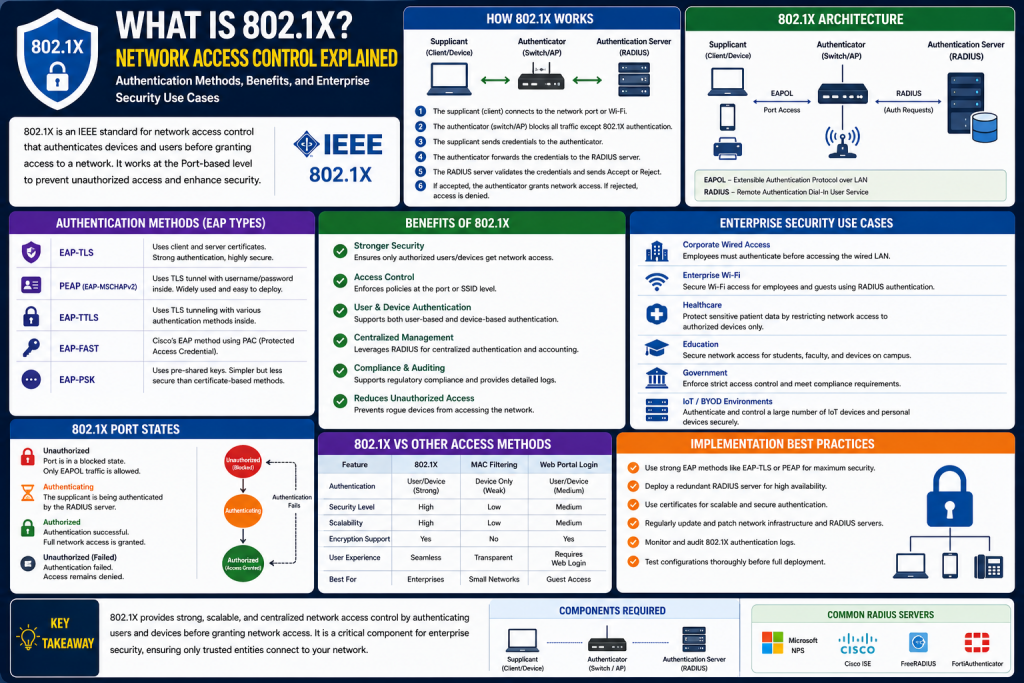
802.1X is a port-based Network Access Control standard developed by IEEE that ensures devices and users are authenticated before they receive full access to a network. It acts as a gatekeeper, controlling whether a system can communicate beyond a limited authentication state. In simple terms, 802.1X answers a critical security question before access is allowed:
Who are you, and should you be here?
This technology is widely used across wired Ethernet networks, enterprise wireless deployments, universities, healthcare systems, government agencies, and secure industrial environments because it establishes identity before trust. Rather than simply allowing access because a device knows a shared password or is physically connected, 802.1X can enforce identity-based access policies that dramatically reduce risk.
For networking professionals, understanding 802.1X is essential because it combines security, authentication, policy enforcement, and infrastructure design into one of the foundational frameworks of modern enterprise access control.
Understanding IEEE Standards and the Meaning Behind 802.1X
To fully understand 802.1X, it helps to first understand the broader IEEE 802 family of standards.
The Institute of Electrical and Electronics Engineers, or IEEE, is responsible for developing many of the technical standards that govern networking technologies. The IEEE 802 project specifically focuses on networking standards related to local area networks, metropolitan area networks, and personal area networks.
Some of the most recognizable standards in this family include:
802.3 for Ethernet
802.11 for wireless LANs, commonly known as Wi-Fi
802.15 for personal area networking technologies
802.1 for network management, bridging, and security
Because 802.1 focuses on infrastructure-level control and policy, 802.1X specifically addresses authentication and access control at the network port level.
This naming structure is important because many people confuse 802.1X with “802.11x,” a term often incorrectly used when discussing wireless authentication. In reality, 802.1X is not a Wi-Fi standard. It is an access control standard that can be applied to both wired and wireless environments.
The “X” in 802.1X designates a specific IEEE standard, and its purpose is to define port-based authentication mechanisms that verify identity before granting broader communication privileges.
Understanding this distinction is crucial because it separates transport technologies from security frameworks.
802.11 defines how wireless devices communicate.
802.1X defines how devices prove they belong.
802.1X vs. 802.11x: Correcting a Common Misconception
One of the most common mistakes among beginners in networking is the misuse of the term “802.11x.”
This confusion often happens because wireless authentication is frequently discussed in relation to Wi-Fi, causing people to assume the authentication mechanism itself is part of the 802.11 family. However, 802.11 standards are wireless communication amendments, such as:
802.11a
802.11b
802.11g
802.11n
802.11ac
802.11ax
These standards define wireless frequencies, throughput, modulation methods, and performance improvements.
802.1X, on the other hand, is not about wireless speed or radio communication. It is about access control.
When someone refers to “802.11x,” they are usually trying to describe enterprise wireless authentication, but the correct terminology is 802.1X operating over an 802.11 wireless network.
This distinction matters because 802.1X is used in both:
Wired Ethernet security
Wireless enterprise authentication
For example, in a corporate office:
A desktop plugged into a switch port may use 802.1X
A laptop connecting to WPA2-Enterprise Wi-Fi may also use 802.1X
The medium changes, but the authentication framework remains the same.
The Core Purpose of 802.1X: Identity Before Access
At its heart, 802.1X exists to solve a simple but critical problem:
How can a network verify that a device or user should be trusted before allowing meaningful access?
Without 802.1X or similar controls, many networks rely on weaker assumptions such as:
Physical presence
Shared passwords
Open switch ports
Basic SSID access
MAC filtering
These methods create serious vulnerabilities because they often fail to verify identity securely.
For example:
An unauthorized visitor could plug into an unused office Ethernet port
A stolen password could grant wireless access
A rogue IoT device could connect unnoticed
A malicious actor could impersonate a trusted system
802.1X addresses these risks by creating an authentication checkpoint at the moment of connection.
Before full network traffic is allowed, the connecting device must authenticate successfully. Until then, the network connection remains highly restricted.
This approach shifts access control from location-based trust to identity-based trust.
Controlled Ports and Uncontrolled Ports: The Security Checkpoint
A central concept in 802.1X is the separation between controlled and uncontrolled ports.
This model is one of the easiest ways to understand how 802.1X works.
When a device first connects, it does not immediately gain unrestricted network access.
Instead, communication is divided into two states.
Uncontrolled Port
The uncontrolled port allows only authentication-related communication.
This may include:
Identity requests
Credential exchange
EAP messages
Authentication challenges
At this stage, the device can communicate only for the purpose of proving identity.
Controlled Port
The controlled port handles regular data traffic.
This includes:
Web browsing
Internal servers
Cloud platforms
File transfers
Voice applications
The controlled port remains closed until authentication succeeds.
A useful analogy is entering a secure building.
The front desk receptionist asks for your ID.
You can speak to the receptionist before being approved.
But the secure office door remains locked until your credentials are verified.
The receptionist represents the uncontrolled port.
The secure office door represents the controlled port.
This layered model ensures that authentication occurs before trust.
The Three Main Components of 802.1X Authentication
802.1X authentication depends on three distinct roles working together.
Supplicant
The supplicant is the client device requesting access.
Examples include:
Laptops
Smartphones
Tablets
VoIP phones
Workstations
This is typically software built into the operating system or network adapter.
Authenticator
The authenticator is the gatekeeper device controlling access.
Examples include:
Ethernet switches
Wireless access points
Wireless LAN controllers
The authenticator does not usually verify credentials directly. Instead, it acts as an intermediary.
Authentication Server
This is usually a RADIUS server or centralized identity system.
Examples include:
Microsoft NPS
Cisco ISE
FreeRADIUS
Aruba ClearPass
The authentication server validates credentials and determines whether access should be granted.
Together, these three components create a secure authentication chain.
The supplicant requests entry.
The authenticator controls the gate.
The authentication server decides.
How the 802.1X Authentication Process Works
When a new device attempts to connect, a structured authentication process begins.
First, the device connects physically or wirelessly.
Second, the authenticator blocks regular traffic and requests identity.
Third, the supplicant provides identity information.
Fourth, the authenticator forwards this request to the authentication server.
Fifth, the server challenges the device using an EAP method.
Sixth, credentials are verified.
Seventh, access is approved or denied.
If approved, the controlled port opens.
If denied, access remains blocked.
This process may seem simple conceptually, but it can involve multiple exchanges depending on the authentication method used.
The important takeaway is this:
The device must prove identity before network trust is granted.
What Is EAP and Why It Is Central to 802.1X
802.1X provides the framework, but EAP provides the language.
EAP stands for Extensible Authentication Protocol.
Rather than being one single authentication type, EAP is a flexible framework that supports multiple authentication methods.
This design makes 802.1X adaptable to many different security requirements.
Common EAP methods include:
EAP-TLS
PEAP
EAP-TTLS
EAP-FAST
LEAP
EAP-MD5
Each method offers different balances between:
Security strength
Certificate requirements
User convenience
Deployment complexity
For example:
EAP-TLS offers strong certificate-based authentication
PEAP often uses usernames and passwords within protected tunnels
LEAP is considered outdated
This flexibility allows organizations to choose authentication approaches that match their security goals.
Why EAP-TLS Is Often Considered the Gold Standard
Among EAP methods, EAP-TLS is widely considered one of the most secure.
This is because it uses digital certificates for mutual authentication.
This means:
The client verifies the server
The server verifies the client
This significantly reduces risks such as:
Credential theft
Phishing
Rogue access points
Password reuse
Because certificates are harder to steal and replicate than passwords alone, EAP-TLS is often favored in security-sensitive environments.
However, it also requires Public Key Infrastructure, certificate management, and administrative planning.
This creates a trade-off:
Higher security
Greater deployment complexity
PEAP and Password-Based Enterprise Authentication
Protected EAP, or PEAP, is another common deployment model.
PEAP creates an encrypted tunnel between the client and authentication server, then transmits credentials inside that tunnel.
This allows organizations to avoid deploying certificates to every endpoint while still protecting password exchanges.
PEAP is often popular because:
It is easier to deploy
It supports username/password models
It works well with directory systems
It balances usability with security
While not always as strong as certificate-only models, PEAP remains common in many enterprise environments.
Why 802.1X Is Essential for Wireless Security
Wireless networking presents unique challenges because physical boundaries do not restrict radio signals.
Without strong authentication, attackers may attempt:
Unauthorized connections
Credential theft
Rogue AP attacks
Evil twin attacks
802.1X is foundational in WPA2-Enterprise and WPA3-Enterprise because it ensures each user or device authenticates individually.
This is far stronger than shared pre-shared keys because:
Each user has unique credentials
Access can be revoked individually
Policy can be role-based
Authentication can integrate with certificates
For large organizations, this scalability is critical.
Wired 802.1X: Often Overlooked but Highly Valuable
Many people associate 802.1X primarily with Wi-Fi, but wired deployments can be equally important.
Unused Ethernet jacks can represent major security risks.
Without wired 802.1X:
Anyone with physical access could potentially connect
Unauthorized devices may bypass wireless controls
Internal segmentation becomes weaker
Wired 802.1X ensures physical ports are not automatically trusted.
This can be especially important in:
Healthcare facilities
Schools
Government buildings
Data centers
Shared office spaces
AAA: Authentication, Authorization, and Accounting
802.1X works best when integrated into AAA systems.
Authentication confirms identity.
Authorization determines permissions.
Accounting logs activity.
This means two users can both authenticate successfully but receive different access levels.
For example:
Employees may access internal systems
Guests may receive internet-only access
Contractors may be restricted
IoT devices may be isolated
This policy-driven flexibility is a major strength of 802.1X.
Understanding the Role of EAP in 802.1X Authentication
While 802.1X provides the framework for controlling access to a network, it does not define every specific authentication method by itself. Instead, it relies heavily on EAP, or Extensible Authentication Protocol, to manage the actual exchange of authentication information between devices and identity systems.
This distinction is essential.
802.1X acts as the gatekeeper mechanism that controls whether a port opens or stays restricted, but EAP is the language used during the authentication conversation.
Think of 802.1X as the security checkpoint at an airport.
EAP is the conversation between you, the security officer, and the central identity system that determines whether you can proceed.
This flexibility is one of the reasons 802.1X became so widely adopted. Rather than forcing every organization into one authentication method, it allows multiple EAP types depending on security requirements, infrastructure maturity, device support, and administrative complexity.
This adaptability means organizations can choose methods based on:
Certificate availability
Password policies
BYOD support
Legacy device compatibility
Security priorities
Operational complexity
Understanding EAP is critical because your 802.1X deployment is only as secure as the authentication method it uses.
How EAP Functions Within the Authentication Process
EAP was designed to be extensible, meaning it can support multiple authentication methods under one framework.
When a device connects to a network protected by 802.1X, the supplicant and authentication server communicate using EAP messages that pass through the authenticator.
This process generally includes:
Identity request
Identity response
Authentication challenge
Credential verification
Access approval or denial
Different EAP types define how those challenges and credentials are structured.
For example:
Some EAP types use certificates
Some use usernames and passwords
Some use tunneled encryption
Some support token systems
Some rely on mutual authentication
Because EAP is flexible, it can adapt to both simple and highly secure environments.
EAP Over LAN (EAPoL): The Local Delivery Mechanism
When EAP operates over local networks, especially Ethernet or Wi-Fi, it often uses EAPoL, or EAP over LAN.
EAPoL is essentially the transport method that carries EAP messages between the supplicant and authenticator.
This matters because before full network access is granted, the only traffic generally allowed is authentication-related communication.
EAPoL enables that conversation while broader traffic remains blocked.
For wireless networks, this process is often invisible to users.
A laptop joins a secure SSID, credentials are exchanged, authentication completes, and access is granted—often within seconds.
Behind the scenes, however, EAPoL is helping carry those identity conversations securely.
Common EAP Types and Their Security Differences
Not all EAP methods are equally secure.
Some were designed decades ago and are now considered weak.
Others remain highly trusted in modern enterprise environments.
Understanding these differences is crucial for choosing the right deployment model.
EAP-MD5
EAP-MD5 is one of the older methods and is generally considered insecure today.
It uses MD5 hashing, which is vulnerable by modern standards.
Weaknesses include:
No mutual authentication
Susceptibility to credential theft
Poor protection against man-in-the-middle attacks
Limited enterprise suitability
While historically important, EAP-MD5 is rarely recommended for modern secure deployments.
LEAP (Lightweight EAP)
LEAP was originally developed for wireless enterprise authentication and became popular in earlier wireless environments.
However, it is now considered semi-deprecated due to weaknesses.
Problems included:
Password vulnerability
Dictionary attack exposure
Legacy limitations
Although historically significant, LEAP has largely been replaced by stronger methods.
PEAP (Protected EAP)
PEAP remains one of the most common enterprise deployment models because it balances security and deployment simplicity.
PEAP creates an encrypted TLS tunnel first, then authenticates users inside that secure channel.
Advantages include:
Protects password exchange
Supports directory integration
Works well with existing usernames/passwords
Avoids full client certificate deployment
PEAP is especially useful for organizations that want stronger security than shared passwords without the administrative overhead of issuing certificates to every device.
EAP-TTLS (Tunneled TLS)
EAP-TTLS functions similarly to PEAP but often offers broader flexibility in credential handling.
It establishes a secure tunnel and then supports multiple inner authentication mechanisms.
Benefits include:
Flexible credential support
Strong encryption
Good enterprise usability
Reduced client certificate burden
EAP-TLS (Transport Layer Security)
EAP-TLS is widely considered the most secure mainstream 802.1X method.
This is because it uses certificates for both client and server authentication.
Advantages include:
Mutual authentication
Strong phishing resistance
No password dependence
Excellent zero-trust alignment
High enterprise trust
Challenges include:
Certificate lifecycle management
PKI infrastructure needs
Deployment planning
Administrative overhead
For organizations with mature security teams, EAP-TLS is often preferred.
EAP-FAST
Originally developed to reduce certificate deployment complexity, EAP-FAST uses Protected Access Credentials instead of traditional certificates.
It can offer a useful middle ground but may involve compatibility considerations depending on infrastructure.
Why Certificate-Based Authentication Changes Security
Passwords are familiar, but they also present risks:
Phishing
Reuse
Sharing
Weak complexity
Social engineering
Certificates dramatically improve this model because authentication depends on possession of cryptographic credentials rather than knowledge alone.
With certificate-based systems:
A stolen password alone may not be enough
Mutual trust becomes possible
Rogue authentication servers are easier to detect
Device identity can be enforced
Certificates also support machine authentication, which is especially useful when organizations want to verify both:
The user
The device itself
For example, a company may require:
Corporate-owned laptop certificate
Employee credentials
Security policy compliance
This layered identity model is much stronger than password-only systems.
Public Key Infrastructure and 802.1X
To fully leverage certificate-based authentication, organizations often deploy PKI, or Public Key Infrastructure.
PKI enables:
Certificate issuance
Certificate revocation
Trust chains
Certificate renewal
Identity validation
While PKI adds complexity, it also creates scalable enterprise trust.
For example:
A new laptop can automatically receive certificates
Lost devices can be revoked
Expired credentials can be renewed
Unauthorized devices can be denied
This automation becomes especially valuable in large enterprises.
Supplicant Configuration Across Devices
The supplicant is the software component responsible for handling 802.1X authentication on endpoint devices.
Different platforms may manage this differently.
Windows often includes built-in supplicant functionality.
macOS supports enterprise Wi-Fi profiles.
Linux can use tools like wpa_supplicant.
Mobile devices may use MDM-managed profiles.
This diversity means administrators must consider endpoint support carefully.
Misconfigured supplicants are a common source of authentication failures.
The Backbone of Centralized Authentication
Most enterprise 802.1X deployments rely on RADIUS, or Remote Authentication Dial-In User Service.
RADIUS acts as the authentication server that validates credentials.
It can integrate with:
Active Directory
LDAP
Cloud identity systems
Certificate authorities
Security policy engines
RADIUS is powerful because it centralizes trust decisions.
Instead of each switch or access point storing authentication logic independently, RADIUS allows centralized identity control.
This supports:
Consistent policy
Scalability
Logging
Role-based access
Dynamic segmentation
Dynamic VLAN Assignment
One of the most powerful enterprise features tied to 802.1X is dynamic VLAN assignment.
This means authenticated users can be placed into different network segments automatically based on identity.
For example:
Employees → Internal VLAN
Guests → Internet-only VLAN
Contractors → Restricted VLAN
IoT Devices → Isolated VLAN
Finance Staff → Sensitive resource VLAN
This improves both security and network efficiency.
Instead of one network for everyone, identity determines placement.
Machine Authentication vs. User Authentication
802.1X can validate:
Users
Devices
Or both
This distinction matters.
A user may have valid credentials, but if they connect from an unmanaged or insecure device, access may still be inappropriate.
Machine authentication ensures the endpoint itself is trusted.
Examples include:
Corporate laptops
Managed desktops
Registered VoIP phones
Approved printers
By combining machine and user authentication, organizations create stronger access assurance.
BYOD Challenges and 802.1X
Bring Your Own Device environments create unique complications.
Personal devices may:
Lack certificates
Use unsupported supplicants
Present privacy concerns
Need simplified onboarding
To solve this, many organizations use onboarding portals, temporary certificates, or MDM platforms.
Balancing usability with security becomes critical.
Too much complexity frustrates users.
Too little security increases risk.
IoT and Non-Traditional Device Authentication
Not every device has a user sitting behind it.
Printers
Cameras
Sensors
Badge readers
Medical equipment
These devices often require alternative authentication strategies.
Common approaches include:
MAC Authentication Bypass
Certificate provisioning
Dedicated VLANs
Device profiling
Because IoT security is often weaker than endpoint security, segmentation becomes especially important.
Common Deployment Pitfalls
802.1X can be powerful, but implementation challenges are real.
Frequent issues include:
Certificate expiration
RADIUS misconfiguration
Supplicant errors
Time synchronization failures
Directory integration mistakes
Policy conflicts
Troubleshooting often requires analyzing:
EAP exchanges
RADIUS logs
Switch port states
Wireless controller logs
Certificate chains
Because multiple systems interact, root cause analysis can be layered.
Why 802.1X Supports Zero Trust Security
Zero trust security assumes no device or user should be trusted automatically.
802.1X supports this perfectly by enforcing authentication at the network edge.
Benefits include:
Identity-first security
Policy enforcement
Segmentation
Credential accountability
Reduced lateral movement
This makes 802.1X highly relevant in modern cybersecurity strategies.
Guest Access Without Compromising Security
Not every user needs enterprise-level access.
Guests often need internet access but should not reach internal systems.
802.1X can work alongside guest onboarding systems to maintain separation while preserving usability.
This ensures convenience without sacrificing infrastructure protection.
Real-World Enterprise Examples
Healthcare organizations may authenticate staff while isolating medical devices.
Universities may authenticate students individually.
Manufacturers may separate operational systems.
Government agencies may enforce certificate-only access.
Large enterprises may integrate 802.1X with NAC systems for posture checks.
Each deployment differs, but identity remains central.
Building a Practical 802.1X Deployment Strategy
Understanding 802.1X concepts, EAP methods, certificates, and authentication workflows is only part of the journey. Real-world success depends on deployment strategy. Even the most secure authentication model can fail if it is implemented without planning, testing, user education, and operational readiness.
Deploying 802.1X across an enterprise is not as simple as turning on a security feature. It often requires coordination between networking teams, system administrators, security teams, certificate authorities, identity services, help desks, and end users. Because 802.1X directly affects who can connect to the network, mistakes can cause widespread access disruption.
A strong deployment strategy focuses on three major priorities:
Security
Usability
Scalability
If security is too strict without usability planning, users may be locked out or overwhelmed.
If usability is prioritized without proper controls, risk increases.
If scalability is ignored, small pilot success may fail at enterprise scale.
The best implementations balance all three.
Starting With Assessment and Infrastructure Readiness
Before deploying 802.1X, organizations need a full understanding of their infrastructure.
This includes:
Switches
Wireless access points
Controllers
Authentication servers
Directory services
Certificate services
Endpoint operating systems
IoT devices
Legacy systems
Not every device in an environment may support the same EAP methods.
For example:
Modern laptops may support EAP-TLS
Legacy printers may require MAC Authentication Bypass
Older operating systems may struggle with certificate provisioning
BYOD devices may require onboarding portals
A readiness assessment helps prevent rollout surprises.
This phase often identifies:
Unsupported hardware
Firmware upgrade needs
Certificate authority gaps
Policy inconsistencies
Authentication server capacity limits
Without this groundwork, deployment can quickly become unstable.
Pilot Programs: Why Gradual Rollouts Matter
A common mistake is enabling 802.1X everywhere at once.
Because 802.1X affects access directly, phased deployments are far safer.
Pilot groups may include:
IT staff
Security teams
Small office departments
Test VLANs
Non-critical wireless SSIDs
This allows teams to validate:
Authentication flow
Certificate delivery
RADIUS policies
Supplicant configuration
Fallback options
Logging visibility
Pilot programs also expose user experience issues early.
For example:
Password prompts
Certificate warnings
Mobile onboarding confusion
Legacy application interruptions
These insights improve broader rollout quality.
Open Mode, Monitor Mode, and Enforcement Mode
Many enterprise solutions support progressive deployment modes.
Open Mode
Authentication may occur, but access is not yet blocked if authentication fails.
This allows visibility without disruption.
Monitor Mode
Administrators can observe which devices would fail without fully enforcing policy.
This helps identify readiness issues.
Enforcement Mode
Authentication becomes mandatory.
Failed authentication means restricted or denied access.
Using these stages reduces deployment risk dramatically.
Certificate Enrollment and Endpoint Management
Certificate-based authentication is powerful, but certificate logistics can become one of the most complex aspects of 802.1X.
Organizations must decide:
How certificates are issued
How certificates are renewed
How revoked certificates are handled
How lost devices are blocked
How unmanaged devices are treated
This is where MDM and endpoint management systems often become essential.
Tools may automate:
Certificate provisioning
Wi-Fi profile deployment
Supplicant configuration
Compliance checks
Renewal scheduling
Without automation, certificate deployment can become administratively overwhelming.
Supplicant Configuration Challenges
Even if backend systems are perfect, improperly configured supplicants can break authentication.
Common endpoint issues include:
Wrong EAP method selected
Certificate trust failures
Expired credentials
Incorrect server validation settings
User credential mismatch
Clock drift
For example, if a client does not trust the certificate authority of the authentication server, users may see warnings or fail authentication.
This is why profile standardization is crucial.
Organizations often use:
Group Policy
MDM profiles
Configuration profiles
Automated scripts
Standardization reduces support burden and improves security consistency.
RADIUS Policy Design and Access Logic
RADIUS policies are where authentication becomes actionable.
A successful credential check alone is not enough.
RADIUS can enforce:
VLAN placement
ACL assignment
Session timeout
Device restrictions
Time-of-day controls
Role mapping
This transforms authentication into authorization.
For example:
A finance employee may access sensitive databases
A guest receives internet-only access
A contractor gets segmented resources
A security camera only reaches management servers
This policy-driven design supports zero trust architecture by limiting access scope.
Dynamic Segmentation and Zero Trust Alignment
Traditional flat networks create security problems because once inside, lateral movement may be easier.
802.1X supports dynamic segmentation by assigning network access based on identity.
This means:
Who you are determines where you go
What device you use affects policy
How compliant your endpoint is may change access
This aligns strongly with zero trust principles.
Rather than granting broad internal access automatically, segmentation minimizes exposure.
Benefits include:
Reduced breach spread
Containment of compromised devices
Improved policy granularity
Better compliance
Enhanced visibility
Dynamic segmentation transforms network access from broad trust to identity-driven precision.
Handling Non-802.1X Devices
Not every device supports 802.1X.
Common examples include:
Printers
Legacy scanners
Industrial controllers
Medical equipment
Badge systems
Cameras
Ignoring these devices creates blind spots.
Common solutions include:
MAC Authentication Bypass
Dedicated VLANs
Device profiling
Certificate alternatives
Exception policies
However, exceptions must be tightly controlled.
Too many bypasses weaken security posture.
A mature deployment minimizes exceptions while acknowledging operational realities.
Guest Access Strategy
Visitors, contractors, and temporary users often need network connectivity without internal access.
A secure guest strategy should:
Separate guest traffic
Avoid exposing internal systems
Provide simple onboarding
Maintain accountability
Common approaches include:
Captive portals
Sponsor approval systems
Temporary credentials
Time-limited certificates
The goal is convenience without compromising security.
Common Troubleshooting Scenarios
802.1X troubleshooting can be challenging because failures may occur at multiple layers.
Common problem categories include:
Identity issues
Certificate issues
RADIUS communication failures
Supplicant misconfiguration
Policy mismatches
Time synchronization problems
Firmware incompatibility
Authentication Failures
Symptoms:
Credential rejection
Repeated prompts
No access
Causes:
Wrong password
Expired account
Incorrect EAP type
Directory sync issues
Certificate Failures
Symptoms:
Trust warnings
Silent failures
TLS negotiation errors
Causes:
Expired certificates
Missing root CA
Revoked credentials
Name mismatch
RADIUS Failures
Symptoms:
No response
Timeouts
Intermittent access
Causes:
Shared secret mismatch
Firewall blocks
Network reachability
Server overload
Policy Failures
Symptoms:
Authenticated but wrong access
Unexpected VLAN
Blocked resources
Causes:
Misconfigured rules
Incorrect group mapping
Authorization conflicts
Effective troubleshooting often requires coordinated log analysis across:
Switches
Controllers
RADIUS servers
Certificate systems
Endpoints
Wireshark and Packet-Level Troubleshooting
For advanced troubleshooting, packet captures can reveal EAP exchanges directly.
Administrators often inspect:
EAPoL frames
TLS handshakes
RADIUS Access-Requests
Access-Challenges
Access-Accepts
Access-Rejects
This visibility can identify exactly where authentication breaks.
For example:
No EAP response may indicate supplicant issues
TLS errors may indicate certificate problems
Repeated Access-Challenges may indicate identity mismatch
Understanding packet flow significantly improves troubleshooting efficiency.
Security Best Practices for 802.1X
A secure deployment should prioritize more than basic functionality.
Use Strong EAP Methods
Prefer EAP-TLS or strong tunneled methods over outdated protocols.
Validate Certificates Properly
Do not disable server certificate validation for convenience.
Segment Access
Authentication alone is not enough. Limit access scope.
Monitor Logs Continuously
Authentication logs can reveal:
Credential abuse
Rogue devices
Policy anomalies
Failed attack attempts
Automate Certificate Lifecycle
Manual certificate handling increases operational risk.
Minimize Exceptions
Every bypass weakens security.
Educate Users
End-user awareness reduces phishing and credential misuse.
802.1X and Compliance Frameworks
Many regulatory frameworks benefit from or align with identity-based access control.
Examples include:
HIPAA
PCI-DSS
NIST frameworks
ISO security standards
Government zero trust models
Because 802.1X supports identity validation, segmentation, and logging, it often strengthens compliance posture.
Cloud Identity and Hybrid Authentication
As organizations adopt cloud identity providers, 802.1X is evolving.
Modern environments may integrate with:
Cloud directories
Identity providers
Conditional access engines
Multi-factor authentication
Posture validation systems
This creates opportunities for more adaptive security.
For example:
A compliant managed laptop may gain full access
An unmanaged device may receive restricted access
A risky login may trigger MFA
This future expands 802.1X beyond static authentication into adaptive trust.
The Role of Multi-Factor Authentication
Traditional 802.1X often emphasizes device and credential authentication, but MFA integration is growing.
This may include:
Certificate + password
Password + token
Identity + compliance
Although not universal in every deployment, MFA can strengthen sensitive environments significantly.
802.1X in IoT and OT Security
Operational technology and IoT expansion create new challenges.
Factories, hospitals, and smart infrastructure increasingly rely on connected devices.
These devices may:
Lack strong authentication support
Remain unpatched
Operate continuously
Use proprietary systems
802.1X, segmentation, and profiling can reduce these risks.
This is especially important because compromised IoT devices can become entry points.
Future Trends in Network Access Control
The future of 802.1X is closely tied to broader NAC evolution.
Emerging trends include:
Passwordless authentication
Certificate automation
AI-driven anomaly detection
Identity-based microsegmentation
Cloud-native NAC
Continuous trust scoring
Rather than one-time authentication, future systems may continuously evaluate trust.
This represents a shift from static access to adaptive access.
The Often Overlooked Security Layer
Technology alone cannot secure a network.
Users may still:
Ignore certificate warnings
Share credentials
Connect rogue devices
Fall for phishing
This is why policy, awareness, and support matter.
The strongest technical controls still depend on operational discipline.
Conclusion: Why 802.1X Remains Foundational in Modern Security
802.1X is far more than a networking standard.
It represents a major shift in how organizations think about trust.
Instead of assuming access based on physical presence or shared passwords, 802.1X enforces identity verification at the point of connection. It establishes a framework where authentication, authorization, segmentation, and accountability work together to create more secure environments.
Its importance continues to grow because modern networks are increasingly decentralized, mobile, cloud-connected, and threat-exposed.
From wired Ethernet ports to enterprise Wi-Fi, from IoT devices to zero trust frameworks, 802.1X remains one of the most practical and scalable ways to enforce identity-first access control.
For IT professionals, mastering 802.1X means understanding not just authentication mechanics, but broader principles of trust, segmentation, policy, and security architecture.
As networks continue evolving, the organizations that succeed will not simply connect devices faster—they will verify identity smarter.
802.1X remains one of the clearest examples of that philosophy in action.
Continue exploring the technologies and certification concepts that matter most to you.