There was a time when adding Microsoft Office skills to your resume made you look modern, capable, and ready for the workplace. Knowing how to use Word, Excel, or PowerPoint once separated candidates who were comfortable with computers from those who were not. Employers saw these tools as valuable technical skills, and listing them could genuinely improve your chances of getting hired.
That landscape has changed significantly. Today, Microsoft Office tools are everywhere. Students use them in schools and universities, professionals rely on them in almost every industry, and even personal tasks often involve them. Because of this widespread usage, most hiring managers assume that candidates already have a basic understanding of these programs.
As a result, simply listing Microsoft Office on a resume no longer creates the same impact it once did. In many cases, it can feel outdated or unnecessary. Recruiters reviewing resumes often skim quickly, and generic skills do not stand out. Instead, they are looking for specific experiences, measurable achievements, and evidence of problem-solving abilities.
However, this does not mean that Microsoft Office skills have lost their importance. They are still essential in many roles, but the way you present them matters more than ever. The shift is not about whether the skills are valuable, but about how you communicate that value effectively.
Why Basic Office Skills Are Now Considered Standard
In today’s professional world, basic computer literacy is expected. Just as employers assume you can communicate clearly or manage your time, they also assume you can use standard workplace tools. Microsoft Office falls into this category of foundational skills.
Think of it as a minimum requirement rather than a competitive advantage. If you do not have these skills, it can raise concerns about your ability to perform everyday tasks. Writing documents, organizing data, and creating presentations are common responsibilities in many jobs, and lacking these abilities can slow down workflows or require additional training.
Because these skills are so common, listing them without context does not add much value. It is similar to stating that you can use email or browse the internet. While these abilities are necessary, they are not impressive on their own.
Employers are more interested in what you can do beyond the basics. They want to know how you apply your skills to solve problems, improve processes, or contribute to team goals. This is why generic statements about Microsoft Office proficiency often fail to capture attention.
At the same time, basic skills still play an important role, especially for candidates who are just starting their careers. For entry-level positions, demonstrating familiarity with common tools can reassure employers that you are ready to handle routine tasks. In these cases, including Microsoft Office skills can still be relevant, but they should be presented thoughtfully.
The Risk of Listing Generic Skills
One of the biggest mistakes job seekers make is filling their resumes with generic skills that do not provide meaningful information. Listing Microsoft Office without any details falls into this category.
When recruiters see a long list of basic skills, it can make a resume feel unfocused or outdated. It may give the impression that the candidate does not have stronger qualifications to highlight. In competitive job markets, this can put you at a disadvantage.
Another issue is that generic skills take up valuable space. A resume should be concise and focused on the most important information. Every line should contribute to telling your professional story. If a skill does not add value or differentiate you from other candidates, it may be better to leave it out.
There is also the risk of appearing out of touch with current hiring practices. Modern resumes emphasize achievements and results rather than simple lists of abilities. Employers want to see evidence of impact, not just claims of competence.
This does not mean you should never mention Microsoft Office. Instead, it means you should be strategic about how you include it. The goal is to make your skills meaningful and relevant, rather than generic and forgettable.
Understanding What Employers Actually Look For
To decide whether to include Microsoft Office skills on your resume, it helps to understand what employers are really looking for. Hiring managers are not interested in software for its own sake. They care about how you use tools to achieve results.
For example, knowing how to use Excel is less important than being able to analyze data, identify trends, and support decision-making. Similarly, using Word is less about typing documents and more about creating clear, professional communication. PowerPoint is not just about slides, but about presenting ideas effectively.
Employers value skills that contribute to productivity, efficiency, and problem-solving. They want candidates who can use tools to make their work easier, faster, or more accurate. This is why context is so important when presenting your skills.
Instead of focusing on the tools themselves, think about the outcomes they enable. What did you accomplish using Microsoft Office? How did your work benefit your team or organization? Answering these questions can help you present your skills in a more impactful way.
Another important factor is relevance. Different jobs require different levels of expertise. For some roles, basic Office skills may be enough. For others, advanced knowledge can be a significant advantage. Tailoring your resume to the specific job ensures that you highlight the most relevant skills.
The Role of Microsoft Office in Modern Workplaces
Despite changes in how skills are perceived, Microsoft Office remains a core part of many workplaces. It is used for a wide range of tasks, from simple documentation to complex data analysis and collaboration.
Word is commonly used for writing reports, creating documents, and managing written communication. Excel is a powerful tool for organizing data, performing calculations, and generating insights. PowerPoint helps professionals present ideas clearly and persuasively. Other tools, such as Access and SharePoint, support data management and team collaboration.
These tools are not just individual productivity applications. They are often integrated into larger workflows and systems. Understanding how they fit into business processes can enhance your effectiveness and make you a more valuable employee.
For example, Excel is widely used in finance, marketing, and operations. Being able to analyze data and create meaningful reports can support strategic decisions. Similarly, SharePoint is used in many organizations to manage documents and facilitate collaboration. Familiarity with these tools can help you work more efficiently in team environments.
The key point is that Microsoft Office skills are still relevant, but their importance depends on how they are applied. Basic usage is expected, but advanced or specialized skills can set you apart.
How to Think Strategically About Listing These Skills
Instead of automatically including Microsoft Office on your resume, take a strategic approach. Consider whether it adds value and how it aligns with the job you are applying for.
Start by reviewing the job description. If it mentions specific tools or skills related to Microsoft Office, it is important to include them. This not only shows that you meet the requirements but also helps your resume pass automated screening systems.
Next, think about your level of expertise. If you only have basic skills, it may be better to focus on other strengths unless the job specifically requires them. If you have advanced skills, make sure to highlight them clearly and provide examples of how you have used them.
Another important consideration is placement. Instead of listing Microsoft Office as a standalone skill, consider integrating it into your work experience. This allows you to provide context and demonstrate real-world application.
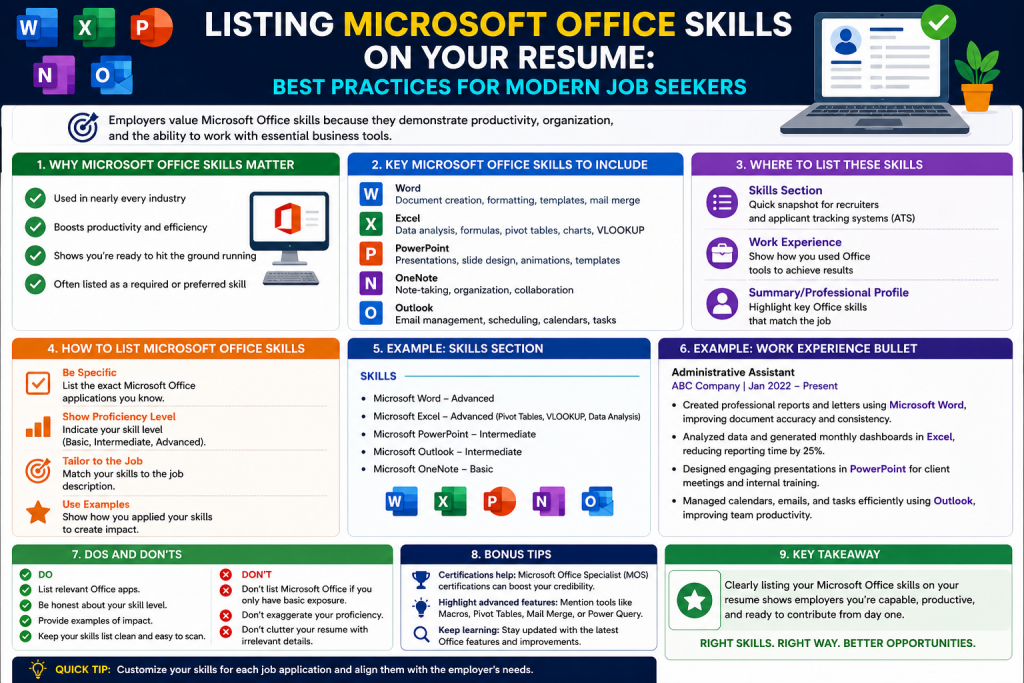
For example, instead of writing “Proficient in Microsoft Excel,” you could describe how you used Excel to analyze data, create reports, or improve processes. This approach makes your skills more meaningful and impactful.
Moving Beyond Assumptions
One of the biggest challenges in resume writing is avoiding assumptions. While it may seem obvious that you know how to use Microsoft Office, not all employers think the same way. Some may expect you to list these skills explicitly, especially if they are part of the job requirements.
At the same time, you should not assume that listing basic skills will impress recruiters. The key is to find the right balance between clarity and relevance.
If you decide to include Microsoft Office skills, make sure they are presented in a way that adds value. Avoid vague statements and focus on specific tools or abilities. For example, mentioning advanced Excel functions or experience with data visualization is more informative than simply stating “Excel proficiency.”
It is also important to be honest about your abilities. Overstating your skills can lead to problems during interviews or on the job. Employers may ask you to demonstrate your knowledge, and being unprepared can hurt your credibility.
The Importance of Continuous Improvement
Even though Microsoft Office skills are common, there is always room for growth. New features and updates are introduced regularly, and learning how to use them can improve your efficiency and effectiveness.
Investing time in developing your skills can pay off in multiple ways. It can help you perform better in your current role, increase your confidence, and make you more competitive in the job market.
Advanced skills, in particular, can open up new opportunities. For example, learning how to automate tasks in Excel or create dynamic presentations in PowerPoint can save time and improve the quality of your work. These abilities are often valued by employers and can set you apart from other candidates.
Continuous improvement also shows initiative and a willingness to learn. These are qualities that employers appreciate, regardless of the specific tools you use.
Setting the Foundation for the Rest of Your Resume
Understanding the role of Microsoft Office skills is just one part of building an effective resume. The bigger goal is to present yourself as a capable and results-driven candidate.
Your resume should tell a clear story about your experience, skills, and achievements. Every section should contribute to that story, including how you present your technical abilities.
Microsoft Office can still play a role in that narrative, but it should not be the focus unless it is directly relevant to the job. Instead, it should support your overall message and demonstrate your ability to work effectively in a professional environment.
By thinking strategically and focusing on value, you can decide whether to include these skills and how to present them in the best possible way.
Entry-Level Roles and Early Career Candidates
For candidates who are just beginning their professional journey, the expectations are different from those placed on experienced professionals. At the entry level, employers are not necessarily looking for years of specialized experience. Instead, they want reassurance that a candidate can function effectively in a basic workplace environment. This is where Microsoft Office skills can still play a meaningful role.
When you are applying for your first job, internship, or junior position, you may not yet have a long list of achievements to showcase. In such cases, even foundational technical skills can help demonstrate readiness. Being familiar with tools like Word, Excel, and PowerPoint signals that you can handle everyday responsibilities such as writing reports, organizing data, and preparing presentations.
Employers hiring for entry-level roles often prioritize trainability and adaptability. They want to know that you can quickly learn company-specific systems without struggling with basic tools. Listing Microsoft Office skills in this context is less about standing out and more about meeting baseline expectations.
However, even at this stage, it is important to avoid being overly generic. Instead of simply stating that you know Microsoft Office, try to provide some context. For example, you might mention that you used Excel for academic projects, created presentations for class assignments, or wrote structured reports using Word. These details make your skills more tangible and credible.
Another important factor is confidence. Many entry-level candidates underestimate their abilities and hesitate to include skills they think are too basic. But if those skills are relevant to the role and demonstrate your readiness, they are worth mentioning. The key is to present them in a way that feels purposeful rather than filler content.
When the Job Description Specifically Requires It
One of the clearest situations where you should include Microsoft Office skills is when they are explicitly mentioned in the job description. Many employers list required or preferred tools as part of the role’s qualifications. Ignoring these details can hurt your chances, even if you actually possess the skills.
Modern hiring processes often rely on Applicant Tracking Systems. These systems scan resumes for specific keywords before passing them along to human reviewers. If your resume does not include the terms the system is looking for, it may be filtered out automatically.
This means that even if Microsoft Office skills seem obvious, you should still include them when they are listed as requirements. Being explicit ensures that your resume aligns with the job posting and increases the likelihood of passing the initial screening.
It is also important to match the language used in the job description. If the employer mentions specific tools such as Excel, PowerPoint, or SharePoint, include those exact terms in your resume. This improves compatibility with automated systems and makes it easier for recruiters to see that you meet the criteria.
At the same time, avoid simply copying and pasting the requirements. Instead, integrate them naturally into your skills section or work experience. This approach makes your resume feel more authentic and less mechanical.
Demonstrating Verified Knowledge Through Training and Certifications
Another situation where Microsoft Office skills can strengthen your resume is when you have formal training or certifications. While many people claim proficiency in these tools, not everyone has taken the time to develop their skills through structured learning.
Certifications provide a level of credibility that self-reported skills do not. They show that you have invested time and effort into mastering specific tools and that your abilities have been assessed against a standard.
Including certifications can be particularly helpful if you are transitioning into a new field or trying to demonstrate technical competence. For example, if you have completed a course in Excel that covers advanced functions, data analysis, or automation, it signals that you are capable of handling more complex tasks.
Training also shows initiative. Employers appreciate candidates who take the time to improve their skills independently. It reflects a proactive mindset and a willingness to learn, which are valuable traits in any role.
When listing certifications, be clear about what you have completed. Mention the specific tool, the type of training, and any relevant focus areas. This provides context and helps employers understand the depth of your knowledge.
Highlighting Advanced Excel Skills as a Competitive Advantage
While basic Microsoft Office skills are widely expected, advanced Excel skills remain a strong differentiator in many industries. Excel is a versatile tool that goes far beyond simple spreadsheets, and not everyone knows how to use it effectively at a higher level.
If you have experience with complex formulas, pivot tables, macros, or data visualization, these are skills worth highlighting. They demonstrate your ability to work with data in a meaningful way and contribute to decision-making processes.
In fields such as finance, marketing, operations, and analytics, Excel is often a core tool. Employers in these areas value candidates who can organize large datasets, identify patterns, and present insights clearly. Advanced Excel skills can make you more efficient and reduce the need for additional resources.
It is important to go beyond simply stating that you have advanced skills. Provide examples of how you have used Excel in real situations. For instance, you might describe how you automated a reporting process, built dashboards, or improved data accuracy. These examples make your skills more concrete and demonstrate their practical value.
Even if your role is not heavily data-focused, advanced Excel knowledge can still be beneficial. It shows problem-solving ability and a willingness to go beyond basic tasks. These qualities are attractive to employers across many fields.
Roles That Involve Collaboration and Team Tools
Modern workplaces rely heavily on collaboration, and Microsoft Office includes tools that support teamwork and shared workflows. In environments where multiple people work on the same projects, familiarity with collaboration tools can be a significant advantage.
For example, platforms like SharePoint are commonly used to manage documents, share information, and coordinate tasks. If you have experience using such tools, it indicates that you can work effectively in team settings and adapt to collaborative systems.
Employers value candidates who can contribute to group efforts without causing disruptions. Understanding how to manage shared files, track changes, and maintain version control is an important part of this. These skills help ensure that projects run smoothly and that information is organized properly.
When applying for roles that involve teamwork, mentioning your experience with collaboration tools can strengthen your application. It shows that you are not only capable of working independently but also able to integrate into a team environment.
Again, context is key. Instead of simply listing the tool, describe how you used it. For example, you might mention that you managed shared documents, coordinated project updates, or supported team communication. These details make your experience more meaningful.
When Your Skills Directly Support Job Responsibilities
Another important factor to consider is how closely your Microsoft Office skills align with the responsibilities of the job. If the role involves tasks that rely heavily on these tools, including them becomes more relevant.
For example, administrative roles often require strong Word and Excel skills for document preparation and data management. Marketing roles may involve creating presentations or analyzing campaign data. Project management positions may require tracking progress and coordinating information across teams.
In these cases, Microsoft Office is not just a basic requirement but a core part of the job. Highlighting your skills can help demonstrate that you are prepared to handle the responsibilities effectively.
The key is to connect your skills to the tasks you will be performing. Instead of listing tools in isolation, show how they relate to the role. This makes your resume more targeted and increases its impact.
Tailoring your resume for each application is important. Even if you have a standard set of skills, the way you present them should change based on the job. This ensures that your resume remains relevant and focused.
Avoiding Overuse While Staying Relevant
While there are many situations where including Microsoft Office skills makes sense, it is equally important to avoid overusing them. Not every role requires detailed knowledge of these tools, and listing them unnecessarily can dilute your resume.
If the job does not mention Microsoft Office and your experience does not rely heavily on it, you may choose to leave it out or mention it briefly. This allows you to focus on more important skills and achievements.
Balance is essential. You want to provide enough information to show that you meet the requirements without overwhelming the reader with unnecessary details. A well-structured resume highlights the most relevant aspects of your experience and keeps the content concise.
Think of Microsoft Office skills as one piece of the puzzle rather than the main focus. They should support your overall narrative, not dominate it.
Presenting Skills in a Meaningful Way
How you present your Microsoft Office skills can make a significant difference in how they are perceived. Instead of listing them as generic bullet points, consider integrating them into your work experience or achievements.
For example, instead of writing “Proficient in Microsoft PowerPoint,” you could describe how you created presentations that helped communicate ideas or secure approvals. This approach provides context and demonstrates real-world application.
Using action-oriented language can also enhance your resume. Focus on what you did, how you did it, and what the outcome was. This structure makes your experience more engaging and easier to understand.
Clarity is important as well. Avoid vague statements and be specific about your abilities. If you have experience with certain features or functions, mention them. This gives employers a better sense of your skill level.
Ultimately, the goal is to show that your skills are not just theoretical but practical and effective. By presenting them in a meaningful way, you can make even common tools feel valuable.
Aligning Skills With Career Goals
Finally, it is important to consider how your Microsoft Office skills fit into your broader career goals. Not every skill needs to be highlighted in every situation. Focus on those that support the direction you want to take.
If you are pursuing a role that relies heavily on data analysis, emphasize your Excel skills. If your goal is to work in communications or management, highlight your ability to create documents and presentations. Aligning your skills with your objectives helps create a cohesive and focused resume.
Your resume should reflect not just where you have been, but where you are going. Including Microsoft Office skills strategically can support that narrative and reinforce your suitability for the role.
By understanding when and how to include these skills, you can make your resume more effective and increase your chances of success.
Moving Beyond Basic Knowledge
In today’s job market, simply knowing how to use Microsoft Office tools is no longer enough to make an impression. Most candidates already possess basic proficiency, which means employers rarely consider it a distinguishing factor. What truly matters is how you use these tools to create value, solve problems, and contribute to meaningful outcomes.
Instead of focusing on the tools themselves, it is more effective to highlight what you have achieved using them. Employers are not particularly interested in whether you can open a spreadsheet or format a document. They want to understand how your skills translate into real-world impact.
For example, using Excel to enter data is a routine task. However, using Excel to analyze trends, improve reporting accuracy, or streamline workflows demonstrates a higher level of capability. The same applies to Word and PowerPoint. Writing documents or creating slides is expected, but producing clear, professional, and persuasive materials that support business goals is what sets you apart.
This shift in perspective is essential. It transforms your resume from a list of tools into a story of contributions and achievements. When you present your skills in this way, even common tools can become powerful assets.
Demonstrating Real-World Applications
One of the most effective ways to make your Microsoft Office skills stand out is by showing how you have applied them in real situations. Context is key. Without it, your skills remain abstract and difficult for employers to evaluate.
Think about the tasks you have completed in previous roles, internships, or academic projects. Identify moments where you used Microsoft Office tools to accomplish something meaningful. Then, describe those experiences in a way that highlights your role and the outcome.
For instance, instead of stating that you are proficient in Word, you could explain how you created structured reports that improved communication within a team. Instead of listing Excel as a skill, you could describe how you organized and analyzed data to support decision-making.
These examples provide clarity and make your skills more relatable. They help employers visualize how you might perform in their organization. The more specific and relevant your examples are, the stronger your resume becomes.
It is also helpful to focus on challenges and solutions. If you encountered a problem and used Microsoft Office tools to address it, that story can demonstrate both technical ability and problem-solving skills. Employers value candidates who can think critically and find effective solutions.
Highlighting Efficiency and Productivity Gains
Another way to elevate your Microsoft Office skills is by emphasizing how they have improved efficiency or productivity. In many workplaces, time and accuracy are critical. Employees who can streamline processes and reduce errors are highly valued.
Consider whether you have used Excel to automate repetitive tasks, created templates in Word to standardize documents, or developed presentations that simplified complex information. These actions may seem routine, but they can have a significant impact on workflow efficiency.
When describing these experiences, try to quantify the results whenever possible. For example, you might mention that you reduced the time required to complete a task, improved accuracy, or increased output. Numbers make your achievements more concrete and credible.
Even small improvements can be meaningful. Saving a few hours each week or reducing errors in a process can add up over time. By highlighting these contributions, you show that you are not just completing tasks but actively improving the way work is done.
This approach also demonstrates initiative. It shows that you are willing to go beyond basic responsibilities and find ways to make processes more effective. Employers often look for this kind of proactive mindset.
Using Specific Examples to Strengthen Your Resume
Specificity is one of the most important elements of a strong resume. Vague statements do not provide enough information for employers to assess your abilities. Detailed examples, on the other hand, create a clearer picture of your skills and experience.
When describing your Microsoft Office skills, avoid generic phrases such as “proficient in Excel” or “experienced with PowerPoint.” Instead, focus on what you actually did. Mention the types of tasks you performed, the tools you used, and the results you achieved.
For example, you could describe how you built a financial tracking system in Excel, created a series of reports in Word, or designed presentations that supported key decisions. These details make your resume more engaging and informative.
It is also helpful to tailor your examples to the job you are applying for. If the role involves data analysis, emphasize your experience with Excel. If it requires strong communication skills, highlight your work with Word and PowerPoint. Aligning your examples with the job requirements increases their relevance and impact.
Remember that your goal is not to list everything you have done, but to showcase the most relevant and impressive aspects of your experience. Choosing the right examples can make a significant difference.
Showcasing Advanced Skills and Techniques
While basic Microsoft Office skills are widely expected, advanced skills can still set you apart from other candidates. These skills demonstrate a deeper understanding of the tools and a higher level of capability.
In Excel, advanced skills might include creating complex formulas, building pivot tables, developing dashboards, or automating tasks with macros. In Word, they could involve advanced formatting, document automation, or managing large and complex files. In PowerPoint, they might include designing visually compelling presentations or using advanced features to enhance communication.
If you have developed these skills, it is important to highlight them clearly. Employers often look for candidates who can handle more complex tasks without extensive training. Demonstrating advanced proficiency can make you a more attractive candidate.
However, it is important to be honest about your abilities. Do not claim advanced skills unless you can confidently demonstrate them. Employers may test your knowledge during interviews or expect you to apply these skills on the job.
Providing examples of how you have used advanced techniques can strengthen your claims. It shows that your skills are not just theoretical but have been applied in real situations.
Emphasizing Collaboration and Communication
Microsoft Office tools are not only used for individual tasks but also for collaboration and communication. In many workplaces, employees need to work together on projects, share information, and coordinate efforts.
Experience with collaborative features, such as shared documents, version control, and team platforms, can be valuable. These skills show that you can work effectively in a team environment and contribute to group efforts.
For example, you might describe how you collaborated on a shared document, managed updates across a team, or used presentation tools to communicate ideas. These experiences highlight your ability to work with others and support collective goals.
Communication is another important aspect. Tools like Word and PowerPoint are often used to convey information clearly and professionally. Demonstrating your ability to create well-structured documents or engaging presentations can strengthen your resume.
Employers value candidates who can communicate effectively, both in writing and visually. By highlighting these skills, you show that you can contribute to clear and effective communication within the organization.
Keeping Your Skills Updated
Technology continues to evolve, and Microsoft Office is no exception. New features and updates are introduced regularly, and staying current with these changes can enhance your effectiveness.
Investing time in learning new features or improving your skills can provide long-term benefits. It can help you work more efficiently, adapt to changing requirements, and remain competitive in the job market.
Continuous learning also demonstrates a proactive attitude. Employers appreciate candidates who take the initiative to develop their skills and stay informed about industry trends. It shows that you are committed to growth and improvement.
You do not need to master every feature, but focusing on the areas that are most relevant to your career can be valuable. For example, if your role involves data analysis, improving your Excel skills may be particularly beneficial.
Keeping your skills updated also increases your confidence. When you feel comfortable using the tools required for your job, you are more likely to perform well and take on new challenges.
Integrating Skills into Your Professional Story
Your resume should tell a cohesive story about your experience and capabilities. Microsoft Office skills should be integrated into that story rather than presented as isolated elements.
Instead of listing these skills separately, consider how they fit into your overall experience. For example, you might describe how you used Excel as part of a larger project or how you created presentations to support strategic decisions.
This approach makes your resume more dynamic and engaging. It shows that your skills are part of a broader set of abilities and contributions. It also helps employers understand how you might fit into their organization.
Think of your resume as a narrative rather than a checklist. Each section should build on the others and reinforce your overall message. Microsoft Office skills can play a role in that narrative, but they should support your main strengths rather than overshadow them.
Avoiding Common Mistakes
When presenting Microsoft Office skills, there are several common mistakes to avoid. One of the most frequent is being too vague. Generic statements do not provide enough information and can make your resume less effective.
Another mistake is overloading your resume with unnecessary details. Listing every tool you have ever used can make your resume cluttered and difficult to read. Focus on the most relevant skills and experiences.
It is also important to avoid exaggeration. Claiming skills that you do not possess can lead to problems during interviews or on the job. Be honest and accurate in your descriptions.
Finally, do not treat Microsoft Office as the main focus of your resume unless it is directly relevant to the role. It should be one part of your overall skill set, not the defining feature.
Conclusion
Microsoft Office skills are no longer a guaranteed way to stand out, but they are still an important part of many professional roles. The difference lies in how you present them. Instead of listing them as basic abilities, focus on how you have used these tools to create value, improve processes, and achieve results.
By providing specific examples, highlighting efficiency gains, and showcasing advanced skills, you can turn something ordinary into a meaningful advantage. Employers are not just looking for familiarity with tools; they are looking for candidates who can use those tools effectively.
A strong resume goes beyond listing skills. It tells a story of capability, initiative, and impact. When you integrate your Microsoft Office skills into that story in a thoughtful and strategic way, you increase your chances of making a lasting impression.
Ultimately, the goal is not just to show that you can use Microsoft Office, but to demonstrate that you can use it well.
Continue exploring the technologies and certification concepts that matter most to you.