Linux is designed as a multi-user operating system, which means multiple people can use the same system at the same time without interfering with each other’s work. To make this possible, Linux relies on a well-defined permission and ownership model. This model ensures that users can only access files and resources they are allowed to, while keeping the system stable and secure.
At the heart of this model are two important concepts: the User Identifier, commonly known as UID, and the Group Identifier, known as GID. These identifiers are not just labels; they are numeric values that the system uses internally to manage ownership and permissions. While users interact with usernames and group names, Linux actually relies on these numbers to enforce rules.
Understanding UID and GID is essential for anyone working with Linux, whether you are a beginner learning the basics or an experienced administrator managing complex systems. These identifiers influence how files are accessed, how processes run, and how security is maintained across the system.
What is a UID in Linux
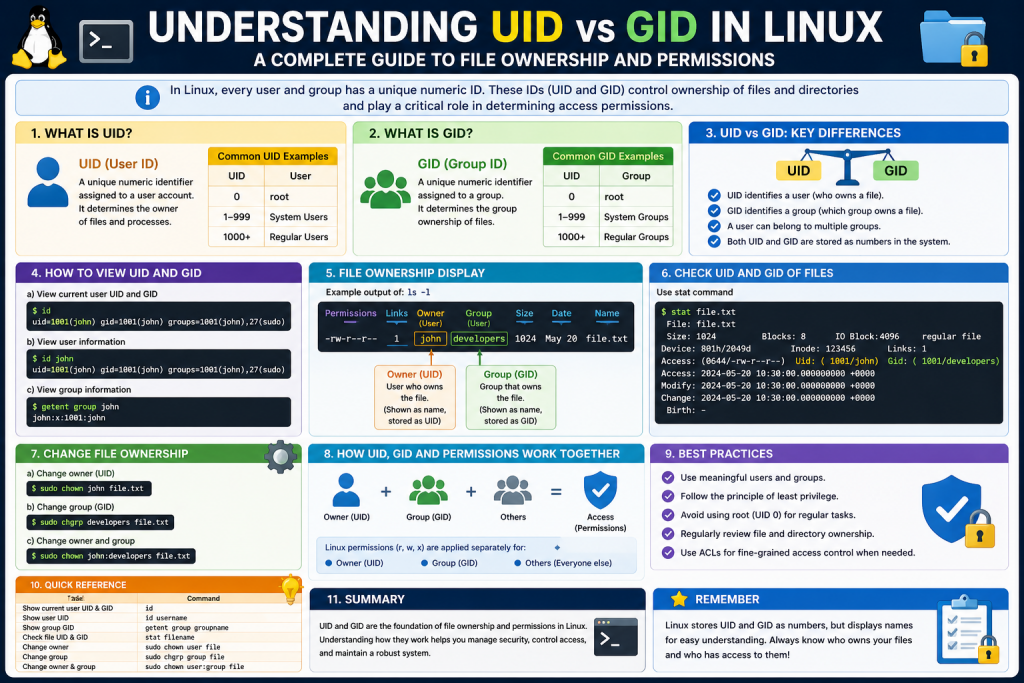
A UID, or User Identifier, is a unique number assigned to every user account on a Linux system. When a new user is created, the system automatically assigns a UID to that user. This number is used internally to identify the user, even though humans typically refer to users by their usernames.
The reason Linux uses numeric identifiers instead of names is efficiency and consistency. Numbers are easier for the system to process, and they eliminate confusion that might arise if usernames are changed. Even if a username is modified, the UID remains the same, ensuring that file ownership and permissions are preserved.
Each user has exactly one UID, and no two users share the same UID. This uniqueness is critical because it allows the system to distinguish between different users and apply permissions accurately.
For example, when a user creates a file, that file is tagged with the UID of the user. This tag tells the system who owns the file and what permissions should be applied when someone tries to access it.
What is a GID in Linux
A GID, or Group Identifier, works in a similar way but applies to groups instead of individual users. A group is simply a collection of users who share certain permissions. By organizing users into groups, administrators can manage access more efficiently.
Each group has a unique GID, and users can belong to one or more groups. When a file is associated with a group, all members of that group may have certain permissions for that file, depending on how those permissions are configured.
Groups are particularly useful in collaborative environments. For example, a team working on a project can be placed in the same group. Files created for that project can then be assigned to the group, allowing all team members to access and modify them as needed.
Like UIDs, GIDs are numeric values used internally by the system. Group names are simply a human-friendly way of referring to these identifiers.
Difference Between UID and GID
Although UID and GID are closely related, they serve different purposes. UID identifies an individual user, while GID identifies a group of users. Together, they form the basis of Linux ownership and permission management.
When a file exists on a Linux system, it is associated with both a UID and a GID. The UID indicates the owner of the file, and the GID indicates the group that has access to the file. This dual association allows for flexible permission settings.
For instance, a file might be fully accessible to its owner, partially accessible to its group, and restricted for everyone else. This layered approach provides a balance between security and usability.
Understanding the distinction between UID and GID is important because it helps you interpret file permissions correctly and manage access effectively.
Reserved UID and GID Ranges
Linux systems reserve certain ranges of UIDs and GIDs for specific purposes. The most important of these is the identifier 0, which is assigned to the root user and root group. The root account has complete control over the system and can perform any operation without restriction.
Because of its power, the root account is used carefully and typically only for administrative tasks. Regular users are assigned higher UID values to limit their privileges and reduce the risk of accidental or malicious changes.
In addition to the root account, there are reserved ranges for system accounts. These accounts are used by services and background processes rather than human users. For example, a web server or database service may run under its own user account with a specific UID and GID.
The exact ranges used for system accounts can vary depending on the Linux distribution. Some systems reserve UIDs from 1 to 99 for system use, while others extend this range further. After the reserved range, standard user accounts are assigned UIDs starting from a higher number, often 1000.
This separation helps maintain a clear distinction between system processes and regular users, which is important for both organization and security.
How UID and GID Affect File Ownership
Every file and directory in Linux has an owner and a group associated with it. These are represented by the UID and GID stored in the file’s metadata. When you view file details using commands like ls -l, you see the owner and group names, but behind the scenes, these correspond to numeric identifiers.
When a file is created, it is automatically assigned the UID of the user who created it. The GID is typically set to the user’s primary group. These assignments determine who has control over the file and how it can be accessed.
File ownership is important because it directly affects permissions. The owner of a file usually has the highest level of control, including the ability to modify permissions and delete the file. Group members may have limited access, depending on how permissions are set, while others may have little or no access.
If ownership needs to be changed, it can be done using system commands. This is often necessary when managing shared resources or transferring files between users.
Role of UID and GID in Permissions
Linux permissions are divided into three categories: owner, group, and others. These categories correspond directly to UID and GID. The owner category applies to the user whose UID matches the file’s UID. The group category applies to users whose GID matches the file’s GID or who belong to that group. The other category applies to everyone else.
Each category can have different permissions, such as read, write, and execute. When a user tries to access a file, the system checks these categories in order. If the user is the owner, owner permissions apply. If not, the system checks group membership. If neither condition is met, the system applies the permissions for others.
This structure allows for fine-grained control over access. For example, a file can be configured so that only the owner can edit it, while group members can view it, and others have no access at all.
UID and GID are essential to this process because they determine which category a user falls into when accessing a file.
UID and GID in Multi User Environments
In a multi-user system, UID and GID play a crucial role in maintaining order and security. Each user has a unique UID, which ensures that their files and processes are separate from those of other users. This isolation prevents accidental interference and protects sensitive data.
At the same time, GIDs allow users to collaborate by sharing access to resources. By assigning users to groups, administrators can create environments where teamwork is possible without compromising security.
For example, in a company setting, different departments can be assigned different groups. Files related to each department can then be restricted to members of that group, ensuring that only authorized users can access them.
This combination of isolation and collaboration is one of the key strengths of Linux’s permission model.
Why UID and GID Matter for System Security
Security is one of the main reasons UID and GID exist. By assigning unique identifiers to users and groups, Linux can enforce strict access controls. This prevents unauthorized users from accessing or modifying files and helps protect the system from potential threats.
When a user logs in, their UID and GID determine what actions they can perform. These identifiers are used to check permissions whenever the user interacts with the system. If the user does not have the required permissions, the action is denied.
This mechanism is also applied to processes. When a program runs, it inherits the UID and GID of the user who started it. This ensures that the program operates within the same permission boundaries as the user.
By limiting what users and processes can do, UID and GID help reduce the risk of damage caused by mistakes or malicious activity.
Practical Importance of Learning UID and GID
For anyone working with Linux, understanding UID and GID is more than just theoretical knowledge. It has practical applications in everyday tasks such as managing files, configuring permissions, and troubleshooting access issues.
For example, if a user cannot access a file, checking the UID and GID can help identify the problem. It may be that the file is owned by a different user or assigned to a group the user does not belong to. By adjusting ownership or permissions, the issue can be resolved.
Similarly, when setting up a system, proper use of UID and GID ensures that users have the access they need without exposing sensitive data. This is especially important in environments where security is a priority.
Understanding these concepts also lays the foundation for more advanced topics, such as access control lists and system auditing.
Introduction to Permissions and Identity in Linux
In a Linux system, permissions and identity are tightly connected. Every action performed on the system, whether it involves reading a file, modifying a directory, or executing a program, is evaluated based on who is performing that action. This identity is defined by the User Identifier (UID) and Group Identifier (GID). These numeric values are not just labels; they actively control how the system behaves when access requests are made.
Understanding how UID and GID influence permissions and processes is essential for managing a Linux system effectively. It allows you to predict how the system will respond to different actions and helps you configure access in a secure and efficient way. This section explores how these identifiers interact with file permissions, process execution, and overall system behavior.
The Structure of Linux File Permissions
Linux permissions are organized into three main categories: owner, group, and others. These categories are directly linked to UID and GID. The owner category applies to the user whose UID matches the file’s UID. The group category applies to users who belong to the group identified by the file’s GID. The other category includes all remaining users.
Each category can have three types of permissions: read, write, and execute. Read allows viewing the contents of a file, write allows modifying it, and execute allows running it as a program. These permissions can be combined in different ways to create specific access rules.
When a user attempts to access a file, the system checks these categories in a specific order. First, it compares the user’s UID with the file’s UID. If they match, the system applies the owner’s permissions. If not, it checks whether the user belongs to the group associated with the file’s GID. If that condition is met, the group permissions apply. If neither condition is satisfied, the system uses the permissions defined for others.
This evaluation process ensures that access decisions are consistent and predictable. It also highlights the importance of UID and GID, as they determine which set of permissions is used.
How UID Determines File Access
The UID plays a central role in determining file access. When a user creates a file, the system assigns the file’s UID to match the user’s UID. This establishes ownership and gives the user control over the file.
As the owner, the user typically has the ability to read, write, and modify the file’s permissions. This level of control allows users to manage their own data without affecting others. For example, a user can restrict access to a private document or grant permission to others when collaboration is needed.
If another user attempts to access the file, the system checks whether their UID matches the file’s UID. If it does not, the system moves on to evaluate group membership. This ensures that ownership is always the first factor considered in access decisions.
The importance of UID becomes even more apparent when dealing with sensitive files. System configuration files, for instance, are often owned by the root user. Since regular users have different UIDs, they are prevented from modifying these files, which helps protect the system from accidental or unauthorized changes.
How GID Enables Group Based Access
While UID focuses on individual ownership, GID enables shared access through groups. Each file is associated with a group, and users who belong to that group may have specific permissions for the file.
Groups are particularly useful in environments where multiple users need access to the same resources. Instead of assigning permissions individually to each user, administrators can assign permissions to a group and add users to that group. This simplifies management and ensures consistency.
For example, in a development team, all members can be placed in a group dedicated to a specific project. Files related to that project can be assigned to the group, allowing all members to read and modify them. If a new member joins the team, adding them to the group automatically grants them access.
GID also plays a role in controlling access to directories. When permissions are set appropriately, group members can create, modify, and delete files within shared directories. This makes collaboration more efficient while maintaining control over who can participate.
Primary and Supplementary Groups
In Linux, each user has a primary group and can also belong to multiple supplementary groups. The primary group is identified by the user’s GID, while supplementary groups are additional groups that the user is a member of.
When a file is created, it is typically assigned the GID of the user’s primary group. However, the user’s supplementary groups are still considered when determining access permissions. This allows users to interact with files associated with multiple groups.
For instance, a user might belong to a design group, a development group, and a testing group. Each group provides access to different sets of files. When the user attempts to access a file, the system checks all group memberships to determine whether access should be granted.
This flexibility is one of the strengths of the Linux permission model. It allows users to participate in multiple roles without requiring separate accounts or complicated configurations.
UID and GID in Process Execution
UID and GID are not limited to file permissions; they also influence how processes run. Every process in Linux is associated with a UID and GID, which define its privileges.
When a user starts a program, the process inherits the user’s UID and GID. This means the program can only access resources that the user is allowed to access. For example, if a user does not have permission to modify a file, a program running under that user’s UID will also be unable to modify the file.
This behavior is crucial for maintaining security. It ensures that programs cannot exceed the permissions of the user who started them. Even if a program contains vulnerabilities, its impact is limited by the UID and GID under which it operates.
Processes also have real and effective UIDs and GIDs. The real UID represents the user who started the process, while the effective UID determines the permissions the process uses. In most cases, these values are the same, but they can differ in special situations.
Special Permissions and Privilege Changes
Linux includes special permission bits that allow processes to run with different privileges. One of the most important is the setUID bit. When this bit is set on an executable file, the process runs with the UID of the file’s owner instead of the user who started it.
This mechanism is used for programs that need elevated privileges to perform certain tasks. For example, changing a user’s password requires access to system files that are normally restricted. By using setUID, the program can temporarily operate with higher privileges while still being accessible to regular users.
There is also a setGID bit, which works in a similar way but applies to groups. When set on an executable file, it causes the process to run with the GID of the file’s group. This is useful in scenarios where group level access is required.
While these features are powerful, they must be used carefully. Improper configuration can create security risks, as it may allow users to perform actions beyond their intended permissions.
File Creation and Group Inheritance
When a file is created, its UID is set to the UID of the user who created it, and its GID is usually set to the user’s primary group. However, this behavior can be influenced by directory settings.
One important feature is the setGID bit on directories. When this bit is set, new files created within the directory inherit the GID of the directory instead of the user’s primary group. This ensures consistent group ownership, which is especially useful in shared environments.
For example, in a shared project directory, setting the setGID bit ensures that all files belong to the same group. This makes it easier for team members to collaborate, as they automatically have the appropriate access.
Without this feature, files might be assigned to different groups based on each user’s primary group, leading to inconsistent permissions and potential access issues.
UID and GID in Networked Systems
In networked environments, UID and GID play a critical role in maintaining consistent access control across multiple systems. When files are shared between systems, their ownership is determined by numeric IDs rather than usernames.
This can create challenges if different systems assign different UIDs to the same user. For example, a file owned by UID 1000 on one system might correspond to a different user on another system if the mappings are not consistent.
To address this issue, administrators often synchronize UID and GID assignments across systems. This ensures that users have consistent identities and access rights, regardless of where they log in.
Centralized authentication systems can also be used to manage identities across multiple machines. These systems provide a unified way to assign and manage UIDs and GIDs, reducing the risk of conflicts and simplifying administration.
Security Implications of UID and GID
UID and GID are fundamental to Linux security. By controlling access based on these identifiers, the system can enforce strict boundaries between users and processes. This reduces the risk of unauthorized access and helps protect sensitive data.
For example, system files are typically owned by the root user and have restricted permissions. Regular users, with different UIDs, are unable to modify these files. This prevents accidental changes that could disrupt the system.
Similarly, services and applications often run under dedicated user accounts with limited privileges. This ensures that even if a service is compromised, its impact is contained.
Understanding how UID and GID influence permissions and processes allows administrators to design secure systems and respond effectively to potential threats.
Practical Scenarios and Troubleshooting
In real world scenarios, issues related to UID and GID often arise when permissions are misconfigured. For example, a user may be unable to access a file because they are not the owner and do not belong to the appropriate group.
By examining the UID and GID of the file and comparing them with the user’s identifiers, the problem can be diagnosed. Adjusting ownership or modifying group memberships can often resolve the issue.
Another common scenario involves shared directories where files are created with inconsistent group ownership. Using features like setGID on directories can help maintain consistency and prevent access problems.
Understanding these concepts not only helps in troubleshooting but also in designing systems that avoid such issues in the first place.
Introduction to Practical UID and GID Usage
Understanding UID and GID conceptually is important, but real mastery comes from knowing how to view, manage, and apply these identifiers in practical situations. In Linux, administrators and users frequently interact with UID and GID when creating accounts, assigning permissions, troubleshooting access issues, and maintaining system security.
This part focuses on how UID and GID appear in everyday system operations, how you can inspect them, and how they are managed effectively. It also explores how these identifiers influence real-world workflows, from simple file management to complex system administration tasks.
Viewing UID and GID Through System Files
One of the most direct ways to view UID and GID information is through system configuration files. The most important file for user information is /etc/passwd. This file contains essential details about every user account on the system.
Each line in this file represents a single user and is divided into several fields separated by colons. Among these fields, the third represents the UID and the fourth represents the GID. By reading this file, you can see the numeric identifiers associated with each user.
Although this file may look complex at first, it provides a clear mapping between usernames and their corresponding identifiers. This mapping is critical because, internally, Linux uses these numeric values rather than names.
Another related file is /etc/group, which stores information about groups. It lists group names along with their GIDs and the users who belong to each group. Together, these files form the foundation of identity management in Linux.
By examining these files, administrators can verify user and group configurations, detect inconsistencies, and ensure that identifiers are assigned correctly.
Using Commands to Display UID and GID
While system files provide raw information, Linux also offers user-friendly commands to display UID and GID. One of the most commonly used commands is id. When executed, it shows the current user’s UID, primary GID, and all supplementary group memberships.
This command is particularly useful because it provides a complete view of a user’s identity in a single output. It helps users understand which groups they belong to and what permissions they might have.
You can also use the id command with a username as an argument to view information about another user. This makes it a versatile tool for both personal use and system administration.
Another useful command is ls -l, which displays file details, including ownership. Although it shows usernames and group names, these are derived from the underlying UID and GID values. This command is essential for understanding how ownership is applied to files and directories.
Together, these tools make it easy to inspect UID and GID information without needing to manually parse system files.
Creating and Managing Users and Groups
Managing UID and GID often involves creating and maintaining user and group accounts. Linux provides a set of commands for these tasks, allowing administrators to control how identifiers are assigned and used.
When a new user is created, the system automatically assigns a UID and a primary GID. This process ensures that each user has a unique identity. However, administrators can also specify custom UIDs and GIDs when creating users, which is useful in environments where consistency across systems is required.
Groups can be created and managed in a similar way. By assigning users to groups, administrators can define shared access to resources. This approach simplifies permission management and reduces the need for individual configurations.
Adding a user to multiple groups allows them to participate in different roles or projects. This flexibility is especially valuable in collaborative environments where users need access to various resources.
Removing users or groups must be done carefully, as it can affect file ownership and access permissions. Proper planning ensures that resources remain accessible and organized.
Modifying UID and GID Safely
In some cases, it may be necessary to change a user’s UID or a group’s GID. This can happen when migrating systems, synchronizing identifiers across networks, or resolving conflicts.
However, changing these identifiers is not a simple task. Since UID and GID are used to track file ownership, altering them without updating file metadata can lead to inconsistencies. Files that were previously accessible may become inaccessible because their ownership no longer matches the user’s new identifier.
To avoid these issues, administrators must update file ownership when changing UID or GID values. This ensures that files remain associated with the correct user or group.
Careful planning and execution are essential when making such changes. It is often recommended to perform these operations during maintenance periods to minimize disruption.
Changing File Ownership and Group Association
File ownership can be modified using system tools that allow administrators to reassign files to different users or groups. This is a common task when transferring files between users, managing shared resources, or correcting permission issues.
Changing ownership ensures that the correct UID is associated with a file, giving the appropriate user control over it. Similarly, changing the group association updates the GID, allowing the correct group members to access the file.
These operations are particularly important in collaborative environments. For example, when a project is handed over to a new team, updating file ownership and group association ensures that the new team has the necessary access.
Proper use of these tools helps maintain an organized and secure file system, where access rights are clearly defined and enforced.
UID and GID in Shared Environments
In shared environments, UID and GID play a critical role in enabling collaboration. By organizing users into groups and assigning appropriate permissions, administrators can create spaces where multiple users can work together efficiently.
Shared directories are a common example of this. By assigning a directory to a specific group and configuring permissions, all group members can access and modify its contents. This setup eliminates the need for individual permission adjustments.
To maintain consistency, features like group inheritance can be used. This ensures that new files created within a shared directory automatically belong to the correct group, preventing access issues.
Such configurations are widely used in workplaces, educational institutions, and development teams, where collaboration is essential.
UID and GID in System Services
System services in Linux often run under dedicated user accounts with specific UIDs and GIDs. This design enhances security by isolating services from each other and from regular users.
For example, a web server might run under its own user account with limited permissions. This ensures that even if the service is compromised, it cannot access sensitive system files or interfere with other services.
Assigning unique UIDs and GIDs to services also makes it easier to manage permissions and monitor activity. Administrators can track which service is responsible for specific actions based on these identifiers.
This approach is a key aspect of Linux security, as it minimizes the potential impact of vulnerabilities and maintains system stability.
Troubleshooting UID and GID Issues
Problems related to UID and GID are common in Linux, especially in complex systems. These issues often manifest as permission errors, where users are unable to access files or perform certain actions.
Troubleshooting typically involves checking the ownership and permissions of the affected files. By comparing the file’s UID and GID with the user’s identifiers, administrators can identify mismatches.
Another common issue arises in networked environments, where inconsistent UID and GID mappings can lead to incorrect file ownership. Resolving these issues may require synchronizing identifiers across systems or adjusting configurations.
Understanding how UID and GID work makes it easier to diagnose and fix such problems, reducing downtime and improving system reliability.
Advanced Applications of UID and GID
Beyond basic file permissions, UID and GID are used in more advanced features of Linux. Access control lists provide additional layers of permission management, allowing more granular control over who can access specific resources.
Containerization technologies also rely on UID and GID to isolate environments and manage resource access. By mapping identifiers between host and container systems, they ensure that processes run securely and independently.
Identity management systems extend these concepts across multiple machines, providing centralized control over users and groups. This is particularly useful in large organizations where consistency and scalability are important.
Learning how UID and GID integrate with these advanced features opens the door to more sophisticated system administration techniques.
Best Practices for Managing UID and GID
Effective management of UID and GID involves following best practices that promote security, consistency, and efficiency. One important practice is maintaining consistent identifier assignments, especially in networked environments.
Using groups to manage permissions is another key practice. Instead of assigning permissions to individual users, grouping users simplifies management and reduces the risk of errors.
Regularly reviewing user and group configurations helps ensure that access rights remain appropriate. Removing unused accounts and updating group memberships can prevent unauthorized access.
Finally, documenting UID and GID assignments is helpful for long-term maintenance. Clear records make it easier to manage systems and resolve issues when they arise.
Conclusion
UID and GID are fundamental to how Linux operates, influencing everything from file ownership to process execution and system security. In practical terms, they provide the structure needed to manage users, control access, and maintain order in a multi-user environment.
By learning how to view, manage, and apply these identifiers, you gain the ability to work more effectively with Linux systems. Whether you are creating users, configuring permissions, or troubleshooting issues, UID and GID are at the center of your actions.
Their importance extends beyond basic tasks, forming the foundation for advanced features such as access control lists, containerization, and centralized identity management. Mastering these concepts not only improves your technical skills but also prepares you for more complex challenges in system administration.
In the end, understanding UID and GID is not just about memorizing definitions. It is about recognizing how these identifiers shape the behavior of the entire system and using that knowledge to create secure, efficient, and well-organized environments.
Continue exploring the technologies and certification concepts that matter most to you.