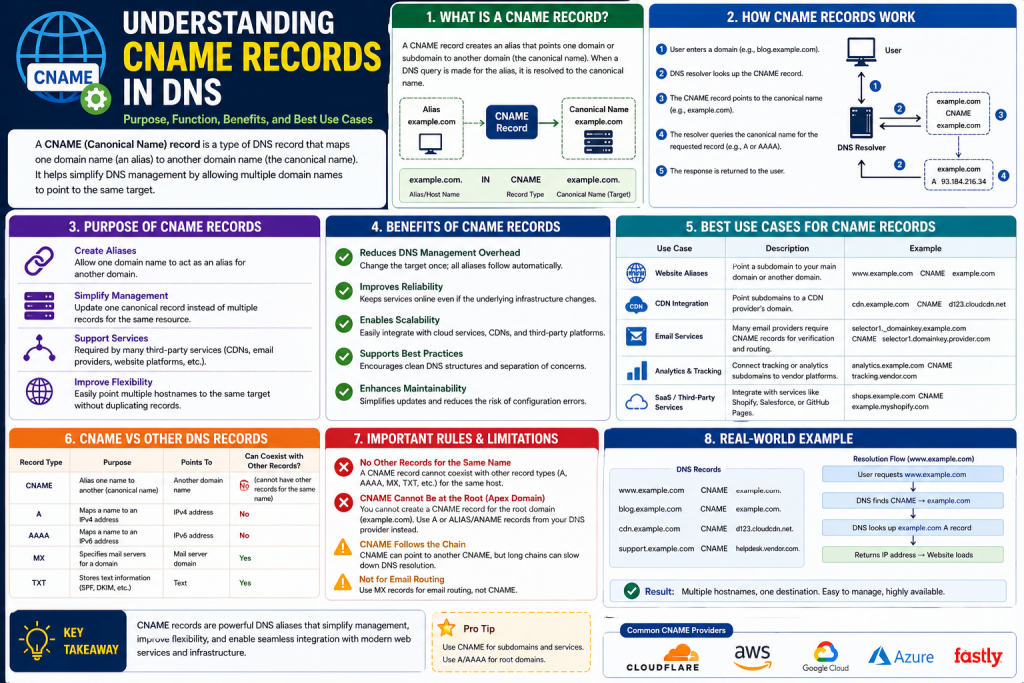
The internet feels simple from the user’s perspective. You type a website name into a browser, press enter, and the site loads. Behind that seemingly effortless process is an intricate system that translates human-friendly names into machine-readable destinations. This system is the Domain Name System, commonly called DNS, and it acts as one of the internet’s most essential foundations.
DNS is often compared to a phonebook because it connects domain names with numerical IP addresses. Instead of remembering strings of numbers for every website, users can access resources using recognizable names. While this explanation is useful, DNS does far more than simply map names to addresses. It manages how domains behave, where traffic is sent, how services are organized, and how administrators maintain flexibility across digital infrastructure.
Among the many DNS record types available, the Canonical Name record, or CNAME record, plays a unique role. Rather than pointing directly to an IP address, a CNAME points one domain name to another domain name. This creates an alias, allowing one hostname to inherit the DNS destination of another.
CNAME records are critical for website scalability, cloud integration, brand consistency, and service management. They simplify DNS administration, reduce repetitive configuration, and make it easier for businesses to adapt to changing infrastructure without disrupting users.
To fully understand why CNAME records are so widely used, it is important to first understand the broader purpose of DNS, the concept of hostnames, and the challenges CNAMEs solve in network design.
Understanding DNS Before Learning CNAME
DNS exists because computers communicate using IP addresses, but humans prefer words. Every website, server, or online service is hosted on systems reachable through an IP address such as IPv4 or IPv6. These addresses are technically accurate but difficult for users to memorize.
DNS bridges this gap by translating names into addresses.
When someone enters a website name into a browser, several steps occur:
- The browser checks its local cache for a previous answer.
- The operating system checks its DNS cache.
- A recursive DNS resolver is queried.
- If necessary, the resolver asks root servers.
- The resolver then contacts top-level domain servers.
- Finally, authoritative DNS servers provide the requested record.
This process often happens in milliseconds.
DNS records are the instructions stored within DNS zones. These records tell the internet how to handle requests for specific names. Common record types include:
A record: Maps a hostname directly to an IPv4 address
AAAA record: Maps a hostname to an IPv6 address
MX record: Directs email to mail servers
TXT record: Stores text-based verification or security data
NS record: Defines name servers for a zone
CNAME record: Maps one hostname to another hostname
CNAME records stand apart because they do not resolve directly to an address. Instead, they create an alias relationship.
What Does Canonical Name Mean?
The phrase canonical name refers to the “true” or “official” domain name for a resource.
In DNS terms, a canonical name is the primary domain name that holds the actual DNS resolution path. A CNAME creates an alternate name that points to this canonical hostname.
For example:
If support.companysite points to helpdesk.serviceprovider
Then support.companysite is an alias
And helpdesk.serviceprovider is the canonical name
When a user requests the alias, DNS responds by saying that the requested name is actually another hostname. The resolver must then perform another lookup for the target hostname to obtain the final IP address.
This means CNAME records create indirection.
That indirection is powerful because administrators can update one target hostname without changing every alias attached to it.
Why CNAME Records Were Created
As internet services evolved, organizations began using multiple subdomains for different functions:
shop
blog
support
mail
api
cdn
Managing each subdomain independently with separate IP addresses can become cumbersome, especially when services move between platforms, clouds, or providers.
CNAME records solve this by allowing administrators to assign aliases.
Instead of manually updating every service endpoint when infrastructure changes, administrators can point subdomains to provider-managed hostnames.
This became especially useful with:
Cloud hosting platforms
Software-as-a-Service applications
Content delivery networks
Load balancers
Security proxies
Marketing campaign URLs
By separating public-facing names from infrastructure endpoints, CNAME records improve flexibility.
How a CNAME Record Works Step by Step
To understand the technical process, imagine a company has a customer portal.
The business wants users to access:
portal.companysite
But the application is hosted by a cloud provider under:
hosted-app.providerplatform
Rather than exposing the provider hostname, DNS can use a CNAME:
portal.companysite → hosted-app.providerplatform
Here’s what happens:
A user enters portal.companysite
The DNS resolver checks for records
The authoritative server returns the CNAME target
The resolver then requests hosted-app.providerplatform
The final A or AAAA record is returned
The browser connects to the correct IP
This process is transparent to the user.
From the user’s perspective, they typed one address and arrived at the correct destination. Behind the scenes, DNS followed an alias chain.
Decoupling Names from Infrastructure
One of the greatest advantages of CNAME records is decoupling.
Without CNAME:
If the server IP changes, DNS admins must update every record manually.
With CNAME:
Admins only update the canonical hostname’s target.
This is especially useful when working with providers that frequently shift infrastructure for:
Scaling
Failover
Geographic balancing
Security filtering
Platform upgrades
For example, if a cloud application changes IP addresses regularly, users never notice because the provider updates the canonical endpoint while your CNAME remains unchanged.
CNAME Records and Subdomains
CNAME records are most commonly used for subdomains rather than root domains.
Examples include:
blog.companysite
store.companysite
learn.companysite
status.companysite
Each subdomain can point to different platforms while maintaining consistent branding.
A blog hosted on a publishing platform can use:
blog.companysite → publishing-service
An online store hosted elsewhere can use:
store.companysite → ecommerce-platform
This allows organizations to maintain a unified domain identity even when services are distributed across vendors.
Why Root Domains Usually Cannot Use CNAME
A major DNS limitation is that the root domain, also called the apex domain, generally cannot be assigned a traditional CNAME if other required records exist.
This is because the root domain typically requires:
NS records
SOA records
Since DNS standards do not allow CNAME coexistence with other data at the same node, root-level CNAMEs are often restricted.
That is why many DNS providers offer alternatives like:
ALIAS records
ANAME records
Flattening
These mimic CNAME functionality while preserving DNS compliance.
This distinction is important because many beginners assume CNAMEs work everywhere equally.
Performance Considerations
CNAME records introduce an extra DNS query because the alias must first resolve to another hostname before reaching an IP.
This means:
Alias lookup
Canonical lookup
Final IP response
While modern DNS caching minimizes noticeable delays, this additional step can affect performance slightly.
However, the operational flexibility often outweighs the tiny latency cost.
DNS providers and CDN services often optimize this process heavily, making the user experience nearly identical.
Common Real-World Uses of CNAME Records
CNAME records are deeply integrated into modern digital operations.
Website Hosting
Businesses frequently connect branded subdomains to hosting platforms.
Content Delivery Networks
CDNs use CNAMEs so websites can route traffic through globally distributed edge servers.
Email and SaaS Integrations
Third-party services often verify ownership or configure branded access through CNAME.
Marketing Campaigns
Short branded URLs can redirect users to campaign-specific destinations.
Security Services
Web application firewalls and DDoS protection providers often require CNAME routing.
CNAME and Brand Consistency
A major strategic advantage is preserving branded experiences.
Users trust recognizable domains more than unfamiliar provider URLs.
For example:
careers.companysite appears more professional than companysite.thirdpartyjobboard
CNAME records let businesses maintain brand identity while outsourcing services.
This creates:
Better trust
Improved recognition
Simpler navigation
Consistent digital ecosystems
DNS Propagation and TTL Basics
When creating or updating CNAME records, changes are not always instant.
TTL, or Time to Live, defines how long resolvers cache DNS information.
Short TTL:
Faster updates
More DNS queries
Long TTL:
Slower updates
Reduced DNS load
If a CNAME is changed, old cached data may persist until TTL expires.
Understanding TTL is crucial for migrations, rebranding, or service cutovers.
Potential Risks and Misconfigurations
Although CNAMEs are simple, mistakes can cause outages.
Common issues include:
Pointing to the wrong hostname
Creating loops
Using invalid targets
Misconfigured SSL certificates
Deleting canonical endpoints
For example:
A points to B
B points to A
This creates an infinite loop.
DNS systems typically reject such setups, but poor planning can still create failures.
CNAME and Security Awareness
CNAME records themselves are not inherently dangerous, but abandoned CNAMEs can create subdomain takeover risks.
If a business points a subdomain to an external provider but later stops using that provider without deleting the DNS record, attackers may claim the unused external resource.
This makes DNS hygiene essential.
Regular audits help prevent:
Broken services
Unused aliases
Security vulnerabilities
The Strategic Importance of CNAME in Cloud Computing
Modern cloud ecosystems rely heavily on CNAME records.
Why?
Cloud providers prioritize abstraction. Instead of exposing raw IP addresses, they give customers service endpoints.
This allows providers to:
Rebalance traffic
Scale automatically
Move workloads
Enhance resilience
Customers keep their DNS alias stable while providers manage complexity.
This makes CNAME records central to digital transformation strategies.
CNAME Records as a Tool for Scalability
As organizations grow, DNS complexity increases.
CNAMEs simplify scaling by reducing record duplication.
Instead of creating many separate A records, administrators can centralize service mapping.
This improves:
Maintainability
Flexibility
Migration speed
Administrative efficiency
For enterprises managing hundreds of services, this can significantly reduce operational burden.
Introduction to DNS Record Types and Why Comparing Them Matters
Understanding CNAME records in isolation is useful, but real DNS management requires knowing how CNAME fits into the broader ecosystem of DNS records. DNS is not a single-purpose system. It is a structured framework made up of specialized record types, each designed to solve a specific problem in internet communication.
When administrators configure DNS, they are not simply choosing random settings. They are deciding how users will reach websites, where email should be delivered, how services will scale, how domains will be verified, and how traffic should move through infrastructure. Choosing the wrong DNS record can lead to poor performance, broken services, failed integrations, or unnecessary administrative complexity.
This is why one of the most important skills in DNS management is understanding the differences between CNAME records, A records, and other common record types.
Many beginners assume all DNS records serve similar purposes because they all exist in the same DNS zone file. In reality, DNS records differ dramatically in function, structure, and operational impact.
To build a strong foundation, it helps to think of DNS records as categories of instructions:
Some records define where traffic goes
Some records define which server is authoritative
Some records define how email works
Some records define security policies
Some records define aliases and naming relationships
CNAME belongs to the alias category, while A records belong to direct address resolution. That distinction is fundamental.
What an A Record Does
An A record, or Address record, directly maps a hostname to an IPv4 address.
Example:
website.companysite → 192.0.2.1
This means when a user requests website.companysite, DNS immediately returns the numerical address needed to connect to the destination server.
A records are the most straightforward DNS records because they provide a direct path between a name and an IP address.
This simplicity creates several advantages:
Fast lookup process
No intermediate alias step
Broad compatibility
Ideal for stable infrastructure
Works well for root domains
Because A records directly resolve to an IP address, they are commonly used when:
A business hosts its own server
A static IP is assigned
A dedicated hosting environment exists
A load balancer has a fixed endpoint
A root domain requires direct mapping
However, A records also create limitations. If the IP address changes, every related record must be updated manually.
How CNAME Differs from A Records
CNAME records do not point directly to IP addresses. Instead, they point to another hostname.
Example:
shop.companysite → ecommerce.providerplatform
The resolver must then query ecommerce.providerplatform to find its A or AAAA record.
This creates a two-step process.
CNAME:
Hostname → Hostname → IP
A Record:
Hostname → IP
This difference may appear minor, but it dramatically changes DNS design philosophy.
A records prioritize directness.
CNAME records prioritize flexibility.
Direct Mapping vs Alias Abstraction
The choice between A and CNAME often depends on infrastructure stability.
If your server IP rarely changes:
A record may be simpler
If your provider manages dynamic endpoints:
CNAME may be better
For example:
Self-hosted company website:
A record often makes sense
Cloud-hosted application:
CNAME often makes sense
The more dynamic the infrastructure, the more useful CNAME becomes.
Advantages of A Records
Direct Resolution
A records resolve immediately without additional DNS queries.
Better for Apex Domains
Since root domains often cannot use CNAME, A records are essential.
Slightly Lower Latency
One fewer DNS lookup can improve performance marginally.
Greater Simplicity
Fewer dependencies reduce complexity.
Disadvantages of A Records
Manual Updates
Changing infrastructure requires IP replacement.
Poor Scalability Across Providers
If multiple services depend on one changing endpoint, updates become burdensome.
Less Flexible for Cloud Environments
Dynamic cloud systems often prefer hostnames over fixed IPs.
Advantages of CNAME Records
Infrastructure Flexibility
Providers can change IPs without customer intervention.
Easier Service Integration
Works well with SaaS, CDNs, and managed platforms.
Centralized Management
Multiple aliases can point to one canonical endpoint.
Brand Preservation
Branded subdomains can point to external services.
Disadvantages of CNAME Records
Extra DNS Lookup
Potentially adds small latency.
Cannot Typically Be Used at Root
DNS standards impose restrictions.
Dependency on External Hostname
If the target fails, aliases fail too.
IPv6 Counterpart to A Records
AAAA records perform the same role as A records but map names to IPv6 addresses.
Example:
website.companysite → 2001:db8::1
As IPv6 adoption grows, AAAA records become increasingly important.
Many organizations now configure both:
A record for IPv4
AAAA record for IPv6
This dual-stack approach ensures compatibility across networks.
CNAME records can still point to hostnames that eventually resolve via AAAA.
Email Routing Specialists
Mail Exchange records control where email is delivered.
Example:
companysite mail → mailserver.provider
MX records differ from CNAME because they prioritize mail server routing rather than web traffic.
A critical DNS rule:
MX records should not point to CNAMEs in many best-practice scenarios because mail systems prefer stable direct targets.
MX records often work alongside:
A records
AAAA records
TXT records
Verification and Policy
TXT records store text instructions.
Common uses include:
SPF email validation
DKIM authentication
Domain ownership verification
Security policies
TXT records do not route traffic but are increasingly essential for:
Email deliverability
Third-party service validation
Cybersecurity
DNS Authority
Name Server records define which DNS servers are authoritative for a domain.
Without NS records, DNS zones cannot function correctly.
These records are foundational and operate differently from traffic-routing records.
Administrative Backbone
Start of Authority records contain:
Primary nameserver
Administrative contact
Serial number
Refresh intervals
SOA records govern DNS zone administration and synchronization.
Because root domains require SOA and NS records, this is one reason CNAME restrictions exist at the apex.
Why DNS Standards Restrict CNAME Coexistence
A CNAME record represents an alias, meaning the DNS node should only function as a pointer.
If other records coexist at the same hostname, conflicts emerge.
For example:
If rootdomain has a CNAME
But also has MX, NS, SOA
Which data should resolvers trust?
To prevent ambiguity, DNS standards generally prohibit CNAME coexistence with other record types.
This rule preserves consistency.
ALIAS and ANAME Records: Modern Workarounds
Because root domains often need alias-like behavior, DNS providers created pseudo-records.
ALIAS:
Provider-side flattening of hostname targets
ANAME:
Similar concept with provider-managed resolution
These are not official DNS standards everywhere, but they solve practical problems.
They allow:
Root domain flexibility
Cloud integration
Managed DNS convenience
CNAME in CDN and Reverse Proxy Architecture
Content Delivery Networks often require CNAME records.
Why?
Because CDN providers need traffic routed through their network before reaching your origin server.
Example:
cdn.companysite → edge.providercdn
This allows:
Caching
DDoS protection
Global load balancing
SSL offloading
Without CNAME, CDN integration can become harder.
CNAME and Load Balancers
Managed load balancers often expose DNS names instead of fixed IPs.
This allows backend scaling.
If instances change:
The load balancer hostname remains stable
CNAME makes this operationally seamless.
CNAME and SaaS Ecosystems
Modern SaaS platforms frequently require branded subdomains.
Examples:
help.companysite
academy.companysite
status.companysite
Behind the scenes, these often point to:
knowledgebase.provider
learningplatform.vendor
statuspage.service
This preserves user trust while outsourcing functionality.
SEO and DNS Record Choices
From a search engine perspective, DNS record type itself is not typically a ranking factor.
However, DNS configuration affects:
Uptime
Performance
SSL reliability
Site accessibility
Misconfigured CNAME chains can hurt:
Load speed
Certificate matching
Subdomain stability
So while search engines may not reward A vs CNAME directly, operational quality still matters.
DNS Chaining and Overcomplexity
One mistake organizations make is excessive chaining.
Example:
A points to B
B points to C
C points to D
Each additional step increases lookup complexity.
Best practice:
Keep chains minimal
DNS should be flexible, not unnecessarily convoluted.
Subdomain Strategy and Record Selection
Choosing DNS records often depends on use case:
Corporate homepage:
A or ALIAS
Blog platform:
CNAME
Email:
MX + TXT
API gateway:
A, AAAA, or CNAME depending architecture
Verification:
TXT
This strategic thinking prevents misconfiguration.
Operational Risks Across Record Types
Every record has risks.
A record:
Outdated IP
CNAME:
Broken alias target
MX:
Mail outage
TXT:
Security failures
NS:
Domain-wide DNS collapse
The key is matching the right tool to the right purpose.
DNS Provider Features Can Influence Design
Not all DNS hosts support the same capabilities.
Some provide:
Flattening
Geo-routing
Failover
Weighted responses
This means DNS architecture may vary by provider.
The Fundamental Tradeoff
A records often win on simplicity and speed.
CNAME records often win on flexibility and maintainability.
In enterprise environments, flexibility often outweighs tiny latency differences.
In highly performance-sensitive scenarios, minimizing unnecessary lookups can still matter.
Security Considerations Across DNS Records
Security depends heavily on maintenance.
For CNAME:
Watch for orphaned aliases
For A:
Watch for IP changes and exposure
For MX:
Protect against spoofing
For TXT:
Maintain SPF, DKIM, DMARC
Good DNS security is holistic.
The Business Perspective on DNS Record Selection
DNS is not just technical. It affects:
Branding
Customer trust
Migration speed
Vendor integration
Business continuity
A poor DNS choice can complicate scaling or create downtime.
A strategic DNS choice supports growth.
Final Thoughts on Comparing CNAME, A Records, and DNS Types
CNAME records are not replacements for A records, and A records are not obsolete because of CNAMEs. Each serves distinct purposes.
Records provide directness.
CNAME records provide abstraction.
MX records manage email.
TXT records secure and verify.
NS and SOA maintain authority.
DNS architecture works best when these records are understood as complementary tools.
For modern organizations, DNS success often depends on balancing:
Performance
Scalability
Security
Simplicity
Flexibility
Knowing when to use a CNAME instead of an A record can reduce maintenance headaches, improve third-party integrations, and support cloud-first infrastructure.
Knowing when not to use one is equally important.
DNS is one of the internet’s oldest systems, but its design remains deeply relevant because naming, routing, and trust are still core to digital operations.
Mastering DNS records means mastering the logic behind how services are delivered online. And among those records, understanding the relationship between CNAME and A records is one of the most valuable foundations for administrators, developers, and IT professionals alike.
This knowledge goes far beyond memorizing definitions. It shapes how professionals design reliable systems, troubleshoot connectivity issues, integrate third-party platforms, and build scalable digital environments. A records provide the direct, foundational link between a hostname and an IP address, making them essential for stable infrastructure and straightforward routing. CNAME records, by contrast, introduce flexibility by allowing one hostname to act as an alias for another, which is especially useful in cloud computing, SaaS integrations, content delivery networks, and rapidly changing environments where backend endpoints may evolve frequently.
Understanding when to prioritize direct resolution versus abstraction can significantly impact operational efficiency. A developer launching a web application, a systems administrator migrating services to the cloud, or a network engineer managing enterprise infrastructure all benefit from knowing how these records influence uptime, performance, security, and maintainability. Misusing DNS records can lead to outages, poor performance, or administrative headaches, while strategic DNS planning creates resilience and adaptability.
In a broader sense, DNS knowledge empowers professionals to think architecturally. It teaches not just how internet traffic finds a destination, but how organizations preserve branding, support business continuity, and future-proof services in an ever-changing technological landscape. As infrastructure grows more distributed and cloud-dependent, mastering CNAME and A records becomes an essential skill for building modern, reliable, and scalable online systems.
Introduction to Practical CNAME Record Management
Understanding what a CNAME record is and how it compares to other DNS records is only part of mastering DNS. The real-world value of CNAME records becomes clear when administrators begin creating, maintaining, troubleshooting, and optimizing them across live environments.
In modern infrastructure, DNS is not static. Websites move between hosting providers, applications scale globally, cloud services rotate endpoints, SaaS integrations evolve, and security standards change constantly. In this dynamic environment, CNAME records often act as one of the most flexible tools available to DNS administrators.
Rather than forcing organizations to constantly reconfigure public-facing DNS every time backend infrastructure changes, CNAME records provide a layer of abstraction that simplifies adaptation. They allow businesses to maintain consistent, recognizable subdomains for users while redirecting those requests to provider-managed endpoints that may shift behind the scenes due to scaling, redundancy, maintenance, or platform upgrades. This flexibility is especially valuable in cloud-first and hybrid environments, where workloads may move across regions, data centers, or even entirely different vendors without requiring users to learn new URLs.
For example, a business may use branded subdomains for support portals, online stores, APIs, or customer dashboards while relying on third-party SaaS or cloud platforms to deliver those services. With CNAME records, the business preserves branding and continuity even as the underlying provider adjusts infrastructure. This separation between public identity and backend location helps reduce downtime during migrations, streamlines vendor integrations, and supports long-term scalability. As digital ecosystems become increasingly distributed, CNAME records remain a foundational tool for maintaining operational agility, administrative efficiency, and seamless user experiences across changing technical environments.
But flexibility can also introduce complexity.
A properly configured CNAME record can simplify management, improve scalability, support cloud adoption, and preserve branding. A poorly configured one can cause outages, propagation issues, broken SSL certificates, service interruptions, performance degradation, or even security vulnerabilities.
This is why practical DNS management is about more than simply adding records. It involves strategy, planning, verification, and ongoing governance.
This section explores the full operational lifecycle of CNAME records:
Planning
Configuration
Validation
Propagation
Troubleshooting
Performance optimization
Security hardening
Long-term maintenance
Mastering these areas can transform CNAME records from a simple DNS tool into a strategic infrastructure asset.
Planning Before Creating a CNAME Record
Before touching a DNS management panel, the most important step is planning.
Many DNS problems happen not because DNS itself is difficult, but because administrators implement records without clearly understanding:
What service the alias supports
Who manages the target endpoint
Whether the provider endpoint is stable
SSL requirements
Subdomain strategy
TTL expectations
Security implications
The first planning question should always be:
What user-facing hostname do you want people to access?
Examples:
support.companysite
shop.companysite
academy.companysite
status.companysite
The second question:
What service or canonical hostname will this subdomain point to?
Examples:
helpdesk.provider
store.platform
training.vendor
status.service
A CNAME essentially becomes the bridge between branding and infrastructure.
Without proper planning, organizations often create inconsistent naming conventions, vendor lock-in challenges, or future migration difficulties.
Choosing the Right Subdomain Strategy
Subdomains matter because they shape usability, branding, and operational clarity.
Strong subdomains are:
Short
Memorable
Purpose-driven
Brand-consistent
Examples:
blog
store
support
learn
jobs
portal
Weak examples:
service-v2-temp
external-ticketing-main
old-store-backup
Subdomain choices should prioritize user trust and long-term relevance.
Remember, DNS often becomes public-facing architecture. Names matter.
Accessing DNS Management Systems
To create a CNAME record, administrators use DNS management platforms provided by:
Domain registrars
Web hosting providers
Cloud DNS platforms
Enterprise DNS systems
CDN dashboards
Although interfaces differ, most platforms provide similar options:
Record type
Hostname or name
Target value
TTL
Some providers simplify this process with guided integrations, while others require manual configuration.
Regardless of platform, understanding the technical meaning of each field is essential.
Creating a CNAME Record Step by Step
Select Record Type
Choose CNAME from the DNS record menu.
Enter the Alias
This is the hostname users will access.
Example:
support
This creates:
support.yourdomain
Enter the Canonical Target
This is the provider-managed destination.
Example:
customer-helpdesk.providerplatform
Set TTL
TTL determines cache duration.
Save and Publish
DNS changes are submitted to authoritative servers.
Verify
Always confirm the record resolves correctly.
Understanding TTL and DNS Propagation
TTL, or Time to Live, is one of the most misunderstood DNS settings.
TTL tells DNS resolvers how long to cache a response before asking again.
For example:
TTL 300 = 5 minutes
TTL 3600 = 1 hour
TTL 86400 = 24 hours
Short TTL Benefits
Fast updates
Better migration flexibility
Rapid rollback
Short TTL Drawbacks
Higher query volume
Potentially more resolver traffic
Long TTL Benefits
Reduced DNS load
Stable caching
Long TTL Drawbacks
Slow updates
Longer propagation delays
For migrations, administrators often reduce TTL before changes.
For stable production systems, longer TTLs may improve efficiency.
DNS Propagation Reality
DNS changes are not globally instant.
Even after authoritative DNS updates:
Resolvers worldwide may still serve cached data
This creates temporary inconsistency.
Factors affecting propagation:
TTL
ISP cache behavior
Recursive resolver policies
Regional DNS infrastructure
Propagation can take minutes or, in some cases, longer.
How to Verify CNAME Configuration
Verification is critical.
Methods include:
DNS lookup tools
Command line utilities
Global propagation checkers
Browser testing
SSL validation
Common command examples:
nslookup
dig
Verification should confirm:
Correct alias
Correct canonical target
Correct final IP
Expected propagation
Common CNAME Configuration Mistakes
Incorrect Target Formatting
Some providers require trailing dots, others do not.
Pointing to the Wrong Hostname
A typo can break resolution entirely.
CNAME at Root Domain
Many DNS systems reject this.
CNAME Loops
Alias points to itself or circular targets.
Overlapping Records
A hostname cannot generally have both CNAME and conflicting records.
SSL Mismatch
DNS may resolve correctly while HTTPS fails.
Understanding SSL and CNAME Relationships
DNS only resolves names. SSL secures traffic.
This distinction is crucial.
If:
shop.companysite points to ecommerce.provider
Then SSL certificates must still cover:
shop.companysite
Without proper certificate validation, users may see warnings even though DNS works.
This is why many SaaS providers require domain verification before enabling branded subdomains.
Troubleshooting Broken CNAME Records
When CNAME fails, symptoms may include:
Site unreachable
SSL warnings
Intermittent routing
Unexpected redirects
Provider errors
Troubleshooting Process
Check DNS syntax
Verify target exists
Confirm no loops
Check TTL/caching
Inspect SSL certificate
Validate provider onboarding
Review propagation globally
CNAME Chains and Why Simplicity Matters
One CNAME pointing to another CNAME can work, but excessive chaining introduces risk.
Example:
app → service → endpoint → server
Problems:
More lookups
Higher latency
More failure points
Troubleshooting complexity
Best practice:
Minimize chain length
Performance Optimization for CNAME Usage
CNAMEs inherently create additional DNS lookups, but optimization strategies help.
Use Reliable DNS Providers
Fast authoritative DNS reduces delays.
Leverage CDN Integrations
CDNs often optimize alias resolution globally.
Monitor DNS Latency
Performance testing identifies bottlenecks.
Avoid Unnecessary Chains
Direct provider endpoints are often best.
Balance TTL Strategically
Choose TTL based on operational needs.
CNAME in Multi-Cloud and Hybrid Infrastructure
As organizations adopt multi-cloud models, CNAME records often unify services.
Examples:
api.companysite → cloud-provider-api
media.companysite → CDN provider
auth.companysite → identity platform
This abstraction allows organizations to migrate providers while preserving public-facing domains.
CNAME and Disaster Recovery
CNAME records can support resilience.
If a provider offers failover endpoints, DNS aliases can redirect traffic with minimal branding disruption.
However, DNS failover depends on provider architecture and TTL responsiveness.
Subdomain Takeover
One of the most serious CNAME-related risks is abandoned aliases.
Example:
oldcampaign.companysite → retiredservice.vendor
If the vendor resource is deleted but DNS remains:
Attackers may claim the vendor resource
This can allow malicious content under your trusted subdomain.
Prevention
Audit DNS regularly
Remove unused records
Track vendor dependencies
Monitor subdomain health
DNS Governance and Documentation
Large organizations often struggle because DNS changes accumulate without governance.
Best practices:
Record ownership
Purpose documentation
Vendor association
Review schedules
Expiration policies
DNS should be treated like infrastructure inventory.
Monitoring and Alerting
Professional DNS management includes monitoring.
Watch for:
Resolution failures
Certificate expiration
Unexpected changes
Orphaned records
Latency spikes
Automation tools can strengthen reliability.
Migration Best Practices
When moving services:
Reduce TTL early
Configure new target
Test privately
Update CNAME
Monitor traffic
Keep rollback plan
This minimizes disruption.
When to Replace a CNAME with Another Record Type
Sometimes CNAME is not ideal.
Use alternatives when:
Root domain needed
Direct IP stability exists
Email infrastructure requires specific compliance
Provider flattening improves architecture
DNS should evolve with infrastructure.
CNAME and Vendor Lock-In Awareness
While CNAMEs simplify third-party integration, they can obscure service dependencies.
Organizations should track:
Provider relationships
Migration feasibility
Certificate ownership
Operational costs
Flexibility should not become a hidden dependency.
Advanced Enterprise Considerations
Large enterprises often integrate CNAMEs into:
Global traffic management
Zero trust systems
Identity federation
Regional localization
Platform segmentation
In these cases, DNS strategy becomes part of business architecture.
Building a Sustainable DNS Strategy
Strong CNAME usage is not about isolated records. It is about repeatable governance.
This means:
Standard naming
Lifecycle reviews
Security checks
Documentation
Provider accountability
Conclusion
CNAME records are far more than simple aliases. In modern digital ecosystems, they are strategic tools that connect branding, scalability, cloud infrastructure, and operational flexibility.
When configured thoughtfully, CNAME records can:
Simplify migrations
Reduce administrative overhead
Support SaaS integrations
Preserve user trust
Enable cloud agility
Improve infrastructure abstraction
But with that flexibility comes responsibility.
Poorly managed CNAME records can create:
Downtime
Security vulnerabilities
Performance inefficiencies
SSL issues
Operational confusion
The difference between success and failure often comes down to planning, verification, governance, and maintenance.
DNS is one of the internet’s invisible foundations, and CNAME records are one of its most practical instruments. They allow organizations to separate public identity from backend complexity, which is increasingly valuable in a world of cloud-native systems and distributed services.
For administrators, developers, and IT professionals, mastering CNAME management means understanding not just how to create a DNS record, but how to design sustainable, secure, and scalable naming architecture.
In practical terms, CNAME records represent flexibility.
In strategic terms, they represent adaptability.
And in modern infrastructure, adaptability is often the difference between systems that merely function and systems that scale successfully.
Continue exploring the technologies and certification concepts that matter most to you.