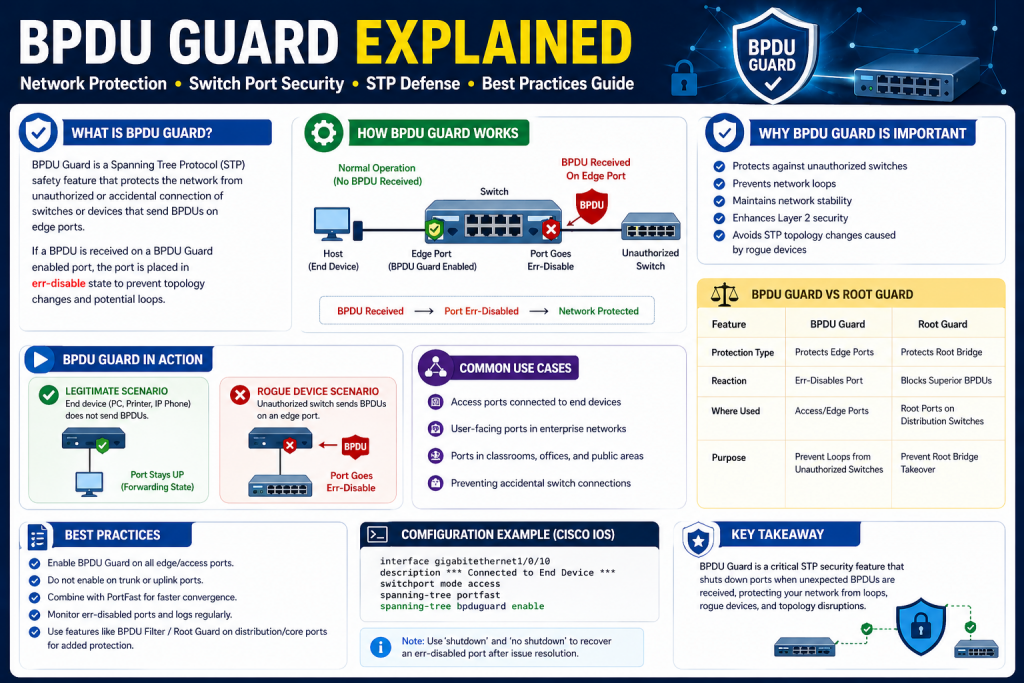
In modern networking, maintaining a secure and stable environment is essential for both small and large infrastructures. Networks are no longer simple collections of connected devices; they are complex systems that support business operations, communication, and data transfer across multiple locations. With this complexity comes the need for robust security mechanisms that can prevent both accidental disruptions and intentional attacks.
One area that often requires careful attention is Layer 2 of the networking model. This is where switches operate and where decisions about frame forwarding are made. While many people focus on higher-layer security, such as firewalls and encryption, Layer 2 security is just as critical. If the switching environment is compromised, it can lead to widespread network instability.
BPDU Guard is one of the key features designed to protect this layer. It is specifically built to safeguard the network against unauthorized devices that might attempt to interfere with its operation. To understand its importance, it is necessary to first explore the underlying concepts that make it relevant.
Understanding the Basics of Network Switching
Switches are fundamental components in a network. They connect devices such as computers, printers, and servers, allowing them to communicate efficiently. Unlike hubs, switches make intelligent decisions about where to send data based on MAC addresses.
In a simple network, a single switch may be enough. However, most real-world networks require multiple switches connected together. This creates redundancy, which is beneficial because it ensures that if one link fails, another can take its place.
While redundancy improves reliability, it also introduces a significant challenge. When multiple paths exist between switches, there is a risk of creating loops. These loops can cause serious problems, including broadcast storms and duplicate traffic.
To prevent these issues, networks rely on a protocol designed specifically for loop prevention.
The Purpose of Spanning Tree Protocol
Spanning Tree Protocol, commonly known as STP, is a mechanism that ensures a loop-free network topology. It works by analyzing the network and determining which paths should remain active and which should be blocked.
Instead of allowing all connections to be active at once, STP creates a logical structure that resembles a tree. In this structure, there is only one active path between any two devices, eliminating the possibility of loops.
This process is dynamic. If a link fails, STP can quickly recalculate and activate a previously blocked path. This ability to adapt makes it an essential tool for maintaining network reliability.
At the center of this system is the concept of a root bridge.
The Role of the Root Bridge in STP
The root bridge is the most important switch in an STP-enabled network. It acts as the reference point for all path calculations. Every other switch determines the best path to reach this root bridge.
The selection of the root bridge is based on a value known as the Bridge ID. This ID includes a priority value and a MAC address. The switch with the lowest Bridge ID becomes the root bridge.
Once the root bridge is established, all other switches organize their connections based on the shortest path to it. Ports that provide the best path remain active, while others are placed in a blocking state.
This structure ensures that the network remains loop-free while still maintaining redundancy.
What Are BPDUs and Why They Matter
Bridge Protocol Data Units, or BPDUs, are the messages used by switches to communicate within the Spanning Tree environment. These messages contain important information about the network, including the identity of the sending switch and its view of the topology.
Switches continuously exchange BPDUs to maintain an accurate understanding of the network. This constant communication allows them to detect changes and adjust the topology as needed.
Each BPDU carries data that helps determine which switch should be the root bridge and which paths should be used. Without BPDUs, STP would not be able to function effectively.
Because BPDUs play such a critical role, they also represent a potential point of vulnerability.
The Risk of Unauthorized BPDU Transmission
In a secure network, only trusted switches should participate in the exchange of BPDUs. However, if an unauthorized device is connected to the network, it may attempt to send its own BPDUs.
This can happen in several ways. A user might connect a personal switch to a network port, or a malicious actor might intentionally introduce a device designed to disrupt the network.
If this unauthorized device sends BPDUs with a lower Bridge ID, it could attempt to become the root bridge. If successful, it could alter the network topology in ways that degrade performance or compromise security.
Even if the device does not become the root bridge, its presence can still trigger topology changes, leading to instability.
This is why controlling where BPDUs are allowed to appear is so important.
Introducing BPDU Guard
BPDU Guard is a feature designed to address the risks associated with unauthorized BPDU transmission. It acts as a protective mechanism that prevents unexpected devices from influencing the network topology.
The idea behind BPDU Guard is simple. Certain ports on a switch are intended to connect only to end-user devices, such as computers or printers. These devices do not normally send BPDUs.
When BPDU Guard is enabled on these ports, the switch monitors for any incoming BPDUs. If a BPDU is detected, the switch immediately takes action by disabling the port.
This action prevents the unauthorized device from participating in the network and stops any potential disruption before it can occur.
How BPDU Guard Protects the Network
The strength of BPDU Guard lies in its strict enforcement of network design rules. It assumes that any BPDU received on a protected port is a violation.
Instead of attempting to analyze the situation, it responds immediately. The port is placed into an error-disabled state, which effectively shuts down all communication through that interface.
This immediate response ensures that the issue is contained quickly. It also alerts network administrators to the presence of an unexpected device.
By taking a proactive approach, BPDU Guard helps maintain both security and stability.
The Importance of Access Ports
Access ports are the points where end-user devices connect to the network. These ports are typically configured to allow a single device and are not expected to connect to other switches.
Because access ports are often located in easily accessible areas, they are more vulnerable to unauthorized connections. This makes them a primary target for security measures like BPDU Guard.
Enabling BPDU Guard on access ports ensures that any attempt to connect a switch or other network device is immediately detected and blocked.
This is one of the most effective ways to prevent unauthorized changes to the network topology.
The Relationship Between BPDU Guard and PortFast
PortFast is another feature commonly used on access ports. It allows a port to transition directly to the forwarding state, bypassing the usual STP delay.
This is beneficial for end-user devices, as it reduces the time required for network connectivity after a device is connected.
However, PortFast assumes that the connected device will not send BPDUs. If this assumption is violated, it could lead to problems.
BPDU Guard complements PortFast by providing a safeguard. If a BPDU is detected on a PortFast-enabled port, BPDU Guard disables the port, preventing any potential issues.
Together, these features provide both performance and protection.
Real-World Scenarios Where BPDU Guard Is Essential
In many environments, users have physical access to network ports. This includes offices, schools, and public facilities. In such settings, it is not always possible to control what devices are connected.
A user might unintentionally connect a small switch to share a network connection, or they might use a device with built-in bridging capabilities.
Without BPDU Guard, these actions could introduce BPDUs into the network, potentially causing instability.
With BPDU Guard in place, any such attempt is immediately stopped. The port is disabled, and the issue can be investigated.
This makes BPDU Guard a critical tool for maintaining control in environments where physical access cannot be fully restricted.
Preventing Network Loops and Instability
One of the main goals of STP is to prevent loops. However, if unauthorized devices are allowed to participate, they can interfere with this process.
By blocking unexpected BPDUs, BPDU Guard helps ensure that only trusted devices influence the topology. This reduces the risk of loops and the problems they cause.
It also minimizes the likelihood of frequent topology changes, which can disrupt network performance.
In this way, BPDU Guard contributes not only to security but also to overall network reliability.
Simplifying Network Management
Another advantage of BPDU Guard is its simplicity. Once configured, it requires very little maintenance. It operates automatically, monitoring for BPDUs and taking action when necessary.
This reduces the burden on network administrators, allowing them to focus on other tasks.
When an issue does occur, it is usually easy to identify. The port will be in an error-disabled state, and logs will indicate that BPDU Guard was triggered.
This straightforward behavior makes troubleshooting more efficient.
Building a Strong Security Foundation
BPDU Guard is just one component of a comprehensive network security strategy. While it addresses a specific risk, it works best when combined with other features.
These may include mechanisms for controlling MAC addresses, monitoring DHCP traffic, and protecting against other types of attacks.
Together, these tools create a layered defense that protects the network from multiple angles.
Understanding how each component fits into the overall strategy is key to building a secure and resilient infrastructure.
Looking Ahead
As networks continue to evolve, the need for reliable and effective security measures will only grow. Features like BPDU Guard will remain essential for protecting the foundational layers of network communication.
By understanding how BPDU Guard works and why it is important, network professionals can make informed decisions about how to implement and manage it.
This knowledge not only improves security but also enhances the overall performance and stability of the network
BPDU Guard Works in Real Network Environments
After understanding the purpose of BPDU Guard and the risks it is designed to prevent, the next step is to explore how it actually behaves within a live network. While the concept itself is straightforward, its real value becomes clear when examining how it interacts with switches, ports, and the Spanning Tree Protocol in practical scenarios.
BPDU Guard is not just a theoretical safeguard. It is actively involved in monitoring traffic, enforcing policies, and ensuring that only trusted devices participate in Layer 2 topology decisions. Its behavior is precise, immediate, and intentionally strict.
The Operational Logic Behind BPDU Guard
At its core, BPDU Guard operates on a simple rule. If a port is not supposed to receive BPDUs, then any BPDU detected on that port is considered a violation. This rule is enforced without exception.
When BPDU Guard is enabled on a port, the switch continuously monitors incoming frames. Under normal circumstances, access ports only receive standard Ethernet traffic from end devices. These devices do not generate BPDUs.
The moment a BPDU frame is detected, the switch reacts instantly. Instead of analyzing whether the BPDU is legitimate or harmless, it assumes that the presence of the BPDU itself is enough reason to take action.
This immediate response is what makes BPDU Guard effective. It does not wait for a problem to escalate. It stops the issue at the earliest possible moment.
The Err-Disabled State Explained
When BPDU Guard detects a BPDU on a protected port, it places that port into an error-disabled state. This state is essentially a shutdown condition enforced by the switch.
A port in an error-disabled state does not forward traffic. It is effectively removed from the network until corrective action is taken. This prevents any further communication from the device connected to that port.
The err-disabled state is not random or ambiguous. It is a clearly defined condition that can be easily identified using standard switch commands. This clarity helps network administrators quickly diagnose the issue.
The port remains in this state until it is manually re-enabled or until an automatic recovery mechanism is configured. This ensures that the problem is addressed before normal operation resumes.
Why Immediate Shutdown Is Necessary
Some might wonder why the BPDU Guard takes such a strict approach. Why not simply ignore the BPDU or log a warning?
The reason lies in the potential impact of unauthorized BPDUs. Even a single BPDU can trigger changes in the network topology. These changes can lead to temporary outages, increased latency, or even complete network failure in extreme cases.
By shutting down the port immediately, BPDU Guard eliminates the risk before it can affect the rest of the network. This proactive approach is essential in environments where uptime and stability are critical.
It also sends a clear signal that something unexpected has occurred, prompting further investigation.
Interaction Between BPDU Guard and STP
BPDU Guard works alongside Spanning Tree Protocol but does not directly participate in its decision-making process. Instead, it acts as a gatekeeper, controlling which ports are allowed to carry BPDU traffic.
STP relies on BPDUs to function correctly. However, it assumes that all participating devices are trusted. BPDU Guard enforces this assumption by ensuring that only designated ports are allowed to receive BPDUs.
On trunk ports and uplink connections between switches, BPDU Guard is typically not enabled. These ports are expected to exchange BPDUs as part of normal STP operation.
On access ports, however, BPDU Guard ensures that STP is not influenced by devices that should not be part of the topology.
This separation of roles helps maintain a clean and predictable network structure.
The Role of PortFast in BPDU Guard Deployment
PortFast is often closely associated with BPDU Guard. It is a feature that allows ports to transition quickly into a forwarding state without waiting for the usual STP convergence process.
This is particularly useful for end-user devices, which benefit from immediate network access.
However, PortFast comes with an assumption. It assumes that the connected device will not introduce loops or participate in STP. If this assumption is violated, it could lead to serious issues.
BPDU Guard reinforces this assumption. When both features are enabled on the same port, the port is allowed to forward traffic immediately, but any BPDU detected will result in an instant shutdown.
This combination provides both speed and security, making it a best practice in many network environments.
Global vs Interface-Level Configuration
BPDU Guard can be configured in two primary ways. It can be applied globally across the switch, or it can be enabled on specific interfaces.
When configured globally, BPDU Guard is typically applied to all PortFast-enabled ports. This approach simplifies deployment, especially in large networks with many access ports.
Instead of configuring each port individually, administrators can enable BPDU Guard once and ensure that it is automatically applied wherever PortFast is active.
Alternatively, BPDU Guard can be configured on a per-interface basis. This allows for more granular control, enabling administrators to selectively protect certain ports based on their role in the network.
Both methods are valid, and the choice depends on the specific requirements of the network.
Detecting and Responding to Violations
When BPDU Guard is triggered, it generates clear indicators that help administrators identify the issue. The affected port enters the err-disabled state, and logs are created to record the event.
These logs typically include information about the port, the reason for the shutdown, and the time at which the event occurred.
Using standard diagnostic commands, administrators can quickly determine which ports are affected and why. This visibility is crucial for effective troubleshooting.
Once the issue is identified, the administrator can take appropriate action. This may involve disconnecting the unauthorized device, correcting a configuration error, or educating users about proper network usage.
After resolving the issue, the port can be manually re-enabled.
Automatic Recovery Options
In some environments, manual intervention may not be practical for every incident. For this reason, many switches offer an automatic recovery feature for err-disabled ports.
This feature allows the switch to periodically attempt to re-enable a port after a specified interval. If the issue has been resolved, the port will return to normal operation.
While this can be convenient, it must be used with caution. Automatically re-enabling a port without addressing the underlying issue could lead to repeated disruptions.
For critical networks, manual recovery is often preferred to ensure that each incident is properly investigated.
Comparing BPDU Guard with Root Guard
BPDU Guard is often mentioned alongside another feature known as Root Guard. While both are designed to protect the Spanning Tree environment, they serve different purposes.
Root Guard is used to prevent specific ports from becoming the root port. It allows BPDUs to be received but blocks those that could change the root bridge.
When a superior BPDU is detected, Root Guard places the port into a root-inconsistent state. This state blocks traffic temporarily but does not fully disable the port.
BPDU Guard, on the other hand, does not analyze the type of BPDU. It simply disables the port upon detecting any BPDU on a protected interface.
This makes BPDU Guard more aggressive, while Root Guard is more selective.
Understanding the difference between these features is important for designing an effective security strategy.
The Impact on Network Design
Implementing BPDU Guard requires careful consideration of network design. Administrators must clearly identify which ports are intended for end devices and which are used for inter-switch connections.
Applying BPDU Guard to the wrong ports can lead to unintended disruptions. For example, enabling it on a trunk port between switches would result in the port being disabled as soon as BPDUs are exchanged.
To avoid such issues, proper documentation and planning are essential. Each port should be configured according to its role, ensuring that BPDU Guard is applied only where appropriate.
This disciplined approach helps maximize the benefits of BPDU Guard while minimizing risks.
Real-World Example of BPDU Guard in Action
Consider an office environment where employees have access to network ports at their desks. One employee decides to connect a small unmanaged switch to share the connection with multiple devices.
Without BPDU Guard, this switch might begin sending BPDUs, potentially affecting the network topology. Depending on its configuration, it could even attempt to become the root bridge.
With BPDU Guard enabled, the moment the switch sends a BPDU, the port is disabled. The unauthorized device is effectively isolated, and the rest of the network remains unaffected.
This simple example highlights the practical value of BPDU Guard in everyday scenarios.
Strengthening Layer 2 Security
BPDU Guard is a key component of Layer 2 security, but it is not a standalone solution. It works best as part of a broader set of protections.
These may include features that limit MAC address learning, monitor DHCP activity, and control traffic flows. Together, these mechanisms create a comprehensive defense against a wide range of threats.
By combining multiple layers of security, administrators can build networks that are both resilient and secure.
The Balance Between Security and Usability
While BPDU Guard provides strong protection, it must be implemented in a way that does not hinder legitimate network usage. This requires a balance between strict enforcement and practical usability.
In most cases, enabling BPDU Guard on all access ports is a safe and effective approach. However, exceptions may be necessary in certain situations, such as when connecting trusted devices that participate in STP.
Careful planning and testing can help ensure that BPDU Guard enhances security without causing unnecessary disruptions.
Preparing for Configuration and Troubleshooting
Understanding how BPDU Guard works lays the foundation for configuring and troubleshooting it effectively. Knowing what to expect when a violation occurs makes it easier to respond quickly and appropriately.
In the next section, the focus will shift to the practical aspects of working with BPDU Guard, including configuration steps, troubleshooting techniques, and best practices for maintaining a secure network environment.
By building on this knowledge, network professionals can confidently deploy BPDU Guard and use it as a reliable tool for protecting their infrastructure.
Configuring, Troubleshooting, and Optimizing BPDU Guard in Networks
After understanding what BPDU Guard is and how it operates within a network, the next step is to focus on its practical implementation. This includes configuring the feature correctly, identifying and resolving issues, and applying best practices to ensure long-term network stability and security.
BPDU Guard is powerful, but like any network feature, its effectiveness depends on how well it is deployed and managed. Proper configuration ensures that it protects the network without causing unintended disruptions, while effective troubleshooting helps maintain smooth operations when issues arise.
Preparing for BPDU Guard Deployment
Before enabling BPDU Guard, it is important to evaluate the network design. Not every port should have BPDU Guard enabled, and applying it incorrectly can lead to connectivity problems.
The first step is identifying access ports. These are ports that connect to end-user devices such as computers, printers, and IP phones. These ports are the primary candidates for BPDU Guard because they are not expected to receive BPDUs.
Next, identify trunk ports and uplink connections. These ports connect switches to each other and must exchange BPDUs as part of normal Spanning Tree operation. BPDU Guard should not be enabled on these ports.
Clear documentation of port roles helps ensure that BPDU Guard is applied correctly. Without this clarity, there is a risk of misconfiguration that could disrupt communication between switches.
Enabling BPDU Guard Globally
One of the easiest ways to deploy BPDU Guard is by enabling it globally. When configured globally, BPDU Guard is typically applied to all ports that have PortFast enabled.
This method is efficient in environments with many access ports. Instead of configuring each port individually, administrators can apply a single command that ensures consistent protection across the network.
The process generally involves entering configuration mode on the switch and enabling BPDU Guard as a default behavior for PortFast ports. Once enabled, any PortFast port that receives a BPDU will automatically be shut down.
This approach reduces the likelihood of human error and ensures that new access ports are protected without additional configuration.
Configuring BPDU Guard on Specific Interfaces
In some cases, administrators may prefer to enable BPDU Guard on specific ports rather than globally. This approach provides greater control and allows for more tailored configurations.
To do this, the administrator enters the interface configuration mode for the desired port and enables BPDU Guard directly. This ensures that only selected ports are protected.
This method is useful in networks with mixed requirements, where some access ports may need different configurations. It also allows administrators to gradually implement BPDU Guard without affecting the entire network at once.
Regardless of the method used, it is important to verify that BPDU Guard is active on the intended ports.
Verifying BPDU Guard Configuration
After enabling BPDU Guard, verification is a critical step. This ensures that the feature is functioning as expected and that no ports have been misconfigured.
Switches provide commands that display the status of BPDU Guard across all interfaces. These commands show which ports have the feature enabled and whether any violations have occurred.
Regular verification helps catch issues early and provides confidence that the network is properly protected.
It is also a good practice to periodically review configurations, especially after making changes to the network.
Understanding Common BPDU Guard Issues
The most common issue associated with BPDU Guard is ports entering the err-disabled state. This occurs when a BPDU is detected on a protected port.
While this behavior is intentional, it can sometimes cause confusion, especially if administrators are not aware of the reason behind the shutdown.
For example, a user might report that their device has lost network connectivity. Upon investigation, the administrator may find that the port is disabled due to BPDU Guard.
Understanding this behavior is key to effective troubleshooting.
Identifying Err-Disabled Ports
Switches provide commands that allow administrators to identify ports that are in the err-disabled state. These commands list all affected interfaces along with their status.
By examining this information, administrators can quickly determine which ports are impacted and begin investigating the cause.
In addition to status commands, logs and system messages provide valuable insights. These logs typically include details about the BPDU Guard violation, making it easier to pinpoint the issue.
This visibility is one of the strengths of BPDU Guard, as it provides clear and actionable information.
Determining the Root Cause of Violations
Once a port has been identified as err-disabled, the next step is determining why the violation occurred. This involves examining the device connected to the port and understanding its behavior.
In many cases, the cause is straightforward. A user may have connected a switch or a device with bridging capabilities. In other cases, the issue may be due to a misconfigured network device.
Physically inspecting the connection and reviewing device configurations can help identify the source of the BPDU.
It is important to address the root cause before re-enabling the port. Simply restoring the port without resolving the issue may result in repeated violations.
Recovering from BPDU Guard Shutdowns
After resolving the issue, the port can be restored to normal operation. This typically involves manually re-enabling the interface through the switch configuration.
Some networks may also use automatic recovery mechanisms. These allow the switch to periodically attempt to bring the port back online after a specified interval.
While automatic recovery can be convenient, it should be used carefully. If the underlying issue has not been resolved, the port may repeatedly enter the err-disabled state.
For critical environments, manual recovery ensures that each incident is properly investigated before the port is restored.
Best Practices for Using BPDU Guard
To get the most out of BPDU Guard, it is important to follow best practices. These practices help ensure that the feature is used effectively without causing unintended disruptions.
One of the most important practices is enabling BPDU Guard on all access ports. This provides consistent protection across the network and reduces the risk of unauthorized devices influencing the topology.
Another best practice is combining BPDU Guard with PortFast. This pairing ensures fast connectivity for end devices while maintaining strong security.
It is also important to regularly review network configurations and update them as needed. As networks evolve, port roles may change, and configurations should reflect these changes.
Training users and enforcing policies can also help reduce the likelihood of unauthorized devices being connected.
Integrating BPDU Guard with Other Security Features
BPDU Guard is most effective when used as part of a broader Layer 2 security strategy. It addresses a specific risk, but other features are needed to provide comprehensive protection.
For example, DHCP snooping helps prevent unauthorized DHCP servers, while port security limits the number of devices that can connect to a port.
Other features may focus on controlling traffic flows or monitoring network activity. By combining these tools, administrators can create a layered defense that addresses multiple types of threats.
This integrated approach provides greater resilience and reduces the likelihood of successful attacks.
Avoiding Common Configuration Mistakes
While BPDU Guard is relatively simple to configure, mistakes can still occur. One common error is enabling it on trunk ports or uplinks.
Since these ports are expected to receive BPDUs, enabling BPDU Guard on them will result in immediate shutdowns, disrupting network connectivity.
Another mistake is failing to enable BPDU Guard on all access ports. This leaves gaps in the network’s defenses, allowing potential vulnerabilities to persist.
Careful planning, thorough testing, and regular audits can help prevent these issues.
Monitoring and Maintaining BPDU Guard
Ongoing monitoring is essential for maintaining an effective BPDU Guard deployment. This includes reviewing logs, checking port statuses, and ensuring that configurations remain consistent.
Monitoring tools can provide alerts when a port enters the err-disabled state, allowing administrators to respond quickly.
Regular maintenance also involves updating configurations as the network changes. New devices, new connections, and new requirements may all impact how BPDU Guard should be applied.
By staying proactive, administrators can ensure that BPDU Guard continues to provide reliable protection.
The Role of Documentation
Good documentation is a key part of successful network management. This includes recording which ports have BPDU Guard enabled, as well as any exceptions.
Clear and detailed documentation allows network administrators to quickly understand how security policies are applied across the infrastructure. It serves as a reliable reference when troubleshooting issues, performing audits, or onboarding new team members who need to become familiar with the network setup.
In addition to listing which ports have BPDU Guard enabled, documentation should also explain why certain ports are excluded. For example, trunk links between switches or specific infrastructure connections may require different configurations. Including these details helps prevent accidental misconfigurations that could disrupt network operations.
Well-maintained documentation also supports change management processes. When updates or expansions are planned, administrators can review existing configurations and ensure consistency with current standards. This reduces the risk of errors during implementation.
Another important aspect is version control. Keeping track of when changes were made, who made them, and what was modified provides accountability and helps in diagnosing issues that may arise after updates. Over time, this historical record becomes invaluable for understanding how the network has evolved.
Ultimately, strong documentation improves efficiency, enhances collaboration, and ensures that BPDU Guard and other security features continue to function as intended.
Documentation helps ensure consistency, especially in large networks with multiple administrators. It also provides a reference point for troubleshooting and future planning.
Keeping documentation up to date is just as important as creating it. As the network evolves, documentation should reflect the current state of the environment.
Real-World Implementation Strategy
In a real-world deployment, BPDU Guard is typically rolled out in phases. Administrators may start with a small subset of access ports, monitor the results, and gradually expand the deployment.
This approach allows for testing and adjustment before applying the configuration across the entire network.
During deployment, communication with users is important. Informing users about policies and potential impacts can help reduce confusion and support smoother implementation.
Over time, BPDU Guard becomes a standard part of the network configuration, providing continuous protection with minimal intervention.
Conclusion
BPDU Guard is a simple yet highly effective feature that plays a crucial role in protecting Layer 2 networks. By preventing unauthorized devices from sending BPDUs, it helps maintain a stable and secure network topology.
Its strength lies in its proactive approach. Instead of reacting to problems after they occur, it stops them before they can have an impact. This makes it an essential tool for both network security and reliability.
When combined with proper planning, careful configuration, and ongoing monitoring, BPDU Guard becomes a powerful component of a comprehensive network defense strategy.
Understanding how to configure, troubleshoot, and optimize BPDU Guard allows network administrators to take full advantage of its capabilities. As networks continue to grow and evolve, features like BPDU Guard will remain vital for ensuring that they operate smoothly and securely.
Continue exploring the technologies and certification concepts that matter most to you.