Every digital device that stores information relies on an underlying system to organize and manage that data. This system is known as a file system. Whether you are saving a document, downloading a video, or installing software, the file system plays a crucial role in ensuring that data is stored in a structured and retrievable way.
A file system acts as a bridge between the operating system and the physical storage hardware. Without it, data would be scattered randomly across the storage medium, making it nearly impossible to locate or manage. The file system creates a logical structure that allows users and applications to interact with files in a meaningful and efficient manner.
To understand its importance, imagine a large warehouse filled with items but no labeling or organization. Finding a specific item would be time-consuming and inefficient. A file system solves this problem by categorizing, labeling, and indexing data so that it can be accessed quickly.
What is a File System
A file system is a method used by an operating system to store, organize, and retrieve data on storage devices such as hard drives, solid-state drives, USB flash drives, and memory cards. It defines how data is written, read, and managed.
At its core, a file system divides storage space into smaller units and keeps track of where each piece of data is located. It also maintains information about files, such as their names, sizes, creation dates, and permissions.
This structured approach allows the operating system to perform tasks like opening files, saving changes, deleting data, and managing storage space efficiently.
Different file systems are designed with different goals in mind. Some prioritize compatibility, others focus on performance, and some emphasize security and reliability.
How File Systems Organize Data
File systems organize data by dividing storage into small segments known as blocks or clusters. When a file is saved, it is broken into smaller pieces and stored across these segments.
Along with storing the actual data, the file system maintains an index or directory that records the location of each piece. This index acts as a map, allowing the operating system to quickly locate and retrieve files.
In addition to location data, the file system stores metadata. Metadata includes details such as file size, type, timestamps, and permissions. This information helps the system manage files more effectively.
The efficiency of a file system depends on how well it organizes data and how quickly it can locate and retrieve files.
Introduction to FAT32
FAT32 is one of the most widely recognized file systems in computing history. It stands for File Allocation Table 32, which refers to the structure it uses to manage data.
FAT32 was developed as an improvement over earlier FAT versions and quickly became popular due to its simplicity and broad compatibility. It is supported by nearly all operating systems, including Windows, macOS, Linux, and many embedded systems.
Because of this compatibility, FAT32 is commonly used in removable storage devices such as USB drives, SD cards, and external storage used across different platforms.
Structure of FAT32
The core of FAT32 lies in its File Allocation Table. This table is essentially a map that tracks where data is stored on the disk.
When a file is created, it is divided into smaller units called blocks. These blocks are then stored in available spaces across the storage device. The File Allocation Table keeps track of which blocks belong to which file and the order in which they should be read.
Each entry in the table contains information about whether a block is free or occupied and, if occupied, which block comes next in the sequence. This creates a chain of blocks that together form a complete file.
How FAT32 Works
To better understand how FAT32 operates, consider a simple analogy. Imagine a series of numbered boxes lined up in a row. Each box can hold a portion of a file.
When you store a file, you place pieces of it into different boxes. You then create a list that records which boxes were used and the order in which they should be accessed.
When retrieving the file, the system follows this list, moving from one box to the next until the entire file is reconstructed. The final box in the sequence is marked to indicate the end of the file.
This method allows FAT32 to store files even when there is no continuous space available, making it flexible and efficient for basic storage needs.
File Fragmentation in FAT32
One of the challenges with FAT32 is fragmentation. Over time, as files are created, deleted, and modified, the storage space becomes fragmented.
Instead of storing files in continuous blocks, FAT32 often places them in scattered locations wherever space is available. This means that a single file may be split into multiple fragments stored in different parts of the disk.
Fragmentation can slow down performance because the system must gather all the pieces of a file from different locations. On traditional hard drives, this requires the read/write head to move back and forth, increasing access time.
Performance Characteristics of FAT32
FAT32 performs well when the storage device has plenty of free space and files are stored in continuous blocks. However, as fragmentation increases, performance can decline.
The simplicity of FAT32 contributes to its speed in certain scenarios, especially when dealing with smaller files and simple storage tasks. However, it lacks advanced optimization features found in modern file systems.
To improve performance, users can perform defragmentation, which reorganizes data so that files are stored in contiguous blocks. This reduces the time needed to access files.
Advantages of FAT32
FAT32 offers several benefits that have contributed to its long-lasting popularity. One of its greatest strengths is compatibility. It works across a wide range of devices and operating systems, making it ideal for transferring data between different platforms.
Another advantage is its simplicity. FAT32 has a straightforward structure that requires minimal system resources, making it suitable for low-power devices.
It is also reliable for basic storage tasks and is widely supported by various hardware devices, including cameras, gaming consoles, and media players.
Limitations of FAT32
Despite its advantages, FAT32 has several limitations. One of the most significant is its maximum file size limit of 4GB. This makes it unsuitable for storing large files such as high-definition videos or large software packages.
FAT32 also lacks advanced features such as file permissions, encryption, and journaling. This means it does not provide the same level of security and reliability as newer file systems.
Additionally, FAT32 is not optimized for large storage devices. As disk sizes increase, its efficiency decreases, making it less suitable for modern high-capacity drives.
Common Uses of FAT32
FAT32 is commonly used in removable storage devices where compatibility is essential. USB flash drives, SD cards, and external storage devices often use FAT32 to ensure they can be read by different systems.
It is also used in older devices that do not support newer file systems. Many multimedia devices rely on FAT32 because of its simplicity and widespread support.
In situations where data needs to be shared between different operating systems, FAT32 is often the preferred choice.
Why FAT32 Remains Relevant
Even with the availability of newer file systems, FAT32 continues to be relevant due to its universal compatibility. It serves as a reliable option for users who need a simple and widely supported file system.
Its ability to work across different platforms makes it especially useful for portable storage devices. While it may not offer advanced features, its ease of use and reliability ensure that it remains a practical choice in many scenarios.
Role of FAT32 in Modern Computing
In today’s computing environment, FAT32 is often used alongside more advanced file systems. While it may not be suitable for primary system drives or large-scale data storage, it plays an important role in specific use cases.
For example, it is frequently used for bootable USB drives, firmware updates, and devices that require a simple and compatible file system. Its predictable behavior makes it a dependable choice for these applications.
Understanding the Importance of Choosing the Right File System
Selecting the right file system is an important decision that can impact performance, compatibility, and data security. Each file system is designed with specific use cases in mind.
FAT32 excels in environments where compatibility and simplicity are the primary concerns. However, it may not be the best choice for scenarios that require large file support or advanced security features.
By understanding how FAT32 works and where it is most effective, users can make informed decisions about how to format their storage devices.
Introduction to NTFS
The New Technology File System, commonly known as NTFS, represents a significant advancement in how data is stored and managed on modern storage devices. Developed to overcome the limitations of earlier file systems such as FAT32, NTFS was designed with performance, security, and reliability in mind. It has become the standard file system for Windows operating systems and is widely used in personal computers, enterprise environments, and servers.
Unlike simpler file systems, NTFS introduces a more structured and feature-rich approach to data management. It is capable of handling large volumes of data while maintaining system stability and efficiency. This makes it particularly suitable for modern computing environments where data complexity and security requirements continue to grow.
Evolution from FAT to NTFS
Before NTFS, file systems like FAT and FAT32 dominated the computing landscape. While these systems were effective for their time, they lacked the ability to support advanced features such as security permissions, large file sizes, and fault tolerance.
NTFS was developed to address these shortcomings. It introduced a new architecture that allowed for better organization of data, improved performance, and enhanced reliability. The transition from FAT-based systems to NTFS marked a shift toward more robust and scalable storage solutions.
This evolution was driven by the increasing demands of users and organizations. As storage capacities grew and applications became more complex, the need for a more capable file system became evident.
Core Structure of NTFS
At the heart of NTFS lies a sophisticated structure that organizes data efficiently. Instead of relying on a simple allocation table, NTFS uses a centralized database known as the Master File Table. This table contains detailed information about every file and directory on the storage device.
Each file in NTFS is treated as an object with attributes. These attributes include the file name, size, location, permissions, and timestamps. The Master File Table stores all of this information, allowing the system to quickly access and manage files.
Storage space in NTFS is divided into clusters, which are groups of sectors. These clusters are used to store file data. The size of a cluster can vary depending on the configuration of the file system, and it can impact performance and storage efficiency.
The Role of the Master File Table
The Master File Table is one of the most important components of NTFS. It acts as a comprehensive index that keeps track of all files on the disk. Each file has a corresponding record in the table, which contains its metadata and location information.
This centralized approach allows NTFS to manage files more efficiently than older systems. Instead of scanning the entire disk to locate a file, the system can simply refer to the Master File Table.
The table also includes special records that store information about the file system itself. These records help maintain the integrity and functionality of the system.
Metadata and File Attributes
NTFS places a strong emphasis on metadata. Metadata is essentially data about data, and it plays a crucial role in file management. In NTFS, metadata includes information such as file size, creation date, modification date, and access permissions.
This detailed metadata allows the system to perform advanced operations such as indexing, searching, and sorting files. It also enables features like file compression and encryption.
By storing extensive metadata, NTFS provides a more organized and efficient way to manage data compared to simpler file systems.
Security Features in NTFS
One of the standout features of NTFS is its robust security model. Unlike FAT32, which offers little to no security, NTFS includes built-in mechanisms to protect data.
Access control is a key component of NTFS security. Each file and directory can have permissions that determine who can read, write, or modify it. These permissions are managed through Access Control Lists, which define the rights of different users and groups.
NTFS also supports encryption, allowing users to secure sensitive data. Encrypted files can only be accessed by authorized users, providing an additional layer of protection.
Access Control and Permissions
Access Control Lists in NTFS provide a flexible way to manage file permissions. Each file or directory can have multiple entries that specify the access rights for different users or groups.
These permissions can include read, write, execute, and full control. Administrators can configure these settings to ensure that only authorized users have access to certain data.
This level of control is particularly important in multi-user environments, where data security is a top priority.
Encryption and Data Protection
NTFS includes a feature known as the Encrypting File System, which allows users to encrypt files and directories. This ensures that even if the storage device is accessed by unauthorized individuals, the data remains protected.
Encryption is especially useful for sensitive information such as financial records, personal data, and confidential business documents. It adds an extra layer of security that goes beyond basic access control.
Journaling and Fault Tolerance
Another important feature of NTFS is journaling. This mechanism helps maintain the integrity of the file system by keeping a record of changes.
Whenever a file operation occurs, NTFS logs the details in a journal before applying the changes. If the system crashes or loses power during the operation, the journal can be used to recover the file system to a consistent state.
This reduces the risk of data corruption and makes NTFS more reliable than older file systems.
How Journaling Improves Reliability
Journaling ensures that the file system can recover quickly from unexpected events. Instead of scanning the entire disk for errors, NTFS can use the journal to identify and correct issues.
This not only improves reliability but also reduces downtime. Systems can recover faster, minimizing the impact of crashes or power failures.
Performance Features of NTFS
NTFS is designed to deliver high performance, especially on large storage devices. It includes several optimizations that improve speed and efficiency.
One such feature is the use of caching, which allows frequently accessed data to be stored in memory for quicker retrieval. NTFS also supports advanced allocation strategies that reduce fragmentation and improve data access times.
Additionally, NTFS allows multiple users to access files simultaneously, making it suitable for networked environments.
Handling Large Files and Volumes
One of the major advantages of NTFS is its ability to handle large files and storage volumes. Unlike FAT32, which has strict size limitations, NTFS supports very large file sizes and disk capacities.
This makes it ideal for modern applications that require significant storage space, such as video editing, database management, and large-scale data processing.
File Compression in NTFS
NTFS includes built-in support for file compression. This feature allows users to reduce the size of files and save storage space.
Compressed files are automatically decompressed when accessed, making the process seamless for users. This can be particularly useful for storing large amounts of data without requiring additional storage capacity.
Disk Quotas and Storage Management
NTFS also supports disk quotas, which allow administrators to limit the amount of storage space that users can consume. This is especially useful in shared environments where multiple users access the same storage system.
Disk quotas help prevent any single user from using excessive storage space, ensuring fair distribution of resources.
Limitations of NTFS
Despite its many advantages, NTFS has some limitations. One of the main drawbacks is its limited compatibility with non-Windows systems. While some operating systems can read NTFS, full support may require additional software.
NTFS also has a higher level of complexity compared to simpler file systems. This can result in increased system overhead, particularly on low-powered devices.
In addition, NTFS may not be the best choice for removable storage devices where compatibility with a wide range of devices is important.
Common Use Cases for NTFS
NTFS is commonly used for internal storage in Windows-based systems. It is the default file system for most modern Windows installations.
It is also widely used in enterprise environments, where data security, reliability, and performance are critical. Servers, workstations, and network storage systems often rely on NTFS for managing large amounts of data.
NTFS in Professional Environments
In professional settings, NTFS provides the tools needed to manage complex data environments. Its support for permissions, encryption, and large storage volumes makes it ideal for businesses and organizations.
It enables administrators to control access to sensitive information and ensure that data is stored securely.
Why NTFS is Essential in Modern Computing
NTFS has become an essential part of modern computing due to its advanced features and reliability. It addresses the limitations of older file systems and provides a robust solution for managing data.
Its ability to handle large files, support multiple users, and maintain data integrity makes it the preferred choice for many applications.
Introduction to ExFAT
Extended File Allocation Table, commonly known as ExFAT, is a modern file system designed to address the limitations of older systems while maintaining simplicity and flexibility. It was developed to serve as a bridge between FAT32 and NTFS, combining the lightweight structure of FAT32 with support for larger files similar to NTFS.
ExFAT is particularly optimized for flash-based storage devices such as USB drives, SD cards, and external storage systems. As digital storage needs expanded and file sizes increased, there was a clear demand for a file system that could handle large files without the complexity of NTFS. ExFAT emerged as a practical solution to meet these requirements.
Evolution and Purpose of ExFAT
The development of ExFAT was driven by the need for a file system that could efficiently handle modern storage demands. FAT32, while highly compatible, had strict limitations on file size and storage capacity. NTFS, on the other hand, offered advanced features but introduced complexity and overhead that were not always necessary for portable devices.
ExFAT was designed to fill this gap. It provides support for very large files and volumes while maintaining a relatively simple structure. This makes it ideal for removable storage devices that need to be compatible across multiple platforms.
The goal of ExFAT was not to replace NTFS but to complement it by offering a more suitable option for portable storage solutions.
Structure and Design of ExFAT
ExFAT uses a structure similar to FAT32 but with several important improvements. It retains the concept of a file allocation table to track data but enhances it to support larger storage capacities and improved performance.
The file system divides storage into clusters, which are used to store file data. These clusters can be larger than those used in FAT32, allowing for more efficient storage of large files.
ExFAT also reduces the amount of overhead required to manage files. Unlike NTFS, it does not rely on complex metadata structures or journaling systems. This simplicity makes it faster and more efficient for certain use cases.
How ExFAT Stores and Retrieves Data
In ExFAT, files are stored in clusters, and the file allocation table keeps track of which clusters belong to each file. When a file is saved, it is divided into segments and stored across available clusters.
The system maintains a chain of clusters for each file, allowing it to reconstruct the file when needed. This process is similar to FAT32 but optimized for larger files and storage devices.
ExFAT also includes improvements that reduce fragmentation and improve allocation efficiency. This helps maintain better performance over time.
Performance Characteristics of ExFAT
ExFAT is designed to perform well on flash storage devices. It provides faster read and write speeds compared to FAT32, especially when dealing with large files.
Because it does not include complex features like journaling, ExFAT has less overhead than NTFS. This allows it to operate more efficiently on devices with limited processing power.
However, in some cases, NTFS may outperform ExFAT on high-performance systems, particularly when advanced features are required. Despite this, ExFAT offers a balanced approach that works well for most portable storage scenarios.
Advantages of ExFAT
One of the primary advantages of ExFAT is its support for large files. Unlike FAT32, which has a file size limit of 4GB, ExFAT can handle extremely large files, making it suitable for high-definition videos and large data sets.
This capability is especially important in today’s digital environment, where file sizes continue to grow due to advancements in media quality and data processing.
For example, modern video recording devices often capture footage in high resolutions such as Full HD, 4K, or even 8K. These formats produce very large files that can easily exceed the 4GB limit imposed by FAT32. With ExFAT, users can store and transfer these files without worrying about splitting them into smaller segments or encountering compatibility issues. This makes workflows smoother and more efficient, particularly for content creators, videographers, and media professionals.
In addition to video files, large datasets used in fields like data analysis, software development, and scientific research also benefit from ExFAT’s capabilities. These files can include large databases, virtual machine images, and backup archives that require substantial storage space. ExFAT allows these files to be handled seamlessly, reducing the need for complex file management techniques.
Another advantage related to large file support is improved convenience during file transfers. When using FAT32, users often need to compress or divide files before transferring them to external storage. This not only takes extra time but also increases the risk of errors during the process. ExFAT eliminates these challenges by allowing files to be transferred in their original form, saving both time and effort.
ExFAT also enhances compatibility for large file handling across multiple operating systems. Whether a user is working on Windows, macOS, or certain Linux distributions, ExFAT provides a consistent experience. This is particularly useful in collaborative environments where files need to be shared between different systems without restrictions.
Furthermore, ExFAT’s support for large files makes it an ideal choice for external hard drives and high-capacity USB devices. As storage capacities continue to increase, the ability to manage large volumes of data efficiently becomes more important. ExFAT ensures that users can take full advantage of modern storage technologies without being limited by outdated file size constraints.
Overall, the ability of ExFAT to handle extremely large files is one of its most valuable features. It simplifies data management, improves workflow efficiency, and ensures compatibility across devices and platforms, making it a practical choice for modern storage needs.
ExFAT also offers broad compatibility across modern operating systems. It is supported by Windows, macOS, and many Linux distributions, making it a convenient choice for transferring data between different platforms.
Another advantage is its efficiency on flash storage devices. ExFAT is designed to minimize unnecessary write operations, which helps extend the lifespan of devices such as USB drives and memory cards.
Limitations of ExFAT
Despite its strengths, ExFAT has some limitations. One of the main drawbacks is the lack of advanced security features. Unlike NTFS, ExFAT does not support file permissions or encryption.
This means that any user who gains access to the storage device can read, modify, or delete the files without restrictions, which can be a serious concern in environments where data privacy and control are important.
Another limitation is the absence of journaling. Without a journaling mechanism, ExFAT cannot track changes made to the file system in real time. In the event of a sudden power loss or improper device removal, there is a higher risk of data corruption compared to file systems like NTFS. This makes it less reliable for critical data storage where consistency is essential.
ExFAT also offers fewer features for managing and organizing data. It lacks built-in tools such as disk quotas, compression, and detailed auditing capabilities. These missing features may not affect casual users, but they can be significant in professional or enterprise environments.
While ExFAT is highly effective for portability and handling large files, these limitations highlight why it is best suited for simple storage tasks rather than secure or mission-critical applications.
It also does not include journaling, which means it is more vulnerable to data corruption in the event of a system crash or power failure.
Additionally, while ExFAT is widely supported, it may not be compatible with very old devices that only recognize FAT32.
Common Uses of ExFAT
ExFAT is commonly used in portable storage devices that require support for large files. This includes USB flash drives, external hard drives, and high-capacity SD cards.
It is particularly popular in devices such as digital cameras and video recorders, where large media files are frequently stored and transferred.
ExFAT is also used in situations where data needs to be shared between different operating systems without compatibility issues.
ExFAT in Flash Storage Technology
Flash storage devices have unique characteristics that require specialized file systems. Unlike traditional hard drives, flash memory has limited write cycles and benefits from efficient data management.
. This means that every write operation contributes to the gradual wear of the storage cells, making it important for file systems to minimize unnecessary writes and distribute data evenly across the device.
To address this, modern file systems designed for flash storage often incorporate techniques such as wear leveling. Wear leveling ensures that data is written across different areas of the storage rather than repeatedly using the same blocks, which helps extend the overall lifespan of the device. Efficient allocation strategies also play a key role by reducing fragmentation and optimizing how space is used.
Another important factor is the absence of mechanical components in flash storage. Since there are no moving parts, access times are significantly faster, and file systems can be optimized for quick read and write operations rather than physical movement. Additionally, flash-friendly file systems aim to reduce background processes that could generate excessive write activity.
These considerations make specialized file systems essential for maintaining performance, reliability, and longevity in flash-based storage devices, ensuring they remain efficient even under heavy usage conditions.
ExFAT is optimized for these conditions. It reduces unnecessary write operations and uses allocation strategies that improve performance and durability.
This makes it an ideal choice for modern portable storage devices that rely on flash memory technology.
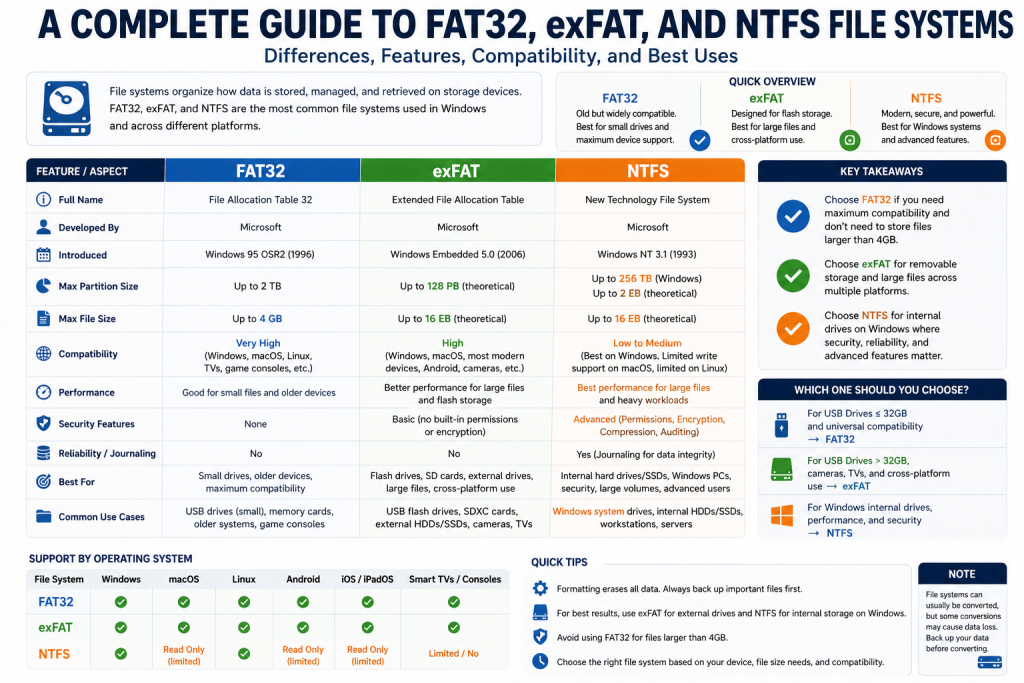
Comparing FAT32, NTFS, and ExFAT
When comparing these three file systems, it becomes clear that each one is designed for specific use cases.
FAT32 is known for its simplicity and compatibility. It works well on a wide range of devices but is limited by file size restrictions and lack of advanced features.
NTFS offers powerful features such as security, encryption, and journaling. It is ideal for internal storage and systems that require high performance and reliability.
ExFAT provides a balance between the two. It supports large files and maintains compatibility without introducing unnecessary complexity.
Choosing the Right File System
Selecting the appropriate file system depends on how the storage device will be used.
For devices that need to work with older systems or a wide variety of hardware, FAT32 is often the safest choice.
For internal drives and environments where security and performance are critical, NTFS is the preferred option.
For portable storage devices that need to handle large files and work across multiple platforms, ExFAT is usually the best solution.
Practical Scenarios and Recommendations
In real-world scenarios, the choice of file system can significantly impact usability and performance.
For example, if you are using a USB drive to transfer large video files between computers, ExFAT would be the most practical choice. Its ability to handle large files without compatibility issues makes it ideal for this purpose.
If you are setting up a primary storage drive for a Windows system, NTFS would be the best option due to its advanced features and reliability.
For smaller devices or older hardware, FAT32 may still be the most compatible and convenient choice.
Understanding File System Trade-offs
Each file system involves trade-offs between performance, compatibility, and features.
FAT32 sacrifices advanced functionality for simplicity and compatibility. NTFS prioritizes performance and security but may not be universally supported. ExFAT strikes a balance by offering modern capabilities without excessive complexity.
These differences highlight how each file system is designed with a specific purpose in mind rather than trying to be a one-size-fits-all solution. FAT32 remains useful in situations where devices need to communicate seamlessly, especially with older hardware or systems that may not recognize newer formats. Its straightforward structure makes it easy to implement and dependable for basic storage tasks, even if it lacks modern enhancements.
NTFS, on the other hand, is built for environments where data integrity and control are essential. Its support for permissions, encryption, and system logging makes it ideal for professional and personal computing where protecting information is a priority. However, this added functionality comes with increased complexity, which can limit its usability on non-Windows platforms or lightweight devices.
ExFAT fills the gap by delivering flexibility without unnecessary overhead. It allows users to store large files and transfer data across systems without worrying about strict limitations. This makes it particularly valuable for portable storage and modern workflows where efficiency and compatibility are both important considerations.
Understanding these trade-offs helps users make informed decisions based on their specific needs.
The Future of File Systems
As technology continues to evolve, file systems will also continue to improve. New storage technologies and increasing data demands will drive the development of more advanced systems.
Future file systems are expected to focus heavily on speed, scalability, and intelligent data management. With the rise of solid-state drives and cloud-based storage, traditional limitations such as slow access times and fragmentation are becoming less relevant, pushing developers to rethink how data is structured and accessed.
Another important direction is automation and optimization. Modern file systems may include smarter algorithms that automatically organize data based on usage patterns, reducing the need for manual maintenance tasks. Security will also play a bigger role, with stronger encryption methods and better protection against data corruption or cyber threats becoming standard features.
In addition, support for massive data volumes will be essential as industries generate increasingly large datasets. Technologies like artificial intelligence and big data analytics will require file systems that can handle complex workloads efficiently. Cross-platform compatibility will likely improve as well, making it easier to share data seamlessly between different devices and operating systems. Overall, the future of file systems will be shaped by the need for faster, safer, and more adaptable data storage solutions.
While FAT32, NTFS, and ExFAT remain widely used, future file systems may offer even greater efficiency, security, and scalability.
However, the principles behind these systems will continue to influence how data is managed and stored.
Conclusion
FAT32, NTFS, and ExFAT each play a unique role in the world of data storage. They are designed to meet different needs and are suited to different types of devices and applications.
FAT32 remains a reliable choice for compatibility and simplicity, especially for smaller storage devices and older systems. NTFS stands out as a powerful and feature-rich file system, offering security, performance, and reliability for modern computing environments. ExFAT provides a balanced solution, supporting large files and cross-platform compatibility while maintaining efficiency on portable storage devices.
There is no single file system that is best for every situation. The right choice depends on the specific requirements of the user and the intended use of the storage device.
By understanding the strengths and limitations of each file system, users can make better decisions when formatting their drives. This knowledge not only improves performance and compatibility but also ensures that data is stored safely and efficiently.
In the end, file systems are an essential part of modern computing, working quietly behind the scenes to keep our data organized and accessible.
Continue exploring the technologies and certification concepts that matter most to you.