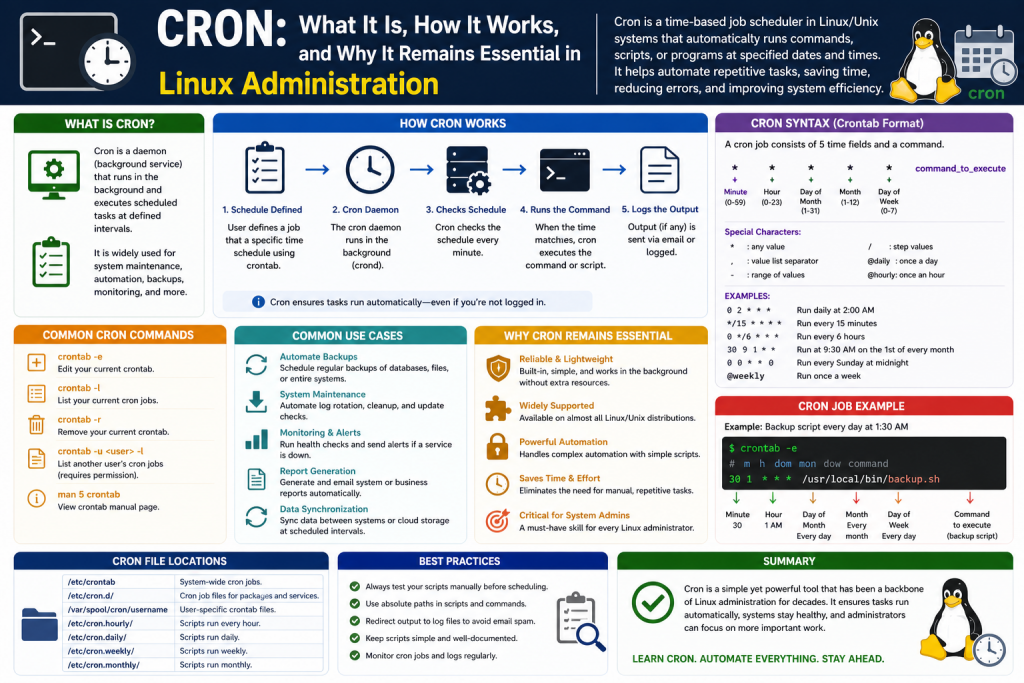
In the rapidly changing world of technology, tools, frameworks, and programming languages constantly evolve. Developers and IT professionals frequently adapt to new systems, certifications, and methodologies as industries shift toward innovation. Yet despite this constant transformation, some technologies remain foundational because they solve critical operational challenges so effectively that replacement becomes unnecessary. Cron is one of those rare tools.
Cron has remained a cornerstone of Unix and Linux system administration for decades because it addresses one of the most important needs in computing: automation through time-based scheduling. Since its introduction in the late 1970s, Cron has enabled system administrators, developers, engineers, and organizations to automate repetitive tasks with remarkable reliability.
Automation is one of the greatest strengths of modern computing. Computers are not simply valuable because they process data quickly; their true power lies in their ability to execute repetitive operations consistently, accurately, and without fatigue. Across enterprise systems, cloud environments, development infrastructures, and standalone Linux machines, many critical operations must occur on recurring schedules. These tasks include system backups, software updates, security checks, data synchronization, log cleanup, scheduled reporting, database maintenance, and countless other functions.
Without automation, these responsibilities would rely on human memory and manual execution. This approach introduces significant risks, including missed deadlines, operational inconsistency, human error, and unnecessary labor costs. Cron eliminates these vulnerabilities by providing a lightweight, dependable scheduling engine that performs tasks automatically at exact times or intervals.
Cron’s value comes from its simplicity and flexibility. It can schedule jobs to run every minute, hourly, daily, weekly, monthly, or on highly customized schedules such as the first Monday of each month or every Friday at midnight. This makes it indispensable for organizations that depend on operational consistency.
For Linux professionals, understanding Cron is more than a technical convenience—it is a fundamental skill. Whether someone is pursuing Linux administration, DevOps engineering, cybersecurity, cloud architecture, or systems operations, Cron knowledge is essential because automation is deeply embedded in nearly every professional Linux environment.
What Cron Is and What It Does
Cron is a time-based job scheduler used primarily in Unix-like operating systems, including Linux. Its purpose is to automatically execute commands, shell scripts, or programs according to predefined schedules.
The term “cron” originates from the Greek word “chronos,” meaning time. This is appropriate because Cron revolves entirely around time-driven execution.
Cron runs as a background process known as a daemon. In Linux, a daemon is a service that operates continuously behind the scenes without direct user interaction. Once the system starts, the cron daemon typically launches automatically and remains active unless intentionally disabled.
Its primary function is to read scheduling instructions from configuration files known as crontabs, short for cron tables. These crontabs contain specific job definitions created by users or system administrators.
Cron’s operational cycle is straightforward:
The daemon continuously runs in the background.
Every minute, it checks the current system time.
It compares the current time to all configured schedules.
If a scheduled job matches the current time, Cron executes the corresponding command.
This design is one of Cron’s greatest strengths. It is efficient, lightweight, and extremely dependable.
Each Linux user can maintain personal Cron jobs, while administrators can also configure system-wide Cron tasks for broader operational control. This flexibility allows Cron to function equally well for individual automation and enterprise-scale infrastructure management.
Why Cron Remains Important in Modern Linux Systems
Although newer scheduling systems and orchestration tools now exist, Cron remains deeply relevant because many operational tasks still depend on reliable recurring execution.
In practical computing environments, recurring maintenance is unavoidable. Systems generate logs continuously, databases accumulate outdated records, applications require updates, and security monitoring must happen consistently. Cron serves as the invisible automation layer that ensures these tasks occur on schedule.
For example, consider a business that stores customer support inquiries. Regulatory or storage policies may require deleting records older than one year. Rather than assigning staff to manually run deletion scripts each month, Cron can automate the process precisely.
Similarly, backup schedules are among the most common Cron use cases. Businesses cannot afford inconsistent backup practices. Cron ensures backups happen exactly as scheduled, whether nightly, weekly, or hourly.
Security also benefits heavily from Cron automation. Cron can schedule:
Routine vulnerability scans
Malware definition updates
Firewall log analysis
Intrusion detection checks
Patch deployment reminders
In software development, Cron supports recurring application logic such as:
Sending automated emails
Refreshing caches
Synchronizing APIs
Cleaning temporary files
Generating business reports
Cron’s importance lies not only in convenience but in operational reliability. It transforms recurring technical obligations into dependable automated processes.
Real-World Examples of Cron in Action
Cron becomes easier to understand when viewed through real-world scenarios.
A web hosting provider may use Cron to rotate server logs every night at midnight, compressing old files and preserving storage space.
An e-commerce platform may schedule Cron jobs to update inventory every hour by synchronizing product quantities with warehouse databases.
A university IT department may use Cron to back up student records every evening.
A cybersecurity team may configure Cron to scan authentication logs for suspicious login attempts every 15 minutes.
A financial reporting system may generate monthly accounting reports automatically on the first day of each month.
These examples reveal Cron’s versatility. It can support small personal tasks, such as deleting temporary downloads, or large-scale enterprise functions involving compliance and security.
The Difference Between Cron Jobs and Manual Task Execution
To fully appreciate Cron, it helps to compare automated scheduling with manual operations.
Without Cron, recurring tasks require someone to remember when to run them. This creates several operational weaknesses.
Human memory is unreliable, especially when tasks occur infrequently or outside business hours.
Manual execution times may vary, causing inconsistent reporting or maintenance schedules.
Repeated operational tasks consume staff time that could be better spent on strategic initiatives.
Missed jobs can create security vulnerabilities, data loss, or compliance failures.
Cron removes these inefficiencies by automating exact execution schedules.
For instance, if backups must occur daily at 1:00 a.m., Cron performs them precisely every day without delay or oversight.
This consistency is especially valuable for businesses where timing affects data integrity, legal obligations, or service reliability.
How Cron Works Behind the Scenes
Cron’s simplicity often hides its operational elegance.
When Linux boots, the cron daemon starts automatically.
This daemon references one or more crontab files containing scheduling rules.
Every minute, Cron compares the current date and time against all configured entries.
If a match occurs, the daemon launches the associated command using the permissions of the job owner.
Because Cron evaluates schedules once per minute, standard Cron jobs are limited to minute-level precision. For most administrative tasks, this is sufficient.
Cron also generates logs, allowing administrators to verify execution and troubleshoot failures.
For example, if a backup script fails because of permission issues, logs can reveal the problem.
This logging capability is crucial because automation without visibility can create silent failures.
Understanding Crontab and Its Role
Crontab is the configuration system used to define Cron jobs.
Each user can create and manage personal crontabs, while administrators can manage broader system schedules.
Crontab entries specify:
When a task should run
What command or script should execute
Which user context should execute it
This separation allows personalized automation while maintaining system-wide administrative oversight.
Users typically edit crontabs through command-line tools, making Cron particularly relevant for Linux professionals comfortable with terminal environments.
The Five Core Time Fields in Cron Scheduling
Cron syntax is built around five time fields:
Minute
Hour
Day of month
Month
Day of week
These fields determine exactly when a job executes.
For example:
A wildcard means “every.”
A specific number narrows the schedule.
This structure allows extraordinary flexibility.
A job can run:
Every minute
Every weekday at 9:00 a.m.
Every Sunday at midnight
Every January 1st
Every Friday evening
This balance of simplicity and precision is one reason Cron remains so widely used.
The Power and Risk of Cron Syntax
Cron’s flexibility can also create danger if configured incorrectly.
A misplaced wildcard or incorrect field value can dramatically change system behavior.
For example, a resource-heavy script intended to run monthly could accidentally execute every minute, potentially overwhelming system resources.
This is why Cron jobs should always be tested carefully before deployment in production environments.
Administrators should verify:
Correct timing
Proper command syntax
Accurate file paths
Permission settings
Expected output
Cron is powerful, but precision is essential.
Why Cron Knowledge Is Essential for Linux Careers
Cron remains a core Linux competency because scheduling and automation are central to system management.
Professionals in these roles regularly interact with Cron:
Linux administrators
DevOps engineers
Cloud engineers
Security analysts
Database administrators
Site reliability engineers
For certification paths such as Linux+, RHCSA, or DevOps-focused credentials, Cron knowledge is often assumed.
Understanding Cron demonstrates not only scheduling proficiency but also broader command-line confidence, automation awareness, and operational responsibility.
Cron’s Legacy and Ongoing Relevance
Despite newer technologies such as Kubernetes schedulers, workflow orchestration tools, and enterprise automation platforms, Cron continues to thrive because of its simplicity.
It does not require heavy infrastructure.
It does not demand complex interfaces.
It consumes minimal resources.
It works.
For countless Linux systems worldwide, Cron remains the invisible engine powering maintenance, reliability, and automation.
Its longevity is proof of practical engineering excellence. In a field dominated by constant disruption, Cron has endured because the need it fulfills—reliable time-based automation—is permanent.
Final Thoughts on Cron’s Foundational Role
Cron is far more than an old Linux utility. It is a mission-critical scheduling system that continues to support servers, businesses, applications, and infrastructure around the world.
Its ability to automate repetitive tasks with precision reduces human error, improves operational consistency, enhances security, and frees technical professionals to focus on more valuable work.
For beginners, Cron may initially appear technical or intimidating. However, once understood, it becomes one of the most practical and empowering tools in Linux.
Mastering Cron means understanding one of the oldest and most trusted forms of automation in computing history. It is a tool built on simplicity, strengthened by reliability, and proven by decades of real-world use. Its continued presence in modern Linux and Unix systems is not accidental—it reflects the enduring need for precise, dependable task scheduling in environments where consistency matters. Cron’s design demonstrates that powerful technology does not always require complexity.
Instead, its strength comes from doing one job exceptionally well: executing scheduled tasks accurately and repeatedly with minimal overhead. Over the years, Cron has supported everything from personal productivity scripts to enterprise-scale infrastructure maintenance, quietly powering backups, updates, security monitoring, reporting systems, and countless administrative workflows. This longevity has made Cron more than just a scheduler; it has become a foundational operational principle for generations of system administrators and developers.
Learning Cron also introduces broader automation thinking, teaching professionals how to reduce repetitive labor, minimize human error, and design systems that function predictably over time. These lessons remain relevant even as technology evolves toward cloud orchestration, DevOps pipelines, and large-scale automation frameworks. Cron’s principles continue to influence modern scheduling systems because the need for reliable recurring execution has never disappeared. By mastering Cron, technical professionals gain not only practical Linux capability but also a timeless understanding of how disciplined automation supports stability, efficiency, and long-term technological success.
For anyone serious about Linux, Cron is not just useful—it is essential.
Understanding Why Cron Syntax Matters
Cron’s true power lies not simply in its ability to automate tasks, but in the precision of its scheduling syntax. While the concept of automation is straightforward, the real value of Cron comes from defining exactly when tasks should execute. This is where many Linux beginners become overwhelmed. At first glance, Cron expressions can look cryptic, filled with numbers, asterisks, commas, dashes, and slashes. However, once broken down properly, Cron syntax becomes one of the most logical and efficient scheduling systems in computing.
Understanding Cron syntax is critical because even a minor mistake can significantly alter system behavior. A misconfigured backup job could run too frequently and overload resources. A cleanup script scheduled incorrectly could fail to run entirely, leaving old data in place indefinitely. Because Cron often executes silently in the background, syntax mistakes can persist unnoticed until operational problems emerge.
For Linux administrators, developers, DevOps professionals, and security engineers, learning Cron syntax is essential because scheduled automation directly impacts system performance, compliance, and reliability.
The Basic Structure of a Cron Job
Every standard Cron job consists of six parts:
Five scheduling fields
One command field
The structure appears in this order:
Minute Hour Day-of-Month Month Day-of-Week Command
Each field controls a specific aspect of timing.
Minute determines when within the hour a task runs.
Hour determines the hour of execution.
Day-of-Month controls the calendar day.
Month controls the month.
Day-of-Week controls weekday execution.
The command is the actual script, program, or shell command Cron executes.
This structure allows administrators to define schedules ranging from extremely broad to highly specific.
Breaking Down the Five Time Fields
Minute Field
The minute field is the first position and accepts values from 0 to 59.
If you set this field to 0, the task runs at the beginning of the hour.
If you set it to 30, the task runs at the 30th minute.
Using an asterisk means every minute.
Examples:
0 = At minute zero
15 = At minute fifteen
- = Every minute
*/5 = Every five minutes
This field is especially useful for recurring monitoring tasks such as checking server health every few minutes.
Hour Field
The hour field ranges from 0 to 23 using 24-hour time.
0 = Midnight
12 = Noon
23 = 11:00 p.m.
Examples:
2 = 2:00 a.m.
14 = 2:00 p.m.
- = Every hour
This field is often used for overnight maintenance windows when user activity is low.
Day of Month Field
This field ranges from 1 to 31.
It determines which calendar day the job runs.
Examples:
1 = First day of the month
15 = Fifteenth day
31 = Thirty-first day
- = Every day
This is useful for monthly billing, payroll preparation, or scheduled report generation.
Month Field
The month field ranges from 1 to 12.
1 = January
12 = December
- = Every month
This field is ideal for annual audits, seasonal tasks, or year-end reporting.
Day of Week Field
This field ranges from 0 to 7.
0 or 7 = Sunday
1 = Monday
2 = Tuesday
3 = Wednesday
4 = Thursday
5 = Friday
6 = Saturday
This field is highly useful for business operations that only occur on weekdays or weekends.
The Wildcard Asterisk and Its Importance
The asterisk symbol is one of Cron’s most important operators.
It means “every possible value” for a field.
For example:
- means every minute of every hour of every day of every month.
This is the broadest possible Cron schedule.
While powerful, overusing wildcards can create unintended resource consumption if commands are expensive.
Specific Timing Examples
To understand Cron better, practical examples are essential.
0 0 * * *
Runs daily at midnight.
30 2 * * 1
Runs every Monday at 2:30 a.m.
0 18 * * 5
Runs every Friday at 6:00 p.m.
15 14 1 * *
Runs at 2:15 p.m. on the first day of every month.
0 0 1 1 *
Runs annually on January 1st at midnight.
These examples illustrate how flexible Cron can be.
Using Commas for Multiple Values
Commas allow multiple specific values within one field.
Example:
0 9,17 * * *
Runs at 9:00 a.m. and 5:00 p.m. daily.
This is useful when tasks must execute at several fixed times.
Using Dashes for Ranges
Dashes define ranges.
Example:
0 9-17 * * *
Runs hourly from 9:00 a.m. through 5:00 p.m.
This is common for business-hour automation.
Using Slashes for Intervals
Slashes create repeating intervals.
Example:
*/10 * * * *
Runs every 10 minutes.
0 */2 * * *
Runs every two hours.
Intervals are useful for monitoring, polling, or frequent maintenance.
Combining Operators for Advanced Scheduling
Cron becomes especially powerful when combining operators.
Example:
0 9-17/2 * * 1-5
This means:
At minute 0
Every two hours
Between 9 a.m. and 5 p.m.
Monday through Friday
This creates a highly customized business-hours schedule.
Special Characters and Their Practical Use
Some Cron implementations support additional syntax such as:
@daily
@weekly
@monthly
@yearly
These shortcuts simplify common schedules.
For example:
@daily backup.sh
This is equivalent to running a job once every day at midnight.
While convenient, explicit syntax often provides clearer visibility.
Understanding Command Execution Environment
A common beginner mistake is assuming Cron behaves exactly like an interactive terminal session.
Cron runs commands in a limited shell environment.
This means:
Environment variables may differ
Default paths may be restricted
Aliases may not work
Scripts should use absolute paths whenever possible.
For example, instead of:
backup.sh
Use:
/home/user/scripts/backup.sh
This reduces execution failures.
Output Handling and Logging
By default, Cron may email output to the user account if mail services are configured.
However, administrators often redirect output manually.
Example:
0 2 * * * /path/script.sh >> /var/log/script.log 2>&1
This captures both standard output and errors.
Proper logging is essential for troubleshooting silent failures.
Common Cron Mistakes That Cause Major Problems
Cron syntax errors are often subtle but dangerous.
Running Too Frequently
A monthly cleanup job accidentally written with too many wildcards could execute every minute.
This may cause:
CPU spikes
Disk exhaustion
Database overload
Incorrect File Paths
Relative paths may fail because Cron’s working directory differs.
Permission Issues
Scripts may work manually but fail in Cron if permissions are insufficient.
Ignoring Time Zones
Server timezone differences can cause unexpected timing.
Overlapping Jobs
If one job takes longer than its schedule interval, multiple instances may stack.
This can overwhelm systems.
Testing Cron Safely Before Production
Before implementing Cron jobs, professionals should:
Run commands manually
Verify permissions
Use test schedules
Redirect logs
Confirm expected outputs
A best practice is scheduling a new job for a temporary short interval before long-term deployment.
How Cron Interprets Day-of-Month and Day-of-Week Together
This area often confuses beginners.
In many Cron implementations, if both fields are restricted, the job may run when either condition matches.
This can create unintended schedules.
Careful testing is necessary.
Cron and System Performance
Cron itself is lightweight, but the commands it launches may not be.
Resource-heavy jobs should be scheduled during off-peak hours.
Examples include:
Database indexing
Large backups
Virus scans
Batch processing
Thoughtful scheduling prevents user disruption.
Security Considerations in Cron Jobs
Cron jobs can become security risks if poorly managed.
Sensitive scripts should:
Use proper file permissions
Avoid exposing credentials
Log responsibly
Prevent unauthorized editing
Because Cron automates commands, malicious modifications can persist silently.
Why Cron Syntax Mastery Builds Linux Confidence
Learning Cron syntax develops more than scheduling ability.
It strengthens:
Command-line proficiency
System logic
Automation thinking
Operational discipline
Troubleshooting skill
These are foundational Linux competencies.
Practical Learning Through Repetition
Cron syntax may seem intimidating initially, but repetition makes it intuitive.
A useful learning method is practicing common schedules:
Every hour
Every weekday
Every month
Every five minutes
Every Sunday
Over time, interpreting Cron becomes second nature.
Moving from Theory to Practical Cron Administration
Understanding what Cron is and how its syntax works creates a strong foundation, but true Linux proficiency comes from applying that knowledge in real-world environments. Cron is not simply a concept to memorize for exams or interviews. It is a practical administrative tool used daily across servers, enterprise systems, cloud platforms, web applications, and personal Linux environments.
The real strength of Cron appears when administrators move beyond reading schedules and begin creating, editing, managing, testing, and troubleshooting actual jobs. This practical side of Cron separates beginners from professionals because automation without implementation provides little operational value.
For Linux users, system administrators, DevOps engineers, cybersecurity professionals, and developers, knowing how to deploy Cron jobs effectively can improve efficiency, reduce repetitive labor, strengthen security, and ensure mission-critical tasks occur reliably.
In this section, the focus is on transforming Cron from a scheduling concept into a hands-on Linux skill.
The Control Center for Cron Jobs
Cron jobs are typically managed through a configuration system known as crontab, which stands for cron table. A crontab is essentially a file that stores scheduled commands for a specific user or for the entire system. It serves as the primary scheduling interface that allows Linux users and administrators to define exactly when commands, scripts, or automated processes should execute.
Rather than manually launching recurring tasks, users can rely on crontab to organize these instructions in a structured, time-based format. Each entry inside a crontab file contains scheduling parameters alongside the command to be executed, giving users precise control over automation frequency and timing. This design makes crontab especially powerful because it supports both simple personal automation and large-scale administrative operations.
Individual users might schedule tasks like file backups, email reminders, or temporary file cleanup, while system administrators may configure broader maintenance processes such as security scans, software updates, database optimization, or log rotation. Crontab also enhances operational separation by allowing each user to manage their own scheduled tasks independently without interfering with others on the same machine. In enterprise environments, this scalability is particularly valuable because it enables organized automation across multiple users, departments, or services. By centralizing recurring job definitions into a dedicated configuration system, crontab transforms Linux from a manually operated environment into one capable of consistent, structured, and highly efficient automation.
Each user on a Linux machine can maintain their own personal crontab, while administrators can also configure system-wide cron schedules for broader maintenance or operational tasks.
Crontab acts as the interface between users and the cron daemon. Instead of directly modifying the daemon itself, users define job schedules in the crontab file, and Cron reads those instructions every minute.
This design makes Cron both organized and scalable. Multiple users can automate tasks independently without interfering with one another, while administrators retain centralized oversight when needed.
Viewing Existing Cron Jobs
Before creating new Cron jobs, professionals should first understand what is already scheduled on a system.
The command used to display a user’s current cron jobs is:
crontab -l
This command lists all Cron entries associated with the current user.
If no jobs exist, the output may indicate an empty crontab.
Reviewing existing jobs is important because duplicate schedules, conflicting scripts, or forgotten automation tasks can create performance issues or security risks.
For system administrators managing production environments, checking existing cron jobs should always be part of change management.
Creating or Editing Cron Jobs
The most common command for creating or editing Cron jobs is:
crontab -e
This opens the user’s cron table in a text editor.
Depending on Linux distribution and configuration, this editor may be Vim, Nano, or another command-line editor.
Inside the crontab file, each new line represents one scheduled job.
For example, a simple recurring task might instruct Linux to create a file every minute.
When saving the file, Cron automatically validates and installs the updated schedule.
This makes Cron deployment relatively fast, though syntax mistakes can still cause major operational problems if not carefully reviewed.
Choosing the Right Text Editor
Many Linux beginners encounter confusion not because of Cron itself, but because of terminal text editors.
Vim can feel intimidating due to its command modes, while Nano is often simpler for newcomers.
Regardless of editor, administrators should become comfortable editing crontabs because command-line administration remains central to Linux operations.
Key priorities when editing include:
Avoid accidental syntax errors
Maintain proper spacing
Use absolute command paths
Save changes correctly
Even a perfectly designed Cron schedule will fail if formatting is broken.
Writing Your First Practical Cron Job
A classic beginner exercise is creating a recurring file creation task.
For example, a user may schedule Linux to create a file named TestFile every minute.
This demonstrates:
Cron syntax
Command execution
Path accuracy
File system interaction
After waiting one minute, the file should appear automatically if the Cron job is functioning correctly.
This simple exercise teaches a powerful lesson: once configured correctly, Linux performs tasks automatically without further human action.
Using Absolute Paths for Reliability
One of the most common practical Cron mistakes is relying on relative paths.
Cron jobs should always use full absolute paths because Cron’s execution environment may differ from an interactive shell session.
For example:
Incorrect:
touch TestFile
Better:
touch /home/user/Desktop/TestFile
Absolute paths reduce ambiguity and dramatically improve reliability.
This principle also applies to scripts, binaries, logs, and dependencies.
Environment Variables and Cron Limitations
Cron operates in a more limited environment than a standard terminal session.
This means:
PATH variables may be minimal
Custom aliases may not load
Profile scripts may not execute automatically
Because of this, commands that work manually may fail under Cron.
Administrators often explicitly define environment variables inside crontab files to ensure reliability.
For example, specifying shell paths or exporting required variables can prevent silent failures.
Understanding Cron’s execution environment is essential for advanced troubleshooting.
Managing Output and Logging
Cron jobs frequently run silently, which can make failures difficult to detect.
To improve visibility, administrators often redirect output to log files.
For example:
Standard output can be written to one file.
Error output can be captured for troubleshooting.
Combined logging ensures administrators can confirm whether jobs ran successfully.
Without logging, automation may fail unnoticed for weeks or months.
This is particularly dangerous for critical jobs such as:
Backups
Security scans
Database maintenance
Compliance reporting
Reliable logging transforms Cron from blind automation into manageable automation.
Testing Cron Jobs Before Deployment
Testing is one of the most important professional practices in Cron administration.
Before placing a job into production:
Run the command manually
Verify permissions
Confirm expected results
Test file paths
Review resource consumption
A useful strategy is temporarily scheduling a new job every minute for validation. Once confirmed, the schedule can be adjusted to its intended frequency.
This minimizes production risk while validating syntax and behavior.
System-Wide Cron Directories
Beyond user crontabs, Linux systems often include broader scheduling directories.
These may include:
Hourly tasks
Daily tasks
Weekly tasks
Monthly tasks
These system directories simplify recurring maintenance by grouping scripts according to execution frequency.
For example, placing a maintenance script in a daily directory may automatically schedule it for daily execution depending on system configuration.
This organizational structure is especially useful for enterprise environments where centralized automation improves consistency.
Common Administrative Uses for Cron
Cron supports countless operational workflows.
Backups
Automating backups ensures business continuity and disaster recovery readiness.
Database Maintenance
Tasks such as purging expired records or rebuilding indexes can be scheduled reliably.
Security Monitoring
Cron can automate malware scans, patch checks, and log analysis.
Application Maintenance
Cron supports cache clearing, queue processing, and recurring notifications.
Housekeeping
Deleting temporary files, compressing logs, and clearing unused storage prevent long-term system degradation.
These recurring processes are fundamental to professional Linux operations.
Troubleshooting Failed Cron Jobs
Even experienced administrators encounter Cron issues.
Common troubleshooting steps include:
Checking cron service status
Reviewing syntax
Confirming executable permissions
Verifying script shebang lines
Testing commands manually
Reviewing logs
Ensuring correct user privileges
Many Cron failures stem not from scheduling syntax, but from environment assumptions or permission limitations.
Troubleshooting Cron builds broader Linux diagnostic skills.
Permission and Security Best Practices
Cron jobs inherit the permissions of the user who created them.
This means:
User-level jobs cannot exceed user privileges
Root Cron jobs can perform system-wide actions
Because elevated Cron jobs can be powerful, security is critical.
Best practices include:
Restricting script modification permissions
Avoiding plaintext credentials
Using dedicated service accounts when appropriate
Reviewing root-level jobs carefully
Poorly secured Cron jobs can become attack vectors if compromised.
Avoiding Overlapping Jobs
A common operational issue occurs when one Cron job takes longer to complete than its schedule interval.
For example:
A backup scheduled every five minutes that takes seven minutes to finish may create overlapping executions.
This can cause:
Resource exhaustion
Duplicate processing
Data corruption
Administrators often use lock files or process checks to prevent concurrency issues.
Cron in DevOps and Modern Infrastructure
Even with modern automation platforms, Cron remains relevant.
In DevOps, Cron often supports:
Scheduled deployments
Container maintenance
Health checks
Data synchronization
Cloud instance tasks
Many orchestration tools build on principles similar to Cron because recurring automation remains essential.
Cron’s longevity reflects its practical value.
Building Professional Confidence Through Cron Mastery
Mastering Cron improves more than task scheduling.
It develops:
Linux command-line skill
Operational thinking
Automation strategy
System discipline
Troubleshooting ability
These competencies directly strengthen professional value in Linux careers.
Advanced Cron Strategies
As expertise grows, professionals may implement:
Conditional execution
Script chaining
Monitoring integrations
Alerting systems
Environment customization
Cron can evolve from basic automation into sophisticated operational orchestration.
When Not to Use Cron
Despite its usefulness, Cron is not ideal for every task.
Cron may be unsuitable for:
Real-time event-driven automation
Second-level precision
Complex dependency workflows
Distributed orchestration
In such cases, alternative schedulers may be preferable.
Knowing Cron’s limitations is part of professional maturity.
Maintaining Cron Documentation
In enterprise settings, undocumented Cron jobs create long-term operational risks.
Administrators should document:
Purpose
Owner
Frequency
Dependencies
Expected output
This ensures continuity if team members change.
Documentation transforms Cron from isolated scripts into sustainable infrastructure.
Cron’s Role in Long-Term Linux Success
Cron is one of Linux’s most enduring automation tools because it addresses a universal challenge: recurring operational responsibility.
Whether maintaining servers, protecting data, automating compliance, or simplifying personal workflows, Cron offers practical, dependable automation.
Its importance extends beyond Linux basics into advanced administration, DevOps, and enterprise systems.
Conclusion
Cron represents one of the clearest examples of Linux’s philosophy: simple tools performing powerful tasks efficiently.
From understanding what Cron is, to mastering syntax, to deploying and troubleshooting real-world jobs, Cron remains an essential skill for anyone serious about Linux administration.
Its true value lies in transforming repetitive work into reliable automation, reducing human error while improving consistency, security, and efficiency.
For beginners, Cron may start as a technical utility. For professionals, it becomes a foundational operational asset.
Learning Cron is not merely about scheduling commands—it is about understanding how Linux systems maintain themselves, how businesses automate critical functions, and how technical professionals create reliable infrastructures.
In a constantly changing technology landscape, Cron’s continued relevance proves that dependable automation never goes out of style. Mastering it equips Linux users with a timeless skill that supports career growth, operational excellence, and long-term technical confidence.
Continue exploring the technologies and certification concepts that matter most to you.