Every device that connects to a modern network needs some method of identification. Whether it is a laptop joining office Wi-Fi, a smartphone connecting to a home router, a gaming console accessing hotel internet, or a smart television streaming online content, networks must determine how devices are recognized, managed, and controlled. One of the oldest and most widely used methods for identifying devices on a network is through the Media Access Control address, more commonly known as the MAC address.
MAC filtering is a network management and access control method that uses this unique hardware identifier to allow, deny, or assign policies to devices. While it may sound technical, MAC filtering is essentially a rule system that tells a network which devices can connect and what level of access they should receive.
This system has been widely used in homes, businesses, educational institutions, hospitality settings, and service provider environments because it offers a relatively simple way to identify and categorize devices. It can help streamline network access, automate policy enforcement, and create basic control mechanisms without requiring users to manually configure advanced security settings.
To fully understand MAC filtering, it is important to first understand the MAC address itself, because MAC filtering depends entirely on how devices are identified at the hardware level.
What Is a MAC Address?
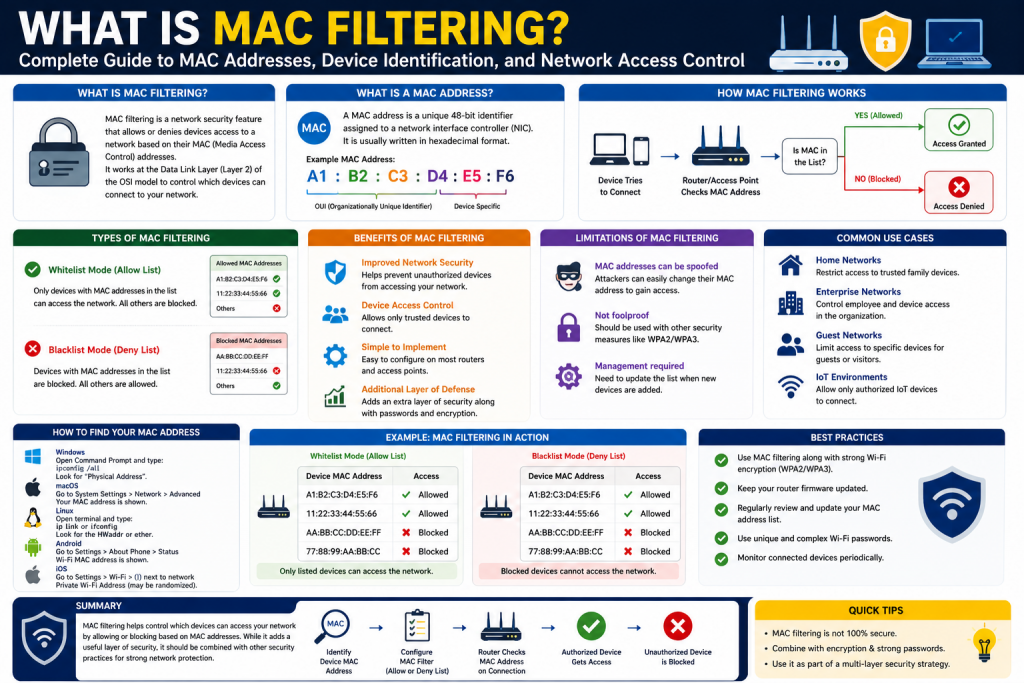
A MAC address is a unique identifier assigned to a network interface card (NIC) or network-enabled hardware component. It is primarily used in local network communication to distinguish one device from another at the data link layer of networking.
A MAC address is usually represented as six groups of two hexadecimal characters separated by colons or hyphens. For example:
00:1A:2B:3C:4D:5E
This identifier is embedded into the device’s network hardware by the manufacturer, although it can sometimes be modified or spoofed through software.
Every network-enabled device typically has at least one MAC address. This includes:
- Desktop computers
- Laptops
- Smartphones
- Tablets
- Wireless access points
- Routers
- Printers
- Gaming consoles
- Smart TVs
- Internet of Things devices
Because MAC addresses operate at a lower layer than IP addresses, they are critical for communication within local area networks. While IP addresses can change depending on network configuration, MAC addresses are generally intended to remain consistent for hardware identification.
Breaking Down the Structure of a MAC Address
A MAC address consists of 48 bits, usually displayed as 12 hexadecimal digits. These are divided into two major sections:
- Organizationally Unique Identifier (OUI)
- Device Identifier
The first half of the MAC address identifies the manufacturer of the device’s network hardware. This is called the OUI. Each manufacturer is assigned specific prefixes, allowing network administrators to identify the company that produced the hardware.
For example, different manufacturers may own thousands of MAC address ranges for products they produce. This can help administrators determine whether a device belongs to a known vendor, such as a networking company, smartphone manufacturer, or IoT producer.
The second half of the address is assigned by the manufacturer and should theoretically be unique to each individual device.
This design allows billions of unique combinations, making MAC addresses a practical system for distinguishing devices on networks worldwide.
Why MAC Addresses Are Important in Networking
MAC addresses are essential because local network communication depends on them. When devices communicate within the same network segment, data frames are delivered based on MAC addresses rather than IP addresses alone.
For example, when a computer sends data to a nearby printer on the same network:
- The sending device identifies the printer’s MAC address
- The switch uses MAC tables to direct traffic correctly
- The frame is delivered to the intended hardware
Without MAC addressing, local device-to-device communication would be far less efficient.
This hardware-level identification is why MAC addresses are often used for:
- Network device recognition
- Access control
- Traffic segmentation
- Device inventory
- Authentication assistance
- Monitoring and troubleshooting
MAC filtering builds on this foundation by using MAC addresses as a policy decision point.
Burned-In Addresses vs Locally Administered Addresses
Although MAC addresses are commonly described as permanent, there are actually different types.
Burned-In Address (BIA)
A burned-in address is the factory-assigned MAC address embedded into hardware by the manufacturer. This is considered the default identifier.
BIAs are designed to be globally unique and standardized.
Locally Administered Address (LAA)
A locally administered address is a MAC address that has been manually changed or overridden by software. This allows users or administrators to alter the visible MAC address of a device.
This can happen for many reasons:
- Privacy protection
- Network testing
- Bypassing restrictions
- Virtual machine configuration
- Troubleshooting
The ability to alter MAC addresses introduces one of the biggest limitations of MAC filtering, since systems relying solely on MAC identity can potentially be bypassed.
How Devices Use MAC Addresses During Communication
When devices join a network, MAC addresses are used immediately for frame transmission. On Ethernet or Wi-Fi networks, communication requires source and destination MAC addresses.
For example:
- A laptop connects to Wi-Fi
- The access point detects its MAC address
- The router or controller checks policy rules
- Access is allowed, denied, or restricted
This process can happen almost instantly.
Networking equipment such as switches, routers, and wireless controllers constantly read MAC addresses to determine where data should go and what policies apply.
This natural reliance on MAC identification is what makes MAC filtering possible.
What Is MAC Filtering?
MAC filtering is the process of creating rules that determine whether a device can connect to a network or what permissions it receives based on its MAC address.
In practical terms, MAC filtering works like a guest list.
If a MAC address is approved:
- The device may gain access
- It may receive full privileges
- It may be assigned bandwidth or policy roles
If a MAC address is not approved:
- The connection may be denied
- The device may be isolated
- The user may be redirected
MAC filtering generally works in two primary modes:
Whitelist Mode
Only approved MAC addresses are allowed to connect.
This is often used in:
- Small offices
- Home networks
- Device-specific systems
- Restricted environments
Blacklist Mode
Specific MAC addresses are blocked while others are allowed.
This can be useful for:
- Blocking known unauthorized devices
- Preventing repeat misuse
- Temporary restrictions
MAC Filtering as a Policy Tool
MAC filtering is not only about blocking or allowing devices. In many environments, it is also used to assign automated policies.
Examples include:
- Guest devices redirected to login portals
- Employee devices receiving broader access
- IoT devices isolated to specific VLANs
- Gaming devices receiving entertainment-only access
- Customer devices assigned bandwidth limits
This makes MAC filtering useful for network segmentation and convenience.
Where MAC Filtering Is Commonly Used
MAC filtering appears in more places than many users realize.
Home Networks
Many routers allow homeowners to restrict Wi-Fi access to approved household devices.
Hotels and Hospitality
Devices may need MAC registration before internet use.
Educational Institutions
Dorms or campus systems may track approved devices.
Wireless Internet Providers
Customer hardware may be recognized and assigned speed plans.
Corporate Networks
MAC addresses may assist with onboarding or device categorization.
Public Wi-Fi
Returning devices may be recognized automatically.
Advantages of MAC Filtering
MAC filtering remains popular because it offers several practical advantages.
Simple Deployment
Many routers and access points support it natively.
Low User Friction
Once configured, users often connect automatically.
Basic Device Awareness
Administrators can identify repeat devices.
Bandwidth or Service Policy Control
Different devices can receive customized treatment.
Useful for Legacy Systems
Older systems without advanced authentication may still use MAC-based rules.
Limitations Begin with Visibility
Despite its convenience, MAC filtering should never be mistaken for high-security authentication.
MAC addresses can often be discovered through traffic observation, especially on wireless networks. Since these identifiers are frequently visible during communication, attackers may capture approved addresses.
If the attacker then changes their own device’s MAC address to match an approved one, they may bypass MAC-based restrictions.
This is known as MAC spoofing.
Because of this, MAC filtering is better viewed as a convenience layer than a primary security solution.
Why Understanding MAC Filtering Starts with MAC Fundamentals
To understand MAC filtering properly, one must first understand that it is built on device identity rather than true user identity.
MAC filtering identifies hardware addresses, not people.
This distinction matters because:
- Devices can be shared
- Addresses can be changed
- Hardware can be replaced
- Spoofing is possible
As a result, MAC filtering is most effective when used for:
- Convenience
- Basic control
- Resource management
- Supplemental policy enforcement
It becomes less effective when used alone for:
- Sensitive security
- Confidential environments
- High-risk authentication
The Role of MAC Filtering in Modern Networks
In today’s networking landscape, MAC filtering still has value, but its role has evolved.
Modern security increasingly relies on:
- WPA3
- 802.1X
- Certificate authentication
- Multi-factor authentication
- Zero trust frameworks
Even so, MAC filtering continues to serve useful purposes, especially in operational simplicity.
It remains relevant because not every network requires enterprise-grade complexity. For many smaller or transitional environments, MAC filtering provides a manageable balance between control and convenience.
Introduction to How MAC Filtering Functions in Practical Networking
Understanding what a MAC address is provides the foundation, but the true value of MAC filtering becomes clearer when examining how it actually works in live network environments. MAC filtering is not just a concept stored inside a router’s settings menu. It is a practical operational tool used to recognize devices, automate access decisions, manage resources, and simplify administration across many types of networks.
From home Wi-Fi systems to enterprise guest access, from hospitality internet services to wireless internet providers, MAC filtering often operates quietly in the background. Many users interact with it daily without realizing it. Every time a device is remembered by a network, automatically allowed, restricted, redirected, or blocked based on its hardware identity, MAC filtering may be involved.
At its core, MAC filtering works because every network-enabled device presents a MAC address during communication. Network infrastructure can compare that address against stored policies and determine what should happen next. This process can occur within milliseconds and may involve multiple networking systems, including routers, wireless access points, switches, firewalls, captive portals, or authentication servers.
This section explores how MAC filtering functions operationally, where it is deployed, how policies are enforced, and why it remains relevant despite more advanced authentication technologies.
The Basic Operational Process of MAC Filtering
When a device attempts to connect to a network, it must first identify itself at the data link layer. This means presenting its MAC address during communication setup.
A simplified process looks like this:
- A device sends a request to join a wired or wireless network
- The network infrastructure detects the device’s MAC address
- The MAC address is checked against an internal rule set
- A policy decision is made
- The device is allowed, denied, redirected, or assigned restrictions
This process happens automatically.
For example, imagine a wireless router configured with a whitelist of approved MAC addresses:
- Laptop A is on the list and connects successfully
- Smartphone B is on the list and connects successfully
- Unknown Device C is not on the list and is denied
This creates a straightforward hardware-based access model.
In blacklist mode, the opposite occurs:
- All devices may connect except listed blocked devices
This can be useful when administrators want broad access but need to prevent specific unauthorized systems.
MAC Filtering on Wireless Networks
Wireless networks are among the most common environments for MAC filtering because Wi-Fi access points continuously monitor devices requesting association.
When a phone or laptop attempts to join a Wi-Fi network:
- It broadcasts or responds with identifying information
- The access point reads the MAC address
- Security and policy checks occur
- The system decides whether to continue authentication
This makes MAC filtering attractive for:
- Home routers
- Coffee shop Wi-Fi
- Hotels
- Dormitories
- Small offices
- Temporary event networks
For example, a family may configure a router so only household devices can connect. If a neighbor discovers the Wi-Fi password but their device’s MAC address is not approved, the router can still deny access.
Similarly, hospitality systems may register a guest device’s MAC after a room login, allowing future reconnection without repeatedly entering credentials.
MAC Filtering on Wired Networks
While often associated with wireless, MAC filtering also plays a role in wired Ethernet networks.
On wired systems, switches and access controls can examine the MAC address of devices plugged into physical ports.
Examples include:
- Office desks restricted to company-owned systems
- Manufacturing equipment assigned dedicated policies
- Public terminals limited to approved endpoints
- Campus dorm Ethernet registration
A university might require students to register their gaming consoles before granting dorm access. Once the MAC is approved, the console can connect without additional credentials.
This is particularly useful in structured environments where port security matters.
Whitelist vs Blacklist Strategies in Depth
MAC filtering strategies generally fall into two administrative models.
Whitelist Approach
A whitelist allows only explicitly approved devices.
Advantages:
- Greater control
- Predictable access
- Reduced accidental connections
- Useful for smaller or stable networks
Disadvantages:
- Administrative overhead
- Requires manual updates
- Device replacements need reauthorization
- Less practical for large public environments
Common use cases:
- Small businesses
- Secure IoT deployments
- Family networks
- Lab systems
Blacklist Approach
A blacklist blocks only identified unwanted devices.
Advantages:
- Easier for public access
- Less maintenance for broad-use networks
- Quick removal of problematic devices
Disadvantages:
- Unknown devices may still connect
- More reactive than proactive
- Less secure
Common use cases:
- Public hotspots
- Libraries
- Shared campuses
- Large visitor networks
MAC Filtering and Captive Portals
One of the most recognizable modern uses of MAC filtering is within captive portal systems.
A captive portal is the login page often encountered when connecting to hotel, airport, or café Wi-Fi.
The process often works like this:
- Device connects to open Wi-Fi
- MAC address is recorded
- User is redirected to terms of service or payment page
- Upon acceptance, the MAC address is temporarily approved
- Future traffic from that MAC is permitted
This creates convenience because users often do not need to repeatedly log in during their session.
For example:
- Hotel guests may register one or more devices
- Conference attendees may gain timed access
- Coffee shop users may receive temporary internet
The MAC address acts as a session identity marker.
Internet Service Providers and MAC-Based Provisioning
Some broadband and wireless internet providers use MAC filtering for customer equipment management.
This is particularly common in:
- Fixed wireless systems
- Cable modem provisioning
- Customer premises equipment registration
For instance, a provider may associate service plans with the MAC address of a customer’s modem or receiving antenna.
If a different device attempts connection:
- Service may fail
- Bandwidth may be denied
- Registration may be required
This ensures that subscribed hardware receives the intended service level.
It also helps providers enforce:
- Speed tiers
- Device authorization
- Usage metering
- Service plans
MAC Filtering for Device Categorization
Modern networking often goes beyond simple allow-or-block decisions.
Many systems use MAC addresses to classify devices into categories.
Examples:
- Smart TVs assigned streaming VLANs
- Security cameras isolated from corporate resources
- Employee laptops placed on business networks
- Guest phones redirected to guest segments
- IoT devices limited to internet-only access
This creates segmentation.
Segmentation improves organization, performance, and sometimes security by ensuring different device classes receive appropriate treatment.
For example, a smart thermostat may not need access to payroll servers.
MAC Filtering and Quality of Service Policies
Some administrators use MAC addresses to assign performance rules.
Examples include:
- Prioritizing business-critical systems
- Restricting children’s gaming consoles
- Limiting guest bandwidth
- Protecting VoIP device quality
A household router might throttle entertainment devices during work hours while preserving speed for remote work systems.
This shows MAC filtering can be more than access control—it can be a traffic management tool.
MAC Authentication Bypass in Enterprise Systems
In enterprise networking, MAC Authentication Bypass (MAB) is sometimes used for devices that cannot perform advanced authentication.
Examples include:
- Printers
- Security cameras
- Badge readers
- Legacy medical equipment
- Industrial devices
These devices may not support 802.1X certificate-based security.
In such cases:
- The switch reads the MAC address
- A policy server checks it
- Access is granted based on registration
This allows compatibility for older technologies while maintaining some control.
However, because MAC addresses can be spoofed, MAB is usually considered less secure than certificate-based systems.
Administrative Challenges of MAC Filtering
While useful, MAC filtering introduces management burdens.
Device Replacement
When hardware changes, policies may need updates.
MAC Randomization
Modern smartphones increasingly randomize MAC addresses for privacy, especially on Wi-Fi.
This can complicate:
- Tracking
- Whitelisting
- Persistent guest recognition
Scalability
Large organizations may struggle to manually maintain massive MAC databases.
Policy Complexity
More devices often mean more exceptions.
These factors have encouraged many larger organizations to supplement or replace MAC filtering with stronger identity systems.
MAC Filtering in BYOD Environments
Bring Your Own Device policies introduce additional complexity.
When employees use personal:
- Phones
- Tablets
- Laptops
MAC filtering can help identify known devices, but maintaining dynamic approval lists can become difficult.
Some organizations combine MAC awareness with:
- Certificates
- Device posture checks
- Mobile device management
This layered model balances convenience with security.
MAC Filtering in Smart Homes and IoT
Smart homes represent one of the fastest-growing MAC filtering environments.
Devices may include:
- Cameras
- Doorbells
- Speakers
- Lights
- Appliances
Because IoT devices often have limited security controls, homeowners may use MAC filtering to:
- Restrict unauthorized additions
- Organize devices
- Separate IoT from personal systems
While not foolproof, this can reduce accidental exposure.
The Human Factor: Ease of Use vs Security
One major reason MAC filtering persists is usability.
Compared with certificates or enterprise identity systems:
- It is simple
- It is familiar
- It is widely supported
- It requires little user training
This matters in casual or temporary environments where convenience often outweighs high-security needs.
Examples include:
- Vacation rentals
- Hotels
- Community Wi-Fi
- Family homes
In these settings, easy administration can be more valuable than advanced complexity.
When MAC Filtering Works Best
MAC filtering is strongest when used for:
- Casual access control
- Resource metering
- Guest onboarding
- Device categorization
- Temporary authorization
- Legacy system compatibility
It works less effectively as a standalone defense against sophisticated threats.
Combining MAC Filtering with Broader Policies
In practical deployments, MAC filtering often serves as one layer among many.
Additional controls may include:
- WPA2/WPA3
- 802.1X
- Captive portals
- MFA
- RBAC
- VLAN segmentation
This layered strategy improves resilience.
For example:
A company printer may use MAC recognition for placement into a printer VLAN while broader network security prevents unauthorized administrative access.
The Operational Value of MAC Filtering
MAC filtering’s true value lies in operational efficiency.
It answers practical questions:
- Is this device known?
- Should it connect?
- What type of access should it get?
- Should it be limited?
- Does it belong here?
These are administrative questions, not always deep security questions.
That distinction explains why MAC filtering remains relevant.
Introduction to the Security Reality of MAC Filtering
MAC filtering is often introduced as a network control feature that can allow or block devices based on hardware addresses, but understanding its operational value is only part of the picture. To truly use MAC filtering effectively, network administrators and everyday users must also understand its weaknesses, security limitations, and role within a broader cybersecurity strategy.
While MAC filtering can be useful for convenience, device recognition, guest onboarding, and policy enforcement, it is not a complete security solution. One of the biggest mistakes in network design is assuming that because MAC filtering can restrict access, it automatically provides strong protection. In reality, MAC filtering is often better described as an administrative control than a robust security barrier. Its primary strength lies in helping networks organize and identify devices rather than truly verifying trusted users or preventing determined attackers. MAC filtering can streamline operations by automatically allowing recognized devices, assigning policies to known hardware, or simplifying access for repeat visitors, but these advantages should not be confused with deep security. Because MAC addresses can often be observed, copied, or changed, attackers may bypass MAC-based restrictions through spoofing techniques if stronger safeguards are absent. This means a network relying solely on MAC filtering may stop casual unauthorized access while remaining vulnerable to more deliberate intrusion attempts.
Effective network protection requires layered security measures such as strong encryption, authenticated logins, role-based permissions, network segmentation, and continuous monitoring. In this broader framework, MAC filtering can still provide value as an additional checkpoint or management tool, but it should support stronger defenses rather than replace them. Organizations that understand this distinction are far more likely to design secure, resilient networks that balance usability with realistic threat protection.
This distinction matters because cyber threats continue evolving. Attackers today have access to tools that can scan wireless traffic, identify approved MAC addresses, and imitate legitimate devices. Without layered defenses, relying exclusively on MAC filtering can create a false sense of security.
To make intelligent use of MAC filtering, it is essential to examine what risks it can reduce, what threats it cannot stop, and how it should fit into modern security architecture.
The Core Security Weakness: MAC Addresses Can Be Spoofed
The most widely recognized limitation of MAC filtering is MAC spoofing.
MAC spoofing occurs when a device changes its visible MAC address to impersonate another device. Because many operating systems allow users or software to alter locally administered MAC addresses, attackers can often replace their own device’s identifier with one that appears trusted. This process can be performed using built-in system commands, third-party software tools, or specialized penetration testing utilities, making it relatively accessible even to users with moderate technical knowledge.
In many cases, an attacker first observes network traffic to identify an approved or trusted MAC address currently allowed on the network. Once discovered, they can modify their own network interface to match that address and potentially bypass MAC-based access restrictions. This technique is particularly concerning on wireless networks, where MAC addresses are often visible in transmitted management frames. If the legitimate device is offline or the network does not detect duplicate address conflicts effectively, the spoofed device may gain unauthorized access with minimal resistance.
MAC spoofing can be used for unauthorized internet access, bypassing captive portals, avoiding device bans, or conducting deeper network attacks while appearing legitimate. Although MAC spoofing alone does not automatically defeat stronger authentication systems like WPA3-Enterprise or certificate-based controls, it highlights why MAC filtering should never be treated as a standalone security measure in environments where sensitive data, confidential systems, or business-critical infrastructure must be protected.
A basic attack path may look like this:
- An attacker monitors local network traffic
- Approved MAC addresses are observed
- One legitimate MAC address is copied
- The attacker changes their device to use that address
- The network mistakes the attacker for an approved device
This weakness exists because MAC filtering verifies hardware identity only at a superficial level. It does not confirm who owns the device, whether the user is legitimate, or whether the device has been compromised.
For example, if a coffee shop allows internet access to registered customer MAC addresses, a malicious actor may simply clone one and gain similar access.
This does not mean MAC filtering is useless, but it does mean it should not be treated like enterprise-grade authentication.
Wireless Networks and Passive Observation Risks
Wireless environments amplify MAC filtering vulnerabilities because Wi-Fi traffic often exposes device identifiers openly during connection processes.
Even when encryption protects data payloads, MAC addresses themselves are often still visible in management frames.
This creates opportunities for:
- Network reconnaissance
- Device fingerprinting
- Approved MAC harvesting
- Session impersonation
Attackers with basic wireless monitoring tools may collect MAC addresses from nearby devices without requiring direct network access.
This is why security professionals often say that hiding a network name or using MAC filtering alone is not true wireless security.
The barrier to observation is often low.
False Sense of Security in Home Networks
Many home users enable MAC filtering believing it will fully secure their Wi-Fi. While it may stop casual or accidental connections, it is generally insufficient against knowledgeable attackers.
Common misconceptions include:
- “Only my listed devices can join, so I’m safe”
- “Unknown users cannot bypass this”
- “MAC filtering replaces strong passwords”
In reality, MAC filtering should supplement, not replace:
- WPA2 or WPA3 encryption
- Strong passwords
- Firmware updates
- Guest segmentation
A home network that uses MAC filtering but weak Wi-Fi encryption may still be vulnerable.
Administrative Overconfidence in Small Business Settings
Small businesses sometimes adopt MAC filtering because it is easy to configure, but ease can lead to overconfidence.
For example:
- Employee devices are whitelisted
- Guest devices are blocked
- Administrators assume sufficient protection
However, if an attacker clones an employee laptop’s MAC, access may still be possible.
Businesses handling sensitive information should implement stronger protections such as:
- 802.1X authentication
- Certificate-based access
- Network segmentation
- Multi-factor authentication
- Endpoint posture checks
MAC filtering can still play a role, but it should never be the sole protective mechanism.
MAC Randomization and the Changing Privacy Landscape
Modern operating systems increasingly use MAC randomization for privacy.
This feature changes the MAC address a device presents to networks, reducing tracking by retailers, advertisers, or public hotspots.
Examples include:
- Smartphones scanning Wi-Fi
- Tablets probing for networks
- Laptops using randomized connection identifiers
While this improves user privacy, it creates operational challenges:
Whitelist Problems
A previously approved device may appear new.
Captive Portal Complications
Returning devices may not be recognized.
Monitoring Limitations
Persistent tracking becomes harder.
This trend highlights a broader shift: MAC addresses are becoming less reliable as permanent identity markers in some contexts.
When MAC Filtering Still Provides Security Value
Despite limitations, MAC filtering does provide legitimate value in certain scenarios.
Reducing Casual Unauthorized Access
A neighbor casually trying to connect may be stopped.
Basic IoT Restrictions
Unauthorized smart devices may be prevented from joining.
Guest Network Segmentation
Known devices may be separated more easily.
Legacy Device Policy
Older hardware can receive structured access.
Administrative Convenience
Networks can quickly identify repeat systems.
The key is understanding that MAC filtering primarily raises the effort required for unauthorized access rather than eliminating determined threats.
Defense in Depth: The Best Way to Use MAC Filtering
The most effective use of MAC filtering is within layered security.
Defense in depth means combining multiple protections so that if one layer fails, others remain active.
Examples include:
Encryption
Use WPA3 or WPA2 for wireless security.
Authentication
Use usernames, passwords, or certificates.
Authorization
Apply role-based permissions.
Segmentation
Separate devices into VLANs.
Monitoring
Watch for unusual MAC duplication.
MFA
Require additional identity verification.
In this model, MAC filtering becomes one supporting layer.
Role-Based Access Control and MAC Filtering
Role-Based Access Control (RBAC) improves MAC filtering by linking devices to broader identity systems.
For example:
- Employee laptop MAC recognized
- Device assigned corporate role
- User still authenticates with credentials
- Access depends on both device and identity
This dual approach reduces the impact of spoofing alone.
802.1X and Certificate-Based Authentication
802.1X is often considered a superior modern alternative for secure network admission.
Unlike MAC filtering:
- User or device credentials are validated
- Certificates can confirm authenticity
- Spoofing is harder
- Identity is stronger
However, 802.1X may require more infrastructure and expertise.
MAC filtering often persists where simplicity is prioritized.
EAP and Enterprise Wireless Security
Extensible Authentication Protocol (EAP) supports stronger authentication methods.
Examples include:
- EAP-TLS
- PEAP
- Certificate models
These systems often outperform MAC filtering because they validate more than visible hardware addresses.
Still, MAC filtering can complement them by identifying device categories.
Port Security in Wired Networks
On switches, port security can enhance MAC controls.
For example:
- A port may allow only one MAC address
- Additional MACs trigger shutdown
- Violations alert administrators
This is especially useful in controlled office spaces.
Port security can reduce unauthorized hardware swaps.
Detecting MAC Spoofing
Because spoofing is possible, administrators should monitor for warning signs.
Indicators include:
- Duplicate MAC addresses on multiple ports
- Frequent MAC changes
- Unexpected vendor OUIs
- Devices appearing in unusual locations
- Session conflicts
Advanced monitoring tools can help detect anomalies.
Network Access Control Systems
Network Access Control (NAC) platforms often integrate MAC awareness with stronger checks.
These may include:
- Antivirus status
- Patch compliance
- Certificate validation
- User identity
- Device profiling
In this environment, MAC filtering becomes one signal among many.
Where MAC Filtering Often Excels
Guest environments remain one of the best use cases.
Examples:
- Hotels
- Airports
- Cafés
- Event spaces
Benefits include:
- Temporary recognition
- Device limits
- Session tracking
- Basic abuse control
Because these networks prioritize usability over confidentiality, MAC filtering often fits well.
IoT Security and MAC Filtering
Internet of Things growth has revived MAC filtering relevance.
Many IoT devices lack advanced authentication.
MAC filtering can help:
- Restrict unknown additions
- Group smart devices
- Separate from core systems
- Reduce accidental exposure
However, IoT environments should also use:
- VLAN isolation
- Firmware updates
- Password hygiene
The Legal and Ethical Side of Device Identification
Because MAC addresses can identify hardware, organizations must also consider privacy implications.
Tracking devices over time may intersect with:
- User consent
- Privacy regulations
- Visitor policies
As privacy laws evolve, administrators should balance convenience with transparency.
Practical Best Practices for MAC Filtering
To maximize value while minimizing weaknesses:
Use MAC Filtering as a Supplemental Layer
Never rely on it alone.
Pair It with Strong Encryption
Secure the network itself.
Implement Strong Authentication
Require more than hardware identity.
Segment Devices
Separate trusted, guest, and IoT systems.
Monitor for Duplicates
Watch for suspicious behavior.
Update Lists Regularly
Remove obsolete devices.
Educate Users
Avoid overconfidence.
Use Enterprise Security for Sensitive Systems
Protect high-value assets properly.
Common Mistakes to Avoid
Treating MAC Filtering as Complete Security
It is not.
Ignoring Spoofing Risks
Spoofing is real.
Failing to Maintain Lists
Outdated lists create blind spots.
Using It Without Encryption
Visibility increases vulnerability.
Overcomplicating Small Networks
Use practical controls appropriate to need.
The Future of MAC Filtering
MAC filtering is unlikely to disappear, but its role is changing.
Future trends include:
- More privacy randomization
- Greater NAC adoption
- Zero trust security
- Device certificates
- AI-driven anomaly detection
Rather than serving as primary security, MAC filtering will likely remain a lightweight administrative and policy tool.
Conclusion
MAC filtering remains a valuable networking feature because it offers simplicity, accessibility, and practical control over how devices are recognized and managed. It can streamline guest onboarding, organize IoT systems, support legacy equipment, and provide basic administrative oversight. In the right context, it is efficient and useful.
However, MAC filtering’s greatest weakness is also its defining limitation: MAC addresses alone do not prove trust. They can be observed, copied, randomized, or spoofed. Because of this, MAC filtering should never be mistaken for comprehensive security.
The smartest approach is to view MAC filtering as one component of a broader security framework. When combined with encryption, authentication, segmentation, monitoring, and modern access controls, it can meaningfully improve operational management without becoming a dangerous single point of failure.
In modern networking, security is strongest when layered. MAC filtering can absolutely contribute to that strategy—but only when used with clear expectations, thoughtful deployment, and stronger complementary protections. The true strength of network security does not come from one tool alone, but from how multiple controls work together to reduce risk while maintaining usability.
Continue exploring the technologies and certification concepts that matter most to you.