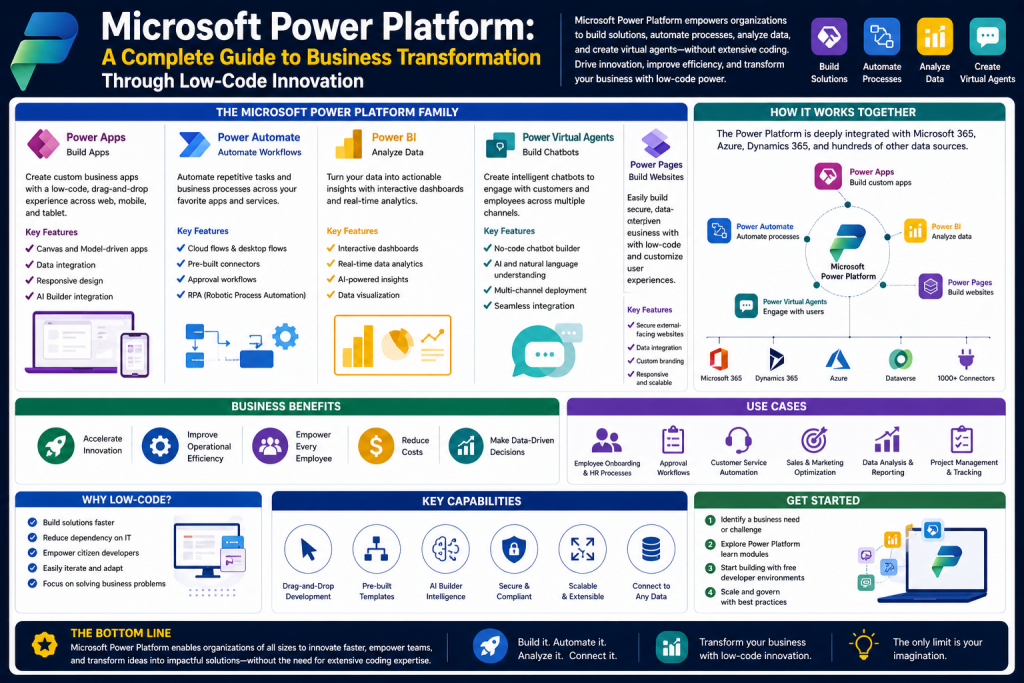
Modern businesses operate in a world where speed, flexibility, automation, and data-driven decisions determine long-term success. Organizations of every size are constantly searching for ways to simplify operations, reduce manual workloads, improve collaboration, and gain better insights from the information they generate every day. Microsoft Power Platform has emerged as one of the most powerful business technology ecosystems designed to address these needs.
Microsoft Power Platform is a collection of low-code and no-code tools created to help users analyze data, build business applications, automate workflows, and develop intelligent virtual assistants. Unlike traditional software development environments that often require advanced coding skills and long development cycles, Power Platform provides a more accessible framework where both technical professionals and non-technical employees can create solutions that solve real business problems.
The platform combines several core products into one connected ecosystem. These products include Power BI for data analysis and visualization, Power Apps for custom application development, Power Automate for workflow automation, and Microsoft Copilot Studio for AI-powered conversational solutions. Together, these tools allow organizations to modernize operations without relying entirely on software engineering teams.
The rise of digital transformation has created pressure on companies to innovate faster while controlling costs. Businesses are expected to make decisions using real-time data, provide personalized customer experiences, and streamline repetitive tasks. Microsoft Power Platform addresses these challenges by allowing users to connect data sources, build applications quickly, and automate processes without extensive infrastructure investments.
One of the most important reasons for the platform’s popularity is its accessibility. Employees in finance, HR, operations, customer service, logistics, education, and healthcare can all use Power Platform to solve department-specific problems. This democratization of technology allows organizations to reduce bottlenecks, empower employees, and encourage innovation across departments.
Understanding the Purpose of Microsoft Power Platform
At its core, Microsoft Power Platform exists to make technology development more inclusive and practical for businesses. Rather than forcing organizations to choose between expensive custom software or limited off-the-shelf tools, Power Platform creates a middle ground where businesses can tailor solutions to their own workflows.
The platform is designed around four major business goals:
First, it helps organizations understand data more effectively. Every business produces data from customer transactions, internal systems, supply chains, employee performance, and digital interactions. Without proper analysis, this data becomes overwhelming. Power BI transforms raw information into dashboards, reports, and visual insights that support strategic decisions.
Second, it allows users to create custom applications that solve operational challenges. Businesses often need software for tasks such as inventory management, leave approvals, inspections, or sales tracking. Power Apps enables these applications to be created faster and more affordably than traditional development.
Third, it automates repetitive processes. Manual tasks such as document approvals, email routing, notifications, and data entry consume valuable time. Power Automate replaces these repetitive workflows with digital automation.
Fourth, it improves communication and customer interaction through AI-driven assistants. Microsoft Copilot Studio enables organizations to build chatbots and virtual agents capable of answering questions, guiding customers, and supporting internal teams.
This integrated approach means that businesses can use Power Platform not just as a set of individual tools, but as a connected digital transformation framework.
Why Low-Code and No-Code Platforms Matter
To understand Microsoft Power Platform’s value, it is important to recognize the growing role of low-code and no-code technology in modern business.
Traditional software development can be expensive, slow, and resource-intensive. Building a custom business application often requires developers, testers, project managers, infrastructure teams, and long implementation cycles. This creates challenges for smaller organizations or departments that need quick solutions.
Low-code and no-code platforms reduce these barriers by offering visual design tools, drag-and-drop interfaces, templates, and pre-built integrations. Microsoft Power Platform allows users to create workflows and apps without writing extensive code.
This shift offers several major advantages:
Speed becomes significantly faster because solutions can be developed in days instead of months.
Costs are lower because organizations rely less on large development teams.
Innovation expands because employees closest to business problems can directly design solutions.
Adaptability improves because applications and workflows can evolve quickly as business needs change.
For organizations facing constant market changes, this flexibility can be a major competitive advantage.
The Core Components of Microsoft Power Platform
Microsoft Power Platform consists of several major tools, each serving a distinct purpose while integrating with the others.
Power BI focuses on business intelligence and analytics.
Power Apps provides application development capabilities.
Power Automate delivers process automation.
Microsoft Copilot Studio enables AI-powered conversational experiences.
Dataverse acts as a secure data platform supporting many Power Platform applications.
Connectors link the platform with hundreds of external applications and services.
These components are powerful individually, but their true strength lies in integration. For example, a company might use Power Apps to build a field inspection app, Power Automate to send alerts based on inspection results, Power BI to analyze inspection trends, and Copilot Studio to answer employee questions about procedures.
This interconnected design allows businesses to build complete digital ecosystems.
Power BI: Turning Data Into Strategic Intelligence
Power BI is one of the most recognized components of Microsoft Power Platform because data is central to every business decision.
Organizations often struggle with fragmented data stored across spreadsheets, databases, cloud applications, and third-party platforms. Power BI solves this challenge by bringing together multiple data sources into unified dashboards and reports.
Its primary function is to convert raw data into meaningful visual insights. Rather than reviewing endless rows of numbers, users can interpret business performance through charts, graphs, maps, scorecards, and KPIs.
This capability transforms decision-making from reactive to proactive.
Data Visualization and Dashboard Capabilities
Power BI’s visualization tools make complex data easier to understand.
Users can create bar charts to compare revenue, line graphs to monitor trends over time, pie charts to analyze percentages, and geographic maps to track regional performance.
Dashboards can combine multiple visual elements into one interface, giving leadership teams immediate access to essential metrics.
For example, a sales manager could monitor monthly sales, customer acquisition, top-performing products, and regional growth all within one dashboard.
These dashboards are interactive, meaning users can click on visuals to explore deeper layers of information. This interactivity improves analytical depth without requiring advanced technical expertise.
Real-Time Data Monitoring
A major advantage of Power BI is its ability to connect to live data streams.
Businesses no longer need to rely solely on static reports created weekly or monthly. Power BI can continuously update dashboards using current data from operational systems.
This is especially valuable in industries such as logistics, finance, retail, and customer service, where real-time awareness can improve performance.
For example, a retail company can monitor inventory shortages instantly, while a customer support center can track live ticket volume.
Real-time visibility supports faster decisions and reduces delays.
Integration Across Business Systems
Power BI integrates with a wide range of systems, including spreadsheets, databases, cloud services, enterprise applications, and Microsoft tools.
Organizations commonly connect Power BI with Excel, Teams, SharePoint, Azure, and Dynamics solutions.
This integration eliminates isolated data silos and creates centralized intelligence.
For many businesses, this means data from finance, HR, operations, and customer support can be analyzed together for broader organizational insights.
Custom Visualizations and Scalability
Standard visual templates cover many business needs, but organizations with specialized requirements can also use custom visuals.
This flexibility allows businesses to tailor analytics to industry-specific scenarios.
Power BI also scales effectively from small teams to large enterprises. A startup may use it for simple dashboards, while a multinational corporation may implement advanced enterprise analytics frameworks.
This scalability ensures long-term relevance.
Business Benefits of Power BI
Power BI delivers practical advantages beyond attractive charts.
Improved decision-making is perhaps its greatest value. Leaders gain access to clear, evidence-based insights rather than relying solely on assumptions.
Operational efficiency improves because teams can identify bottlenecks faster.
Transparency increases as departments share common metrics.
Forecasting becomes more accurate when trends are easier to analyze.
Collaboration strengthens because reports can be shared across teams.
These benefits make Power BI a strategic tool rather than just a reporting platform.
Common Use Cases for Power BI
Power BI supports a wide range of industries and functions.
Sales teams use it to monitor revenue and customer performance.
Finance departments track budgets, expenses, and profitability.
HR teams analyze employee turnover and workforce trends.
Supply chain managers track shipping performance and inventory.
Healthcare providers monitor patient outcomes and resource utilization.
Educational institutions analyze student performance metrics.
Because nearly every organization generates measurable data, Power BI has broad relevance.
User Accessibility and Ease of Adoption
Although analytics platforms can sometimes seem intimidating, Power BI is designed for accessibility.
Its interface supports drag-and-drop functionality, guided dashboards, and familiar Microsoft-style navigation.
This lowers the barrier for non-technical users while still offering advanced capabilities for data professionals.
Organizations often find that employees adopt Power BI more quickly than traditional BI platforms because of its intuitive structure.
Challenges and Considerations
Despite its strengths, Power BI still requires thoughtful implementation.
Data quality remains critical. Poor data sources can produce misleading insights.
Governance is necessary to ensure reports are accurate and secure.
Training may still be required for advanced analytics.
Licensing models can vary depending on collaboration and enterprise needs.
However, these challenges are typically manageable compared to the platform’s advantages.
Power BI as a Foundation for Digital Transformation
Power BI often becomes the starting point for broader Power Platform adoption because data visibility naturally reveals inefficiencies.
Once businesses identify repetitive processes or operational gaps through analytics, they often expand into Power Apps and Power Automate to solve those problems.
In this way, Power BI serves not only as an analytics tool but as a catalyst for wider digital transformation.
Introduction to the Expanding Capabilities of Microsoft Power Platform
While data intelligence is a critical first step in digital transformation, businesses also need tools that help them act on those insights. Understanding business performance through analytics is valuable, but organizations gain even greater advantages when they can directly create solutions, automate repetitive processes, and improve customer experiences. This is where the broader capabilities of Microsoft Power Platform become transformative.
Beyond analytics, Microsoft Power Platform gives businesses the ability to design applications, automate workflows, and create intelligent conversational systems. These capabilities are primarily delivered through Power Apps, Power Automate, and Microsoft Copilot Studio. Together, these tools allow organizations to shift from passive data analysis to active business process transformation.
In many organizations, employees face recurring challenges such as outdated paper-based systems, disconnected approval processes, repetitive administrative tasks, and delayed customer support responses. Traditional software development can address these issues, but it often requires time, budget, and specialized expertise. Power Platform’s low-code ecosystem changes this by enabling faster innovation and broader accessibility.
Power Apps helps businesses create custom software solutions without requiring full-scale development teams. Power Automate reduces manual labor by automating repetitive workflows across systems. Microsoft Copilot Studio expands productivity through AI-powered virtual assistants and chatbots capable of serving customers or internal teams.
These tools represent a practical path toward modernization because they help businesses move faster while controlling complexity.
Power Apps: Custom Application Development for Every Business
Power Apps is Microsoft’s low-code application development platform designed to help organizations build custom applications that address specific business needs. Instead of relying entirely on third-party software or expensive custom development projects, businesses can create apps tailored to their own workflows.
The value of Power Apps lies in its accessibility. Users do not need advanced programming expertise to build functional applications. Through drag-and-drop interfaces, templates, connectors, and visual design tools, both technical professionals and business users can participate in app creation.
This accessibility supports what is often called “citizen development,” where employees closest to operational challenges can help create solutions directly.
Why Custom Apps Matter
Every organization has unique operational requirements. Generic software products may solve broad business needs, but they often fail to address specialized internal processes.
For example:
A warehouse may need a mobile inventory scanner.
An HR department may require a leave request system.
A sales team may need field visit reporting tools.
A school may want a student attendance management system.
A maintenance company may need inspection forms.
Power Apps allows businesses to design these solutions without waiting for traditional software projects.
This level of customization improves operational efficiency and gives organizations more control over their processes.
Types of Applications in Power Apps
Power Apps offers multiple approaches to application development, each suited for different scenarios.
Canvas Apps provide maximum design flexibility. Users can visually arrange screens, controls, and workflows much like designing a presentation. This option is ideal for organizations that want highly customized user experiences.
Model-Driven Apps focus more on structured data and business processes. These apps are built around data models and workflows, making them useful for more complex enterprise applications where consistency is essential.
Power Pages extend capabilities externally, allowing businesses to create secure websites or portals for customers, vendors, or partners.
This variety ensures organizations can select the right approach for specific business goals.
Low-Code Development and Accessibility
One of Power Apps’ greatest strengths is reducing technical barriers.
Traditional app development often requires expertise in programming languages, UI/UX design, backend systems, APIs, and deployment infrastructure. Power Apps simplifies this through visual development.
Users can:
Drag and drop buttons, forms, and controls.
Connect data sources through built-in connectors.
Use templates for faster deployment.
Publish across web and mobile platforms.
This democratization of development accelerates solution delivery while empowering employees.
Cross-Platform Functionality
Modern businesses operate across devices. Employees may work from desktops, tablets, or smartphones.
Power Apps supports responsive applications that function across platforms, which is especially useful for remote workers, field staff, and mobile teams.
For example, delivery teams can update shipment statuses from mobile devices, while office managers access dashboards through desktops.
This flexibility supports modern workforce expectations.
Integration with Microsoft and External Systems
Power Apps does not function in isolation. It connects with a broad ecosystem of services.
Organizations can integrate Power Apps with:
Microsoft 365
Teams
SharePoint
Excel
Dynamics 365
SQL databases
Cloud platforms
Third-party applications
This connectivity allows businesses to build applications that work within existing digital ecosystems rather than replacing them.
Business Impact of Power Apps
The strategic benefits of Power Apps include:
Faster solution deployment
Reduced software development costs
Greater operational flexibility
Department-specific customization
Improved employee productivity
Reduced dependency on IT backlogs
Because of these advantages, Power Apps often becomes a central tool for internal innovation.
Power Automate: Streamlining Repetitive Processes
If Power Apps builds custom solutions, Power Automate ensures those solutions operate efficiently by automating processes.
Power Automate is Microsoft’s workflow automation platform that allows users to create automated processes known as flows. These flows connect applications, services, notifications, approvals, and tasks.
In many organizations, repetitive tasks consume significant employee time. Examples include:
Approving requests
Sending notifications
Moving files
Collecting data
Updating records
Scheduling reminders
These tasks are necessary but often repetitive. Power Automate replaces manual repetition with digital workflows.
The Trigger-Action Framework
Power Automate works primarily through a trigger-and-action model.
A trigger is an event that starts a workflow.
Examples include:
Receiving an email
Submitting a form
Updating a database
Uploading a file
Completing a sale
An action is the automated response.
Examples include:
Sending notifications
Creating records
Approving requests
Updating spreadsheets
Posting alerts
This framework makes automation intuitive even for non-technical users.
Templates and Speed of Deployment
Power Automate offers pre-built templates for common scenarios, reducing implementation time.
Businesses can quickly automate:
Approval chains
Invoice processing
Document management
Social media alerts
Task assignments
Data synchronization
Templates reduce the learning curve and help organizations realize value quickly.
Robotic Process Automation
Power Automate also supports robotic process automation, which allows businesses to automate tasks involving legacy systems or repetitive screen-based actions.
This is particularly useful for organizations with older systems that may not support direct integrations.
RPA can mimic human actions such as clicking, copying, entering data, or navigating software.
This expands automation possibilities significantly.
Benefits of Workflow Automation
Automation provides several organizational advantages:
Reduced human error
Improved speed
Operational consistency
Lower labor costs
Better compliance
Higher employee focus on strategic tasks
Rather than replacing employees, automation often shifts their focus toward more meaningful work.
Examples Across Departments
HR can automate onboarding workflows.
Finance can streamline invoice approvals.
IT can automate ticket routing.
Sales can automate lead notifications.
Customer service can automate escalation processes.
This broad usability makes Power Automate relevant across nearly every industry.
Microsoft Copilot Studio: AI-Powered Business Interaction
As organizations seek smarter engagement tools, Microsoft Copilot Studio introduces conversational AI into business operations.
Previously known for Power Virtual Agents capabilities, this platform allows users to create AI-powered copilots and chatbots without advanced coding.
These tools can serve both customers and internal teams.
The Growing Importance of Conversational AI
Customers increasingly expect instant responses, while employees often need quick access to information.
Traditional support models can be expensive and limited by staffing.
AI-driven copilots provide scalable, always-available assistance.
Common uses include:
Customer support
Internal HR help desks
IT troubleshooting
Sales guidance
Knowledge retrieval
This availability improves responsiveness while controlling costs.
No-Code Chatbot Development
Copilot Studio allows organizations to create virtual assistants through visual workflows.
Users can define conversation paths, connect data sources, and deploy bots without software engineering expertise.
This accessibility helps businesses implement AI faster.
Natural Language Processing
Modern copilots use natural language processing to understand conversational language.
Rather than forcing users into rigid keyword structures, bots can interpret broader requests.
For example, an employee might ask about vacation policy, or a customer might request order status.
This creates more human-like interactions.
Integration with Business Systems
Copilots can connect with records, workflows, and enterprise systems to perform actions rather than simply answer questions.
Examples include:
Checking shipment details
Resetting passwords
Booking appointments
Escalating tickets
Retrieving policy information
This functionality transforms bots from informational tools into operational assistants.
Operational Benefits
Microsoft Copilot Studio can provide:
24/7 support
Reduced wait times
Lower support costs
Scalable service delivery
Consistent responses
Enhanced customer satisfaction
For businesses facing rising support demands, this can be highly valuable.
Combining Power Apps, Power Automate, and Copilot Studio
The real strength of Microsoft Power Platform lies in integration.
Consider a field service company:
Power Apps creates technician inspection forms.
Power Automate sends alerts when urgent repairs are identified.
Power BI tracks repair trends.
Copilot Studio answers customer service inquiries.
Together, these tools create an end-to-end business solution.
This interconnected design reduces operational silos and improves organizational agility.
Core Business Use Cases Across Industries
Healthcare organizations use Power Apps for patient intake and Power Automate for appointment workflows.
Retailers automate inventory alerts and customer interactions.
Manufacturers create inspection apps and automate maintenance requests.
Educational institutions build student support systems.
Government agencies digitize approvals and citizen services.
This flexibility demonstrates why Power Platform is relevant far beyond IT departments.
Governance and Strategic Planning
While these tools are accessible, successful implementation still requires governance.
Organizations should consider:
Security policies
Data management
Compliance requirements
User training
Scalability planning
Without governance, rapid adoption can create fragmented systems.
A structured strategy ensures long-term sustainability.
The Human Impact of Power Platform Expansion
An important misconception is that low-code tools only benefit organizations financially. In reality, they often improve employee experience as well.
By reducing repetitive work, simplifying tasks, and empowering staff to create solutions, businesses often improve morale and innovation culture.
Employees can spend less time on administrative burden and more time on strategic or creative work.
This cultural shift can be as important as operational savings.
Conclusion
Power Apps, Power Automate, and Microsoft Copilot Studio expand Microsoft Power Platform from a data intelligence ecosystem into a full digital transformation framework. These tools empower organizations not only to understand their operations but also to redesign them.
Power Apps enables businesses to build custom solutions quickly and affordably. Power Automate streamlines repetitive tasks, reducing inefficiency and human error. Microsoft Copilot Studio introduces AI-powered interaction that enhances both customer and employee experiences.
Together, these technologies allow organizations to modernize processes, improve agility, reduce costs, and foster innovation. Their greatest strength lies not in individual functionality but in their integration, creating a unified system where applications, automation, data, and AI work together.
As businesses continue adapting to digital demands, mastering these tools can provide a significant strategic advantage. Microsoft Power Platform is no longer simply a set of tools—it is becoming a foundational business capability for organizations seeking long-term competitiveness.
Introduction to the Long-Term Business Value of Microsoft Power Platform
As organizations continue to modernize operations, the decision to adopt digital tools is no longer based solely on functionality. Businesses must also evaluate long-term value, cost efficiency, security, governance, scalability, and adaptability. Microsoft Power Platform has gained significant attention not only because of its low-code tools but because it offers a broader strategic framework for digital transformation.
While Power BI, Power Apps, Power Automate, and Microsoft Copilot Studio each serve specific operational purposes, the real organizational question often becomes whether the platform can provide sustainable value over time. Decision-makers need to understand what benefits they can realistically expect, how pricing structures work, what licensing complexities may arise, how secure the environment is, and whether the platform can adapt to industry-specific requirements.
Beyond initial implementation, leaders must also evaluate scalability, employee adoption, governance controls, integration with existing systems, and long-term return on investment. A platform may appear powerful at first, but its true value depends on how effectively it supports growth, innovation, regulatory compliance, and changing business strategies over time.
For small businesses, Power Platform may represent an affordable route to digital maturity. For enterprises, it may serve as a unified framework for innovation, process standardization, and workforce empowerment. Understanding these broader dimensions is essential for making informed technology investments.
This section explores the strategic advantages, practical costs, licensing models, hidden considerations, security framework, customization opportunities, and future business impact of Microsoft Power Platform.
Major Benefits of Microsoft Power Platform
One of the most compelling reasons organizations adopt Microsoft Power Platform is the broad range of operational and strategic benefits it delivers. Unlike isolated software tools that address only one business challenge, Power Platform creates an interconnected ecosystem capable of improving multiple layers of business performance.
Ease of Use and Accessibility
A major strength of Microsoft Power Platform is its accessibility to both technical and non-technical users.
Traditional enterprise software often creates dependence on specialized developers or consultants. This can slow innovation because departments must wait for IT resources. Power Platform changes this dynamic by giving business users tools they can often use independently.
With drag-and-drop interfaces, templates, guided workflows, and familiar Microsoft design patterns, users across departments can build apps, automate tasks, or create reports without advanced programming expertise.
This ease of use encourages innovation at all organizational levels.
Cost Efficiency and Resource Optimization
Operational efficiency is one of the strongest financial arguments for Power Platform adoption.
Organizations frequently spend large amounts of money on repetitive administrative work, disconnected systems, or custom software development. By automating tasks, reducing manual workloads, and enabling internal app creation, Power Platform can significantly lower operational costs.
For example:
Automating invoice approvals reduces finance labor time.
Digitizing inspections lowers paper management costs.
Self-service analytics reduces external reporting expenses.
AI chatbots reduce customer support overhead.
While initial licensing costs exist, businesses often realize value through time savings and productivity gains.
Improved Productivity
Power Platform directly supports productivity by minimizing repetitive tasks and simplifying workflows.
Employees spend less time on manual approvals, repetitive data entry, or searching for fragmented information. Instead, they can focus on strategic, creative, or customer-facing responsibilities.
This productivity shift can improve organizational output without necessarily increasing workforce size.
Seamless Integration with Existing Microsoft Ecosystems
For organizations already using Microsoft products, Power Platform’s integration capabilities are especially valuable.
It connects naturally with:
Microsoft 365
Teams
Excel
SharePoint
Azure
Dynamics 365
Outlook
This means businesses can extend existing investments rather than replacing them.
For example, a company already using Teams can integrate Power Apps directly into collaboration environments, while Excel data can flow into Power BI dashboards.
This interoperability reduces transition friction.
Real-Time Data and Decision-Making
Modern organizations require faster decisions, and Power Platform supports this through connected intelligence and automation.
Power BI offers live dashboards, Power Automate triggers immediate actions, and Power Apps supports field-level updates.
This combination reduces decision delays and improves responsiveness.
For industries such as logistics, healthcare, or retail, real-time responsiveness can create measurable competitive advantages.
Customization for Industry and Organizational Needs
Unlike one-size-fits-all software, Power Platform supports customization.
Organizations can build industry-specific solutions for:
Healthcare compliance
Retail operations
Manufacturing inspections
Educational workflows
Government approvals
Financial controls
This flexibility allows businesses to align technology with operational realities.
Licensing and Pricing Models
While Microsoft Power Platform offers broad value, understanding pricing is critical for successful planning.
Pricing can vary significantly depending on usage scale, tool selection, and enterprise complexity.
Power BI Pricing Considerations
Power BI often offers multiple tiers ranging from basic individual use to enterprise collaboration environments.
Free or entry-level options may provide dashboard creation but limited sharing.
Professional plans generally support broader collaboration and reporting distribution.
Enterprise-grade solutions often include larger-scale analytics infrastructure.
This means organizations should evaluate not just current needs but future growth.
Power Apps Licensing
Power Apps pricing can depend on whether organizations use per-user or per-app licensing structures.
Per-user models may be more suitable for broad employee access.
Per-app models may be cost-effective for specialized applications.
Larger enterprises may also negotiate scale pricing.
Organizations should carefully assess expected app adoption before selecting models.
Power Automate Pricing
Power Automate costs can vary based on workflow complexity, number of users, and robotic process automation requirements.
Basic automation may be affordable, but enterprise RPA or advanced integrations can increase costs.
Businesses should calculate expected ROI from labor savings.
Copilot and AI-Related Costs
AI-powered capabilities may involve premium licensing depending on deployment scope.
While these features can reduce support costs, organizations should balance automation benefits against licensing expenses.
Hidden Costs and Strategic Budgeting
Subscription fees are only part of total cost considerations.
Organizations may also encounter:
Premium connectors
Additional storage requirements
Training expenses
Governance investments
Security administration
Change management costs
Without strategic planning, these hidden expenses can affect ROI.
A full cost-benefit analysis is recommended before large-scale deployment.
Security Features of Microsoft Power Platform
Security is a major concern for any business technology investment, especially when platforms handle sensitive operational or customer data.
Microsoft Power Platform includes robust enterprise-grade security capabilities, which is one reason it is widely adopted across regulated sectors.
Role-Based Access Control
Organizations can define user permissions based on role, department, or responsibility.
This ensures employees access only the tools or data relevant to their functions.
For example, HR records can remain restricted while operations dashboards remain broadly visible.
Data Encryption
Power Platform supports data encryption both at rest and in transit.
This protects sensitive information against unauthorized access during storage and communication.
Compliance Standards
Many organizations must comply with legal and regulatory frameworks.
Power Platform supports governance aligned with various compliance standards, which is especially valuable in industries such as healthcare, finance, and government.
Dataverse Security
Microsoft Dataverse provides centralized, secure data storage for many Power Platform applications.
This creates stronger governance and more consistent security controls than fragmented spreadsheets or disconnected apps.
Threat Monitoring and Administration
Administrative tools allow organizations to monitor activity, enforce policies, and reduce risks.
This governance layer is particularly important in large-scale enterprise environments.
Customization for Specific Industries
One of Power Platform’s greatest long-term strengths is adaptability.
Different industries have distinct operational demands, compliance obligations, and customer expectations.
Power Platform’s customization capabilities allow organizations to design around these realities.
Healthcare
Patient workflows, scheduling, compliance, and data visualization.
Manufacturing
Inspections, maintenance workflows, supply chain visibility.
Retail
Inventory automation, customer service bots, sales dashboards.
Education
Student tracking, communication systems, analytics.
Government
Citizen service portals, internal approvals, secure workflows.
This adaptability makes the platform more than a generic business tool.
Challenges Organizations Should Consider
Despite its strengths, Power Platform is not without limitations.
Governance Complexity
Without proper oversight, organizations may create too many disconnected apps or automations.
This can lead to “shadow IT” challenges.
Training Needs
Although low-code is accessible, effective enterprise deployment still requires training.
Licensing Complexity
Pricing structures can become confusing across multiple tools and premium features.
Scalability Planning
Rapid growth may require more structured architecture.
Recognizing these challenges early helps organizations implement more effectively.
Strategic Competitive Advantage
Organizations that successfully implement Power Platform often gain more than process efficiency.
They can become more agile, innovative, and responsive.
Departments solve problems faster.
Leaders access better intelligence.
Employees innovate independently.
Customer service improves.
Operational resilience strengthens.
This strategic advantage can influence competitiveness significantly.
The Future of Power Platform
As AI, automation, and digital transformation continue evolving, Power Platform is positioned as more than a temporary productivity suite.
Its integration with AI, data ecosystems, and low-code development suggests growing strategic importance.
Businesses increasingly need platforms that combine flexibility, intelligence, and scalability.
Microsoft’s ecosystem positioning makes Power Platform particularly relevant for organizations seeking long-term modernization.
Best Practices for Successful Adoption
To maximize value, organizations should:
Define clear business goals
Start with high-value use cases
Build governance frameworks
Train users effectively
Monitor ROI consistently
Scale strategically
This disciplined approach improves sustainability.
Conclusion
Microsoft Power Platform offers far more than a collection of business productivity tools. It represents a strategic framework that enables organizations to modernize operations, reduce inefficiencies, empower employees, and adapt faster to changing business demands.
Its benefits include accessibility, cost savings, productivity enhancement, customization, and integration with broader digital ecosystems. Power BI transforms data into strategic intelligence, Power Apps enables rapid application development, Power Automate reduces repetitive work, and Microsoft Copilot Studio expands AI-powered engagement.
At the same time, successful implementation requires thoughtful evaluation of pricing, licensing, governance, training, and security. Organizations that approach Power Platform strategically are more likely to unlock long-term competitive advantages.
For businesses navigating digital transformation, Microsoft Power Platform can serve as both an operational toolkit and an innovation engine. Its true value lies not simply in automating tasks or building dashboards, but in helping organizations become more agile, informed, and capable in an increasingly digital world.
Continue exploring the technologies and certification concepts that matter most to you.