Linux is known for its flexibility and adaptability, which is one of the main reasons it is used across such a wide range of environments. From personal computers and servers to embedded systems and large-scale enterprise infrastructures, Linux provides a stable and customizable platform. A major factor behind this versatility is its support for multiple file systems, each designed with different priorities such as performance, reliability, scalability, or advanced data management.
A file system is the backbone of how data is stored and organized on any storage device. It determines how files are named, how they are structured, how they are accessed, and how storage space is managed. Without a file system, a storage device would simply contain raw, unstructured data, making it impossible to use efficiently.
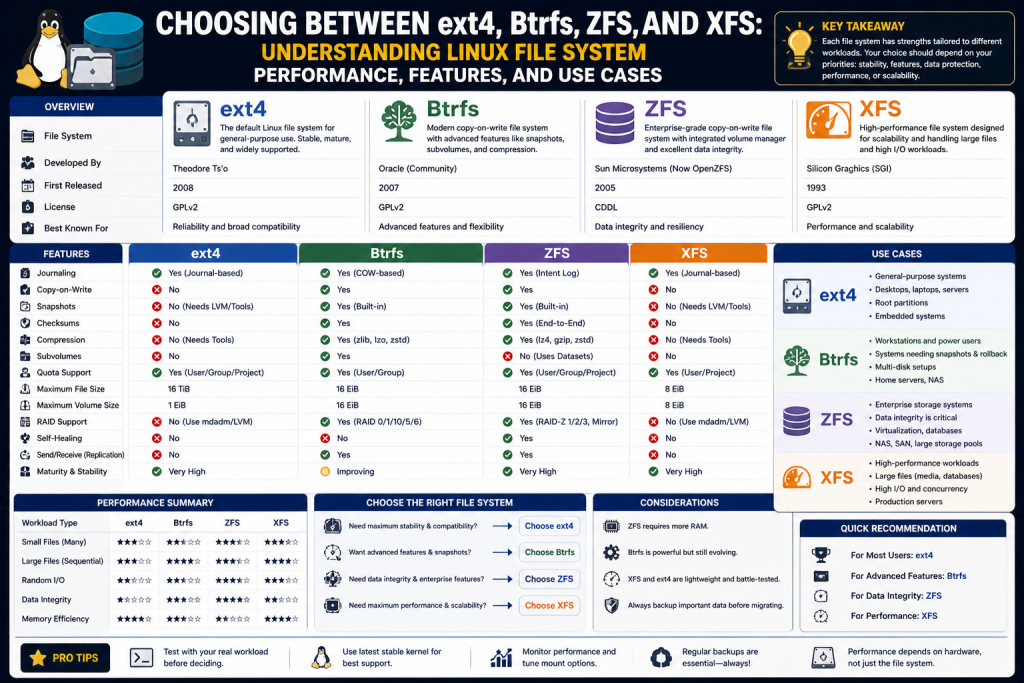
Linux offers several file systems, including ext4, Btrfs, ZFS, and XFS. Each of these has its own strengths and weaknesses, making them suitable for different types of workloads. Understanding these differences is essential for anyone working with Linux systems, whether you are a beginner, a system administrator, or an advanced user.
Understanding File System Basics
Before diving into specific file systems, it is important to understand the basic principles behind how file systems work. A file system acts as an interface between the operating system and the storage hardware. It translates user actions, such as saving or opening a file, into operations that the storage device can perform.
One of the key roles of a file system is managing metadata. Metadata is information about files, such as their size, location, permissions, and timestamps. Efficient handling of metadata ensures that files can be accessed quickly and reliably.
Another important concept is storage allocation. File systems must decide how to store data blocks on disk in a way that minimizes fragmentation. Fragmentation occurs when parts of a file are scattered across different locations on the disk, which can slow down performance because the system must access multiple areas to retrieve a single file.
Journaling is another fundamental feature found in many modern file systems. A journaling file system keeps a log of changes before they are applied. This log allows the system to recover quickly in the event of a crash or power failure. However, journaling typically protects metadata rather than the actual file content.
Modern file systems also incorporate features such as checksums, snapshots, and compression. Checksums help detect data corruption, snapshots allow users to save the state of a file system at a specific point in time, and compression reduces the amount of storage space required.
What isext4
Ext4 is one of the most widely used file systems in the Linux ecosystem. It is the fourth generation of the extended file system family and was developed as an improvement over ext3. The goal of ext4 was to provide better performance, improved scalability, and enhanced reliability while maintaining compatibility with earlier versions.
Over time, ext4 has become the default file system for many Linux distributions. Its widespread adoption is largely due to its stability and consistent performance. Unlike newer file systems that focus on advanced features, ext4 prioritizes reliability and simplicity.
Ext4 is designed to handle modern storage requirements. It supports very large file sizes and large file systems, making it suitable for both personal and enterprise use. Its mature design and extensive testing make it a dependable choice for many users.
Key Features of ext4
One of the most important features of ext4 is journaling. Journaling ensures that file system changes are recorded before they are applied, which helps maintain consistency in the event of a system crash. This significantly reduces the risk of data corruption and allows for faster recovery.
Another key feature is the use of extents. Extents allow the file system to store data in contiguous blocks rather than tracking individual blocks. This reduces fragmentation and improves performance, especially when working with large files.
Delayed allocation is another performance optimization used by ext4. Instead of writing data immediately, the file system delays allocation until it has a better understanding of how data will be used. This helps reduce fragmentation and improves overall efficiency.
Ext4 also supports large files and large volumes. It can handle files up to 16 terabytes and file systems up to one exbibyte. This scalability ensures that ext4 can meet the needs of modern computing environments.
Backward compatibility is another advantage. Ext4 can work with ext3 and ext2 file systems, allowing users to upgrade without needing to completely reformat their storage. This ease of transition has contributed to its popularity.
Performance Characteristics of ext4
Ext4 is known for its balanced performance. It provides reliable read and write speeds for a wide range of workloads. While it may not always be the fastest option, it offers consistent performance that meets the needs of most users.
It performs well in environments with moderate workloads, such as desktop systems and general purpose servers. Its efficient handling of both small and medium sized files makes it a versatile choice.
Another advantage of ext4 is its low resource usage. Because it does not include as many advanced features as newer file systems, it requires fewer system resources. This makes it suitable for systems with limited hardware capabilities.
Ext4 also benefits from years of optimization and testing. Its performance characteristics are well understood, making it a predictable and dependable choice.
Reliability and Stability of ext4
Reliability is one of the strongest aspects of ext4. Its journaling feature ensures that the file system can recover quickly from unexpected failures. This minimizes downtime and reduces the risk of data loss.
The simplicity of ext4 contributes to its stability. By avoiding overly complex features, it reduces the chances of bugs and performance issues. This makes it a safe choice for users who need a dependable storage solution.
Ext4 is also widely supported within the Linux community. It receives regular updates and improvements, ensuring compatibility with modern systems. Its long history of use has proven its reliability in real world scenarios.
Limitations of ext4
Despite its many strengths, ext4 has some limitations. One of the main drawbacks is the lack of advanced features found in newer file systems. For example, it does not support built in snapshots, which are useful for backups and system recovery.
Another limitation is the absence of data checksumming. While ext4 can handle certain types of errors, it does not provide the same level of protection against data corruption as file systems like Btrfs or ZFS.
Ext4 also does not include native compression. This means it may use more storage space compared to file systems that support automatic data compression. In environments where storage efficiency is important, this can be a disadvantage.
Additionally, ext4 does not offer integrated volume management. Users who need advanced storage configurations must rely on external tools, which can increase complexity.
Use Cases for ext4
Ext4 is widely used in desktop Linux systems because it provides a stable and easy to manage environment. It is ideal for users who want a reliable file system without needing to configure advanced features.
In server environments, ext4 is commonly used for general workloads such as web hosting, application servers, and small databases. Its consistent performance and reliability make it a practical choice.
Ext4 is also suitable for embedded systems and devices with limited resources. Its low overhead allows it to run efficiently on hardware with limited processing power and memory.
Why ext4 Remains Relevant
Even though newer file systems offer advanced features, ext4 continues to be widely used. Its reliability, simplicity, and strong community support make it a dependable option for many use cases.
For users who prioritize stability and ease of use over advanced functionality, ext4 remains one of the best choices available. It provides a solid foundation for everyday computing while maintaining compatibility with a wide range of systems.
Its continued development ensures that it remains relevant in modern Linux environments, making it a trusted choice for both new and experienced users.
What is Btrfs
Btrfs, short for B-Tree File System, is a modern Linux file system designed to address the limitations of traditional file systems like ext4. It was developed with a strong focus on advanced storage features, scalability, and improved data integrity. Unlike older file systems that rely on external tools for certain capabilities, Btrfs integrates many of these features directly into the file system itself.
The design of Btrfs is based on B-tree data structures, which allow it to manage data and metadata efficiently. This structure enables better scalability and performance, especially as storage systems grow larger and more complex. Btrfs is often considered a next generation file system because it combines multiple storage management features into a single unified solution.
Btrfs is particularly appealing to users who require advanced functionality such as snapshots, compression, and data integrity checks. While it may not be as simple as ext4, it provides powerful tools that can significantly improve how data is managed and protected.
Core Design Principles of Btrfs
Btrfs was built with several key principles in mind. One of the most important goals was to create a file system that could scale efficiently as storage requirements increase. Traditional file systems often struggle to maintain performance as they grow, but Btrfs is designed to handle large volumes of data without significant degradation.
Another principle is data integrity. Btrfs aims to ensure that data remains accurate and uncorrupted over time. This is achieved through features like checksumming and self healing mechanisms.
Flexibility is also a major focus. Btrfs allows users to manage storage in ways that would typically require separate tools, such as logical volume management. This integration simplifies administration and reduces the need for additional layers of complexity.
Finally, Btrfs emphasizes efficient storage utilization. Features like compression and copy on write help reduce wasted space and improve overall efficiency.
Copy on Write Mechanism
One of the most important features of Btrfs is its use of copy-on -write. This approach changes how data is written to disk. Instead of modifying existing data directly, Btrfs writes changes to a new location and updates references to point to the new data.
This method provides several advantages. First, it ensures that the original data remains intact until the new data is successfully written. This reduces the risk of data corruption during write operations. Second, it enables efficient creation of snapshots, since unchanged data can be shared between different versions.
Copy on write also improves consistency. Because data is never overwritten in place, the file system can maintain a consistent state even if an unexpected failure occurs during a write operation.
However, this approach can introduce some overhead, particularly in workloads with frequent small writes. Proper configuration and tuning can help mitigate these effects.
Snapshot and Subvolume Capabilities
Snapshots are one of the standout features of Btrfs. A snapshot is a read only or writable copy of the file system at a specific point in time. Snapshots are created almost instantly and require very little additional storage because they only store changes made after the snapshot is taken.
This feature is extremely useful for backups and system recovery. If something goes wrong, users can revert to a previous snapshot and restore the system to a known good state. This can save significant time and effort compared to traditional backup methods.
Btrfs also supports subvolumes, which are independent file system roots within the same file system. Subvolumes allow users to organize data more effectively and apply different policies or configurations to different parts of the file system.
The combination of snapshots and subvolumes provides a powerful framework for managing data, making Btrfs a popular choice for advanced users and system administrators.
Data Integrity and Checksumming
Data integrity is a critical concern in modern storage systems, and Btrfs addresses this through built in checksumming. Every piece of data and metadata stored in Btrfs is associated with a checksum, which is used to verify its integrity.
When data is read, the file system calculates its checksum and compares it to the stored value. If a mismatch is detected, it indicates that the data has been corrupted. In some configurations, Btrfs can automatically repair corrupted data using redundant copies.
This level of protection is particularly important in environments where data accuracy is essential. It helps prevent silent data corruption, which can occur without triggering any obvious errors.
Checksumming also enhances reliability by ensuring that errors are detected early, allowing administrators to take corrective action before data loss occurs.
Compression Features
Btrfs includes native support for transparent compression. This means that data can be compressed automatically as it is written to disk and decompressed when it is read. The process is handled by the file system, so users do not need to manage compression manually.
Compression provides several benefits. It reduces the amount of storage space required, allowing users to store more data on the same device. It can also improve performance in some cases, as less data needs to be read from or written to disk.
Btrfs supports multiple compression algorithms, giving users the flexibility to choose the one that best suits their needs. Some algorithms prioritize speed, while others focus on achieving higher compression ratios.
The effectiveness of compression depends on the type of data being stored. Text and other highly compressible data benefit the most, while already compressed files may see little improvement.
Storage Pooling and Volume Management
One of the unique features of Btrfs is its ability to manage multiple storage devices as a single pool. This eliminates the need for separate volume management tools, simplifying storage configuration.
Users can add or remove devices from a Btrfs file system without significant disruption. This makes it easy to expand storage capacity as needed. Data can also be redistributed across devices to maintain balance and optimize performance.
Btrfs supports various redundancy configurations, similar to RAID setups. These configurations provide protection against hardware failures by storing multiple copies of data across different devices.
This integrated approach to storage management makes Btrfs a powerful solution for systems that require flexibility and scalability.
Performance Considerations
Btrfs offers good performance for many workloads, but its advanced features can introduce some overhead. Copy on write operations, checksumming, and compression all require additional processing, which can impact performance in certain scenarios.
For read heavy workloads, Btrfs performs well, especially when combined with features like compression. However, write intensive workloads may experience slower performance compared to simpler file systems like ext4.
Proper tuning can help improve performance. For example, disabling certain features or adjusting configuration settings can reduce overhead and optimize the file system for specific use cases.
It is important to evaluate workload requirements when choosing Btrfs to ensure that its performance characteristics align with the needs of the system.
Limitations of Btrfs
Despite its many advantages, Btrfs is not without limitations. One of the main concerns is the stability of certain features, particularly RAID5 and RAID6 configurations. These features are not considered fully mature and may not be suitable for critical production environments.
Btrfs can also be more complex to manage compared to traditional file systems. Its advanced capabilities require a deeper understanding of how the file system works, which can be challenging for less experienced users.
Another limitation is performance variability. While Btrfs performs well in many scenarios, its performance can be inconsistent depending on the workload and configuration.
Use Cases for Btrfs
Btrfs is well suited for environments that require advanced storage features. It is commonly used in systems where snapshots and data integrity are important, such as development environments and backup systems.
It is also a good choice for users who need flexible storage management. The ability to add and remove devices dynamically makes it ideal for systems that need to scale over time.
Btrfs is often used in modern Linux distributions as an alternative to ext4, particularly in scenarios where advanced features are desired.
Why Choose Btrfs
Btrfs offers a combination of features that make it a compelling choice for many users. Its support for snapshots, compression, and checksumming provides a high level of functionality that is not available in traditional file systems.
For users who need more than just basic storage, Btrfs provides the tools necessary to manage data effectively. While it may require more effort to configure and maintain, the benefits it offers can be significant.
As development continues, Btrfs is expected to become even more stable and widely adopted, further solidifying its position as a modern file system for Linux environments.
What is ZFS
ZFS, which stands for Zettabyte File System, is one of the most advanced file systems available in modern computing. It was originally developed by Sun Microsystems with the goal of addressing the limitations found in traditional file systems and volume managers. Unlike conventional designs, ZFS combines both file system and volume management capabilities into a single integrated solution, which simplifies storage administration while improving reliability and scalability.
ZFS is designed for environments where data integrity is critical. It is widely used in enterprise systems, data centers, and storage servers where large volumes of data must be stored and protected. Its architecture is built to handle massive storage capacities, making it suitable for modern workloads that demand both performance and resilience.
Another defining aspect of ZFS is its focus on eliminating data corruption. Traditional file systems may not detect silent data corruption, but ZFS uses advanced mechanisms to ensure that stored data remains accurate and consistent over time.
Core Design of ZFS
The design of ZFS is fundamentally different from that of traditional file systems. Instead of relying on separate tools for disk management, ZFS integrates storage pooling directly into the file system. This means that multiple physical storage devices can be combined into a single storage pool, from which file systems are created.
This approach provides significant flexibility. Administrators can add new storage devices to the pool without disrupting existing data. The system automatically manages how data is distributed across the available devices, optimizing performance and space utilization.
ZFS also uses a transactional model for writing data. Changes are written in a way that ensures consistency, even in the event of a system failure. This eliminates many of the risks associated with partial writes and corrupted data structures.
End to End Data Integrity
One of the most important features of ZFS is its end to end data integrity model. Every block of data stored in ZFS is associated with a checksum. When data is read, its checksum is verified to ensure that it has not been altered or corrupted.
If a mismatch is detected, ZFS can automatically repair the corrupted data using redundant copies, provided that redundancy has been configured. This self healing capability is one of the key reasons why ZFS is trusted in environments where data reliability is essential.
Unlike traditional file systems that only protect metadata, ZFS protects both metadata and user data. This comprehensive approach ensures that all stored information is verified and maintained correctly.
Copy on Write and Transaction Model
ZFS uses a copy-on -write mechanism similar to Btrfs, but it is implemented in a highly robust manner. Instead of modifying existing data, ZFS writes new data to a different location and updates pointers only after the write operation is complete.
This ensures that the file system is always in a consistent state. Even if a failure occurs during a write operation, the original data remains intact. This eliminates the need for traditional journaling, as the file system itself maintains consistency through its transactional design.
The transaction model also allows ZFS to group multiple changes into a single operation. This improves performance and ensures that updates are applied atomically.
Snapshots and Clones
Snapshots are a powerful feature of ZFS that allow users to capture the state of a file system at a specific point in time. These snapshots are created instantly and consume minimal storage space because they only store differences between versions.
Snapshots are particularly useful for backups and system recovery. Users can quickly revert to a previous state if something goes wrong, making it easier to recover from errors or data loss.
ZFS also supports clones, which are writable copies of snapshots. Clones allow users to create new environments based on existing data without duplicating it. This is especially useful for testing and development purposes.
The efficiency and flexibility of snapshots and clones make ZFS a strong choice for systems that require frequent backups and rapid recovery.
RAID Z and Storage Redundancy
ZFS includes built-in support for redundancy through RAID Z. This feature allows data to be distributed across multiple disks in a way that protects against hardware failures. Unlike traditional RAID systems, RAID Z is designed to avoid common issues such as data inconsistency during partial writes.
This is often referred to as the write hole problem, which can lead to corrupted data in other RAID implementations.
RAID Z improves reliability by ensuring that data and parity information are always written in a consistent manner. It also supports different levels of redundancy, allowing systems to tolerate one or more disk failures depending on the configuration. This flexibility makes it suitable for both small setups and large enterprise storage systems where data protection is a top priority.
RAID Z comes in different configurations, allowing users to choose the level of redundancy that best suits their needs. Some configurations can tolerate the failure of one disk, while others can handle multiple simultaneous failures.
This built in redundancy simplifies storage management and improves data protection. Administrators do not need to rely on separate RAID controllers or software, as everything is handled within ZFS.
Storage Pools and Scalability
ZFS introduces the concept of storage pools, which combine multiple physical devices into a single logical unit. File systems are then created within this pool, allowing for flexible and efficient storage management.
This approach eliminates the need for traditional partitioning, as storage can be dynamically allocated and adjusted based on usage requirements.
One of the major advantages of storage pools is their ability to simplify expansion. New disks can be added to the pool without disrupting existing data, and the system automatically utilizes the additional space. ZFS also intelligently distributes data across devices to balance performance and improve reliability. This design not only enhances scalability but also makes it easier for administrators to manage large and complex storage environments with minimal effort.
As storage needs grow, additional devices can be added to the pool without requiring downtime or complex reconfiguration. ZFS automatically redistributes data to take advantage of the new capacity.
This scalability makes ZFS ideal for large scale storage systems. It can handle massive amounts of data while maintaining performance and reliability.
Performance Characteristics of ZFS
ZFS is designed to deliver strong performance, particularly in environments with large datasets. Its caching mechanisms, such as the adaptive replacement cache, help improve read performance by keeping frequently accessed data in memory.
This reduces the need to repeatedly access slower disk storage, resulting in faster response times and improved overall efficiency. The caching system is intelligent and adapts to workload patterns, ensuring that the most relevant data is prioritized for quick access.
In addition to memory based caching, ZFS can also utilize secondary cache devices, such as solid state drives, to further enhance performance. This is often referred to as a level two adaptive replacement cache and can significantly boost read speeds for large scale systems. Write performance is also optimized through mechanisms that group operations together, reducing overhead and improving consistency. These features make ZFS highly effective for data intensive applications that require both speed and reliability.
However, ZFS can be resource intensive. Its advanced features, including checksumming and copy-on-write, require additional processing power and memory. As a result, systems running ZFS typically benefit from having more RAM compared to those using simpler file systems.
For write operations, ZFS performance can vary depending on configuration. Features like compression and deduplication can impact performance, so they must be used carefully based on workload requirements.
Limitations of ZFS
Despite its many strengths, ZFS has some limitations. One of the most notable is its memory requirement. ZFS performs best with a large amount of RAM, which may not be available in all systems.
This is because ZFS relies heavily on memory for caching data and maintaining its advanced features such as checksumming, deduplication, and compression. Without sufficient RAM, performance can degrade, especially under heavy workloads or when handling large datasets.
In addition, systems with limited memory may experience slower read and write operations, reducing the overall efficiency of the file system. Administrators often need to carefully plan hardware resources when deploying ZFS to ensure optimal performance. This requirement can increase costs, making ZFS less suitable for smaller or resource constrained environments.
Another limitation is its licensing. Because ZFS uses a different license than the Linux kernel, it is not included by default in many Linux distributions. Users often need to install it separately.
ZFS can also be complex to manage, especially for users who are unfamiliar with its features. Proper configuration is essential to achieve optimal performance and reliability.
What is XFS
XFS is a high performance file system designed to handle large files and heavy workloads. Originally developed for high end systems, it has become a popular choice in enterprise environments due to its speed and scalability.
Its design focuses on delivering consistent throughput, especially in systems that process large volumes of data such as media servers, databases, and analytics platforms. XFS is optimized for parallel operations, allowing multiple read and write processes to occur simultaneously without significant performance degradation.
Another strength of XFS is its ability to maintain efficiency as storage systems grow in size. It uses advanced allocation and metadata management techniques to ensure that performance remains stable even with very large file systems. This makes it particularly suitable for modern infrastructures that require both reliability and the ability to scale seamlessly over time.
XFS is optimized for parallel input and output operations, making it ideal for applications that process large amounts of data. It is commonly used in scenarios such as media production, data analytics, and virtual machine storage.
Unlike file systems that focus heavily on advanced data integrity features, XFS prioritizes performance and efficiency.
Key Features of XFS
One of the main strengths of XFS is its ability to deliver high throughput. It is designed to handle large sequential reads and writes efficiently, which makes it well suited for data intensive applications.
XFS uses advanced data structures to manage storage, allowing it to maintain performance even as the file system grows. Its use of B plus trees helps organize data efficiently and reduce overhead.
Another important feature is metadata journaling. XFS logs changes to metadata, allowing for quick recovery after a crash. This improves reliability without significantly impacting performance.
XFS also supports online resizing, allowing the file system to grow without being unmounted. This is particularly useful in environments where downtime must be minimized.
Performance and Scalability of XFS
XFS excels in environments that require consistent performance under heavy workloads. Its design allows it to handle multiple simultaneous operations without significant slowdowns.
The file system is particularly effective for large files, such as video files, database files, and virtual machine images. Its ability to manage large amounts of data efficiently makes it a preferred choice for enterprise applications.
XFS also scales well as storage capacity increases. It can handle very large file systems without experiencing the performance degradation that affects some older file systems.
Limitations of XFS
While XFS offers excellent performance, it does have some limitations. One of the main drawbacks is the lack of advanced data integrity features. Unlike ZFS or Btrfs, XFS does not provide full data checksumming.
. This means it cannot automatically detect or repair silent data corruption, which can occur without obvious system errors. In environments where data accuracy is critical, this limitation can pose a risk if additional safeguards are not in place.
To compensate for this, administrators often rely on external tools or hardware solutions such as RAID controllers, regular backups, and monitoring systems to ensure data reliability. While these methods can provide protection, they add complexity and require careful management. As a result, XFS is best suited for scenarios where performance is the primary concern and data integrity can be managed through other means.
Another limitation is that XFS cannot be shrunk. Once a file system has been expanded, its size cannot be reduced. This can limit flexibility in certain situations.
XFS also relies on external tools for advanced storage management, as it does not include built in volume management features.
Use Cases for XFS
XFS is ideal for environments that require high performance and scalability. It is commonly used in enterprise systems, data centers, and applications that process large volumes of data.
Its architecture is specifically designed to handle heavy workloads with consistent speed, making it a strong choice for organizations that rely on fast and reliable storage systems. One of the key reasons XFS performs so well in these environments is its ability to efficiently manage large files and support parallel input and output operations without significant slowdowns.
In addition to its performance advantages, XFS is well suited for modern infrastructure that demands continuous availability. It supports online expansion, allowing storage to grow without interrupting system operations, which is critical in production environments where downtime can lead to significant losses. XFS also integrates well with enterprise storage solutions, including network attached storage and storage area networks, making it a flexible option for large scale deployments.
Another important benefit is its stability under sustained workloads. XFS maintains predictable performance even when handling massive datasets, which is essential for applications such as big data analytics, cloud platforms, and virtualization systems. Its reliability and efficiency make it a preferred file system for organizations that need both speed and scalability in demanding environments.
It is also a good choice for media production and streaming, where large files must be read and written efficiently. Its ability to handle parallel workloads makes it suitable for modern computing environments.
Conclusion
Choosing the right file system in Linux depends on the specific needs of the environment. Each file system offers unique advantages and trade offs.
Ext4 remains a reliable and widely used option that provides stability and ease of use. It is suitable for general purpose systems where advanced features are not required.
Btrfs introduces modern capabilities such as snapshots, compression, and data integrity checks, making it a strong choice for users who need flexibility and advanced storage management.
ZFS stands out for its focus on data protection and scalability. Its advanced features, including self healing and integrated storage management, make it ideal for enterprise environments where data integrity is critical.
XFS excels in high performance scenarios, offering speed and scalability for workloads that involve large files and heavy input and output operations.
By understanding the strengths and limitations of each file system, users can select the one that best fits their requirements. Whether the priority is performance, reliability, or advanced features, Linux provides a file system that meets the need.
Continue exploring the technologies and certification concepts that matter most to you.