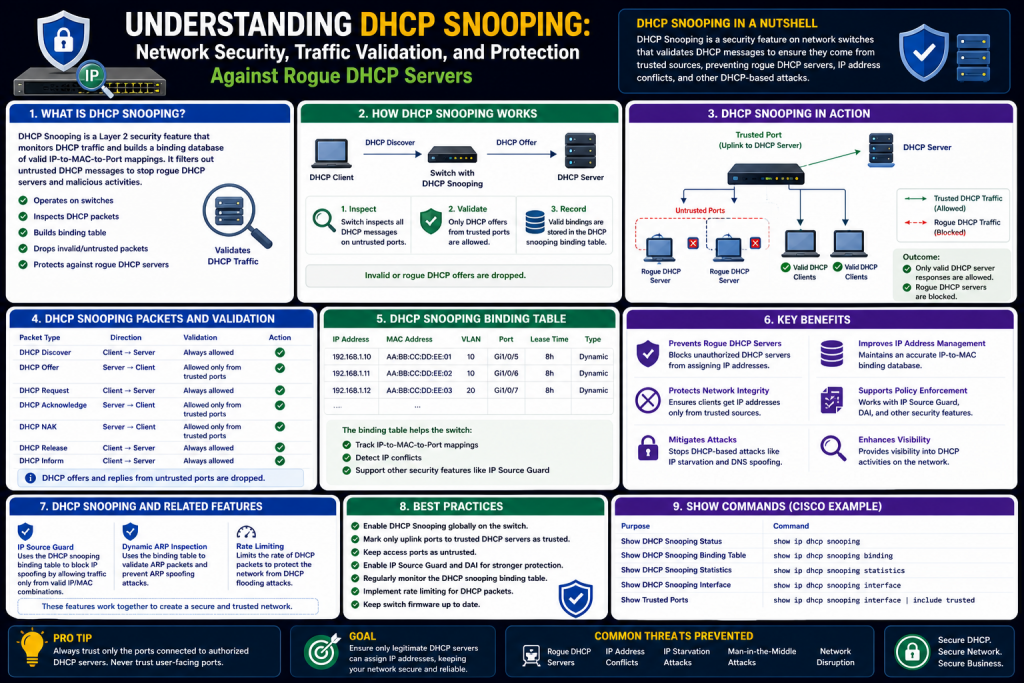
In modern networking environments, devices are expected to connect seamlessly and begin communicating almost instantly. This convenience is made possible through automated processes that handle configuration tasks behind the scenes. One of the most important of these processes is the assignment of IP addresses, which allows devices to identify themselves and communicate within a network. However, the same automation that simplifies connectivity also introduces potential vulnerabilities. DHCP snooping emerges as a critical feature designed to secure this process and protect networks from malicious interference.
DHCP snooping is a security mechanism implemented on network switches that monitors and controls DHCP traffic. Its primary purpose is to ensure that only authorized devices can assign IP addresses to clients. By doing so, it prevents attackers from exploiting weaknesses in the DHCP process to intercept or manipulate network communication. This feature is particularly valuable in environments where many users connect dynamically, such as corporate offices, educational institutions, and public networks.
Understanding DHCP snooping requires a deeper look at how networks operate and how devices obtain their configurations. By exploring these foundational concepts, it becomes easier to appreciate the importance of this security feature and the role it plays in maintaining network integrity.
The Importance of IP Address Assignment
Every device connected to a network requires a unique identifier known as an IP address. This address allows devices to send and receive data, ensuring that information reaches the correct destination. Without IP addresses, communication within a network would not be possible.
Assigning IP addresses manually is not practical in most environments, especially those with a large number of devices. Instead, networks rely on automated systems to handle this task. This automation not only saves time but also reduces the likelihood of configuration errors.
However, the process of assigning IP addresses is more than just a convenience. It is a fundamental aspect of network functionality. If this process is compromised, it can lead to serious issues such as connectivity problems, data breaches, and unauthorized access. Ensuring that IP addresses are assigned securely is therefore a top priority for network administrators.
How DHCP Simplifies Network Configuration
The Dynamic Host Configuration Protocol, commonly known as DHCP, is responsible for automating the assignment of IP addresses. When a device connects to a network, it communicates with a DHCP server to obtain the necessary configuration information.
This interaction follows a structured sequence. Initially, the device broadcasts a message indicating that it needs an IP address. The DHCP server responds with an offer, providing an available address along with other configuration details. The device then requests the offered address, and the server confirms the assignment.
This process happens quickly and without user intervention, allowing devices to connect effortlessly. DHCP also manages the allocation of addresses over time, ensuring that they are reused efficiently when devices disconnect.
While DHCP is highly effective at simplifying network management, it was not designed with strong security mechanisms. This limitation makes it susceptible to certain types of attacks, which can disrupt network operations or compromise user data.
The Lack of Authentication in DHCP
One of the key challenges with DHCP is the absence of authentication. When a device receives a response to its request for an IP address, it has no built-in way to verify whether the response came from a legitimate server.
This means that any device on the network can potentially respond to DHCP requests. If a malicious device responds faster than the legitimate server, it can trick clients into accepting incorrect configuration information.
This lack of verification creates an opportunity for attackers to exploit the DHCP process. By impersonating a legitimate server, they can influence how devices communicate within the network.
Addressing this vulnerability is essential for maintaining a secure networking environment. DHCP snooping provides a solution by introducing controls that restrict which devices can participate in the DHCP process.
Common Threats Targeting DHCP
The weaknesses in DHCP can be exploited in several ways. One of the most common threats is the use of rogue DHCP servers. In this scenario, an attacker sets up a device that responds to DHCP requests, pretending to be a legitimate server.
When clients accept the rogue server’s responses, they receive incorrect configuration settings. These settings may redirect traffic through the attacker’s device, allowing them to monitor or alter the data being transmitted.
Another threat is DHCP starvation. This involves overwhelming the legitimate DHCP server with a large number of requests. Each request consumes an available IP address, eventually exhausting the server’s pool. Once the pool is depleted, legitimate devices cannot obtain addresses, leading to connectivity issues.
After causing a denial of service through starvation, the attacker may introduce a rogue server to provide addresses, gaining control over the network.
These threats highlight the need for additional security measures to protect the DHCP process.
Real-World Implications of DHCP Attacks
The impact of DHCP-related attacks can be significant. In a corporate environment, they can lead to data breaches, loss of productivity, and damage to reputation. Sensitive information such as login credentials, emails, and financial data may be exposed.
In public networks, such as those found in cafes or libraries, users may unknowingly connect through malicious devices. This can result in identity theft, unauthorized access to accounts, and other forms of cybercrime.
Even in smaller networks, disruptions caused by DHCP attacks can affect everyday activities. Devices may lose connectivity, applications may fail to function, and troubleshooting can become complex.
These real-world consequences underscore the importance of implementing security features like DHCP snooping.
The Concept Behind DHCP Snooping
DHCP snooping works by monitoring DHCP messages as they pass through a network switch. It analyzes these messages and applies rules to determine whether they should be allowed or blocked.
The feature introduces the concept of trust within the network. Certain ports on the switch are designated as trusted, meaning they are allowed to send DHCP server messages. All other ports are considered untrusted and are restricted from sending such messages.
By enforcing this distinction, DHCP snooping ensures that only authorized servers can assign IP addresses. This prevents rogue devices from interfering with the DHCP process.
In addition to filtering traffic, DHCP snooping also records information about DHCP transactions. This information is stored in a binding table, which can be used for further security measures and troubleshooting.
Understanding Trusted and Untrusted Ports
The classification of ports is central to the operation of DHCP snooping. Trusted ports are typically those connected to legitimate DHCP servers or other network infrastructure devices. These ports are allowed to send DHCP offers and acknowledgments.
Untrusted ports are usually connected to end-user devices. These ports are not permitted to send DHCP server messages. If a device connected to an untrusted port attempts to act as a DHCP server, its messages are blocked by the switch.
This simple yet effective mechanism prevents unauthorized devices from distributing IP addresses. It also ensures that clients receive configuration information only from trusted sources.
Properly identifying and configuring trusted ports is essential for the successful implementation of DHCP snooping.
How DHCP Snooping Prevents Rogue Servers
When DHCP snooping is enabled, the switch inspects incoming DHCP messages and determines their origin. If a message originates from a trusted port, it is allowed to pass through. If it comes from an untrusted port and attempts to act as a server response, it is dropped.
This prevents rogue servers from sending offers or acknowledgments to clients. As a result, clients are forced to rely on legitimate servers for their configuration.
By blocking unauthorized messages at the switch level, DHCP snooping stops attacks before they can affect end devices. This proactive approach enhances overall network security.
Role of Rate Limiting in DHCP Snooping
In addition to filtering messages, DHCP snooping can limit the rate at which DHCP requests are sent from untrusted ports. This feature is particularly useful in preventing DHCP starvation attacks.
By restricting the number of requests per second, the switch ensures that no single device can overwhelm the DHCP server. If a device exceeds the configured limit, its traffic may be dropped or the port may be temporarily disabled.
Rate limiting helps maintain the availability of IP addresses and ensures that legitimate devices can connect to the network without interruption.
This capability adds another layer of protection, making DHCP snooping a comprehensive security solution.
Building a DHCP Snooping Binding Table
One of the advanced features of DHCP snooping is the creation of a binding table. This table contains records of devices that have successfully obtained IP addresses through the DHCP process.
Each entry in the table includes information such as the device’s MAC address, assigned IP address, lease time, and the port through which it is connected.
The binding table serves as a trusted database that can be used to verify network activity. It helps ensure that devices are using valid IP addresses and can assist in detecting anomalies.
For example, if a device attempts to use an IP address that does not match its binding entry, the switch can identify this as suspicious behavior.
Enhancing Network Security with DHCP Snooping
DHCP snooping is often used in combination with other security features to provide a layered defense strategy. By securing the IP address assignment process, it lays the foundation for additional protections.
It can support features that prevent IP address spoofing and unauthorized access. It also improves visibility into network activity, making it easier to identify and respond to potential threats.
In environments with a high number of users, such as campuses or enterprise networks, DHCP snooping plays a vital role in maintaining stability and security.
Challenges and Considerations
While DHCP snooping offers significant benefits, it must be implemented carefully. Misconfiguration can lead to issues such as legitimate DHCP traffic being blocked.
Since all ports are untrusted by default, failing to designate trusted ports can prevent devices from obtaining IP addresses. This can disrupt network connectivity and require troubleshooting.
Administrators must also consider the impact of rate limiting and ensure that it is set appropriately. Too strict a limit may affect normal operations, while too lenient a limit may not provide adequate protection.
Proper planning, testing, and monitoring are essential to ensure that DHCP snooping functions effectively.
Introduction to DHCP Snooping Configuration
After understanding the purpose and importance of DHCP snooping, the next step is learning how to implement it effectively within a network. Configuration is where theory meets practice, and even a powerful security feature like DHCP snooping can fail if it is not set up correctly. Network administrators must carefully define how the feature behaves, which devices are trusted, and how traffic is handled.
Configuring DHCP snooping is typically done on managed switches. These switches provide the ability to inspect, filter, and control traffic at a granular level. The configuration process involves enabling the feature, selecting the appropriate network segments, and defining trust boundaries.
While the steps themselves are relatively straightforward, the decisions behind those steps require a clear understanding of the network’s design. Each configuration choice affects how devices communicate and how secure the environment becomes.
Enabling DHCP Snooping on a Switch
The first step in implementing DHCP snooping is enabling it globally on the switch. This action activates the feature and prepares the device to begin monitoring DHCP traffic. Without this step, none of the other configurations will take effect.
Once enabled, the switch begins to recognize DHCP messages and apply filtering rules. However, at this stage, the feature is not fully functional because it does not yet know which parts of the network to monitor or which devices to trust.
Enabling DHCP snooping is often done through a command-line interface. This allows administrators to interact directly with the switch’s operating system and apply configurations with precision. While graphical interfaces may also be available, command-line configuration remains the most common approach in professional environments.
It is important to verify that the feature has been successfully enabled before proceeding. This can typically be done by checking the switch’s status or configuration output.
Specifying VLANs for DHCP Snooping
After enabling DHCP snooping globally, the next step is to specify which VLANs should be monitored. A VLAN, or virtual local area network, is a logical grouping of devices within a network. Different VLANs may serve different purposes, such as separating departments or isolating guest traffic.
DHCP snooping does not automatically apply to all VLANs. Administrators must explicitly define which VLANs should be included. This ensures that the feature is applied only where it is needed and avoids unnecessary processing on unrelated segments.
Selecting the correct VLANs is crucial. If a VLAN is not included in the configuration, devices within that VLAN will not benefit from DHCP snooping protection. On the other hand, including too many VLANs without proper planning can complicate management.
Administrators should carefully review their network topology and identify the VLANs where DHCP services are used. These VLANs should then be included in the DHCP snooping configuration.
Defining Trusted Ports
One of the most critical aspects of DHCP snooping configuration is defining trusted ports. Trusted ports are those that are allowed to send DHCP server messages, such as offers and acknowledgments.
Typically, these ports are connected to legitimate DHCP servers or to other network devices that relay DHCP traffic. By marking these ports as trusted, administrators ensure that valid DHCP responses can reach clients.
All other ports remain untrusted by default. This means they cannot send DHCP server messages. If a device connected to an untrusted port attempts to act as a DHCP server, its messages will be blocked.
Carefully identifying trusted ports is essential. Marking the wrong port as trusted could allow unauthorized devices to bypass security controls. Conversely, failing to mark a legitimate port as trusted could prevent clients from receiving IP addresses.
This step requires a clear understanding of the physical and logical connections within the network.
Handling Untrusted Ports
Untrusted ports are those connected to end-user devices, such as computers, phones, and printers. These ports are restricted from sending DHCP server messages, which prevents them from acting as rogue servers.
Even though untrusted ports are limited in what they can send, they are still allowed to forward legitimate DHCP requests from clients. This ensures that devices connected to these ports can still obtain IP addresses from trusted servers.
The switch monitors traffic on untrusted ports closely. Any attempt to send unauthorized DHCP messages is detected and blocked. This helps maintain the integrity of the DHCP process.
Administrators should ensure that all access ports, where user devices connect, are configured as untrusted. This creates a secure baseline for the network.
Verifying DHCP Snooping Configuration
Once the basic configuration is complete, it is important to verify that everything is working as expected. Verification helps identify errors and ensures that the network is operating correctly.
Switches typically provide commands that display the current DHCP snooping configuration. These commands show which VLANs are being monitored, which ports are trusted, and whether the feature is active.
By reviewing this information, administrators can confirm that their settings match the intended design. If discrepancies are found, adjustments can be made before they cause issues.
Verification should not be a one-time task. Regular checks help ensure that the configuration remains accurate as the network evolves.
Implementing Rate Limiting
Rate limiting is an important feature that enhances the effectiveness of DHCP snooping. It controls the number of DHCP messages that can be sent from an untrusted port within a specified time period.
This is particularly useful for preventing DHCP starvation attacks. In such attacks, a malicious device floods the network with requests in an attempt to exhaust the DHCP server’s address pool.
By limiting the rate of requests, the switch prevents any single device from overwhelming the server. If the rate exceeds the configured threshold, the switch may drop excess packets or take further action.
Setting the appropriate rate limit requires careful consideration. The limit should be high enough to accommodate normal network activity but low enough to detect abnormal behavior.
Administrators may need to monitor traffic patterns and adjust the limit over time to achieve the best balance.
Understanding the DHCP Snooping Binding Table
As DHCP snooping operates, it builds a binding table that records information about devices on the network. This table is a key component of the feature and provides valuable insights into network activity.
Each entry in the binding table includes details such as the device’s MAC address, assigned IP address, lease duration, and the port through which it is connected. This information is collected during the DHCP process and stored by the switch.
The binding table serves multiple purposes. It helps validate traffic, supports troubleshooting, and can be used by other security features. For example, it can assist in preventing IP spoofing by ensuring that devices use only the addresses assigned to them.
Maintaining an accurate binding table is essential for the effectiveness of DHCP snooping. Administrators should ensure that the table is properly maintained and updated.
Integration with Other Security Features
DHCP snooping does not operate in isolation. It is often used in conjunction with other network security features to provide comprehensive protection.
For instance, the information stored in the binding table can be used by features that enforce IP and MAC address consistency. This helps prevent unauthorized devices from impersonating others on the network.
By combining DHCP snooping with additional controls, administrators can create a layered security approach. Each layer addresses different types of threats, making the network more resilient.
This integration highlights the importance of DHCP snooping as part of a broader security strategy.
Best Practices for Deployment
Implementing DHCP snooping effectively requires following best practices. One of the most important practices is to plan the configuration carefully before applying it.
Administrators should document the network layout, identify DHCP servers, and determine which ports should be trusted. This preparation reduces the risk of errors during configuration.
Another best practice is to start with a limited deployment. Applying DHCP snooping to a small portion of the network allows administrators to test its behavior and make adjustments before expanding it.
Regular monitoring is also essential. By reviewing logs and observing network activity, administrators can detect potential issues and respond quickly.
Keeping backups of the switch configuration is another important step. In case of a failure or misconfiguration, a backup allows for quick restoration.
Monitoring Logs and Alerts
Switches generate logs that provide information about DHCP snooping activity. These logs can include details about blocked messages, rate limit violations, and configuration changes.
Monitoring these logs helps administrators identify suspicious behavior. For example, repeated attempts to send DHCP server messages from an untrusted port may indicate an attempted attack.
Integrating these logs with a centralized monitoring system can enhance visibility. Real-time alerts allow administrators to respond quickly to potential threats.
Effective log monitoring is a key part of maintaining a secure network.
Avoiding Common Configuration Mistakes
Despite its benefits, DHCP snooping can cause issues if not configured properly. One common mistake is failing to designate trusted ports. This can prevent legitimate DHCP servers from responding to clients, resulting in connectivity problems.
Another mistake is applying overly strict rate limits. This can interfere with normal network operations, especially in environments with high device turnover.
Misidentifying VLANs is another potential issue. If DHCP snooping is not enabled on the correct VLANs, some parts of the network may remain unprotected.
To avoid these problems, administrators should test configurations thoroughly and make incremental changes.
Scaling DHCP Snooping in Large Networks
In larger networks, implementing DHCP snooping requires careful planning. With multiple switches and VLANs, consistency becomes important.
Administrators should ensure that configurations are applied uniformly across devices. This helps maintain consistent behavior and simplifies management.
Automation tools can assist in deploying configurations at scale. These tools reduce manual effort and minimize the risk of errors.
Regular audits can also help ensure that the configuration remains accurate as the network grows and changes.
Maintaining Configuration Over Time
Networks are not static. Devices are added, removed, and relocated, and configurations must adapt accordingly. Maintaining DHCP snooping over time requires ongoing attention.
Administrators should review configurations პერიოდically and update them as needed. Changes in network topology may require adjustments to trusted ports or VLAN settings.
Keeping documentation up to date is also important. Accurate records help administrators understand the current state of the network and make informed decisions.
By maintaining the configuration, administrators ensure that DHCP snooping continues to provide effective protection.
Strengthening Network Resilience
DHCP snooping contributes to overall network resilience by preventing disruptions and protecting against attacks. By controlling the DHCP process, it ensures that devices can connect reliably and securely.
In addition to preventing malicious activity, it also helps identify and resolve issues more quickly. The visibility it provides allows administrators to diagnose problems and take corrective action.
A resilient network is one that can withstand challenges and continue to operate effectively. DHCP snooping plays a key role in achieving this goal.
Introduction to Advanced DHCP Snooping Concepts
Once DHCP snooping has been implemented and configured, the next step is understanding how to manage it effectively in real-world environments. Networks are constantly evolving, and administrators must be prepared to handle new challenges, unexpected behavior, and potential security threats. Advanced knowledge of DHCP snooping allows for better optimization, stronger protection, and more efficient troubleshooting.
This section explores deeper aspects of DHCP snooping, including how it interacts with other technologies, how to resolve common issues, and how to apply best practices that ensure long-term reliability. These insights are essential for maintaining a secure and stable network.
Understanding the DHCP Snooping Binding Database
A critical component of DHCP snooping is the binding database, often referred to as the binding table. This database stores information about devices that have successfully obtained IP addresses through the DHCP process.
Each entry typically includes the MAC address of the device, the assigned IP address, the VLAN, the port number, and the lease duration. This information is collected as DHCP transactions occur and is maintained by the switch.
The binding database is more than just a record of activity. It acts as a trusted source of information that can be used to validate network behavior. For example, if a device attempts to use an IP address that does not match its recorded entry, the system can identify this as suspicious.
Maintaining the accuracy of this database is essential. If entries become outdated or corrupted, it may affect the effectiveness of DHCP snooping and related security features.
Persistent Storage of Binding Information
In many environments, switches may reboot due to maintenance, updates, or unexpected failures. When this happens, volatile memory is cleared, and the binding database may be lost.
To address this, administrators can configure persistent storage for the binding database. This ensures that entries are saved to a file and can be restored after a reboot. Persistent storage helps maintain continuity and prevents disruptions in security enforcement.
Without persistent storage, the network may temporarily lose the ability to validate DHCP assignments, which could create a window of vulnerability. Therefore, enabling this feature is considered a best practice in most deployments.
Integration with Additional Security Mechanisms
DHCP snooping is often used as a foundation for other network security features. These features rely on the information stored in the binding database to enforce policies and detect anomalies.
For instance, certain mechanisms can prevent devices from using IP addresses that were not assigned to them. Others can ensure that MAC addresses remain consistent with their assigned IP addresses. These protections help prevent spoofing and unauthorized access.
By integrating DHCP snooping with other security tools, administrators can create a layered defense strategy. Each layer adds an additional level of protection, making it more difficult for attackers to compromise the network.
This integration highlights the importance of DHCP snooping as a core component of network security.
Detecting and Responding to Suspicious Activity
One of the key benefits of DHCP snooping is its ability to detect unusual behavior. By monitoring DHCP traffic and enforcing rules, it can identify patterns that may indicate an attack.
For example, repeated attempts to send DHCP server messages from an untrusted port may signal the presence of a rogue device. Similarly, an unusually high number of DHCP requests from a single device could indicate a starvation attack.
When such activity is detected, the switch may take action automatically. This could include dropping packets, limiting traffic, or disabling a port temporarily.
Administrators can also review logs to investigate incidents and determine the appropriate response. Quick detection and response are essential for minimizing the impact of potential threats.
Troubleshooting DHCP Snooping Issues
Despite its benefits, DHCP snooping can sometimes cause connectivity problems if not configured correctly. Troubleshooting these issues requires a systematic approach and a clear understanding of how the feature operates.
One of the most common issues is clients failing to obtain IP addresses. This often occurs when the port connected to the DHCP server has not been marked as trusted. Since untrusted ports cannot send DHCP server messages, the server’s responses are blocked.
Another issue may arise from incorrect VLAN configuration. If DHCP snooping is not enabled on the VLAN where the client resides, the feature will not function as expected.
Rate limiting can also cause problems if set too low. Legitimate DHCP traffic may be dropped, preventing devices from connecting.
To troubleshoot these issues, administrators can use diagnostic commands to view the current configuration and status. Examining logs can also provide clues about what is going wrong.
Resolving Misconfiguration Problems
Misconfiguration is one of the leading causes of DHCP snooping issues. Fortunately, most problems can be resolved by carefully reviewing and correcting the configuration.
The first step is to verify that DHCP snooping is enabled globally and on the correct VLANs. Next, administrators should confirm that the appropriate ports are marked as trusted.
It is also important to check rate limits and ensure they are set to reasonable values. If necessary, adjustments can be made based on observed traffic patterns.
Testing changes in a controlled environment can help prevent further issues. Once the configuration is corrected, devices should be able to obtain IP addresses normally.
Monitoring and Log Analysis
Continuous monitoring is essential for maintaining the effectiveness of DHCP snooping. Switches generate logs that record DHCP-related events, including blocked messages and rate limit violations.
By analyzing these logs, administrators can gain insights into network activity and identify potential issues. Logs can reveal patterns that may not be immediately apparent, such as repeated attempts to bypass security controls.
Integrating logs with centralized monitoring systems allows for real-time analysis and alerting. This enables administrators to respond quickly to emerging threats.
Effective monitoring not only enhances security but also improves overall network management.
Best Practices for DHCP Snooping Deployment
Implementing DHCP snooping successfully requires adherence to best practices. One of the most important practices is to plan the deployment carefully. This includes understanding the network topology, identifying DHCP servers, and determining which ports should be trusted.
Another best practice is to enable DHCP snooping incrementally. Starting with a small portion of the network allows administrators to test the configuration and make adjustments before expanding it.
Regular audits are also important. Reviewing configurations periodically ensures that they remain accurate and aligned with the network’s needs.
Backing up configurations is another critical step. Having a backup allows for quick recovery in case of errors or failures.
Importance of Documentation
Documentation plays a vital role in managing DHCP snooping. Keeping detailed records of configurations, trusted ports, and VLAN assignments helps administrators understand the current state of the network.
Good documentation makes it easier to troubleshoot issues, implement changes, and onboard new team members. It also provides a reference point for audits and compliance requirements.
Without proper documentation, managing DHCP snooping can become complex and error-prone.
Adapting to Network Changes
Networks are dynamic environments that evolve over time. Devices are added, removed, and relocated, and configurations must adapt accordingly.
When changes occur, administrators should review DHCP snooping settings to ensure they remain accurate. For example, adding a new DHCP server requires marking the corresponding port as trusted.
Similarly, changes in VLAN structure may require updates to the list of monitored VLANs.
By proactively adapting to changes, administrators can maintain the effectiveness of DHCP snooping and avoid disruptions.
Performance Considerations
While DHCP snooping enhances security, it also introduces additional processing on the switch. Monitoring and filtering traffic requires resources, and administrators must consider the impact on performance.
In most modern switches, the overhead is minimal and does not significantly affect performance. However, in large or high-traffic networks, it is important to ensure that the hardware can handle the additional load.
Optimizing configurations, such as limiting the number of monitored VLANs, can help reduce unnecessary processing.
Balancing security and performance is key to achieving optimal network operation.
Role in Enterprise and Public Networks
DHCP snooping is widely used in both enterprise and public network environments. In enterprises, it protects sensitive data and ensures reliable connectivity for employees and systems.
In public networks, such as those in cafes, airports, and educational institutions, it helps protect users from malicious activity. These environments are particularly vulnerable because they allow open access to many users.
By implementing DHCP snooping, administrators can provide a safer experience for users and reduce the risk of attacks.
Long-Term Benefits of DHCP Snooping
The benefits of DHCP snooping extend beyond immediate security improvements. Over time, it contributes to a more stable and manageable network.
By preventing unauthorized activity, it reduces the likelihood of disruptions and security incidents. This leads to improved user experience and lower maintenance costs.
The visibility provided by DHCP snooping also supports better decision-making. Administrators can use the insights gained to optimize network design and performance.
These long-term advantages make DHCP snooping a valuable investment for any organization.
Building a Comprehensive Security Strategy
While DHCP snooping is an important tool, it should not be the only security measure in place. A comprehensive strategy includes multiple layers of protection, each addressing different aspects of network security.
Firewalls, intrusion detection systems, and access controls all play a role in protecting the network. DHCP snooping complements these measures by securing the IP address assignment process.
By combining multiple security features, administrators can create a robust defense against a wide range of threats.
Conclusion
DHCP snooping is a powerful and practical security feature that plays a crucial role in protecting modern networks. By monitoring DHCP traffic, enforcing trust boundaries, and maintaining a binding database, it prevents unauthorized devices from interfering with the IP address assignment process.
Through proper configuration, ongoing monitoring, and adherence to best practices, DHCP snooping can significantly reduce the risk of attacks such as rogue DHCP servers and starvation. It also enhances network visibility and supports integration with other security mechanisms.
As networks continue to grow in complexity, the importance of securing foundational processes like DHCP becomes even more critical. DHCP snooping provides a reliable and effective solution, helping administrators maintain control, ensure stability, and protect users from potential threats.
Continue exploring the technologies and certification concepts that matter most to you.