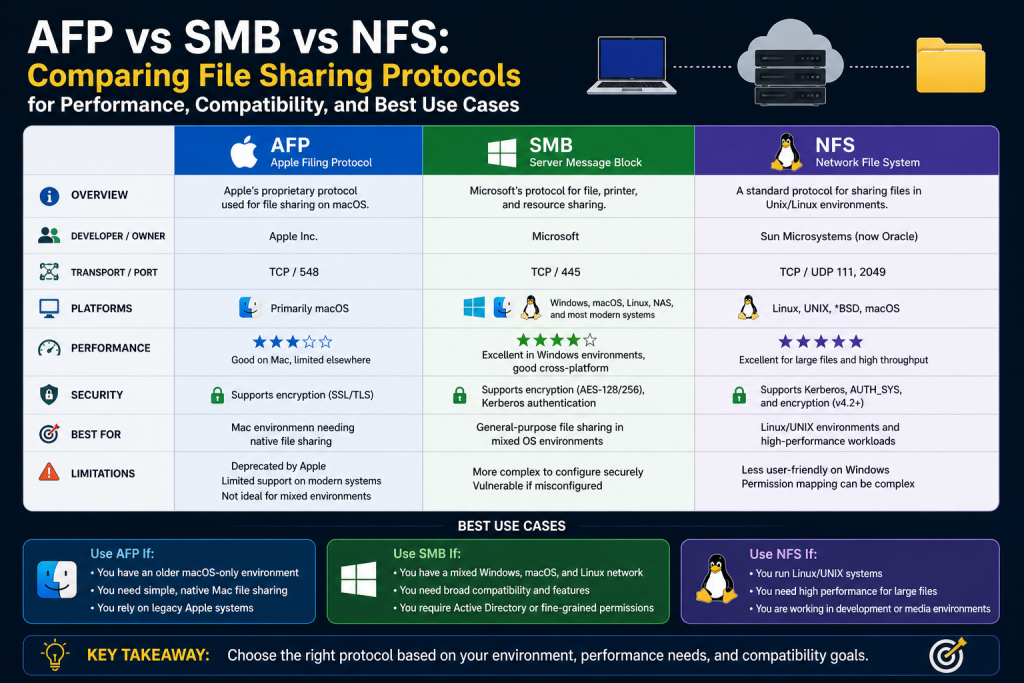
File sharing is one of the most essential functions in modern computing. From small home networks to large multinational enterprises, the ability to access and exchange files across systems is critical for productivity, collaboration, and data management. Over time, the methods used to share files have evolved significantly, moving from manual and physical processes to highly efficient, automated network-based systems.
In the early days of computing, file sharing was a manual task. Users relied on physical storage devices such as floppy disks, CDs, and later USB drives to transfer data between machines. This method, often referred to as SneakerNet, was simple but highly inefficient. It required physical movement, introduced risks of data loss or corruption, and was not scalable for environments where multiple users needed access to shared data.
As computer networks became more common, the need for a more efficient solution became clear. Organizations required a way to share files seamlessly across multiple systems without relying on physical media. This need led to the development of network-based file sharing protocols, which allow computers to communicate and exchange data over local area networks.
Today, file sharing is a core component of IT infrastructure. It enables teams to collaborate in real time, ensures consistent access to data, and supports a wide range of applications and services. Understanding how file sharing works—and the protocols that make it possible—is essential for anyone involved in managing or using networked systems.
Understanding the Difference Between File Transfer and File Sharing
Although the terms file transfer and file sharing are often used interchangeably, they represent different concepts. Recognizing the distinction between them is important for understanding how network protocols are used in different scenarios.
File transfer refers to the process of moving a file from one system to another. This is typically a one-time operation where a file is uploaded or downloaded. For example, when a user downloads a document from a website or uploads a file to a server, they are performing a file transfer. Protocols such as FTP and HTTP are commonly used for this purpose. These protocols are designed to handle the movement of data efficiently, but they do not provide ongoing access to files once the transfer is complete.
File sharing, on the other hand, involves providing continuous access to files stored on a remote system. Instead of copying files back and forth, users can open, edit, and save files directly on a shared server. This creates a more dynamic and collaborative environment, where multiple users can work with the same data simultaneously.
File sharing protocols are designed to support this type of interaction. They handle tasks such as managing file permissions, ensuring data consistency, and coordinating access among multiple users. This makes them essential for environments where collaboration and centralized data management are important.
The distinction between transfer and sharing also affects how systems are designed and secured. File transfer protocols are often used in situations where data needs to be moved between different locations, such as uploading files to a web server. File sharing protocols, by contrast, are used within networks to provide ongoing access to shared resources.
The Evolution of File Sharing Technologies
The development of file sharing technologies has been closely tied to the evolution of computer networks. As networks grew in size and complexity, the protocols used to share files had to adapt to meet new requirements.
In the early days, networks were small and often limited to a single office or department. File sharing solutions were simple and designed to work within these constrained environments. However, as organizations expanded and networks became more interconnected, the need for more robust and scalable solutions became apparent.
Different technology vendors developed their own approaches to file sharing, each tailored to their specific operating systems and user bases. Over time, three major protocols emerged as the most widely used solutions for network file sharing.
These protocols are Server Message Block, Network File System, and Apple Filing Protocol. Each of these protocols was designed with a particular environment in mind, and each has its own strengths and limitations.
The coexistence of these protocols reflects the diversity of computing environments. Organizations often use a mix of operating systems, and the choice of file sharing protocol can have a significant impact on performance, compatibility, and ease of management.
Server Message Block and Its Role in File Sharing
Server Message Block is one of the most widely used file sharing protocols in the world. It was originally developed to enable shared access to files and resources across a network, particularly in environments using early personal computers.
At its core, SMB allows client systems to request access to files, printers, and other resources hosted on a server. These requests are handled through a structured communication process, where the client sends a request and the server responds with the appropriate data or action.
One of the defining features of SMB is its integration with operating systems. Over time, it became closely associated with Windows environments, where it is used as the default file sharing protocol. This integration has contributed to its widespread adoption, as many organizations rely on Windows-based systems for their daily operations.
SMB has evolved significantly since its initial development. Early versions were limited in functionality and were designed for smaller networks. However, modern versions have introduced a wide range of features that make SMB suitable for large and complex environments.
These features include support for secure communication, advanced authentication methods, and improved performance. As a result, SMB is now capable of handling the demands of modern enterprise networks, where reliability and security are critical.
Key Characteristics of Modern SMB Implementations
Modern implementations of SMB have been designed to address the challenges of contemporary networking environments. One of the most important aspects of these implementations is security.
Security is a major concern in any networked environment, and file sharing protocols are no exception. Modern SMB versions include features such as encryption and message signing, which help protect data as it travels across the network. These features ensure that sensitive information remains secure, even in environments where network traffic may be intercepted.
Another important characteristic of SMB is its support for centralized authentication. In many organizations, user access is managed through directory services. SMB integrates with these services, allowing administrators to control access to shared resources based on user credentials. This simplifies management and helps enforce security policies.
Performance is also a key consideration. Modern SMB versions include optimizations that improve data transfer speeds and reduce latency. These improvements make it possible to use SMB in environments where large volumes of data need to be accessed quickly and efficiently.
In addition to these features, SMB supports a range of advanced capabilities, such as file locking and caching. File locking ensures that multiple users do not overwrite each other’s changes, while caching helps improve performance by storing frequently accessed data locally.
Network File System and Its Design Philosophy
Network File System represents a different approach to file sharing. It was developed to provide a simple and efficient way for systems to access files over a network, particularly in environments using UNIX and Linux operating systems.
One of the key principles behind NFS is simplicity. The protocol is designed to minimize overhead and provide fast access to files. This makes it well suited for environments where performance is a priority.
In NFS, files are shared as part of a distributed file system. This means that users can interact with remote files as if they were stored on their local machine. The system handles the details of network communication, allowing applications to operate without needing to know where the files are physically located.
This approach provides a high level of transparency, making it easier for users and applications to work with shared data. It also simplifies the development of applications that rely on file access, as they can use standard file operations without needing to account for network differences.
Performance and Efficiency in NFS Environments
One of the main advantages of NFS is its performance. The protocol is optimized for handling file operations efficiently, particularly in environments where there are frequent read and write requests.
NFS is especially effective when dealing with small, random file operations. This makes it a popular choice for development environments, where applications often need to access many small files quickly. It is also commonly used in research and engineering settings, where large datasets are processed and analyzed.
Another factor that contributes to the performance of NFS is its lightweight design. By minimizing the amount of overhead involved in file operations, NFS is able to deliver faster response times compared to more complex protocols.
Modern versions of NFS have introduced additional features to improve performance and reliability. These include support for parallel access and improved fault tolerance. These enhancements make NFS suitable for use in large-scale environments, where high availability is essential.
Despite these improvements, NFS is still most commonly associated with Linux and UNIX systems. Its design aligns closely with the needs of these environments, making it a natural choice for organizations that rely on open-source technologies.
Apple Filing Protocol and Its Historical Significance
Apple Filing Protocol was developed to support file sharing in Apple’s ecosystem. It was designed to provide a simple and user-friendly experience, particularly for users who were not familiar with complex networking concepts.
AFP was closely tied to Apple’s networking technologies, which emphasized ease of use and seamless integration. This made it particularly popular in creative industries, where users often worked with large media files and required reliable access to shared resources.
One of the strengths of AFP was its ability to handle metadata and resource forks, which are important features in macOS environments. This made it well suited for applications such as graphic design and video editing, where file attributes play a significant role.
However, as networking standards evolved, Apple began to move away from AFP. Modern macOS systems now use SMB as the default file sharing protocol. This shift reflects a broader trend toward standardization and interoperability.
Today, AFP is considered a legacy protocol. While it may still be used in older systems, it is no longer the preferred choice for new deployments. Organizations that continue to use AFP often do so for compatibility reasons, rather than as a primary solution.
The Importance of Choosing the Right Protocol
Selecting the appropriate file sharing protocol is a critical decision for any organization. The choice of protocol can affect performance, security, and compatibility, as well as the overall user experience.
Different environments have different requirements. In some cases, performance may be the primary concern, while in others, security or ease of management may take precedence. Understanding the strengths and limitations of each protocol is essential for making an informed decision.
Operating systems play a significant role in this decision. In environments dominated by Windows systems, SMB is often the most practical choice. In Linux or UNIX environments, NFS may be more suitable. In mixed environments, organizations may need to consider how different protocols can be integrated or whether a single protocol can meet all their needs.
Another important consideration is the future of the network. As technologies evolve, organizations need to ensure that their chosen protocol will continue to meet their needs. This includes considering factors such as scalability, support, and compatibility with emerging technologies.
By carefully evaluating these factors, organizations can choose a file sharing protocol that supports their current operations while also preparing them for future growth.
Introduction to Practical Protocol Selection
Choosing between different file sharing protocols is not simply a theoretical exercise. In real-world environments, decisions must be made based on practical requirements such as infrastructure, user behavior, performance expectations, and long-term maintainability. While SMB, NFS, and AFP each have their own strengths, their effectiveness depends heavily on how and where they are deployed.
Organizations rarely operate in perfectly uniform environments. Instead, they deal with a mixture of operating systems, applications, and user needs. This complexity makes protocol selection a strategic decision rather than a purely technical one. Understanding how these protocols perform in real scenarios helps organizations design systems that are both efficient and sustainable.
Enterprise Environments and Centralized Infrastructure
Large enterprises typically operate centralized IT infrastructures that include data centers, directory services, and managed client systems. In such environments, consistency and control are critical. Administrators need to manage thousands of users, enforce security policies, and ensure reliable access to shared resources.
In these settings, SMB is often the dominant protocol. Its integration with centralized authentication systems allows administrators to control access using a single set of credentials. This simplifies user management and reduces the complexity of maintaining separate authentication systems.
Another advantage in enterprise environments is SMB’s compatibility with a wide range of applications. Many business applications are designed to work seamlessly with SMB-based file shares, making it easier to deploy and manage software across the organization.
Performance is also an important consideration. Enterprise networks often include high-speed connections and advanced hardware, allowing SMB to deliver strong performance even under heavy workloads. Features such as caching and parallel processing help improve responsiveness, particularly when dealing with large files or multiple simultaneous users.
However, enterprises must also consider scalability. As organizations grow, their file sharing infrastructure must be able to handle increased demand. SMB’s support for distributed file systems and clustering makes it well suited for scaling across multiple servers.
Small and Medium Business Environments
Small and medium-sized businesses often face different challenges compared to large enterprises. They typically have fewer resources, smaller IT teams, and less complex infrastructure. As a result, simplicity and ease of deployment become key priorities.
In these environments, SMB is again a common choice due to its ease of use and widespread support. Many small businesses rely on Windows-based systems, making SMB a natural fit. Setting up shared folders and managing permissions can be done with minimal technical expertise, which is important for organizations without dedicated IT staff.
At the same time, small businesses may also use network-attached storage devices. These devices often support multiple protocols, including SMB and NFS, allowing businesses to choose the option that best fits their needs. In most cases, SMB is preferred because it provides better compatibility with common desktop operating systems.
Cost considerations also play a role. SMB-based solutions are often included as part of existing operating systems, reducing the need for additional software or licensing. This makes it a cost-effective option for organizations with limited budgets.
Creative and Design-Focused Workflows
Creative industries, such as graphic design, video production, and media editing, have unique requirements when it comes to file sharing. These environments often involve large files, such as high-resolution images and video footage, which require fast and reliable access.
Historically, AFP was widely used in these environments due to its strong integration with macOS. It provided features that were particularly useful for handling metadata and file attributes, which are important in creative workflows.
However, as macOS evolved, SMB became the preferred protocol even in Apple-centric environments. Modern implementations of SMB are capable of delivering the performance needed for large file transfers, while also providing compatibility with other operating systems.
In mixed environments where both macOS and Windows systems are used, SMB offers a unified solution that reduces complexity. Instead of maintaining separate file sharing systems, organizations can standardize on a single protocol that works across all devices.
Performance tuning is especially important in creative workflows. Network bandwidth, storage speed, and protocol configuration all play a role in ensuring smooth operation. Organizations often invest in high-speed networks and optimized storage systems to support these demands.
Linux and Development Environments
In environments dominated by Linux systems, NFS is often the preferred file sharing protocol. Its design aligns closely with the needs of developers and system administrators, making it a natural choice for these settings.
Development environments frequently involve tasks such as compiling code, running scripts, and accessing shared libraries. These tasks require fast and consistent file access, which NFS is well equipped to provide. Its efficiency in handling small, frequent file operations makes it particularly suitable for these workloads.
Another advantage of NFS in development environments is its integration with Linux permissions and tools. Administrators can manage access using familiar mechanisms, reducing the learning curve and simplifying system management.
Automation is also an important factor. Many development workflows rely on scripts and configuration management tools. NFS integrates well with these tools, allowing for automated deployment and management of shared resources.
In some cases, development teams may need to support multiple operating systems. While NFS is ideal for Linux systems, SMB may still be required to provide access for Windows or macOS users. This creates a hybrid environment where both protocols are used, requiring careful planning to ensure compatibility and security.
Hybrid Environments and Cross-Platform Compatibility
Modern organizations often operate hybrid environments that include a mix of operating systems and devices. These environments present unique challenges, as different systems may have different requirements and capabilities.
In such cases, cross-platform compatibility becomes a key consideration. SMB has emerged as a leading solution in this area due to its widespread support across multiple operating systems. It allows organizations to provide a consistent file sharing experience, regardless of the underlying platform.
However, hybrid environments may still require the use of multiple protocols. For example, a Linux-based backend system may use NFS for internal operations, while SMB is used to provide access to end users. This approach allows organizations to take advantage of the strengths of each protocol while maintaining overall compatibility.
Managing multiple protocols requires careful planning. Administrators must ensure that access controls are consistent and that data integrity is maintained across different systems. This often involves implementing centralized management tools and monitoring systems.
Performance Considerations in Different Scenarios
Performance is one of the most important factors in selecting a file sharing protocol. Different protocols have different performance characteristics, and their effectiveness can vary depending on the specific use case.
SMB is known for its versatility and ability to handle a wide range of workloads. It performs well in environments where large files are transferred and where advanced features such as caching and compression are beneficial.
NFS, on the other hand, excels in scenarios involving frequent, small file operations. Its lightweight design allows it to deliver fast response times, making it ideal for development and research environments.
Network conditions also play a significant role in performance. Factors such as latency, bandwidth, and packet loss can affect how well a protocol performs. Organizations must consider these factors when designing their network infrastructure.
Storage systems are another important consideration. The performance of a file sharing protocol is closely tied to the underlying storage hardware. High-performance storage systems can significantly improve the responsiveness of file sharing operations.
Deployment Strategies and Best Practices
Implementing a file sharing solution requires careful planning and execution. Organizations must consider factors such as network design, security, and user requirements when deploying file sharing protocols.
One of the first steps is to assess the needs of the organization. This includes identifying the types of files being shared, the number of users, and the expected workload. This information helps determine which protocol is best suited for the environment.
Network design is also critical. A well-designed network can improve performance and reliability, while a poorly designed one can lead to bottlenecks and downtime. Organizations should ensure that their network infrastructure is capable of supporting their file sharing requirements.
Security is another key consideration. File sharing systems must be protected against unauthorized access and data breaches. This involves implementing strong authentication mechanisms, encrypting data, and monitoring access to shared resources.
Testing and optimization are important parts of the deployment process. Organizations should test their file sharing systems under realistic conditions to identify potential issues and make necessary adjustments. This helps ensure that the system performs well in production.
Managing Complexity in Multi-Protocol Environments
In some cases, organizations may choose to use multiple file sharing protocols to meet different needs. While this approach can provide flexibility, it also introduces complexity.
Managing multiple protocols requires careful coordination. Administrators must ensure that users can access the resources they need without confusion or conflict. This may involve creating clear guidelines and providing training to users.
Consistency is also important. Access controls and security policies should be applied uniformly across all protocols to prevent gaps in security. This often requires the use of centralized management systems.
Monitoring and maintenance are ongoing responsibilities. Organizations must regularly review their file sharing systems to ensure that they continue to meet their needs. This includes updating software, addressing vulnerabilities, and optimizing performance.
The Role of Network Infrastructure in File Sharing
The effectiveness of any file sharing protocol depends heavily on the underlying network infrastructure. Even the most advanced protocol cannot perform well if the network is slow or unreliable.
High-speed networks are essential for modern file sharing. Technologies such as gigabit and fiber connections provide the bandwidth needed to handle large volumes of data. These technologies are particularly important in environments where large files are frequently accessed.
Latency is another important factor. Low latency ensures that file operations are performed quickly, improving the user experience. This is especially important for applications that require real-time access to data.
Reliability is also critical. Network outages can disrupt access to shared resources, affecting productivity and potentially leading to data loss. Organizations must implement measures to ensure network reliability, such as redundancy and failover mechanisms.
By investing in robust network infrastructure, organizations can maximize the performance and reliability of their file sharing systems.
Introduction to Security in File Sharing
As file sharing has become more central to modern computing, security has moved from being an optional consideration to an absolute necessity. Organizations are no longer just concerned with making files accessible—they must also ensure that access is controlled, monitored, and protected against a wide range of threats.
File sharing protocols such as SMB and NFS were originally designed for trusted local networks. In those early environments, security risks were relatively low because access was limited to internal users. However, today’s networks are far more complex. They often include remote users, cloud services, and connections over the public internet, all of which introduce new vulnerabilities.
This shift has forced file sharing protocols to evolve. Modern implementations now include features such as encryption, authentication, and access control. Even so, the responsibility for security does not rest solely on the protocol itself. It also depends on how the system is configured and managed.
Understanding the security implications of file sharing is essential for protecting sensitive data and maintaining the integrity of network systems.
Authentication and Access Control Mechanisms
One of the most important aspects of file sharing security is authentication. Authentication ensures that only authorized users can access shared resources. Without proper authentication, any user on the network could potentially gain access to sensitive data.
SMB provides strong support for authentication through integration with centralized directory services. This allows organizations to manage user identities and permissions from a single location. Users can be assigned roles and access rights, making it easier to enforce security policies.
NFS also supports authentication, but its approach has historically been simpler. Earlier versions relied heavily on client-side trust, which could create security risks in less controlled environments. Modern versions have introduced stronger authentication methods, improving overall security.
Access control is closely related to authentication. Once a user is authenticated, the system must determine what actions they are allowed to perform. This includes reading, writing, and modifying files. Properly configured access controls help prevent unauthorized changes and protect critical data.
Organizations must carefully design their access control policies to balance security and usability. Overly restrictive policies can hinder productivity, while overly permissive ones can expose sensitive information.
Encryption and Data Protection
Encryption plays a crucial role in protecting data as it moves across a network. Without encryption, data can be intercepted and read by unauthorized parties. This is especially important in environments where network traffic may pass through untrusted systems.
Modern SMB implementations include built-in encryption capabilities. These features ensure that data is protected during transmission, reducing the risk of interception. Encryption can be enabled at different levels, depending on the organization’s security requirements.
NFS has also introduced support for encryption in newer versions. While earlier implementations lacked this capability, modern configurations can provide secure communication channels. This makes NFS more suitable for environments where data protection is a priority.
Encryption is not limited to data in transit. Organizations must also consider data at rest. This involves securing the storage systems where files are kept. Combining encryption with proper access controls provides a comprehensive approach to data protection.
Risks of Exposing File Sharing Protocols to the Internet
One of the most common mistakes in network security is exposing file sharing protocols directly to the public internet. Protocols such as SMB and NFS were not designed for this purpose, and doing so can create significant security risks.
When these protocols are exposed to the internet, they become potential targets for attackers. Vulnerabilities in the protocol or its implementation can be exploited to gain unauthorized access to systems. This can lead to data breaches, malware infections, and other security incidents.
In addition to security risks, performance can also be affected. File sharing protocols are optimized for local networks, where latency is low and bandwidth is high. Over the internet, these conditions are not guaranteed, leading to slower performance and a degraded user experience.
To mitigate these risks, organizations should avoid exposing file sharing services directly to the internet. Instead, they should use secure methods for remote access.
Secure Remote Access Solutions
As remote work becomes more common, organizations need to provide secure access to shared files from outside the local network. This presents a challenge, as traditional file sharing protocols are not designed for direct use over the internet.
One common solution is the use of virtual private networks. A VPN creates an encrypted tunnel between the user and the organization’s network. This allows remote users to access file shares as if they were physically present on the local network.
Another approach is to use application-level solutions, such as web-based file access systems. These systems allow users to access files through a web browser, using secure protocols such as HTTPS. This approach reduces the need to expose internal file sharing services directly.
Cloud-based platforms have also become popular for remote file access. These platforms provide built-in security features and are designed to handle internet-based access. They offer an alternative to traditional file sharing protocols, particularly for organizations that are moving toward cloud infrastructure.
Each of these solutions has its own advantages and trade-offs. Organizations must choose the approach that best fits their needs, taking into account factors such as security, performance, and ease of use.
The Role of Virtual Private Networks in File Sharing
Virtual private networks play a central role in enabling secure remote access to file sharing systems. By encrypting network traffic, VPNs protect data from interception and ensure that users can connect to internal resources safely.
When a user connects to a VPN, their device becomes part of the organization’s network. This allows them to access file shares using the same protocols and tools as on-site users. From the user’s perspective, the experience is often seamless.
However, VPNs also introduce additional considerations. They require proper configuration and management to ensure security and performance. Poorly configured VPNs can become a weak point in the network, potentially exposing sensitive data.
Performance is another factor. Because VPN traffic is encrypted and routed through additional systems, it can introduce latency. Organizations must ensure that their network infrastructure can handle this additional load.
Despite these challenges, VPNs remain one of the most effective ways to provide secure remote access to file sharing systems.
Monitoring and Auditing File Access
Security does not end with authentication and encryption. Organizations must also monitor and audit access to shared files to detect and respond to potential threats.
Monitoring involves tracking user activity, such as which files are accessed and when. This information can be used to identify unusual behavior, such as unauthorized access attempts or large data transfers.
Auditing provides a record of file access and changes. This is important for compliance with regulations and for investigating security incidents. Detailed audit logs can help organizations understand what happened and take appropriate action.
Modern file sharing systems often include built-in monitoring and auditing features. These tools can generate alerts when suspicious activity is detected, allowing administrators to respond quickly.
Effective monitoring requires careful planning. Organizations must decide what information to collect and how to analyze it. They must also ensure that monitoring systems do not impact performance.
Data Integrity and Reliability
In addition to security, file sharing systems must ensure data integrity and reliability. Data integrity refers to the accuracy and consistency of data over time. Reliability refers to the system’s ability to provide continuous access to data.
File sharing protocols include mechanisms to maintain data integrity. For example, file locking prevents multiple users from making conflicting changes to the same file. This helps ensure that data remains consistent.
Reliability is achieved through redundancy and fault tolerance. Organizations often use multiple servers and storage systems to ensure that data remains accessible even in the event of hardware failures.
Backup and recovery systems are also essential. Regular backups protect against data loss caused by hardware failures, human error, or cyberattacks. Recovery systems ensure that data can be restored quickly when needed.
By combining these strategies, organizations can build file sharing systems that are both secure and reliable.
The Future of File Sharing Protocols
The landscape of file sharing continues to evolve as new technologies emerge. While SMB and NFS remain dominant, they are being adapted to meet the needs of modern environments.
One major trend is the shift toward cloud computing. Many organizations are moving their data and applications to the cloud, where file sharing is handled by cloud-based services. These services often use different protocols and technologies, but they build on the same principles as traditional file sharing.
Another trend is the increasing importance of security. As cyber threats become more sophisticated, file sharing protocols must continue to evolve to provide stronger protection. This includes improvements in encryption, authentication, and monitoring.
Interoperability is also becoming more important. Organizations want solutions that work seamlessly across different platforms and environments. This has contributed to the growing adoption of SMB as a standard protocol.
At the same time, specialized use cases will continue to rely on protocols such as NFS. Its performance and efficiency make it well suited for certain workloads, ensuring that it remains relevant in the future.
Balancing Simplicity and Complexity
One of the ongoing challenges in file sharing is balancing simplicity and complexity. Organizations want systems that are easy to use and manage, but they also need advanced features to meet their requirements.
Simplifying file sharing often involves standardizing on a single protocol. This reduces the complexity of managing multiple systems and makes it easier for users to access shared resources.
However, in some cases, complexity is unavoidable. Organizations may need to support multiple protocols to meet different needs. This requires careful planning and management to ensure that systems remain secure and efficient.
The key is to strike the right balance. By understanding their requirements and choosing the appropriate tools, organizations can build file sharing systems that are both effective and manageable.
Conclusion
File sharing protocols such as SMB, NFS, and AFP have played a crucial role in the development of modern computing. Each protocol was designed to meet the needs of a specific environment, and each has evolved over time to address new challenges.
Today, SMB and NFS dominate the landscape, providing reliable and efficient solutions for a wide range of use cases. AFP, while still present in some legacy systems, has largely been replaced by more modern alternatives.
Security has become a central concern in file sharing. Organizations must implement strong authentication, encryption, and monitoring to protect their data. At the same time, they must ensure that systems remain accessible and easy to use.
Remote access has introduced new challenges, requiring the use of secure solutions such as VPNs and cloud-based platforms. These technologies allow users to access shared files from anywhere while maintaining security.
Looking ahead, file sharing will continue to evolve as new technologies emerge. Cloud computing, increased security requirements, and the need for interoperability will shape the future of file sharing protocols.
Ultimately, choosing the right protocol depends on understanding the specific needs of the environment. By carefully evaluating these needs and implementing best practices, organizations can create file sharing systems that support productivity, collaboration, and long-term growth.
Continue exploring the technologies and certification concepts that matter most to you.