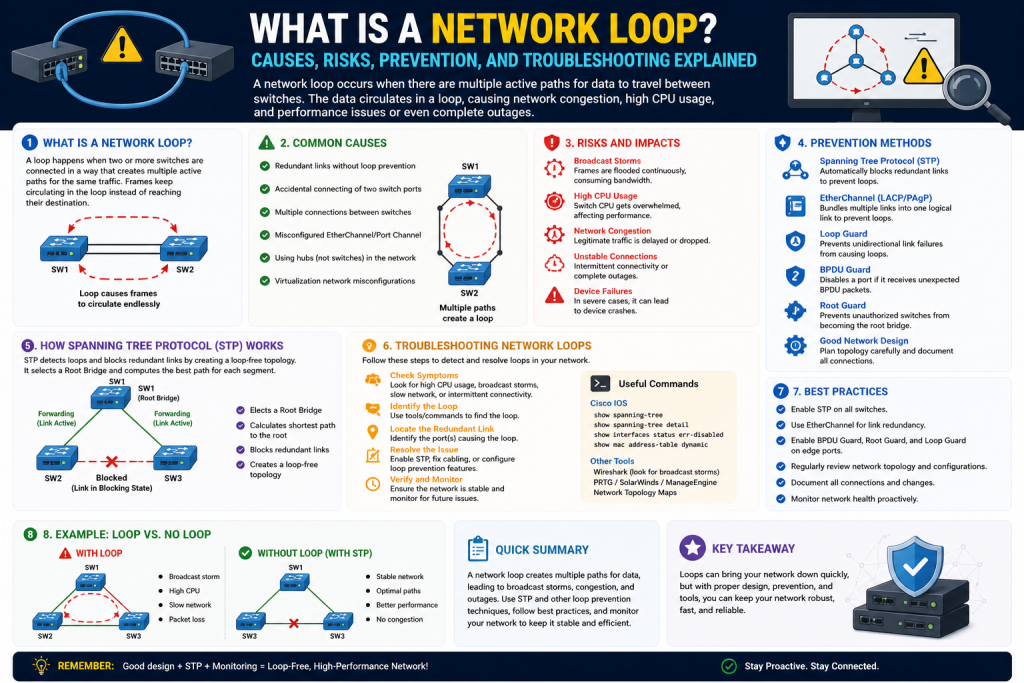
Modern computer networks are built around one essential purpose: moving data efficiently from one point to another. Whether an organization operates a small office network, a global enterprise infrastructure, or a cloud-connected data center, every network depends on predictable communication paths. Devices such as switches, routers, access points, and firewalls all work together to ensure that information reaches its intended destination quickly and accurately.
However, networks do not always behave as planned. One of the most dangerous and disruptive issues that can occur is a network loop. A network loop happens when data packets circulate repeatedly through a network without reaching a final endpoint, creating endless traffic cycles that consume bandwidth, overwhelm devices, and potentially bring communication to a halt.
At first glance, a network loop may seem like a minor routing mistake, but in reality, loops can escalate rapidly into major outages. A single unintended loop can trigger widespread congestion, create broadcast storms, overload switch processors, destabilize routing tables, and shut down business operations. In severe cases, an unmanaged loop can collapse an entire network segment within seconds.
Understanding network loops is a fundamental skill for network administrators, engineers, cybersecurity professionals, and anyone pursuing networking certifications. To manage modern infrastructures effectively, professionals must know how loops form, why redundancy can both help and hurt, how loops differ across network layers, and why proper design is essential for stability.
This section explores the foundations of network loops by explaining what they are, why they happen, the role of redundancy, common causes, and the major variations found across networking environments.
What Is a Network Loop?
A network loop occurs when packets continue traveling through interconnected devices in a repeating cycle instead of reaching a destination or being discarded properly.
Imagine a network where Switch A connects to Switch B, Switch B connects to Switch C, and due to a misconfiguration, Switch C sends traffic back to Switch A. If no prevention mechanism exists, packets may continue moving in circles indefinitely.
Unlike humans, network devices do not “realize” they are repeating the same path unless protocols are designed to detect and stop such behavior. Packets simply follow forwarding rules, MAC tables, or routing tables. If those rules create circular paths, the result is endless traffic repetition.
This can happen in multiple ways:
- A switch forwarding broadcast traffic repeatedly
- Routers passing packets between one another due to inconsistent routes
- VLAN misconfigurations creating redundant forwarding paths
- Incorrect protocol metrics causing unstable route decisions
The result is unnecessary packet duplication, wasted bandwidth, and severe performance degradation.
Why Redundancy Creates Both Protection and Risk
Redundancy is a key principle in network design. Networks often include backup links so communication can continue if one path fails.
For example:
- Dual uplinks between switches
- Multiple router paths to the same destination
- Backup WAN circuits
- High-availability core architectures
These redundant links improve fault tolerance, but they also introduce loop potential.
Without redundancy:
- A failed link can disconnect users
With redundancy but no loop prevention:
- Traffic may circulate endlessly
This creates a paradox in networking:
Redundancy increases resilience, but unmanaged redundancy increases loop risk.
Because enterprise networks prioritize uptime, they often include many interconnected pathways. Protocols must therefore balance availability with path control. This is why loop prevention technologies are central to professional networking.
The Core Mechanics Behind a Loop
To understand loops, it is helpful to examine packet forwarding behavior.
Network devices make forwarding decisions based on:
- MAC addresses at Layer 2
- IP routes at Layer 3
- VLAN segmentation
- Spanning-tree states
- Routing protocol metrics
If forwarding information becomes inconsistent, traffic may be sent in circles.
For example:
- Switch A receives a broadcast frame
- Switch A forwards it to Switch B
- Switch B forwards it to Switch C
- Switch C forwards it back to Switch A
- The cycle repeats
Since broadcast traffic is designed for wide distribution, repeated broadcasts can multiply exponentially.
This is particularly dangerous because:
- Ethernet frames lack a TTL field at Layer 2
- Frames may persist until manually interrupted
- MAC tables can become unstable
- Devices repeatedly relearn addresses from multiple directions
At Layer 3, IP packets usually have TTL protection, but routing loops can still waste resources until TTL expires.
Layer 2 vs Layer 3 Network Loops
Not all loops are identical. Understanding the distinction between Layer 2 and Layer 3 loops is essential.
Layer 2 Network Loops
Layer 2 loops occur in switching environments, often due to redundant Ethernet paths without proper Spanning Tree Protocol protection.
Common causes:
- Multiple physical switch connections
- Disabled STP
- Misconfigured trunk links
- Incorrect bridge priorities
- Broadcast forwarding duplication
Layer 2 loops are especially dangerous because Ethernet broadcasts and unknown unicast traffic can multiply rapidly.
Effects include:
- Broadcast storms
- MAC address instability
- Switch CPU overload
- VLAN disruption
Layer 3 Network Loops
Layer 3 loops involve routers repeatedly forwarding packets because of routing table inconsistencies.
Common causes:
- Incorrect static routes
- Routing protocol convergence failures
- Misconfigured OSPF
- EIGRP metric inconsistencies
- Route redistribution errors
Unlike Layer 2 loops, Layer 3 loops are often limited by TTL, but they still waste resources and create latency.
Effects include:
- Delayed traffic
- Packet drops
- High router CPU utilization
- Routing instability
Broadcast Storms and Their Relationship to Loops
A broadcast storm is one of the most destructive consequences of a Layer 2 loop.
Broadcast traffic is intended for all devices within a broadcast domain. Examples include:
- ARP requests
- DHCP discovery
- Certain service advertisements
In a healthy network, broadcasts are controlled. In a looped network, each switch forwards broadcasts repeatedly, multiplying them.
For example:
One broadcast becomes:
1 → 2 → 4 → 8 → 16 → 32 copies
This exponential growth can saturate network links almost instantly.
Broadcast storms can:
- Consume all available bandwidth
- Crash switches
- Interrupt VoIP
- Prevent DHCP assignment
- Disconnect endpoints
Because of this, preventing loops is not just about avoiding inefficiency—it is about avoiding catastrophic network collapse.
MAC Address Table Instability
Switches use MAC address tables to map device addresses to physical ports.
When loops occur:
- The same MAC address may appear on multiple ports
- Switches continuously relearn locations
- Tables become unstable
This is known as MAC flapping.
Example:
A switch sees MAC address X on Port 1, then Port 2, then Port 3 repeatedly.
Consequences:
- Incorrect forwarding
- Increased flooding
- Security concerns
- Performance degradation
MAC instability is often one of the earliest warning signs of a Layer 2 loop.
Common Causes of Network Loops
Several technical and human factors contribute to loop formation.
Physical Cabling Mistakes
A technician may accidentally connect:
- Two switch ports together
- Redundant links without STP
- Incorrect patch panel paths
Even a simple cable mistake can create immediate loops.
Protocol Misconfiguration
Examples:
- STP disabled
- Wrong root bridge priority
- Misconfigured EtherChannel
- Improper VLAN trunking
Routing Errors
Examples:
- Static route recursion
- OSPF adjacency issues
- Route redistribution mistakes
- Administrative distance conflicts
Device Failure
Switches or routers may malfunction and forward improperly.
Unauthorized Devices
A user connecting a consumer-grade switch can accidentally introduce loops.
Network Topology Complexity
Large infrastructures increase the risk of:
- Hidden loops
- Overlooked redundancy
- Mismanaged failover paths
The Hidden Danger of Temporary Loops
Not all loops are constant. Some appear only during:
- Topology changes
- Link failover
- Device reboot
- STP recalculation
- Routing convergence
Temporary loops can still cause:
- Packet bursts
- Voice drops
- Session interruptions
- Application instability
These intermittent issues are often harder to diagnose because they disappear before administrators identify them.
How Network Size Influences Loop Severity
Small office networks:
- Fewer devices
- Easier troubleshooting
- Lower blast radius
Enterprise networks:
- More VLANs
- Multiple switches
- Data center paths
- WAN integration
As scale increases:
- Loop detection becomes harder
- Broadcast domains expand
- Root cause analysis becomes more complex
In cloud-integrated or software-defined environments, loops may also involve virtual switching layers, making prevention even more critical.
Why Loops Matter for Certification and Career Development
Understanding loops is foundational for:
- CCNA
- CCNP
- Network+
- Security+
- Systems administration
Professionals are expected to:
- Identify symptoms
- Configure STP
- Prevent broadcast storms
- Troubleshoot routing loops
- Design resilient topologies
A network administrator who understands loops is better equipped to maintain uptime, optimize infrastructure, and protect organizational productivity.
Real-World Analogy: Traffic Roundabouts Without Exits
A useful analogy is city traffic.
Imagine cars entering a circular highway with no exit signs.
Cars continue driving endlessly.
More cars enter.
Congestion builds.
Eventually, all movement stops.
This is how loops impact digital traffic.
Packets:
- Enter
- Repeat
- Multiply
- Consume pathways
- Prevent legitimate traffic
Just as transportation systems need traffic lights and road design, networks require protocols and architecture to prevent endless circulation.
The Relationship Between Loops and Network Performance
When loops exist, network performance suffers in multiple dimensions:
Bandwidth:
Repeated traffic consumes capacity.
Latency:
Packets take longer paths.
Jitter:
Voice and video become unstable.
Packet Loss:
Buffers overflow.
Device Health:
CPU and memory resources spike.
Security:
Monitoring systems may fail.
This is why loops are considered both operational and security concerns.
Loop Prevention Begins with Awareness
Many network loops are preventable through:
- Proper design
- Standardized configuration
- Documentation
- Monitoring
- Protocol implementation
But prevention starts with understanding.
Network professionals must recognize that:
Every redundant link is a potential asset or liability.
The difference depends on whether proper controls exist.
Key Technologies Introduced by Loop Prevention
Although explored in more depth later, several technologies are central:
- Spanning Tree Protocol (STP)
- Rapid STP (RSTP)
- Multiple STP (MSTP)
- BPDU Guard
- Root Guard
- Loop Guard
- VLAN segmentation
- Dynamic routing controls
These systems do not eliminate redundancy.
They manage it safely.
Introduction to the Real-World Impact of Network Loops
Understanding what a network loop is provides only the foundation. The greater challenge for network professionals is recognizing how loops affect real environments once they occur. A network loop is not simply a technical flaw hidden inside switch configurations or routing tables—it is a force that can rapidly degrade communication, interrupt business operations, and trigger widespread infrastructure instability.
In practical terms, network loops can transform a healthy, high-performing network into a congested, unstable, and often unusable system. Their effects can range from subtle intermittent packet loss to catastrophic outages that impact every connected device. Some loops begin as small, almost invisible inefficiencies before escalating into severe disruptions, while others can collapse network segments within moments.
This is why network administrators, engineers, and IT decision-makers must understand not only how loops form but also how they manifest operationally. The symptoms of loops are often mistaken for unrelated issues such as slow internet, hardware failure, DNS delays, or overloaded servers. Without proper diagnosis, troubleshooting can become lengthy and expensive.
This section explores the operational consequences of network loops in detail, including congestion, broadcast storms, latency, packet loss, MAC instability, routing failures, financial impact, and troubleshooting challenges.
The Immediate Effect: Bandwidth Congestion
The first and most obvious consequence of a network loop is congestion.
Bandwidth represents the communication capacity of a network link. Under normal conditions, that bandwidth is shared among legitimate applications such as:
- File transfers
- Voice calls
- Video conferencing
- Cloud services
- Authentication traffic
When a loop occurs, packets are duplicated or repeatedly forwarded, consuming bandwidth with useless traffic.
For example:
A single broadcast frame can be copied repeatedly across multiple switches, creating thousands or millions of unnecessary transmissions.
This excessive traffic competes directly with valid business communication.
The result:
- Slow file transfers
- Delayed application response
- Interrupted cloud access
- Failed logins
- Session timeouts
Congestion from loops is particularly dangerous because it often grows exponentially. Unlike ordinary high traffic caused by legitimate usage, loop traffic creates self-sustaining overload.
How Broadcast Storms Develop
A broadcast storm is one of the most severe outcomes of a Layer 2 loop.
Broadcast traffic is necessary for network functions like:
- ARP requests
- DHCP discovery
- Service announcements
Normally, broadcast frames are distributed to all devices in a VLAN or broadcast domain once.
In a loop:
- Switch A forwards broadcast traffic
- Switch B receives and forwards it
- Switch C forwards it again
- Switch A receives the same traffic and repeats the cycle
This process multiplies traffic rapidly.
Example:
One frame becomes:
1 → 2 → 4 → 8 → 16 → 32
Within seconds:
- Link saturation occurs
- Switches overload
- Devices become unreachable
Broadcast storms are particularly destructive because Layer 2 frames do not inherently expire like Layer 3 packets with TTL values.
Symptoms of a Broadcast Storm
Common signs include:
- Entire network slowdown
- Flashing switch LEDs at maximum activity
- DHCP failures
- VoIP call drops
- ARP table issues
- Network-wide packet loss
- Sudden outages
Administrators may initially suspect malware or DDoS attacks because the symptoms appear similarly overwhelming.
Latency: The Silent Performance Killer
Latency is the delay between sending and receiving data.
Even before a network loop creates total failure, it often increases latency dramatically.
Why latency rises:
- Packets compete for congested bandwidth
- Switches process duplicate traffic
- Routing decisions become unstable
- Buffers fill faster
Latency-sensitive applications are especially vulnerable:
- Voice over IP
- Video conferencing
- Remote desktop
- Online gaming
- Financial transactions
In voice communication, excessive latency produces:
- Echo
- Delays
- Choppy audio
- Dropped calls
In enterprise settings, high latency can reduce employee productivity and disrupt customer-facing services.
Jitter and Real-Time Application Instability
Jitter refers to inconsistent packet arrival timing.
Loops create jitter because:
- Some packets arrive quickly
- Others are delayed
- Some are duplicated
- Others are dropped
This inconsistency can devastate:
- Zoom meetings
- Microsoft Teams
- SIP phones
- Live streaming
- Remote surgery systems
- Industrial automation
Jitter is particularly frustrating because average bandwidth may appear sufficient while performance remains poor.
Packet Loss and Retransmissions
As network devices become overwhelmed, packet loss becomes common.
Why packets are dropped:
- Interface queues overflow
- Buffers exceed capacity
- Routing paths fail
- Duplicate packets crowd out valid traffic
Packet loss triggers retransmissions in protocols like TCP.
This creates another dangerous cycle:
- Loop creates congestion
- Congestion causes packet loss
- Packet loss triggers retransmission
- Retransmissions increase congestion
This amplifies instability even further.
Consequences:
- Failed downloads
- Corrupt sessions
- Interrupted backups
- Authentication failures
- Poor database performance
MAC Address Table Instability and MAC Flapping
Switches maintain MAC address tables to map device addresses to physical interfaces.
When loops exist:
- The same MAC appears from multiple directions
- Switches repeatedly relearn the address
- Forwarding decisions become inconsistent
This is called MAC flapping.
Example:
A switch sees:
Device A → Port 1
Then:
Device A → Port 2
Then:
Device A → Port 1 again
Consequences:
- Frames sent to wrong ports
- Increased flooding
- Security alerts
- Troubleshooting confusion
MAC flapping often appears in logs before administrators realize a loop exists.
CPU and Memory Overload on Networking Devices
Switches and routers are not unlimited processing machines.
Loops force devices to:
- Process duplicate frames
- Update MAC tables repeatedly
- Recalculate routes
- Handle protocol instability
This increases:
- CPU utilization
- Memory consumption
- Interface buffer usage
When CPU overload occurs:
- Management interfaces freeze
- SSH becomes inaccessible
- SNMP monitoring fails
- Logging becomes delayed
This is dangerous because the very tools needed to diagnose the issue may become unavailable.
Layer 3 Routing Loops and Their Operational Effects
Routing loops differ from Layer 2 loops but can still create serious disruption.
In Layer 3 loops:
Routers repeatedly forward packets due to incorrect route knowledge.
Although TTL eventually drops packets, resources are still wasted.
Effects:
- WAN congestion
- Slow inter-site communication
- MPLS instability
- VPN degradation
- Cloud access interruptions
Routing loops can be especially damaging in geographically distributed organizations where branch offices rely on centralized services.
Impact on Security Systems
Security tools depend on stable network performance.
Loops can disrupt:
- Firewalls
- IDS/IPS
- SIEM logging
- Endpoint detection
- Authentication servers
Consequences:
- Missed alerts
- Delayed threat detection
- Logging gaps
- Policy enforcement failure
In some cases, loop conditions can accidentally create blind spots that attackers exploit.
Service Outages and Business Downtime
Modern businesses depend on network uptime for:
- Sales systems
- Payment processing
- Communication
- Inventory management
- Remote work
- Customer support
A network loop can halt:
- POS systems
- ERP platforms
- CRM tools
- SaaS applications
Financial consequences may include:
- Lost sales
- Missed deadlines
- Contract penalties
- Customer dissatisfaction
- Brand damage
For hospitals, logistics, or industrial systems, downtime may affect safety as well as profitability.
Hidden Loops and Intermittent Problems
Not all loops are catastrophic immediately.
Some loops remain hidden and cause:
- Random slowdowns
- Periodic disconnections
- VLAN-specific instability
- Occasional VoIP glitches
These “gray failures” are harder to detect because:
- Symptoms appear inconsistent
- Reboots temporarily mask issues
- Monitoring may miss brief events
Hidden loops often persist longer and cause chronic inefficiency.
Troubleshooting Challenges
Diagnosing loops can be difficult because symptoms mimic:
- Malware
- Hardware failure
- ISP issues
- Server overload
- DNS problems
Administrators often investigate:
- Routers
- Firewalls
- Endpoints
- WAN links
When the true issue is Layer 2 switching.
Effective troubleshooting often requires:
- Switch logs
- STP status
- MAC table analysis
- Packet captures
- Interface counters
Without loop awareness, troubleshooting time increases dramatically.
Human Error and Organizational Risk
Many loops result from simple mistakes:
- Incorrect patch cables
- Consumer switches
- STP disabled
- VLAN mismatch
- Improper EtherChannel
This highlights an important truth:
Technical complexity is only part of the problem—operational discipline matters equally.
Organizations lacking:
- Documentation
- Change control
- Network diagrams
- Access policies
are more vulnerable.
Case Example: A Single Cable, Major Outage
Imagine:
A user plugs both ends of a patch cable into two wall ports connected to the same switch infrastructure.
Result:
- Immediate Layer 2 loop
- Broadcast storm
- Entire floor loses connectivity
This demonstrates how even non-experts can unintentionally trigger severe disruptions.
Impact on Cloud and Virtualized Environments
Virtualization introduces additional loop risks through:
- Virtual switches
- Hypervisors
- Overlay networks
- SDN policies
Loops can now exist:
- Physically
- Virtually
- Across hybrid environments
This increases complexity and expands troubleshooting scope.
Psychological and Operational Pressure on IT Teams
When loops occur:
- Help desk tickets surge
- Leadership demands answers
- Users lose productivity
- Pressure escalates quickly
Rapid diagnosis becomes essential not only technically but organizationally.
Monitoring Indicators That Suggest Loops
Common warning signs:
- Sudden traffic spikes
- High broadcast percentages
- MAC flapping logs
- STP topology changes
- Interface saturation
- Duplicate IP symptoms
- Switch CPU spikes
Proactive monitoring reduces response time.
Why Loop Awareness Improves Professional Value
Professionals who can recognize and resolve loops quickly are highly valuable because they:
- Reduce downtime
- Protect infrastructure
- Improve resilience
- Prevent recurring outages
- Strengthen architecture
This is why loop troubleshooting remains central to certifications and enterprise roles.
Introduction to Network Loop Prevention
Understanding what network loops are and recognizing their consequences is only part of building reliable infrastructure. The true mark of a skilled network administrator is not merely the ability to troubleshoot loops after damage begins, but the ability to prevent them before they ever impact production systems.
Modern networks are intentionally built with redundancy. Multiple switches, failover paths, backup uplinks, VLAN segmentation, cloud integrations, wireless controllers, and software-defined environments all rely on interconnected designs that prioritize uptime. Without redundancy, networks are fragile. But without proper loop prevention, redundancy can become a major liability.
This is why network loop prevention is one of the most critical responsibilities in networking. Preventing loops requires a combination of protocol knowledge, configuration discipline, physical design awareness, monitoring tools, and organizational processes.
Among all prevention mechanisms, Spanning Tree Protocol (STP) remains the foundational technology for Layer 2 loop prevention. However, STP alone is not enough for modern infrastructures. Additional tools such as Rapid Spanning Tree, BPDU Guard, Loop Guard, Root Guard, VLAN segmentation, routing controls, and network design strategies all contribute to creating a stable and resilient architecture.
This section explores how network professionals proactively prevent loops, why STP is so essential, what advanced protections exist, and how best practices create long-term network health.
Why Prevention Matters More Than Repair
A network loop can spread rapidly, often within seconds.
By the time users report:
- Slow internet
- Dropped calls
- Failed applications
- Wi-Fi issues
The loop may already be causing widespread instability.
Reactive troubleshooting is important, but prevention is better because:
- Downtime is avoided
- Business continuity is protected
- Security tools remain operational
- User trust is preserved
- Financial loss is minimized
The most effective network environments are designed to assume mistakes will happen and include safeguards that minimize damage automatically.
Spanning Tree Protocol (STP): The Foundation of Layer 2 Loop Prevention
Spanning Tree Protocol was designed specifically to prevent Layer 2 loops in Ethernet networks.
Its primary goal:
Create a loop-free logical topology while preserving physical redundancy.
In simpler terms:
STP allows redundant cables and backup paths to exist, but it blocks certain paths unless they are needed.
Without STP:
Multiple switch connections may create loops.
With STP:
Only one active forwarding path exists between devices, while backup paths remain ready.
How STP Works
STP operates by electing a central reference point called the Root Bridge.
The process:
- Switches exchange Bridge Protocol Data Units (BPDUs)
- The switch with the best bridge ID becomes Root Bridge
- Each non-root switch calculates the best path to the root
- Redundant paths are identified
- Some ports are placed into blocking states
This creates a tree structure rather than a looped mesh.
Key STP Port Roles
Root Port:
The best path from a switch to the Root Bridge
Designated Port:
The preferred forwarding port for a network segment
Blocked Port:
A redundant path disabled to prevent loops
By selectively blocking ports, STP ensures frames cannot circulate endlessly.
STP Port States
Traditional STP uses several states:
- Blocking
- Listening
- Learning
- Forwarding
- Disabled
These transitional states prevent immediate forwarding changes that could create instability.
Root Bridge Selection and Its Importance
Root Bridge placement matters greatly.
If an unintended access-layer switch becomes root:
- Path efficiency suffers
- Traffic flow may become suboptimal
- Failover behavior may degrade
Best practice:
Manually configure core or distribution switches as root bridges.
This ensures:
- Predictable topology
- Better performance
- Easier troubleshooting
Rapid Spanning Tree Protocol (RSTP): Faster Convergence
Traditional STP can take significant time to converge after topology changes.
This delay can impact:
- VoIP
- Video
- Real-time services
RSTP improves convergence speed dramatically.
Advantages:
- Faster failover
- Reduced downtime
- Quicker adaptation
- Better modern compatibility
RSTP is preferred in most enterprise environments because rapid topology changes are common.
Multiple Spanning Tree Protocol (MSTP)
Large networks often use multiple VLANs.
If each VLAN calculates separate spanning trees inefficiently, complexity rises.
MSTP allows:
- Multiple VLANs grouped into instances
- Better scalability
- Improved load balancing
- Reduced overhead
This is particularly useful in enterprise and campus environments.
BPDU Guard: Protecting Edge Ports
BPDU Guard protects access ports from unauthorized switch connections.
Why it matters:
A user could connect:
- Consumer switches
- Mini-switches
- Misconfigured devices
These devices may introduce loops.
BPDU Guard automatically disables ports receiving unexpected BPDUs.
Benefits:
- Prevents rogue topology changes
- Reduces accidental loops
- Protects switch hierarchy
Root Guard: Preserving Root Bridge Stability
Root Guard prevents unauthorized switches from becoming root.
Without Root Guard:
A lower bridge ID switch could unintentionally replace the intended root.
Consequences:
- Topology disruption
- Traffic inefficiency
- Unexpected path changes
Root Guard enforces architectural stability.
Loop Guard: Detecting Silent Failures
Sometimes blocked ports stop receiving BPDUs unexpectedly due to unidirectional link failures.
Without Loop Guard:
A blocked port may incorrectly transition to forwarding.
This can create loops.
Loop Guard keeps such ports from forwarding until conditions are validated.
PortFast: Efficiency with Caution
PortFast allows end-device ports to bypass lengthy STP states.
Useful for:
- PCs
- Printers
- Phones
Benefits:
- Faster connectivity
- Immediate DHCP
- Reduced startup delays
Risk:
If enabled on switch-to-switch links, loops may form quickly.
Best practice:
Use PortFast only on trusted endpoint ports.
EtherChannel and Link Aggregation
EtherChannel bundles multiple physical links into one logical connection.
Benefits:
- Redundancy
- Increased bandwidth
- Reduced STP complexity
Without proper configuration:
Mismatched EtherChannel settings can create loops.
Best practice:
Ensure consistency across:
- Speed
- Duplex
- VLAN settings
- Negotiation protocols
VLAN Segmentation as a Loop Containment Strategy
VLANs logically divide networks into smaller broadcast domains.
Benefits:
- Limits broadcast storms
- Contains loop damage
- Improves security
- Simplifies troubleshooting
If a loop occurs within one VLAN, segmentation may prevent organization-wide collapse.
However:
Misconfigured trunks or VLAN leaks can still expand loop scope.
Layer 3 Segmentation and Routing Controls
Moving from Layer 2 to Layer 3 boundaries can reduce loop risks.
Layer 3 benefits:
- TTL expiration
- Smaller broadcast domains
- Better route control
- Policy enforcement
Using routing strategically limits the blast radius of Layer 2 loops.
Dynamic Routing Protocol Safeguards
For Layer 3 loop prevention:
- Split horizon
- Route poisoning
- Hold-down timers
- Triggered updates
Protocols like OSPF and EIGRP include safeguards, but proper configuration remains essential.
Physical Design Best Practices
Good design prevents many loops before software intervention is needed.
Examples:
- Clear cable labeling
- Structured patch panels
- Redundancy planning
- Hierarchical topology
- Standardized uplinks
A poorly documented physical network invites human error.
Hierarchical Network Design
Three-tier architecture:
- Access Layer
- Distribution Layer
- Core Layer
Benefits:
- Predictable paths
- Controlled redundancy
- Easier STP planning
- Better troubleshooting
Flat networks are more vulnerable because loops can spread more widely.
Monitoring Tools and Detection Systems
Prevention also means visibility.
Useful tools:
- SNMP
- Syslog
- NetFlow
- SIEM
- Packet analyzers
Monitoring can identify:
- MAC flapping
- Broadcast spikes
- Topology changes
- Interface saturation
Early alerts often prevent full outages.
Change Management and Documentation
Many loops result from unauthorized or undocumented changes.
Best practices:
- Configuration backups
- Change approval processes
- Topology maps
- Port labeling
- Standard templates
Human discipline is as important as technical design.
Training and Certification
Administrators should understand:
- STP election
- BPDU analysis
- VLAN design
- Route logic
- Loop symptoms
This is why certifications emphasize loop prevention heavily.
Knowledge reduces:
- Misconfigurations
- Downtime
- Escalation
Wireless and Virtualized Network Considerations
Modern environments include:
- Virtual switches
- Hypervisors
- SDN overlays
- Wireless mesh
These introduce new loop vectors.
Examples:
- Bridging loops
- Overlay path duplication
- Controller misconfigurations
Loop prevention must now include physical and virtual awareness.
Disaster Recovery and Failover Planning
Redundancy should be tested safely.
Questions:
- What happens if a core link fails?
- Does backup activation create loops?
- Are failover paths STP-compliant?
Testing prevents hidden design flaws.
Common Mistakes to Avoid
Frequent errors:
Disabling STP
Poor root bridge planning
Misusing PortFast
Ignoring BPDU Guard
Unlabeled cabling
Unauthorized switches
Overly flat topologies
Incorrect VLAN trunk configurations
Native VLAN mismatches
Misconfigured EtherChannel or link aggregation settings
Failing to enable Loop Guard or Root Guard
Improper bridge priority assignments
Ignoring spanning tree topology change notifications
Connecting redundant links without testing
Using unmanaged or consumer-grade switches in business environments
Lack of segmentation between departments or services
Overlooking firmware and software updates
Weak physical security around networking equipment
Ignoring MAC flapping or broadcast spike alerts
Poor documentation of switch ports and uplinks
Skipping change approval processes
Misconfigured routing redistribution
Overlapping IP address schemes
Improper subnetting design
Failure to secure unused switch ports
Overreliance on default configurations
Inadequate failover testing
Deploying automation without validation safeguards
Lack of backup configurations
Poor monitoring visibility
These mistakes can seem minor individually, but in complex infrastructures, even small oversights can create major operational instability. Many network outages are caused not by advanced technical failures but by avoidable implementation errors.
Disabling STP is one of the most dangerous mistakes because it removes a foundational protection mechanism against Layer 2 loops. Administrators sometimes disable it to solve temporary connectivity frustrations without fully understanding the broader consequences.
Poor root bridge planning can also create inefficient traffic paths and unpredictable failover behavior. Without intentional root bridge selection, the network may elect an unsuitable switch, reducing performance and complicating troubleshooting.
PortFast is another commonly misunderstood feature. When used correctly on endpoint ports, it improves device startup times. When mistakenly enabled on switch-to-switch links, it can allow loops to form before STP protections activate.
Configuration mismatches, especially in VLAN trunks or EtherChannel bundles, can silently create instability that may only surface during failover or traffic surges. Likewise, failing to document cabling or network changes often turns troubleshooting into guesswork.
Unauthorized devices remain a major threat. A small unmanaged switch added by an employee for convenience can unintentionally bypass enterprise safeguards and introduce loops, security risks, or rogue DHCP behavior.
Flat topologies increase risk by expanding broadcast domains and reducing fault isolation. In such environments, one error can impact large portions of the organization rather than a limited segment.
Operational mistakes are often compounded by process failures:
Lack of peer review
Weak change control
Insufficient monitoring
Poor communication
No rollback plans
To avoid these issues, organizations should adopt disciplined best practices:
Standardized configurations
Clear topology maps
Regular audits
Training programs
Role-based access controls
Simulation or lab testing before deployment
Automated alerts for topology anomalies
Ultimately, resilient networks are not built solely through advanced technology but through consistency, planning, and avoidance of preventable mistakes.
In networking, many disasters do not begin with catastrophic failures.
They begin with small overlooked decisions that quietly remove safeguards until one simple error triggers widespread disruption.
The Human Element in Loop Prevention
Technology can block many mistakes, but culture matters too.
Strong IT culture includes:
Documentation
Verification
Peer review
Continuous learning
Security awareness
Change management
Configuration standardization
Access control discipline
Incident response readiness
Backup and recovery planning
Cross-team communication
Accountability
Regular audits
Proactive monitoring
Testing before deployment
It also depends on leadership that prioritizes operational excellence over shortcuts. Even the best technical safeguards can be undermined by rushed implementations, poor communication, or inconsistent procedures. Teams that follow structured processes reduce preventable outages, strengthen security posture, and improve long-term reliability.
A resilient IT culture encourages administrators to question risky changes, validate assumptions, document infrastructure clearly, and learn from past failures rather than repeating them. It treats every network modification—whether a simple cable addition or a core routing redesign—as a potential operational event that deserves planning and review.
Organizations with mature IT cultures often experience:
Faster troubleshooting
Reduced downtime
Better disaster recovery
Improved compliance
Greater scalability
Lower human-error rates
In many cases, network failures are not caused by technology limitations but by breakdowns in process, oversight, or communication. A poorly documented network can be just as dangerous as a poorly configured one.
Ultimately, network resilience is not built solely through switches, routers, or protocols. It is built through disciplined habits, informed teams, repeatable processes, and a shared commitment to stability.
A network is only as resilient as the practices, people, and principles supporting it every day.
Future Trends in Loop Prevention
Emerging technologies:
Intent-based networking
AI-driven anomaly detection
SDN automation
Zero-touch provisioning
Predictive analytics
Machine learning-assisted traffic optimization
Network digital twins
Cloud-native network orchestration
Self-healing infrastructure
Policy-based segmentation
Infrastructure as Code (IaC)
Network Access Control (NAC) automation
Edge orchestration
Autonomous security response
These innovations are reshaping how networks are designed, deployed, and maintained. Instead of relying solely on manual configuration, modern infrastructures increasingly use software intelligence to interpret goals, enforce policies, optimize traffic, and respond to failures in real time.
Intent-based networking, for example, allows administrators to define desired business outcomes—such as segmentation, compliance, or performance goals—while software translates those intentions into device configurations. AI-driven anomaly detection can identify unusual traffic patterns faster than traditional monitoring, potentially spotting loops, attacks, or misconfigurations before users notice disruption.
SDN automation centralizes network control, allowing administrators to manage large infrastructures dynamically through software controllers rather than configuring devices individually. Zero-touch provisioning accelerates deployment by automatically onboarding and configuring new devices with minimal manual intervention.
Additional innovations such as digital twins create virtual replicas of real-world networks, enabling teams to test topology changes, failover scenarios, and policy updates safely before implementation. Predictive analytics may forecast congestion, hardware degradation, or policy conflicts before outages occur.
However, while these systems can reduce repetitive human error, they do not eliminate the need for expertise. In fact, advanced automation often raises the stakes of mistakes.
Without strong foundational understanding:
A bad policy can scale instantly
A flawed script can misconfigure hundreds of devices
An incorrect intent can propagate across an enterprise
A security gap can expand automatically
A routing error can spread faster than manual systems would allow
Automation accelerates both success and failure.
This is why modern network professionals must understand not only traditional networking concepts like STP, routing, VLANs, and segmentation, but also:
API integrations
Automation frameworks
Policy validation
Data interpretation
Security orchestration
Change governance
The future of networking is not purely manual or purely automated—it is intelligently supervised automation guided by skilled professionals.
Organizations that combine foundational expertise with advanced technologies gain:
Faster deployments
Improved consistency
Reduced operational overhead
Scalable infrastructure
Enhanced resilience
Stronger predictive defense
Those that rely on automation without proper oversight risk magnifying small mistakes into large-scale outages.
Emerging technologies are powerful force multipliers, but they are most effective when paired with architectural discipline, operational maturity, and deep technical knowledge.
The future network will likely be smarter, faster, and more autonomous—but its stability will still depend on human understanding, strategic design, and the wisdom to ensure automation serves the network rather than controls it blindly.
Building a Proactive Loop Prevention Mindset
Professionals should think:
- Where could redundancy become a risk?
- Which ports need safeguards?
- What unauthorized actions are possible?
- How quickly can issues be detected?
This mindset transforms prevention from protocol reliance to strategic design.
Conclusion
Preventing network loops is one of the most essential responsibilities in maintaining stable, secure, and high-performing infrastructure.
While network loops can originate from physical mistakes, protocol failures, poor design, or unauthorized devices, their prevention depends on deliberate architecture and layered safeguards. Spanning Tree Protocol remains the cornerstone of Layer 2 loop prevention, but true resilience comes from combining STP with Rapid STP, BPDU Guard, Root Guard, Loop Guard, VLAN segmentation, Layer 3 boundaries, disciplined design, and continuous monitoring.
The strongest networks are not those with the most connections.
They are the ones where every connection is intelligently governed.
Loop prevention is ultimately about balancing resilience with control. Redundancy should protect uptime, not threaten it. Every cable, VLAN, switch, and route must exist within a framework designed to preserve both performance and predictability.
For network professionals, mastering loop prevention is more than passing certification exams—it is about protecting business continuity, ensuring user trust, and building infrastructures capable of supporting modern digital demands without collapsing under their own complexity.
In networking, stability is rarely accidental.
It is engineered through foresight, discipline, and the constant prevention of paths that should never repeat endlessly.
Continue exploring the technologies and certification concepts that matter most to you.