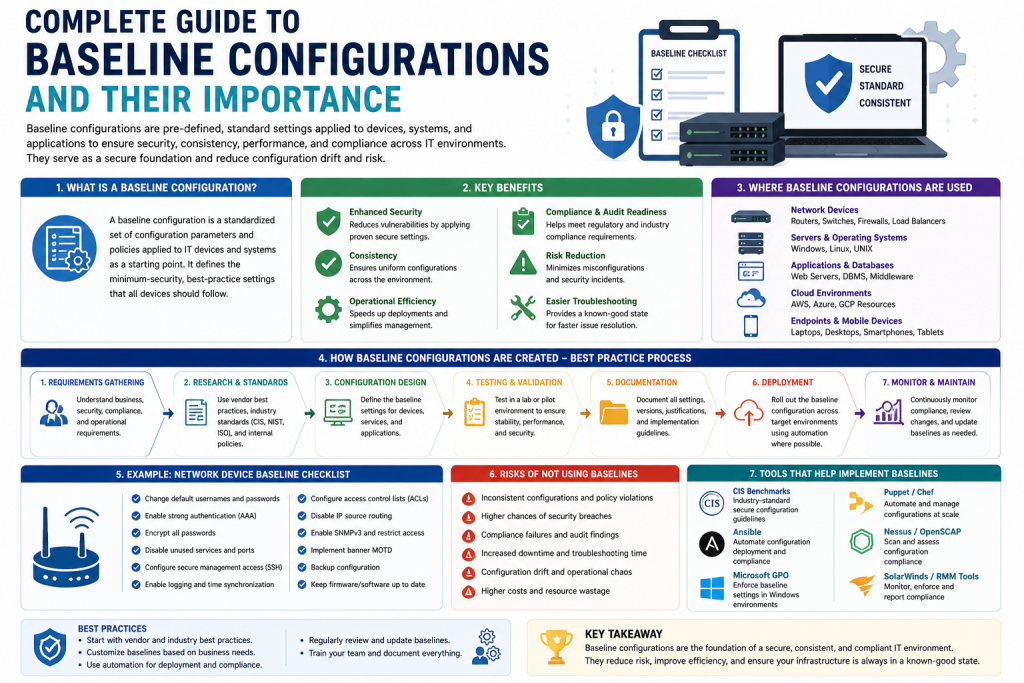
Baseline configurations are a core foundation of modern IT environments. They define a standardized setup that ensures systems operate in a consistent, secure, and manageable way from the start. In simple terms, a baseline configuration is a fixed reference setup that IT teams use to deploy and manage systems without confusion or inconsistency.
In today’s digital infrastructure, organizations rely on thousands of devices, applications, and networks. Without a baseline, every system would be configured differently, leading to security risks, performance issues, and management difficulties. Baseline configurations solve this by creating a structured and repeatable standard.
What Are Baseline Configurations?
A baseline configuration is a documented standard that defines how an IT system should be set up and maintained. It includes hardware specifications, software settings, network rules, and security controls.
Instead of configuring systems manually each time, IT teams apply the same baseline across all devices. This ensures uniformity, reduces human error, and improves reliability. It also helps organizations quickly identify deviations when something goes wrong.
Importance of Baseline Configurations
Baseline configurations play a major role in maintaining stability and security in IT environments. They ensure that systems are predictable and easier to manage.
They help organizations maintain consistency across all systems, reduce configuration errors, strengthen security by enforcing standard protections, simplify troubleshooting by providing a reference point, and support compliance with industry regulations and standards.
Components of Baseline Configurations
Baseline configurations consist of several key components that define how a system operates.
Hardware components include specifications such as processor type, memory size, storage capacity, and network interfaces. These ensure that all systems meet minimum performance requirements.
Software configurations define operating systems, application versions, system updates, and default settings. This ensures compatibility and smooth operation across all environments.
Network configurations include IP addressing, DNS settings, routing rules, and firewall configurations. These settings ensure proper communication between systems.
Security settings define authentication rules, encryption standards, password policies, and access controls. These protect systems from unauthorized access and cyber threats.
Types of Baseline Configurations
System baselines define the standard configuration for operating systems and devices, ensuring consistency across infrastructure.
Application baselines focus on software behavior, ensuring applications run efficiently and are properly configured.
Security baselines establish minimum security requirements such as firewall rules, encryption, and authentication policies.
Compliance baselines ensure systems meet legal and industry standards, which is especially important in regulated industries like finance and healthcare.
Benefits of Baseline Configurations
One major benefit is standardization, which ensures all systems follow the same setup rules. This reduces confusion and makes management easier. They also improve troubleshooting because IT teams can quickly compare systems against the baseline to identify issues. Security is strengthened because baseline configurations enforce consistent protection mechanisms across all systems. They help organizations meet compliance requirements by ensuring systems follow required industry standards. They also improve scalability because new systems can be deployed quickly using predefined configurations.
In addition to these benefits, baseline configurations also significantly improve operational efficiency within IT teams. Since systems are standardized, IT staff spend less time on repetitive manual configurations and more time focusing on strategic tasks such as optimization and innovation. This leads to better productivity and reduced workload pressure on technical teams.
Baseline configurations also enhance system reliability. When all systems follow a consistent structure, the chances of unexpected failures decrease, and recovery becomes faster when issues occur. This improves overall uptime and ensures better service availability for users and customers.
Another important benefit is improved documentation and knowledge sharing. Since configurations are predefined and documented, new team members can quickly understand system setups without relying heavily on experienced staff. This reduces dependency on specific individuals and improves team collaboration.
Overall, baseline configurations create a stable, efficient, and predictable IT environment that supports long-term growth and operational success.
How to Implement Baseline Configurations
Implementation begins with choosing configuration management tools such as Ansible, Puppet, or Chef. These tools help automate deployment and ensure consistency. A phased rollout approach is recommended instead of deploying changes all at once. This reduces risk and allows issues to be identified early. Training is also important so IT staff and users understand how the system works and how to maintain it properly.
In addition to these steps, organizations should also establish a clear governance model before implementation begins. This includes defining roles and responsibilities so every team member knows who is responsible for approving, applying, and monitoring baseline configurations. Without clear ownership, configuration management can become inconsistent and difficult to control.
It is also important to create a testing environment before applying baselines to production systems. This staging environment allows IT teams to simulate real-world scenarios and verify that configurations work correctly without affecting live systems. Another key step is version control, which ensures that every change to the baseline is tracked and documented. This makes it easier to roll back to previous versions if something goes wrong.
Organizations should also integrate monitoring tools to continuously track compliance after implementation. Regular audits help confirm that systems remain aligned with the baseline over time. Finally, feedback loops between IT teams and end users can help refine configurations and improve overall system performance and usability.
Monitoring and Maintenance
Continuous monitoring ensures that systems remain aligned with the baseline. Automated tools can detect changes or deviations in real time. Change management processes ensure that updates are controlled and properly documented before being applied. Regular reviews are necessary to keep baseline configurations updated with evolving technology and security requirements.
In addition to these practices, organizations should also implement alerting mechanisms that immediately notify IT teams when any unauthorized or unexpected configuration change occurs. This helps reduce response time and prevents small issues from escalating into major system failures. Logging and auditing also play an important role, as they provide a detailed history of all configuration activities, making it easier to trace problems and understand when and how changes were made.
Another important aspect is automation integration, where monitoring tools are directly connected with configuration management systems. This allows automatic correction of minor deviations without manual intervention, improving efficiency and reducing human error. Organizations should also define clear thresholds for acceptable changes so that not every small variation triggers an alert, helping teams focus on critical issues.
Finally, periodic reporting is essential for management visibility. Regular reports help decision-makers understand system health, compliance status, and potential risks. When combined, continuous monitoring, structured change control, and regular updates ensure that baseline configurations remain stable, secure, and fully aligned with organizational goals over time.
Challenges in Baseline Configurations
One challenge is maintaining consistency across large and complex IT environments. Another challenge is keeping baselines updated as technology changes frequently. Legacy systems may also create compatibility issues with new baseline standards. Resistance from teams who are used to manual configurations can also slow adoption.
In addition to these challenges, organizations often struggle with scaling baseline configurations across multiple departments, branches, or cloud environments. As infrastructure grows, ensuring every system strictly follows the defined baseline becomes more difficult, especially when different teams manage their own environments. This can lead to configuration drift, where systems slowly deviate from the approved standard without being immediately noticed. Another issue is the lack of proper documentation or outdated records, which makes it hard for IT teams to understand the current baseline state and apply updates correctly.
Security threats also evolve rapidly, meaning baselines must be continuously reviewed and strengthened. If updates are delayed, systems may become vulnerable to new attack methods. Furthermore, integrating modern tools with older infrastructure can require extra effort and customization, increasing workload for IT teams. Limited resources, such as time, budget, and skilled personnel, can also slow down proper implementation and monitoring. To overcome these issues, organizations need strong governance, automation tools, and regular audits to ensure baseline configurations remain accurate, secure, and effective across all systems
Best Practices
Keep baseline configurations simple and easy to manage. Use automation tools wherever possible to reduce manual work. Regularly update configurations to address new security threats and system changes. Maintain clear documentation for all configurations. Conduct regular audits to ensure systems remain compliant and aligned with the baseline.
In addition to these best practices, organizations should also focus on maintaining flexibility within their baseline designs. While standardization is important, overly rigid configurations can slow down innovation and make it difficult to adopt new technologies. A well-designed baseline should allow controlled adjustments without compromising overall consistency and security.
It is also important to involve multiple stakeholders when defining and updating baseline configurations. Input from system administrators, security teams, network engineers, and application developers ensures that the baseline remains practical and effective across different IT domains. This collaborative approach reduces the risk of overlooking critical requirements.
Another key practice is implementing rollback strategies. When updates or changes cause unexpected issues, organizations should be able to quickly revert to a stable baseline version. This minimizes downtime and protects system stability.
Performance monitoring should also be included as part of ongoing maintenance. By tracking system performance trends, IT teams can identify whether baseline configurations are still optimized for current workloads.
Overall, combining simplicity, automation, collaboration, and continuous improvement ensures that baseline configurations remain strong, relevant, and effective in supporting modern IT environments.
Conclusion
Baseline configurations are essential for building stable, secure, and efficient IT systems. They create a standardized foundation that helps organizations reduce errors, improve security, and simplify management.
By implementing and maintaining strong baseline configurations, organizations can ensure better system performance, easier troubleshooting, and improved compliance. In modern IT environments, they are not just helpful—they are necessary for long-term success.
Continue exploring the technologies and certification concepts that matter most to you.