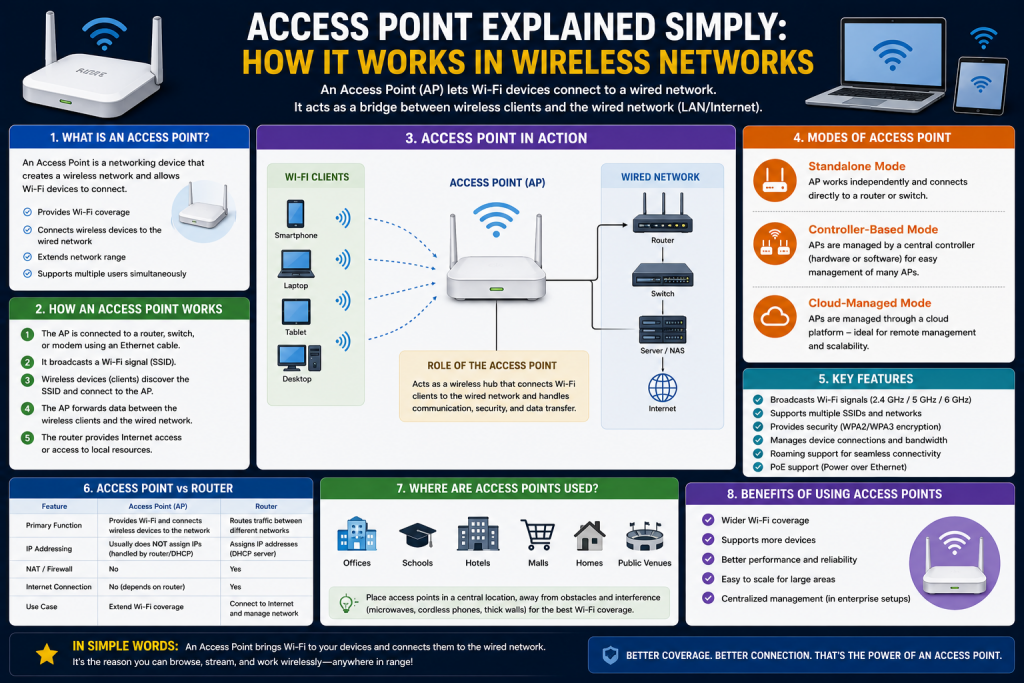
A wireless access point is a key component of modern networking that allows devices such as smartphones, laptops, and tablets to connect to a local network without using physical cables. It acts as a bridge between wired infrastructure and wireless devices, enabling seamless internet and network access in homes, offices, and public spaces.
In practical terms, an access point takes the wired connection from a router, switch, or network switch infrastructure and converts it into a wireless signal that nearby devices can detect and use. This makes it possible for multiple users to connect at the same time without needing direct physical connections. It is especially useful in environments where mobility and flexibility are important, such as offices where employees move between rooms or classrooms where students use personal devices.
Access points also help extend network coverage. A single router often cannot provide strong Wi-Fi signals across large buildings or areas with obstacles like walls and floors. By installing multiple access points, network administrators can ensure consistent connectivity throughout the entire space. This reduces dead zones and improves overall user experience.
In addition, modern access points support advanced features such as security encryption, user authentication, and traffic management. These features help protect the network from unauthorized access while ensuring that bandwidth is distributed efficiently among users. As a result, access points are not just connectivity tools but also important components for maintaining secure and reliable network performance.
Whenever you connect to Wi-Fi in a café, airport, school, or workplace, you are actually connecting through an access point. Although many people confuse it with a router, an access point performs a different and more specialized role within a network. It focuses mainly on providing wireless connectivity rather than managing all routing functions.
Understanding how access points work is important for anyone studying networking or working in IT, as they form the foundation of most wireless communication systems today.
What Is an Access Point?
An access point is a networking device that creates a wireless local area network (WLAN) and allows devices to connect to a wired network using Wi-Fi.
In simple terms, it broadcasts a wireless signal that devices can detect and join. Once connected, users can access the internet or internal network resources depending on the setup.
Unlike a router, an access point does not primarily decide where data should go on the internet. Instead, it focuses on extending wireless coverage and allowing multiple devices to connect efficiently to the same network.
Access points are commonly used in environments where a single router cannot provide sufficient wireless coverage. Large buildings, campuses, hotels, and offices often deploy multiple access points to ensure strong and stable connectivity everywhere.
Why Access Points Are Important
Access points play a critical role in modern communication systems. Without them, wireless connectivity would be limited in range, speed, and reliability.
One of the most important benefits is mobility. Users can move freely within a coverage area without losing connection. This is especially important in workplaces where employees rely on continuous access to cloud applications, communication tools, and shared resources.
Another key advantage is scalability. A single router may support a limited number of devices, but access points can handle many more users when deployed correctly. This makes them ideal for high-density environments such as universities, shopping malls, and corporate offices.
Access points also improve network performance. By distributing wireless traffic across multiple devices, they reduce congestion and help maintain stable speeds even when many users are connected at the same time.
In addition to these benefits, access points also enhance overall network reliability. When properly configured, they can provide redundancy, meaning that if one access point fails, nearby devices can automatically connect to another available access point without significant interruption. This ensures continuous connectivity, which is essential for critical operations such as online meetings, real-time data access, and cloud-based services.
Another important aspect is better signal coverage. Access points can be strategically placed throughout a building to eliminate weak signal areas and ensure consistent connectivity in every corner. This is especially useful in large or multi-story buildings where a single router cannot provide sufficient coverage.
Access points also support advanced wireless standards, allowing faster data transmission and improved efficiency. As technology evolves, newer access points are capable of handling higher speeds and more simultaneous connections, making them essential for modern digital environments that demand high performance and stability.
How Access Points Work
An access point connects directly to a wired network using an Ethernet cable. It then converts that wired connection into a wireless signal using radio frequencies.
When a device such as a smartphone searches for Wi-Fi, it detects the signal broadcasted by the access point. The user then selects the network and authenticates using a password or security credentials. Once connected, the access point handles communication between the device and the rest of the network.
Internally, access points manage data at the network and data link layers. They process wireless signals, manage client connections, and ensure data is transmitted efficiently between devices and the wired network.
They do not typically route traffic between different networks or manage internet connections independently. That responsibility usually belongs to routers or dedicated network gateways.
Types of Access Points
Access points can be categorized based on how they are managed and how they operate within a network. The most common types include standalone access points, controller-managed access points, and cloud-managed access points.
Standalone Access Points
Standalone access points operate independently without centralized management. Each device is configured separately and functions on its own.
These are commonly found in small offices or home environments. In many cases, they are combined with router functionality in a single device, which makes setup easier for non-technical users.
Standalone access points are simple to install and cost-effective. However, they lack advanced coordination features. If multiple standalone devices are used in the same environment, they do not automatically coordinate settings such as channel selection or roaming behavior.
This can sometimes result in weaker performance in larger environments where seamless connectivity is required.
Controller-Managed Access Points
In larger networks, access points are often managed through a centralized system known as a wireless LAN controller. These access points are connected to the controller, which configures and manages them as a group.
This setup allows multiple access points to work together as a unified system. They share the same network name and security settings, making it easier for users to move between different areas without losing connection.
One of the biggest advantages of controller-based systems is seamless roaming. As a user moves across different coverage zones, their device automatically switches to the nearest access point without interrupting the connection.
The controller also helps optimize network performance by managing channel selection and signal strength. This reduces interference and improves overall speed and stability.
These systems are commonly used in enterprises, universities, hospitals, and large public venues where reliability and performance are critical.
Cloud-Managed Access Points
Cloud-managed access points are a more modern approach to wireless networking. Instead of relying on an on-site controller, these access points connect to a cloud platform for configuration and management.
This allows network administrators to control multiple locations from a single interface accessible through the internet. It simplifies management, especially for organizations with distributed networks across different cities or countries.
Cloud-managed systems often include intelligent features such as automatic optimization of channels, power adjustment, and performance monitoring. These features help improve network efficiency without requiring manual intervention.
They also support remote troubleshooting, making it easier to resolve issues without physical access to the hardware.
However, because they rely on internet connectivity for management, they may introduce dependency on external services and raise certain security considerations.
Key Functions of Access Points
Access points perform several important functions in a network environment:
They provide wireless connectivity by converting wired signals into Wi-Fi.
They manage multiple device connections simultaneously.
They help distribute network traffic efficiently to prevent congestion.
They support security features such as encryption and authentication.
They enable roaming between different coverage areas in advanced setups.
These functions ensure that users experience stable and reliable wireless communication across different environments.
Access Points vs Routers
Although access points and routers are often confused, they serve different purposes.
A router connects different networks together and manages traffic between them, especially between a local network and the internet. It assigns IP addresses and controls data routing.
An access point, on the other hand, extends wireless connectivity within an existing network. It does not typically assign IP addresses or route traffic between networks.
In many home devices, both functions are combined into a single unit, which is why users often mistake one for the other.
Advantages of Using Access Points
Access points offer several benefits that make them essential in modern networking environments.
They improve wireless coverage in large areas.
They support a high number of connected devices.
They enhance mobility by allowing users to move without losing connection.
They improve network stability and performance in busy environments.
They allow flexible network expansion without major infrastructure changes.
These advantages make them a fundamental part of enterprise and large-scale wireless networks.
Challenges and Limitations
Despite their advantages, access points also have some limitations.
Standalone models may struggle in large environments due to lack of coordination.
Poor placement of access points can lead to weak signal areas.
High-density environments may require careful planning to avoid interference.
Cloud-managed systems depend on internet connectivity for configuration.
Understanding these challenges is important for designing efficient wireless networks.
Conclusion
Access points are essential building blocks of modern wireless networking. They enable devices to connect to networks without cables and provide the flexibility and mobility that users rely on every day.
From simple standalone devices used in homes to advanced controller-based and cloud-managed systems used in enterprises, access points come in various forms designed to meet different networking needs.
As technology continues to evolve, access points are becoming smarter, more efficient, and more capable of managing complex wireless environments. Understanding how they work is crucial for anyone involved in IT, networking, or cybersecurity, as they form the backbone of wireless communication in today’s connected world.
Continue exploring the technologies and certification concepts that matter most to you.