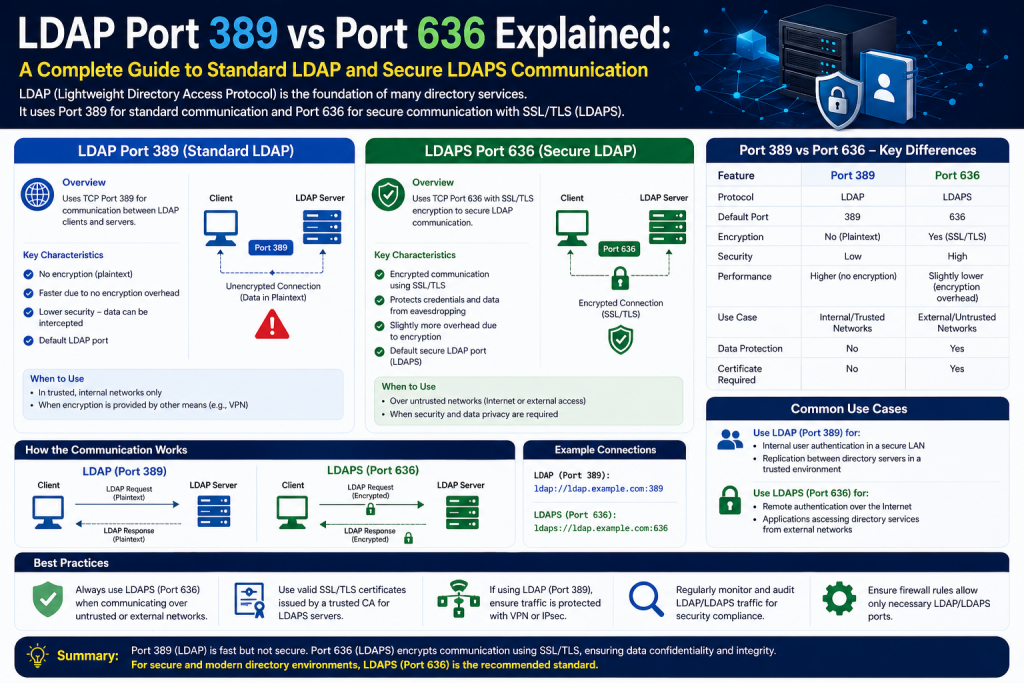
Lightweight Directory Access Protocol, commonly known as LDAP, is a fundamental protocol used in modern networking environments to access and manage directory information. It plays a crucial role in authentication systems, user management, and centralized data organization across networks. Although many users interact with systems powered by LDAP every day, the protocol itself often remains behind the scenes, quietly enabling secure and efficient access to information.
LDAP is not a software application or a database system. Instead, it is a protocol that defines how data should be structured and accessed within a directory service. This distinction is important because it helps clarify that LDAP is more like a language used by systems to communicate rather than a tool that stores data on its own.
Understanding LDAP is essential before diving into the specifics of port 389 and port 636. These ports define how LDAP communication occurs, but the underlying principles of LDAP determine why these ports exist and how they are used.
The Concept of Directory Services
A directory service is a specialized database designed to store and retrieve information efficiently. Unlike traditional databases that handle frequent updates and transactions, directory services are optimized for reading and searching data. This makes them ideal for storing user credentials, organizational structures, and other information that needs to be accessed quickly and frequently.
In a typical organization, a directory service might contain details about employees, departments, devices, and permissions. Instead of storing this information in multiple places, LDAP allows it to be centralized, making management easier and more consistent.
For example, when a company uses a centralized login system, the directory service stores all user credentials. When a user attempts to log in, the system checks the directory to verify the credentials. This process ensures that authentication is consistent across all systems connected to the directory.
Why LDAP Is Important in Modern Networks
As organizations grow, managing users and resources becomes increasingly complex. Without a centralized system, administrators would need to manage accounts separately for each application or service. This approach is inefficient and prone to errors.
LDAP addresses this challenge by providing a unified method for storing and accessing directory information. It allows multiple systems to rely on a single source of truth for user data. This not only simplifies management but also enhances security by reducing duplication and inconsistencies.
Another important benefit of LDAP is interoperability. Because it is a standardized protocol, different systems and applications can use it regardless of the underlying platform. This makes LDAP a versatile solution for organizations with diverse IT environments.
The Hierarchical Structure of LDAP
One of the defining features of LDAP is its hierarchical structure. Data is organized in a tree-like format known as the Directory Information Tree. This structure allows information to be grouped logically, making it easier to manage and search.
At the top of the hierarchy is the root, which represents the highest level of the directory. Below the root are branches that represent organizational units, such as departments or locations. Each branch can contain additional sub-branches or individual entries.
Entries represent objects within the directory, such as users, groups, or devices. Each entry contains attributes that describe the object. For example, a user entry might include attributes such as name, email address, and job title.
This hierarchical organization enables efficient searches. Instead of scanning the entire directory, the system can navigate directly to the relevant branch and retrieve the required information.
Understanding Distinguished Names
Every entry in an LDAP directory is identified by a unique identifier known as a Distinguished Name. The Distinguished Name specifies the exact location of an entry within the directory hierarchy.
A Distinguished Name is composed of a sequence of components that represent the path from the entry to the root of the directory. Each component provides information about the entry’s position within the hierarchy.
For example, a user’s Distinguished Name might include their common name, organizational unit, and domain components. This structure ensures that each entry can be uniquely identified, even if multiple entries have similar attributes.
Distinguished Names play a critical role in LDAP operations because they allow the system to locate and manipulate specific entries within the directory.
Core LDAP Operations
LDAP supports several fundamental operations that enable interaction with directory data. These operations form the basis of how clients communicate with directory servers.
The bind operation is used for authentication. When a user attempts to log in, the client sends credentials to the server using a bind request. The server then verifies the credentials and either grants or denies access.
The search operation allows clients to retrieve information from the directory. Clients can specify search criteria, such as a username or email address, and the server returns matching entries.
The add operation is used to create new entries in the directory. This might involve adding a new user account or registering a new device.
The modify operation allows existing entries to be updated. For example, an administrator might update a user’s job title or change their password.
The delete operation removes entries from the directory. This is typically used when a user leaves an organization or a device is decommissioned.
These operations enable LDAP to function as a dynamic and flexible system for managing directory information.
How LDAP Communication Works
LDAP follows a client-server model. In this model, a client sends requests to a server, and the server processes those requests and returns responses.
The client can be any application or system that needs to access directory information. This includes email clients, authentication systems, and enterprise applications.
When a client needs information, it sends a request to the LDAP server. The server then processes the request by searching the directory and retrieving the relevant data. Once the data is found, the server sends it back to the client.
This process is designed to be efficient and scalable. Because directory services are optimized for reading data, LDAP can handle a large number of requests without significant performance issues.
LDAP and Authentication Systems
One of the most common uses of LDAP is authentication. Many organizations rely on LDAP to verify user credentials and control access to resources.
When a user logs into a system, the application sends a request to the LDAP server to verify the credentials. If the credentials match an entry in the directory, the user is authenticated and granted access.
This approach allows organizations to implement single sign-on systems. With single sign-on, users can access multiple applications using a single set of credentials. This improves user experience and reduces the need for multiple passwords.
LDAP also supports authorization by storing information about user roles and permissions. This allows systems to determine what actions a user is allowed to perform.
Integration with Enterprise Systems
LDAP is widely used in enterprise environments because of its ability to integrate with various systems and applications. Many software solutions support LDAP, making it a common choice for organizations looking to centralize identity management.
Email systems, collaboration tools, and network devices often rely on LDAP for authentication and directory lookups. This ensures consistency across the organization and simplifies administration.
LDAP’s compatibility with different platforms makes it a valuable tool for organizations with diverse IT infrastructures. Whether systems are running on different operating systems or hosted in different environments, LDAP can provide a unified method of accessing directory information.
LDAP and Network Communication
LDAP operates over standard network protocols, primarily TCP/IP. This allows it to function across local and wide area networks.
When a client communicates with an LDAP server, it uses a specific port to establish the connection. Ports act as communication endpoints, allowing multiple services to run on the same system without interference.
LDAP uses two primary ports for communication. One is used for standard, unencrypted communication, and the other is used for secure, encrypted communication. These ports define how data is transmitted between the client and server.
Understanding these ports is essential for configuring network systems and ensuring secure communication.
The Role of Ports in LDAP
Ports are an integral part of network communication. Each service listens on a specific port, allowing clients to connect and exchange data.
In the case of LDAP, port 389 is used for standard communication, while port 636 is used for secure communication. These ports determine whether data is transmitted in plain text or encrypted form.
The choice of port has significant implications for security. Using the wrong port can expose sensitive information to potential threats. This is why understanding the difference between these ports is critical for network administrators.
Security Considerations in LDAP
Security is a major concern when working with directory services. LDAP directories often contain sensitive information, including user credentials and organizational data.
If this information is transmitted without encryption, it can be intercepted by malicious actors. This can lead to unauthorized access and data breaches.
To mitigate these risks, organizations must carefully consider how LDAP communication is configured. This includes choosing the appropriate port and ensuring that data is protected during transmission.
Encryption plays a key role in securing LDAP communication. By encoding data, encryption ensures that even if data is intercepted, it cannot be easily understood.
Preparing for Port-Level Understanding
Before exploring the differences between port 389 and port 636, it is important to understand the broader context of LDAP communication. The protocol itself defines how data is structured and accessed, while ports define how that data is transmitted.
Port 389 represents the traditional approach to LDAP communication, where data is transmitted without encryption. Port 636, on the other hand, introduces encryption to protect data during transmission.
These two approaches reflect different priorities. One focuses on simplicity and performance, while the other emphasizes security and data protection.
In modern networks, security is often the primary concern. However, there are scenarios where unencrypted communication may still be used, particularly in controlled environments.
Understanding these trade-offs is essential for making informed decisions about LDAP configuration.
Transition to Deeper Exploration
With a solid understanding of LDAP fundamentals, it becomes easier to analyze the differences between port 389 and port 636. These ports are not just technical details; they represent different approaches to handling sensitive information in network environments.
The next part will explore port 389 in detail, including how it works, where it is used, and the risks associated with unencrypted communication. This will provide a deeper understanding of why secure alternatives are often preferred in modern systems.
By building on the concepts covered in this section, it will be possible to fully understand the implications of choosing one port over the other and how that choice affects the overall security and performance of a network.
Introduction to Port 389
Port 389 is the default communication port used by LDAP for standard operations. When a client connects to an LDAP server without encryption, it typically does so through this port. Because it is the original and most widely recognized LDAP port, it has been deeply integrated into many systems and environments over time.
Port 389 is often referred to as the clear text LDAP port. This means that the data transmitted between the client and server is not encrypted. While this approach simplifies communication and reduces computational overhead, it also introduces significant security concerns.
Understanding how port 389 works and where it is used is essential for evaluating whether it is appropriate in a given environment.
How Port 389 Handles Communication
When a client initiates a connection to an LDAP server using port 389, the communication begins as a standard TCP session. The client sends a request, such as a bind or search operation, and the server processes that request and returns a response.
All of this data is transmitted in plain text. This includes usernames, queries, and in some cases even passwords, depending on how authentication is configured. Because there is no encryption layer, the data is sent exactly as it is, without any transformation to protect its contents.
This simplicity makes port 389 efficient and easy to implement. However, it also means that anyone with access to the network traffic can potentially read the data.
Why Port 389 Is Called Clear Text
The term clear text refers to data that is transmitted in a readable format. Unlike encrypted data, which is encoded and requires a key to decode, clear text can be interpreted directly by anyone who intercepts it.
In the context of LDAP, using port 389 means that all communication between the client and server is visible in its original form. This includes directory queries, responses, and authentication attempts.
For example, if a user logs into a system and their credentials are sent over port 389 without additional security measures, those credentials could be captured and read by an attacker using a packet analysis tool.
This is the primary reason why port 389 is considered less secure compared to its encrypted counterpart.
Common Use Cases for Port 389
Despite its security limitations, port 389 is still used in certain scenarios. One of the most common use cases is within internal networks that are isolated from external access.
In a controlled environment where network traffic is tightly managed and monitored, the risk of interception may be considered low. In such cases, organizations might choose to use port 389 to reduce complexity and improve performance.
Another use case is for legacy systems that were designed before encryption became a standard requirement. These systems may rely on port 389 because they lack support for secure communication methods.
Port 389 is also sometimes used for initial connections that are later upgraded to a secure session using protocols such as StartTLS. In this scenario, the connection begins unencrypted but is quickly transitioned to an encrypted state.
Performance Considerations
One of the advantages of using port 389 is its performance. Because there is no encryption or decryption involved, the communication process requires fewer computational resources.
This can be beneficial in environments with limited processing power or where high-speed data transfer is a priority. The absence of encryption reduces latency and allows for faster response times.
However, the performance benefits must be weighed against the security risks. In many modern environments, the overhead of encryption is minimal compared to the potential consequences of a security breach.
Advancements in hardware and encryption algorithms have made secure communication more efficient, reducing the need to rely on unencrypted protocols for performance reasons.
Security Risks Associated with Port 389
The primary drawback of port 389 is its lack of security. Because data is transmitted in clear text, it is vulnerable to interception and unauthorized access.
One of the most common threats is packet sniffing. An attacker can use tools to capture network traffic and analyze the data being transmitted. If LDAP communication is unencrypted, the attacker can read sensitive information directly from the captured packets.
Another risk is man-in-the-middle attacks. In this scenario, an attacker intercepts communication between the client and server and may alter or inject data. Without encryption, there is no reliable way to verify the integrity of the data.
Credential exposure is another major concern. If usernames and passwords are transmitted in clear text, they can be easily stolen and used to gain unauthorized access to systems.
These risks make port 389 unsuitable for environments where security is a priority, especially when sensitive data is involved.
The Role of StartTLS with Port 389
StartTLS is a mechanism that allows an existing unencrypted connection to be upgraded to a secure one. It is often used with port 389 to provide a balance between compatibility and security.
When a client connects to an LDAP server on port 389, it can request to initiate a secure session using StartTLS. If the server supports this feature, the connection is upgraded to use encryption.
This approach allows organizations to maintain compatibility with systems that expect communication on port 389 while still providing a level of security.
However, StartTLS requires proper configuration and support on both the client and server. If not implemented correctly, the connection may remain unencrypted, leaving it vulnerable to attacks.
Configuration and Deployment
In many directory services, port 389 is enabled by default. This means that LDAP servers are typically ready to accept connections on this port without additional configuration.
Administrators may need to configure firewall rules to allow traffic on port 389. This involves ensuring that the port is open and accessible to the necessary clients while restricting unauthorized access.
Proper network segmentation can help reduce the risks associated with port 389. By limiting access to trusted systems and isolating sensitive traffic, organizations can mitigate some of the security concerns.
Monitoring and logging are also important. By tracking LDAP activity, administrators can detect unusual behavior and respond to potential threats.
Port 389 in Legacy Environments
Many older systems were built with the assumption that internal networks were secure. As a result, they often rely on unencrypted communication using port 389.
In these environments, upgrading to secure communication may require significant changes, including software updates and infrastructure modifications.
While it may be tempting to continue using port 389 for compatibility reasons, doing so can expose the organization to unnecessary risks. Modern best practices recommend transitioning to secure alternatives whenever possible.
Internal Network Considerations
Some organizations argue that port 389 is acceptable within internal networks that are not exposed to the internet. While this may reduce the likelihood of external attacks, it does not eliminate the risk entirely.
Insider threats, misconfigured systems, and compromised devices can all lead to unauthorized access within a network. Even in a private environment, unencrypted data can still be intercepted.
Additionally, modern networks are often more complex and interconnected than in the past. Remote access, cloud integration, and mobile devices increase the attack surface, making it more difficult to guarantee security.
For these reasons, relying solely on network isolation is not considered a sufficient security measure.
Comparing Simplicity and Risk
Port 389 represents a trade-off between simplicity and security. On one hand, it offers straightforward communication with minimal overhead. On the other hand, it exposes data to potential threats.
In earlier computing environments, this trade-off may have been acceptable. However, as cyber threats have become more sophisticated, the balance has shifted toward prioritizing security.
Organizations must carefully evaluate their needs and consider whether the benefits of using port 389 outweigh the risks.
Best Practices for Using Port 389
If port 389 must be used, there are several best practices that can help reduce risk. These include:
Limiting access to trusted systems only. By restricting which devices can connect to the LDAP server, organizations can reduce the likelihood of unauthorized access.
Implementing network monitoring. Continuous monitoring can help detect suspicious activity and respond quickly to potential threats.
Using StartTLS where possible. This allows for encrypted communication while maintaining compatibility with port 389.
Avoiding the transmission of sensitive data. If clear text communication is unavoidable, it is important to minimize the amount of sensitive information being transmitted.
Regularly reviewing configurations. Ensuring that systems are properly configured can help prevent accidental exposure of data.
While these measures can improve security, they do not fully eliminate the risks associated with unencrypted communication.
The Shift Toward Secure LDAP
Over time, the industry has moved toward more secure communication methods. The risks associated with clear text protocols have become widely recognized, leading to increased adoption of encrypted alternatives.
Port 389 is still supported for compatibility reasons, but it is no longer considered the preferred option for most use cases. Instead, organizations are encouraged to use secure communication methods that protect data in transit.
This shift reflects a broader trend in cybersecurity, where protecting data has become a top priority.
Preparing for Secure Communication
Understanding the limitations of port 389 is an important step toward implementing secure LDAP communication. By recognizing the risks and challenges, organizations can make informed decisions about how to configure their systems.
The next part will focus on port 636, which provides encrypted LDAP communication. This will include an exploration of how encryption works, how secure connections are established, and why this approach is generally recommended.
By comparing the two ports in detail, it becomes clear why secure communication has become the standard in modern networking environments.
This progression from basic understanding to secure implementation highlights the importance of adapting to evolving security requirements and ensuring that directory services remain protected against potential threats.
Introduction to Port 636
Port 636 is the standard port used for secure LDAP communication. Unlike port 389, which transmits data in clear text, port 636 ensures that all data exchanged between the client and the server is encrypted. This encryption protects sensitive information such as login credentials, directory queries, and organizational data from being intercepted or tampered with.
Port 636 is commonly referred to as LDAPS, which stands for LDAP over SSL or TLS. While older implementations used SSL, modern systems rely on TLS, which is more secure and widely adopted. The use of encryption makes port 636 the preferred choice in most production environments.
Understanding how port 636 works requires a closer look at encryption, certificates, and the process of establishing a secure connection.
How Secure LDAP Communication Works
When a client connects to an LDAP server using port 636, the communication begins with a secure handshake. This process establishes trust between the client and the server before any actual data is transmitted.
During the handshake, the server presents a digital certificate to the client. This certificate contains information about the server’s identity and a public key used for encryption. The client verifies the certificate to ensure that it is valid and issued by a trusted authority.
Once the certificate is validated, the client and server agree on encryption parameters and generate session keys. These keys are used to encrypt and decrypt the data exchanged during the session.
After the handshake is complete, all communication between the client and server is encrypted. This means that even if the data is intercepted, it cannot be read without the appropriate keys.
The Role of TLS in Port 636
Transport Layer Security is the protocol responsible for encrypting LDAP communication on port 636. It operates beneath LDAP in the network stack and provides the security layer that protects data in transit.
TLS uses a combination of asymmetric and symmetric encryption. Asymmetric encryption is used during the handshake to establish a secure connection, while symmetric encryption is used for the actual data transfer. This approach balances security and performance.
TLS also ensures data integrity by using cryptographic checks. This means that if data is altered during transmission, the change can be detected. This protects against tampering and ensures that the data received is exactly what was sent.
Benefits of Using Port 636
The most significant advantage of port 636 is security. By encrypting data, it prevents unauthorized access and protects sensitive information from being exposed.
Another benefit is compliance. Many regulatory frameworks require encryption for data in transit. Using port 636 helps organizations meet these requirements and avoid potential penalties.
Port 636 also enhances trust. Users and systems can communicate with confidence, knowing that their data is protected. This is especially important in environments where sensitive information is frequently exchanged.
In addition, encrypted communication reduces the risk of certain types of attacks, such as packet sniffing and man-in-the-middle attacks.
Certificate Management in Secure LDAP
Certificates play a critical role in enabling secure LDAP communication. They are used to verify the identity of the server and establish trust between the client and server.
A certificate can be issued by a trusted certificate authority or generated internally as a self-signed certificate. While self-signed certificates are easier to create, they require additional configuration to be trusted by clients.
Proper certificate management is essential for maintaining security. Certificates have expiration dates and must be renewed regularly. If a certificate expires, secure communication may fail, leading to disruptions in service.
Administrators must also ensure that certificates are stored securely and protected from unauthorized access. If a certificate or its private key is compromised, it can be used to impersonate the server.
Steps to Enable Port 636
Enabling port 636 involves several steps. First, a certificate must be generated and installed on the LDAP server. This certificate will be used to establish secure connections.
Next, the certificate must be distributed to client systems or added to a trusted certificate store. This ensures that clients can verify the server’s identity.
The LDAP service must then be configured to use secure communication. This may involve enabling LDAPS in the server settings or configuring group policies.
After configuration, the server should be restarted to apply the changes. Finally, firewall rules must be updated to allow traffic on port 636.
Testing is an important step in this process. Administrators should verify that secure connections can be established and that data is being transmitted correctly.
Common Challenges with Port 636
While port 636 offers significant security benefits, it also introduces some challenges. One of the most common issues is certificate management. Misconfigured or expired certificates can prevent connections and disrupt services.
Another challenge is compatibility. Some legacy systems may not support secure LDAP or may require additional configuration to work with port 636.
Performance can also be a consideration. Although modern systems handle encryption efficiently, there is still some overhead associated with encrypting and decrypting data.
Despite these challenges, the benefits of using port 636 generally outweigh the drawbacks, especially in environments where security is a priority.
Comparing Port 389 and Port 636
The primary difference between port 389 and port 636 lies in how data is transmitted. Port 389 sends data in clear text, while port 636 encrypts all communication.
This difference has significant implications for security. With port 389, data can be intercepted and read by anyone with access to the network. With port 636, intercepted data remains protected and unreadable.
Another difference is complexity. Port 389 is simpler to set up because it does not require certificates or encryption. Port 636 requires additional configuration but provides much stronger security.
In terms of performance, port 389 may have a slight advantage due to the absence of encryption. However, this difference is often negligible in modern systems.
Ultimately, the choice between the two ports depends on the specific needs of the environment. In most cases, security considerations make port 636 the preferred option.
Security Implications of Choosing the Wrong Port
Using the wrong port can have serious consequences. If sensitive data is transmitted over port 389, it may be exposed to attackers. This can lead to unauthorized access, data breaches, and other security incidents.
On the other hand, using port 636 without proper configuration can also cause issues. If certificates are not properly managed, connections may fail, leading to service disruptions.
Organizations must carefully evaluate their requirements and ensure that their LDAP configuration aligns with best practices.
Real World Scenarios
In modern enterprise environments, port 636 is widely used for secure communication. Organizations that handle sensitive data, such as financial institutions and healthcare providers, rely on encrypted LDAP to protect information.
Port 389 may still be used in isolated environments or for specific purposes, such as testing or internal communication. However, its use in production environments is generally discouraged.
Cloud environments and remote access scenarios further emphasize the need for secure communication. As data travels across public networks, encryption becomes essential.
Best Practices for Secure LDAP
To maximize the benefits of port 636, organizations should follow best practices. These include using certificates from trusted authorities, regularly updating encryption protocols, and monitoring LDAP traffic for unusual activity.
Access to LDAP servers should be restricted to authorized systems בלבד. Strong authentication methods should be used to prevent unauthorized access.
Regular audits and security assessments can help identify potential vulnerabilities and ensure that systems remain secure.
Training and awareness are also important. Administrators should understand how secure LDAP works and how to manage it effectively.
Transitioning from Port 389 to Port 636
Many organizations are in the process of transitioning from port 389 to port 636. This transition involves updating configurations, deploying certificates, and ensuring compatibility with existing systems.
The process should be carefully planned to minimize disruption. Testing should be conducted to ensure that all systems can communicate securely.
In some cases, both ports may be used temporarily during the transition period. However, the goal should be to move entirely to secure communication.
This transition reflects a broader shift toward stronger security practices in networking.
The Future of LDAP Security
As cybersecurity threats continue to evolve, the importance of secure communication will only increase. Encryption is becoming a standard requirement rather than an optional feature.
Future developments in encryption and authentication may further enhance the security of LDAP and other protocols. Organizations must stay informed and adapt to these changes to maintain a strong security posture.
The use of secure protocols like LDAPS is likely to remain a key component of network security strategies.
Conclusion
LDAP is a critical protocol for managing directory information and enabling authentication across networks. Understanding how it works and how it communicates is essential for anyone involved in IT and networking.
It serves as the backbone for many identity and access management solutions, allowing organizations to centralize user information and streamline authentication processes. Instead of maintaining separate credentials for each application, LDAP enables a single, unified directory where user data is stored and managed efficiently. This approach not only simplifies administration but also improves consistency across systems.
LDAP works using a client server model, where requests are sent from applications or devices to a directory server that processes and responds with the required information. These interactions include operations such as searching for user details, verifying login credentials, and updating directory entries. Because of its structured and hierarchical design, LDAP can handle large volumes of data while maintaining fast and reliable performance.
In modern environments, LDAP is often integrated with enterprise systems, email platforms, and cloud services, making it a key component of daily operations. Its role in enabling secure access, supporting single sign on, and maintaining organized directory structures makes it an essential concept for professionals who want to build and manage efficient and secure networks.
Port 389 and port 636 represent two different approaches to LDAP communication. Port 389 offers simplicity and efficiency but lacks security, making it unsuitable for environments where sensitive data is involved. Port 636, on the other hand, provides encrypted communication that protects data and ensures privacy.
In modern networks, security is a top priority. The risks associated with unencrypted communication make port 636 the preferred choice in most situations. While port 389 may still be used in specific scenarios, it should be approached with caution and proper safeguards.
By implementing secure LDAP communication and following best practices, organizations can protect their data, maintain compliance, and ensure reliable access to directory services. Understanding the differences between these ports is not just a technical requirement but a fundamental aspect of building secure and efficient network systems.
Continue exploring the technologies and certification concepts that matter most to you.