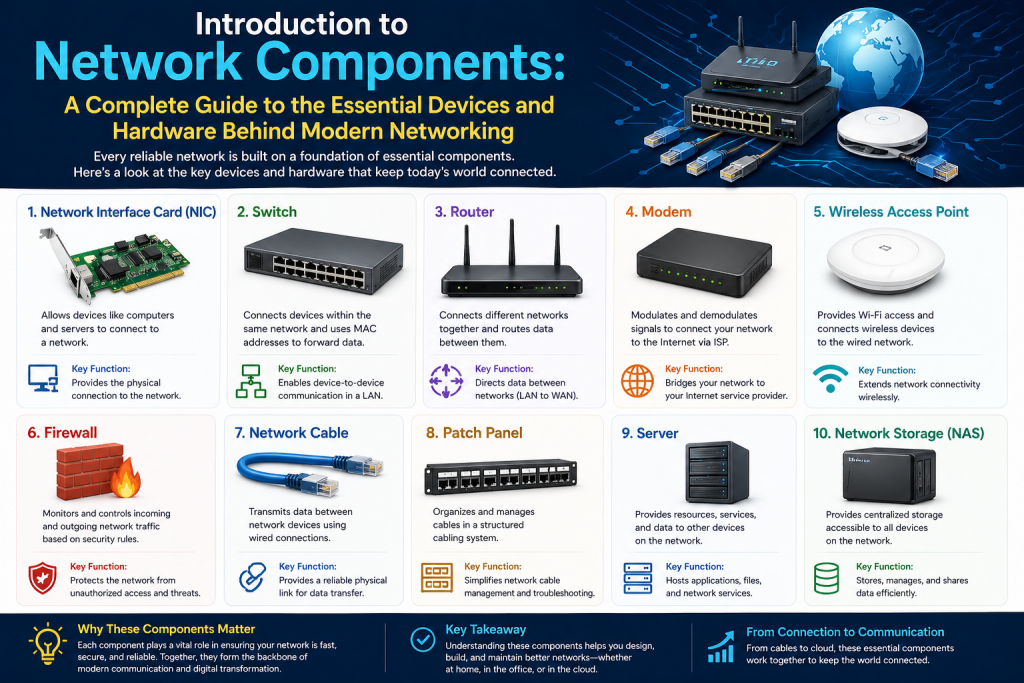
Modern computer networks rely on a set of core devices that make communication possible. Whether it is a small home setup or a large enterprise infrastructure, the same fundamental components are always present. These components determine how devices connect, how data moves from one place to another, and how secure the communication remains.
At the center of every network are three essential devices: switches, routers, and firewalls. Each one performs a specific function, and together they form a complete system that allows seamless and secure communication. To truly understand networking, it is important to study each of these components individually and then see how they work together.
This first part focuses entirely on switches, which are responsible for handling communication within a local network. They are often the first device that connects multiple systems and ensures that data reaches the correct destination efficiently.
Understanding switches provides the foundation needed to grasp more advanced networking topics. Once you clearly understand how devices communicate locally, it becomes easier to learn how networks connect globally and how security is enforced.
What is a Network Switch
A network switch is a device that connects multiple devices within the same network. These devices can include computers, printers, servers, IP phones, and security systems. The switch acts as a central connection point that allows all these devices to communicate with one another.
When a device is connected to a switch, it becomes part of the local network. The switch ensures that any data sent from one device reaches the intended recipient without unnecessary delays or confusion. This makes communication faster and more organized compared to older networking methods.
Switches operate mainly at the data link layer of the OSI model, which is commonly referred to as Layer 2. At this level, communication is based on hardware addresses rather than logical addresses. This allows the switch to identify devices uniquely and manage traffic efficiently.
Some advanced switches can also operate at Layer 3, which allows them to handle routing functions. However, their primary role remains focused on managing local communication within a network.
How a Switch Identifies Devices
Every device that connects to a network has a unique identifier known as a MAC address. This address is permanently assigned to the network interface card of the device and serves as its identity within the network.
When a device connects to a switch, the switch learns its MAC address and associates it with a specific port. This information is stored in a table inside the switch. Over time, as more devices communicate, the switch builds a complete record of which device is connected to which port.
When data is sent across the network, the switch examines the destination MAC address in the data packet. It then checks its internal table to determine where that device is located. If the address is found, the switch sends the data directly to the correct port. This process ensures efficient communication and reduces unnecessary traffic.
If the switch does not yet know the destination address, it temporarily sends the data to all ports except the one it came from. Once the correct device responds, the switch updates its table and uses that information for future communication.
Data Transmission and Full Duplex Communication
One of the key advantages of switches is their ability to support full duplex communication. This means that devices can send and receive data at the same time without waiting for each other.
In older systems, communication was half duplex, where a device had to wait for a response before sending more data. This created delays and reduced efficiency. Full duplex communication eliminates this limitation and allows for faster and smoother data transfer.
Switches also help reduce collisions in the network. A collision occurs when two devices try to send data at the same time. By managing traffic intelligently and providing dedicated communication paths, switches minimize these issues and improve overall network performance.
Types of Network Switches
Switches come in different types depending on the level of control and functionality they provide. The two main categories are unmanaged switches and managed switches.
Unmanaged Switches
Unmanaged switches are simple devices that require no configuration. They are designed for ease of use and can be set up by simply connecting cables. These switches are commonly used in homes and small offices where advanced features are not necessary.
Because they do not require configuration, unmanaged switches are cost-effective and easy to install. However, they offer very limited control. Users cannot monitor traffic, prioritize data, or make adjustments to improve performance.
Despite their limitations, unmanaged switches are suitable for basic networking needs where simplicity is more important than control.
Managed Switches
Managed switches provide advanced features that allow administrators to control and optimize network performance. These switches can be configured to manage traffic, monitor activity, and enhance security.
With managed switches, administrators can check the status of each port, measure bandwidth usage, and identify potential issues. This level of visibility is essential in larger networks where performance and reliability are critical.
Managed switches also support features such as traffic prioritization. This allows important data, such as voice or video communication, to be given higher priority over less critical traffic. As a result, important applications perform better even during heavy network usage.
Another important feature of managed switches is the ability to create virtual networks within a single physical network. This helps organize devices and improve security by separating different types of traffic.
Layer 2 and Layer 3 Switching
Switches are often classified based on the layer of the OSI model at which they operate. This classification helps determine their capabilities and role within the network.
Layer 2 Switching
Layer 2 switches operate at the data link layer and use MAC addresses to forward data. They are designed for communication within a single network and do not handle traffic between different networks.
These switches are efficient and fast, making them ideal for local communication. They are widely used in environments where all devices belong to the same network and do not require routing.
Layer 3 Switching
Layer 3 switches operate at the network layer and use IP addresses in addition to MAC addresses. This allows them to perform routing functions, enabling communication between different networks or segments.
Layer 3 switches use specialized hardware to process data quickly, making them faster than traditional routers in certain situations. They are commonly used in large networks where high-speed communication between different segments is required.
Even though Layer 3 switches can perform routing, they do not completely replace routers. Routers are still needed for connecting to external networks and handling more complex tasks.
Advantages of Using Switches
Switches provide several important benefits that make them essential in modern networks. One of the main advantages is improved efficiency. By sending data only to the intended recipient, switches reduce unnecessary traffic and increase speed.
Another advantage is scalability. Networks can easily grow by adding more devices to the switch. This flexibility makes switches suitable for both small and large environments.
Switches also improve reliability. By managing communication effectively, they reduce errors and ensure that data is delivered accurately. In managed switches, additional features such as monitoring and redundancy further enhance reliability.
In addition, switches support multiple types of devices, allowing different systems to work together seamlessly. This makes them a central component in any network.
Limitations of Switches
Despite their many advantages, switches have certain limitations. They are primarily designed for communication within a local network and cannot connect different networks together. This limitation means that another device is required for external communication.
Switches also provide limited security. While managed switches offer some control, they are not designed to protect the network from external threats. More advanced security measures require the use of firewalls.
Another limitation is that unmanaged switches do not offer monitoring or configuration options. This makes it difficult to troubleshoot issues or optimize performance in more complex environments.
Understanding these limitations helps explain why switches must be used alongside other network components to create a complete system.
Real World Use of Switches
In a typical office environment, switches play a central role in daily operations. Employees connect their computers to the switch, allowing them to access shared resources such as printers, servers, and storage systems.
When one employee sends a file to another, the switch ensures that the data is delivered directly to the correct device. This process happens quickly and efficiently, allowing smooth communication without delays.
As the organization grows, more devices can be added to the switch without major changes to the network. This scalability makes switches an essential tool for expanding businesses.
Switches are also used in homes, schools, and data centers. In each case, they provide the same basic function of connecting devices and enabling communication.
Role of Switches in Network Design
Switches are often considered the foundation of network design. They form the internal structure of the network and determine how devices interact with each other.
In larger networks, multiple switches are used together to create a hierarchy. Some switches connect directly to devices, while others connect different parts of the network. This structure improves performance and makes the network easier to manage.
Proper placement and configuration of switches are important for achieving optimal performance. Factors such as traffic patterns, number of devices, and network layout must be considered when designing a network.
Managed switches provide additional tools that help administrators design and maintain efficient networks. These tools allow for better control and adaptability as the network evolves.
Transition to the Next Component
While switches are responsible for handling communication within a network, they cannot send data beyond their local environment. To connect to other networks or the internet, another device is required.
This is where routers come into play. Routers take the data prepared by switches and determine the best path for it to travel across different networks. They also assign IP addresses and perform essential functions that enable global communication.
Understanding switches is the first step in learning how networks operate. Once this foundation is clear, it becomes easier to explore how routers and firewalls complete the system and ensure secure, efficient communication.
Introduction to Routers in Networking
After understanding how switches manage communication within a local network, the next step is to explore how networks connect to each other. Devices inside a network can communicate efficiently through switches, but without a mechanism to send data beyond that local environment, communication would remain limited.
This is where routers become essential. Routers act as the bridge between different networks, allowing data to travel from a local network to external networks, including the internet. They play a critical role in determining how information moves across vast and complex infrastructures.
Routers are responsible for directing traffic, assigning addresses, and ensuring that data reaches its destination through the most efficient path. Without routers, global communication as we know it would not be possible.
What is a Router
A router is a networking device that connects multiple networks and forwards data between them. Its primary function is to take incoming data packets and determine the best route for them to reach their destination.
Unlike switches, which operate mainly within a single network using MAC addresses, routers operate at the network layer of the OSI model. At this layer, communication is based on IP addresses, which identify devices across different networks.
Routers examine the destination IP address of each packet and decide where to send it next. This decision-making process allows data to travel across multiple networks until it reaches its final destination.
Routers are commonly used to connect local networks to the internet, making them a central component in both home and enterprise environments.
How Routers Forward Data
When a device sends data to another network, the data is first passed to the router. The router then analyzes the destination IP address and checks its routing table, which contains information about available paths.
Based on this information, the router determines the most efficient route and forwards the data accordingly. If the destination is not directly connected, the router sends the packet to another router, and the process continues until the data reaches its target.
This step-by-step forwarding process is known as packet switching. It allows data to travel across multiple networks efficiently, even if those networks are located far apart.
Routers also help manage network traffic by ensuring that data flows smoothly and avoiding congestion whenever possible.
Role of IP Addresses in Routing
IP addresses are essential for routing because they provide a logical way to identify devices across different networks. Each device connected to a network is assigned an IP address, which acts like a unique identifier.
Routers use these addresses to determine where data should go. When a packet is sent, it includes both a source IP address and a destination IP address. The router reads this information and uses it to guide the packet along the correct path.
There are two main types of IP addresses: private and public. Private IP addresses are used within local networks, while public IP addresses are used for communication over the internet.
Routers play a key role in translating between these two types of addresses, allowing devices within a private network to communicate with external systems.
Dynamic Host Configuration Protocol
One of the important functions of a router is assigning IP addresses to devices within a network. This is done using a protocol known as Dynamic Host Configuration Protocol.
When a device connects to the network, it sends a request for an IP address. The router responds by assigning an available address from a predefined range. This process happens automatically, making it easy to connect new devices without manual configuration.
Dynamic assignment ensures that each device has a unique address, preventing conflicts that could disrupt communication. It also allows networks to manage addresses efficiently, especially when devices frequently join and leave.
Without this automated system, administrators would need to assign IP addresses manually, which would be time-consuming and prone to errors.
Network Address Translation
When devices within a local network communicate with the internet, their private IP addresses must be translated into a format that external networks can understand. This process is known as Network Address Translation.
Routers perform this translation by replacing the private IP address of a device with a public IP address before sending data to the internet. When a response is received, the router reverses the process and delivers the data to the correct device within the network.
This mechanism allows multiple devices to share a single public IP address, which is both efficient and cost-effective. It also adds a layer of security by hiding the internal structure of the network from external sources.
Network address translation is a fundamental feature of modern networking and is essential for enabling communication between private networks and the internet.
Port Address Translation
In networks with many devices, a single public IP address may need to support multiple simultaneous connections. Port address translation extends the concept of network address translation by assigning unique port numbers to each connection.
When a device sends data, the router not only changes the IP address but also assigns a specific port number. This combination allows the router to track multiple connections and ensure that responses are delivered to the correct device.
Port address translation is widely used in home and office networks, where numerous devices share a single internet connection. It allows efficient use of limited public IP addresses while maintaining proper communication.
Routing Tables and Decision Making
Routers rely on routing tables to determine the best path for data. These tables contain information about available networks, their locations, and the routes that can be used to reach them.
Routing tables can be built manually or automatically. In smaller networks, administrators may define routes manually. In larger networks, routers use dynamic routing protocols to exchange information and update their tables automatically.
Dynamic routing allows routers to adapt to changes in the network, such as link failures or congestion. This ensures that data can still reach its destination even when conditions change.
The ability to make intelligent decisions based on routing tables is what makes routers so powerful in managing complex networks.
Access Control Lists in Routers
Routers can also control which traffic is allowed to enter or leave the network through a feature known as an access control list. This is essentially a set of rules that defines what type of traffic is permitted.
Each rule specifies conditions based on factors such as IP address, protocol, or port number. When a packet arrives, the router checks it against these rules and decides whether to allow or block it.
Access control lists provide a basic level of security by preventing unauthorized access. However, they are considered stateless, meaning they do not track ongoing connections. They simply evaluate each packet individually based on predefined rules.
While useful, this approach has limitations, which is why more advanced security is typically handled by firewalls.
Types of Routers
Routers come in different types depending on their use and environment. Each type is designed to meet specific networking needs.
Home routers are commonly used in residential settings. They combine multiple functions, including routing, wireless connectivity, and basic security features. These devices are easy to set up and provide sufficient performance for everyday use.
Enterprise routers are used in larger organizations. They offer advanced features such as high-speed processing, support for multiple connections, and enhanced security. These routers are designed to handle heavy traffic and complex network structures.
Core routers are used in large networks such as those operated by internet service providers. They handle massive amounts of data and are responsible for maintaining the backbone of the internet.
Edge routers are positioned at the boundary of a network and connect it to external networks. They play a key role in managing incoming and outgoing traffic.
Advantages of Routers
Routers provide several important benefits that make them essential in networking. One of the main advantages is their ability to connect multiple networks, enabling communication on a global scale.
They also improve efficiency by selecting the best path for data. This reduces delays and ensures that information reaches its destination quickly.
Routers support features such as dynamic address assignment and address translation, which simplify network management and conserve resources.
Another advantage is their ability to control traffic using access control lists. This helps protect the network from unwanted access and improves overall security.
Limitations of Routers
Despite their many capabilities, routers also have limitations. They are generally more complex than switches and require proper configuration to function effectively.
In some cases, routers may introduce delays due to the processing required for routing decisions. This is especially noticeable in high-traffic environments.
Routers also provide only basic security features compared to dedicated security devices. While access control lists can filter traffic, they do not offer the advanced protection needed to defend against modern threats.
These limitations highlight the need for additional components, such as firewalls, to provide comprehensive security.
Real World Use of Routers
In a typical home network, a router connects all devices to the internet. When a user accesses a website, the router forwards the request to the appropriate server and then returns the response to the device.
In an office environment, routers connect multiple departments and allow communication with external networks. They ensure that data flows smoothly between internal systems and external services.
Routers are also used in large-scale networks, where they manage communication between different regions and ensure reliable connectivity.
Their ability to handle complex routing tasks makes them indispensable in modern networking.
Transition to the Final Component
While routers are responsible for connecting networks and directing traffic, they do not provide complete security. As networks grow and become more connected, the risk of unauthorized access and malicious activity increases.
To address these risks, another component is required to monitor and control traffic more intelligently. This is where firewalls come into play.
Firewalls act as a protective barrier between networks, analyzing traffic and blocking potential threats. In the next part, we will explore how firewalls work and how they enhance network security.
Introduction to Firewalls in Networking
As networks expand and become more interconnected, the need for security becomes increasingly important. While switches manage internal communication and routers connect different networks, neither is designed to provide comprehensive protection against threats. This is where firewalls become essential.
Firewalls act as a protective barrier between a trusted internal network and untrusted external networks. They monitor traffic, enforce security policies, and prevent unauthorized access. Without firewalls, networks would be exposed to a wide range of risks, including malicious attacks, data breaches, and unauthorized usage.
Understanding firewalls is critical for building secure networks. They are not just optional components but fundamental elements that ensure safe communication in modern networking environments.
What is a Firewall
A firewall is a device or software system that controls incoming and outgoing network traffic based on predefined security rules. Its main purpose is to allow legitimate traffic while blocking harmful or unauthorized data.
Firewalls are typically placed between a local network and external networks such as the internet. This positioning allows them to inspect all traffic entering or leaving the network. By doing so, they act as a gatekeeper that determines what is allowed and what is denied.
Unlike simpler filtering mechanisms, firewalls analyze multiple aspects of data packets. This includes the source and destination addresses, ports, protocols, and even the behavior of the traffic. This deeper level of inspection makes firewalls far more effective at detecting and preventing threats.
How Firewalls Work
Firewalls operate by examining data packets as they pass through the network. Each packet is checked against a set of rules that define what is permitted and what should be blocked.
When a packet arrives, the firewall analyzes its characteristics. If the packet meets the criteria defined in the rules, it is allowed to pass through. If it does not meet those criteria, it is blocked.
Firewalls can also maintain information about active connections. This allows them to understand the context of the traffic rather than evaluating each packet in isolation. This capability improves both accuracy and security.
In addition to filtering traffic, firewalls can log activity, alert administrators to suspicious behavior, and provide insights into network usage.
Stateful vs Stateless Filtering
One of the key differences in traffic filtering is whether the system is stateful or stateless. This distinction is important for understanding how firewalls differ from simpler mechanisms like access control lists.
Stateless filtering evaluates each packet independently. It checks basic information such as source and destination addresses and decides whether to allow or block the packet. While this approach is fast, it lacks context and can miss more complex threats.
Stateful filtering, on the other hand, keeps track of active sessions. It understands the relationship between packets and ensures that traffic is part of a legitimate connection. This allows the firewall to make more informed decisions and provide stronger security.
Because of this capability, firewalls are generally considered more advanced and effective than stateless filtering methods.
Firewall Rules and Policies
Firewalls rely on rules and policies to control traffic. These rules define what types of traffic are allowed and what should be blocked.
Rules can be based on various factors, including IP addresses, port numbers, protocols, and application types. For example, a firewall might allow web traffic while blocking other types of communication.
Policies are often organized in a specific order, and each packet is checked against these rules sequentially. The first matching rule determines the outcome.
Proper configuration of firewall rules is essential for maintaining security. If rules are too restrictive, legitimate traffic may be blocked. If they are too lenient, the network may become vulnerable to attacks.
Types of Firewalls
Firewalls come in different forms, each designed to meet specific security needs. Understanding these types helps in selecting the right solution for a network.
Packet filtering firewalls are the simplest type. They examine basic information in packets and make decisions based on predefined rules. While fast, they provide limited protection.
Stateful inspection firewalls offer more advanced security by tracking active connections. They can determine whether incoming traffic is part of an established session, making them more reliable.
Proxy firewalls act as intermediaries between users and external networks. They receive requests on behalf of clients, inspect them, and then forward them if they are safe. This adds an extra layer of protection.
Next-generation firewalls provide even more advanced features, including deep packet inspection, intrusion detection, and application awareness. These firewalls are commonly used in enterprise environments where security requirements are high.
Detecting and Preventing Threats
Firewalls play a crucial role in identifying and stopping malicious activity. They can detect unusual patterns in traffic that may indicate an attack.
For example, if a system receives a large number of requests in a short period, it could be a sign of a distributed denial of service attack. A firewall can recognize this pattern and take action to block the traffic.
Firewalls can also enforce rules based on protocols. If a device attempts to use an unauthorized protocol, the firewall can prevent the connection. This helps maintain control over how the network is used.
In addition, firewalls can integrate with other security systems to provide comprehensive protection. This includes intrusion detection systems and antivirus solutions.
Firewalls and Network Segmentation
Another important function of firewalls is network segmentation. This involves dividing a network into smaller sections to improve security and performance.
By placing firewalls between different segments, organizations can control how data flows between them. This limits the spread of potential threats and protects sensitive information.
For example, a company might separate its internal systems from public-facing services. A firewall ensures that only authorized communication occurs between these segments.
Segmentation is especially important in large networks where different departments or systems have varying security requirements.
Advantages of Firewalls
Firewalls provide several benefits that make them essential in modern networking. One of the main advantages is enhanced security. By filtering traffic and blocking threats, firewalls protect networks from unauthorized access.
They also provide visibility into network activity. Administrators can monitor traffic, identify unusual patterns, and respond to potential issues.
Firewalls help enforce policies, ensuring that users follow established guidelines. This is particularly important in organizations where compliance and data protection are critical.
In addition, firewalls can improve network performance by blocking unwanted traffic and reducing congestion.
Limitations of Firewalls
While firewalls are powerful tools, they are not a complete solution on their own. They must be properly configured and maintained to be effective.
One limitation is that firewalls cannot protect against threats that originate from the network. If a device’s network is compromised, the firewall may not detect the issue.
Firewalls also require regular updates to keep up with new threats. Without updates, they may fail to recognize emerging attack methods.
Another limitation is that overly strict rules can disrupt normal operations. Finding the right balance between security and usability is essential.
How Switches, Routers, and Firewalls Work Together
To fully understand networking, it is important to see how all three components interact. Each device has a specific role, and together they create a complete system.
When a device sends data, it first goes to the switch. The switch ensures that the data reaches the correct device within the local network or forwards it to the router if it is destined for another network.
The router then determines the best path for the data and prepares it for transmission on the local network. Before the data leaves, it passes through the firewall.
The firewall inspects the data and decides whether it is safe to allow. If approved, the data continues to its destination. When a response returns, the same process happens in reverse.
This coordinated operation ensures that communication is efficient, organized, and secure.
Real World Application of Firewalls
As networks expand and become more interconnected, the need for security becomes increasingly important. While switches manage internal communication and routers connect different networks, neither is designed to provide comprehensive protection against threats. This is where firewalls become essential.
Firewalls act as a protective barrier between a trusted internal network and untrusted external networks. They monitor traffic, enforce security policies, and prevent unauthorized access. Without firewalls, networks would be exposed to a wide range of risks, including malicious attacks, data breaches, and unauthorized usage.
Understanding firewalls is critical for building secure networks. They are not just optional components but fundamental elements that ensure safe communication in modern networking environments.
In business environments, dedicated firewalls are used to provide stronger security. These systems are configured to protect sensitive data and ensure compliance with regulations.
In addition to basic filtering, business-grade firewalls are designed to handle complex traffic patterns and enforce strict access control policies across different departments and user groups. Organizations often deal with confidential information such as financial records, customer data, and internal communications, which must be protected from unauthorized access. Firewalls help achieve this by limiting access only to approved users and services.
These systems are also capable of monitoring network activity in real time, allowing administrators to detect unusual behavior quickly. For example, if there is a sudden spike in traffic or repeated attempts to access restricted areas, the firewall can trigger alerts or automatically block the activity. This proactive approach helps prevent potential security incidents before they cause damage.
Another important aspect is compliance with industry standards and regulations. Many businesses are required to follow strict guidelines for data protection. Firewalls assist in meeting these requirements by enforcing security rules, maintaining logs of network activity, and supporting audits. This ensures that organizations not only protect their data but also operate within legal and regulatory frameworks.
Firewalls are also used in data centers and cloud environments, where they protect large volumes of data and manage complex traffic patterns.
Their ability to adapt to different environments makes them a critical component in all types of networks.
Conclusion
Switches, routers, and firewalls form the foundation of modern networking. Each component has a distinct role that contributes to the overall functionality and security of the network.
Switches handle communication within a local network, ensuring that devices can connect and share information efficiently. Routers connect different networks and enable communication on a global scale by directing traffic and managing IP addresses. Firewalls protect the network by monitoring traffic and blocking potential threats.
Together, these components create a system that is both efficient and secure. Data flows smoothly from one device to another, across networks, and through protective layers that ensure its safety.
Understanding how these devices work individually and together is essential for anyone studying networking or working in the field. It provides the knowledge needed to design, manage, and troubleshoot networks effectively.
As technology continues to evolve, the importance of these components will only grow. Building a strong understanding of switches, routers, and firewalls lays the groundwork for mastering more advanced networking concepts and ensuring reliable, secure communication in any environment.
Continue exploring the technologies and certification concepts that matter most to you.