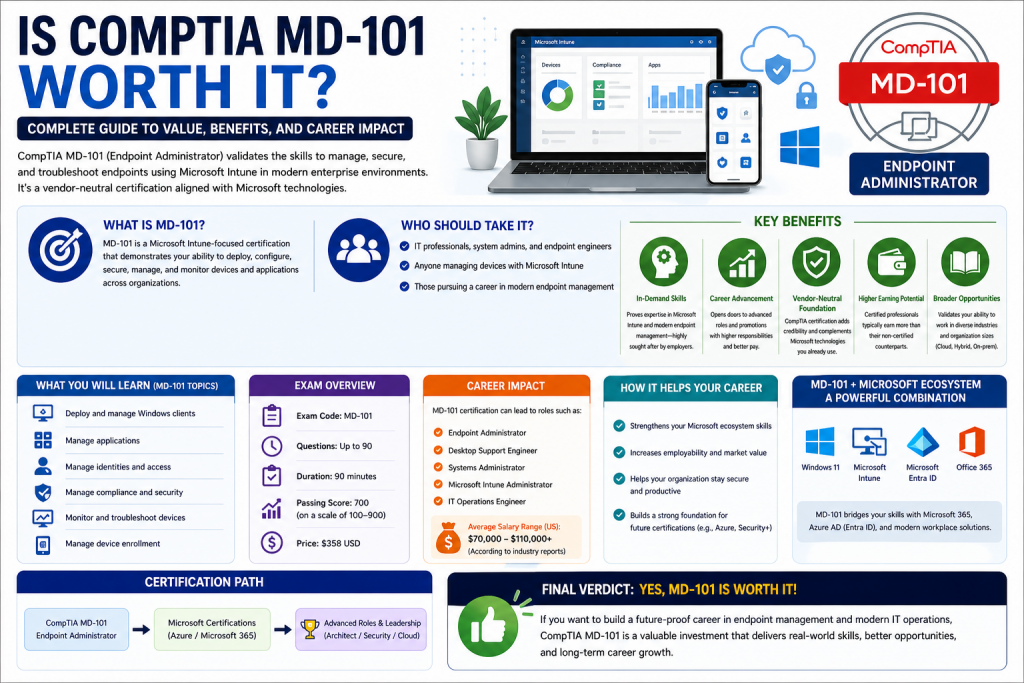
Microsoft certifications have long been considered a reliable way for IT professionals to validate their skills and improve career opportunities. Among these certifications, MD-101 was designed as an intermediate-level exam focused on managing modern desktop environments in enterprise organizations. Although it has now been retired and replaced by MD-102, the knowledge and concepts behind MD-101 are still highly relevant in today’s IT industry.
MD-101 was part of Microsoft’s modern desktop certification path and played an important role in shaping the skills of desktop administrators, systems administrators, and IT support professionals. It was created to test whether a candidate could manage Windows devices at scale using Microsoft’s enterprise tools and cloud-based management systems.
In real-world IT environments, managing a single computer is very different from managing hundreds or thousands of devices across an organization. MD-101 focused on this enterprise-level management, where automation, policy control, security enforcement, and centralized administration are essential. It was not just about basic Windows knowledge but about understanding how Windows devices operate within a structured corporate environment.
Even though MD-101 is no longer active, it still serves as an important reference point for understanding how Microsoft structured its endpoint management certifications. Many of its concepts continue to exist in MD-102 and in real-world IT operations today.
Evolution of Microsoft Desktop Administration Certification
To understand MD-101 properly, it is important to understand how Microsoft certifications evolved over time. Microsoft has consistently updated its certification paths to reflect changes in technology, especially as organizations shifted from traditional on-premises infrastructure to cloud-based environments.
Originally, desktop administration focused heavily on individual systems, local servers, and manual configuration. However, as businesses began adopting cloud services and mobile devices, the need for centralized device management became more important. Microsoft responded by introducing certifications that reflected modern workplace environments.
MD-100 and MD-101 were introduced as part of this shift. MD-100 focused on basic Windows operating system deployment and configuration, while MD-101 focused on enterprise-level device management. Together, they formed the Microsoft 365 Certified: Modern Desktop Administrator Associate certification.
Later, Microsoft consolidated these exams into MD-102, which reflects the latest technologies and modern endpoint management practices. MD-102 includes cloud-based device management, security integration, and modern deployment techniques using Microsoft Intune and Microsoft 365 services.
Despite these changes, MD-101 remains an important milestone in understanding how enterprise desktop management evolved and how Microsoft structured its certification framework.
Purpose of the MD-101 Certification
The primary purpose of MD-101 was to validate the skills required to manage Windows devices in an enterprise environment. Unlike beginner-level certifications that focus on basic computer usage or operating system fundamentals, MD-101 was designed for professionals who already had some experience in IT support or system administration.
The certification focused on real-world tasks that IT professionals perform daily in organizations. These tasks included deploying operating systems to multiple devices, configuring security policies, managing applications, and monitoring device health.
One of the key goals of MD-101 was to ensure that IT professionals understood how to use Microsoft’s ecosystem of tools for modern device management. This included tools such as Microsoft Intune, Windows Autopilot, Microsoft Defender, and other Microsoft 365 services.
The certification was also designed to ensure that professionals could maintain security and compliance across an organization. In modern IT environments, security is not optional. Organizations must ensure that every device connected to their network meets specific security standards. MD-101 tested the ability to enforce these standards using Microsoft’s management tools.
Who the MD-101 Certification Was Designed For
MD-101 was primarily designed for IT professionals working in desktop administration and systems administration roles. These professionals are responsible for managing end-user devices, ensuring system stability, and maintaining security across organizational networks.
Desktop administrators are often responsible for direct user support and device management. They install operating systems, configure devices, troubleshoot issues, and ensure that users have the tools they need to perform their jobs. MD-101 validated these skills in a structured and standardized way.
Systems administrators, on the other hand, often work at a broader level. They manage servers, networks, and enterprise systems that support multiple devices and users. MD-101 was also relevant for them because it covered centralized management of Windows devices and integration with enterprise systems.
Even network administrators and IT support engineers could benefit from MD-101 because modern networks are closely connected to endpoint devices. Understanding how devices are managed, secured, and configured helps improve overall network security and performance.
MD-101 was not designed for complete beginners. It assumed that candidates already had some experience with Windows environments and basic IT support tasks. However, it was still considered an intermediate-level certification, making it accessible to professionals early in their careers.
Core Value of MD-101 in Real IT Environments
One of the most important aspects of MD-101 was its practical relevance. The certification was not purely theoretical. Instead, it focused on real-world scenarios that IT professionals encounter in enterprise environments.
In most organizations, IT departments are responsible for managing large numbers of devices. These devices must be configured consistently, kept secure, and updated regularly. Manual management of each device is not possible at scale, so automation and centralized control become essential. This is especially important in enterprises where employees may be working from different locations and using a variety of devices, including laptops, desktops, and mobile systems. Without centralized management, maintaining uniform security and performance standards would be extremely difficult and time-consuming.
Automation allows IT teams to apply configurations, security updates, and software installations across all devices simultaneously. This reduces human error and ensures that every system meets organizational requirements. Centralized control also helps administrators monitor device health, track compliance status, and quickly respond to security threats or technical issues.
In addition, centralized management improves scalability. As organizations grow and add more employees, IT systems can easily extend management policies to new devices without needing major manual effort. It also supports remote management, allowing administrators to control systems even when they are not physically present in the office. This makes IT operations more efficient, reliable, and secure in modern business environments where flexibility and speed are essential.
MD-101 trained professionals to use Microsoft tools to solve these challenges. For example, instead of manually installing Windows on each device, administrators learned how to use automated deployment methods. Instead of configuring each system individually, they learned how to apply policies across all devices at once.
Security was another major focus. Organizations face constant security threats, and endpoint devices are often the first target. MD-101 emphasized the importance of protecting devices using Microsoft security solutions and ensuring compliance with organizational policies.
Application management was also critical. In modern workplaces, employees use a wide range of applications. IT administrators must ensure that these applications are properly deployed, updated, and secured. MD-101 covered how to manage applications efficiently using Microsoft tools.
Importance of Enterprise Device Management Skills
The skills covered in MD-101 are essential in almost every modern IT environment. As businesses continue to adopt cloud computing and remote work models, the importance of centralized device management has increased significantly.
Enterprise device management involves controlling how devices are configured, updated, and secured across an organization. This ensures that all systems follow the same standards and reduces the risk of security vulnerabilities.
Without proper device management, organizations can face serious issues such as inconsistent configurations, outdated software, and security breaches. MD-101 addressed these challenges by teaching professionals how to manage devices at scale using Microsoft’s ecosystem.
One of the key benefits of learning these skills is career flexibility. IT professionals who understand enterprise device management can work in a wide range of industries, including finance, healthcare, education, and government organizations.
These industries often rely heavily on Microsoft technologies, making MD-101-related skills highly valuable. Even though the certification itself has been retired, the knowledge remains applicable in modern IT roles.
Relevance of MD-101 Skills in Modern Technology
Although MD-101 is no longer an active certification, its content is still highly relevant. Modern IT environments continue to use the same core principles of device management, security enforcement, and application control.
Microsoft has simply updated the tools and technologies used to implement these principles. For example, Microsoft Intune has become a central platform for endpoint management, replacing older management methods.
Similarly, security has become more integrated into device management through Microsoft Defender and cloud-based security solutions. However, the underlying concepts remain the same as those taught in MD-101.
Understanding MD-101 concepts can also make it easier to transition into newer certifications like MD-102. Since MD-102 builds upon the foundation established by MD-101, professionals with MD-101 knowledge will find it easier to understand modern endpoint administration practices.
Career Impact of MD-101 Knowledge
For IT professionals, certifications are not just about passing exams. They are about building skills that translate into real job opportunities. MD-101 was valuable because it aligned closely with job roles in desktop and systems administration.
Professionals with knowledge similar to MD-101 are often responsible for managing critical IT infrastructure. This includes ensuring that employees can access their systems securely, that devices are properly configured, and that organizational data is protected.
These responsibilities are essential in almost every organization, making these skills highly transferable across industries and job roles.
Even without the certification, having MD-101-level knowledge demonstrates a strong understanding of Microsoft enterprise environments. This can significantly improve job prospects and career growth opportunities in IT.
Understanding Enterprise Operating System Deployment
One of the most important areas covered in MD-101 was operating system deployment in enterprise environments. In modern organizations, installing Windows manually on each device is not practical or scalable. IT departments often manage hundreds or thousands of devices, and they need efficient methods to deploy operating systems consistently and securely.
Enterprise deployment is not just about installing Windows. It involves preparing devices for organizational use, ensuring they are properly configured, and making sure they comply with company policies from the moment they are first used. MD-101 focused heavily on understanding how these deployment processes work in real-world environments.
A key concept in this area was automated deployment. Instead of physically configuring each device, administrators use centralized tools that allow devices to configure themselves during setup. This reduces workload and ensures consistency across all systems.
Modern deployment methods also focus on reducing downtime. In traditional environments, setting up a new computer could take hours or even days. With enterprise tools, devices can be shipped directly to employees and configured automatically when they connect to the internet.
MD-101 emphasized understanding these modern approaches because they are essential in cloud-based IT environments where speed, efficiency, and scalability are critical.
Windows Autopilot and Modern Device Setup
A major component of MD-101 was understanding Windows Autopilot, which is a cloud-based deployment solution. Windows Autopilot allows organizations to pre-configure devices so that they automatically set themselves up when turned on for the first time.
Instead of IT staff manually installing software and configuring settings, Autopilot handles the process automatically. When a user receives a new device, they simply sign in with their work account, and the system configures itself based on organizational policies.
This approach significantly reduces IT workload and improves user experience. It also ensures that every device follows the same configuration standards, which is important for security and compliance.
MD-101 required candidates to understand how Autopilot works, how devices are registered, and how deployment profiles are assigned. These concepts are essential in modern enterprise environments where remote work and cloud-based management are common.
Managing Operating System Updates in Organizations
Another important topic in MD-101 was managing Windows updates. In enterprise environments, keeping systems up to date is critical for security and performance. However, updates must be carefully controlled to avoid disrupting business operations.
MD-101 covered strategies for managing update deployment across multiple devices. IT administrators need to decide when updates are installed, how they are tested, and how they are rolled out to users.
In large organizations, updates are often deployed in phases. This means that a small group of devices receives updates first, and if no issues are found, the updates are rolled out to the rest of the organization.
This controlled approach helps prevent system failures caused by faulty updates or compatibility issues. It also allows IT teams to test updates before they affect all users.
MD-101 also emphasized the importance of monitoring update compliance. Administrators must ensure that all devices are running supported versions of Windows and that critical security updates are installed promptly.
Device Enrollment and Identity Integration
A key part of enterprise device management is ensuring that all devices are properly enrolled in the organization’s management system. MD-101 covered how device enrollment works and why it is important.
When a device is enrolled, it becomes part of the organization’s management infrastructure. This allows IT administrators to apply policies, monitor activity, and enforce security settings.
Device enrollment is closely linked to identity management. Users must sign in using organizational accounts, which are connected to cloud-based identity services. This ensures that access to company resources is controlled and secure.
MD-101 required understanding how devices are registered, how user identities are linked to devices, and how authentication works in enterprise environments.
This integration between devices and identity systems is essential for modern IT security. It ensures that only authorized users can access company data and systems.
Policy Management in Enterprise Environments
One of the most critical areas in MD-101 was policy management. In large organizations, it is not enough to configure devices individually. Instead, IT administrators use policies to control how devices behave across the entire organization. This ensures that every system follows the same security standards, configuration rules, and operational guidelines without requiring manual setup on each machine.
Policies also help reduce inconsistencies that can occur when multiple administrators manage devices separately. By using centralized policy management, organizations can enforce restrictions, automate configurations, and maintain a secure and stable IT environment. It also improves efficiency by allowing changes to be applied globally within minutes rather than hours or days.
Policies can define security settings, user restrictions, application behavior, and system configurations. These policies are applied automatically to devices based on organizational rules.
MD-101 emphasized understanding how to create, assign, and manage these policies using Microsoft tools. This includes configuration profiles that define how devices should operate.
For example, a policy might require all devices to have encryption enabled, restrict access to certain system features, or enforce password complexity rules.
By using policies, organizations can ensure consistency and reduce the risk of human error. Instead of configuring each device manually, administrators can apply a single policy that affects all systems.
Conditional Access and Compliance Controls
MD-101 also covered advanced security concepts such as conditional access. This is a security mechanism that controls access to resources based on specific conditions.
For example, a user might only be allowed to access company data if their device meets certain security requirements. If the device is not compliant, access is denied.
This approach adds an extra layer of security by ensuring that only trusted devices and users can access sensitive information.
Compliance policies are closely related to conditional access. These policies define what makes a device compliant with organizational standards. This might include requirements such as having antivirus software enabled, using encryption, or running specific operating system versions.
MD-101 required understanding how these policies work together to create a secure and controlled IT environment.
Managing Device Security in Enterprise Networks
Security was one of the most important topics in MD-101. In modern IT environments, devices are constantly exposed to security threats such as malware, phishing attacks, and unauthorized access attempts.
MD-101 focused on how to use Microsoft security tools to protect devices. This includes endpoint protection systems that monitor devices for suspicious activity and prevent security breaches.
Administrators must be able to monitor device health and identify potential threats before they cause damage. This requires understanding security dashboards, alerts, and reporting tools.
MD-101 also covered advanced protection features that help defend against sophisticated attacks. These include technologies that isolate threats, protect sensitive data, and prevent unauthorized code execution.
Security management is not a one-time task. It requires continuous monitoring and regular updates to ensure that systems remain protected against new threats.
Microsoft Defender and Endpoint Protection Concepts
A key part of MD-101 was understanding Microsoft Defender and its role in enterprise security. Microsoft Defender is a built-in security solution that helps protect devices from malware and other threats.
In enterprise environments, Defender is not just an antivirus tool. It is part of a larger security ecosystem that includes threat detection, behavioral analysis, and automated response systems.
MD-101 required understanding how Defender integrates with other Microsoft tools to provide comprehensive endpoint protection.
Administrators must configure security policies, monitor alerts, and respond to potential threats. This ensures that devices remain secure and that any security incidents are handled quickly.
Endpoint protection is essential in modern IT environments because threats are constantly evolving. Organizations must be able to adapt their security strategies to address new risks.
Application Management in Large Organizations
Another important area of MD-101 was application management. In enterprise environments, employees rely on a wide range of software applications to perform their jobs.
Managing these applications across multiple devices can be challenging without proper tools. MD-101 focused on how to deploy, update, and manage applications centrally.
Applications can be distributed through various channels, including enterprise application stores and cloud-based management platforms.
IT administrators must ensure that applications are installed correctly, updated regularly, and removed when no longer needed.
MD-101 also covered how to control application access. In some cases, organizations may restrict certain applications for security or compliance reasons.
Mobile Application Management and Data Protection
With the increasing use of mobile devices in the workplace, MD-101 also included mobile application management concepts.
Mobile application management allows organizations to control how apps behave on both company-owned and personal devices. This ensures that corporate data remains secure even on mobile platforms.
Administrators can enforce rules that prevent data from being copied, shared, or stored in unauthorized locations.
Data protection is a critical concern in modern IT environments. MD-101 emphasized the importance of securing data across all devices and applications.
Organizations must ensure that sensitive information is protected at all times, regardless of where it is accessed.
Role of MD-101 in Modern IT Skill Development
Even though MD-101 is no longer an active certification, the skills it covered are still highly relevant. Many of the concepts introduced in MD-101 form the foundation of modern endpoint management practices.
IT professionals who understand these concepts are better prepared to work with modern tools such as Microsoft Intune and Microsoft 365.
MD-101 helped professionals develop a structured understanding of enterprise IT management. This includes deployment, security, policy management, and application control.
These skills are still essential in today’s IT environments, making MD-101 knowledge valuable even after the certification’s retirement.
Understanding the Real Value of MD-101 in IT Careers
The MD-101 certification, although now retired, still holds significant value when evaluated from a career development perspective. Its importance is not limited to the exam itself but extends to the skills and knowledge it represents in enterprise IT environments. For many professionals, MD-101 served as a structured pathway into desktop administration and endpoint management roles.
In IT careers, certifications often act as validation tools rather than complete job training programs. MD-101 was no exception. It did not simply test theoretical knowledge but focused on how Microsoft expects administrators to manage Windows devices in real enterprise scenarios. This made it especially relevant for professionals working in organizations that rely heavily on Microsoft technologies.
The true value of MD-101 lies in its alignment with real-world IT responsibilities. Tasks such as deploying operating systems, managing security policies, handling device enrollment, and controlling applications are all core responsibilities in modern IT departments. MD-101 helped professionals standardize their understanding of these tasks using Microsoft’s ecosystem.
Even today, employers still look for professionals who understand these concepts, even if the certification itself is no longer active. This shows that MD-101’s relevance extends beyond its official lifecycle.
Career Opportunities Linked to MD-101 Skills
MD-101 was closely associated with several IT job roles, especially those focused on endpoint management and system administration. Desktop administrators were the primary target audience, as their daily responsibilities closely matched the exam objectives.
Desktop administrators are responsible for managing end-user systems within an organization. This includes installing operating systems, configuring devices, applying security settings, and troubleshooting user issues. MD-101 provided structured knowledge for performing these tasks using Microsoft tools. It also helped administrators understand how to standardize device setups across large environments so that every user receives a consistent and secure computing experience. In addition, it emphasized the importance of automation in modern IT operations, reducing the need for manual configuration on each machine.
The certification also trained professionals to work with centralized management systems where multiple devices can be controlled from a single platform. This approach is essential in enterprise environments where efficiency and scalability are critical. Desktop administrators must also ensure that systems remain compliant with organizational policies, including password rules, encryption requirements, and software restrictions.
MD-101 further strengthened understanding of collaboration between IT departments and end users. Administrators often act as the bridge between technical systems and business needs, ensuring that employees can work without interruptions. The certification helped build problem-solving skills, enabling professionals to quickly diagnose and resolve issues related to hardware, software, and network connectivity while maintaining productivity across the organization.
Systems administrators also benefited from MD-101 knowledge. While their responsibilities often include broader infrastructure management, they still need to understand how endpoint devices interact with servers, networks, and cloud services. MD-101 helped bridge that understanding.
IT support engineers and helpdesk technicians could also gain value from MD-101 concepts. These roles often serve as the first point of contact for technical issues, and having a strong understanding of device management and Windows environments improves troubleshooting efficiency.
In many organizations, professionals who understand endpoint management are considered more valuable because they can handle both user-facing support and backend configuration tasks.
MD-101 and Career Progression in IT
One of the key benefits of MD-101 was its role in career progression. IT careers typically follow a structured path where professionals move from basic support roles into more advanced administrative and engineering positions. MD-101 helped bridge this gap by introducing enterprise-level responsibilities in a structured way. It encouraged professionals to think beyond basic troubleshooting and focus on system-wide management, automation, and security enforcement.
This made it easier for individuals to transition into higher-paying roles such as system administrator or endpoint administrator. It also helped build confidence by providing hands-on knowledge of tools used in real enterprise environments, improving long-term career growth potential significantly.
MD-101 served as a stepping stone in this progression. It helped professionals transition from entry-level IT support roles into more specialized desktop and systems administration roles.
For beginners with some experience in IT support, MD-101 provided a clear direction for developing advanced skills. It introduced enterprise-level concepts that are not always covered in basic IT training programs.
For experienced professionals, MD-101 served as a formal validation of existing skills. Many system administrators already perform the tasks covered in MD-101, but certification helped formalize their expertise and improve job opportunities.
Over time, professionals who mastered MD-101-level skills often moved into more advanced roles such as IT infrastructure specialist, cloud administrator, or endpoint security engineer.
Difficulty Level and Learning Curve of MD-101
MD-101 was considered an intermediate-level certification, which means it was not designed for complete beginners. However, it was also not an expert-level exam, making it accessible to professionals with some IT experience. It required a solid understanding of Windows operating systems and basic familiarity with enterprise IT environments. Candidates were expected to already know fundamental concepts such as user management, device configuration, and basic troubleshooting.
At the same time, it pushed learners to develop more advanced skills in deployment, security, and policy management. This balance made it a practical certification for those transitioning from support roles into full desktop or systems administration responsibilities in real-world organizations.
The difficulty of MD-101 came from its focus on Microsoft-specific tools and enterprise configurations. While the concepts themselves were not overly complex, understanding how Microsoft expects them to be implemented required dedicated study and practice.
One of the challenges candidates faced was the breadth of topics covered. MD-101 included operating system deployment, policy management, security configuration, application management, and cloud integration. Each of these areas required detailed understanding.
Another challenge was the practical nature of the exam. It was not enough to memorize definitions. Candidates needed to understand how to apply concepts in real-world scenarios using Microsoft tools.
For professionals already working in IT environments, MD-101 was easier to grasp because many of the tasks reflected their daily responsibilities. However, for those without hands-on experience, the learning curve could be steep.
Cost and Investment Considerations
The MD-101 exam cost approximately $165 USD, which is relatively standard for Microsoft certification exams. However, MD-101 was only one part of a larger certification path. To achieve the full Microsoft 365 Certified: Modern Desktop Administrator Associate certification, candidates also needed to pass MD-100.
This meant that the total cost of certification was effectively doubled if both exams were taken. In addition to exam fees, candidates often invested in training courses, study materials, and practice labs.
When evaluating cost versus value, MD-101 was generally considered a worthwhile investment for IT professionals aiming to build a long-term career in Microsoft-based environments.
The return on investment came in the form of better job opportunities, higher salaries, and improved technical skills. Many employers also value certifications when considering promotions or hiring decisions.
Even though MD-101 is retired, its successor MD-102 continues to serve the same purpose, meaning the investment in learning these skills remains relevant.
Preparation Strategy for MD-101-Level Knowledge
Preparing for MD-101 required a structured learning approach. Since the exam covered multiple technical domains, candidates needed to allocate study time across different topics.
A strong preparation strategy typically started with understanding Windows operating system fundamentals. This included installation, configuration, and basic administration.
Next, candidates needed to focus on enterprise management tools. This involved learning how Microsoft Intune, Autopilot, and Microsoft Endpoint Manager are used to manage devices at scale.
Security concepts were another critical area. Understanding Microsoft Defender, conditional access, and compliance policies required both theoretical knowledge and practical experience.
Application management and deployment strategies also required attention. Candidates needed to understand how applications are distributed and managed in enterprise environments.
Hands-on practice was extremely important. Many candidates used virtual labs or test environments to simulate real-world scenarios. This helped reinforce theoretical knowledge and improve practical skills.
MD-101 Compared to MD-102
Since MD-101 has been replaced by MD-102, it is important to understand how the two compare. MD-102 is essentially an updated version of MD-101, combining both MD-100 and MD-101 into a single exam.
MD-102 focuses more heavily on cloud-based management and modern workplace environments. It includes deeper integration with Microsoft Intune, Microsoft 365 services, and advanced security features.
While MD-101 focused on traditional and hybrid environments, MD-102 reflects the shift toward fully cloud-managed devices.
However, the foundational concepts remain the same. Device deployment, policy management, security enforcement, and application control are still core areas of focus.
This means that anyone who understands MD-101 concepts will find MD-102 easier to learn and pass.
Industry Recognition and Employer Perspective
From an employer’s perspective, MD-101 was widely recognized as a valid indicator of Microsoft endpoint management skills. Organizations that rely on Windows-based systems often prefer candidates who understand Microsoft’s ecosystem. It demonstrated that a professional could work with enterprise-level tools and manage devices in a structured and secure way. Employers valued it because it reduced onboarding time and training costs, as certified professionals were already familiar with core administrative tasks.
It also gave hiring managers confidence that the candidate understood standardized Microsoft practices for deployment, security, and policy management. In many cases, it helped candidates stand out in competitive job markets where practical Windows administration experience was highly important for daily operations.
Certifications like MD-101 helped employers quickly assess whether a candidate had the required technical knowledge for desktop and systems administration roles.
However, employers also value hands-on experience. Certifications alone are not enough, but they significantly strengthen a candidate’s profile when combined with practical experience.
In many cases, MD-101 served as a differentiator between candidates with similar experience levels. It demonstrated commitment to professional development and validated technical expertise.
Even today, employers recognize the skills associated with MD-101, even though the certification itself is no longer active.
Long-Term Career Impact of MD-101 Skills
The long-term impact of MD-101 is best understood in terms of skill development rather than certification status. The knowledge gained from studying MD-101 continues to be relevant in modern IT environments.
Enterprise device management, security enforcement, and application control are not outdated concepts. They are still central to IT operations in organizations worldwide.
Professionals who developed MD-101-level skills are well-positioned for roles in cloud administration, endpoint security, and IT infrastructure management.
These skills also provide a strong foundation for advanced certifications and specialized IT roles.
As technology continues to evolve, the tools may change, but the underlying principles remain consistent. MD-101 helped professionals understand these principles in a structured way.
Final Conclusion
MD-101 was an important Microsoft certification that played a significant role in shaping modern desktop and endpoint administration skills. It provided IT professionals with a structured path to learn how to manage Windows devices in enterprise environments using Microsoft tools and services.
Although the certification has been retired and replaced by MD-102, its core concepts remain highly relevant in today’s IT industry. The skills it covered—such as device deployment, policy management, security enforcement, and application control—are still essential for modern IT roles.
For IT professionals, MD-101 represented more than just an exam. It was a foundation for understanding enterprise-level device management and building a career in desktop and systems administration.
From a career perspective, the knowledge gained from MD-101 continues to provide value in job roles, promotions, and skill development. Employers still seek professionals who understand Microsoft’s ecosystem and can manage devices efficiently in enterprise environments.
In conclusion, while MD-101 as a certification is no longer available, the skills it represented remain highly valuable. It served as a strong stepping stone for IT professionals and continues to influence modern endpoint management practices through its successor, MD-102.
Continue exploring the technologies and certification concepts that matter most to you.