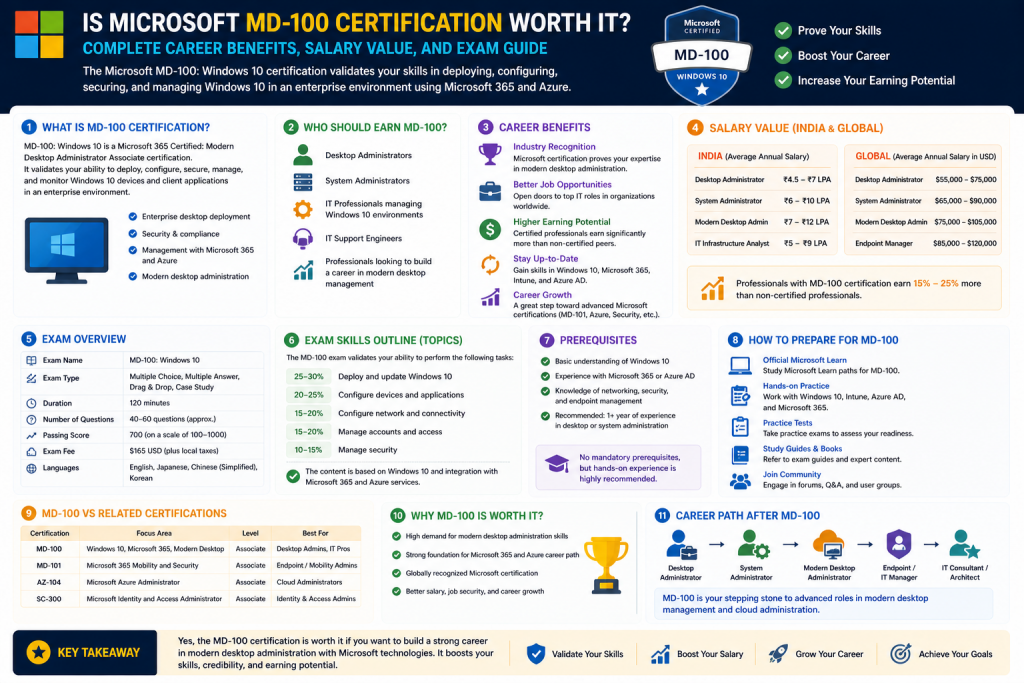
The MD-100 certification was once one of Microsoft’s key exams for IT professionals pursuing a career in desktop administration, endpoint management, and enterprise Windows support. Although Microsoft officially retired the MD-100 and MD-101 exams and replaced them with MD-102, the value of understanding MD-100 remains highly relevant because it laid the foundation for modern Windows administration careers. For many aspiring IT professionals, help desk technicians, junior system administrators, and desktop support specialists, MD-100 represented an entry point into enterprise-level Microsoft technologies.
The exam focused on core Windows client deployment, device configuration, operating system maintenance, security controls, and enterprise troubleshooting. These are not obsolete skills simply because the exam changed names. In reality, the principles covered under MD-100 continue to form the backbone of endpoint administration in organizations around the world. Windows deployment, device imaging, user profile migration, update strategies, policy management, and troubleshooting are still daily responsibilities in most IT environments.
For career-minded professionals, understanding MD-100 is also useful because many employers continue referencing legacy certifications when evaluating resumes, especially in organizations where older certification structures influenced hiring practices. Recruiters and IT managers may still recognize MD-100 as proof of baseline competency in Windows administration, even while transitioning to MD-102.
The significance of MD-100 extends beyond the exam itself. It symbolized Microsoft’s validation that an individual could manage Windows environments professionally rather than casually. Many people know how to use Windows, but enterprise administration requires something very different. It involves understanding deployment lifecycles, enterprise authentication, storage strategies, endpoint security, policy enforcement, and scalable support methods. This distinction is important because businesses do not simply need users; they need administrators capable of supporting hundreds or thousands of systems efficiently.
The MD-100 was particularly valuable because it focused on practical operational knowledge rather than purely theoretical concepts. Candidates needed to understand real administrative workflows, including installing Windows, configuring devices, managing updates, securing endpoints, and troubleshooting system issues. These responsibilities align closely with real-world desktop support and junior systems administration roles.
Even though the certification path evolved, many professionals still ask whether studying MD-100 concepts is worth it. The answer often depends on career goals. If your objective is to build strong Windows administration fundamentals, then the skills are still highly relevant. If your goal is simply to earn the latest Microsoft credential, then transitioning to MD-102 makes more strategic sense. Either way, the knowledge base remains valuable.
The Original Purpose of MD-100 in Microsoft’s Certification Ecosystem
Microsoft designed MD-100 as part of the Modern Desktop Administrator Associate certification path. It served as the technical foundation exam focused primarily on Windows operating systems, while its counterpart expanded into broader management and security functions. This structure reflected how organizations actually operate: before administrators can manage large-scale environments, they must first understand the operating systems themselves.
This certification was targeted toward early-career professionals. Unlike expert-level certifications focused on architecture or advanced cloud engineering, MD-100 concentrated on practical implementation. This made it appealing to individuals transitioning into IT from support roles, career changers entering technology, or junior professionals seeking advancement.
The exam’s structure validated competency in several key areas:
Deploying Windows operating systems across devices
Managing updates and servicing channels
Configuring local and remote connectivity
Managing storage and system performance
Implementing device security
Troubleshooting operating system issues
Supporting user productivity in enterprise settings
These domains represented common tasks that organizations depend on every day. A business cannot function effectively if devices fail, deployments are inconsistent, or user systems are insecure. Microsoft recognized this operational reality and created MD-100 to standardize competency.
For many candidates, this was their first exposure to enterprise methodology. Someone who had spent years using Windows personally might still lack familiarity with concepts like deployment automation, Azure-based identity integration, enterprise update rings, or policy-based configuration. MD-100 helped bridge the gap between personal computing and enterprise IT.
This distinction is essential because self-taught troubleshooting often differs from professional administration. In enterprise environments, consistency, scalability, and compliance matter as much as technical fixes. Administrators are expected to solve problems using repeatable, policy-aligned approaches.
Why Windows Administration Skills Remain in High Demand
Windows remains one of the most widely used operating systems in business environments globally. While cloud computing, virtualization, and platform diversification continue expanding, enterprise Windows environments are still central to countless organizations. Businesses depend on Windows devices for user productivity, software compatibility, identity management, and endpoint integration.
This means professionals with strong Windows administration knowledge continue to hold strategic value. Even as infrastructure evolves, businesses still require administrators who can:
Deploy new user systems
Manage operating system upgrades
Secure endpoints against threats
Configure user permissions
Maintain productivity applications
Troubleshoot performance issues
Manage device compliance
Support hybrid work environments
The shift toward cloud-managed endpoints has not eliminated desktop administration—it has transformed it. Traditional Windows management now intersects with cloud identity, remote management tools, mobile device management, and zero-trust security strategies. Professionals who understand MD-100 foundations are often better prepared to adapt to these changes.
For example, device deployment once centered heavily on imaging and local installations. Today, cloud provisioning, remote deployment, and policy automation are more common. However, the foundational understanding of operating system setup, configuration states, hardware readiness, and user migration still matters.
This continuity is why MD-100 concepts continue offering career value. The technologies may modernize, but administrative principles remain consistent.
Who Typically Benefited Most from MD-100
The ideal MD-100 candidate was not necessarily an advanced engineer. Instead, it was often someone building practical administrative credibility.
Common candidate profiles included:
Help desk technicians seeking promotion
Desktop support specialists
Junior systems administrators
IT support analysts
Managed service provider technicians
Field support professionals
Career changers entering IT
For these individuals, MD-100 served two purposes simultaneously: skills development and professional validation.
Skills development mattered because the exam outlined what Microsoft considered essential administrative knowledge. This gave candidates a roadmap. Rather than learning random troubleshooting tricks, they could build structured competency.
Professional validation mattered because certifications often help hiring managers evaluate capability quickly. In competitive entry-level markets, a recognized certification can differentiate one candidate from another.
A help desk worker with practical experience but no formal credential might be overlooked compared to someone who demonstrates standardized knowledge. While certifications do not replace experience, they often strengthen credibility.
MD-100 as a Career Launchpad
For many professionals, the greatest value of MD-100 was not immediate salary increase but career acceleration. Entry-level certifications often function like leverage tools. They can help candidates qualify for better interviews, transition from reactive support into proactive administration, or justify advancement into more specialized technical roles.
Potential pathways included:
Help desk to desktop administrator
Desktop support to systems administrator
Support technician to endpoint manager
Junior admin to security-focused administrator
Operational support to Microsoft 365 specialization
This progression matters because early career momentum often shapes long-term earnings. A foundational certification can create opportunities that compound over time.
For example, someone who begins by mastering Windows deployment and endpoint management may later specialize in:
Cloud endpoint administration
Identity and access management
Security operations
Infrastructure engineering
Systems architecture
Microsoft ecosystem consulting
Without strong fundamentals, these transitions can be more difficult.
The Psychological Value of Structured Learning
One overlooked benefit of certifications like MD-100 is confidence. Many aspiring IT professionals feel overwhelmed because technology is vast. Structured certifications narrow focus and create achievable milestones.
Rather than asking, “How do I learn all of IT?” MD-100 candidates could ask, “How do I master Windows deployment, management, and support?”
This narrower focus often improves learning efficiency and reduces uncertainty. Structured objectives provide clarity:
Learn deployment
Learn storage
Learn configuration
Learn maintenance
Learn troubleshooting
This framework can be especially helpful for self-taught learners who need direction.
Confidence also affects job performance. Professionals who understand official methodologies may approach issues more systematically than those relying solely on trial and error.
The Retirement of MD-100 and Rise of MD-102
Microsoft’s retirement of MD-100 does not mean the certification lacked value. Instead, it reflects Microsoft’s tendency to modernize certifications as technologies evolve.
MD-102 combines previous concepts into a more unified endpoint administration model aligned with current enterprise realities, including Windows 11, cloud integration, and modern endpoint strategies.
This shift indicates broader industry trends:
Cloud-managed endpoints
Remote administration
Unified device management
Security-first architecture
Hybrid identity ecosystems
However, MD-102 builds on many of the same administrative foundations. Professionals familiar with MD-100 often possess transferable knowledge that remains relevant.
For those considering certification today, MD-102 is generally the better path. But studying MD-100 concepts can still provide useful foundational understanding.
Is MD-100 Knowledge Still Worth Learning Today?
Yes—especially for those seeking strong Windows administration fundamentals.
Core areas remain highly useful:
OS deployment
Device imaging
Update management
Storage configuration
Policy application
Troubleshooting
Endpoint security
Even if the exam itself is retired, the knowledge remains professionally useful.
Technology careers reward adaptable foundations. A professional who deeply understands Windows administration can often transition more effectively into newer tools and frameworks than someone who learns only surface-level automation.
Common Misconceptions About MD-100
One misconception is that MD-100 was “just for desktop support.” In reality, it often provided broader operational knowledge than many assume.
Another misconception is that retirement equals irrelevance. Certification retirement often reflects restructuring, not uselessness.
A third misconception is that non-technical users can easily pass because they use Windows daily. Enterprise Windows administration is significantly more complex than consumer use.
Final Thoughts on MD-100’s Foundational Value
MD-100 represented more than a certification exam—it represented an introduction to enterprise IT discipline. It helped thousands of professionals move from casual familiarity with Windows into structured administrative capability.
Its retirement does not erase its value. Instead, it highlights the evolving nature of technology certification.
For aspiring IT professionals, the bigger lesson is this: foundational skills matter. Certification names may change, but organizations will always need professionals who can deploy, manage, secure, and support endpoint environments effectively.
Whether through MD-100 historically or MD-102 today, the path remains similar—learn the systems deeply, validate your skills, and use that knowledge to build broader career opportunities.
Breaking Down What the MD-100 Actually Tested
To understand whether the MD-100 was worth pursuing, it is essential to examine what the exam actually measured. Many certifications gain popularity because of branding, but real career value depends on the specific skills being validated. MD-100 stood out because it focused on practical Windows administration responsibilities rather than abstract theory. It tested whether candidates could manage Windows devices in ways that aligned with enterprise operational standards.
At its core, MD-100 validated the ability to deploy, configure, secure, maintain, and troubleshoot Windows operating systems in business environments. These responsibilities are central to many real-world IT support and administrative positions.
The exam was organized around several primary domains that mirrored common workplace tasks.
Deploying Windows was one of the most important sections. Candidates needed to understand installation methods, upgrade paths, deployment strategies, imaging options, activation processes, and migration techniques. This was particularly valuable because businesses regularly refresh hardware, onboard employees, and transition between operating system versions. Administrators who understand deployment reduce downtime and improve organizational efficiency.
Managing devices and data was another major component. This included understanding local users, group configurations, identity considerations, device settings, and data access management. These skills matter because user productivity depends heavily on properly configured systems.
Storage and connectivity objectives focused on networking basics, storage management, and access methods. This domain connected endpoint functionality with business continuity.
Maintaining Windows included updates, monitoring, recovery options, and troubleshooting methodologies. In enterprise IT, maintenance is not optional—it is continuous.
This structure made MD-100 especially practical. Rather than emphasizing obscure niche skills, it focused on responsibilities common in thousands of workplaces.
Why These Skills Were Professionally Valuable
Every exam objective connected directly to business needs. Organizations depend on endpoint administrators to maintain operational continuity. A poorly deployed operating system can disrupt productivity. Weak device security can create vulnerabilities. Misconfigured systems can generate support tickets, compliance failures, or costly downtime.
Because of this, MD-100 preparation often delivered more than certification readiness—it delivered workplace readiness.
For example, deployment knowledge was useful in scenarios such as:
Preparing laptops for new hires
Migrating users to updated operating systems
Managing system refreshes
Supporting remote deployment strategies
Handling user state transitions
Similarly, maintenance knowledge applied to:
Patch management
Performance troubleshooting
Disaster recovery
System rollback
Device lifecycle planning
This real-world alignment increased MD-100’s credibility.
The Financial Cost of MD-100 and Certification ROI
Cost is always an important factor when evaluating certification value. MD-100 required an exam fee, and because it was only one component of a larger credential path, candidates often needed to budget for multiple exams.
On paper, exam costs may appear straightforward. However, the true investment included:
Exam registration fees
Training materials
Practice tests
Lab environments
Retake risks
Time investment
For entry-level professionals, this could feel significant. Yet certifications should not be judged solely by initial cost. Return on investment depends on whether the credential helps improve employability, earning potential, or skill development.
For many candidates, MD-100’s value came from one or more of the following:
Landing a first IT role
Qualifying for desktop administration jobs
Strengthening internal promotion opportunities
Building Microsoft ecosystem credibility
Supporting broader certification pathways
A certification can often pay for itself if it helps secure a role with even modest salary improvement. More importantly, early-career certifications often produce cumulative returns through long-term progression.
For example, if MD-100 helped a candidate move from basic support to junior administration, that shift could create future pathways toward systems engineering, cloud administration, or security operations.
Required Experience and the Beginner-Friendly Nature of MD-100
One of MD-100’s biggest advantages was accessibility. Unlike advanced certifications that assume years of specialized expertise, MD-100 was intentionally designed for early-career professionals.
This made it appealing to several groups:
Recent graduates
Self-taught IT learners
Career changers
Entry-level support staff
Junior technicians
People transitioning from non-technical roles
Microsoft’s approach acknowledged that desktop administration often serves as an IT entry point. Organizations need skilled professionals who can manage user systems, maintain productivity, and support endpoint reliability.
That said, beginner-friendly did not mean effortless.
Candidates still needed to understand:
Windows settings and interfaces
Administrative tools
Deployment logic
Basic networking
User management
Security concepts
Troubleshooting methods
The exam rewarded structured understanding, not casual familiarity.
This distinction was important because many candidates underestimated the gap between being a Windows user and being a Windows administrator. Personal use rarely prepares someone for enterprise deployment strategy or policy-driven device management.
The Difference Between Self-Taught Knowledge and Microsoft Methodology
A particularly interesting aspect of MD-100 was its emphasis on Microsoft-approved approaches. This sometimes created challenges for experienced but informal learners.
Someone may have years of troubleshooting experience yet still struggle if they rely on improvised habits rather than official workflows.
Microsoft certifications often test:
Recommended deployment methods
Approved administrative tools
Policy structures
Enterprise best practices
Scalable solutions
This meant preparation often required candidates to align their knowledge with standardized practices.
This was not necessarily a disadvantage. In many ways, it improved professional consistency. Employers frequently prefer administrators who understand supported methods over those who rely entirely on workaround culture.
Who Gained the Most Career Value from MD-100
Not every professional needed MD-100 equally. Its value depended heavily on role alignment.
For junior systems administrators, MD-100 often offered strong value because it validated core Windows competencies.
For help desk technicians, it could signal readiness for expanded responsibilities.
For desktop support professionals, it often strengthened specialization.
For network administrators, value depended on endpoint involvement. If network responsibilities included user systems, endpoint troubleshooting, or Windows security, MD-100 was often useful. If responsibilities focused exclusively on routing and switching, it may have been less relevant.
For security professionals, endpoint knowledge could still be strategically beneficial because device-level vulnerabilities often intersect with larger security frameworks.
MD-100 for Systems Administrators
Systems administrators often work across a wide range of operational responsibilities, including:
User account provisioning
Operating system deployment
Device security
Permissions management
Policy enforcement
System maintenance
Because of this overlap, MD-100 frequently aligned well with systems administration growth.
It could help aspiring administrators demonstrate competency in foundational tasks before advancing into broader infrastructure roles.
In smaller organizations especially, systems administrators may also handle desktop responsibilities. This overlap made MD-100 practical.
MD-100 for Help Desk and Support Specialists
For help desk professionals, MD-100 was often particularly valuable.
Many support roles involve repetitive troubleshooting, ticket resolution, and user assistance. While these responsibilities build useful experience, certifications can help transform reactive support into proactive career advancement.
MD-100 offered structure by helping support staff understand not just how to fix issues, but how systems are designed, deployed, and managed at scale.
This broader understanding can improve:
Problem-solving depth
Administrative confidence
Promotion potential
Resume competitiveness
Cross-functional communication
For support professionals seeking upward mobility, this could be highly useful.
MD-100 for Non-Technical Professionals
Although primarily technical, MD-100 could also benefit certain operational professionals whose roles involved advanced Windows management responsibilities.
Examples might include:
Technical coordinators
Operations managers overseeing deployments
Power users with configuration responsibilities
Administrative staff in IT-adjacent functions
However, for most non-technical users, pursuing the full certification was often unnecessary unless role requirements justified it.
Still, studying MD-100 content without necessarily taking the exam could improve productivity and technical literacy.
The Role of MD-100 in Building Broader Microsoft Expertise
Microsoft certifications often function best when viewed as ecosystem pathways rather than isolated achievements.
MD-100 could serve as a stepping stone toward:
Endpoint administration
Cloud device management
Identity solutions
Security administration
Microsoft 365 specialization
Enterprise support leadership
This broader context mattered because modern IT careers increasingly reward integrated knowledge. Understanding Windows endpoints can support future learning in areas like:
Entra ID
Endpoint Manager
Cloud security
Compliance
Hybrid work architecture
A candidate who began with MD-100 could continue evolving strategically.
Salary and Employability Considerations
No certification guarantees salary increases. Compensation depends on market conditions, geography, experience, and employer priorities.
However, MD-100 could improve employability by:
Strengthening resume visibility
Supporting interview credibility
Demonstrating commitment
Reducing perceived onboarding risk
Providing structured knowledge
In many hiring scenarios, certifications function as screening advantages rather than salary guarantees.
For example, two junior candidates may have similar experience, but the certified candidate may appear more prepared or motivated.
This can influence hiring outcomes.
Challenges and Limitations of MD-100
Despite its strengths, MD-100 was not perfect.
Some limitations included:
Retirement reducing direct exam relevance
Need for complementary certifications
Potential overemphasis on Microsoft ecosystems
Exam cost considerations
Limited value for highly specialized non-Windows careers
Additionally, certifications alone rarely replace practical experience. Employers often value hands-on capability just as much as credentials.
The strongest strategy usually combined:
Certification
Lab practice
Real troubleshooting
Continuous learning
Professional communication skills
Why MD-100 Preparation Often Delivered Value Even Without Certification Completion
Even candidates who never completed certification could benefit from structured MD-100 study.
The exam blueprint itself provided a curriculum covering:
Deployment
Management
Security
Maintenance
Troubleshooting
For many learners, this structure was useful independently.
Learning how Microsoft expects administrators to manage environments can improve practical effectiveness even without official validation.
Strategic Lessons from MD-100’s Legacy
The broader lesson from MD-100 is not simply whether one retired certification was worthwhile. It is that foundational administrative skills remain powerful career assets.
Technology changes constantly, but organizations still need professionals who can:
Deploy systems effectively
Manage endpoints securely
Support users efficiently
Maintain operational continuity
Adapt to evolving tools
Certification names may change, but operational needs remain.
Final Perspective on MD-100’s Career Utility
MD-100 was often most valuable for those at the beginning or early-middle stages of IT careers. It offered a practical, structured, and employer-recognized pathway into enterprise Windows administration.
Its greatest strengths included:
Beginner accessibility
Practical skill alignment
Professional credibility
Microsoft ecosystem relevance
Career launch potential
Although newer certifications have replaced it, the principles it validated continue to matter. For many professionals, MD-100 represented an important bridge between informal technical familiarity and formal administrative competence.
In the end, the real worth of MD-100 was never just the exam—it was the professional discipline, operational structure, and career momentum it could help create.
The Transition from MD-100 to MD-102 and What It Means for IT Professionals
Microsoft’s decision to retire MD-100 and MD-101 and replace them with MD-102 reflected a larger industry transformation rather than a dismissal of the original certification’s value. Technology certifications evolve because enterprise environments evolve. Operating systems change, management tools improve, security threats expand, and organizations increasingly adopt cloud-based infrastructure. Microsoft’s certification restructuring acknowledged these realities.
MD-102 was designed to unify desktop administration responsibilities into a more modern framework that better aligns with contemporary endpoint management. While MD-100 focused heavily on Windows deployment and traditional device management, MD-102 places stronger emphasis on integrated endpoint administration, security, cloud connectivity, and hybrid workplace management.
For professionals evaluating certification pathways today, understanding this transition is critical. The retirement of MD-100 does not mean its concepts are outdated. Instead, it means the original knowledge base has been expanded to reflect new enterprise priorities.
Core MD-100 topics such as operating system deployment, troubleshooting, storage, and endpoint maintenance still matter. However, MD-102 broadens these foundations to include more modern tools and strategies.
This includes:
Cloud-managed devices
Remote provisioning
Policy automation
Identity integration
Enhanced endpoint security
Hybrid work administration
This shift reflects a major truth about IT careers: foundational knowledge remains valuable, but adaptability determines long-term relevance.
Professionals who built strong MD-100 fundamentals often have an easier time transitioning into MD-102 because they already understand endpoint principles. Their challenge becomes modernization, not reinvention.
Why Microsoft Certifications Continue to Matter in the Enterprise
Despite skepticism from some corners of the tech world, Microsoft certifications remain relevant because Microsoft technologies remain deeply integrated into enterprise operations.
Businesses around the world still depend on Microsoft ecosystems for:
Windows endpoints
Identity management
Office productivity
Security controls
Cloud infrastructure
Endpoint compliance
User collaboration
For this reason, certifications aligned with Microsoft operational environments continue to carry professional weight.
Employers often view certifications as evidence of:
Technical commitment
Structured learning
Vendor-specific familiarity
Reduced onboarding risk
Administrative discipline
This is particularly important in large organizations where standardized environments matter. A hiring manager may feel more confident in a candidate who has studied official administrative frameworks than one whose knowledge is entirely informal.
However, certifications are most powerful when used strategically. A certification alone rarely guarantees success. It works best when combined with hands-on practice, communication skills, and broader technical growth.
Using Desktop Certifications to Learn Practical Skills
One of the most overlooked advantages of certifications like MD-100 or MD-102 is their value as structured educational roadmaps.
Many aspiring IT professionals struggle because technology learning can feel chaotic. There are endless tools, platforms, and specializations. Without structure, it is easy to become overwhelmed.
Microsoft desktop certifications solve this problem by organizing learning around practical objectives.
These objectives often include:
OS deployment
Configuration
Identity
Maintenance
Security
Troubleshooting
Application delivery
This structure can dramatically improve learning efficiency.
For example, someone learning independently may randomly troubleshoot Windows issues for years without understanding enterprise deployment models or policy management. Certification preparation can fill those knowledge gaps.
The exam blueprint becomes a strategic map rather than a simple test outline.
This is especially useful for:
Career changers
Entry-level technicians
Self-taught learners
Support professionals seeking advancement
Students entering IT
Even if certification is not immediately pursued, the learning pathway itself can deliver meaningful professional value.
Using Desktop Certifications to Validate Existing Skills
For experienced professionals, certifications often serve a different purpose: validation.
An administrator may already know how to manage devices, troubleshoot Windows issues, or deploy operating systems. However, without formal validation, employers may not immediately recognize that capability.
This is where certification can strengthen positioning.
Validation can help with:
Promotions
Internal advancement
Resume filtering
Consulting credibility
Contract opportunities
Client trust
For example, a technician who has informally managed deployments may benefit from certification because it translates experience into standardized language employers understand.
This is especially important in competitive job markets where hiring managers often use certifications as screening tools.
Validation also matters psychologically. Formal recognition can improve confidence and help professionals articulate their skills more clearly.
The Risk of Certification Without Experience
Although certifications can be valuable, relying solely on credentials is risky.
One of the most common mistakes in IT career planning is assuming certification automatically equals competence. Employers often discover quickly whether a professional can apply knowledge practically.
A certification-heavy but experience-light candidate may struggle if they cannot:
Troubleshoot real systems
Communicate effectively
Adapt under pressure
Manage user expectations
Solve operational problems
This is why the strongest strategy combines certification with hands-on practice.
Examples include:
Home labs
Virtual machines
Help desk work
Internships
Volunteer IT support
Practical deployment exercises
For desktop administration specifically, real experience matters because endpoint issues are often messy, inconsistent, and user-driven.
Practical context transforms theory into operational confidence.
Long-Term Career Paths After Desktop Administration
Desktop administration is often viewed as an entry-level or mid-level role, but it can also be a strategic launchpad.
Professionals who begin with endpoint management frequently expand into broader specialties.
Common progression paths include:
Systems administration
Cloud administration
Identity and access management
Security operations
Endpoint engineering
Infrastructure support
Microsoft 365 specialization
IT management
Consulting
Desktop administration builds valuable habits:
Documentation
Policy awareness
Troubleshooting
User empathy
Security discipline
Operational consistency
These habits often translate well into higher-responsibility roles.
For example, someone who understands endpoint deployment may later specialize in cloud endpoint automation. Someone experienced with Windows security may transition into compliance or cybersecurity.
This progression demonstrates why foundational certifications can have compounding career benefits.
How Hiring Managers Often View Microsoft Desktop Certifications
Hiring perspectives vary, but many employers view certifications differently depending on role level.
For entry-level candidates, certifications often signal initiative.
For mid-level professionals, they may signal specialization.
For experienced professionals, they may support credibility but are often secondary to demonstrated results.
In practical terms:
Entry-level applicants may benefit significantly from certification visibility.
Mid-career professionals may use certifications to pivot or specialize.
Senior professionals may rely more on achievements than certifications alone.
This does not reduce certification value—it simply changes how that value is interpreted.
Should You Pursue MD-102 If You Originally Considered MD-100?
For most current candidates, the answer is yes.
Because MD-100 is retired, pursuing MD-102 generally offers better relevance for today’s hiring environment. It aligns more directly with modern Microsoft technologies and enterprise expectations.
However, studying MD-100 content conceptually can still be useful, particularly if you want stronger historical and foundational context.
A practical strategy might include:
Learning MD-100-style fundamentals
Transitioning to MD-102 objectives
Building hands-on labs
Practicing cloud and hybrid tools
Developing broader endpoint strategy
This layered approach can create deeper competency than exam-focused memorization alone.
Balancing Microsoft Certifications with Broader IT Development
A common strategic error is over-specialization too early.
While Microsoft certifications can be powerful, broader career resilience often comes from diversification.
Complementary skills may include:
Networking fundamentals
Security principles
Cloud basics
Scripting
Automation
Documentation
Customer support
Identity systems
This broader perspective can improve flexibility and long-term employability.
For example, a desktop administrator with scripting knowledge may automate deployments more effectively. A Windows administrator with security awareness may transition into endpoint protection roles.
The goal is not to collect random certifications but to build interconnected capability.
The Emotional and Professional Confidence Factor
Another underappreciated value of certifications is confidence building.
Career transitions can be intimidating. Many professionals struggle with imposter syndrome, especially when entering technical fields.
Structured certification paths can create measurable progress.
Passing objectives, mastering concepts, and validating knowledge often improves:
Interview confidence
Professional communication
Technical vocabulary
Problem-solving structure
Career direction
This confidence can influence outcomes just as much as technical knowledge.
A candidate who can clearly explain deployment strategies, maintenance cycles, and endpoint security often performs better than one with fragmented understanding.
Common Reasons Professionals Regret Ignoring Foundational Certifications
Some professionals later realize they underestimated the value of foundational certifications.
Common regrets include:
Weak fundamentals
Missed promotion opportunities
Difficulty structuring learning
Resume disadvantages
Slower transitions into administration
While certifications are not mandatory for success, they can accelerate development when used effectively.
When Desktop Certifications May Be Less Valuable
There are scenarios where desktop certifications may offer limited ROI.
Examples include:
Highly specialized software development careers
Pure networking roles with no endpoint focus
Non-Microsoft-exclusive environments
Advanced architecture roles already beyond endpoint scope
In these cases, alternative certifications may provide stronger alignment.
Still, for anyone involved in enterprise endpoint ecosystems, desktop certifications often retain strategic relevance.
Building a Sustainable Certification Strategy
The most successful IT professionals rarely chase certifications randomly. Instead of collecting credentials simply because they seem popular, they build certification strategies that align with career goals, industry demand, and practical skill development. A sustainable certification strategy focuses on long-term professional growth rather than short-term badge accumulation.
Technology changes quickly, and certifications can lose relevance if they are not connected to real responsibilities or broader specialization plans. That is why strategic professionals evaluate each certification based on how it contributes to their desired path, whether that path involves systems administration, cybersecurity, cloud engineering, networking, endpoint management, or leadership.
A balanced strategy often begins with mastering core fundamentals. Before pursuing specialized certifications, professionals benefit from understanding operating systems, networking basics, troubleshooting, security principles, and infrastructure concepts. Foundational knowledge creates stability, making future certifications easier to understand and more valuable in practice. Without strong fundamentals, advanced certifications may become memorization exercises rather than meaningful professional development.
Choosing role-aligned certifications is equally important. Not every certification fits every career path. A desktop administrator may benefit more from endpoint or Microsoft-focused certifications, while a cloud engineer may prioritize cloud architecture or automation credentials. Strategic alignment ensures that each certification supports real job opportunities instead of becoming an unrelated line on a resume.
Practical lab building is another critical component. Certifications are most valuable when paired with hands-on experience. Virtual labs, home labs, cloud sandboxes, and test environments allow professionals to apply concepts directly. Building systems, configuring policies, deploying software, troubleshooting failures, and practicing security controls transform theoretical knowledge into usable capability. Employers often value demonstrated skill more than exam completion alone, and practical labs help bridge that gap.
Gaining real-world experience should also remain central. Entry-level jobs, freelance support, internships, volunteer projects, or internal workplace responsibilities can provide exposure to operational realities certifications alone cannot teach. Real environments involve deadlines, communication, user behavior, and business priorities that exams may only partially reflect.
Expanding strategically means progressing thoughtfully into adjacent specialties over time. Rather than earning too many unrelated certifications, professionals often benefit more from stacking complementary expertise that deepens career direction. Avoiding certification overload prevents wasted effort, reduces burnout, and improves professional coherence, creating a stronger and more credible long-term career trajectory.
Conclusion
The MD-100 may be retired, but its legacy remains deeply relevant because the foundational skills it validated are still essential in enterprise IT. Deployment, configuration, maintenance, troubleshooting, and endpoint security continue to shape the daily responsibilities of countless technical professionals.
For those who pursued MD-100 historically, it often served as a powerful entry point into Microsoft desktop administration. For today’s candidates, MD-102 offers the modern equivalent, reflecting cloud integration, hybrid work, and evolving endpoint strategies.
The bigger lesson is not about one specific exam—it is about the enduring value of structured skill development.
Microsoft desktop certifications are most worthwhile when they help professionals do one or more of the following:
Build strong technical foundations
Validate practical abilities
Improve hiring competitiveness
Support career transitions
Expand long-term growth opportunities
Certification alone is rarely enough. Real value comes from combining structured learning with practical experience, adaptability, and strategic specialization.
In a technology landscape defined by constant change, foundational knowledge remains one of the most reliable career assets. Whether through MD-100 in the past or MD-102 today, mastering desktop administration principles can still provide meaningful professional leverage.
For aspiring IT professionals, support specialists, and administrators, the real question is not simply whether MD-100 was worth it—it is whether building strong endpoint administration expertise is worth it.
For most professionals working within Microsoft ecosystems, the answer remains yes.
Continue exploring the technologies and certification concepts that matter most to you.