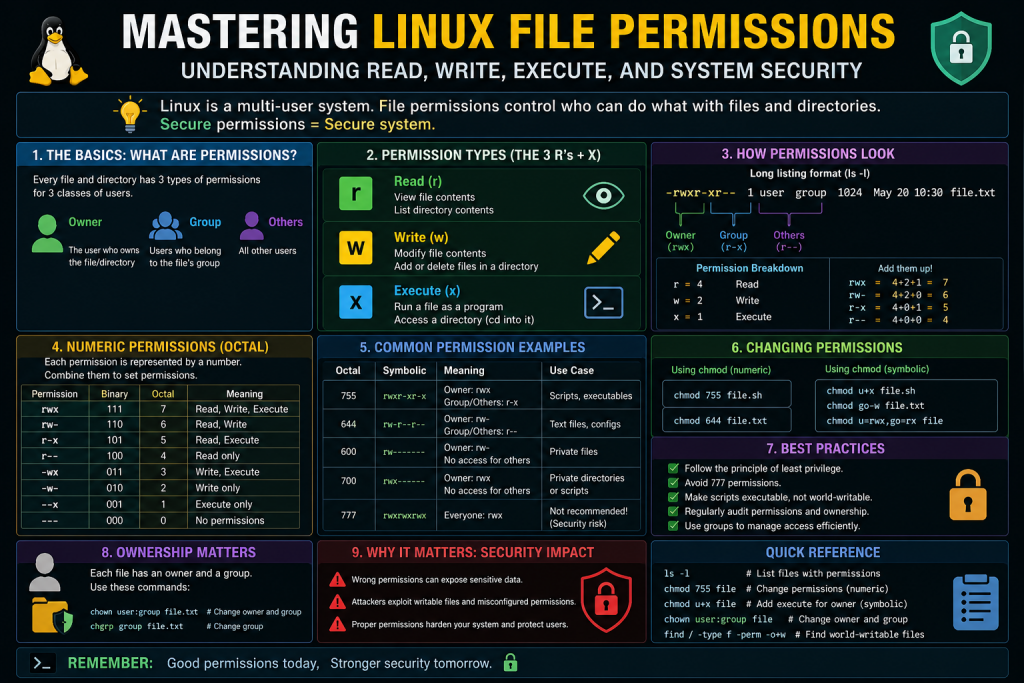
Linux file permissions form the backbone of system security and access control. Every file and directory in a Linux system is governed by a structured permission model that determines who can read, write, or execute it. While basic permissions are relatively easy to grasp, special permission bits such as setuid, setgid, and the sticky bit introduce additional layers of control that can significantly alter how access is granted and managed.
These special bits are often misunderstood because they do not simply grant or deny access. Instead, they modify how processes behave when interacting with files and directories. This makes them powerful tools for administrators, but also potential security risks if misconfigured. A deeper understanding is necessary for anyone aiming to work effectively with Linux systems or pursue professional certifications.
This discussion focuses on building that deeper understanding, starting from how standard permissions work and gradually moving toward the concept of setuid. The goal is to connect theory with real-world behavior so that these concepts become intuitive rather than abstract.
How Standard Permissions Work in Linux
Before exploring special permission bits, it is essential to understand how Linux permissions function under normal conditions. Each file or directory has three key attributes: an owner, a group, and a set of permissions assigned to each category. These permissions define what actions can be performed by the owner, members of the group, and all other users.
When a user attempts to access a file, the system evaluates their identity and determines whether the requested action is allowed. If the user is the owner, the owner permissions apply. If the user belongs to the group associated with the file, group permissions are considered. Otherwise, the system falls back to the permissions assigned to others.
Processes in Linux inherit the identity of the user who starts them. This means that any command executed by a user runs with that user’s privileges. If a user lacks permission to perform an action, the process they initiate will also lack that permission. This consistent behavior ensures that users cannot exceed their authorized access levels under normal circumstances.
For example, if a directory is owned by the root user and does not grant read or execute permissions to others, a regular user will not be able to list its contents. The system enforces this restriction strictly, preventing unauthorized access.
Limitations of the Default Permission Model
While the standard permission model is effective for maintaining security, it can be restrictive in certain situations. There are cases where a user needs to perform a specific task that requires higher privileges than they normally possess. Granting full administrative access to such users would be excessive and potentially dangerous.
Consider the task of changing a password. Password data is stored in a protected system file that is only writable by the root user. If users were required to have root access to change their passwords, it would create a major security vulnerability. At the same time, denying users the ability to change their passwords would be impractical.
This creates a need for a controlled mechanism that allows users to perform specific privileged operations without granting them unrestricted access. The solution lies in special permission bits, which modify how processes run and what permissions they can use.
Introduction to Special Permission Bits
Special permission bits extend the traditional Linux permission system by introducing new behaviors. Instead of simply controlling access to files, these bits influence how processes interact with the system. They allow certain programs to operate with elevated privileges or enforce additional restrictions in shared environments.
In a standard Linux permission model, access is defined using three basic categories: read, write, and execute. These permissions are assigned separately to the file owner, the group, and others. While this system works well for most scenarios, it becomes limited when there is a need for controlled privilege escalation or strict collaboration rules. This is where special permission bits come into play, enhancing the flexibility of the permission model without compromising security when used correctly.
The setuid bit is one of the most powerful of these special permissions. When applied to an executable file, it allows users to run that file with the permissions of the file’s owner rather than their own. This is particularly useful for tasks that require higher privileges but should not grant full administrative access to users. Instead of giving users direct root access, administrators can allow access to specific functionalities through controlled binaries. This reduces risk while maintaining usability.
Similarly, the setgid bit modifies how group permissions are handled. When applied to executables, it allows programs to run with the permissions of the file’s group. However, its most practical use is on directories. In such cases, it ensures that newly created files inherit the group ownership of the parent directory. This behavior simplifies collaboration in shared environments, where multiple users need consistent access to files within a directory.
The sticky bit serves a different purpose altogether. It is primarily used on directories to restrict file deletion. In directories with this bit set, users can only delete files they own, even if the directory itself is writable by everyone. This is especially important in shared directories, where unrestricted deletion could lead to accidental or malicious data loss. By enforcing ownership-based deletion rules, the sticky bit helps maintain order and security in multi-user systems.
Together, these special permission bits provide a more advanced layer of control over how files and processes behave in a Linux system. They are essential for implementing secure workflows, particularly in environments where multiple users interact with shared resources or where certain operations require elevated privileges without exposing the entire system to risk.
However, with increased flexibility comes the need for careful management. Misusing these bits can create security vulnerabilities. For instance, improperly configured setuid programs may allow attackers to gain unauthorized access or escalate privileges. Therefore, administrators must ensure that only trusted and necessary programs are granted such permissions.
Understanding special permission bits is not just about knowing their definitions. It involves recognizing when to use them, how they affect system behavior, and how to manage them responsibly. When applied correctly, they enhance both functionality and security, making them a vital component of Linux system administration.
Among these special bits, setuid is one of the most important and widely used. It enables a program to run with the permissions of its owner rather than the user who executes it. This makes it possible to perform tasks that would otherwise be restricted, while still maintaining overall system security.
Understanding how setuid works requires a shift in perspective. Instead of thinking only in terms of file access, it is necessary to consider how processes are identified and how permissions are applied during execution.
Understanding Process Identity in Linux
Every process in a Linux system has associated user and group identifiers. These identifiers determine what the process is allowed to do. When a user runs a command, the process inherits the user’s identity, including their user ID and group memberships.
This identity is used by the system to enforce access control. If a process attempts to read or modify a file, the system checks the permissions against the process’s user and group identifiers. If the required permissions are not present, the operation is denied.
The concept of process identity is central to understanding setuid. By changing the identity under which a process runs, it becomes possible to grant access to resources that would otherwise be restricted. This is not the same as permanently changing a user’s privileges; the change applies only for the duration of the process.
What Is Setuid
Setuid, short for set user ID, is a special permission bit that alters the execution behavior of a file. When this bit is set on an executable file, any user who runs the file will execute it with the permissions of the file’s owner instead of their own.
This means that if a file is owned by the root user and has the setuid bit enabled, it will run with root-level privileges regardless of who executes it. The user does not gain permanent root access; the elevated privileges are limited to that specific program.
The presence of the setuid bit can be identified by examining file permissions. In a standard permission listing, the execute bit for the owner is replaced with a special indicator when setuid is active. This provides a visual cue that the file has modified execution behavior.
Setuid is typically applied to programs that need to perform restricted operations on behalf of users. It allows these programs to access system resources securely while still enforcing authentication and other controls.
Real-World Example of Setuid
One of the most common examples of setuid in action is the password-changing utility. Changing a password requires updating a protected system file that is not accessible to regular users. However, users must be able to change their own passwords without requiring administrative intervention.
The password utility solves this problem by using setuid. The program itself is owned by the root user and has the setuid bit enabled. When a user runs the program, it executes with root privileges, allowing it to modify the protected file.
Despite running with elevated privileges, the program enforces strict checks to ensure that users can only change their own passwords. This demonstrates how setuid can provide controlled access to sensitive operations without exposing the system to unnecessary risk.
This example highlights the balance that setuid achieves between functionality and security. It allows necessary tasks to be performed while maintaining clear boundaries on what users can do.
Behavior Without Setuid
To fully appreciate the role of setuid, it is helpful to consider how the system behaves without it. When a user runs a command, the process operates strictly within the limits of that user’s permissions. If the user does not have access to a resource, the process cannot access it either.
For instance, if a directory is restricted to the root user, a regular user will not be able to list its contents or interact with its files. The system enforces these restrictions consistently, ensuring that users cannot bypass access controls.
If the same command is executed by the root user, it will succeed because the root user has the necessary permissions. This demonstrates the difference between normal and elevated privileges.
Without setuid, there would be no mechanism to bridge this gap selectively. Users would either need full administrative access or be completely restricted from performing certain tasks. Setuid provides a middle ground by allowing specific programs to operate with elevated privileges.
Security Implications of Setuid
While setuid is a powerful tool, it also introduces potential security risks. Any program that runs with elevated privileges becomes a target for attackers. If a vulnerability exists in such a program, it could be exploited to gain unauthorized access to the system.
For example, if a setuid program contains a flaw that allows arbitrary code execution, an attacker could use it to run commands with the privileges of the file owner. If the owner is the root user, this could lead to full system compromise.
Because of this risk, it is essential to limit the use of setuid to only those programs that truly require it. Administrators should regularly audit their systems to identify files with setuid enabled and verify that they are necessary and secure.
It is also important to ensure that setuid programs are properly maintained and updated. Security patches should be applied promptly to reduce the risk of exploitation. In addition, unnecessary setuid permissions should be removed to minimize the attack surface.
Best Practices for Managing Setuid
Effective management of setuid permissions is critical for maintaining system security. One of the most important practices is to minimize the number of files that have the setuid bit enabled. Only trusted and essential programs should be granted this capability.
Regular audits should be performed to identify files with setuid permissions. This can be done using system tools that scan for special permission bits. Any unexpected or unfamiliar files should be investigated to determine whether they pose a risk.
Another important practice is to avoid applying setuid to custom or unverified programs. Unless a program has been thoroughly tested and reviewed, granting it elevated privileges can introduce significant vulnerabilities.
Administrators should also monitor system activity to detect unusual behavior related to setuid programs. Unexpected access patterns or errors may indicate an attempt to exploit a vulnerability.
Finally, it is important to understand that setuid is not a substitute for proper access control. It should be used as a targeted solution for specific problems, not as a general method for granting permissions.
Understanding Setgid and Its Role in Linux Permissions
After exploring how setuid changes the execution identity of a process, the next concept to understand is setgid. While it is often introduced alongside setuid, it behaves differently depending on whether it is applied to executable files or directories. This dual behavior is where many learners get confused, but it is also what makes setgid especially useful in real-world environments.
Setgid stands for set group ID. Like setuid, it modifies how a process runs, but instead of affecting the user identity, it affects the group identity. This means a program can run with the permissions of a specific group rather than the group of the user executing it. In addition, when applied to directories, it influences how new files inherit group ownership, making it essential for collaborative environments.
Understanding setgid requires a clear grasp of how group permissions work in Linux. Groups allow multiple users to share access to files and directories without giving full ownership rights. By controlling group membership, administrators can manage access efficiently across teams.
How Setgid Works on Executable Files
When setgid is applied to an executable file, it changes the group identity under which the program runs. Normally, a process runs with the primary group of the user who starts it. With setgid enabled, the process instead runs with the group ownership of the file.
This behavior is similar in concept to setuid but operates at the group level. When a user executes a setgid program, the system temporarily assigns the group ID of the file to the process. This allows the program to access resources that are restricted to that group.
For example, if a file belongs to a specific system group that has access to certain resources, enabling setgid ensures that anyone running the program can utilize those resources without needing to be a permanent member of the group. The privilege is limited to the duration and scope of the program.
This mechanism is often used in system utilities that require access to group-restricted resources. It provides a controlled way to grant temporary group-level permissions without modifying the user’s actual group memberships.
Identifying Setgid in File Permissions
Setgid can be identified by examining file permissions using standard commands. When listing file details, the execute bit for the group is replaced with a special indicator if setgid is enabled. This visual representation helps administrators quickly recognize files that have modified execution behavior.
If the execute permission is present, the indicator appears as a lowercase character in the group execute position. If the execute permission is not set but the setgid bit is enabled, the indicator appears in uppercase form. These variations provide insight into both execution capability and special permission status.
Recognizing these indicators is important during system audits. Files with setgid should be reviewed to ensure they serve a legitimate purpose and do not introduce unnecessary risk.
Practical Uses of Setgid on Executables
Setgid is particularly useful in situations where programs need to access shared resources controlled by group permissions. Instead of granting broad access to all users, administrators can restrict access to a group and use setgid to allow specific programs to operate within that group’s privileges.
For instance, certain system utilities may need to write to log files or communicate with services that are accessible only to a particular group. By assigning setgid to these utilities, users can perform necessary tasks without being granted permanent group membership.
This approach maintains a balance between accessibility and security. It ensures that users can complete their tasks while limiting the scope of their privileges. The temporary nature of the permission change reduces the risk associated with long-term access.
However, as with setuid, setgid must be used carefully. Programs that run with elevated group privileges should be thoroughly tested and monitored to prevent misuse or exploitation.
Setgid on Directories and Group Inheritance
The behavior of setgid becomes even more important when applied to directories. In this context, it does not change how a program runs. Instead, it affects how new files and subdirectories inherit group ownership.
Under normal circumstances, when a user creates a file, it is assigned the user’s primary group. This can create inconsistencies in shared directories, where files end up belonging to different groups depending on who created them.
When setgid is applied to a directory, it changes this behavior. Any file or subdirectory created within that directory inherits the group ownership of the directory itself, rather than the group of the user who created it.
This ensures consistency in group ownership, which is particularly useful in collaborative environments. All files within the directory remain associated with the same group, making it easier to manage permissions and access control.
Benefits of Setgid in Collaborative Environments
Setgid on directories is widely used in environments where multiple users need to work on shared files. By ensuring consistent group ownership, it simplifies permission management and reduces administrative overhead.
For example, a team working on a project may share a directory where all members need read and write access. Without setgid, files created by different users may belong to different groups, requiring manual adjustments to maintain access.
With setgid enabled, all new files automatically belong to the designated group. This allows all team members to access and modify files without additional configuration. It creates a seamless collaboration environment where permissions remain consistent.
This approach is commonly used in development teams, content management systems, and shared workspaces. It ensures that group-based access control functions as intended without constant intervention.
Interaction Between Setgid and Default Permissions
Setgid works in conjunction with other permission mechanisms, including default file permissions and user umask settings. While setgid controls group ownership, the actual permissions assigned to new files are still influenced by these factors.
When a file is created in a setgid directory, it inherits the directory’s group but not necessarily its permissions. The permissions are determined by the system’s default settings and the user’s umask, which defines which permission bits are removed during file creation.
This means that while group ownership remains consistent, administrators must still ensure that appropriate permissions are set for the group to access the files. In some cases, additional configuration may be required to achieve the desired level of access.
Understanding this interaction is important for effective permission management. It highlights the need to consider multiple factors when designing access control strategies.
Security Considerations for Setgid
Like setuid, setgid introduces potential security concerns. Any program that runs with elevated group privileges can become a target for attackers. If a vulnerability exists, it could be exploited to gain unauthorized access to group-restricted resources.
Administrators should carefully evaluate which programs require setgid and ensure that they are secure and necessary. Unused or unnecessary setgid permissions should be removed to reduce the attack surface.
Regular audits are essential for identifying files with setgid enabled. Tools that scan for special permissions can help detect unexpected configurations. Any anomalies should be investigated promptly.
In addition, directories with setgid should be monitored to ensure that group ownership is being applied correctly and that permissions remain appropriate. Misconfigurations can lead to unintended access or data exposure.
Comparing Setuid and Setgid
While setuid and setgid share similar concepts, their purposes and behaviors differ in important ways. Setuid focuses on user identity, allowing programs to run with the permissions of the file owner. Setgid focuses on group identity, influencing both execution behavior and file ownership in directories.
Setuid is primarily used for programs that require elevated user privileges, often associated with administrative tasks. Setgid is more commonly used for managing group-based access, especially in shared environments.
Another key difference is how they behave on directories. Setuid has limited or no effect on directories in most systems, while setgid plays a crucial role in group inheritance. This distinction makes setgid particularly valuable for organizing collaborative workflows.
Understanding these differences helps administrators choose the appropriate mechanism for each situation. It also prevents confusion when interpreting file permissions and system behavior.
Managing and Auditing Setgid Permissions
Effective management of setgid permissions involves regular monitoring and careful configuration. Administrators should maintain a clear understanding of which files and directories have setgid enabled and why.
System tools can be used to locate files with setgid permissions. These tools scan the filesystem and identify entries that have special bits set. This information can be used to verify that all configurations are intentional and secure.
Documentation is also important. Keeping records of why certain permissions are applied helps ensure consistency and accountability. It also aids in troubleshooting and future system maintenance.
In environments with multiple administrators, clear policies should be established for using setgid. This ensures that permissions are applied consistently and that security standards are maintained.
Preparing for Advanced Concepts
Understanding setgid provides a strong foundation for exploring more advanced aspects of Linux file permissions. It introduces the idea that permissions are not static but can influence system behavior in dynamic ways.
This concept becomes even more relevant when considering other special permission bits and modern computing environments. For example, shared directories, multi-user systems, and containerized applications all rely on proper permission management to function securely and efficiently.
By mastering setgid, users gain the ability to design more effective access control strategies. This knowledge is essential for both system administration and security-focused role
Advanced Usage of Setuid and Setgid in Real Systems
In real-world Linux environments, setuid and setgid are not just theoretical concepts; they are actively used by the system to safely delegate limited privileged operations to regular users. Understanding how they behave in practical scenarios is essential for system administration, security management, and troubleshooting.
When a binary has the setuid bit enabled, it runs with the effective user ID of the file owner rather than the user executing it. This mechanism allows controlled privilege escalation for specific tasks. A common example is the passwd utility, which must modify sensitive authentication files. Even though a regular user does not have direct permission to edit these files, the setuid mechanism enables the binary to perform the required operation securely.
Setgid operates similarly but focuses on group privileges. When applied to executables, it allows processes to run with the group permissions of the file. However, its more common and practical use is on directories rather than executables. When setgid is applied to a directory, any new files or subdirectories created inside inherit the group ownership of the parent directory instead of the creator’s default group. This behavior is extremely useful in collaborative environments.
For example, imagine a shared project directory used by multiple developers. Without setgid, files created by different users may belong to different groups, leading to inconsistent access permissions. By enabling setgid on the directory, all files inherit a consistent group, simplifying permission management and reducing administrative overhead.
Setgid on Directories and Collaboration
The setgid bit on directories plays a crucial role in team-based workflows. In organizations where multiple users contribute to shared resources, maintaining consistent permissions is essential.
When a directory has setgid enabled, every file created inside automatically inherits the directory’s group ownership. This ensures that all members of that group can access and modify the files, provided the appropriate permissions are set.
Consider a development team working on a shared codebase. If each developer creates files under their own primary group, others may not have the necessary access. By setting the setgid bit on the project directory, all files will belong to a common group, such as developers, ensuring seamless collaboration.
To enable this behavior, administrators use a command like chmod g+s on the directory. Once applied, the directory listing will show an “s” in the group execute position, indicating that the setgid bit is active.
This approach reduces the need for constant manual permission adjustments and helps maintain consistency across shared environments.
Sticky Bit in Depth and Multi-User Systems
The sticky bit is another important permission feature, particularly in multi-user environments. Unlike setuid and setgid, which affect execution privileges, the sticky bit controls deletion rights within directories.
When the sticky bit is set on a directory, users can create and modify their own files but cannot delete files owned by others. Only the file owner, the directory owner, or the root user can remove or rename files.
This behavior is critical for shared directories such as /tmp. In such directories, multiple users and processes create temporary files. Without the sticky bit, any user with write access to the directory could delete files created by others, potentially disrupting applications or causing data loss.
By enabling the sticky bit, the system ensures that users cannot interfere with each other’s files, even in a globally writable directory. This simple yet powerful mechanism enhances system stability and security.
To set the sticky bit, administrators use chmod +t on a directory. The directory permissions will then display a “t” in the others execute position, indicating that the sticky bit is active.
Security Implications of Special Permission Bits
While setuid, setgid, and the sticky bit provide useful functionality, they also introduce potential security risks if misconfigured.
Setuid binaries, especially those owned by root, are a common target for attackers. If a vulnerability exists in such a program, it could be exploited to gain elevated privileges. This is known as privilege escalation, and it is one of the most serious security threats in a Linux system.
For this reason, administrators must carefully evaluate which programs truly require setuid permissions. Only trusted and well-maintained binaries should be allowed to run with elevated privileges. Any unnecessary setuid bits should be removed immediately.
Setgid also carries risks, particularly when applied to executables. While less dangerous than setuid, it can still lead to unintended access if group permissions are not properly managed.
The sticky bit is generally safer but must still be used correctly. Without it, shared directories can become vulnerable to accidental or malicious file deletion.
Auditing and Monitoring Special Permissions
Regular auditing is a critical practice for maintaining system security. Administrators should periodically scan the system for files with setuid and setgid bits enabled.
Using tools like find, it is possible to locate all files with these special permissions. For example, scanning for setuid files can reveal unexpected binaries that may pose a security risk. Similarly, scanning for setgid files can help identify misconfigurations.
Monitoring tools and security frameworks can also assist in detecting changes to file permissions. By keeping track of these changes, administrators can quickly identify suspicious activity and respond accordingly.
In addition to scanning, it is important to verify the integrity of critical binaries. Checksums and package management tools can help ensure that system files have not been tampered with.
Removing and Managing Special Bits
Managing special permission bits involves both enabling and disabling them as needed. Removing unnecessary permissions is just as important as setting them correctly.
To remove the setuid bit, administrators use chmod u-s on the file. Similarly, chmod g-s removes the setgid bit, and chmod -t removes the sticky bit from a directory.
These operations should be performed with caution, as removing required permissions from system binaries can break functionality. For example, removing setuid from passwd would prevent users from changing their passwords.
Therefore, any changes should be carefully evaluated and tested before being applied in production environments.
Special Permissions in Containerized Environments
Modern computing environments increasingly rely on containerization technologies. Even within containers, Linux file permissions, including setuid, setgid, and the sticky bit, remain relevant.
Containers share the host system’s kernel, which means that file permission mechanisms are still enforced. Processes inside containers run with specific user and group IDs, and these IDs determine access to files and directories.
One challenge arises from the mapping between container user IDs and host user IDs. If not properly configured, this mapping can lead to unexpected permission issues or security risks.
For example, a container running as a specific user ID may inadvertently gain access to files on the host system if the IDs match. This highlights the importance of carefully managing user namespaces and permissions in container environments.
Best Practices for Containers and Permissions
To maintain security in containerized systems, several best practices should be followed.
First, avoid running containers as the root user whenever possible. Running as a non-root user reduces the impact of potential vulnerabilities and limits the scope of damage.
Second, use security contexts and policies to control permissions at the container level. Tools and orchestration platforms provide mechanisms to define user IDs, group IDs, and access controls.
Third, carefully manage volume mounts. When containers access host directories, permissions should be configured to prevent unauthorized access.
By following these practices, administrators can ensure that special permission bits do not introduce unnecessary risks in containerized environments.
Practical Commands for Everyday Use
Understanding commands related to setuid, setgid, and the sticky bit is essential for practical usage.
Checking permissions with ls -l allows administrators to identify special bits quickly. The presence of “s” or “t” in the permission string indicates that a special bit is set.
Setting these bits can be done using symbolic or numeric methods. Symbolic methods use commands like chmod u+s, chmod g+s, and chmod +t. Numeric methods involve adding specific values to the permission code, such as 4 for setuid, 2 for setgid, and 1 for the sticky bit.
Listing files with special permissions can be achieved using find commands. These commands help administrators identify potential security issues and maintain proper system configuration.
Common Misconceptions and Clarifications
There are several misconceptions about special permission bits that can lead to confusion.
One common misunderstanding is that setuid can be applied to scripts. In most modern systems, setuid is ignored on scripts for security reasons. This prevents attackers from exploiting scripts to gain elevated privileges.
Another misconception is that the sticky bit affects regular files. In modern Linux systems, the sticky bit only applies to directories and has no effect on individual files.
Understanding these nuances is important for correctly applying and managing special permissions.
Conclusion
Setuid, setgid, and the sticky bit are fundamental components of Linux file permission management. They provide powerful mechanisms for controlling access, enabling collaboration, and maintaining system security.
However, with this power comes responsibility. Misconfigured permissions can lead to serious vulnerabilities, including privilege escalation and unauthorized access. Administrators must carefully evaluate when and where to use these features.
By regularly auditing permissions, removing unnecessary special bits, and following best practices, it is possible to harness the benefits of these mechanisms while minimizing risks.
In modern environments, including containerized systems, these concepts remain highly relevant. A strong understanding of how they work allows administrators to build secure, efficient, and reliable systems.
Mastering these permission bits is not just about passing exams or memorizing commands. It is about developing a deeper understanding of how Linux enforces security and how to use that knowledge effectively in real-world scenarios.
Continue exploring the technologies and certification concepts that matter most to you.