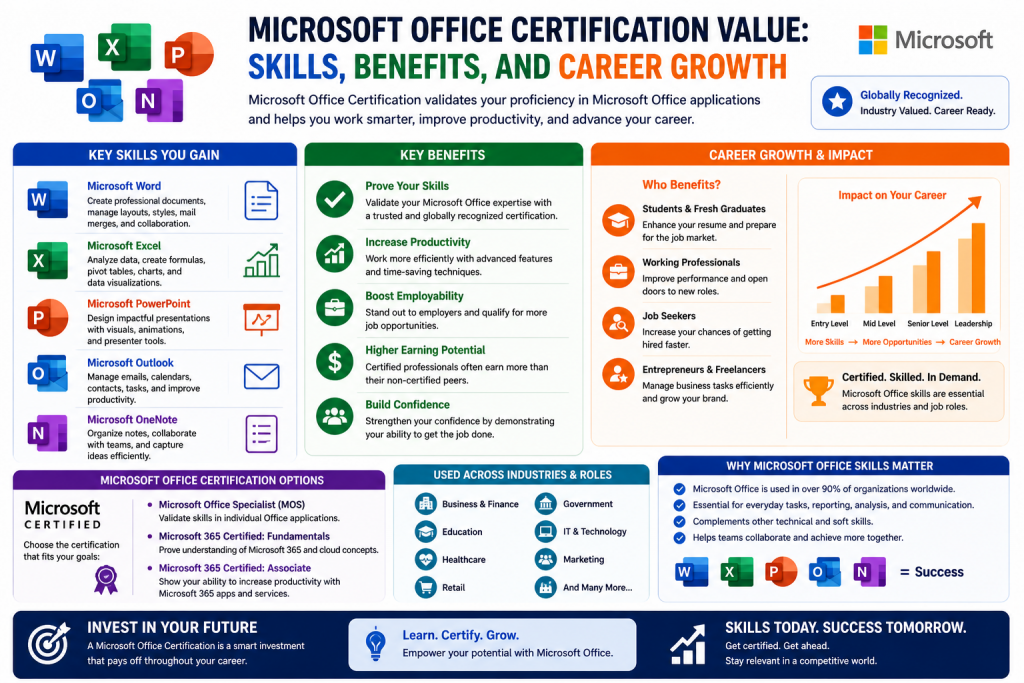
Microsoft Office applications have become a standard part of modern work environments. From small businesses to global enterprises, tools like Word, Excel, PowerPoint, Outlook, and Access are used daily to create documents, manage data, communicate with teams, and present ideas. Because of their widespread use, many employers assume that job candidates already possess basic proficiency in these tools.
To formalize and validate these skills, Microsoft introduced a series of certifications focused specifically on its Office suite. These certifications were designed to measure how effectively individuals could use the applications in real-world scenarios. Over time, they have evolved to reflect changes in technology, workplace expectations, and Microsoft’s own product strategy.
Despite their long history, Microsoft Office certifications have become a topic of debate. Some professionals see them as a valuable way to stand out, while others consider them unnecessary because Office skills are often viewed as basic requirements rather than specialized expertise.
Understanding the purpose, structure, and relevance of these certifications is essential before deciding whether they are worth pursuing.
The Role of Microsoft Office in the Workplace
Microsoft Office tools are deeply integrated into everyday business operations. Word is used for writing reports, proposals, and official documents. Excel is widely relied upon for data analysis, budgeting, and financial modeling. PowerPoint is essential for creating presentations that communicate ideas clearly and effectively. Outlook serves as a central hub for email communication, scheduling, and task management. Access, although less commonly used, plays an important role in database management for certain organizations.
Because these applications are so common, they are often taken for granted. Many individuals learn how to use them informally through school, on-the-job experience, or self-teaching. This familiarity can create the impression that formal certification is unnecessary.
However, there is a significant difference between basic usage and advanced proficiency. While most people know how to type a document or create a simple spreadsheet, fewer individuals understand how to use advanced features such as automation, data visualization, complex formulas, or document collaboration tools.
Microsoft Office certifications aim to bridge this gap by providing a structured way to demonstrate both basic and advanced skills.
Evolution of Microsoft Office Certifications
Microsoft Office certifications have changed significantly over the years. In earlier versions of the program, there were multiple certification levels that reflected increasing expertise. These included entry-level certifications, advanced certifications, and master-level credentials.
The goal of this structure was to provide a clear progression path. Individuals could start with basic skills and gradually move toward more complex capabilities, eventually achieving mastery across multiple applications.
As Microsoft’s product offerings evolved, so did its certification strategy. The company introduced updated certification tracks aligned with specific versions of Office. For example, certifications tied to Office 2019 focus on the features and functionality available in that version.
At the same time, Microsoft began shifting its focus toward cloud-based services through Microsoft 365. This transition has influenced how certifications are designed and delivered. While traditional Office certifications still exist, newer certifications emphasize cloud integration, collaboration, and system-wide functionality.
This evolution reflects a broader change in how technology is used in the workplace. Instead of relying solely on standalone applications, organizations are increasingly adopting integrated platforms that support real-time collaboration and remote work.
Understanding the Certification Structure
Modern Microsoft Office certifications are generally divided into two main levels. The first level is the Associate certification, which focuses on foundational skills across multiple Office applications. The second level is the Expert certification, which demonstrates advanced proficiency in specific tools.
The Associate certification requires candidates to pass several exams that cover different applications. These exams test the ability to perform common tasks, such as formatting documents, creating spreadsheets, designing presentations, and managing emails.
The Expert certification builds on this foundation by requiring additional exams that focus on more complex features. These may include advanced data analysis, automation techniques, and sophisticated document design.
This two-tier structure is intended to accommodate individuals with different levels of experience. Beginners can start with the Associate certification, while more experienced users can pursue the Expert level to showcase their advanced skills.
What the Associate Certification Covers
The Associate certification is designed to validate a broad range of skills across core Office applications. It is often considered the starting point for individuals who want to demonstrate their proficiency in Microsoft Office.
In Word, candidates are expected to understand how to create and format documents, manage layouts, and use templates effectively. They may also need to demonstrate the ability to insert tables, images, and other elements that enhance document presentation.
In Excel, the focus is on working with data. This includes creating spreadsheets, using formulas and functions, organizing information, and generating charts. Excel is one of the most powerful tools in the Office suite, and even at the Associate level, candidates are expected to have a solid understanding of its core features.
PowerPoint exams test the ability to create visually appealing presentations. Candidates must know how to design slides, apply themes, add multimedia elements, and use transitions effectively. The goal is to ensure that users can communicate ideas clearly and professionally.
Outlook exams focus on email management, scheduling, and organization. Candidates must demonstrate the ability to manage inboxes, create calendar events, and coordinate tasks efficiently.
The Associate certification does not require prior experience, making it accessible to students, job seekers, and professionals who want to validate their skills.
The Purpose of Certification in Skill Validation
Certifications serve as a formal way to validate skills and knowledge. In theory, they provide employers with a standardized measure of a candidate’s abilities. For Microsoft Office, this means demonstrating proficiency in tools that are widely used across industries.
However, the effectiveness of certification as a validation tool depends on how it is perceived by employers. In many cases, Office skills are considered basic requirements rather than specialized qualifications. As a result, certifications may not carry as much weight as they do in other areas of technology.
For example, certifications in cybersecurity, cloud computing, or networking often indicate specialized expertise that is not easily acquired without formal training. In contrast, Office skills are often learned through everyday use.
This difference affects how certifications are valued in the job market. While they can still provide benefits, they may not be as impactful as certifications in more specialized fields.
The Impact of Familiarity on Certification Value
One of the main challenges facing Microsoft Office certifications is the widespread familiarity with the tools. Because so many people use Office applications regularly, it can be difficult for certifications to stand out.
Employers often assume that candidates already have basic proficiency. This assumption reduces the need for formal validation. Instead of looking for certifications, employers may focus on practical experience and the ability to apply skills in real-world situations.
This does not mean that certifications are useless. For individuals with limited experience, they can provide a way to demonstrate competence. They may also be useful in competitive job markets where candidates need to differentiate themselves.
However, for experienced professionals, certifications may offer limited additional value unless they are directly relevant to the job role.
The Difference Between Basic and Advanced Skills
While basic Office skills are common, advanced skills are less widespread. Many users only utilize a small portion of the available features. This creates an opportunity for individuals who invest time in learning more advanced capabilities.
For example, in Excel, advanced users can create complex formulas, automate tasks using macros, and analyze large datasets. These skills can significantly improve productivity and decision-making.
In Word, advanced features include document automation, advanced formatting, and collaboration tools. In PowerPoint, advanced users can create highly engaging presentations with animations, multimedia integration, and custom designs.
The Expert certification is designed to highlight these advanced skills. It demonstrates that a candidate can go beyond basic usage and fully leverage the capabilities of the applications.
This distinction between basic and advanced skills is important when evaluating the value of certification. While basic proficiency may be assumed, advanced expertise can still be a differentiating factor.
The Changing Nature of Productivity Tools
The way people use productivity tools has changed significantly in recent years. Traditional desktop applications are no longer the only way to work with documents and data. Cloud-based platforms have introduced new ways to collaborate, share information, and access files from anywhere.
Microsoft 365 represents this shift. It integrates Office applications with cloud services, enabling real-time collaboration and seamless communication. Features such as shared documents, online storage, and integrated communication tools have transformed how teams work together.
This shift has implications for certification. Certifications that focus solely on desktop applications may not fully reflect the skills needed in modern workplaces. Instead, there is a growing emphasis on understanding how different tools work together within a larger ecosystem.
As a result, newer certifications are focusing more on cloud-based solutions and integrated workflows. This trend is likely to continue as technology evolves.
Evaluating the Relevance of Office Certifications
When considering whether to pursue a Microsoft Office certification, it is important to evaluate its relevance to your career goals. Different roles have different requirements, and not all positions place the same value on certification.
For entry-level roles, certifications can provide a way to demonstrate basic competence. They can help candidates build confidence and show that they have taken the initiative to develop their skills.
For more advanced roles, practical experience and specialized knowledge may be more important. In these cases, certifications may serve as a supplement rather than a primary qualification.
It is also important to consider the specific applications and features that are relevant to your field. For example, someone working in finance may benefit from advanced Excel skills, while someone in marketing may focus more on PowerPoint and communication tools.
Understanding these factors can help you make an informed decision about whether certification is worth pursuing.
Why Microsoft Office Certifications Often Feel Unnecessary
One of the most common criticisms of Microsoft Office certifications is that they validate skills many employers already expect. In today’s workplace, proficiency in tools like Word, Excel, PowerPoint, and Outlook is often treated as a baseline requirement rather than a specialized capability. Job descriptions rarely demand certification; instead, they typically include general phrases such as being comfortable with Office applications or having strong computer skills.
This expectation changes how certifications are perceived. When a skill is assumed, proving it formally may not add significant value. Employers often prioritize experience, communication ability, and problem-solving over formal validation of widely used tools. As a result, candidates with certifications may not gain a substantial advantage unless they can demonstrate how those skills translate into real-world productivity.
Another reason certifications can feel unnecessary is that many people learn Office applications organically. Students use them in school projects, employees pick them up during their jobs, and professionals refine their skills through daily tasks. This informal learning path makes certification seem redundant for those who already feel confident in their abilities.
However, this perception does not tell the whole story. While basic familiarity is common, deeper knowledge is far less widespread. The challenge lies in distinguishing between routine usage and true expertise.
The Gap Between Everyday Use and True Proficiency
Many Office users operate within a limited range of features. For example, someone might use Excel primarily for simple calculations, basic tables, or straightforward data entry. While this level of usage is sufficient for many tasks, it barely scratches the surface of what the application can do.
True proficiency involves understanding advanced capabilities. In Excel, this might include using pivot tables, advanced formulas, data visualization tools, and automation techniques. In Word, it could involve managing large documents, using styles effectively, and automating repetitive tasks. In PowerPoint, advanced users can create dynamic presentations that incorporate multimedia, animations, and interactive elements.
This gap between everyday use and advanced proficiency is where certifications can provide value. They encourage users to explore features they might not otherwise encounter. By preparing for certification exams, individuals often discover new tools and techniques that improve their efficiency and effectiveness.
Even so, the question remains whether certification itself is necessary to achieve this level of learning. Many individuals can develop advanced skills through experience, training programs, or self-directed study without pursuing formal credentials.
When Certification Can Make a Difference
Although Microsoft Office certifications may not be essential for everyone, there are specific situations where they can be beneficial. One of the most important factors is career stage. For individuals who are just entering the workforce, certifications can serve as a way to demonstrate competence in the absence of extensive experience.
Students and recent graduates often face the challenge of proving their abilities to potential employers. In these cases, a certification can provide tangible evidence of skill. It shows that the individual has taken the initiative to learn and validate their knowledge.
Career changers may also benefit from certification. If someone is transitioning into a role that requires Office skills, having a certification can help bridge the gap between previous experience and new job requirements. It signals a commitment to developing relevant competencies.
In certain industries, certifications may carry more weight. Roles that rely heavily on data analysis, financial modeling, or administrative efficiency may value advanced Excel or Office expertise. In these contexts, an Expert-level certification can help candidates stand out.
Additionally, certifications can be useful in organizations that place a strong emphasis on professional development. Some employers encourage or even require certifications as part of training programs. In these environments, earning a certification can contribute to career advancement and recognition.
The Limitations of Microsoft Office Certifications
Despite their potential benefits, Microsoft Office certifications have several limitations that should be considered. One of the most significant issues is their focus on specific software versions. Certifications tied to Office 2019, for example, may not fully reflect the features available in newer or cloud-based versions.
Technology evolves rapidly, and software updates can introduce new tools, interfaces, and workflows. Certifications that do not keep pace with these changes may become outdated. This can reduce their relevance in modern workplaces that rely on the latest technology.
Another limitation is the emphasis on exam performance rather than practical application. Certification exams are designed to test knowledge and skills, but they may not fully capture how those skills are used in real-world scenarios. Passing an exam does not necessarily guarantee that a candidate can apply their knowledge effectively in a professional setting.
There is also the question of return on investment. Preparing for certification requires time, effort, and often financial resources. Individuals must weigh these costs against the potential benefits. In some cases, the value gained from certification may not justify the investment.
Finally, certifications may not address broader workplace skills. While they focus on technical proficiency, they do not measure abilities such as communication, teamwork, or critical thinking. These skills are often just as important, if not more so, in determining professional success.
The Rise of Microsoft 365 and Its Impact
Microsoft’s shift toward Microsoft 365 has had a profound impact on how Office tools are used and how skills are evaluated. Unlike traditional Office versions, Microsoft 365 operates as a cloud-based platform that integrates multiple services and applications.
This shift has introduced new capabilities, such as real-time collaboration, cloud storage, and seamless integration between tools. Users can work on documents simultaneously, access files from different devices, and communicate within the same ecosystem.
As a result, the skills required to use Office tools effectively have expanded. It is no longer enough to understand individual applications in isolation. Users must also understand how these applications interact within a broader system.
This change has influenced certification programs. Newer certifications focus on concepts such as cloud computing, security, compliance, and collaboration. These areas are increasingly relevant in modern workplaces.
For individuals considering certification, this shift raises an important question. Should they focus on traditional Office certifications or pursue newer certifications that reflect the current technological landscape?
The answer depends on career goals. Those seeking roles that involve administration, IT support, or system management may benefit more from Microsoft 365 certifications. On the other hand, individuals whose work revolves around specific applications may still find value in traditional certifications.
Comparing Office Certifications with Modern Alternatives
When evaluating Microsoft Office certifications, it is helpful to compare them with other types of certifications. In fields such as cybersecurity, cloud computing, and networking, certifications often play a critical role in career development. They demonstrate specialized knowledge that is not easily acquired without formal training.
In contrast, Office certifications focus on tools that are widely accessible and commonly used. This difference affects their perceived value. While specialized certifications can open doors to new career opportunities, Office certifications may have a more limited impact.
However, this does not mean they are without merit. They can still serve as a foundation for learning and skill development. They may also complement other certifications by providing a well-rounded skill set.
For example, someone pursuing a career in data analysis might combine advanced Excel skills with certifications in data science or business intelligence. In this context, Office certification becomes part of a broader professional profile.
Understanding how different certifications fit together can help individuals make more strategic decisions about their learning paths.
The Role of Training Without Certification
Another important consideration is the value of training without certification. Many individuals choose to improve their Office skills through courses, tutorials, and hands-on practice without pursuing formal credentials.
This approach allows learners to focus directly on practical abilities rather than exam preparation, which can sometimes feel restrictive or disconnected from real-world tasks. By engaging in self-paced learning, individuals can target specific areas they need to improve, such as advanced Excel formulas, data visualization, or creating more effective presentations.
Training without certification also offers flexibility. Learners can explore different resources, including video tutorials, interactive labs, and real workplace scenarios, to build skills that are immediately applicable. This method often encourages experimentation, helping users discover shortcuts, tools, and techniques that increase efficiency in daily tasks. Over time, this kind of learning can lead to a deeper and more intuitive understanding of Office applications.
In many cases, employers value demonstrated ability more than formal credentials. Being able to complete tasks accurately, solve problems, and contribute to team objectives can outweigh the presence of a certificate. As a result, individuals who invest in consistent practice and real-world application often develop stronger, more adaptable skills that serve them well across different roles and industries.
This approach can be highly effective. Training programs often focus on practical skills and real-world applications. They allow learners to develop expertise at their own pace and tailor their learning to specific needs.
In some cases, training may provide more immediate benefits than certification. Instead of preparing for an exam, learners can focus on acquiring skills that directly enhance their productivity and performance.
Employers may also value demonstrated ability over formal certification. Being able to complete tasks efficiently, solve problems, and contribute to team goals can be more important than having a certificate.
This does not mean certification is unnecessary. Rather, it highlights that certification is just one of many ways to develop and demonstrate skills.
Balancing Certification with Practical Experience
A balanced approach to skill development often yields the best results. Combining certification with practical experience can provide both validation and real-world competence.
For example, an individual might pursue certification to learn new features and techniques, then apply those skills in their work. This combination reinforces learning and demonstrates the ability to use knowledge effectively.
Practical experience also helps bridge the gap between theory and application. It allows individuals to understand how tools are used in different contexts and adapt to changing requirements.
Employers often look for candidates who can not only demonstrate knowledge but also apply it in meaningful ways. By combining certification with hands-on experience, individuals can present a more complete picture of their abilities.
The Psychological Benefits of Certification
Beyond practical considerations, certification can have psychological benefits. Earning a certification can boost confidence and provide a sense of accomplishment. It can motivate individuals to continue learning and improving their skills.
For some people, the structured nature of certification programs provides a clear path for development. It sets goals and milestones that guide the learning process. This structure can be especially helpful for those who prefer organized learning environments.
Certification can also serve as a form of recognition. It acknowledges the effort and dedication required to develop skills. This recognition can be valuable both personally and professionally.
While these benefits may not directly translate into job opportunities, they can contribute to overall growth and motivation.
Evaluating Personal Goals and Career Needs
Ultimately, the decision to pursue Microsoft Office certification depends on individual goals and circumstances. There is no one-size-fits-all answer.
Individuals should consider their current skill level, career aspirations, and the demands of their desired roles. They should also evaluate how certification fits into their broader professional development strategy.
For some, certification may be a valuable step toward building confidence and demonstrating competence. For others, it may be less relevant compared to gaining practical experience or pursuing more specialized certifications.
Taking the time to assess these factors can help individuals make informed decisions and invest their resources wisely.
The Growing Importance of Microsoft 365 Certifications
As workplaces continue to evolve, Microsoft 365 certifications have become increasingly relevant. Unlike traditional Microsoft Office certifications that focus on individual desktop applications, Microsoft 365 certifications emphasize a broader ecosystem that includes cloud services, collaboration tools, and integrated productivity solutions.
This shift reflects how organizations operate today. Teams are no longer confined to a single location or device. Employees collaborate across different regions, share files in real time, and rely on cloud-based systems to maintain productivity. Microsoft 365 enables these capabilities by combining familiar tools with advanced services such as cloud storage, communication platforms, and security features.
The Microsoft 365 Fundamentals certification is often considered an entry point into this ecosystem. It focuses on understanding how cloud-based solutions work, how productivity tools integrate, and how organizations can use these services to improve efficiency. Unlike traditional Office certifications, this credential is less about mastering individual applications and more about understanding how everything fits together.
For individuals interested in roles related to IT support, administration, or systems management, this type of certification can be more valuable than a traditional Office certification. It demonstrates awareness of modern workplace technologies and the ability to navigate a connected environment.
Understanding the Broader Skill Set Required Today
The modern workplace demands more than just technical proficiency in specific tools. Employees are expected to adapt to new technologies, collaborate effectively, and contribute to organizational goals in meaningful ways.
While Microsoft Office skills remain important, they are only one part of a larger skill set. Communication, critical thinking, problem-solving, and adaptability are equally essential. Employers often prioritize these abilities because they directly impact productivity and teamwork.
For example, creating a spreadsheet is a technical task, but interpreting the data and making informed decisions based on it requires analytical thinking. Similarly, designing a presentation involves technical skills, but delivering it effectively depends on communication abilities.
This broader perspective highlights a limitation of Microsoft Office certifications. They focus primarily on technical skills and do not fully address the other competencies required for success. As a result, individuals should consider how certification fits into their overall development rather than relying on it as a standalone achievement.
When Microsoft Office Certifications Still Make Sense
Despite the rise of modern certifications and changing workplace expectations, Microsoft Office certifications still have their place. There are specific scenarios where they can provide meaningful benefits.
One such scenario is for individuals who want to specialize in a particular application. For example, advanced Excel skills are highly valued in fields such as finance, data analysis, and operations. In these cases, an Expert-level certification can demonstrate a high level of proficiency and dedication.
Another scenario involves structured learning. Some individuals prefer a clear path with defined goals. Certification programs provide this structure, guiding learners through specific topics and ensuring comprehensive coverage of the material.
Educational institutions also play a role in the continued relevance of these certifications. Many schools and training programs include Microsoft Office certifications as part of their curriculum. For students, earning these credentials can enhance their resumes and provide a foundation for further learning.
Additionally, certifications can be useful in regions or industries where formal credentials are highly valued. In such environments, having a recognized certification can improve credibility and increase opportunities.
The Role of Certifications in Career Advancement
Certifications can contribute to career advancement, but their impact varies depending on the context. In some cases, they can help individuals qualify for new roles or demonstrate readiness for additional responsibilities.
For example, an administrative professional who earns an Expert certification in Excel may be considered for roles that involve data analysis or reporting. Similarly, someone with strong Office skills may be able to take on tasks that require greater technical expertise.
However, certifications alone are rarely sufficient for career advancement. They must be combined with experience, performance, and the ability to apply skills effectively. Employers are more likely to promote individuals who consistently deliver results and contribute to team success.
Certifications can also play a role in professional development plans. Some organizations encourage employees to pursue certifications as part of their growth strategy. In these cases, certifications may be linked to performance reviews, promotions, or salary increases.
Understanding how certifications fit into career advancement requires careful consideration of organizational expectations and industry standards.
Cost, Time, and Return on Investment
Pursuing certification involves both time and financial investment. Candidates must prepare for exams, study relevant materials, and often pay fees to take the tests. These costs can vary depending on the certification and the resources used for preparation.
Evaluating the return on investment is an important step. Individuals should consider whether the benefits of certification justify the time and expense involved. This evaluation depends on factors such as career goals, job market conditions, and personal learning preferences.
For some, the investment may be worthwhile. Certification can lead to new opportunities, increased confidence, and improved skills. For others, the same time and resources might be better spent gaining practical experience or pursuing other forms of education.
It is also important to consider opportunity cost. Time spent preparing for certification could be used for other activities, such as working on projects, networking, or learning new technologies. Weighing these options can help individuals make more informed decisions.
Practical Skills Versus Formal Credentials
One of the ongoing debates surrounding Microsoft Office certifications is the balance between practical skills and formal credentials. While certifications provide a standardized way to measure knowledge, they do not always reflect real-world performance.
Practical skills are developed through experience and application. They involve understanding how to use tools effectively in different situations and adapting to changing requirements. These skills are often more valuable to employers because they directly impact productivity.
Formal credentials, on the other hand, serve as proof of knowledge. They can help individuals stand out in competitive environments and demonstrate commitment to learning. However, without practical application, their value may be limited.
The most effective approach is to combine both elements. Certification can provide a foundation of knowledge, while practical experience reinforces and expands that knowledge. Together, they create a well-rounded skill set that is more attractive to employers.
The Influence of Industry Trends
Industry trends play a significant role in determining the value of certifications. As technology continues to evolve, the demand for certain skills changes accordingly.
The increasing focus on cloud computing, data analysis, and digital transformation has shifted attention toward certifications that address these areas. Microsoft 365 certifications, for example, align with the growing need for cloud-based solutions and integrated systems.
At the same time, traditional Office skills remain relevant. Many organizations still rely on Word, Excel, and PowerPoint for daily operations. However, the emphasis is shifting from basic usage to advanced capabilities and integration with other tools.
Staying informed about industry trends can help individuals choose the right certifications and focus on skills that are in demand. This approach ensures that their efforts align with current and future opportunities.
Building a Long-Term Learning Strategy
Rather than focusing solely on a single certification, individuals should think in terms of long-term learning strategies. Continuous learning is essential in a rapidly changing technological landscape.
A well-rounded strategy might include a combination of certifications, training programs, practical experience, and self-directed learning. This approach allows individuals to adapt to new developments and maintain their relevance in the job market.
Microsoft Office certifications can be part of this strategy, but they should not be the only focus. Exploring other areas, such as data analysis, project management, or cloud computing, can provide additional opportunities for growth.
Setting clear goals and regularly evaluating progress can help individuals stay on track and make the most of their learning efforts.
Making an Informed Decision
Deciding whether to pursue Microsoft Office certification requires careful consideration of multiple factors. These include personal interests, career goals, industry requirements, and available resources.
Individuals should ask themselves what they hope to achieve through certification. Are they looking to gain new skills, improve their resumes, or qualify for specific roles? Understanding these objectives can guide the decision-making process.
It is also helpful to research job requirements in the desired field. If certifications are commonly mentioned, they may be worth pursuing. If not, focusing on practical experience and other skills may be more beneficial.
Ultimately, the decision should be based on what provides the greatest value in terms of personal and professional development.
The Future of Microsoft Office Certifications
The future of Microsoft Office certifications will likely be shaped by ongoing technological changes. As Microsoft continues to expand its cloud offerings and integrate new features, certification programs will need to adapt.
There may be a greater emphasis on hybrid skills that combine traditional application knowledge with cloud-based capabilities. Certifications could evolve to reflect how tools are used in real-world environments rather than focusing solely on individual applications.
At the same time, the demand for foundational skills will remain. Understanding how to create documents, analyze data, and communicate effectively will always be important. The challenge will be balancing these foundational skills with emerging technologies.
Individuals who stay adaptable and continue learning will be better positioned to navigate these changes and take advantage of new opportunities.
Conclusion
Microsoft Office certifications have long been a way to validate skills in widely used productivity tools. While their importance has shifted over time, they still offer value in certain contexts. For beginners, they can provide structure and confidence. For specialists, they can demonstrate advanced expertise in specific applications.
However, their limitations must also be recognized. In many workplaces, Office skills are considered basic requirements, and certifications may not significantly influence hiring decisions. The rise of cloud-based solutions and integrated platforms has also shifted attention toward broader and more modern certifications.
The key to making the right decision lies in understanding personal goals and the demands of the job market. Certifications should be viewed as part of a larger strategy that includes practical experience, continuous learning, and the development of a wide range of skills.
By taking a thoughtful and informed approach, individuals can determine whether Microsoft Office certifications are worth pursuing and how they fit into their overall career journey.
Continue exploring the technologies and certification concepts that matter most to you.