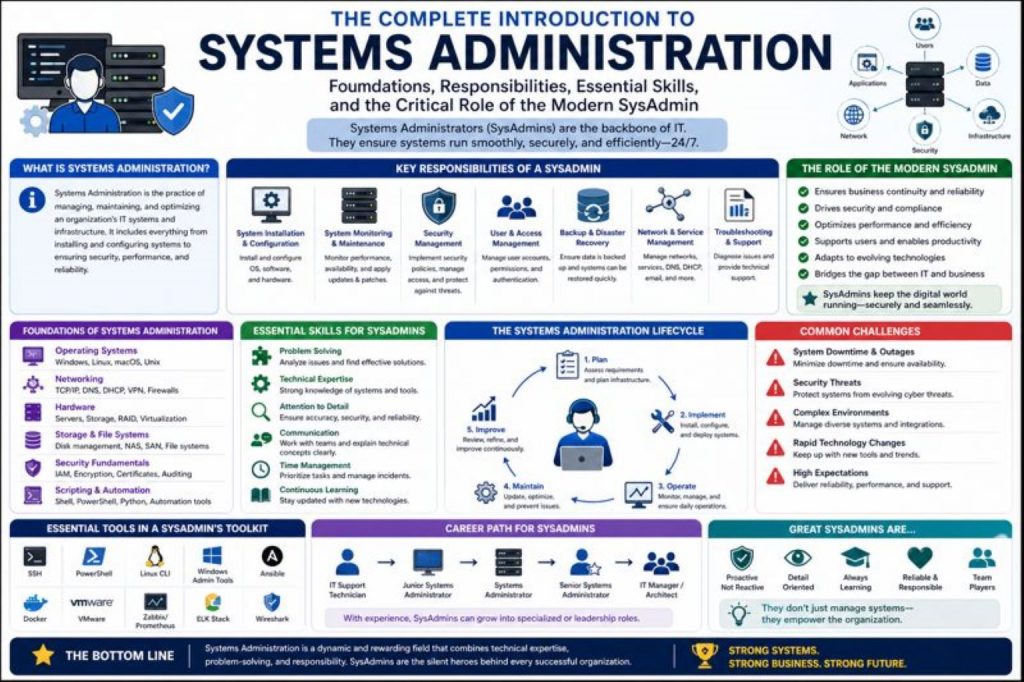
Systems administration is one of the foundational pillars of modern information technology. Every organization that depends on computers, networks, servers, cloud platforms, applications, and digital communication relies on systems administration to keep operations functioning smoothly. While some technology careers specialize deeply in one area, such as cybersecurity, software development, or network engineering, systems administration stands apart because of its breadth. A systems administrator is often the versatile technical professional who ensures all major IT components work together efficiently, securely, and reliably.
At its core, systems administration is the discipline of managing, maintaining, configuring, troubleshooting, and optimizing the technological infrastructure that supports an organization’s daily operations. This includes everything from desktop computers and user accounts to enterprise servers, cloud services, operating systems, virtualization platforms, backup solutions, and security controls. In many ways, systems administrators act as the operational backbone of IT environments because they are responsible for ensuring that technology systems remain available and productive.
Organizations of all sizes require systems administration. A small business may depend on one administrator to manage all hardware, software, and network resources, while a large enterprise may employ entire teams of systems administrators specializing in server infrastructure, identity management, cloud operations, endpoint management, or systems automation. Regardless of company size, the fundamental mission remains the same: maintain stable and secure systems that support business goals.
The importance of systems administration has grown alongside digital transformation. Businesses increasingly depend on technology not only for communication but also for finance, operations, logistics, security, customer support, and strategic growth. Downtime can mean lost revenue, security incidents, compliance failures, and damaged reputation. Systems administrators are often the first line of defense against these risks.
A useful way to understand systems administration is to think of it as organizational infrastructure management. Just as buildings require maintenance teams to ensure electricity, plumbing, and safety systems function properly, digital businesses require systems administrators to maintain technical infrastructure. Without effective systems administration, systems become unstable, security vulnerabilities grow, and productivity suffers.
What a Systems Administrator Actually Does
The role of a systems administrator is broad because organizational technology environments are broad. SysAdmins are often described as IT generalists because they possess working knowledge across multiple technology domains rather than extreme specialization in only one. This versatility makes them indispensable.
A systems administrator’s daily responsibilities often include installing operating systems, configuring software, maintaining user accounts, troubleshooting hardware failures, monitoring system health, managing servers, applying security updates, handling backups, supporting end users, and documenting system changes. Depending on the environment, these duties may also expand into cloud administration, virtualization management, scripting, compliance support, or disaster recovery planning.
One defining characteristic of systems administration is responsiveness. When employees cannot log in, systems fail, applications crash, or infrastructure becomes unstable, the systems administrator often responds first. Because of this, SysAdmins need strong troubleshooting instincts and the ability to quickly identify root causes under pressure.
For example, if an employee cannot access a business-critical application, the issue may stem from password problems, network permissions, server outages, DNS failures, software corruption, or firewall restrictions. Systems administrators must understand enough about all these areas to isolate the issue and restore functionality.
This requirement for broad competency is what makes systems administration both challenging and rewarding. It combines technical depth with operational breadth.
The SysAdmin as a Technology Generalist
Systems administrators are often among the few IT professionals who interact with nearly every part of an organization’s technical environment. While software developers build applications and network engineers design connectivity, systems administrators frequently manage the practical implementation and maintenance of both.
This cross-functional exposure gives SysAdmins a unique perspective. They understand how servers support applications, how networks connect users, how permissions affect access, how backups preserve continuity, and how security controls reduce risk. Their role often bridges departments and technologies.
Because of this, systems administration is often considered one of the best starting points for IT careers. New professionals entering the field gain exposure to multiple technical disciplines before deciding whether to specialize later in networking, cloud engineering, security, DevOps, or infrastructure architecture.
For many professionals, systems administration becomes the gateway to advanced technical leadership because it builds operational understanding across the full IT stack.
Core Technical Areas Within Systems Administration
Systems administration spans several technical domains, each essential for maintaining business operations.
Operating System Management
A fundamental responsibility is working with operating systems such as Windows Server, Linux, macOS, and enterprise desktop platforms. SysAdmins install systems, configure settings, apply updates, manage user permissions, monitor performance, and troubleshoot operating system failures.
Operating system management also includes patching vulnerabilities, maintaining system policies, managing authentication frameworks, and ensuring compatibility with organizational applications.
User and Identity Management
Managing users is a central SysAdmin responsibility. This includes account creation, password resets, permission assignments, group policies, identity lifecycle management, and access controls.
In enterprise environments, systems administrators often work with centralized identity platforms such as Active Directory, LDAP, Azure AD, or other identity and access management systems. Proper user management is not just operational; it is critical for security.
Server Administration
Servers are central to modern organizations, supporting email, applications, databases, virtualization, file storage, and web services. Systems administrators configure and maintain physical servers, virtual machines, and increasingly cloud-hosted systems.
Server administration includes hardware monitoring, resource allocation, patching, software deployment, service configuration, uptime monitoring, and backup integration.
Network Support and Infrastructure Maintenance
Although dedicated network engineers may design architectures, systems administrators often maintain connectivity, troubleshoot outages, configure DNS, support DHCP, manage VPN access, and monitor network health.
They frequently serve as the practical interface between users and network infrastructure.
Security Maintenance
Security is a major component of systems administration. SysAdmins routinely implement software patches, configure endpoint protections, enforce password policies, manage firewall settings, monitor suspicious activities, and support compliance initiatives.
A poorly maintained system can quickly become a vulnerability, making proactive security essential.
Backup and Disaster Recovery
Business continuity depends heavily on backups and recovery planning. Systems administrators often design, test, and maintain backup schedules while ensuring critical systems can be restored after failures, ransomware incidents, accidental deletions, or natural disasters.
This role can be the difference between minor disruption and catastrophic data loss.
Essential Skills Every Systems Administrator Needs
To succeed, systems administrators require a combination of technical expertise, problem-solving ability, communication, and adaptability.
Technical Versatility
A SysAdmin must understand multiple operating systems, hardware platforms, software ecosystems, networking fundamentals, cloud systems, and security practices. Breadth matters because problems often cross categories.
Troubleshooting and Critical Thinking
The ability to diagnose unfamiliar issues efficiently is one of the most valuable SysAdmin skills. Effective troubleshooting requires logic, patience, and process.
Automation and Scripting
Modern systems administration increasingly relies on automation. Skills in PowerShell, Bash, Python, or configuration tools help administrators reduce repetitive tasks, improve consistency, and scale infrastructure management.
Documentation
Accurate documentation supports continuity, especially during outages or staffing changes. SysAdmins maintain records for system configurations, procedures, incidents, and recovery plans.
Communication
Systems administrators regularly translate technical issues for non-technical users, executives, or cross-functional teams. Clear communication improves trust and operational efficiency.
The Evolution of Systems Administration in the Cloud Era
The traditional image of a systems administrator managing only on-premises servers has changed significantly. Cloud computing, virtualization, containerization, and hybrid infrastructure have transformed the role.
Today’s SysAdmins may manage Microsoft 365 tenants, Azure virtual machines, AWS EC2 instances, Google Cloud services, SaaS integrations, endpoint management platforms, and identity federation systems.
Cloud adoption has not eliminated systems administration; it has expanded it. Administrators must now understand both physical and virtual systems while adapting to infrastructure-as-a-service, platform management, and software-defined environments.
This shift has also increased the importance of automation, policy management, and cloud security awareness.
Challenges in Systems Administration
Systems administration is rewarding, but it comes with significant challenges.
Rapid Technological Change
Tools, platforms, and security threats evolve constantly. SysAdmins must commit to continuous learning.
High Responsibility
Downtime, data loss, or security failures can have major consequences. Administrators often manage mission-critical systems under pressure.
Balancing Security and Usability
Organizations need strong security without disrupting productivity. SysAdmins frequently balance both priorities.
Resource Constraints
Many administrators support large environments with limited budgets, staffing, or time.
Why Systems Administration Is an Excellent Career Starting Point
For newcomers to IT, systems administration provides broad foundational exposure that can lead almost anywhere. Because SysAdmins work across infrastructure, networking, security, support, and cloud, they gain practical insight into multiple disciplines.
Many cybersecurity analysts, cloud engineers, IT managers, and infrastructure architects began their careers in systems administration because it develops real operational awareness.
This career path also helps individuals discover personal strengths. Someone may begin managing endpoints and later specialize in cloud architecture. Another may discover a passion for security hardening or network design.
The Strategic Value of the Modern SysAdmin
The modern systems administrator is no longer simply a technical repair person. They are strategic operational professionals who support resilience, efficiency, compliance, and scalability.
As organizations continue embracing digital transformation, the SysAdmin role increasingly intersects with automation, cloud governance, security operations, and strategic infrastructure planning.
A well-trained systems administrator contributes directly to business continuity, user productivity, risk reduction, and technological innovation.
Building a Foundation for Long-Term Success
Success in systems administration comes from combining curiosity, discipline, and adaptability. The strongest administrators are often lifelong learners who continually improve their technical abilities while also strengthening strategic thinking.
Whether managing a small office network or enterprise-scale infrastructure, the principles remain the same: maintain reliability, secure systems, solve problems quickly, and support organizational goals.
Systems administration remains one of the most practical, respected, and opportunity-rich careers in information technology because every digital organization depends on stable systems. It is a profession that develops broad technical intelligence, sharp troubleshooting ability, and operational leadership.
For those entering IT, few career paths offer a better foundation. Systems administration teaches how technology truly works in practice—not just in theory—and provides experience that can evolve into countless specialized or leadership opportunities.
In a world where organizations increasingly rely on interconnected systems, cloud platforms, cybersecurity frameworks, and uninterrupted digital services, systems administrators remain essential. They are the professionals who keep technology functioning, businesses productive, and infrastructure resilient.
Managing the Digital Backbone of Modern Organizations
Systems administration is one of the most operationally critical functions in information technology because it directly supports the infrastructure that organizations depend on every day. While many people associate systems administrators primarily with troubleshooting broken computers or managing user accounts, the reality is far broader and significantly more strategic. Systems administrators are responsible for maintaining, optimizing, securing, and supporting the digital ecosystems that power businesses, institutions, and public services.
Every organization relies on technology infrastructure to perform essential tasks. Employees need access to systems, communication platforms, software applications, cloud resources, databases, printers, collaboration tools, and secure networks. These technologies must work consistently and securely. If servers fail, networks collapse, user authentication breaks, or data becomes inaccessible, business productivity can halt immediately. Systems administrators exist to prevent these disruptions, resolve them when they occur, and create resilient environments that minimize future risk.
A systems administrator’s role is often compared to infrastructure management in the physical world. Just as roads, electrical systems, and water supply networks require maintenance to keep cities functioning, digital infrastructure requires systems administrators to maintain operational continuity. They are responsible not only for individual devices but for the interconnected systems that make modern organizations productive.
This broad responsibility is what makes systems administration both demanding and valuable. SysAdmins work across technology layers, often bridging hardware, software, networks, identity systems, cloud platforms, and security operations.
Desktop, Endpoint, and Device Administration
One of the most visible responsibilities of systems administrators involves endpoint systems—the desktops, laptops, mobile devices, and workstations that employees use daily. These devices are often the primary interface between workers and organizational systems, making endpoint stability essential.
Endpoint administration begins before a user even logs in for the first time. When new employees join an organization, SysAdmins often prepare their devices by installing operating systems, applying updates, configuring software, joining devices to organizational domains, assigning permissions, enabling security protections, and ensuring compliance with company standards.
This process may sound straightforward, but in enterprise environments it often includes:
- Operating system imaging
- Device enrollment
- Identity integration
- Security configuration
- Encryption setup
- Software licensing
- Patch baselines
- VPN access
- Email configuration
- Policy enforcement
Once devices are deployed, systems administrators continue maintaining them throughout their lifecycle. This includes patching vulnerabilities, resolving performance issues, replacing failing hardware, managing inventory, deploying updates, troubleshooting software conflicts, and ensuring compatibility with evolving business systems.
Modern endpoint administration has become more complex with hybrid work and remote environments. Devices may now connect from homes, public networks, or international locations. This increases the importance of remote management tools, zero trust security frameworks, encryption, and mobile device management platforms.
Effective endpoint administration directly impacts productivity, security, and user satisfaction.
Identity Management, User Access, and Authentication Systems
Identity and access management is one of the most important areas in systems administration because it governs who can access what, when, and how.
Every user in an organization requires digital identity. This includes usernames, passwords, permissions, access roles, software entitlements, and resource privileges. Systems administrators often manage this entire lifecycle.
Key responsibilities include:
- Creating user accounts
- Managing passwords
- Resetting credentials
- Assigning groups
- Configuring permissions
- Enforcing role-based access
- Managing employee onboarding
- Supporting offboarding
- Disabling compromised accounts
- Monitoring privilege escalation
In many organizations, this work is performed through systems like Active Directory, Azure AD, LDAP, or cloud identity platforms.
Identity management is not just administrative—it is a major security function. Excessive permissions can expose critical systems, while poorly managed offboarding can leave former employees with unauthorized access. SysAdmins help enforce least privilege principles, ensuring users only have access to what they genuinely need.
Modern identity systems increasingly incorporate:
Multi-Factor Authentication
Additional verification beyond passwords improves security significantly.
Single Sign-On
Simplifies access while centralizing authentication.
Conditional Access
Restricts login based on device health, location, or risk.
Privileged Access Management
Protects high-risk administrative accounts.
As cyber threats increasingly target credentials, identity management has become one of the most security-sensitive SysAdmin responsibilities.
Server Administration and Infrastructure Maintenance
Servers are central to organizational technology because they host applications, databases, identity systems, file storage, web services, and countless operational resources. Systems administrators frequently manage both physical and virtual servers.
Physical Server Responsibilities
Physical server management may include:
- Hardware installation
- Rack deployment
- BIOS and firmware updates
- RAID configuration
- Storage optimization
- Resource monitoring
- Environmental controls
- Hardware replacement
Virtual Infrastructure Management
Virtualization has transformed server administration by enabling multiple systems to operate on shared hardware. SysAdmins often work with:
- VMware
- Hyper-V
- VirtualBox
- Cloud virtual machines
Virtualization responsibilities include provisioning, snapshots, resource allocation, scaling, failover support, and patching.
Service Reliability
Maintaining uptime is a central goal. Administrators monitor:
- CPU load
- Memory utilization
- Disk performance
- Service status
- Application response
- System logs
Downtime can cost organizations revenue, trust, and productivity. As a result, SysAdmins often implement redundancy, backup failover, load balancing, and maintenance windows.
Strong server administration supports organizational continuity at every level.
Networking Responsibilities Within Systems Administration
While network engineers often design large-scale architectures, systems administrators regularly support practical networking operations.
This includes:
- DNS configuration
- DHCP management
- VPN support
- Wireless troubleshooting
- Firewall coordination
- Remote connectivity
- IP troubleshooting
- Network diagnostics
Understanding networking fundamentals is essential because many system issues are network-dependent. A user unable to access an application may actually be experiencing DNS failure, authentication timeout, VPN misconfiguration, or firewall restrictions.
Essential networking knowledge for SysAdmins includes:
DNS
Name resolution for applications and services.
DHCP
Automated IP assignment.
IP Addressing
Understanding address conflicts and subnet structures.
VPNs
Secure remote access.
Routing Basics
Traffic movement between systems.
Firewall Awareness
Security policy interaction.
Without networking competency, troubleshooting is incomplete.
Security as a Daily Systems Administration Function
Security has become inseparable from systems administration. Modern SysAdmins contribute directly to cybersecurity through operational control of infrastructure.
Daily security-related tasks may include:
- Applying security patches
- Updating antivirus solutions
- Configuring firewalls
- Monitoring event logs
- Managing administrative privileges
- Enforcing password standards
- Deploying MFA
- Hardening endpoints
- Securing backups
- Managing encryption
Because systems administrators often manage configuration baselines, their decisions significantly influence organizational risk.
For example:
- A delayed patch may leave systems vulnerable
- Weak password policies may increase breach likelihood
- Misconfigured permissions may expose sensitive data
- Poor backup protection may worsen ransomware impact
Many SysAdmins also assist with:
Compliance
Supporting standards like HIPAA, PCI-DSS, or ISO frameworks.
Incident Response
Helping contain and restore systems after breaches.
Security Monitoring
Collaborating with security teams on suspicious activity.
Security-aware systems administration is essential for modern infrastructure resilience.
Backup, Recovery, and Disaster Preparedness
One of the most critical but often underestimated SysAdmin responsibilities is preparing organizations for failure.
Technology can fail due to:
- Hardware breakdown
- Human error
- Malware
- Ransomware
- Power outages
- Natural disasters
- Software corruption
Systems administrators help organizations survive these events by building resilient backup and disaster recovery strategies.
Backup Responsibilities
These often include:
- Scheduled backups
- Incremental backups
- Full backups
- Cloud backups
- Offsite replication
- Retention policies
- Encryption
- Backup validation
Recovery Planning
Recovery involves:
- Restoration testing
- Recovery time objectives
- Recovery point objectives
- Incident response coordination
- Failover design
A backup strategy is only valuable if recovery works when needed. For this reason, strong systems administrators regularly test restorations rather than assuming backups are functional.
Automation and Scripting for Scale
As organizations grow, manual systems administration becomes inefficient. Automation helps administrators scale.
Popular automation tools include:
- PowerShell
- Bash
- Python
- Task schedulers
- Configuration management platforms
Automation can streamline:
- Account creation
- Password resets
- Patch verification
- Software installation
- Log collection
- Health checks
- Reporting
- Security audits
Automation improves consistency and reduces repetitive workload. Administrators who automate effectively often become more strategic contributors.
Documentation and Operational Continuity
Documentation is a major professional differentiator. Strong systems administrators record:
- Configurations
- Procedures
- Recovery steps
- Infrastructure maps
- Licensing details
- Incident histories
- Security controls
Documentation improves team coordination, troubleshooting speed, audit readiness, and resilience.
Without documentation, organizations risk knowledge silos where critical information exists only in one administrator’s memory.
Monitoring and Proactive Infrastructure Management
Reactive troubleshooting is important, but proactive systems management is more strategic.
Monitoring tools help SysAdmins track:
- Server uptime
- Resource usage
- Security events
- Login anomalies
- Storage capacity
- Application performance
This proactive approach allows organizations to prevent issues before users are affected.
Cloud Administration and Hybrid Infrastructure
Modern systems administrators increasingly manage hybrid environments where on-premises systems interact with cloud platforms.
Common cloud responsibilities include:
- Azure administration
- AWS virtual systems
- SaaS integrations
- Identity synchronization
- Cloud security
- Cost governance
- Remote endpoint integration
Cloud adoption has expanded, not replaced, systems administration.
Career Growth Through Operational Mastery
Systems administration often leads to advanced roles such as:
- Senior Systems Administrator
- Cloud Engineer
- Infrastructure Architect
- Security Administrator
- DevOps Engineer
- IT Manager
Because the role develops broad operational intelligence, it often serves as a gateway to specialized or leadership careers.
Understanding the Long-Term Learning Journey of a Systems Administrator
Systems administration is one of the most versatile careers in information technology because it sits at the center of infrastructure, operations, security, and organizational continuity. However, becoming a capable systems administrator does not happen by accident. It requires intentional education, practical experience, continuous development, and a mindset built around adaptability. Unlike highly specialized fields that may focus deeply on a narrow domain, systems administration requires professionals to understand a wide range of technologies and how they work together in real operational environments.
A systems administrator may manage operating systems, user identities, server infrastructure, networking, cloud services, security controls, backup strategies, automation frameworks, and troubleshooting processes simultaneously. This breadth means the learning path for SysAdmins is often broader than many other IT roles.
The journey begins with fundamentals but should eventually evolve into advanced competency. Entry-level learners focus on operating systems, networking, troubleshooting, and endpoint support. Mid-career administrators often expand into virtualization, cloud infrastructure, automation, and security. Senior professionals may specialize further in architecture, DevOps, cybersecurity, or strategic IT leadership.
This layered progression makes systems administration one of the strongest foundations for long-term IT success.
Building the Core Educational Foundation
Before an aspiring professional can manage enterprise systems effectively, they must first understand the building blocks of technology environments.
Operating Systems Mastery
Operating systems are the foundation of digital infrastructure, and every systems administrator must become comfortable managing them. At minimum, this includes understanding:
- Windows desktop environments
- Windows Server
- Linux distributions
- macOS basics
- User permissions
- Process management
- Command-line tools
- Service configuration
- Patch management
- System recovery
Windows remains highly relevant because of its widespread enterprise use, especially in organizations dependent on Active Directory, Microsoft 365, Azure integrations, and endpoint management tools.
Linux is equally critical due to its dominance in web hosting, cloud systems, server infrastructure, DevOps, and enterprise backend services.
A strong SysAdmin should not rely solely on graphical interfaces. Command-line confidence in PowerShell, Bash, or shell environments greatly improves troubleshooting and automation capabilities.
Networking Fundamentals
Networking knowledge is essential because systems rarely function independently. Systems administrators must understand how infrastructure communicates.
Important topics include:
- TCP/IP
- Subnetting
- DNS
- DHCP
- NAT
- Routing
- Firewalls
- VPNs
- Wireless infrastructure
- Port functionality
- Remote access protocols
Without networking knowledge, troubleshooting becomes incomplete. A failed login, unreachable application, or inaccessible server may be caused by identity issues, but it may also stem from DNS failures, VPN disruptions, or firewall restrictions.
Hardware and Infrastructure Awareness
Even in cloud-first environments, foundational hardware knowledge remains valuable. Systems administrators should understand:
- CPUs
- RAM
- Storage systems
- RAID
- Power redundancy
- Network interfaces
- BIOS/UEFI
- Virtualization hardware requirements
This knowledge helps administrators diagnose failures, optimize performance, and understand infrastructure limitations.
Hands-On Experience: The Most Important Teacher
While formal education can provide structure, systems administration is ultimately a practical profession. Real competency develops through doing.
Hands-on experience can come from:
Home Labs
Building virtualized environments at home using tools like Hyper-V, VMware, or VirtualBox can simulate enterprise systems.
Cloud Free Tiers
AWS, Azure, and Google Cloud offer learning opportunities.
Virtual Machines
Testing Windows Server, Linux servers, DNS, Active Directory, and scripting.
Help Desk or Support Roles
Entry-level support often provides critical troubleshooting practice.
Volunteer IT Work
Supporting nonprofits or small organizations can create practical exposure.
Practical experimentation allows learners to break systems, troubleshoot failures, configure environments, and understand infrastructure behavior in ways theory alone cannot provide.
The Value of Certifications in Systems Administration
Certifications are not substitutes for experience, but they can validate knowledge, improve structure, and strengthen employability.
Entry-Level Certifications
A starting point for understanding IT basics.
CompTIA A+
Covers endpoint support, operating systems, troubleshooting, and hardware.
CompTIA Network+
Strengthens networking fundamentals.
CompTIA Security+
Introduces security operations and infrastructure defense.
These vendor-neutral certifications are particularly useful for beginners because they create broad foundational understanding.
Platform-Specific Certifications
Microsoft Certifications
Useful for enterprise Windows, Azure, Microsoft 365, and identity environments.
Linux Certifications
Linux+, RHCSA, or other Linux-focused pathways support server and cloud progression.
VMware Certifications
Valuable for virtualization-heavy enterprise environments.
Cloud Certifications
AWS, Azure, and Google Cloud pathways are increasingly important.
Cloud certifications are especially valuable because modern systems administration often intersects with hybrid infrastructure.
Developing Practical Administrative Skills Beyond Certification
Certifications can open doors, but long-term success requires operational maturity.
Troubleshooting Discipline
Troubleshooting is one of the defining SysAdmin skills. Effective troubleshooting requires:
- Problem isolation
- Root cause analysis
- Log interpretation
- Pattern recognition
- Testing methodology
- Prioritization
Strong administrators learn not to guess—they diagnose.
Documentation
Documentation is critical for continuity. Systems administrators should document:
- Configurations
- Password policies
- Recovery steps
- Backup schedules
- Infrastructure maps
- Software licenses
- Incident histories
Documentation improves resilience and reduces organizational dependency on memory.
Automation
Automation increasingly separates modern administrators from outdated ones.
Learning:
- PowerShell
- Bash
- Python
- Scheduled tasks
- Infrastructure-as-code concepts
…can dramatically improve scalability and efficiency.
Soft Skills That Shape Professional Advancement
Systems administration is highly technical, but technical skill alone is insufficient for career growth.
Communication
Administrators must explain issues to:
- Users
- Managers
- Security teams
- Vendors
- Executives
Clear communication builds trust and reduces confusion.
Time Management
SysAdmins often juggle incidents, projects, upgrades, and user support simultaneously.
Adaptability
Technology changes constantly, making adaptability essential.
Patience
Troubleshooting can be repetitive and stressful.
Professionalism Under Pressure
During outages or incidents, calm decision-making matters.
Career Progression Pathways in Systems Administration
One of the greatest strengths of systems administration is that it can lead almost anywhere.
Early Career
Common starting roles include:
- Help Desk Technician
- Desktop Support Specialist
- IT Support Technician
- Junior Systems Administrator
Mid-Level
With experience, progression may include:
- Systems Administrator
- Server Administrator
- Infrastructure Analyst
- Cloud Support Administrator
Advanced Career
Experienced professionals may advance to:
- Senior Systems Administrator
- Cloud Engineer
- DevOps Engineer
- Security Administrator
- Infrastructure Architect
- IT Operations Manager
Because systems administration develops broad technical understanding, it often serves as a launchpad into higher-paying specializations.
Specialization Opportunities After SysAdmin Foundations
Cloud administration, architecture, automation, governance.
Cybersecurity
Identity security, endpoint defense, vulnerability management.
DevOps
Automation, CI/CD, infrastructure-as-code.
Networking
Enterprise routing, wireless, security.
Leadership
IT management, operations leadership, infrastructure strategy.
Modern Challenges Facing Systems Administrators
The profession continues evolving rapidly.
Cloud Transformation
Administrators must understand hybrid ecosystems.
Zero Trust Security
Identity-centric security models are growing.
Remote Workforce
Endpoint and access complexity have increased.
Automation Expectations
Manual work is becoming less scalable.
Compliance
Regulatory frameworks continue expanding.
These changes mean that learning cannot stop after landing a first job.
Creating a Long-Term Professional Development Plan
A strategic growth plan may include:
Learn IT fundamentals
Build a home lab
Earn foundational certifications
Gain entry-level support experience
Develop networking competency
Learn scripting
Study security
Explore virtualization
Learn cloud platforms
Pursue specialization
Develop troubleshooting discipline
Master operating systems administration
Strengthen hardware knowledge
Learn endpoint management
Study system architecture
Practice backup and disaster recovery
Understand patch management
Develop documentation habits
Improve communication and customer service skills
Study Active Directory and identity management
Learn Linux and Windows administration
Explore containerization technologies
Study DevOps fundamentals
Gain experience with automation tools
Understand compliance frameworks
Learn risk management principles
Practice monitoring and performance tuning
Develop incident response awareness
Study database fundamentals
Explore infrastructure as code
Build project management skills
Learn change management processes
Develop analytical thinking
Strengthen problem-solving under pressure
Study enterprise networking concepts
Understand firewalls and access control
Learn SIEM and logging tools
Build scripting proficiency in PowerShell, Bash, or Python
Study API integrations
Explore SaaS and enterprise software ecosystems
Understand cost optimization in cloud environments
Develop leadership and collaboration skills
Create a professional portfolio
Join IT communities and forums
Attend workshops, webinars, and conferences
Seek mentorship from experienced professionals
Stay informed on emerging technologies like AI, Zero Trust, and edge computing
Pursue advanced certifications aligned with career goals
Develop business acumen to align IT with organizational strategy
Build resilience, adaptability, and continuous learning habits
This structured approach creates sustainable advancement by transforming technical curiosity into professional capability. Rather than focusing solely on certifications or isolated skills, long-term success in IT and systems administration comes from layering foundational knowledge with practical experience, strategic thinking, and adaptability. Each stage builds upon the previous one, creating a progression from beginner to specialist to strategic leader. Professionals who intentionally combine technical depth, operational discipline, automation expertise, and business understanding position themselves for stronger career mobility, higher compensation, and leadership opportunities. In a rapidly evolving technology landscape, consistent growth is achieved not by chasing trends alone, but by building a resilient, diversified skill ecosystem that supports both current operational excellence and future innovation.
Why Systems Administration Remains a Powerful Career Foundation
Few IT roles provide such comprehensive exposure to technology ecosystems. Systems administration teaches how infrastructure functions as a complete operational system. It builds technical breadth, troubleshooting resilience, and strategic awareness.
Professionals who begin in systems administration often gain advantages because they understand how infrastructure, users, policies, and business operations intersect.
This broad perspective is valuable not only in technical roles but also in management, architecture, and security leadership.
The Future of Systems Administration
The systems administrator of the future will likely spend far less time manually configuring individual devices, performing repetitive maintenance tasks, or reacting only when systems fail. Instead, the profession is evolving into a more strategic, policy-driven, and intelligence-supported role focused on designing, governing, automating, and securing entire technology ecosystems at scale.
Future SysAdmins will increasingly oversee:
Automated policies
Cloud governance
Security frameworks
Hybrid infrastructure
Identity ecosystems
Monitoring platforms
AI-assisted operations
Infrastructure-as-code
Zero trust architecture
Compliance automation
Predictive analytics
Self-healing systems
Cross-platform orchestration
Digital resilience planning
Business continuity strategy
As organizations expand across cloud, on-premises, edge computing, SaaS, and remote environments, systems administrators will become orchestrators of integrated infrastructure rather than just maintainers of isolated systems. Their responsibilities will shift from device-by-device configuration to centralized governance through automation tools, policy engines, identity controls, and intelligent monitoring frameworks.
Automation will continue replacing repetitive tasks such as patch deployment, endpoint provisioning, software rollouts, configuration enforcement, and routine diagnostics. This will allow SysAdmins to focus more on optimization, governance, and long-term architecture decisions. Infrastructure-as-code and configuration management platforms will increasingly define environments automatically, reducing inconsistency while improving scalability.
Artificial intelligence and machine learning will also reshape the profession. AI-assisted platforms will help administrators detect anomalies, predict failures, identify suspicious behavior, optimize performance, and recommend remediation before outages occur. Instead of spending most of their time solving known problems manually, SysAdmins will increasingly supervise intelligent systems that proactively identify and address operational risks.
Cybersecurity integration will deepen as identity becomes the new perimeter. Future systems administrators will play larger roles in zero trust security models, access governance, privileged identity management, compliance monitoring, and policy enforcement across distributed environments. Their role will increasingly overlap with security operations, especially in areas like endpoint governance, cloud security posture, and infrastructure hardening.
Hybrid and multi-cloud environments will also demand broader expertise. Systems administrators will need to coordinate workloads across AWS, Azure, Google Cloud, private data centers, and SaaS ecosystems while balancing cost, security, performance, and compliance. This means governance, architecture awareness, and interoperability will become as important as technical troubleshooting.
Soft skills will become even more valuable. Future SysAdmins will not only manage systems—they will influence business strategy by aligning infrastructure decisions with resilience goals, operational efficiency, regulatory obligations, and digital transformation initiatives. Communication with executives, security leaders, compliance teams, and cloud architects will become more central to the role.
Rather than becoming obsolete, systems administration is becoming more strategic, analytical, and leadership-oriented. The SysAdmin of tomorrow will be less of a reactive technician and more of an infrastructure strategist, automation architect, security partner, and operational intelligence professional.
In this transformation, the most successful systems administrators will be those who embrace continuous learning, automation, cloud fluency, AI collaboration, and strategic governance. As technology ecosystems grow more complex, the value of professionals who can unify, secure, automate, and optimize them will only increase. Systems administration is not disappearing—it is evolving into one of the most influential operational disciplines in modern IT.
Conclusion
Systems administration is one of the most practical, resilient, and opportunity-rich careers in information technology because it provides both immediate operational value and long-term professional flexibility. It teaches professionals how organizations truly function through technology, from endpoints and servers to identity, cloud systems, security, and business continuity.
For beginners, it offers one of the best entry points into IT because it builds foundational understanding across multiple disciplines. For experienced professionals, it opens doors to specialization in cloud, security, DevOps, networking, or leadership.
The path to success requires more than technical curiosity. It demands structured learning, certifications, practical experimentation, troubleshooting discipline, communication, and continuous adaptation.
The strongest systems administrators are not simply technicians who fix problems when they appear. They are strategic professionals who design stability, maintain resilience, secure infrastructure, optimize performance, and support organizational growth.
As businesses become increasingly dependent on technology, the need for skilled systems administrators will remain strong. Whether managing local infrastructure, global cloud environments, or hybrid enterprise ecosystems, SysAdmins continue to serve as the operational core of modern IT.
For anyone seeking a technology career with strong growth potential, broad applicability, and lasting relevance, systems administration remains one of the smartest and most durable professional foundations available.
Continue exploring the technologies and certification concepts that matter most to you.