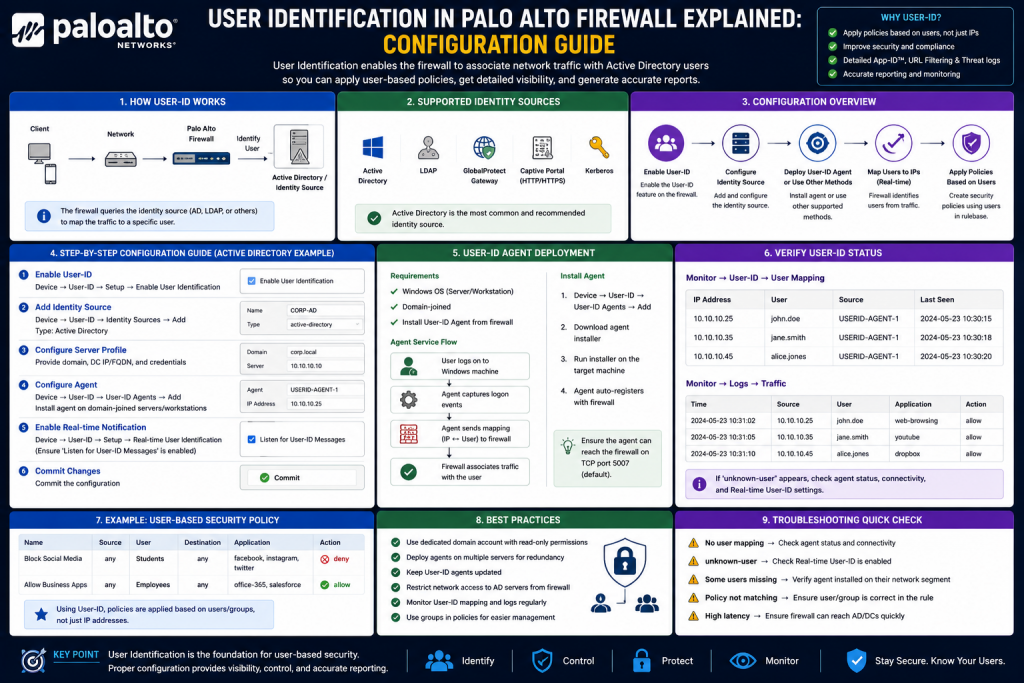
In modern enterprise networks, controlling access based only on IP addresses is no longer sufficient. Users frequently move between devices, connect remotely, and access resources from dynamic networks. This makes it difficult to apply consistent security policies using traditional IP-based methods.
A Palo Alto firewall solves this challenge using a feature called User Identification, commonly known as User-ID. This capability allows administrators to associate network activity with actual users and groups rather than just IP addresses. By doing this, security policies become more precise, reporting becomes more meaningful, and incident investigation becomes more efficient.
This guide explains how User-ID works and how it is configured in a structured and practical manner within a Palo Alto firewall environment.
Understanding User Identification
User-ID is a feature that maps IP addresses to individual users by integrating with identity sources such as directory services, authentication systems, and network login events. Once a user is identified, the firewall can enforce policies based on that identity instead of relying on static addressing.
This approach improves visibility and control across the network. Instead of seeing traffic as coming from a machine, the firewall understands which user generated it, what application they are using, and what content they are accessing.
The strength of User-ID lies in combining three important elements:
User identity
Application identification
Content inspection
Together, these elements allow organizations to build security rules that reflect real user behavior.
How User-ID Works in a Network
User-ID collects identity information from multiple sources and maps it to IP addresses in real time or near real time. The firewall continuously updates this mapping to ensure accuracy, especially in environments where users frequently change devices or locations.
It uses several methods to collect identity data:
Authentication event monitoring captures login information from systems where users authenticate. When a user logs into a system, the firewall records the username and associated IP address.
Directory service integration connects the firewall to centralized identity systems where user and group information is stored. This allows the firewall to understand organizational structure.
Captive portal authentication forces users to identify themselves before accessing network resources when other methods are not available.
Remote access integration collects identity information from VPN or remote connectivity solutions, ensuring remote users are also identified correctly.
These methods ensure that the firewall maintains a reliable mapping between users and IP addresses.
Preparing for Configuration
Before enabling User-ID, a few prerequisites should be considered. The network should have a working identity infrastructure where user accounts are centrally managed. Administrative access to the firewall is also required.
It is important to identify which network zones will use User-ID, as enabling it globally without planning can increase unnecessary load. Typically, internal user zones are prioritized.
A clear understanding of security policy requirements is also needed, as User-ID will later be used in rule definitions.
Enabling User-ID in Network Zones
The first configuration step involves enabling User Identification within the relevant network zone.
Administrators begin by selecting the internal network zone in the firewall configuration. Within the zone settings, User Identification is enabled. This allows the firewall to begin associating traffic from that zone with user identity information. Once activated, the firewall starts monitoring network traffic passing through that zone and attempts to match IP addresses with logged-in users.
This process is essential for building accurate user-to-IP mappings that will later be used in security policies. Enabling this feature at the zone level ensures that only relevant internal traffic is tracked, which helps maintain performance and reduces unnecessary processing overhead. Administrators should also ensure that the correct zones are selected to avoid missing important user activity or unintentionally monitoring unrelated network segments.
At this stage, optional subnet filtering can be applied. This ensures that only specific internal networks are monitored for user mapping, reducing unnecessary processing.
Once enabled, the firewall begins collecting identity-related data from traffic passing through that zone.
Configuring User Mapping Through Directory Integration
To accurately identify users, the firewall must connect to an identity source where login information is stored. This is typically a centralized directory system used in enterprise environments.
A service account is configured on the firewall to allow it to securely query login events and user information. Once credentials are provided, the firewall is able to communicate with the directory service.
Next, a monitoring profile is created. This profile defines how the firewall will retrieve authentication logs and map them to IP addresses. It continuously checks for login events and updates the user mapping database accordingly.
After configuration, the firewall should be committed so that changes become active. At this point, it will begin learning user-to-IP relationships automatically.
Defining Directory Access for User and Group Information
User-ID becomes more powerful when it understands not only individual users but also group memberships. This allows administrators to create policies for departments or roles rather than single users.
To achieve this, a directory access profile is created. This profile contains the necessary settings for connecting to the identity source and retrieving group information.
Within this configuration, administrators define how the firewall should locate user directories and retrieve group structures. It may include specifying a base location within the directory and authentication credentials for access.
Once the connection is established, the firewall can retrieve a list of users and groups and synchronize them for policy use.
Mapping Groups for Policy Use
After retrieving directory information, group mapping must be configured. This step defines which user groups will be used in firewall policies.
Administrators select specific groups such as standard users or administrative roles. These groups are then imported into the firewall’s user identification system.
Only selected groups are included to ensure that policies remain manageable and relevant. Once configured, these groups become available in security rule definitions.
After committing the configuration, the firewall maintains continuous synchronization with the identity source to ensure updated group membership information.
Creating Security Policies Using User Identity
Once User-ID and group mapping are active, security policies can be created using user-based criteria instead of IP addresses.
When creating a new rule, administrators can define the source zone and destination zone as usual. However, instead of specifying an IP address, they select a user or group.
For example, a rule can be created for standard users with restricted access and another rule for administrative users with broader permissions.
This approach ensures that policies follow users regardless of the device they are using or their location within the network.
Rules are arranged in order of priority, with more specific policies placed higher to ensure proper enforcement.
Verifying User-ID Functionality
After configuration, it is important to verify that User-ID is working correctly. The firewall provides monitoring tools that display current user-to-IP mappings.
Administrators can view active mappings to confirm that users are being correctly identified. This helps ensure that directory integration and authentication event monitoring are functioning properly.
If a user logs into the network, their username should appear alongside their assigned IP address in the mapping database.
This verification step confirms that identity-based policies will operate as expected.
Best Practices for User-ID Deployment
To ensure reliable performance, User-ID should be deployed carefully. Only necessary zones should have identity tracking enabled to avoid unnecessary processing overhead.
Directory integration should be tested thoroughly before applying it in production environments. Service accounts used for authentication should have minimal required permissions for security. This approach reduces the risk of unauthorized access and limits the potential impact if the credentials are ever compromised. Testing in a controlled lab or staging environment allows administrators to validate connectivity, confirm that user and group information is being retrieved correctly, and ensure that there are no synchronization issues between the firewall and the identity source.
During testing, it is important to verify that login events are properly captured and mapped to the correct IP addresses. Any inconsistencies should be investigated before deployment in a live environment. Administrators should also monitor how frequently the firewall queries the directory service, as excessive polling can introduce unnecessary load on the identity infrastructure.
Another key aspect is ensuring that time synchronization between the firewall and directory servers is accurate. Even small time differences can lead to delays or incorrect user mappings. Additionally, logging should be enabled during testing so that any authentication or connectivity issues can be quickly diagnosed.
Service accounts should never have administrative privileges unless absolutely necessary. Instead, they should be granted only read access to required directory objects. This principle of least privilege strengthens overall security and ensures that User-ID integration remains both stable and secure in long-term operation.
Group selection should be limited to relevant organizational roles to maintain clarity in policy design.
Regular monitoring should be performed to ensure that user mappings remain accurate, especially in environments with frequent network changes.
Conclusion
User Identification is a powerful feature that transforms how firewall policies are enforced. Instead of relying on static IP addresses, organizations can build intelligent security rules based on real user identity and group membership.
By integrating directory services, monitoring authentication events, and mapping users to network traffic, Palo Alto firewalls provide deep visibility into network activity.
When properly configured, User-ID enhances security, simplifies policy management, and improves incident response capabilities. It is an essential component of modern network security architectures where user mobility and dynamic access are the norm.
Continue exploring the technologies and certification concepts that matter most to you.