In modern IT infrastructures, ensuring that applications and services remain accessible at all times is a top priority. Organizations depend heavily on digital systems for daily operations, and even short periods of downtime can lead to financial loss, reduced productivity, and damage to reputation. Virtualization has transformed how infrastructure is managed, making it more flexible and efficient, but it has also introduced new challenges in maintaining uptime.
VMware provides a comprehensive set of tools designed to address these challenges. Among them, High Availability stands out as one of the most widely used features for protecting virtual workloads. It is built into the vSphere platform and offers a practical way to recover from host failures without requiring manual intervention.
Understanding how High Availability works, its configuration, and its limitations is essential for anyone managing a virtualized environment. It forms the foundation upon which more advanced availability and recovery solutions are built.
What is VMware High Availability
High Availability is a feature that automatically restarts virtual machines on another host when the original host fails. It is designed to minimize downtime caused by hardware or system failures. Rather than preventing failures, it focuses on recovering from them quickly and efficiently.
When a host in a cluster becomes unavailable, High Availability detects the failure and initiates a recovery process. Virtual machines that were running on the failed host are restarted on other hosts within the same cluster. This ensures that workloads are brought back online without requiring administrator intervention.
The process is automated and relies on preconfigured policies. Once enabled, High Availability continuously monitors the health of hosts and virtual machines, allowing it to respond immediately when a problem is detected.
Core Requirements for High Availability
To use High Availability effectively, certain infrastructure requirements must be met. The most important requirement is the presence of a cluster. A cluster is a group of hosts that share resources and can work together to provide redundancy. Without multiple hosts, High Availability cannot function because there would be no alternative location to restart virtual machines.
Shared storage is another critical requirement. All hosts in the cluster must have access to the same datastore. This ensures that virtual machine files are accessible from any host, allowing seamless recovery when a failure occurs.
Networking also plays a vital role. Hosts must be able to communicate with each other to exchange heartbeat signals. These signals are used to determine whether a host is still operational. If communication is lost, High Availability assumes that the host has failed and takes action accordingly.
In addition to these core requirements, proper resource allocation is necessary. Hosts must have enough CPU and memory capacity to handle additional workloads in case of a failure. Without sufficient resources, restarted virtual machines may experience delays or performance issues.
Cluster Architecture and Host Roles
Within a High Availability cluster, hosts are assigned specific roles that help coordinate monitoring and recovery processes. One host is designated as the master, while the others act as secondary hosts. The master host is responsible for managing the cluster and making decisions when failures occur.
The master host keeps track of the state of all virtual machines and hosts in the cluster. It receives heartbeat signals from other hosts and uses this information to determine their health status. If a host stops sending heartbeats, the master assumes that it has failed and initiates the recovery process.
Secondary hosts play a supporting role by running virtual machines and sending regular updates to the master. They also participate in the election process if the master host fails. In such cases, a new master is automatically selected to ensure continuous operation.
This architecture ensures that there is always a central point of coordination while maintaining redundancy within the cluster.
Host Failure Detection Mechanisms
High Availability relies on multiple mechanisms to detect host failures accurately. The primary method is network heartbeat monitoring. Each host sends periodic heartbeat signals to indicate that it is functioning correctly. If these signals stop, it suggests that the host may have failed.
However, network issues can sometimes interrupt communication without the host actually failing. To address this, High Availability also uses datastore heartbeats. This involves writing heartbeat information to shared storage, allowing other hosts to verify whether a host is still active.
By combining network and datastore heartbeats, High Availability reduces the risk of false failure detection. This ensures that recovery actions are only triggered when truly necessary.
In some cases, additional monitoring techniques may be used to enhance reliability. These mechanisms work together to provide a comprehensive view of the cluster’s health.
Virtual Machine Restart Process
When a host failure is confirmed, High Availability begins the process of restarting affected virtual machines. The master host determines which virtual machines were running on the failed host and identifies suitable hosts within the cluster to run them.
The selection of target hosts is based on available resources and predefined policies. High Availability ensures that workloads are distributed in a way that maintains performance and avoids overloading any single host.
Once target hosts are selected, the virtual machines are powered on. This process is similar to a normal boot sequence, meaning that operating systems and applications must start from scratch. As a result, there is a short period of downtime before services are fully restored.
The duration of this downtime depends on factors such as the size of the virtual machines, the speed of storage systems, and the complexity of applications. While High Availability minimizes downtime, it does not eliminate it entirely.
Host Isolation and Response Strategies
Host isolation occurs when a host loses network connectivity but continues to run virtual machines. In such situations, it is unclear whether the host has failed or simply become disconnected from the network.
High Availability provides configurable response strategies to handle host isolation. Administrators can choose to leave virtual machines running, shut them down, or power them off. Each option has its own implications and must be selected carefully based on the environment.
Leaving virtual machines running may be suitable if network issues are expected to be temporary. However, this can lead to duplicate instances if the system incorrectly assumes that the host has failed and restarts the virtual machines elsewhere.
Shutting down or powering off virtual machines ensures that they can be safely restarted on other hosts. This approach reduces the risk of conflicts but may result in longer downtime.
Selecting the appropriate isolation response requires a thorough understanding of the infrastructure and potential failure scenarios.
Storage Failure Handling
Storage is a critical component of any virtual environment, and High Availability includes features to handle storage-related issues. One such scenario is Permanent Device Loss, where a datastore becomes completely inaccessible.
In this case, High Availability can restart virtual machines on hosts that still have access to alternative storage resources. This ensures that workloads remain available even when storage failures occur.
Another scenario is All Paths Down, where all connections to a datastore are temporarily lost. Unlike permanent failures, this condition may resolve itself without intervention. High Availability allows administrators to configure a delay before taking action, giving the system time to recover.
These features provide flexibility in handling different types of storage failures and help maintain service continuity.
Virtual Machine Monitoring and Recovery
High Availability can also monitor the health of individual virtual machines. This is achieved through heartbeat signals generated by tools running the virtual machines. If these signals stop, it indicates that the virtual machine may be unresponsive.
When a failure is detected, High Availability can restart the virtual machine to restore normal operation. This is particularly useful for recovering from operating system crashes or application hangs.
However, virtual machine monitoring must be configured carefully. If the monitoring sensitivity is too high, temporary issues may trigger unnecessary restarts. On the other hand, if it is too low, genuine failures may go undetected.
Proper configuration ensures that monitoring is both accurate and effective.
Resource Management and Admission Control
To ensure that sufficient resources are available for recovery, High Availability uses admission control policies. These policies reserve a portion of cluster resources for failover scenarios, preventing overcommitment.
Admission control can be configured in different ways. One approach is to reserve a specific percentage of resources for failover. Another method is to dedicate one or more hosts exclusively for recovery purposes.
By enforcing these policies, High Availability ensures that virtual machines can be restarted without resource shortages. This is essential for maintaining reliability during failures.
However, strict admission control may limit resource utilization during normal operations. Administrators must balance efficiency and availability when configuring these settings.
Benefits of High Availability
High Availability offers several advantages that make it a valuable feature in virtual environments. One of its main benefits is automation. Recovery processes are handled automatically, reducing the need for manual intervention and minimizing response times.
It also improves reliability by providing a safety net for hardware failures. Even if a host fails completely, workloads can continue running on other hosts in the cluster.
Another advantage is ease of implementation. High Availability is integrated into the vSphere platform and can be enabled with minimal configuration. This makes it accessible to organizations of all sizes.
Additionally, it supports a wide range of workloads, making it suitable for various applications and use cases.
Limitations and Considerations
Despite its benefits, High Availability has limitations that must be considered. The most significant limitation is that it does not provide continuous availability. Virtual machines must be restarted after a failure, resulting in some downtime.
It also does not protect against application-level failures unless virtual machine monitoring is enabled. Even then, recovery is limited to restarting the virtual machine rather than addressing the root cause of the issue.
Another consideration is resource dependency. If the cluster does not have enough resources to handle failover, recovery may be delayed or incomplete.
Finally, High Availability does not protect against large-scale disasters that affect the entire data center. In such cases, additional solutions are required to ensure recovery.
Real-World Applications of High Availability
High Availability is widely used in enterprise environments to protect critical workloads. It is particularly useful for applications that can tolerate brief interruptions but require quick recovery.
For example, web servers, file servers, and internal business applications often rely on High Availability to maintain uptime. In these scenarios, a short reboot is acceptable as long as services are restored.
It is also commonly used in environments where cost and simplicity are important considerations. Compared to more advanced solutions, High Availability provides a good balance between reliability and complexity.
Preparing for Advanced Availability Solutions
While High Availability provides a strong foundation for maintaining uptime, it is not always sufficient for applications that require continuous operation. In such cases, more advanced solutions must be considered.
Fault Tolerance is one such solution. Unlike High Availability, it eliminates downtime by maintaining a live copy of a virtual machine that can take over instantly in case of failure.
Understanding the differences between these technologies is essential for designing a resilient infrastructure. High Availability serves as the first layer of protection, but it is often combined with other solutions to achieve higher levels of reliability.
In the next section, the focus will shift to Fault Tolerance and how it provides near-zero downtime for critical workloads.
Understanding VMware Fault Tolerance and Continuous Availability
As organizations increasingly depend on uninterrupted access to applications and services, the limitations of simple restart-based recovery mechanisms become more apparent. While High Availability provides a reliable way to recover from failures, it still involves downtime because virtual machines must reboot. For many critical systems, even a few seconds of downtime can be unacceptable. This is where VMware Fault Tolerance becomes an essential solution.
Fault Tolerance is designed to provide continuous availability by eliminating downtime entirely in the event of a host failure. Instead of restarting virtual machines after a failure, it ensures that a duplicate copy is always running and ready to take over instantly. This proactive approach distinguishes it from reactive solutions and makes it ideal for mission-critical workloads.
What is VMware Fault Tolerance
Fault Tolerance is a feature within VMware vSphere that creates and maintains a live, synchronized copy of a virtual machine. This copy is known as the secondary virtual machine, while the original is referred to as the primary. Both virtual machines run simultaneously on separate hosts, ensuring that if one fails, the other can immediately take over.
The key concept behind Fault Tolerance is that the primary and secondary virtual machines are always in sync. Every operation performed by the primary virtual machine is simultaneously executed on the secondary. This includes CPU instructions, memory changes, and storage operations.
Because of this continuous synchronization, the secondary virtual machine is always an exact replica of the primary. If the host running the primary virtual machine fails, the secondary becomes the new primary instantly, without any interruption to the workload. Users and applications typically do not notice that a failure has occurred.
How Fault Tolerance Works
Fault Tolerance relies on a technology known as lockstep execution. In this model, both the primary and secondary virtual machines execute the same instructions at the same time. The primary virtual machine sends a stream of execution data to the secondary, ensuring that both remain identical.
This process requires a high-speed network connection between the hosts. The data transmitted includes CPU instructions and memory updates, which must be delivered with minimal latency to maintain synchronization.
Storage is also shared between the primary and secondary virtual machines. Both instances access the same virtual disks, ensuring that data remains consistent. This shared storage architecture is essential for maintaining the integrity of the virtual machine state.
When a failure occurs, the system automatically promotes the secondary virtual machine to primary status. A new secondary can then be created to restore redundancy. This process happens seamlessly and does not require manual intervention.
Key Components of Fault Tolerance
Fault Tolerance involves several components that work together to provide continuous availability. One of the most important components is the FT logging network. This dedicated network is used to transmit synchronization data between the primary and secondary virtual machines.
The performance of this network is critical. Any delay in data transmission can disrupt synchronization and affect the stability of the system. For this reason, a high-bandwidth, low-latency network is recommended.
Another key component is the hypervisor, which manages the execution of virtual machines. The hypervisor ensures that both the primary and secondary virtual machines remain in lockstep and handles the transition in case of a failure.
Additionally, the underlying hardware must support Fault Tolerance. This includes compatible CPUs and sufficient system resources to run duplicate virtual machines simultaneously.
Requirements for Implementing Fault Tolerance
Implementing Fault Tolerance requires careful planning and adherence to specific requirements. One of the primary requirements is compatible hardware. Hosts must use supported processors that can handle lockstep execution. Modern CPUs from major vendors typically meet these requirements, but compatibility should always be verified.
Network infrastructure is another critical factor. A dedicated network for FT logging is strongly recommended to ensure optimal performance. This network should provide high throughput and low latency to handle the continuous stream of synchronization data.
Shared storage is also necessary. Both the primary and secondary virtual machines must have access to the same storage resources. This ensures that data remains consistent and accessible regardless of which instance is active.
Resource availability is equally important. Since Fault Tolerance requires running two instances of each protected virtual machine, sufficient CPU and memory resources must be available on the hosts.
Licensing considerations must also be taken into account. Different editions of vSphere support varying levels of Fault Tolerance functionality, including limits on the number of virtual CPUs that can be protected.
Advantages of Fault Tolerance
Fault Tolerance offers several advantages that make it an attractive option for critical workloads. The most significant benefit is zero downtime. Because the secondary virtual machine takes over instantly, there is no interruption in service.
Another advantage is continuous data protection. Since both virtual machines are always synchronized, there is no data loss during a failure. This ensures that applications can continue running without any inconsistencies.
Fault Tolerance is also transparent to users and applications. The failover process happens seamlessly, without requiring any changes to the application or operating system.
Additionally, it simplifies disaster recovery for localized failures. There is no need for complex recovery procedures or manual intervention, as the system handles failover automatically.
Limitations and Challenges of Fault Tolerance
Despite its benefits, Fault Tolerance has several limitations that must be considered. One of the primary challenges is resource consumption. Running two instances of each virtual machine effectively doubles the resource requirements, which can be costly in large environments.
Another limitation is scalability. Fault Tolerance is typically used for a limited number of critical virtual machines rather than entire environments. This is due to both resource constraints and configuration complexity.
Performance overhead is also a consideration. The process of synchronizing execution between the primary and secondary virtual machines can introduce latency. While this is usually minimal, it can impact performance in high-demand applications.
There are also restrictions on the types of workloads that can be protected. Certain features and configurations may not be compatible with Fault Tolerance, limiting its applicability.
Finally, network dependency is a critical factor. The synchronization process relies heavily on network performance, and any issues with the FT logging network can affect the stability of the system.
Use Cases for Fault Tolerance
Fault Tolerance is best suited for applications that require continuous availability and cannot tolerate downtime. These often include legacy systems that do not support clustering or other high-availability mechanisms.
Examples include financial transaction systems, critical databases, and real-time processing applications. In these scenarios, even a brief interruption can have significant consequences, making Fault Tolerance an ideal solution.
It is also useful in environments where application-level redundancy is not feasible. Instead of modifying the application, Fault Tolerance provides availability at the infrastructure level.
However, it is important to carefully evaluate whether Fault Tolerance is necessary for a given workload. In many cases, High Availability may provide sufficient protection at a lower cost and complexity.
Comparing Fault Tolerance with High Availability
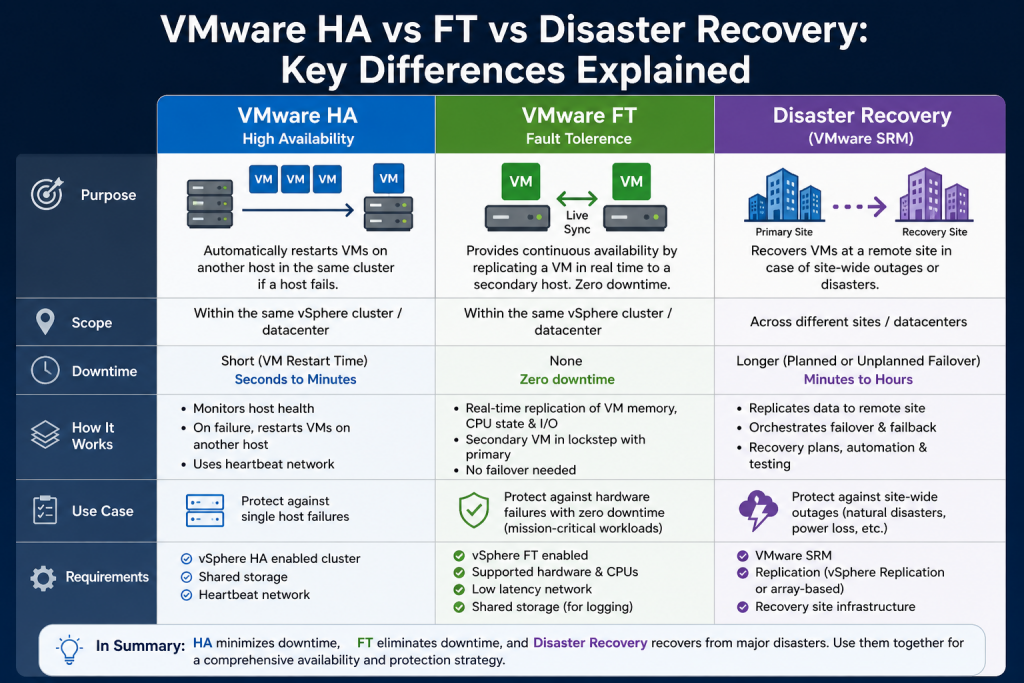
Fault Tolerance and High Availability serve similar purposes but operate in fundamentally different ways. High Availability focuses on recovery after a failure, while Fault Tolerance prevents downtime by maintaining a live backup.
In High Availability, virtual machines are restarted on another host after a failure, resulting in some downtime. In contrast, Fault Tolerance ensures that a secondary virtual machine is always ready to take over instantly.
Resource usage is another key difference. High Availability requires spare capacity for failover but does not duplicate virtual machines during normal operation. Fault Tolerance, on the other hand, requires continuous duplication, leading to higher resource consumption.
Configuration complexity also varies. High Availability is relatively simple to set up, while Fault Tolerance requires careful planning and specific infrastructure requirements.
These differences highlight the importance of selecting the right solution based on the needs of the workload.
Operational Considerations for Fault Tolerance
Managing Fault Tolerance requires ongoing attention to ensure optimal performance and reliability. Monitoring is essential to detect any issues with synchronization or network performance.
Regular testing should be conducted to verify that failover processes work as expected. This helps identify potential problems before they impact production systems.
Capacity planning is also critical. As workloads grow, additional resources may be needed to maintain Fault Tolerance. This includes both compute and network resources.
Maintenance activities must be carefully coordinated. For example, when performing host maintenance, the system must ensure that both primary and secondary virtual machines remain protected.
Proper documentation and training are important to ensure that administrators understand how to manage and troubleshoot Fault Tolerance environments.
When to Use Fault Tolerance
Deciding when to use Fault Tolerance depends on the specific requirements of the workload. It is most appropriate for applications that require continuous uptime and cannot tolerate interruptions.
However, it should not be used indiscriminately. The cost and complexity of Fault Tolerance make it suitable only for a subset of workloads.
In many cases, a combination of High Availability and other solutions may provide a more balanced approach. For example, less critical workloads can rely on High Availability, while critical systems use Fault Tolerance.
Understanding the trade-offs between different availability solutions is essential for designing an effective infrastructure.
Preparing for Disaster Recovery Strategies
While Fault Tolerance provides excellent protection against host-level failures, it does not address all types of disasters. For example, if an entire data center is affected by a natural disaster or power outage, both the primary and secondary virtual machines may be impacted.
To address these scenarios, organizations must implement Disaster Recovery solutions. These solutions focus on replicating data to a secondary location and enabling recovery in case of large-scale failures.
Fault Tolerance can be part of a broader availability strategy, but it must be complemented by Disaster Recovery to comprehensive protection.
In the next section, the focus will shift to Disaster Recovery and how it enables organizations to recover from major disruptions while minimizing data loss and downtime.
Understanding VMware Disaster Recovery and Full Infrastructure Protection
As organizations expand their reliance on digital systems, the risks associated with large-scale failures become more significant. While High Availability and Fault Tolerance address host-level and localized failures, they do not fully protect against disasters that impact an entire data center. Events such as power outages, natural disasters, cyberattacks, or storage failures can disrupt all systems within a single location. To handle these scenarios, Disaster Recovery becomes a critical component of any resilient IT strategy.
Disaster Recovery focuses on restoring services after a major disruption by replicating workloads to a secondary site. Unlike High Availability and Fault Tolerance, which aim to maintain uptime within a single environment, Disaster Recovery ensures business continuity across geographically separated locations.
What is VMware Disaster Recovery
Disaster Recovery in VMware environments involves replicating virtual machines and their data from a primary site to a secondary site. This secondary site acts as a backup location where workloads can be restored in the event of a failure at the primary site.
The key objective of Disaster Recovery is to minimize downtime and data loss. When a disaster occurs, administrators can initiate a recovery process that brings virtual machines online at the secondary site. This allows business operations to continue even when the primary environment is unavailable.
Disaster Recovery is not instantaneous like Fault Tolerance. Instead, it involves a controlled process of powering on replicated virtual machines and reconnecting services. However, with proper configuration, this process can be completed quickly and efficiently.
Core Components of VMware Disaster Recovery
VMware provides several tools that work together to enable Disaster Recovery. Two of the most important components are vSphere Replication and Site Recovery Manager. These tools handle data replication and recovery orchestration, respectively.
vSphere Replication is responsible for copying virtual machine data from the primary site to the secondary site. It operates at the hypervisor level and does not require specialized storage hardware. This makes it a flexible and cost-effective solution for many environments.
Site Recovery Manager builds on this by automating the recovery process. It allows administrators to define recovery plans that specify how virtual machines should be restored, including the order in which they are powered on and any necessary configuration changes.
Together, these tools provide a comprehensive Disaster Recovery solution that can handle a wide range of scenarios.
How vSphere Replication Works
vSphere Replication continuously copies changes made to virtual machines from the primary site to the secondary site. This process ensures that a recent copy of each virtual machine is always available for recovery.
Replication is performed at regular intervals, which can be configured based on the organization’s needs. These intervals determine how much data may be lost in the event of a disaster. Shorter intervals provide better protection but require more bandwidth and resources.
One of the key features of vSphere Replication is its ability to support point-in-time recovery. This means that multiple snapshots of a virtual machine can be stored, allowing administrators to restore to a specific moment in time. This is particularly useful in cases such as data corruption or ransomware attacks.
Replication traffic is transmitted over the network, so sufficient bandwidth must be available to handle the data transfer. The performance of the replication process depends on factors such as network speed, latency, and the size of the virtual machines.
Understanding Recovery Point Objective and Recovery Time Objective
Two important concepts in Disaster Recovery are Recovery Point Objective and Recovery Time Objective. These metrics define the acceptable levels of data loss and downtime for an organization.
Recovery Point Objective refers to the maximum amount of data loss that can be tolerated. It is determined by the frequency of replication. For example, if replication occurs every 15 minutes, up to 15 minutes of data may be lost in a disaster.
Recovery Time Objective refers to the maximum amount of time it takes to restore services after a failure. This includes the time required to power on virtual machines and make them operational.
Balancing these objectives is a key part of Disaster Recovery planning. Lower objectives require more resources and investment, while higher objectives may result in greater impact during a failure.
Site Recovery Manager and Recovery Automation
Site Recovery Manager plays a crucial role in automating Disaster Recovery processes. It allows administrators to create detailed recovery plans that define how virtual machines should be restored.
These plans include steps such as powering on virtual machines, configuring network settings, and running scripts to prepare applications. By automating these tasks, Site Recovery Manager reduces the complexity of recovery and minimizes the risk of human error.
One of the most valuable features of Site Recovery Manager is its ability to perform non-disruptive testing. Administrators can simulate a disaster and execute recovery plans in an isolated environment without affecting production systems. This allows organizations to verify that their Disaster Recovery strategy works as expected.
Reports generated from these tests provide valuable insights into recovery times and potential issues, helping organizations improve their preparedness.
Differences Between Replication and Orchestration
While vSphere Replication and Site Recovery Manager work together, they serve different purposes. Replication focuses on copying data, ensuring that a backup of virtual machines is available at the secondary site.
Orchestration, on the other hand, focuses on how that data is used during recovery. It defines the sequence of actions required to bring systems back online and ensures that dependencies between applications are handled correctly.
Both components are essential for effective Disaster Recovery. Without replication, there would be no data to recover. Without orchestration, the recovery process would be manual and prone to errors.
Infrastructure Requirements for Disaster Recovery
Implementing Disaster Recovery requires a secondary site with sufficient resources to run replicated workloads. This includes compute capacity, storage, and networking infrastructure.
Both sites must have compatible configurations to ensure that virtual machines can run without issues. This may involve standardizing hardware, software versions, and network settings.
Network connectivity between sites is also critical. Reliable and high-speed connections are needed to support replication traffic and ensure timely updates.
In addition, proper security measures must be in place to protect data during transmission and storage. This includes encryption and access controls.
Benefits of Disaster Recovery
Disaster Recovery provides several key benefits that make it an essential part of any IT strategy. One of the most important is protection against large-scale failures. By maintaining a secondary site, organizations can continue operations even if the primary site is completely unavailable.
It also reduces downtime and data loss. With proper configuration, services can be restored quickly, minimizing the impact on users and customers.
Another benefit is flexibility. Disaster Recovery solutions can be tailored to meet the specific needs of an organization, allowing for different levels of protection for different workloads.
Additionally, regular testing capabilities help ensure that recovery plans are effective and up to date.
Limitations of Disaster Recovery
Despite its advantages, Disaster Recovery has limitations. One of the main challenges is cost. Maintaining a secondary site requires significant investment in infrastructure and resources.
Another limitation is recovery time. Unlike Fault Tolerance, which provides instant failover, Disaster Recovery involves a process that takes time to complete.
Data loss is also a consideration. Depending on the replication interval, some data may be lost during a disaster.
Complexity is another factor. Designing and managing a Disaster Recovery solution requires careful planning and expertise.
Comparing Disaster Recovery with High Availability and Fault Tolerance
Disaster Recovery differs significantly from High Availability and Fault Tolerance. High Availability focuses on restarting virtual machines after a host failure within the same site. Fault Tolerance eliminates downtime by maintaining a live copy of a virtual machine.
Disaster Recovery, on the other hand, addresses site-level failures by replicating data to a separate location. It provides protection against events that affect the entire primary environment.
Each solution serves a different purpose and is best suited for specific scenarios. In many cases, they are used together to provide comprehensive protection.
Building a Comprehensive Availability Strategy
A robust IT strategy often combines High Availability, Fault Tolerance, and Disaster Recovery. Each layer addresses different types of failures and contributes to overall resilience.
High Availability provides quick recovery from host failures. Fault Tolerance ensures continuous operation for critical workloads. Disaster Recovery protects against large-scale disruptions.
By integrating these solutions, organizations can achieve a high level of availability and minimize the impact of failures.
Best Practices for Disaster Recovery Implementation
Successful Disaster Recovery implementation requires careful planning and adherence to best practices. One important practice is regular testing. Recovery plans should be tested frequently to ensure that they work as expected.
Documentation is also essential. Clear documentation helps administrators understand recovery procedures and respond effectively during a disaster.
Monitoring and maintenance are important to ensure that replication processes are functioning correctly and that resources are available when needed.
Finally, organizations should continuously review and update their Disaster Recovery strategy to address changing requirements and emerging threats.
Conclusion
Maintaining availability in virtual environments requires a multi-layered approach. High Availability, Fault Tolerance, and Disaster Recovery each play a unique role in protecting workloads and ensuring business continuity.
High Availability provides automated recovery from host failures by restarting virtual machines on other hosts. It is simple to implement and suitable for a wide range of workloads, but it involves some downtime.
Fault Tolerance takes availability a step further by eliminating downtime entirely. By maintaining a synchronized copy of a virtual machine, it ensures continuous operation even during failures. However, it requires additional resources and careful configuration.
Disaster Recovery addresses the most severe scenarios by enabling recovery at a secondary site. It protects against large-scale disruptions but involves some recovery time and potential data loss.
Together, these solutions form a comprehensive strategy for maintaining uptime and protecting critical systems. By understanding their differences and strengths, organizations can design an infrastructure that meets their specific availability requirements while balancing cost, complexity, and performance.
Continue exploring the technologies and certification concepts that matter most to you.