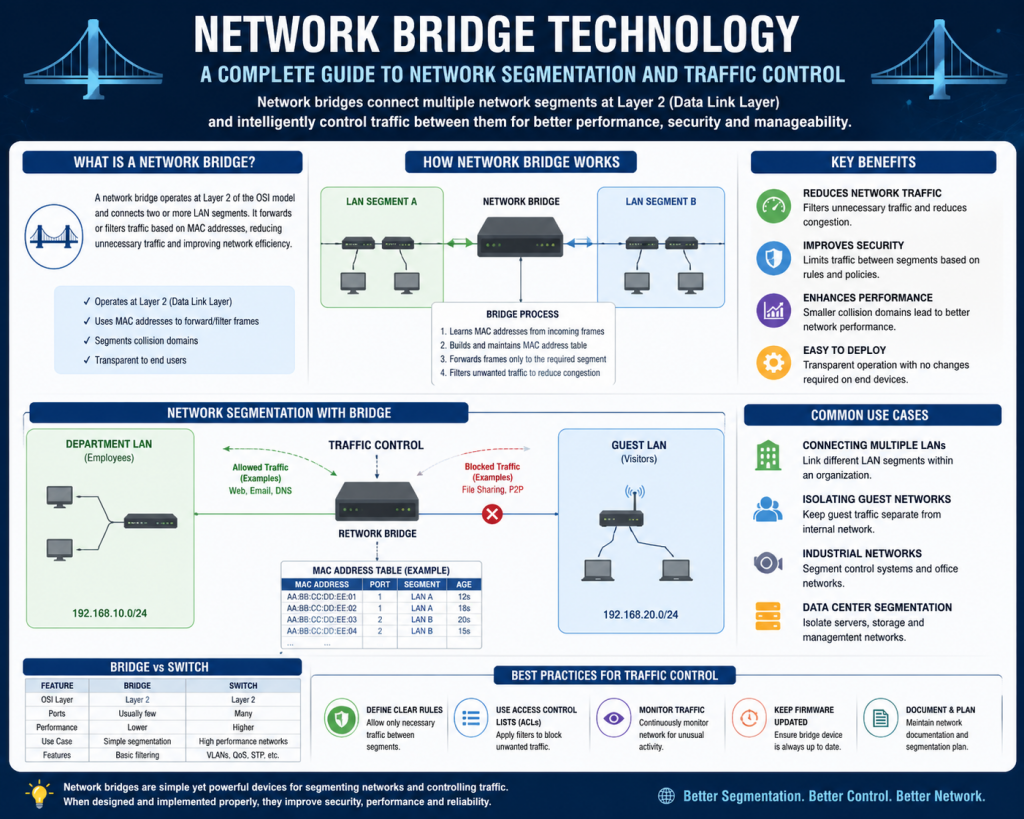
A network bridge is a fundamental networking device used to connect and manage communication between different segments of a local area network. It plays a key role in improving how data flows within a network by dividing it into smaller, more efficient sections. Although it is considered a basic concept compared to more advanced networking technologies, understanding how a bridge works is essential for building a strong foundation in networking.
In simple terms, a network bridge connects two or more parts of a network while controlling the traffic that moves between them. Instead of allowing all data to pass freely, it examines the information and decides whether it should be forwarded or blocked. This selective forwarding helps reduce unnecessary data transmission and improves overall network performance.
A useful way to visualize a network bridge is to imagine two separate office rooms connected by a controlled doorway. Without the doorway, people in each room cannot interact. With an open doorway, everyone can move freely, which might create crowding and confusion. A bridge acts like a smart doorway that allows only the right people to pass through at the right time, maintaining order and efficiency.
The Role of a Network Bridge in Networking
In a typical network environment, devices such as computers, printers, and servers communicate by sending data to one another. When too many devices are connected in a single network segment, the amount of traffic can become overwhelming. This leads to slower communication, higher chances of data collisions, and difficulty in managing the network.
A network bridge addresses this problem by dividing a large network into smaller segments. Each segment can operate independently, but the bridge ensures that communication between segments still occurs when needed. By doing so, it reduces the overall load on each segment and allows data to move more efficiently.
This segmentation also makes it easier for network administrators to monitor and control traffic. Instead of dealing with one large, complex network, they can manage smaller sections that are easier to understand and maintain.
Operation at the Data Link Layer
A network bridge operates at the data link layer, which is the second layer of the OSI model. This layer is responsible for handling physical addressing and ensuring that data is transferred correctly between devices on the same network.
Unlike routers, which work with IP addresses, a bridge uses MAC addresses to make its decisions. A MAC address is a unique identifier assigned to each network interface. It allows the bridge to recognize individual devices and determine where data should be sent.
Because it operates at this layer, a bridge does not concern itself with complex routing decisions or communication between completely different networks. Its primary focus is on managing data within a local network environment.
This simplicity makes it efficient for its intended purpose, but it also means that it lacks the advanced features found in higher-layer devices.
How a Network Bridge Connects Segments
When a network bridge is placed between two network segments, it creates a controlled connection between them. Each segment can still function as its own network, but the bridge allows data to pass between them when necessary.
For example, consider two departments within an organization, each with its own network. Without a bridge, these departments would not be able to share information easily. By introducing a bridge, communication becomes possible while still maintaining some level of separation.
The bridge monitors all incoming data frames and determines whether they should be forwarded to another segment or kept within the current one. This selective process ensures that only relevant data is transmitted, reducing unnecessary traffic.
Understanding Data Frames and MAC Addresses
To fully understand how a bridge works, it is important to know how data is transmitted within a network. Data is sent in units called frames. Each frame contains important information, including the source and destination MAC addresses.
When a frame reaches the bridge, the device examines these addresses to determine where the frame should go. If the destination address belongs to a device on a different segment, the bridge forwards the frame. If it belongs to a device on the same segment, the frame is not forwarded.
This process ensures that data is delivered efficiently without overloading other parts of the network.
The MAC Address Table
One of the key components of a network bridge is its MAC address table. This table stores information about which devices are located on which network segments.
When a bridge first starts operating, its table is empty. As frames pass through the bridge, it learns the location of devices by recording their source MAC addresses. Over time, this table becomes more complete and allows the bridge to make faster and more accurate forwarding decisions.
If the bridge receives a frame with a destination address that is not in its table, it temporarily broadcasts the frame to all segments. When the correct device responds, the bridge updates its table with the new information.
This learning process is continuous and allows the bridge to adapt to changes in the network.
Filtering and Forwarding Traffic
A network bridge performs two main actions when handling data: filtering and forwarding. These actions are based on the information stored in the MAC address table.
Filtering occurs when the bridge decides that a frame does not need to be sent to another segment. This happens when both the source and destination devices are located on the same segment. By filtering out such frames, the bridge reduces unnecessary traffic.
Forwarding occurs when the bridge determines that a frame needs to be sent to a different segment. In this case, the frame is transmitted through the appropriate interface.
This combination of filtering and forwarding helps maintain efficient communication within the network.
Reducing Network Collisions
In shared network environments, collisions can occur when multiple devices attempt to send data at the same time. Collisions can lead to delays and reduced performance.
By dividing a network into smaller segments, a bridge reduces the number of devices competing for the same communication channel. Each segment becomes its own collision domain, which means that collisions in one segment do not affect others.
This separation significantly improves network performance, especially in environments with high levels of traffic.as it reduces congestion, limits unnecessary data transmission, and allows devices to communicate more efficiently without competing for the same network resources. When a network is divided into smaller segments, each segment handles its own local traffic, which prevents the entire network from becoming overloaded. This means that devices do not have to wait as long to send or receive data, resulting in faster communication and improved responsiveness.
In addition, separating the network helps minimize the impact of heavy usage in one segment on the rest of the network. For example, if one group of devices is transferring large amounts of data, it will not significantly slow down communication in another segment. This isolation ensures a more balanced distribution of network activity and helps maintain consistent performance across all connected devices.
Another important advantage is that it reduces the likelihood of data collisions, which can occur when multiple devices attempt to transmit data at the same time. Fewer collisions mean less need for retransmissions, which further improves efficiency. Overall, this structured approach to managing traffic allows networks to operate more smoothly, reliably, and effectively, even as the number of connected devices and the volume of data continue to grow.
Broadcast Traffic and Its Impact
Broadcast traffic refers to data that is sent to all devices within a network. While this type of communication is sometimes necessary, excessive broadcasts can lead to congestion.
A network bridge does not completely block broadcast traffic, but it helps manage it by reducing the amount of unnecessary data being transmitted between segments.
By filtering out irrelevant unicast traffic, the bridge ensures that broadcast traffic does not overwhelm the network.This is important because broadcast messages are sent to all devices within a network segment, and if too many broadcasts occur at the same time, they can consume a large portion of the available bandwidth. When bandwidth is heavily used by unnecessary traffic, devices may experience delays, slower response times, and reduced overall performance.
A network bridge helps prevent this situation by limiting the amount of data that is allowed to move between segments. Since unicast traffic is directed toward specific devices, filtering out unnecessary unicast transmissions reduces the total volume of data traveling across the network. As a result, more bandwidth is available for essential communications, including broadcast messages that need to reach all devices.
In addition, this filtering process creates a more organized flow of data. Instead of allowing every piece of information to pass freely, the bridge ensures that only relevant traffic reaches each segment. This structured approach helps maintain a balance between different types of network communication and prevents any single type of traffic from dominating the network.
Another benefit is that it improves the reliability of broadcast communication. When broadcast traffic is not competing with excessive unicast traffic, it can be delivered more quickly and consistently. This is especially important for network functions that rely on broadcasts, such as device discovery and certain types of system updates.
Furthermore, reducing unnecessary traffic also lowers the processing burden on network devices. Each device must examine incoming data to determine whether it is relevant. By minimizing the amount of irrelevant traffic, the bridge allows devices to operate more efficiently and focus on meaningful communication.
Overall, by filtering out unnecessary unicast traffic, the bridge creates a cleaner and more efficient network environment. It ensures that broadcast traffic remains manageable, supports better performance, and contributes to a more stable and reliable network for all connected devices.
For more advanced control of broadcasts, other devices such as routers are typically used.
Differences Between Bridges and Other Devices
It is important to understand how a network bridge compares to other networking devices.
A bridge is often confused with a switch because both operate at the data link layer and use MAC addresses. In fact, modern switches are essentially advanced versions of bridges with multiple ports and higher performance capabilities.
Routers, on the other hand, operate at the network layer and use IP addresses to route data between different networks. They provide more advanced features, such as traffic management and security controls.
While a bridge is simpler than these devices, it is still highly effective for its intended purpose.
Simplicity and Efficiency of Network Bridges
One of the main advantages of a network bridge is its simplicity. It does not require complex configuration or advanced knowledge to operate.
In many cases, a bridge can function automatically, learning about the network as it processes data. This makes it a practical choice for basic networking needs.
Despite its simplicity, a bridge can have a significant impact on network performance. By reducing congestion and improving efficiency, it helps create a more stable and reliable network environment.
Practical Importance of Learning Network Bridges
Although modern networks often rely on switches and routers, the concept of bridging remains highly relevant. Understanding how bridges work provides insight into how data moves within a network.
This knowledge is essential for troubleshooting network issues, designing efficient network structures, and understanding more advanced technologies.
For students and professionals preparing for networking exams, mastering the basics of bridging is an important step. It helps build a strong foundation that makes it easier to learn more complex concepts later on.
Functions and Benefits of a Network Bridge
After understanding what a network bridge is and how it operates at a fundamental level, it becomes important to explore what it actually does in a working network and why it is useful. A network bridge is not just a connecting device; it actively improves the organization, performance, and manageability of a network. Its functions revolve around controlling traffic, reducing unnecessary communication, and ensuring that data reaches its intended destination efficiently.
A bridge works quietly in the background, making decisions about where data should go without requiring constant human intervention. This makes it both practical and efficient, especially in environments where simplicity and stability are important.
Network Segmentation and Its Importance
One of the primary functions of a network bridge is segmentation. Segmentation refers to dividing a large network into smaller, more manageable parts. In a network with many devices, having everything connected in a single segment can create chaos. Data packets may travel unnecessarily across the entire network, leading to congestion and slower communication.
By splitting the network into segments, a bridge ensures that traffic stays localized whenever possible. Devices within the same segment can communicate directly without affecting other segments. Only the data that actually needs to cross segments is allowed through the bridge.
This approach not only improves performance but also makes the network easier to understand and maintain. Administrators can focus on specific segments rather than dealing with a complex and overloaded system.
Improving Network Performance
Performance is one of the most noticeable benefits of using a network bridge. When a network becomes too crowded, devices must compete for bandwidth. This competition leads to delays, slower data transfer, and an overall decrease in efficiency.
A bridge reduces this problem by limiting how much traffic flows between segments. Since it filters out unnecessary transmissions, only relevant data is forwarded. This reduces congestion and allows devices to communicate more quickly.
In addition, because each segment operates more independently, the amount of traffic within each segment is lower. This creates a smoother and more responsive network experience.
Reduction of Collision Domains
In traditional network setups, especially older Ethernet systems, collisions were a major issue. A collision happens when two devices attempt to send data at the same time over the same communication medium. When this occurs, both transmissions can fail, and the devices must resend their data.
A network bridge helps reduce collisions by creating separate collision domains. Each segment connected by the bridge becomes its own domain, meaning that collisions in one segment do not affect others.
This isolation improves reliability and ensures that communication remains stable even when multiple devices are active. It is particularly useful in environments with heavy network usage.
Traffic Filtering for Efficiency
Traffic filtering is one of the most important tasks performed by a network bridge. Instead of forwarding every data frame it receives, the bridge carefully analyzes each one.
Using its MAC address table, the bridge determines whether the destination device is located in the same segment or a different one. If the destination is in the same segment, the frame is filtered out and not forwarded. This prevents unnecessary data from traveling across the network.
If the destination is in another segment, the frame is forwarded accordingly. This selective approach ensures that bandwidth is used efficiently and that network resources are not wasted.
Learning and Adapting to the Network
A network bridge is not a static device. It continuously learns about the network as it operates. Each time it processes a data frame, it updates its MAC address table with new information.
This learning process allows the bridge to adapt to changes in the network, such as new devices being added or existing devices being moved. Over time, the bridge becomes more accurate in its forwarding decisions.
This adaptability is one of the reasons why bridges require minimal configuration. They are capable of managing themselves to a large extent, making them suitable for dynamic environments.
Supporting Different LAN Technologies
Modern networks often include a mix of technologies. For example, some devices may be connected through wired Ethernet, while others use wireless connections. A network bridge can help connect these different types of networks.
By acting as a link between different LAN technologies, a bridge allows devices to communicate seamlessly, regardless of how they are connected. This flexibility is especially useful in environments where both wired and wireless devices need to coexist.
It also makes it easier to integrate new technologies into an existing network without major changes.
Simplifying Network Expansion
As organizations grow, their networking needs expand as well. Adding new devices, departments, or locations can increase the complexity of the network.
A network bridge makes expansion easier by allowing new segments to be added without disrupting the existing structure. Instead of redesigning the entire network, administrators can simply connect a new segment using a bridge.
This scalability is one of the practical advantages of using bridges. It allows networks to grow gradually while maintaining efficiency and organization.
Managing Broadcast Traffic
Broadcast traffic is a type of communication where a message is sent to all devices within a network. While broadcasts are sometimes necessary, excessive broadcast traffic can lead to congestion and reduced performance.
A network bridge helps manage broadcast traffic indirectly. While it does not completely block broadcasts, it reduces overall traffic by filtering unnecessary unicast frames. This ensures that the network is not overwhelmed by excessive communication.
For more advanced control of broadcast traffic, other devices such as routers are typically used. However, bridges still play a role in maintaining a balanced and efficient network.
Ease of Configuration and Use
One of the reasons network bridges are widely used is their simplicity. Unlike routers, which require detailed configuration and knowledge of routing protocols, bridges are relatively easy to set up.
In many cases, a bridge can operate with minimal manual configuration. It automatically learns about the network and adjusts its behavior accordingly.
This ease of use makes it an attractive option for smaller networks or situations where advanced features are not required.
Bridge Mode in Networking
Bridge mode is a configuration in which a device is set to function as a bridge rather than performing other roles such as routing. Many modern networking devices, including some routers, offer a bridge mode option.
When a device is in bridge mode, it stops performing tasks like assigning IP addresses or routing traffic between different networks. Instead, it simply passes data between segments, acting as a transparent connection.
This is useful in situations where another device is responsible for routing, and the goal is to avoid conflicts or duplication of functions.
Bridge mode is commonly used in home and business networks to simplify the network structure and improve compatibility between devices.
When to Use a Network Bridge
A network bridge is best suited for situations where basic segmentation and traffic control are needed. It is ideal for environments where the network is becoming too large or congested and needs to be divided into smaller sections.
It is also useful when different LAN segments need to be connected without implementing complex routing solutions.
For example, in an office environment, a bridge can be used to separate departments while still allowing communication between them. This improves organization and reduces unnecessary traffic.
However, a bridge is not the right solution for every scenario. If advanced features such as security filtering, IP-based routing, or communication between completely different networks are required, a router is a better choice.
Limitations of Network Bridges
While network bridges offer several benefits, they also have limitations. One of the main limitations is their lack of advanced security features. Since they operate at the data link layer, they do not analyze data at a deeper level.
This means they cannot filter traffic based on IP addresses or application-level information. As a result, they are not suitable for environments where strong security measures are required.
Another limitation is their handling of broadcast traffic. Although they reduce overall traffic, they do not completely isolate broadcast domains. This can become a problem in very large networks.
Additionally, bridges are less efficient than modern switches in handling high volumes of traffic. Switches are essentially improved versions of bridges with greater speed and capacity.
Relationship Between Bridges and Switches
In modern networking, switches have largely replaced traditional bridges. However, the concept of bridging is still very much alive.
A switch can be thought of as a multi-port bridge. It performs the same basic functions but on a larger scale and with greater efficiency.
Understanding how bridges work makes it easier to understand switches, as they share the same fundamental principles. This is why learning about bridges is still important, even in modern network environments.
Contribution to Network Stability
A well-segmented network is more stable and easier to manage. By dividing a network into smaller parts, a bridge helps prevent issues from spreading.
For example, if one segment experiences heavy traffic or a malfunctioning device, the impact is limited to that segment. Other parts of the network can continue to operate normally.
This isolation improves overall reliability and makes troubleshooting easier.
Practical Value in Real-World Networks
Even though dedicated bridge devices are less common today, the concept is still widely used. Many networking devices include bridging functionality as part of their design.
For example, wireless access points often use bridging to connect wireless devices to a wired network. Similarly, virtualization technologies use software bridges to connect virtual machines.
This shows that bridging is not an outdated concept but rather a foundational idea that continues to play a role in modern networking.
Setting Up a Network Bridge
Setting up a network bridge is an important practical step that helps transform theoretical knowledge into real-world understanding. While the concept of a bridge may seem simple, the process of configuring it correctly requires attention to detail and a clear understanding of how network interfaces operate.
At its core, creating a bridge involves linking two or more network interfaces so they function as a single logical connection. This allows devices on different segments to communicate as if they were part of the same network, while still benefiting from segmentation and traffic control.
The process can vary depending on the operating system and environment being used, but the general principles remain consistent across platforms. Whether working on a server, a personal computer, or a dedicated networking device, the goal is to establish a bridge interface and assign physical or virtual interfaces to it.
Identifying Network Interfaces
The first step in setting up a network bridge is identifying the available network interfaces on the system. These interfaces represent the points where the device connects to the network, such as Ethernet ports or wireless adapters.
Each interface typically has a unique name, and understanding which interface corresponds to which physical connection is essential. Misidentifying interfaces can lead to incorrect configurations and connectivity issues.
In most systems, commands or graphical tools are available to list all network interfaces. This allows the administrator to verify which interfaces will be included in the bridge.
Once identified, these interfaces are prepared for bridging by removing any independent configurations they may have had. Instead of operating separately, they will now function as part of the bridge.
Creating the Bridge Interface
After identifying the interfaces, the next step is creating the bridge itself. The bridge acts as a virtual interface that combines multiple physical interfaces into one logical entity.
This bridge interface is responsible for managing traffic between the connected segments. It becomes the central point through which data flows, applying filtering and forwarding rules as needed.
The creation process usually involves defining a new interface and assigning the selected network interfaces to it. This step effectively links the segments together.
Once the bridge is created, it behaves like a standard network interface from the system’s perspective. It can be assigned an IP address, configured for automatic addressing, or integrated into existing network settings.
Assigning Interfaces to the Bridge
After creating the bridge interface, the physical or virtual interfaces must be attached to it. This step is critical because it determines which network segments will be connected.
Each interface that is added to the bridge becomes part of the same logical network. Data entering through one interface can be forwarded to another, depending on the bridge’s filtering decisions.
It is important to ensure that the interfaces being bridged are not simultaneously configured with separate IP addresses or conflicting settings. Doing so can cause network instability.
Proper assignment ensures that the bridge operates smoothly and that traffic flows correctly between segments.
Configuring IP Addressing
Once the bridge is set up, IP addressing must be configured. In most cases, the bridge interface itself is assigned an IP address, while the individual interfaces do not have separate addresses.
This approach ensures that the system communicates with the network through the bridge rather than through individual interfaces.
The IP address can be assigned manually or obtained automatically through a dynamic configuration service. The choice depends on the network environment and administrative preferences.
Correct IP configuration is essential for ensuring connectivity and enabling communication with other devices on the network.
Activating the Bridge
After completing the configuration steps, the bridge must be activated. This usually involves restarting the network service or enabling the bridge interface.
Once activated, the bridge begins operating immediately. It starts learning MAC addresses, building its internal table, and forwarding traffic between segments.
At this stage, devices connected to different interfaces should be able to communicate with each other through the bridge.
Testing the bridge after activation is an important step to confirm that everything is working as expected.
Testing Connectivity
Testing is a crucial part of the setup process. It ensures that the bridge is functioning correctly and that communication between segments is possible.
One common method of testing is sending data between devices located on different segments. If the bridge is configured properly, the data should pass through without issues.
Network tools can also be used to monitor traffic and verify that frames are being forwarded correctly. Observing how the bridge handles traffic provides valuable insight into its operation.
If any issues are detected during testing, adjustments can be made before the bridge is fully deployed.
Common Troubleshooting Techniques
Even with careful setup, problems can arise when working with network bridges. Troubleshooting is an essential skill that helps identify and resolve these issues efficiently.
The first step in troubleshooting is to remain systematic. Instead of making random changes, it is important to analyze the situation and identify possible causes.
By following a structured approach, most issues can be resolved without significant difficulty.
Checking Physical Connections
One of the most basic yet important troubleshooting steps is checking physical connections. Network cables, connectors, and ports must all be functioning correctly.
A loose or damaged cable can prevent communication entirely, making it appear as though the bridge is not working.
Replacing cables or testing connections with known working components can help identify physical issues quickly.
This simple step is often overlooked but can save a significant amount of time.
Verifying Configuration Settings
Incorrect configuration is a common cause of bridge-related problems. Even a small error in interface assignment or addressing can disrupt communication.
Reviewing the configuration carefully helps ensure that all settings are correct. This includes checking interface names, bridge assignments, and IP configurations.
Consistency is key. All parts of the configuration must align with the intended network design.
Correcting configuration errors often resolves connectivity issues immediately.
Avoiding IP Address Conflicts
IP address conflicts occur when two devices on the same network are assigned the same address. This can cause unpredictable behavior and prevent communication.
In a bridged network, conflicts can affect multiple segments, making the issue more widespread.
Ensuring that each device has a unique IP address is essential. This can be managed through proper planning or by using automatic address assignment systems.
Identifying and resolving conflicts restores normal network operation.
Restarting Network Services
Sometimes, issues arise due to temporary glitches or incomplete configurations. Restarting network services can help clear these problems.
A restart forces the system to reload its settings and reinitialize connections. This can resolve minor issues without requiring further intervention.
While simple, this step is often effective and should be considered early in the troubleshooting process.
Monitoring Network Traffic
Advanced troubleshooting often involves analyzing network traffic. Monitoring tools can provide detailed information about how data is moving through the network.
By observing traffic patterns, it is possible to identify bottlenecks, misrouted frames, or unusual behavior.
This level of analysis is particularly useful in complex environments where multiple factors may be contributing to an issue.
Understanding traffic flow helps pinpoint the root cause of problems and guides effective solutions.
Maintaining a Network Bridge
Once a network bridge is set up and functioning correctly, ongoing maintenance is necessary to ensure continued performance.
Maintenance involves monitoring the network, updating configurations as needed, and addressing issues before they become serious problems.
Regular checks help ensure that the bridge continues to operate efficiently and that the network remains stable.
As networks grow and change, adjustments may be required to accommodate new devices or segments.
Adapting to Network Changes
Networks are dynamic environments. Devices are added, removed, or relocated, and usage patterns can change over time.
A network bridge must adapt to these changes to remain effective. Fortunately, its ability to learn and update its MAC address table allows it to adjust automatically in many cases.
However, manual intervention may still be required for significant changes, such as adding new segments or modifying network structure.
Staying aware of network changes helps maintain optimal performance.
Practical Applications in Modern Networks
Although dedicated bridge devices are less common today, the concept of bridging is still widely used.
Many modern devices include built-in bridging functionality. For example, wireless access points often act as bridges between wired and wireless networks.
Virtualization technologies also rely on software bridges to connect virtual machines to physical networks.
These applications demonstrate that bridging remains a relevant and important concept in modern networking.
Understanding the Limitations in Practice
While bridges are useful, they are not suitable for every situation. Their limitations must be considered when designing a network.
They do not provide advanced security features or detailed traffic analysis. They also do not isolate broadcast traffic completely.
In large or complex networks, relying solely on bridges can lead to inefficiencies.
Understanding these limitations helps ensure that bridges are used appropriately and in combination with other networking devices when necessary.
Building Strong Networking Skills
Working with network bridges helps develop essential networking skills. It provides hands-on experience with concepts such as segmentation, traffic filtering, and MAC addressing.
These skills are valuable not only for basic networking but also for understanding more advanced technologies.
By mastering the setup and troubleshooting of bridges, learners gain confidence in managing network environments.
This practical knowledge forms the foundation for further learning and professional development.
Conclusion
A network bridge is a simple yet powerful tool that plays an important role in managing local networks. It connects different segments, controls traffic flow, and improves overall efficiency without the complexity of higher-level devices.
Understanding how to set up, configure, and troubleshoot a bridge provides valuable insight into how networks function at a fundamental level. It also helps develop practical skills that are essential for anyone working in networking.
While modern technologies have introduced more advanced devices, the principles of bridging remain relevant. They continue to influence how networks are designed and managed today.
By learning and applying these concepts, you build a strong foundation that supports further exploration into more complex areas of networking.
Continue exploring the technologies and certification concepts that matter most to you.