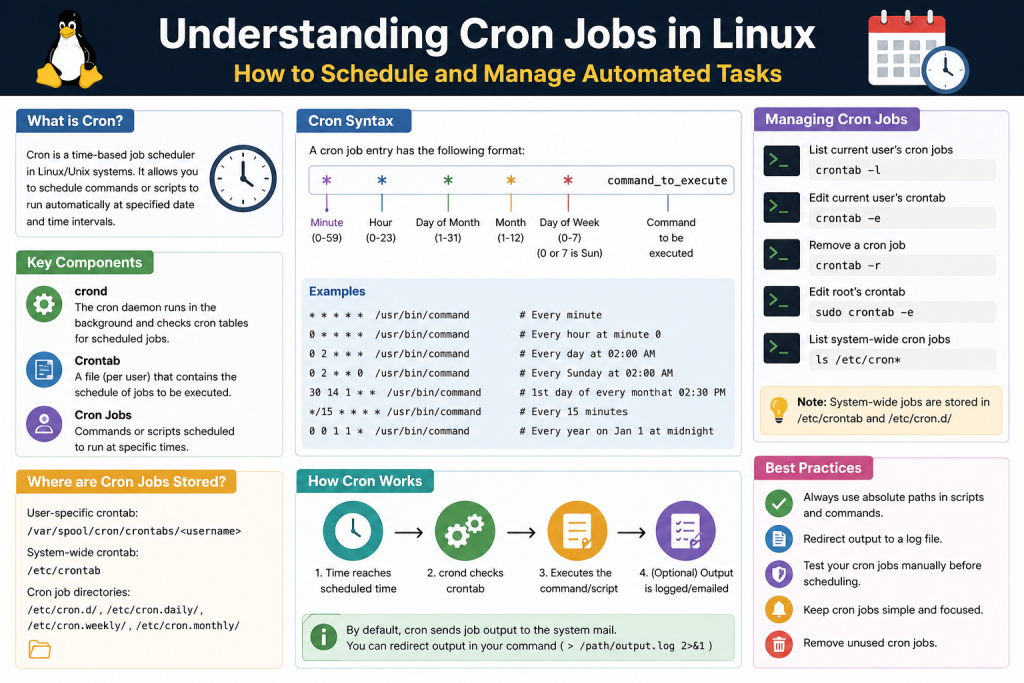
Cron jobs are one of the most important automation features available in Linux and Unix-based systems. They allow users to schedule commands or scripts to run automatically at specified times or intervals. This capability is especially useful for system administrators and developers who need to perform repetitive tasks without manual intervention. Instead of running commands again and again, cron jobs handle everything in the background, ensuring consistency and saving time.
The concept behind cron is simple but powerful. You define what task should run and when it should run, and the system takes care of the rest. Once configured, cron jobs work silently in the background, making them an essential part of maintaining servers, applications, and system health.
What Is a Cron Job
A cron job is a scheduled task that executes automatically at a defined time or interval in a Linux system. These tasks can include anything from running scripts to executing system commands. The scheduling is handled by a built-in service, which ensures that tasks are executed exactly when specified.
Cron jobs are widely used because they eliminate the need for manual execution. For example, instead of remembering to back up files every night, you can create a cron job that performs the backup automatically. This reduces human error and ensures that important operations are never missed.
Each cron job is defined by a line in a configuration file. This line specifies both the timing and the command to execute. Once added, the cron system continuously monitors the schedule and runs the job when the conditions are met.
The Role of the Cron Daemon
The cron daemon is the background service responsible for executing scheduled jobs. In Linux, background services are often referred to as daemons. The cron daemon runs continuously and checks the system’s scheduling files at regular intervals.
Whenever the current time matches a scheduled task, the cron daemon triggers the corresponding command. This process happens automatically without requiring user interaction. Because it operates in the background, users often do not notice its activity unless something goes wrong or logs are reviewed.
The cron daemon is highly reliable and designed to handle multiple scheduled tasks efficiently. It ensures that jobs run on time and in the correct sequence. Even if multiple tasks are scheduled at the same moment, the daemon manages their execution smoothly.
Why Cron Jobs Are Important
Cron jobs play a critical role in automating routine system operations. They help maintain system performance, ensure data integrity, and reduce manual workload. Without automation, many repetitive tasks would require constant attention, which is inefficient and prone to mistakes.
One of the biggest advantages of cron jobs is consistency. Tasks are executed at the exact same time and in the same manner every time. This is especially important for operations like backups and system maintenance, where reliability is crucial.
Another key benefit is time efficiency. Once a cron job is configured, it runs indefinitely according to the schedule. This allows users to focus on more important tasks rather than routine operations.
Cron jobs also improve system organization. By scheduling tasks properly, system administrators can ensure that resource-intensive operations run during off-peak hours, minimizing the impact on performance.
Common Uses of Cron Jobs
Cron jobs are used in a wide range of scenarios across different types of systems. One of the most common uses is automating backups. Systems often need regular backups to prevent data loss, and cron jobs make it easy to perform these backups daily, weekly, or at any custom interval.
Another common use is cleaning up temporary files. Over time, systems accumulate unnecessary files that can take up valuable storage space. Cron jobs can be used to delete these files automatically, keeping the system clean and efficient.
Cron jobs are also used to send scheduled notifications or emails. For example, a system can send daily reports or alerts at specific times. This is useful for monitoring system performance or notifying users about important events.
System maintenance tasks are another major application. These tasks can include updating software, restarting services, or running scripts that check system health. By automating these operations, administrators can ensure that systems remain stable and secure.
Cron jobs are also frequently used in web development. They can run scripts that update content, process data, or manage background tasks required by applications. This makes them an essential tool for managing dynamic systems.
Understanding Cron, Crontab, and Cron Jobs
To fully understand how cron works, it is important to distinguish between three related terms: cron, crontab, and cron jobs. Although they are closely connected, each serves a different purpose.
Cron is the service that manages and executes scheduled tasks. It is the engine that drives the entire scheduling system. Without cron, there would be no way to automate tasks based on time.
Crontab refers to the configuration file where scheduled tasks are defined. Each user in a Linux system can have their own crontab file, allowing them to manage their own schedules independently. The crontab file contains all the instructions that cron uses to determine what to run and when.
A cron job is an individual task listed within the crontab file. Each line in the file represents a separate job. When someone talks about editing a cron job, they are referring to modifying one of these lines.
Understanding the difference between these three components is essential for working with cron effectively. Once you know how they interact, it becomes much easier to create and manage scheduled tasks.
How Cron Works in the Background
Cron operates by continuously checking the crontab files for scheduled tasks. It compares the current system time with the time conditions specified in each cron job. When a match is found, the corresponding command is executed.
This process happens every minute. Cron reads the scheduling rules and determines which tasks need to run at that exact moment. Because of this design, cron jobs cannot be scheduled at intervals shorter than one minute without additional techniques.
The commands defined in cron jobs are executed in a non-interactive environment. This means they do not have access to the same environment variables as a user’s shell session. As a result, it is important to specify full paths and ensure that all dependencies are properly configured.
Cron also logs its activity, allowing users to review what tasks have been executed and identify any issues. These logs are useful for troubleshooting and verifying that scheduled tasks are running as expected.
Advantages of Using Cron Jobs
One of the main advantages of cron jobs is automation. By scheduling tasks in advance, users can eliminate repetitive manual work. This not only saves time but also reduces the risk of errors.
Another advantage is reliability. Once a cron job is set up, it runs consistently according to the defined schedule. This makes it ideal for critical operations that must be performed regularly.
Cron jobs also provide flexibility. Users can create highly customized schedules, allowing tasks to run at specific times, on certain days, or at regular intervals. This level of control makes cron suitable for a wide variety of applications.
Scalability is another benefit. Cron can handle multiple tasks simultaneously, making it suitable for both small systems and large-scale environments. Whether you are managing a single server or a complex infrastructure, cron can adapt to your needs.
Finally, cron jobs contribute to better resource management. By scheduling tasks during low-usage periods, users can optimize system performance and avoid unnecessary strain on resources.
Limitations of Cron Jobs
Despite their many advantages, cron jobs do have some limitations. One of the main limitations is the minimum scheduling interval of one minute. This means tasks cannot be directly scheduled to run more frequently without using workarounds.
Another limitation is the lack of a graphical interface. Cron is typically managed through the command line, which can be challenging for beginners. However, once the syntax is understood, it becomes much easier to use.
Cron jobs also require careful configuration. Mistakes in scheduling or command syntax can lead to unexpected behavior. For example, an incorrectly written command could delete important files or fail to execute entirely.
Additionally, cron jobs run in a limited environment. They do not automatically inherit user-specific settings, so commands must be written with full paths and proper configurations. This can sometimes lead to confusion if a script works in the terminal but fails when executed by cron.
When to Use Cron Jobs
Cron jobs are best suited for tasks that need to run regularly without manual intervention. If a task is repetitive and follows a predictable schedule, it is a good candidate for automation باستخدام cron.
They are commonly used in server environments where tasks such as backups, updates, and monitoring need to be performed consistently. They are also useful in development workflows where scripts need to run at specific intervals.
However, cron may not be the best choice for tasks that require real-time execution or complex event-based triggers. In such cases, other tools or scheduling systems may be more appropriate.
Getting Ready to Use Cron
Before creating cron jobs, it is important to understand the system environment and ensure that all required scripts and commands are properly configured. This includes verifying file paths, permissions, and dependencies.
It is also a good practice to test commands manually before scheduling them. This helps ensure that they work correctly and prevents issues when they are executed automatically.
Users should also familiarize themselves with basic command-line tools and text editors, as these are commonly used to manage crontab files. Understanding these tools will make it much easier to create and modify cron jobs.
Crontab Structure and Scheduling Syntax
The crontab file is the foundation of scheduling tasks in Linux using cron. It defines when and how commands should run. Each entry in the crontab represents a specific scheduled task, and understanding its structure is essential for working effectively with cron jobs. While the syntax may appear minimal, it provides a powerful way to control task execution with precision.
Every user in a Linux system can have their own crontab file, which allows different users to schedule tasks independently. These files are read and executed by the cron daemon, which ensures that each task runs at the appropriate time.
Learning how the crontab structure works is the key to unlocking the full potential of cron jobs. Once you understand the timing fields and how they interact, you can create schedules ranging from simple to highly complex.
Basic Format of a Crontab Entry
A crontab entry is written as a single line that includes timing information followed by the command to be executed. The structure consists of five time fields and then the command.
The five time fields define exactly when a task should run. These fields represent minute, hour, day of the month, month, and day of the week. Each field accepts a specific range of values, and together they determine the schedule.
After the time fields, the command section specifies what should be executed. This can be a script, a binary, or a combination of commands. The command is executed exactly as written, so accuracy is very important.
Each line in the crontab file is independent. This means you can define multiple tasks, each with its own schedule and command, without affecting the others.
Understanding the Time Fields
The time fields in a crontab entry are what make scheduling possible. Each field corresponds to a unit of time and allows you to specify when the task should run.
The first field represents minutes. It accepts values from 0 to 59. This determines the exact minute within the hour when the command will execute.
The second field represents hours. It uses a 24-hour format, with values ranging from 0 to 23. This defines the hour of the day when the task should run.
The third field specifies the day of the month. It allows values from 1 to 31. This determines which day of the month the command should execute.
The fourth field represents the month. Values range from 1 to 12, corresponding to the months of the year.
The fifth field represents the day of the week. It typically uses values from 0 to 7, where both 0 and 7 represent Sunday. Other numbers correspond to the remaining days of the week.
All five fields must be present in every crontab entry. If any field is missing, the entry will not work correctly.
The Role of Wildcards
Asterisks are commonly used in crontab entries and act as wildcards. A wildcard means that the field can match any possible value. This allows you to create flexible schedules without specifying every detail.
For example, if you place an asterisk in the minute field, it means the task can run at any minute. If all five fields contain asterisks, the task will run every minute of every hour, every day.
Wildcards are useful when you want a task to run frequently or when certain time conditions are not important. They simplify the scheduling process and reduce the need for multiple entries.
However, it is important to use wildcards carefully. Using too many wildcards can cause a task to run more often than intended, which may impact system performance.
Using Specific Values
In addition to wildcards, you can specify exact values in any of the time fields. This allows you to control precisely when a task runs.
For example, if you set the minute field to 15, the task will run at the 15th minute of the specified hour. If you set the hour field to 10, the task will run at 10 AM.
By combining specific values across multiple fields, you can create highly targeted schedules. For instance, you can schedule a task to run at a specific time on a specific day of the month.
Using specific values is useful for tasks that need to run at predictable times, such as generating reports or performing maintenance.
Combining Fields for Scheduling
The true power of crontab lies in combining different fields to create complex schedules. Each field acts as a condition, and the task runs only when all conditions are met.
For example, if you set the minute to 30 and the hour to 2, the task will run at 2:30 AM. If you also set the day of the month to 1, the task will run only on the first day of each month at that time.
This combination approach allows for precise scheduling without requiring multiple entries. It also makes it possible to create schedules that match real-world requirements.
Understanding how these fields interact is essential for creating effective cron jobs. Once you are comfortable combining conditions, you can design schedules for almost any scenario.
Lists, Ranges, and Step Values
Crontab syntax also supports advanced scheduling features such as lists, ranges, and step values. These features provide additional flexibility and make it easier to define complex schedules.
A list allows you to specify multiple values separated by commas. For example, you can run a task at multiple specific times by listing those values in a field.
A range allows you to specify a continuous sequence of values. For instance, you can define a range of hours during which a task should run.
Step values allow you to define intervals within a range. This is done using a slash symbol. For example, you can schedule a task to run every five minutes by using a step value in the minute field.
These features can be combined to create detailed schedules. For example, you can run a task every ten minutes during specific hours on certain days.
Using these advanced options can greatly enhance your ability to manage tasks efficiently. However, they require careful planning to avoid unintended behavior.
Special Scheduling Strings
In addition to the standard five-field format, some systems support special scheduling strings that simplify common schedules. These strings provide shortcuts for frequently used patterns.
Examples include running a task every hour, every day, or once a week. These shortcuts make it easier to define schedules without remembering the exact field values.
While these strings are convenient, they may not be supported in all environments. It is important to check your system’s documentation before using them.
Even when available, understanding the standard format is still important, as it provides more flexibility and control.
Command Execution in Crontab
The command section of a crontab entry is where the actual task is defined. This can include a single command or multiple commands combined together.
Commands in crontab are executed in a non-interactive shell environment. This means they do not have access to the same environment settings as a normal terminal session.
Because of this, it is important to use full paths for commands and scripts. For example, instead of relying on system variables, you should specify the exact location of the executable.
You can also include multiple commands by separating them with semicolons. This allows you to perform several actions within a single cron job.
Proper command formatting is essential to ensure that tasks run correctly. Any errors in the command section can prevent the job from executing.
Handling Output and Logs
When a cron job runs, it may produce output. By default, this output can be sent to the system’s mail service or stored in logs.
Managing output is important for monitoring and debugging. You can redirect output to a file to keep a record of what the job is doing.
For example, you can store logs in a specific file and review them later to check for errors or confirm successful execution.
Proper logging helps identify issues quickly and ensures that your scheduled tasks are functioning as expected.
Understanding Execution Environment
Cron jobs run in a limited environment compared to a regular shell session. This means certain environment variables may not be available.
For example, the path variable may not include all directories where commands are located. As a result, commands that work in the terminal may fail in cron if full paths are not specified.
To avoid issues, it is important to define any required environment variables explicitly within the crontab file.
Understanding the execution environment helps prevent common mistakes and ensures reliable operation of cron jobs.
Scheduling Limitations
One of the main limitations of cron is its one-minute resolution. This means tasks cannot be scheduled to run more frequently than once per minute using standard syntax.
To achieve shorter intervals, workarounds such as using sleep commands are required. However, these methods are not always precise and may not be suitable for all use cases.
Another limitation is the lack of built-in error handling. If a job fails, cron does not automatically retry it. This means additional logic may be needed in scripts to handle failures.
Despite these limitations, cron remains a powerful and widely used scheduling tool.
Best Practices for Writing Crontab Entries
Writing effective crontab entries requires attention to detail. Small mistakes can lead to unexpected results or failed tasks.
It is important to double-check all time fields and commands before saving the file. Testing commands manually can help identify issues early.
Using clear and simple schedules makes it easier to understand and maintain cron jobs. Complex schedules should be documented to avoid confusion.
Organizing crontab entries and adding comments can also improve readability. This is especially useful when managing multiple tasks.
Following best practices ensures that your cron jobs run smoothly and are easy to manage over time.
Preparing for Practical Usage
Before creating cron jobs, it is important to have a clear understanding of what tasks need to be automated and how often they should run.
Planning your schedule in advance helps avoid conflicts and ensures efficient use of system resources.
It is also helpful to start with simple tasks and gradually move to more complex schedules. This allows you to build confidence and gain experience with cron.
Once you are comfortable with the syntax and structure, you can begin creating and managing cron jobs effectively.
Creating and Managing Cron Jobs in Linux
Creating and managing cron jobs is the practical step where all the concepts of scheduling and syntax come together. Once you understand how cron works and how crontab entries are structured, the next step is to apply that knowledge in real scenarios. This involves editing the crontab file, adding new entries, testing commands, and maintaining existing scheduled tasks.
Cron jobs are widely used in real-world environments for automation. Whether you are managing a personal system or a production server, knowing how to create and manage cron jobs efficiently can save time and reduce manual effort. It also helps ensure that important tasks are executed reliably and consistently.
Accessing the Crontab File
To create or manage cron jobs, you need to access the crontab file. This file stores all scheduled tasks for a specific user. Each user in a Linux system can have their own crontab file, which allows independent task scheduling.
The most common way to open the crontab file is by using a command that launches it in a text editor. When you run this command, the system may ask you to choose a default editor if one has not already been set. Once selected, the crontab file will open for editing.
If the file is empty, you can begin adding new cron jobs immediately. If it already contains entries, you can modify or remove them as needed. Each line represents a separate cron job, so it is important to edit carefully to avoid affecting other tasks.
For tasks that require administrative privileges, the crontab file must be accessed with elevated permissions. This ensures that the job runs with the appropriate level of access when executed.
Writing Your First Cron Job
Creating a cron job starts with defining a clear goal. You need to decide what command or script you want to run and how often it should execute. Once this is determined, you can translate that requirement into a crontab entry.
A basic cron job includes the five time fields followed by the command. For example, if you want a script to run every minute, you would use wildcards for all time fields. If you want it to run at a specific time, you would replace the wildcards with the desired values.
It is important to use the full path to the script or command. Cron does not always have access to the same environment variables as a regular shell session, so relying on relative paths can lead to errors.
Before adding a cron job, it is recommended to test the command manually in the terminal. This helps ensure that the command works as expected and avoids issues when it is executed automatically.
Scheduling Scripts with Full Paths
One of the most common mistakes when working with cron jobs is not using full paths. Unlike a normal terminal session, cron operates in a limited environment where certain variables may not be available.
For example, if you run a script from your home directory, you should specify the complete path to that script. This ensures that cron can locate and execute it correctly.
Using full paths also applies to commands within scripts. If your script depends on external tools, you should ensure that their paths are properly defined. This reduces the risk of execution failures.
Taking the time to define paths accurately is a small step that can prevent many common issues in cron job management.
Running Jobs at Different Intervals
Cron jobs can be scheduled to run at a wide range of intervals. You can create jobs that run every minute, every hour, daily, weekly, or even at specific times of the year.
For example, running a script once per hour involves specifying a particular minute while leaving the other fields as wildcards. Running a task daily requires setting both the minute and hour fields while using wildcards for the rest.
You can also create more complex schedules by combining multiple conditions. For instance, you can run a job only on certain days of the week or during specific months.
Understanding how to adjust these intervals allows you to tailor cron jobs to your exact needs. This flexibility is one of the reasons cron is so widely used.
Running Jobs More Frequently Than One Minute
Cron has a built-in limitation where it cannot schedule tasks at intervals shorter than one minute. However, there are ways to work around this limitation.
One common method is to use a delay within the command itself. For example, you can run a command at the start of each minute and then use a delay to execute it again after a certain number of seconds.
Another approach is to create multiple cron job entries that run at staggered times. This can simulate shorter intervals by distributing execution across different moments within the same minute.
While these methods are effective, they should be used carefully. Running tasks too frequently can increase system load and affect performance.
Managing Permissions for Cron Jobs
Permissions play a critical role in cron job execution. Each cron job runs with the permissions of the user who created it. This means the job can only access files and perform actions that the user is allowed to do.
If a task requires higher privileges, it must be configured under a user with the necessary permissions. This is often done using administrative access.
It is important to be cautious when running cron jobs with elevated privileges. Incorrect commands can cause significant system changes, so they should be tested thoroughly before being scheduled.
Understanding permissions helps ensure that cron jobs run securely and without unintended consequences.
Editing and Updating Existing Jobs
Managing cron jobs is not just about creating new entries. It also involves updating and maintaining existing ones. Over time, requirements may change, and schedules may need to be adjusted.
To update a cron job, you can open the crontab file and modify the relevant line. Changes take effect immediately after the file is saved.
If a job is no longer needed, it can be removed by deleting its line from the file. It is important to review the file carefully to avoid removing the wrong entry.
Keeping the crontab file organized and up to date helps maintain system efficiency and prevents unnecessary tasks from running.
Debugging Cron Jobs
Sometimes cron jobs do not behave as expected. Debugging is an important part of managing scheduled tasks. Identifying the cause of an issue can involve checking command syntax, file paths, and permissions.
One useful technique is to redirect output to a log file. This allows you to see what happens when the job runs and identify any errors.
Another approach is to test the command manually. If it works in the terminal but fails in cron, the issue may be related to the execution environment.
Reviewing system logs can also provide valuable information. These logs often contain details about cron activity and can help pinpoint problems.
Debugging requires patience and attention to detail, but it is an essential skill for managing cron jobs effectively.
Organizing Multiple Cron Jobs
As the number of cron jobs increases, organization becomes important. A cluttered crontab file can be difficult to manage and understand.
One way to improve organization is by adding comments. Comments can describe what each job does and why it is needed. This is especially helpful when multiple users are working on the same system.
Grouping related tasks together can also make the file easier to read. For example, you can place all backup-related jobs in one section and maintenance tasks in another.
Clear organization helps prevent errors and makes it easier to update or troubleshoot cron jobs in the future.
Best Practices for Reliable Scheduling
To ensure that cron jobs run reliably, it is important to follow best practices. One of the most important practices is testing commands before scheduling them. This helps identify issues early and ensures that the job will run correctly.
Using full paths for all commands and scripts is another essential practice. This prevents problems related to missing environment variables.
It is also important to keep schedules simple whenever possible. Complex schedules can be difficult to understand and maintain. If a schedule becomes too complicated, it may be better to split it into multiple simpler jobs.
Monitoring cron jobs regularly is also important. Checking logs and verifying execution helps ensure that tasks are running as expected.
By following these practices, you can create cron jobs that are reliable and easy to manage.
Real World Examples of Cron Job Usage
In real-world environments, cron jobs are used for a wide variety of tasks. One common example is database backups. These backups can be scheduled to run daily during off-peak hours to minimize system impact.
Another example is log file management. Systems generate large amounts of log data, and cron jobs can be used to rotate or delete old logs automatically.
Cron jobs are also used in web applications to perform background tasks. These tasks can include sending emails, processing data, or updating content.
System monitoring is another area where cron jobs are useful. They can run scripts that check system health and generate alerts if issues are detected.
These examples highlight the versatility of cron jobs and their importance in modern computing environments.
Avoiding Common Mistakes
There are several common mistakes that users make when working with cron jobs. One of the most frequent issues is incorrect syntax. Even a small error in the time fields can cause a job to run at the wrong time or not at all.
Another common mistake is forgetting to use full paths. This can lead to commands not being found when executed by cron.
Permissions are another area where mistakes occur. Running a job without the necessary permissions can cause it to fail.
It is also important to avoid scheduling tasks too frequently. This can overload the system and reduce performance.
Being aware of these mistakes and taking steps to avoid them can greatly improve the effectiveness of your cron jobs.
Monitoring and Maintenance
Once cron jobs are set up, they should not be ignored. Regular monitoring and maintenance are important to ensure that they continue to function correctly.
Checking logs periodically can help identify issues before they become serious problems. It also provides confirmation that tasks are running as expected.
Updating cron jobs as system requirements change is another important aspect of maintenance. This ensures that tasks remain relevant and useful.
Removing outdated or unnecessary jobs can also improve system performance and reduce clutter.
Consistent monitoring and maintenance help keep cron jobs effective and reliable over time.
Conclusion
Cron jobs are a powerful tool for automating tasks in Linux systems. By allowing commands and scripts to run automatically at scheduled times, they simplify system management and improve efficiency. From basic scheduling to advanced automation, cron provides a flexible and reliable solution for handling repetitive tasks.
In this part, you explored how to create, manage, and maintain cron jobs in practical scenarios. You learned how to access the crontab file, write and schedule jobs, handle permissions, and debug issues when they arise. You also saw how cron jobs are used in real-world environments and how to avoid common mistakes.
When used correctly, cron jobs can significantly reduce manual workload and ensure that important tasks are performed consistently. They are an essential skill for anyone working with Linux systems, whether in development, administration, or operations.
By combining the knowledge from all three parts, you now have a complete understanding of cron jobs, from basic concepts to advanced usage. With practice and careful planning, you can use cron to automate complex workflows and make your system more efficient and reliable.
Continue exploring the technologies and certification concepts that matter most to you.