For anyone entering the world of networking, understanding cable types is one of the earliest and most practical technical skills to develop. While modern networking often emphasizes wireless technologies, cloud platforms, software-defined infrastructure, and automation, physical connections remain critically important. Routers, switches, firewalls, and other network devices still rely on specific cable types for deployment, troubleshooting, and direct management. Among the many cable categories used in IT, rollover cables and console cables are often misunderstood because the terms are frequently used as though they mean exactly the same thing.
This confusion is understandable. In many networking environments—especially older Cisco-centric infrastructures—the rollover cable was the primary cable used for console access, causing the two terms to become nearly interchangeable in everyday conversation. However, from a technical perspective, they are not identical. A rollover cable refers to a particular wiring pattern, while a console cable refers to the broader function of providing direct access to a networking device’s management interface.
This distinction may seem minor at first, but for networking students, certification candidates, and working professionals, it can be highly important. Using the wrong cable can prevent communication with a device, delay troubleshooting, or create unnecessary confusion during deployment. Knowing the difference between these cables is not simply about memorization—it reflects an understanding of how networking hardware is physically accessed and managed.
To fully appreciate the role of rollover and console cables, it helps to first understand the baseline cable standard from which these specialized cable types differ: the straight-through Ethernet cable.
The Foundation of Network Cabling: Straight-Through Cables
The straight-through cable is the most common cable used in traditional Ethernet networking. It serves as the default cable for connecting devices that perform different roles on a network. In this cable type, each wire inside the connector terminates on the same pin number at both ends. Pin 1 connects to pin 1, pin 2 to pin 2, continuing all the way through pin 8.
This one-to-one configuration makes straight-through cables ideal for connecting unlike devices, such as:
PC to switch
Laptop to router
Wireless access point to switch
Printer to switch
VoIP phone to switch
These connections became the standard because they matched the communication patterns of most enterprise and office networks. A computer sending data to a switch, for example, relies on proper alignment between transmit and receive pairs according to Ethernet standards.
Straight-through cables generally follow one of two wiring standards:
T568A
T568B
Although these standards use slightly different wire color sequences, both ends of the cable must use the same standard for the cable to function as straight-through. In practical networking, the exact standard often matters less than consistency.
Because straight-through cables became so universally common, any cable wired differently needed a specific purpose. This necessity led to specialized cable types like crossover and rollover cables.
Why Networking Requires Different Cable Types
Networking devices do not all communicate in the same way. In older networking environments especially, hardware did not automatically adjust communication pairs. Devices depended on physical cable design to ensure transmit and receive pathways aligned correctly.
This created three major cable categories:
Straight-through cables for unlike devices
Crossover cables for like devices
Rollover cables for console management
Each design served a unique purpose.
Straight-through cables supported normal Ethernet communication between different device categories.
Crossover cables swapped transmit and receive pairs to allow similar devices to communicate directly.
Rollover cables completely reversed pin order for console access rather than Ethernet traffic.
These distinctions were particularly important before technologies like Auto-MDIX allowed interfaces to detect and adapt automatically. While modern hardware has reduced dependence on some cable distinctions, console and rollover concepts remain essential because out-of-band management still matters.
What a Rollover Cable Actually Is
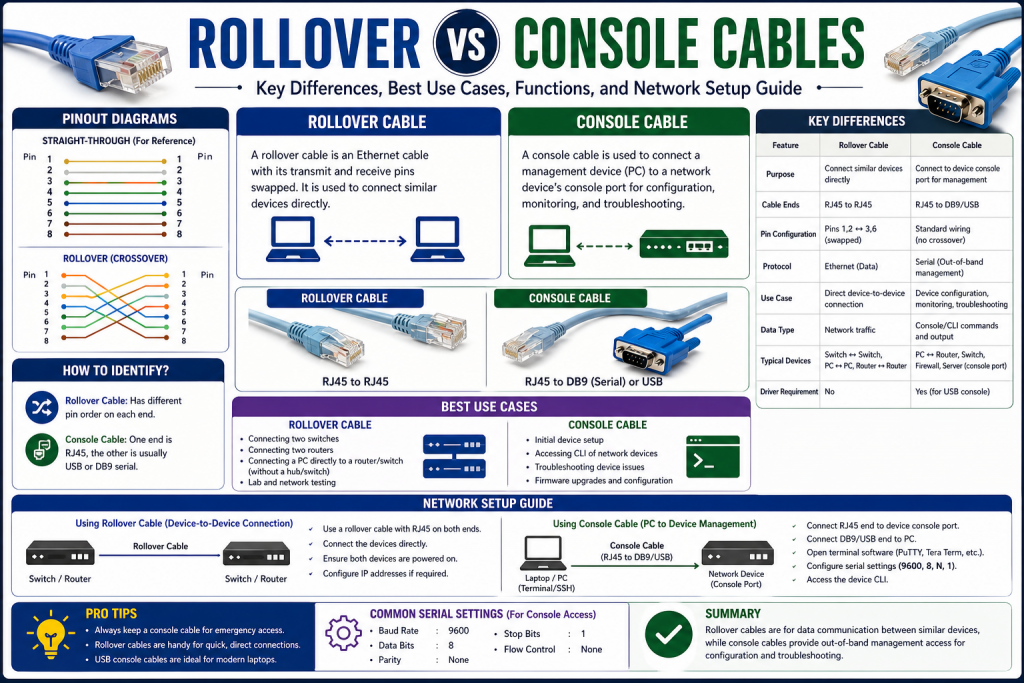
A rollover cable is not an Ethernet cable for standard data communication. It is a cable with a completely reversed pinout from one end to the other.
The wiring pattern is as follows:
Pin 1 to Pin 8
Pin 2 to Pin 7
Pin 3 to Pin 6
Pin 4 to Pin 5
Pin 5 to Pin 4
Pin 6 to Pin 3
Pin 7 to Pin 2
Pin 8 to Pin 1
This full reversal creates the “rollover” effect that gives the cable its name. If you physically compare both ends, one connector appears to be the mirror image of the other.
This design was intentional. It differentiated the cable from normal Ethernet patch cables while creating a dedicated path for terminal communication.
Unlike straight-through or crossover cables, rollover cables do not carry standard Ethernet traffic. Their primary function is console connectivity—direct communication with a network device’s command-line interface for management purposes.
The Historical Role of Rollover Cables in Networking
Rollover cables became especially prominent in enterprise networking because they were widely associated with router and switch console access. For years, many network devices shipped with dedicated rollover cables to ensure technicians could configure hardware before network services were operational.
This was essential because a brand-new router or switch typically lacked:
An IP address
Remote management settings
SSH access
Telnet access
Web interfaces
Cloud integration
Without these capabilities, administrators needed a direct path into the device to perform initial configuration. The rollover cable provided that path.
Using terminal software, a technician could connect a computer directly to the device’s console port and perform critical tasks such as:
Setting hostnames
Assigning IP addresses
Creating passwords
Configuring interfaces
Loading firmware
Recovering from configuration failures
Resetting credentials
This made rollover cables indispensable for deployment and recovery.
Understanding Out-of-Band Management
One of the most important concepts tied to rollover cables is out-of-band management.
Out-of-band management refers to accessing a device through a dedicated management channel separate from the primary network.
This distinction is extremely valuable because network-based management depends on the network functioning properly. If a switch is misconfigured, a router has failed routes, or firewall rules block access, remote management may be impossible.
A console connection bypasses those issues entirely.
By connecting directly through the console port, engineers can manage the device regardless of:
Network outages
Routing failures
Incorrect VLANs
Password lockouts
Interface shutdowns
Security policy mistakes
This direct access capability makes rollover cables essential in scenarios where normal network communication is unavailable.
Why the Terms “Rollover” and “Console” Are Often Mixed Up
Because rollover cables were historically the most common tool for console access, many professionals began using the terms interchangeably. Over time, “console cable” and “rollover cable” became almost synonymous in casual conversation.
Technically, however, they are different.
A rollover cable defines a wiring method.
A console cable defines a function.
This means:
All rollover cables used for console access are console cables.
Not all console cables are rollover cables.
Modern console access may use:
USB to RJ45
USB-C to USB-C
Mini-USB
Micro-USB
Serial adapters
Proprietary vendor cables
These alternatives still provide console access but do not necessarily use rollover pinouts.
This distinction matters because assuming all console cables are rollover cables can lead to compatibility issues with newer hardware.
Physical Characteristics of Traditional Rollover Cables
Classic rollover cables often had distinctive visual traits that made them easy to identify.
Common characteristics included:
Flat cable design
Light blue color in many enterprise kits
RJ45 connectors
Serial or DB9 adapters
Vendor-specific packaging
The flat, often brightly colored design helped distinguish rollover cables from standard Ethernet patch cords, reducing accidental misuse.
This was particularly useful in busy server rooms or training labs where many cables might otherwise appear similar.
For many engineers, carrying a rollover cable was once as essential as carrying screwdrivers or patch cords.
Serial Connectivity and DB9 Adapters
Before USB became standard on laptops, many systems used serial communication ports for console access. These ports commonly used DB9 connectors.
Networking devices often used RJ45 console ports, creating a mismatch that required rollover cables paired with RJ45-to-DB9 adapters.
This setup allowed a technician to connect a laptop serial port to a router or switch console port.
Terminal emulation software was then used to establish communication using standard settings such as:
9600 baud
8 data bits
No parity
1 stop bit
No flow control
These settings became foundational knowledge for networking professionals and remain relevant in many legacy environments.
Even though many modern laptops no longer include serial ports, USB-to-serial adapters continue to support older console workflows.
Why Beginners Often Misunderstand Cable Roles
One of the most common mistakes among networking beginners is assuming that identical connectors mean identical function.
For example, RJ45 connectors appear on:
Straight-through Ethernet cables
Crossover cables
Rollover cables
Despite looking similar externally, their internal wiring differs dramatically.
This means a cable that physically fits may still fail functionally.
A standard Ethernet patch cable plugged into a console port may not establish management access.
A rollover cable plugged into a switch uplink will not function as a normal network link.
This is why understanding pinout matters more than simply recognizing connector shape.
The Importance of Cable Knowledge in Certification and Real Work
Cable distinctions remain important not only for historical reasons but because they reinforce foundational networking principles.
Learning these differences develops understanding of:
Physical layer communication
Signal pathways
Management interfaces
Device deployment
Troubleshooting methodology
Operational preparedness
Certification exams often test these topics because they reflect real-world readiness. A technician who understands console access is more capable of handling deployment failures, hardware recovery, and emergency troubleshooting.
Practical Professional Habits
Experienced network engineers often develop disciplined habits around cable management, including:
Labeling specialized cables clearly
Keeping USB and serial adapters available
Testing cables before deployment
Color-coding management tools
Storing backup console cables
Maintaining terminal software familiarity
These habits reduce downtime and improve efficiency, particularly in data centers and enterprise environments where quick physical access may determine recovery speed.
Deep Dive Into Console Cables, Crossover Cables, and Real-World Networking Applications
Once the foundational differences between straight-through and rollover cables are understood, the next step is exploring the broader category of console cables and how they fit into practical networking. This is where many learners begin to see that networking cable knowledge is not just about identifying wire patterns—it is about understanding purpose, hardware evolution, vendor standards, and operational environments.
In modern IT infrastructure, direct access to networking devices remains a critical capability. Cloud dashboards, remote SSH sessions, web interfaces, and centralized orchestration tools have made administration easier than ever, but none of those tools eliminate the need for physical management access when systems fail, configurations break, or new devices are deployed. This is the environment where console cables continue to prove their value.
While rollover cables represent one historically important form of console connectivity, console cables themselves have evolved into a broader and more flexible category. Understanding this shift is essential for technicians, engineers, and students who want to work effectively with both legacy systems and contemporary infrastructure.
What a Console Cable Really Means
A console cable is any cable designed to connect a computer, terminal, or management device directly to the console port of networking hardware for out-of-band administration. The term describes function rather than wiring style.
This distinction is important because many people mistakenly assume that console cable automatically means rollover cable. Historically, that was often true because rollover cables dominated enterprise networking for years, but modern technology has expanded the possibilities significantly.
A console cable may now include:
RJ45-to-DB9 serial cables
RJ45-to-USB cables
USB-A to mini-USB
USB-A to micro-USB
USB-C to USB-C
USB-C to RJ45 console adapters
Vendor-specific console connectors
Each serves the same fundamental purpose: direct management access to infrastructure devices.
This means that the term console cable should be understood similarly to terms like “management interface” or “administrative access.” It defines why the cable exists, not necessarily how it is wired internally.
Why Console Access Is So Important
Console access is one of the most reliable forms of device management because it operates independently of network functionality. If a switch is offline, if a firewall has blocked remote access, or if routing is broken, console access still provides direct communication.
This matters because many critical networking tasks occur before network services are fully operational or after they have failed.
Examples include:
Initial hardware deployment
Boot sequence monitoring
Password recovery
Factory resets
Firmware restoration
Interface troubleshooting
Security policy correction
Operating system upgrades
Emergency diagnostics
Without console access, administrators may have no practical way to recover a severely misconfigured device.
This is why console capability is considered an essential layer of operational resilience.
The Shift From Legacy Serial to Modern USB Console Connectivity
In earlier decades, console access depended heavily on serial communication. Most enterprise laptops and workstations included serial COM ports, making DB9 adapters a normal part of every networking toolkit.
Over time, however, laptops became thinner, USB became universal, and DB9 ports largely disappeared from mainstream computing devices. Networking vendors adapted by offering USB-compatible console options.
This transition created several practical changes:
USB reduced dependence on serial ports
Drivers became important for compatibility
USB-C improved portability for modern devices
Mini-USB and micro-USB appeared on some networking hardware
Direct USB console ports simplified setup
Despite these hardware changes, the underlying purpose remained identical: establish direct command-line access.
For technicians working across generations of equipment, this means flexibility is critical. A professional toolkit may need multiple console adapters to support different hardware families.
Vendor Differences in Console Design
Although some console standards became widely recognized, not all vendors implemented management interfaces identically.
Different manufacturers have historically used:
RJ45 serial console ports
USB mini-B console ports
USB-C console ports
Proprietary rollover implementations
Dedicated management ports
This means cable compatibility cannot always be assumed based solely on connector appearance.
For example, two devices may both have RJ45 ports, but one may be an Ethernet interface while the other is a serial console interface.
This distinction reinforces a larger networking lesson: physical appearance does not guarantee functional equivalence.
Always confirm:
Port type
Vendor documentation
Pinout requirements
Driver support
Terminal settings
Understanding these variables prevents unnecessary troubleshooting delays.
Terminal Emulation Software and Console Communication
A console cable alone does not provide management access; it must be paired with terminal emulation software.
This software creates the communication environment that allows a computer to interact with a networking device’s command-line interface.
Common terminal tools include:
PuTTY
Tera Term
SecureCRT
Minicom
screen (Linux/macOS)
These tools allow administrators to configure connection parameters such as:
Baud rate
Data bits
Parity
Stop bits
Flow control
The classic standard remains 9600 8N1:
9600 baud
8 data bits
No parity
1 stop bit
No flow control
While many devices still default to these settings, some hardware may differ. Incorrect terminal settings can make a working cable appear defective, which is why troubleshooting must include software configuration as well as hardware checks.
Understanding Crossover Cables in the Larger Conversation
To fully understand rollover and console cables, crossover cables must also be examined because they represent another specialized deviation from standard Ethernet.
A crossover cable swaps transmit and receive pairs so that similar devices can communicate directly.
Historically, this was important when connecting:
PC to PC
Switch to switch
Router to router
Hub to hub
Without crossover wiring, transmit pins could connect incorrectly to transmit pins, preventing communication.
Unlike rollover cables, crossover cables still carry Ethernet traffic. They are data cables, not console cables.
This distinction is critical:
Crossover = Ethernet communication between like devices
Rollover = Console communication for management
Because both differ from straight-through wiring, beginners sometimes confuse them, but their purposes are entirely separate.
How Auto-MDIX Changed Cable Dependency
Modern networking interfaces increasingly support Auto-MDIX, a technology that automatically detects and adjusts transmit/receive orientation.
This advancement dramatically reduced the need for crossover cables in many scenarios.
With Auto-MDIX:
Switch-to-switch links often work with standard patch cables
PC-to-PC connections may auto-correct
Manual crossover selection is less necessary
However, Auto-MDIX did not eliminate the need for console access. Rollover and console cables remain relevant because management interfaces serve a fundamentally different purpose than Ethernet communication.
In other words:
Auto-MDIX reduced data cable complexity.
It did not replace out-of-band management.
Practical Deployment Scenarios for Console and Rollover Cables
In real-world environments, console cables are used in situations where remote access is unavailable, unreliable, or inappropriate.
New Device Deployment
A newly purchased router may require:
Hostname assignment
Interface IP configuration
Administrative password setup
Routing protocol configuration
Security policy definition
Without these settings, the device cannot join production networks securely.
Configuration Failure Recovery
A firewall misconfiguration may block all remote administration. Console access becomes the fastest path to correction.
Disaster Recovery
Operating system corruption or failed firmware may require bootloader-level access available only through console connections.
Lab and Certification Training
Networking students use console cables constantly when learning:
CLI commands
Initial configuration
Password recovery
IOS installation
Boot troubleshooting
Remote Console Servers
Large enterprises may centralize console access using terminal servers, allowing multiple devices to be managed remotely through dedicated console aggregation systems.
Advantages of Console-Based Management
Console access offers several major strengths:
Works without IP connectivity
Bypasses network outages
Provides low-level device access
Supports recovery from severe misconfigurations
Enables secure local administration
Supports initial deployment
Vendor universal in principle
These strengths explain why console interfaces remain standard even in highly advanced enterprise hardware.
Limitations and Drawbacks
Despite their importance, console and rollover workflows also have limitations:
Require physical proximity unless using console servers
Can require multiple adapters
May involve driver issues
Typically lower bandwidth
Less convenient than SSH for daily administration
Cable loss or damage can delay urgent tasks
These drawbacks do not reduce their importance—they simply reinforce that console access is a specialized management method rather than an everyday operational preference.
Common Mistakes in Cable Identification
Professionals often encounter preventable mistakes such as:
Using Ethernet patch cables for console access
Confusing RJ45 shape with Ethernet function
Ignoring USB driver requirements
Misconfiguring terminal settings
Forgetting adapter compatibility
Assuming all console ports are identical
These mistakes can waste time during critical troubleshooting.
One of the best habits an engineer can develop is verifying cable purpose before deployment.
Building an Effective Console Toolkit
Experienced networking professionals often maintain a toolkit containing:
RJ45 rollover cable
USB-to-serial adapter
USB-C console adapter
DB9 adapter
Terminal software
Labeling system
Known-good backup cable
Port reference guide
This preparation allows faster adaptation across environments.
In enterprise support, preparedness often matters as much as technical skill.
Security Considerations of Console Access
Because console access bypasses network-layer protections, physical security becomes essential.
If unauthorized individuals gain console access, they may:
Reset passwords
Modify configurations
Bypass remote restrictions
Load unauthorized firmware
Extract system information
For this reason, organizations often secure network closets, data centers, and rack cabinets carefully.
Physical access control remains a cybersecurity priority.
Why Understanding Cable Evolution Matters
Networking is a field where old and new technologies coexist.
A technician may work with:
Legacy serial routers
Modern USB-C switches
Cloud-managed firewalls
Industrial appliances
Console servers
Understanding rollover origins helps professionals adapt more effectively to evolving hardware.
Rather than memorizing one cable type, successful engineers understand principles:
What is the device?
What is the port?
What is the management goal?
What adapter is required?
What communication settings apply?
This mindset is more valuable than memorizing any single connector.
Best Practices, Troubleshooting, Cable Creation, and Long-Term Networking Relevance
As networking technology continues to evolve, the tools used to deploy, configure, and troubleshoot infrastructure have become more advanced, but one principle has remained constant: reliable physical access still matters. While software-defined networking, cloud dashboards, automation platforms, and AI-assisted monitoring have transformed enterprise operations, there are still moments when direct device access becomes essential. In those moments, rollover cables and broader console cable solutions remain some of the most practical and dependable tools in a network professional’s toolkit. These tools serve as a foundational layer beneath even the most sophisticated digital management systems, ensuring that when remote interfaces fail, administrators are not left without options. A device may lose connectivity because of misconfigured VLANs, routing failures, firmware corruption, startup errors, or security lockouts, and in such situations, no cloud portal or automation script can help unless direct communication is first restored. Physical console access bypasses these limitations by creating a dedicated pathway into the device itself. This capability is especially critical during first-time deployment, password recovery, disaster response, and deep troubleshooting scenarios where system visibility is otherwise unavailable. As infrastructure becomes more interconnected and operational dependence on automation increases, fallback mechanisms become more—not less—important. Reliable physical access remains the practical bridge between hardware control and digital abstraction, giving network professionals confidence that regardless of system complexity, they retain the ability to configure, recover, and stabilize essential infrastructure when it matters most.
Understanding cable definitions is only the beginning. Real-world success depends on knowing how to use these cables efficiently, how to troubleshoot failures, how to adapt to changing hardware standards, and how to maintain operational readiness over time. The practical side of cable management often separates theoretical knowledge from field competence. Whether working in enterprise data centers, branch offices, industrial environments, certification labs, or emergency recovery scenarios, mastering these practical considerations helps prevent costly delays and unnecessary downtime.
Why Practical Cable Management Still Matters in Modern IT
It is easy to assume that because remote management technologies are so powerful, physical console methods are becoming obsolete. In practice, the opposite is often true. The more complex networks become, the more valuable dependable fallback methods become.
Consider the following scenarios:
A newly installed router has no IP configuration.
A switch firmware update fails.
A firewall’s remote management rules are accidentally blocked.
A routing loop isolates management traffic.
A password is lost.
A corrupted operating system prevents network boot.
In each of these situations, cloud dashboards and SSH are useless unless the device can first reestablish network functionality. Console access provides the safety net.
This is why experienced professionals often view console cables not as legacy relics, but as infrastructure insurance. They are tools of recovery, initialization, and last-resort access.
Best Practices for Using Rollover and Console Cables
Using console cables effectively requires more than simply plugging in hardware. Professionals often rely on operational best practices that improve speed, accuracy, and reliability.
Label and Organize Your Cables Clearly
Because many networking cables may use similar connectors, confusion is common. A rollover cable may physically resemble an Ethernet cable while functioning completely differently.
To reduce mistakes:
Use visible labels
Separate console cables from patch cables
Color-code management accessories
Store specialty adapters together
Maintain known-good backups
This simple organizational discipline can save valuable time during troubleshooting.
Carry Multiple Adapter Types
Modern networking environments often include equipment from multiple generations. A technician may encounter:
RJ45 serial console ports
DB9 serial interfaces
USB-A console ports
USB-C console ports
Mini-USB or micro-USB console interfaces
Because of this diversity, carrying only one cable type may leave you unprepared. A well-equipped toolkit often includes:
RJ45 rollover cable
USB-to-serial adapter
USB-C to serial adapter
DB9 converter
Vendor-specific console cables
Being prepared for interface variation is a hallmark of professional readiness.
Verify Terminal Software Before Deployment
Many connectivity failures are not cable problems at all—they are software configuration errors.
Before assuming hardware failure, confirm:
Correct COM port
Baud rate
Data bits
Parity
Stop bits
Flow control
The standard 9600 8N1 configuration remains common, but deviations exist. Learning to verify terminal settings quickly can prevent unnecessary cable replacement.
Troubleshooting Console Connectivity Problems
Even though console connections are relatively simple compared to broader networking systems, failures still happen. Effective troubleshooting requires a structured approach.
Confirm the Cable Type
One of the most common mistakes is using the wrong cable entirely.
A standard Ethernet patch cable may fit physically but fail functionally.
A rollover cable may be required where a patch cable is mistakenly used.
USB console cables may require drivers.
Always verify:
Connector type
Cable function
Vendor requirements
Adapter compatibility
Test Physical Connections
Loose connections are often overlooked. Confirm that:
RJ45 connectors click securely
USB ports seat properly
DB9 screws are tightened
Adapters are fully inserted
Damaged ports are ruled out
A partially connected console cable can create symptoms that resemble software failure.
Validate Drivers and Port Detection
USB-based console solutions may depend on drivers.
Without proper drivers:
The cable may not appear in terminal software
COM ports may be unavailable
Device recognition may fail entirely
Checking operating system device management tools is often essential.
Swap Known-Good Components
Experienced engineers frequently isolate failures by substitution:
Try another cable
Try another adapter
Try another USB port
Try another laptop
This process helps identify whether the problem is:
Cable failure
Adapter failure
Driver issue
Device console port failure
Configuration issue
Consider EMI or Physical Damage
Poor cable quality, bent connectors, or electromagnetic interference may create inconsistent console sessions.
While less common, these factors should not be ignored in industrial or crowded rack environments.
How to Create a Rollover Cable in Emergency Situations
Although pre-made console cables are usually inexpensive and widely available, understanding how to create a rollover cable remains useful for education and emergency preparedness.
Basic Requirements
Cat5 or Cat5e cable
Two RJ45 connectors
Crimping tool
Cable tester
Pinout reference
Wiring Method
One end is wired in a standard arrangement, commonly T568B.
The opposite end is wired in complete reverse order:
Pin 1 to Pin 8
Pin 2 to Pin 7
Pin 3 to Pin 6
Pin 4 to Pin 5
Pin 5 to Pin 4
Pin 6 to Pin 3
Pin 7 to Pin 2
Pin 8 to Pin 1
This full reversal distinguishes rollover cables from crossover designs.
Why This Skill Still Matters
Although many professionals never manually build rollover cables, understanding the process reinforces:
Pinout literacy
Connector awareness
Cable testing discipline
Physical layer competence
These are valuable skills, especially in field service or constrained environments.
Console Security and Physical Access Control
Because console access often bypasses network-layer defenses, physical security becomes critically important.
A person with unauthorized console access may be able to:
Reset administrative passwords
Erase configurations
Modify security policies
Load unauthorized firmware
Extract device data
Bypass remote authentication controls
This is why network security is not purely digital. Physical security remains a core component of infrastructure defense.
Best practices include:
Locking racks and cabinets
Restricting data center access
Monitoring console ports
Securing spare console cables
Documenting physical maintenance access
In enterprise environments, physical access often equals administrative power.
The Role of Console Servers in Larger Environments
In major enterprise or service provider environments, manually connecting laptops to each device is inefficient. This challenge led to console servers.
A console server is a dedicated device that aggregates multiple console connections and allows centralized remote access.
Benefits include:
Remote troubleshooting
Centralized out-of-band management
Reduced travel to physical racks
Faster disaster response
Multi-device recovery capability
Console servers effectively modernize traditional console workflows without eliminating the underlying principles.
They demonstrate that even in advanced environments, console access remains essential.
Legacy Skills vs Modern Relevance
Some newcomers mistakenly assume rollover knowledge is outdated because USB and automation tools dominate modern networking. In reality, foundational cable knowledge still provides critical advantages.
Understanding legacy concepts improves:
Backward compatibility support
Certification readiness
Mixed-environment adaptability
Disaster recovery capability
Troubleshooting precision
Technology evolves, but foundational infrastructure principles often persist far longer than expected.
A network engineer who understands only cloud dashboards may struggle during physical deployment failures.
A network engineer who understands console fundamentals is typically more versatile.
Building Professional Confidence Through Preparedness
One of the clearest differences between beginners and experienced professionals is preparation.
Veteran engineers often maintain:
Multiple cable types
Spare adapters
Terminal tools
Driver packages
Portable power
Pinout references
Cable testers
This preparation reduces panic during outages and accelerates recovery.
Networking is often about problem-solving under pressure, and practical preparedness can be just as valuable as theoretical expertise.
Avoiding Common Operational Mistakes
Some of the most preventable console-related issues include:
Using patch cables instead of rollover cables
Assuming all RJ45 ports are Ethernet ports
Ignoring USB driver installation
Misconfiguring baud rate
Forgetting adapter compatibility
Mislabeling cables
Failing to test cables before deployment
Avoiding these mistakes often comes down to process discipline rather than advanced technical skill.
The Bigger Lesson: Function Over Appearance
A major networking principle reinforced by rollover and console cable discussions is that appearance alone can be misleading.
Identical connectors do not guarantee identical purpose.
RJ45 may mean:
Ethernet
Serial console
Proprietary management
Structured cabling
Similarly, USB may represent:
Data transfer
Console access
Power delivery
Firmware interface
This reinforces a broader engineering mindset: always verify function before assumption.
How Rollover and Console Knowledge Supports Career Growth
For certification candidates, support technicians, and infrastructure engineers, cable literacy strengthens multiple professional pathways.
It supports:
CompTIA Network+
CCNA
CCNP
Data center operations
Field engineering
Infrastructure support
Security operations
Managed services
This is because physical-layer competence builds confidence and expands troubleshooting capabilities.
Professionals who understand both legacy and modern access methods are often better equipped for real-world environments.
The Enduring Value of Foundational Networking Skills
Networking trends will continue changing. Devices will evolve. USB-C may replace older standards. Cloud-native management will expand. Automation will improve. Artificial intelligence may increasingly assist with diagnostics, predictive maintenance, and self-healing infrastructure.
Remote orchestration platforms will likely become more sophisticated, allowing administrators to configure global networks from centralized dashboards with unprecedented speed. Zero-touch provisioning, software-defined architectures, and integrated security automation may reduce the frequency of manual device interaction in day-to-day operations. Yet despite these advancements, technology history consistently shows that complexity does not eliminate failure—it often creates new categories of failure. Software bugs, corrupted firmware, misapplied automation policies, credential lockouts, and hardware initialization problems will still occur.
Yet the need for dependable fallback access will remain.
Rollover and console concepts endure because they address a permanent operational truth:
When primary systems fail, direct access becomes invaluable.
This direct path provides something modern abstractions cannot always guarantee—immediate, low-level control independent of broader network conditions. It is the safety mechanism behind deployment, recovery, and resilience. Even in future environments dominated by automation and remote intelligence, professionals will still need trusted methods for restoring order when systems break unexpectedly. This is why these cables continue to matter even as technologies change, serving not merely as legacy tools, but as enduring instruments of control, recovery, and operational confidence.
Conclusion
Rollover and console cables are more than technical accessories—they are practical tools that represent one of networking’s most important operational principles: always maintain a reliable path to device control.
A rollover cable is a specific reversed-pin wiring method historically used for console communication, particularly in classic networking environments.
A console cable is the broader category that includes any cable used for direct out-of-band management, including rollover, USB, serial, and modern vendor-specific options.
Understanding these differences is essential not only for certification success but for practical infrastructure management. From initial deployment and password recovery to firmware repair and disaster response, console access remains one of the most dependable methods for interacting with critical networking hardware.
As networking continues evolving, professionals who combine modern automation skills with foundational physical-layer expertise will remain especially valuable. Knowing when to use rollover versus console cables—and how to troubleshoot, secure, and manage them effectively—ensures stronger technical confidence, faster recovery, and more resilient network operations.
Continue exploring the technologies and certification concepts that matter most to you.