Linux has evolved far beyond its early reputation as a command-line–only operating system. While the terminal remains an essential tool for advanced users, most people today interact with Linux through a graphical user interface, or GUI. This visual layer transforms Linux into a user-friendly platform where tasks can be completed through clicks, menus, and windows instead of typed commands.
A GUI acts as the bridge between the user and the system. It allows users to manage files, launch applications, adjust settings, and navigate the operating system using visual elements. Icons represent programs and files, panels organize shortcuts and system tools, and windows allow multiple applications to run side by side. This makes computing accessible to a much broader audience, including those with little or no technical background.
In Linux, the GUI is not a fixed component. Instead, it is part of a larger system known as a desktop environment. A desktop environment includes everything that makes up the graphical experience: the window manager, system panels, application launcher, file manager, settings tools, and default applications. Unlike other operating systems that offer a single interface, Linux provides a wide range of desktop environments to choose from.
This diversity is one of Linux’s defining characteristics. It reflects the open and collaborative nature of the Linux community, where developers are free to create solutions tailored to specific needs. As a result, users are not limited to one way of interacting with their system. They can choose an environment that matches their preferences, hardware capabilities, and workflow.
What is a Graphical User Interface
A graphical user interface is the visual environment that allows users to interact with a computer system. Instead of typing commands into a terminal, users can perform actions by clicking icons, selecting menu options, and dragging windows. This approach simplifies many tasks and reduces the learning curve for new users.
In a typical GUI, the screen is divided into different elements. The desktop serves as the main workspace, often displaying icons that represent files, folders, or applications. Panels or taskbars provide quick access to running programs and system tools. Menus allow users to browse and launch applications, while dialog boxes enable configuration and interaction with software.
The GUI also includes a windowing system that manages how applications appear on the screen. Each application runs within its own window, which can be moved, resized, minimized, or closed. This allows users to multitask efficiently by working with multiple applications at once.
In Linux, the GUI is built on top of a display server, which handles communication between the hardware and the graphical applications. Traditionally, this role was filled by the X Window System, often referred to as X11. However, modern Linux systems are increasingly adopting Wayland, a newer protocol that offers improved performance, better security, and smoother graphics rendering.
Why Linux Has So Many Desktop Environments
One of the first things new users notice about Linux is the sheer number of desktop environments available. This variety can be confusing at first, but it exists for several important reasons.
The most significant factor is the open-source nature of Linux. Because the source code is freely available, developers can modify and redistribute it. This encourages experimentation and innovation. When developers or communities identify a need that is not being met, they can create their own desktop environment to address it.
Another reason is the diversity of the Linux user base. Linux is used by people with vastly different requirements, from casual home users to professional developers and system administrators. Some users want a simple and clean interface, while others prefer a feature-rich environment with extensive customization options. Different desktop environments cater to these varying preferences.
Hardware compatibility also plays a crucial role. Linux runs on a wide range of devices, from powerful workstations to older computers with limited resources. A single desktop environment cannot efficiently serve all these scenarios. Lightweight environments are designed to run on older or less powerful hardware, while more advanced environments take advantage of modern systems with higher performance capabilities.
The culture of customization in the Linux community further contributes to this diversity. Many users enjoy modifying their systems to suit their needs. Desktop environments provide the tools and flexibility to do this, whether it involves changing themes, rearranging panels, or adding new functionality.
In addition, competition between different projects drives improvement. Each desktop environment aims to offer unique features or better performance, which benefits users by providing more choices and higher-quality software.
Evolution of Linux Desktop Environments
Linux desktop environments have undergone significant changes over the years. Early versions were often basic and lacked the polish of modern systems. However, continuous development and community contributions have transformed them into sophisticated platforms capable of competing with mainstream operating systems.
One of the major advancements in recent years is the shift toward Wayland. This new display protocol replaces the older X11 system and addresses many of its limitations. Wayland provides better security by isolating applications, reducing the risk of malicious software accessing sensitive data. It also improves performance by streamlining how graphical data is processed and displayed.
Another important development is improved support for high-resolution displays. As more users adopt 4K and higher-resolution screens, desktop environments have adapted to provide better scaling and sharper visuals. This ensures that text and interface elements remain clear and readable regardless of screen size.
The rise of Linux gaming has also influenced desktop development. With better driver support and compatibility tools, Linux has become a viable platform for gaming. Desktop environments have responded by optimizing performance and reducing latency, making them more suitable for graphics-intensive applications.
User interface design has also evolved. Modern desktop environments focus on usability, accessibility, and aesthetics. They offer smoother animations, cleaner layouts, and more intuitive navigation. This makes Linux more appealing to users who expect a polished and user-friendly experience.
Key Factors to Consider When Choosing a Desktop Environment
Selecting the right desktop environment is an important decision that can significantly impact your overall experience with Linux. Several factors should be taken into account when making this choice.
Hardware capabilities are one of the most critical considerations. Systems with limited memory or processing power benefit from lightweight environments that use fewer resources. On the other hand, modern systems with more powerful hardware can handle feature-rich environments with advanced visuals and functionality.
User experience is another important factor. Some desktop environments prioritize simplicity and ease of use, making them ideal for beginners. Others offer extensive customization options, which may appeal to more experienced users who want to tailor their system to their preferences.
Performance is closely related to hardware but also depends on how efficiently a desktop environment is designed. A well-optimized environment can provide a smooth experience even on modest hardware, while a poorly optimized one may struggle despite having more resources.
Workflow requirements should also be considered. Different users have different needs. For example, developers may require advanced window management and productivity tools, while casual users may prioritize ease of navigation and accessibility.
Aesthetic preferences can also influence the decision. Some users prefer a modern and visually appealing interface, while others favor a more traditional layout. Linux allows users to choose an environment that matches their taste.
Another advantage of Linux is the ability to experiment. Users are not limited to a single desktop environment. It is possible to install multiple environments and switch between them, allowing users to explore different options before settling on one.
The Growing Ecosystem of Desktop Environments
The Linux ecosystem continues to expand, with new desktop environments and projects emerging regularly. These newer environments often aim to introduce innovative features or improve upon existing designs.
Some projects focus on creating a modern and visually appealing interface, while others prioritize performance and efficiency. There are also environments designed specifically for certain distributions or use cases, such as education, development, or multimedia production.
Despite the emergence of new options, established desktop environments remain popular due to their stability and extensive support. They have large user communities, comprehensive documentation, and regular updates, making them reliable choices for most users.
The presence of both established and emerging environments ensures that Linux remains dynamic and adaptable. Users benefit from continuous innovation and the ability to choose from a wide range of options.
Introduction to Popular Linux Desktop Environments
Among the many desktop environments available, a few stand out as the most widely used and supported. These include KDE Plasma, GNOME, XFCE, LXQt, and MATE. Each of these environments represents a different approach to desktop design and functionality.
Some focus on providing a feature-rich experience with extensive customization options. Others aim to deliver a simple and efficient interface that works well on a wide range of hardware. There are also environments that preserve traditional desktop layouts for users who prefer familiarity.
Understanding the strengths and characteristics of these environments is essential for making an informed decision. Each one has its own advantages and trade-offs, and the best choice depends on individual needs and preferences.
Preparing to Explore the Desktop Options
Before diving into specific desktop environments, it is helpful to understand that there is no single “best” option. The ideal choice varies from user to user, depending on factors such as hardware, workflow, and personal preference.
Linux provides the freedom to experiment and adapt. Users can try different environments, customize them, and even combine elements from multiple environments to create a unique setup. This flexibility is one of the reasons why Linux remains a popular choice for enthusiasts and professionals alike.
As you explore the different desktop environments, consider what matters most to you. Whether it is performance, simplicity, customization, or aesthetics, there is likely a Linux desktop environment that meets your needs.
In the next section, we will take a closer look at some of the most popular Linux desktop environments, examining their features, strengths, and ideal use cases in greater detail.
A Flexible and Feature-Rich Desktop Experience
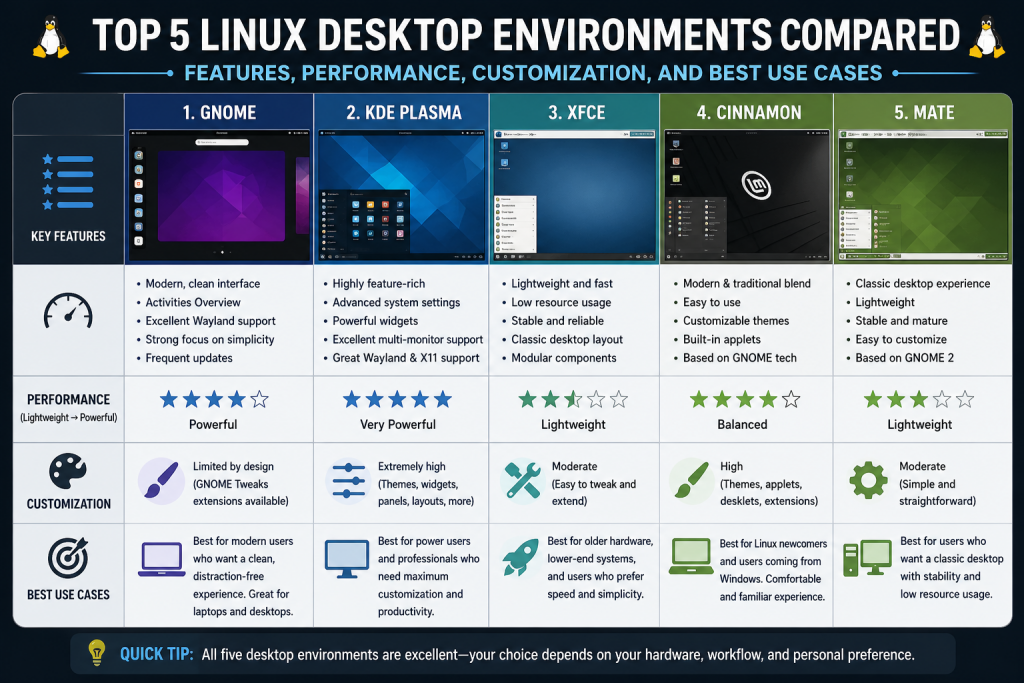
KDE Plasma is widely recognized as one of the most powerful and customizable desktop environments available in Linux. It is designed to give users full control over how their desktop looks and behaves, making it an excellent choice for those who enjoy fine-tuning every aspect of their system.
One of the defining features of KDE Plasma is its adaptability. The desktop layout can be changed extensively, allowing users to move panels, resize widgets, and modify themes. Whether someone prefers a traditional desktop layout similar to other operating systems or a completely unique setup, KDE Plasma makes it possible.
The environment includes a wide selection of widgets that can be added to the desktop or panels. These widgets provide quick access to useful information such as system performance, weather updates, clocks, and calendars. This level of customization helps users create a workspace tailored to their daily needs.
KDE Plasma also excels in integration. It offers tools that allow seamless communication between devices, enabling features such as file sharing, notification syncing, and remote control capabilities. This makes it particularly useful for users who work across multiple devices and want a connected experience.
Performance has improved significantly in recent versions of KDE Plasma. While earlier releases were known for being resource-intensive, modern versions are optimized to run efficiently on a wide range of hardware. This means users can enjoy a visually rich environment without sacrificing speed or responsiveness.
The default applications that come with KDE Plasma are designed to work consistently within the ecosystem. These applications cover essential tasks such as file management, text editing, and system configuration, providing a cohesive and polished experience.
Overall, KDE Plasma is best suited for users who want a modern desktop environment with extensive customization options and a balance between performance and visual appeal.
A Clean and Focused Approach to Desktop Design
GNOME takes a different approach to desktop design by emphasizing simplicity and productivity. Instead of offering countless customization options, it focuses on providing a streamlined and distraction-free environment.
The interface is minimal and uncluttered. GNOME removes many traditional desktop elements, such as multiple panels and icons, in favor of a more centralized workflow. The activities overview serves as the main hub for launching applications, switching between windows, and managing workspaces.
This design philosophy encourages users to focus on their tasks rather than the interface itself. By reducing visual noise and simplifying navigation, GNOME creates a workspace that is both efficient and easy to use.
GNOME is known for its consistency. The design and behavior of the interface remain uniform across different systems, which helps users feel comfortable regardless of the distribution they are using. This consistency is one of the reasons why GNOME is often chosen as the default desktop environment for many Linux distributions.
While GNOME does allow customization, it is more controlled compared to KDE Plasma. Users can extend its functionality through extensions, which add features such as additional panels, system monitors, or interface tweaks. However, the core design remains intentionally simple.
One of the advantages of GNOME is its accessibility. The interface is intuitive and requires minimal configuration, making it a good choice for beginners or users who prefer a straightforward experience. It also includes features that improve usability, such as built-in search and efficient workspace management.
However, GNOME can be more demanding on system resources. Systems with limited memory or older processors may experience slower performance. On modern hardware, though, it delivers a smooth and polished experience.
GNOME is ideal for users who value simplicity, consistency, and a clean interface that allows them to focus on their work.
A Lightweight and Reliable Desktop Environment
XFCE is designed to provide a balance between performance and functionality. It is a lightweight desktop environment that runs efficiently on a wide range of hardware while still offering useful features and customization options.
One of the main strengths of XFCE is its low resource usage. It is optimized to run smoothly even on older systems, making it an excellent choice for users who want to extend the life of their hardware. Despite its lightweight nature, XFCE does not compromise on usability.
The interface is traditional and familiar. It typically includes a panel, application menu, and system tray, making it easy for users to navigate. This familiarity is particularly beneficial for those transitioning from other operating systems.
Customization in XFCE is straightforward. Users can adjust panel layouts, change themes, and configure shortcuts to suit their preferences. While it may not offer as many advanced customization options as KDE Plasma, it provides enough flexibility to create a comfortable working environment.
XFCE is also known for its stability. It is a mature project with a strong focus on reliability, which makes it a dependable choice for everyday use. Users can expect consistent performance without unexpected issues.
The default applications in XFCE are simple and efficient, covering essential tasks without unnecessary complexity. This aligns with its goal of providing a fast and responsive desktop experience.
XFCE is particularly well-suited for users who need a lightweight environment that still offers a familiar and functional interface.
Minimal Resource Usage with Maximum Efficiency
LXQt is one of the most lightweight desktop environments available in Linux. It is designed to use as few system resources as possible while still providing a usable and responsive interface.
The development of LXQt came from the merging of two earlier projects, resulting in a modern desktop environment built on the Qt framework. This gives it a clean and efficient design that performs well on low-powered systems.
One of the key advantages of LXQt is its speed. It uses minimal memory and CPU resources, making it ideal for older computers or devices with limited hardware capabilities. Users can run LXQt on systems that might struggle with heavier desktop environments.
The interface is simple and traditional. It includes a panel, application menu, and system tray, providing a straightforward user experience. There are no unnecessary visual effects or complex features, which helps maintain its efficiency.
While LXQt does not focus heavily on aesthetics, it offers a clean and functional design. Users can still customize basic elements such as themes and panel layouts, but the emphasis remains on performance rather than appearance.
LXQt is also a practical choice for specialized use cases, such as single-board computers or lightweight virtual machines. Its low resource requirements make it suitable for environments where efficiency is critical.
For users who prioritize speed and resource efficiency above all else, LXQt is one of the best options available.
A Classic Desktop Experience with Modern Stability
MATE is a desktop environment that preserves the traditional design of earlier Linux interfaces while incorporating modern improvements. It originated as a continuation of an older desktop environment, maintaining its familiar layout and functionality.
The interface in MATE is straightforward and easy to navigate. It typically features panels, menus, and desktop icons, creating a layout that feels comfortable for users who prefer a classic desktop experience.
One of the strengths of MATE is its balance between performance and usability. It is lightweight enough to run on older hardware while still providing a full set of features for everyday tasks. This makes it a versatile option for a wide range of users.
MATE includes a collection of applications that are designed to work seamlessly within the environment. These applications handle tasks such as file management, text editing, and document viewing, ensuring a consistent user experience.
Customization is available but not overly complex. Users can adjust themes, panel configurations, and other settings to suit their preferences without dealing with excessive complexity.
Stability is another key advantage of MATE. It is a mature and well-maintained project that focuses on delivering a reliable desktop experience. Users can depend on it for consistent performance in both personal and professional environments.
MATE is particularly appealing to users who prefer a traditional desktop layout and want a stable, efficient environment that does not require modern hardware.
Comparing Performance and User Experience
When comparing these desktop environments, it becomes clear that each one is designed with a specific purpose in mind. KDE Plasma and GNOME focus on delivering modern, feature-rich experiences, while XFCE, LXQt, and MATE prioritize efficiency and simplicity.
Performance varies depending on the environment and the hardware it runs on. Lightweight environments like LXQt and XFCE are ideal for older systems, while KDE Plasma and GNOME perform best on modern hardware with sufficient resources.
User experience also differs significantly. KDE Plasma offers extensive customization, allowing users to create a highly personalized workspace. GNOME emphasizes simplicity and consistency, providing a clean and focused interface. XFCE strikes a balance between the two, offering customization without sacrificing performance.
LXQt is designed for maximum efficiency, making it suitable for systems with limited resources. MATE provides a familiar and stable experience, appealing to users who prefer traditional desktop layouts.
Understanding these differences is essential for choosing the right desktop environment. Each option has its own strengths, and the best choice depends on individual needs and preferences.
Preparing for Final Evaluation
With a clear understanding of how these desktop environments function, the next step is to evaluate which one best fits your specific requirements. Factors such as hardware capabilities, workflow preferences, and desired features all play a role in this decision.
In the final section, we will explore additional desktop options, answer common questions, and provide guidance on how to select the most suitable environment for your Linux system.
Emerging Desktop Environments and New Innovations in Linux
While established desktop environments continue to dominate the Linux ecosystem, new projects are constantly emerging to challenge traditional ideas and introduce innovative features. These newer environments are often designed with modern hardware, workflows, and user expectations in mind.
One of the most interesting developments in recent years is the rise of desktop environments built with newer programming languages and frameworks. These projects aim to improve performance, reliability, and maintainability by leveraging modern technologies. They also tend to focus on creating smoother user experiences with better animations and responsiveness.
Many of these newer environments attempt to combine the best aspects of existing desktops. For example, they may incorporate the simplicity of minimal interfaces with the flexibility of advanced customization tools. This hybrid approach appeals to users who want both ease of use and control over their system.
Another area of innovation is window management. Traditional desktop environments rely on floating windows that users move and resize manually. Newer environments often include advanced tiling features, which automatically arrange windows in an organized layout. This is particularly useful for productivity-focused users who work with multiple applications simultaneously.
Keyboard-driven navigation is also becoming more popular. While graphical interfaces are typically associated with mouse usage, many modern desktop environments emphasize efficient keyboard shortcuts. This allows users to perform tasks more quickly and reduces reliance on the mouse.
These innovations demonstrate that the Linux desktop is far from stagnant. Instead, it continues to evolve, driven by community contributions and changing user needs.
Cosmic Desktop Environment: A Modern Approach to Productivity
A notable example of a newer desktop environment is Cosmic. Originally developed as a customized version of an existing desktop, it has since been rebuilt from the ground up to provide a unique experience.
Cosmic focuses on performance and usability. It is designed to be fast and responsive while offering features that enhance productivity. One of its key characteristics is its approach to window management. It includes automatic tiling, which helps users organize their workspace efficiently without manual adjustments.
The interface is designed to be both mouse-friendly and keyboard-efficient. Users can navigate the system using traditional methods or rely on keyboard shortcuts for faster interaction. This flexibility makes it suitable for a wide range of users, from casual to advanced.
Cosmic also emphasizes a clean and modern design. The layout is intuitive, with easy access to applications and system tools. At the same time, it avoids unnecessary complexity, ensuring that users can focus on their work.
Another important aspect of Cosmic is its performance optimization. By using modern development techniques, it aims to deliver a smooth experience even when handling multiple tasks. This makes it an attractive option for developers and power users who require efficiency and reliability.
Although it is still relatively new compared to other desktop environments, Cosmic shows great potential. Its innovative features and modern design make it a strong contender in the evolving Linux desktop landscape.
Alternative Desktop Environments Worth Exploring
In addition to the major desktop environments, there are several alternatives that offer unique approaches to desktop design. These environments may not be as widely used, but they provide valuable options for users looking for something different.
Some environments focus heavily on aesthetics, offering visually appealing interfaces with carefully designed themes and layouts. Others prioritize simplicity, removing unnecessary features to create a clean and distraction-free workspace.
There are also environments designed for specific use cases. For example, some are tailored for educational purposes, while others are optimized for multimedia production or development work. These specialized environments demonstrate the versatility of Linux and its ability to adapt to different needs.
Exploring these alternatives can be a rewarding experience. Users may discover features or workflows that better suit their preferences compared to more mainstream options. Since Linux allows multiple environments to be installed on the same system, experimenting with different desktops is both easy and risk-free.
Choosing the Right Desktop Environment for Your Needs
Selecting the most suitable desktop environment involves evaluating several factors. There is no universal answer, as the best choice depends on individual requirements and preferences.
Hardware capability is one of the most important considerations. Systems with limited resources benefit from lightweight environments that use minimal memory and processing power. On the other hand, modern systems can handle more feature-rich environments without performance issues.
User experience preferences also play a significant role. Some users prefer a simple and minimal interface that reduces distractions, while others enjoy having a wide range of customization options. Understanding what type of experience you want will help narrow down your choices.
Workflow requirements should not be overlooked. Users who multitask frequently may benefit from environments with advanced window management features. Those who primarily perform basic tasks may prefer a straightforward interface that is easy to navigate.
Stability and support are additional factors to consider. Established desktop environments often have larger communities, better documentation, and more frequent updates. This can make troubleshooting easier and ensure a more reliable experience.
It is also important to consider long-term usability. A desktop environment that feels comfortable and efficient today is more likely to remain satisfying over time. Taking the time to test different options can help you find the best fit.
Performance Considerations Across Desktop Environments
Performance is a key factor when comparing desktop environments. Each environment has different resource requirements, which can significantly impact the overall experience.
Lightweight environments are designed to run efficiently on older or less powerful hardware. They minimize background processes and avoid heavy visual effects, resulting in faster performance and lower memory usage. This makes them ideal for systems with limited resources.
More advanced environments often include additional features and visual enhancements. While these can improve usability and aesthetics, they also require more system resources. On modern hardware, this is usually not an issue, but it can affect performance on older systems.
It is important to note that performance is not solely determined by the desktop environment. Other factors, such as system configuration, background applications, and hardware drivers, also play a role. Optimizing these elements can improve performance regardless of the chosen environment.
Users should consider their priorities when evaluating performance. For some, speed and efficiency are the most important factors. For others, visual appeal and advanced features may take precedence. Finding the right balance is key to a satisfying experience.
Customization and Personalization in Linux
One of the defining features of Linux is its ability to be customized. Desktop environments provide various tools and options that allow users to personalize their systems.
Customization can range from simple changes, such as altering themes and wallpapers, to more advanced modifications, such as rearranging panels or installing additional components. This flexibility enables users to create a workspace that matches their preferences and workflow.
Some desktop environments offer extensive customization options, allowing users to modify nearly every aspect of the interface. Others take a more minimal approach, providing a consistent design with limited customization. Both approaches have their advantages, depending on the user’s needs.
Personalization is not just about appearance. It also involves optimizing the system for efficiency and usability. By configuring shortcuts, adjusting layouts, and selecting appropriate tools, users can improve their productivity and overall experience.
The ability to customize and personalize the desktop is one of the reasons why many users choose Linux. It allows them to create a system that feels truly their own.
Experimentation and Flexibility in Linux
One of the greatest advantages of Linux is the freedom to experiment. Users are not restricted to a single desktop environment and can explore different options without significant risk.
Installing multiple desktop environments on the same system is a common practice. This allows users to switch between environments and compare their features and performance. It also provides an opportunity to learn more about how different systems work.
Experimentation is an important part of the Linux experience. It encourages users to explore new ideas, discover better workflows, and develop a deeper understanding of their system. This process can lead to a more satisfying and efficient computing experience.
The flexibility of Linux extends beyond desktop environments. Users can customize nearly every aspect of the system, from the kernel to individual applications. This level of control is unmatched by most other operating systems.
Common Questions About Linux Desktop Environments
Many users have questions when choosing a desktop environment. Understanding the answers to these questions can help simplify the decision-making process.
Beginners often ask which desktop environment is the easiest to use. Environments with simple and intuitive interfaces are generally recommended, as they require less configuration and are easier to learn.
Another common question resource usage. Lightweight environments are typically the best choice for systems with limited hardware capabilities, while more advanced environments are suitable for modern systems.
Users also wonder whether they can switch desktop environments after installation. The answer is yes. Linux allows users to install and switch between multiple environments, providing flexibility and freedom of choice.
Compatibility is another concern. Most desktop environments are compatible with a wide range of Linux distributions, making it easy to find one that works with your preferred system.
Understanding these common questions can help users make informed decisions and feel more confident in their choices.
Final Thoughts on the Linux Desktop Experience
The Linux desktop has grown into a mature and versatile platform that caters to a wide range of users. From lightweight environments designed for older hardware to feature-rich desktops for modern systems, there is something for everyone.
Each desktop environment offers a unique approach to design and functionality. Some prioritize customization and flexibility, while others focus on simplicity and efficiency. Understanding these differences is essential for choosing the right environment.
The ability to experiment and adapt is one of the greatest strengths of Linux. Users can try different environments, customize their systems, and find the setup that works best for them. This flexibility ensures that Linux remains relevant and appealing in an ever-changing technological landscape.
Conclusion
Choosing the right Linux desktop environment is not about finding a single best option, but about discovering what works best for your specific needs. Each environment has its own strengths, whether it is the customization of KDE Plasma, the simplicity of GNOME, the efficiency of XFCE, the lightweight design of LXQt, or the familiarity of MATE.
Newer environments like Cosmic demonstrate that innovation in the Linux ecosystem is ongoing, offering fresh ideas and improved performance. At the same time, established environments continue to evolve, providing stability and reliability.
The key to making the right choice is understanding your hardware, your workflow, and your personal preferences. By experimenting with different environments and exploring their features, you can create a Linux system that is both efficient and enjoyable to use.
Ultimately, the diversity of desktop environments is what makes Linux unique. It empowers users to take control of their computing experience and shape it according to their needs. Whether you are a beginner or an experienced user, the Linux desktop offers endless possibilities for customization, productivity, and exploration.
Continue exploring the technologies and certification concepts that matter most to you.