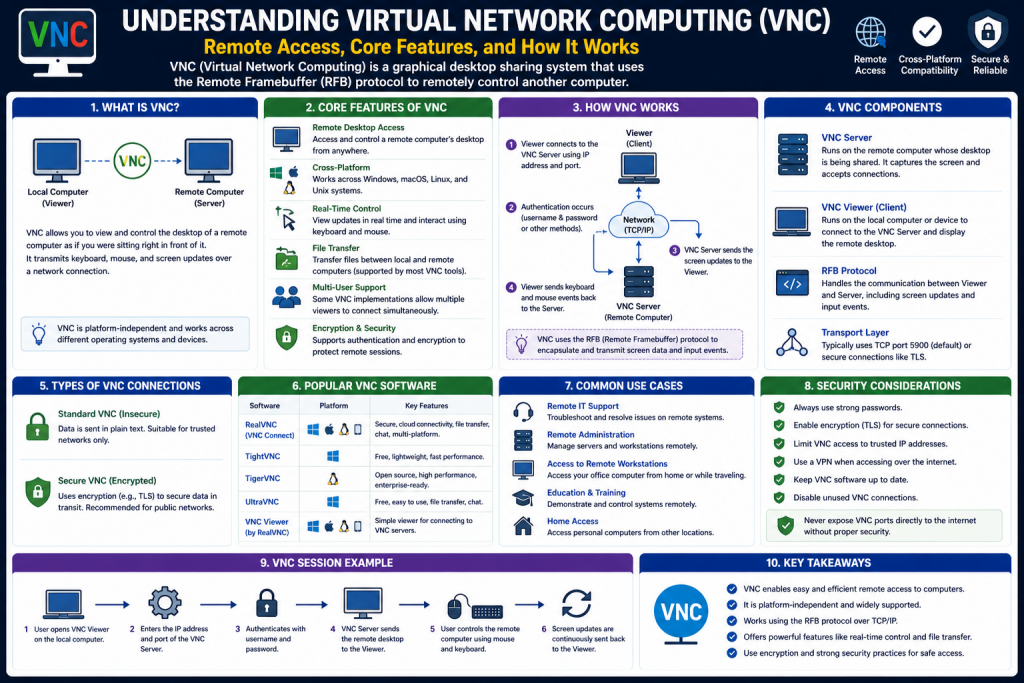
Virtual Network Computing, commonly known as VNC, is a graphical desktop-sharing system that enables users to remotely control another computer over a network. Instead of relying on command-line access or limited control mechanisms, VNC provides a complete visual interface of the remote system. This allows users to see exactly what is happening on the remote desktop and interact with it in real time using their own keyboard and mouse.
In modern computing environments, remote access is no longer a luxury but a necessity. Organizations often maintain servers in remote data centers, while employees may work from different locations around the world. Even individual users may need to access their home or office computers while traveling. VNC addresses these needs by offering a simple yet effective way to connect to and control remote systems without being physically present.
One of the most important advantages of VNC is its ability to replicate the full desktop experience. Unlike some remote access tools that provide limited functionality, VNC allows users to interact with the entire operating system environment. This includes opening applications, modifying files, configuring system settings, and performing administrative tasks. The experience is designed to feel as close as possible to sitting directly in front of the machine.
The Purpose and Importance of Remote Desktop Technology
Remote desktop technology plays a crucial role in today’s interconnected world. As businesses grow and technology infrastructures expand, managing systems locally becomes increasingly impractical. IT administrators are often responsible for maintaining dozens or even hundreds of machines. Without remote access tools, this would require physical presence at each device, which is both time-consuming and inefficient.
VNC simplifies this process by allowing administrators to access multiple systems from a single location. This capability significantly reduces downtime and improves productivity. For example, if a server encounters an issue, an administrator can quickly connect to it using VNC and resolve the problem without needing to travel to the server’s physical location.
In addition to system administration, remote desktop technology is widely used for technical support. Support teams can connect to a user’s computer, diagnose issues, and provide solutions in real time. This not only speeds up the troubleshooting process but also enhances the user experience by providing immediate assistance.
Remote access also supports flexible work environments. With the rise of remote work and hybrid models, employees often need access to office systems from home or other locations. VNC enables this by providing secure and reliable access to workplace computers, ensuring continuity and efficiency regardless of physical location.
Platform Independence and Cross-Compatibility
One of the defining features of VNC is its platform independence. Unlike some remote desktop solutions that are limited to specific operating systems, VNC works across a wide range of platforms. This includes major operating systems such as Linux, Windows, and macOS, as well as various other environments.
This cross-platform compatibility is made possible by the underlying design of VNC, which focuses on transmitting graphical data rather than relying on operating system-specific commands. As a result, a user can connect from one type of system to another without compatibility issues. For example, a user on a macOS device can easily access a Windows computer, or a Linux administrator can manage servers from a Windows laptop.
This flexibility is particularly valuable in environments where multiple operating systems are used. Organizations often deploy different systems for different purposes, and having a tool that can operate seamlessly across all of them simplifies management and reduces the need for multiple remote access solutions.
Another benefit of platform independence is accessibility. Users are not restricted to specific devices or configurations. As long as a compatible VNC client is available, they can connect to their systems from virtually anywhere. This makes VNC a practical choice for both professional and personal use.
The Role of the Remote Framebuffer Protocol
At the core of VNC is the Remote Framebuffer protocol, commonly referred to as RFB. This protocol is responsible for handling communication between the client and the server. It defines how graphical data is transmitted from the remote system to the local device and how user input is sent back.
The RFB protocol operates by capturing the screen of the remote computer and encoding it into a format that can be transmitted over a network. This data is then sent to the client, which decodes it and displays it on the user’s screen. At the same time, the client captures input actions such as keyboard strokes and mouse movements and sends them back to the server.
One of the key strengths of the RFB protocol is its simplicity. It focuses on transmitting only the necessary information, which helps reduce complexity and improve compatibility. Instead of sending the entire screen repeatedly, it transmits only the portions that have changed. This approach minimizes bandwidth usage and enhances efficiency.
The protocol is also highly extensible, allowing developers to add new features and improvements without breaking compatibility. This has led to the development of various VNC implementations that offer additional capabilities such as compression, encryption, and enhanced performance.
Historical Development and Evolution of VNC
VNC was originally developed as part of a research initiative aimed at creating a flexible and accessible remote desktop solution. Its design emphasized simplicity, openness, and compatibility, which contributed to its widespread adoption.
The open nature of VNC encouraged developers to create their own versions and enhancements. Over time, this led to the emergence of multiple implementations, each offering unique features while maintaining compatibility with the core protocol. This collaborative development approach has played a significant role in the evolution of VNC.
As technology has advanced, VNC has adapted to meet new requirements. Early versions focused primarily on basic remote access, but modern implementations include features such as encryption, file transfer, and improved performance optimization. These enhancements have made VNC more suitable for a wide range of applications.
Despite the introduction of newer remote desktop technologies, VNC remains relevant due to its simplicity and versatility. Its ability to operate across different platforms and environments ensures that it continues to be a valuable tool in both professional and personal settings.
Common Use Cases of VNC
VNC is used in a variety of scenarios, each highlighting its flexibility and practicality. One of the most common uses is system administration. IT professionals rely on VNC to manage servers, configure systems, and perform maintenance tasks remotely. This capability is especially important in large organizations where systems are distributed across multiple locations.
Another important use case is remote troubleshooting. When users encounter technical issues, support teams can connect to their systems using VNC and diagnose problems directly. This eliminates the need for lengthy explanations and allows for faster resolution of issues.
VNC is also widely used for remote access to personal computers. Users can connect to their home or office systems while traveling, allowing them to access files, run applications, and perform tasks as needed. This is particularly useful for individuals who need to maintain productivity while on the go.
In educational environments, VNC can be used to demonstrate concepts and provide hands-on learning experiences. Instructors can share their screens with students or allow students to access remote systems for practice and experimentation.
Additionally, VNC is used in collaborative settings where multiple users need to interact with the same system. This can include software development, design work, and other activities that benefit from shared access to a single environment.
Advantages of Using VNC
VNC offers several advantages that contribute to its popularity. One of the most significant is its ease of use. Basic setup and operation are straightforward, making it accessible to users with varying levels of technical expertise. Once configured, connecting to a remote system is typically a simple process.
Another advantage is its flexibility. Because VNC transmits graphical data, it can be used with virtually any application or operating system. This makes it a universal solution for remote access, as it does not depend on specific software or environments.
The platform-independent nature of VNC also enhances its usability. Users can connect to systems across different operating systems without compatibility issues, reducing the need for multiple tools.
VNC is also highly adaptable. With various implementations available, users can choose solutions that meet their specific needs. Some may prioritize performance, while others focus on security or additional features.
Limitations and Challenges of VNC
While VNC offers many benefits, it also has some limitations that users should consider. One of the primary challenges is performance. Because VNC transmits graphical data, it can be affected by network conditions such as latency and bandwidth. High-resolution displays or graphically intensive applications may result in slower performance.
Another limitation is security. Basic VNC implementations may not include strong encryption, making them vulnerable to unauthorized access if not properly configured. Users must take additional steps to secure their connections, such as using encryption or restricting access.
Configuration can also be a challenge for some users. Setting up secure connections and ensuring proper network configuration may require technical knowledge. This can be a barrier for individuals who are not familiar with networking concepts.
Despite these challenges, many of the limitations of VNC can be addressed through proper configuration and the use of enhanced implementations. By understanding these factors, users can make informed decisions and optimize their use of VNC.
The Continued Relevance of VNC
Even with the availability of newer remote desktop technologies, VNC continues to be widely used. Its simplicity, flexibility, and compatibility make it a reliable choice for many applications. While other tools may offer advanced features or improved performance, VNC remains a practical solution for situations where ease of use and cross-platform support are more important.
As remote work and distributed systems become more common, the need for reliable remote access solutions will continue to grow. VNC is well-positioned to meet this demand, thanks to its proven design and adaptability.
In conclusion, Virtual Network Computing is a powerful and versatile tool that enables users to remotely access and control computers through a graphical interface. Its platform independence, ease of use, and wide range of applications make it an essential component of modern computing environments.
Client-Server Architecture Explained
Virtual Network Computing operates on a client-server model, which is the foundation of its functionality. In this setup, two main components are involved: the VNC server and the VNC client. The server runs on the machine that is being accessed remotely, while the client runs on the device used by the person who wants to access that machine.
The server component continuously monitors the graphical output of the host system. It captures everything that appears on the screen, including windows, icons, cursor movements, and application activity. This information is then prepared for transmission over a network. The client, on the other hand, is responsible for receiving this graphical data, decoding it, and displaying it on the user’s screen in real time.
This architecture allows for a clear separation of responsibilities. The server handles all the processing related to the remote system, while the client focuses on displaying the interface and capturing user input. This design ensures that even devices with limited processing power can function effectively as clients, as most of the heavy work is done by the server.
Another important aspect of this architecture is its flexibility. A single server can accept connections from multiple clients, depending on the implementation. This makes it possible for multiple users to view or interact with the same system simultaneously, which can be useful in collaborative environments or training scenarios.
Screen Capture and Framebuffer Transmission
At the heart of VNC’s operation is the concept of a framebuffer. The framebuffer represents the graphical display of the remote system as a matrix of pixels. The VNC server continuously captures this framebuffer and identifies changes that occur on the screen.
Instead of sending the entire screen repeatedly, which would consume a large amount of bandwidth, the server transmits only the portions of the screen that have changed. These updates are known as incremental updates and are essential for maintaining efficiency. For example, if a user moves a window or types text into an application, only the affected areas are updated and transmitted to the client.
Once the client receives this data, it reconstructs the updated portions of the screen and displays them to the user. This process happens rapidly and repeatedly, creating the illusion of a continuous, real-time display.
Different encoding techniques can be used to optimize this process. These techniques determine how the graphical data is compressed and transmitted. Some encodings prioritize speed, while others focus on reducing bandwidth usage. The choice of encoding can significantly impact the performance of the VNC session, especially in environments with limited network resources.
Handling User Input and Interaction
While the server is responsible for sending graphical data, the client plays a crucial role in capturing user input. Every action performed by the user, such as pressing a key or moving the mouse, is detected by the client and transmitted back to the server.
The server receives these input events and processes them as if they were generated locally. This means that when a user clicks a button or types a command, the remote system responds exactly as it would if someone were physically present at the machine.
This bidirectional communication is what makes VNC an interactive remote desktop solution rather than a passive viewing tool. The synchronization between the client and server must be precise to ensure that actions are executed correctly and that the displayed output matches the user’s expectations.
Latency can affect this interaction. In high-latency networks, there may be a noticeable delay between user input and system response. This can make tasks that require quick reactions more challenging. However, for many administrative and troubleshooting tasks, this delay is manageable.
The Role of the Remote Framebuffer Protocol
The Remote Framebuffer protocol is the backbone of VNC communication. It defines how data is exchanged between the client and server, ensuring compatibility across different implementations.
RFB operates at a relatively low level, focusing on pixel data rather than higher-level constructs such as windows or applications. This approach allows it to work across different operating systems and environments without needing to understand their internal structures.
When a VNC connection is established, the client and server perform a handshake process. During this process, they exchange information about their capabilities, including supported encodings, authentication methods, and optional features. Based on this information, they agree on how the session will be conducted.
The simplicity of the RFB protocol is one of its greatest strengths. It is easy to implement and extend, which has led to the development of numerous VNC variants. At the same time, its straightforward design ensures that it remains compatible across different platforms and implementations.
Encoding Methods and Performance Optimization
Encoding plays a critical role in determining the performance of a VNC session. Since graphical data can be large and complex, efficient encoding is necessary to ensure smooth transmission over the network.
There are several encoding methods used in VNC, each with its own advantages. Some encodings are designed for low-bandwidth environments, compressing data to minimize network usage. Others prioritize speed, reducing the computational overhead required for encoding and decoding.
For example, simple encodings may send raw pixel data with minimal processing, which can be fast but requires more bandwidth. More advanced encodings use compression algorithms to reduce the size of the data, which is beneficial in slower networks but may introduce additional processing delays.
Many VNC implementations allow users to select or adjust encoding settings based on their network conditions. This flexibility enables users to optimize performance for their specific environment.
In addition to encoding, other factors such as color depth and screen resolution can affect performance. Reducing color depth or resolution decreases the amount of data that needs to be transmitted, improving responsiveness. These adjustments are often used in situations where network resources are limited.
Connection Establishment and Session Flow
Establishing a VNC connection involves several steps. First, the client initiates a connection to the server using a network address and port number. The server listens for incoming connections and responds when a request is received.
Once the connection is initiated, the handshake process begins. During this phase, the client and server exchange protocol versions and negotiate features. Authentication is also performed at this stage, ensuring that only authorized users can access the system.
After authentication is successful, the session is established, and the server begins transmitting screen updates to the client. The client displays these updates and starts sending user input back to the server. This continuous exchange of data forms the core of the VNC session.
The session remains active until it is terminated by either the client or the server. Some implementations include features such as session persistence, allowing users to reconnect to an existing session without losing their work.
Multi-User Access and Collaboration
One of the advantages of VNC is its ability to support multiple users. Depending on the implementation, multiple clients can connect to the same server simultaneously. This capability is particularly useful in collaborative environments.
For example, a team of developers can connect to a shared system to work on a project together. Similarly, an instructor can demonstrate tasks to a group of students by sharing their desktop through VNC.
In some cases, different users may have different levels of access. For instance, one user may have full control of the system, while others can only view the screen. This flexibility allows VNC to be used in a variety of scenarios, from training sessions to remote support.
However, multi-user access also introduces challenges. Managing multiple inputs and ensuring that actions do not conflict requires careful coordination. Some implementations address this by providing features such as input locking or session control.
Network Considerations and Limitations
The performance of VNC is heavily influenced by network conditions. Factors such as bandwidth, latency, and packet loss can all affect the quality of the remote desktop experience.
In high-bandwidth, low-latency networks, VNC can provide a smooth and responsive experience. However, in slower networks, users may encounter delays, reduced image quality, or lag in input response.
To mitigate these issues, VNC implementations often include options for adjusting performance settings. Users can reduce screen resolution, lower color depth, or select more efficient encoding methods to improve performance.
Another consideration is network security. Since VNC transmits data over a network, it is important to ensure that the connection is secure. Without proper security measures, sensitive information could be exposed.
Advanced Features and Enhancements
Modern VNC implementations offer a range of advanced features that enhance usability and functionality. One common feature is clipboard sharing, which allows users to copy and paste text between the local and remote systems. This simplifies tasks such as transferring information or commands.
File transfer is another useful feature. It enables users to move files between systems without needing separate tools. This can be particularly helpful in remote support scenarios, where files may need to be shared quickly.
Some implementations also include support for hardware acceleration, which can improve performance by leveraging the capabilities of the underlying system. This is especially beneficial for graphically intensive applications.
Other enhancements may include session recording, remote printing, and integration with other tools. These features expand the capabilities of VNC and make it suitable for a wider range of applications.
Reliability and Practical Usage Considerations
VNC is known for its reliability and simplicity, but practical usage requires careful consideration of various factors. Users must ensure that the server is properly configured and that network settings allow for remote connections.
Firewall configurations, port forwarding, and access controls are often necessary to enable VNC connections. These settings can vary depending on the network environment and may require technical expertise to configure correctly.
Despite these challenges, VNC remains a dependable solution for remote access. Its straightforward design and wide compatibility make it a practical choice for many users.
In real-world applications, VNC is often used in combination with other technologies to enhance security and performance. For example, secure tunnels or virtual private networks can be used to protect data during transmission.
Overall, understanding how VNC works provides valuable insight into its capabilities and limitations. By leveraging its strengths and addressing its challenges, users can effectively utilize VNC for a wide range of remote computing tasks.
Understanding VNC Clients and Their Role
VNC clients, often referred to as viewers, are the applications that allow users to connect to and interact with remote systems running a VNC server. These clients act as the interface between the user and the remote machine, displaying the desktop environment and transmitting user input such as keyboard strokes and mouse movements.
The primary function of a VNC client is to establish a connection with a VNC server and render the graphical output it receives. Once connected, the client continuously updates the display to reflect changes occurring on the remote system. At the same time, it captures user interactions and sends them back to the server, enabling full control of the remote environment.
VNC clients are available for a wide range of platforms, including Linux, Windows, macOS, and mobile operating systems. This broad availability ensures that users can access their systems from virtually any device. Whether using a desktop computer, laptop, tablet, or smartphone, a compatible VNC client can provide remote access with minimal setup.
Some VNC solutions include both client and server components in a single package, allowing users to both access and share desktops. Others are designed exclusively as clients, focusing on delivering a streamlined and efficient viewing experience. This flexibility allows users to choose the tools that best suit their needs.
Popular VNC Implementations and Variants
Over time, the open nature of VNC has led to the development of numerous implementations, each offering unique features and enhancements. Despite these differences, most variants remain compatible with one another because they adhere to the Remote Framebuffer protocol.
Common VNC implementations include solutions that provide both server and client functionality, as well as those designed specifically for viewing remote desktops. Some are optimized for performance, while others focus on security or ease of use.
Different variants may include features such as advanced compression techniques, improved graphical performance, and enhanced user interfaces. Some implementations are lightweight and designed for minimal resource usage, making them suitable for older systems or environments with limited hardware capabilities. Others are more feature-rich, offering capabilities such as file transfer, clipboard sharing, and session management.
Compatibility between different VNC implementations is achieved through feature negotiation. When a client connects to a server, they exchange information about their capabilities and agree on which features to use. If a particular feature is not supported by one side, it is simply not used, ensuring that the connection can still be established.
This ecosystem of variants allows users to select solutions that align with their specific requirements. Whether prioritizing performance, security, or simplicity, there is likely a VNC implementation that meets those needs.
Feature Enhancements in Modern VNC Solutions
Modern VNC implementations have evolved significantly beyond their original capabilities. While early versions focused primarily on basic remote desktop access, newer versions include a wide range of features designed to improve usability and performance.
One of the most commonly used features is clipboard sharing. This allows users to copy text or data from their local machine and paste it directly into the remote system, and vice versa. This functionality simplifies many tasks, such as transferring commands or sharing information.
File transfer is another important enhancement. It enables users to move files between the local and remote systems without relying on additional tools. This can be particularly useful in remote support scenarios, where files may need to be shared quickly.
Some VNC implementations also support session recording, allowing users to capture and review remote sessions. This can be useful for training, auditing, or troubleshooting purposes.
Hardware acceleration is another feature that has been introduced in some variants. By leveraging the capabilities of the system’s graphics hardware, VNC can deliver improved performance, especially when dealing with high-resolution displays or graphically intensive applications.
Additional features may include remote printing, multi-monitor support, and customizable display settings. These enhancements make VNC more versatile and capable of handling a wide range of use cases.
Security Considerations and Best Practices
Security is a critical aspect of using VNC, especially when connections are established over public or untrusted networks. While VNC provides a convenient way to access remote systems, it can also introduce vulnerabilities if not properly secured.
One of the primary concerns is the potential for unauthorized access. If a VNC server is exposed to the internet without adequate protection, it may become a target for attackers. To mitigate this risk, it is important to use strong authentication methods, such as complex passwords.
Encryption is another essential component of secure VNC usage. Some VNC implementations include built-in encryption, while others require additional configuration. Encrypting the connection ensures that data transmitted between the client and server cannot be easily intercepted or read by unauthorized parties.
Another common practice is to use secure tunnels or virtual private networks. These technologies create an encrypted pathway for data transmission, adding an extra layer of protection. By routing VNC traffic through a secure channel, users can significantly reduce the risk of exposure.
Firewalls also play a crucial role in securing VNC connections. By restricting access to specific IP addresses or networks, users can limit who is able to connect to the VNC server. This helps prevent unauthorized attempts to access the system.
Regular updates and maintenance are equally important. Keeping VNC software up to date ensures that known vulnerabilities are addressed and that the system benefits from the latest security improvements.
Challenges and Limitations of VNC
Despite its many advantages, VNC is not without its challenges. One of the most notable limitations is its performance in certain environments. Because VNC transmits graphical data, it can be sensitive to network conditions such as latency and bandwidth.
In high-latency networks, users may experience delays between input and response. This can make tasks that require real-time interaction more difficult. Similarly, limited bandwidth can result in reduced image quality or slower screen updates.
Another challenge is the initial configuration. Setting up a secure and reliable VNC connection may require knowledge of networking concepts such as port forwarding and firewall configuration. For users who are not familiar with these concepts, the setup process can be complex.
VNC may also struggle with graphically intensive applications. Tasks such as video playback or 3D rendering may not perform as well compared to other remote desktop solutions that are optimized for such workloads.
Additionally, supporting end-users through VNC can sometimes be less intuitive. While it provides full control of the remote system, explaining actions or guiding users through processes may require clear communication.
Comparing VNC with Other Remote Access Tools
While VNC is a widely used remote desktop solution, it is not the only option available. Other tools offer different approaches to remote access, each with its own strengths and limitations.
One alternative is the Secure Shell protocol, commonly known as SSH. Unlike VNC, which provides a graphical interface, SSH is primarily used for command-line access. It is widely used for managing servers and performing administrative tasks, particularly in Unix-like environments. SSH is known for its strong security features and efficient performance, especially in low-bandwidth conditions.
Another popular option is TeamViewer, a remote desktop application that combines ease of use with advanced features. It is designed to be user-friendly and requires minimal configuration, making it accessible to non-technical users. TeamViewer includes features such as file transfer, session recording, and cross-platform support.
Parsec is a newer remote desktop solution that focuses on high-performance remote access. It is particularly well-suited for applications that require low latency and high graphical performance, such as gaming or video editing. By leveraging hardware acceleration, Parsec can deliver a smoother and more responsive experience compared to traditional VNC implementations.
Each of these tools has its own use cases. VNC is often preferred for its simplicity and compatibility, while SSH is ideal for secure command-line access. TeamViewer and Parsec offer enhanced performance and user-friendly features, making them suitable for specific scenarios.
Practical Applications in Real-World Environments
VNC continues to be widely used in various real-world scenarios. In IT administration, it provides a reliable way to manage systems remotely, perform maintenance tasks, and troubleshoot issues. Its ability to replicate the full desktop environment makes it particularly useful for tasks that require visual interaction.
In educational settings, VNC can be used to demonstrate concepts and provide remote access to lab environments. Students can connect to shared systems and gain hands-on experience without needing physical access to the hardware.
Businesses also use VNC to support remote work. Employees can access their office computers from home or while traveling, ensuring continuity and productivity. This is especially valuable in organizations with distributed teams.
In addition, VNC is used for technical support and customer service. Support teams can connect to user systems, diagnose problems, and provide solutions in real time. This reduces the need for on-site visits and improves response times.
Conclusion
Virtual Network Computing remains a powerful and flexible solution for remote desktop access. Its ability to provide a complete graphical interface, combined with its platform independence, makes it a valuable tool in a wide range of environments. From system administration and technical support to education and remote work, VNC continues to play an important role in modern computing.
While it does have some limitations, particularly in terms of performance and security, these challenges can be addressed through proper configuration and the use of complementary technologies. By implementing best practices such as encryption, strong authentication, and network security measures, users can safely and effectively use VNC.
The availability of multiple VNC implementations ensures that users can find solutions tailored to their specific needs. Whether prioritizing simplicity, performance, or advanced features, there is a VNC option that fits the requirement.
As technology continues to evolve, the demand for remote access solutions will only increase. VNC, with its proven design and adaptability, is well-positioned to remain a relevant and useful tool for years to come.
Continue exploring the technologies and certification concepts that matter most to you.