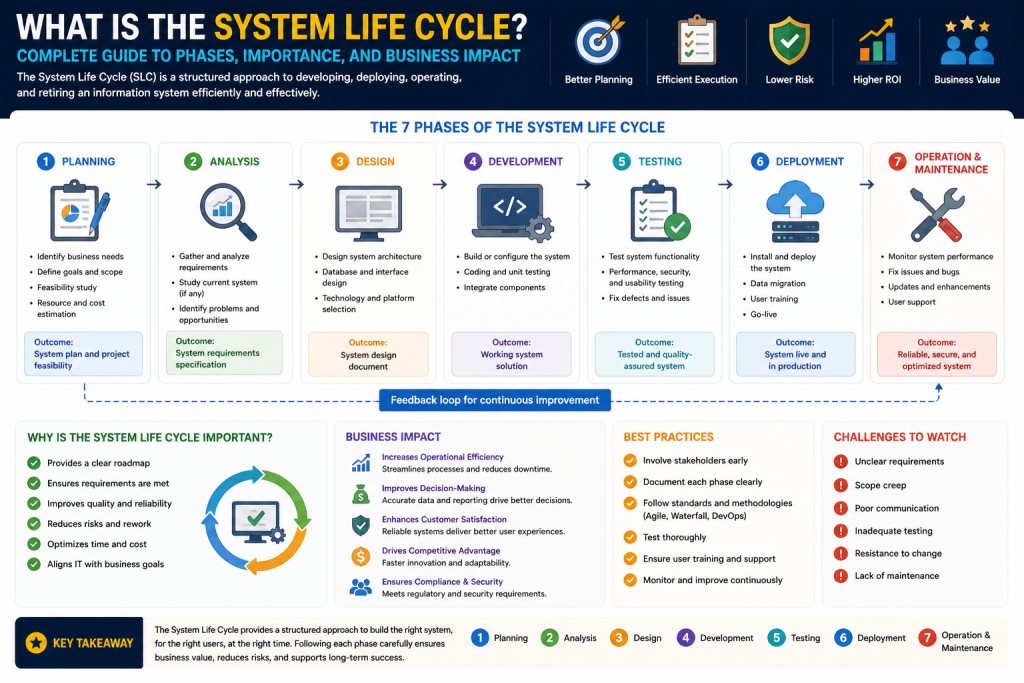
Modern organizations depend on technology for nearly every critical business function. From internal communication platforms and enterprise software to cloud infrastructure and cybersecurity systems, technology is no longer a support tool—it is a core business driver. Every application, network platform, cloud service, or hardware environment introduced into an organization follows a predictable journey from concept to retirement. This structured journey is known as the System Life Cycle.
The System Life Cycle is a comprehensive framework used to guide technology systems through every stage of existence, beginning with identification of a business need and continuing through planning, development, implementation, maintenance, and eventual decommissioning. It is designed to ensure systems not only function correctly, but also align with business goals, financial expectations, operational demands, and compliance standards.
Without a structured life cycle approach, organizations risk implementing systems that are poorly planned, over budget, insecure, difficult to maintain, or obsolete before they generate sufficient value. By contrast, effective life cycle management helps enterprises maximize return on investment, reduce technical debt, improve resilience, and maintain strategic alignment.
This framework is relevant to virtually every category of IT asset:
- Business applications
- Network infrastructure
- Cloud services
- Security platforms
- Data storage systems
- Virtual environments
- Hardware devices
- Communication systems
Whether a company is deploying a new customer relationship management platform, upgrading its cloud architecture, or replacing aging network hardware, the same life cycle principles apply.
For IT leaders, systems administrators, network engineers, cloud architects, project managers, and cybersecurity professionals, understanding the System Life Cycle is essential because it affects strategic planning, budgeting, security, operational efficiency, and business continuity.
This first section explores the foundational purpose of the System Life Cycle, its strategic value, and the critical Planning Phase that determines whether projects succeed or fail.
Why the System Life Cycle Matters in Modern IT
Technology investments are expensive, complex, and deeply integrated into business operations. A poorly managed system can create significant consequences:
- Operational disruptions
- Security vulnerabilities
- Budget overruns
- Compliance violations
- User dissatisfaction
- Productivity losses
- Scalability limitations
The System Life Cycle exists to minimize these risks through structure, governance, and disciplined decision-making.
At its core, the System Life Cycle provides:
- Predictable project progression
- Stakeholder alignment
- Risk reduction
- Resource planning
- Performance monitoring
- Long-term sustainability
- Controlled retirement
Every system has a finite useful life. Even highly advanced systems eventually become outdated due to:
- Technological innovation
- Vendor end-of-support
- Security weaknesses
- Regulatory changes
- Business growth
- Infrastructure modernization
Because of this reality, organizations must treat technology as an evolving investment rather than a one-time purchase.
For example, a company implementing a new ERP platform must consider:
- Why the system is needed
- What problem it solves
- Cost versus expected value
- Security implications
- User adoption requirements
- Integration with existing systems
- Upgrade paths
- Retirement strategy
Ignoring any of these considerations can lead to long-term inefficiency.
System Life Cycle Management transforms technology from a reactive expense into a strategic asset.
Core Objectives of System Life Cycle Management
Although organizations may customize their life cycle frameworks, the primary objectives remain consistent.
Align Technology with Business Strategy
Every system should directly support business goals such as growth, efficiency, customer service, compliance, or innovation.
Improve Financial Oversight
From procurement through retirement, every phase involves costs. Structured planning prevents overspending and identifies return on investment.
Reduce Operational Risk
Formal evaluation and testing reduce the likelihood of catastrophic failures.
Strengthen Security
Security must be built into each phase rather than added later.
Enable Scalability
Well-designed systems can grow with organizational demands.
Ensure Compliance
Industries often require strict data retention, privacy, and security practices.
Facilitate Future Replacement
Systems should be designed with eventual transition in mind.
These objectives reinforce why the System Life Cycle is not simply a technical process—it is a business governance framework.
The Five Primary Phases of the System Life Cycle
While organizations may use slightly different terminology, most enterprise frameworks include five major stages:
- Planning
- Development
- Implementation
- Maintenance
- Decommissioning
Each phase builds on the previous one. Failure in an early phase often creates larger problems later.
For example:
Poor planning leads to weak design.
Weak design leads to flawed deployment.
Flawed deployment leads to operational instability.
Operational instability increases maintenance costs.
High maintenance costs accelerate replacement.
This interconnected structure makes the Planning Phase especially important.
Foundation of System Success
The Planning Phase is where organizations identify needs, define objectives, assess feasibility, and determine whether a project should proceed.
This stage often determines whether a project becomes a strategic asset or an expensive mistake.
Planning begins when leadership identifies a business challenge or technical opportunity. Common triggers include:
The Planning Phase is where organizations identify needs, define objectives, assess feasibility, and determine whether a project should proceed. It is the strategic decision-making stage that establishes the foundation for every subsequent phase of the System Life Cycle. During planning, organizations evaluate current challenges, future opportunities, business priorities, available resources, and potential risks to ensure technology investments are purposeful and aligned with long-term goals.
This stage often determines whether a project becomes a strategic asset or an expensive mistake. Strong planning can prevent wasted budgets, unrealistic timelines, technical mismatches, and operational disruption, while poor planning can create confusion, scope creep, and costly implementation failures. Decisions made here influence architecture, staffing, security, budgeting, and deployment strategies.
Planning begins when leadership identifies a business challenge or technical opportunity. Common triggers include:
- Outdated infrastructure
- Security vulnerabilities
- Compliance requirements
- Performance bottlenecks
- Rapid business growth
- Customer experience issues
- Digital transformation goals
- Vendor end-of-support deadlines
For example, an organization may recognize that aging servers can no longer support modern applications, or leadership may pursue cloud migration to improve scalability and resilience. Planning also includes stakeholder interviews, feasibility studies, cost analysis, and risk assessments. By carefully defining what problem needs solving and why, organizations create a roadmap that improves project clarity, governance, accountability, and overall success.
Identifying Business and Technical Needs
Effective planning starts by answering fundamental questions:
- What problem are we solving?
- Why does this matter now?
- What happens if we do nothing?
- What are the business consequences?
- What technical limitations exist?
- Who will be affected?
This prevents organizations from investing in unnecessary or poorly defined projects.
A critical distinction exists between symptoms and root causes.
Example:
Symptom: Slow network performance
Root Cause: Legacy architecture incapable of handling cloud traffic
Without identifying the true root cause, businesses may waste money on superficial fixes.
Stakeholder Involvement in Planning
Stakeholders play a central role during planning because technology decisions impact multiple departments.
Common stakeholders include:
- Executives
- Finance leaders
- IT management
- Security teams
- Compliance officers
- Department managers
- End users
- Vendors
Each stakeholder offers a unique perspective:
Executives focus on ROI.
IT focuses on feasibility.
Security focuses on protection.
Finance focuses on cost.
Users focus on usability.
Failure to gather stakeholder input can produce systems that technically function but fail organizationally.
Failure to gather stakeholder input can produce systems that technically function but fail organizationally. A solution may meet engineering standards yet ignore user workflows, business priorities, compliance demands, or operational realities. This disconnect often leads to poor adoption, resistance, inefficiency, costly revisions, and systems that deliver limited practical value despite technical success.
Business Case Development
A business case justifies why a system should be funded.
This typically includes:
- Problem statement
- Proposed solution
- Expected benefits
- Cost estimates
- Risk analysis
- Resource requirements
- Timeline projections
- Alternatives considered
A strong business case compares multiple options:
- Upgrade existing systems
- Purchase new systems
- Outsource services
- Move to cloud
- Delay investment
Decision-makers need this information to prioritize spending effectively.
Feasibility Analysis
Not every good idea is practical. Feasibility analysis evaluates whether a project is realistic.
Technical Feasibility
Can the solution be built using current technology and available expertise?
Financial Feasibility
Do projected benefits justify total cost?
Operational Feasibility
Can the business realistically adopt and support the system?
Legal and Compliance Feasibility
Does the solution meet industry regulations?
Schedule Feasibility
Can the project be completed within required timeframes?
This process often prevents major financial losses.
Risk Assessment and Constraint Identification
Every system project carries risks.
Common examples:
- Budget overrun
- Vendor instability
- Security threats
- Resource shortages
- Scope creep
- Integration failures
- Regulatory violations
- User resistance
Constraints may include:
- Budget caps
- Staffing shortages
- Legacy dependencies
- Compliance mandates
- Deadlines
By identifying these early, organizations can develop mitigation strategies.
Requirements Gathering
Requirements define what the system must do.
Functional Requirements
Specific features and capabilities
Technical Requirements
Infrastructure, integrations, compatibility
Security Requirements
Authentication, access control, encryption
Performance Requirements
Speed, scalability, uptime
Compliance Requirements
Retention, privacy, reporting
Poor requirements gathering is one of the most common causes of project failure because unclear expectations create confusion during development.
Poor requirements gathering is one of the most common causes of project failure because unclear expectations create confusion during development. When business needs are not properly documented, developers may build features that do not align with stakeholder goals, resulting in wasted time, budget overruns, and costly redesigns. Incomplete or inaccurate requirements can also create communication gaps between executives, technical teams, and end users, increasing the likelihood of missed deadlines and operational inefficiencies. Security, compliance, and scalability needs may be overlooked entirely if requirements are vague. Effective requirements gathering ensures all stakeholders share a clear understanding of objectives, system functions, limitations, and success criteria, providing a reliable foundation for design, testing, deployment, and long-term project success.
Project Scope Definition
Scope determines project boundaries.
This includes:
- Included features
- Excluded features
- Departments impacted
- Geographic reach
- Timeline
- Budget
- Deliverables
Clear scope prevents scope creep, where uncontrolled expansion increases cost and delays.
For example:
A CRM upgrade intended for sales may become unstable if marketing, customer support, and analytics integrations are added without revised planning.
Budget and Resource Planning
Planning must include:
- Hardware
- Software licensing
- Cloud costs
- Staffing
- Vendor contracts
- Security controls
- Training
- Maintenance forecasts
Many organizations underestimate:
- Migration costs
- Training time
- Downtime risk
- Change management
A realistic budget accounts for full life cycle cost, not just acquisition.
Timeline and Milestone Creation
Projects need structured timelines with milestones such as:
- Approval
- Design completion
- Testing
- Pilot deployment
- Training
- Production launch
Milestones improve accountability and allow early correction if delays occur.
Go/No-Go Decision
Once planning data is complete, leadership decides whether to proceed.
Go Decision
The project moves forward.
No-Go Decision
The project is rejected, delayed, or redesigned.
This decision protects organizations from emotionally driven investments.
Common Planning Mistakes
Organizations often fail during planning because of:
- Undefined objectives
- Poor stakeholder communication
- Unrealistic budgets
- Weak security consideration
- Underestimated migration complexity
- Ignored user adoption challenges
- Lack of risk analysis
These mistakes often compound later.
Strategic Value of Effective Planning
Strong planning produces:
- Better architecture
- Reduced waste
- Faster deployment
- Improved security
- Better compliance
- User satisfaction
- Longer system lifespan
In many cases, excellent planning can reduce total life cycle cost more effectively than technical optimization alone.
The Human Side of Planning
Technology projects are ultimately human projects.
Employees may fear:
- Workflow disruption
- Job changes
- Complexity
- Training burden
Planning should include communication strategies, leadership support, and change management to ensure adoption.
Planning as a Continuous Discipline
Planning does not end with approval. It evolves as:
- Technology changes
- Budgets shift
- Regulations evolve
- Business priorities change
This flexibility is essential for modern agile organizations.
Introduction to the Development and Implementation Stages
Once an organization completes the Planning Phase and leadership approves a project, the System Life Cycle moves into its most visible and resource-intensive stages: Development and Implementation. These phases transform strategic concepts into operational systems.
Planning defines what the business needs and why. Development determines how that solution will be built. Implementation ensures the solution is deployed successfully into real-world production environments.
Planning defines what the business needs and why. It establishes the strategic foundation of the project by identifying organizational goals, evaluating business challenges, assessing feasibility, and determining whether the proposed investment aligns with operational priorities and financial objectives. During this stage, leaders clarify the problem being solved, define project scope, estimate costs, identify risks, and secure stakeholder approval.
Development determines how that solution will be built. This phase transforms approved concepts into technical reality by creating detailed system designs, architecture frameworks, workflows, software code, infrastructure configurations, security controls, and testing strategies. It is where ideas are engineered into practical systems capable of meeting both technical and business expectations.
Implementation ensures the solution is deployed successfully into real-world production environments. This stage focuses on transitioning the completed system from testing into active use through deployment planning, data migration, user training, system validation, and change management. Effective implementation minimizes disruption while ensuring the new system integrates smoothly with business operations.
Together, these three phases create a progression from strategy to execution. Planning provides direction, Development creates the solution, and Implementation delivers operational value. Each stage depends heavily on the quality of the previous one, making coordination essential for achieving reliable, secure, and sustainable system success. When organizations carefully manage all three phases, they reduce costly mistakes, improve stakeholder confidence, strengthen security, and create systems that can adapt to future technological and business changes more effectively.
Together, these two phases are where ideas become functional technologies.
For many organizations, this is also where costs accelerate, risks become more tangible, and technical decisions can create long-term consequences. Architectural flaws, poor coding practices, weak testing, or rushed deployment can undermine even the best planning.
The Development and Implementation phases involve collaboration across:
- Project managers
- Systems architects
- Software developers
- Network engineers
- Security specialists
- Database administrators
- Compliance teams
- Quality assurance analysts
- Trainers
- End users
This collaboration is critical because modern systems are rarely isolated. New technologies often interact with:
- Existing software
- Legacy hardware
- Third-party APIs
- Cloud environments
- Security platforms
- Identity systems
- Databases
- Regulatory controls
Because of this complexity, organizations must treat Development and Implementation as disciplined governance processes rather than simply technical execution.
This section explores how systems are architected, built, tested, deployed, and transitioned into production while minimizing disruption and maximizing value.
The Development Phase
The Development Phase is where the proposed solution becomes a structured, buildable system. It transforms strategic concepts and approved project goals into technical designs, functional components, and operational frameworks that can ultimately be tested and deployed. This phase serves as the bridge between business vision and technological execution, ensuring that organizational objectives are converted into practical solutions.
This stage begins by translating high-level business requirements into technical specifications. The goal is to create a system that satisfies operational demands while maintaining security, scalability, maintainability, and compliance. During this process, architects, developers, engineers, and analysts collaborate to define system architecture, workflows, databases, interfaces, infrastructure requirements, and integration points with existing technologies.
Development is often the longest and most technically detailed stage of the System Life Cycle. It may involve software coding, hardware configuration, database creation, network design, cloud provisioning, security engineering, and process modeling. Teams must carefully document every component to support testing, troubleshooting, and future maintenance.
This phase also includes designing for long-term sustainability. Developers must anticipate future growth, evolving security threats, and changing business requirements so the system remains flexible rather than quickly becoming obsolete. Proper development reduces technical debt, minimizes deployment risks, and improves operational efficiency. Ultimately, the quality of the Development Phase has a direct impact on system reliability, user satisfaction, implementation success, and the long-term cost of ownership.
From Business Requirements to Technical Design
Planning identifies broad objectives such as:
- Improve customer service
- Increase security
- Reduce downtime
- Modernize infrastructure
Development converts these goals into technical realities.
For example:
A goal to improve customer service may require:
- CRM integration
- Mobile support
- Database redesign
- API connectivity
- Cloud hosting
- Enhanced security
This translation process requires systems analysts and architects to break large goals into actionable technical components.
Typical outputs include:
- Functional design documents
- Technical specifications
- Infrastructure diagrams
- Security architecture
- Database schemas
- User interface wireframes
- Integration maps
Without detailed design, development becomes fragmented and inconsistent.
System Architecture Design
Architecture is the blueprint of the system.
This includes:
- Hardware structure
- Software framework
- Data flow
- Authentication systems
- API relationships
- Cloud topology
- Failover models
- Network segmentation
Architects must make strategic choices that influence:
- Performance
- Cost
- Security
- Scalability
- Flexibility
Examples include:
- Monolithic vs microservices architecture
- On-premises vs cloud
- Public vs private cloud
- SQL vs NoSQL databases
- Centralized vs distributed systems
Poor architecture can create years of technical debt.
A well-designed architecture should support:
- Current business needs
- Future growth
- Security best practices
- Disaster recovery
- Regulatory obligations
Detailed Process Modeling
For systems affecting business workflows, process modeling becomes essential.
This may involve:
- User workflows
- Data input/output paths
- Decision trees
- Approval chains
- Transaction lifecycles
For example:
An HR onboarding platform might include:
- Candidate submission
- Manager approval
- IT provisioning
- Payroll activation
- Compliance validation
Modeling ensures the system reflects actual operational requirements.
Security by Design
One of the biggest mistakes organizations make is delaying security until later stages.
Modern Development Phases must embed:
- Role-based access controls
- Encryption
- Authentication
- Logging
- Threat detection
- Patch management
- Compliance controls
Security-first development reduces:
- Breach risk
- Compliance penalties
- Remediation costs
Examples:
- Multi-factor authentication
- Zero Trust access
- Secure API gateways
- Database encryption
Cybersecurity is not an add-on—it is a design requirement.
Infrastructure Preparation
Before coding or deployment begins, teams prepare development and testing environments.
This includes:
- Test servers
- Virtual machines
- Containers
- Network segmentation
- Sandboxed databases
- CI/CD pipelines
- Monitoring systems
These environments should mirror production as closely as possible to reduce surprises during deployment.
For cloud systems, this may include:
- Dev
- Test
- Staging
- Production
This separation improves control and testing reliability.
Software Development and Coding
Developers build system functionality according to design specifications.
Activities include:
- Front-end development
- Back-end logic
- API creation
- Database programming
- Security integration
- Error handling
- Logging
- Performance optimization
Development methodologies may include:
- Waterfall
- Agile
- Scrum
- DevOps
Waterfall
Linear, structured, documentation-heavy
Agile
Iterative, adaptive, collaborative
DevOps
Automation-focused with continuous integration and delivery
Modern enterprises increasingly favor Agile and DevOps for flexibility and speed.
Version Control and Change Management
As code evolves, version control becomes essential.
Tools and practices support:
- Collaboration
- Rollback
- Auditability
- Branch management
- Code review
Without structured version control, projects become chaotic.
Formal change management ensures modifications are:
- Approved
- Tested
- Documented
- Reversible
Testing During Development
Testing is one of the most important elements of the Development Phase.
Unit Testing
Individual components are tested independently.
Integration Testing
Connected components are tested together.
System Testing
Entire system functionality is validated.
Security Testing
Penetration and vulnerability testing
Performance Testing
Load, stress, and scalability analysis
Regression Testing
Ensures updates do not break prior functionality
Testing identifies weaknesses before production deployment.
User Acceptance Testing (UAT)
Technical success does not guarantee business success.
User Acceptance Testing validates whether the system meets stakeholder expectations.
Users test:
- Functionality
- Ease of use
- Workflow fit
- Reporting
- Compliance
- Business logic
This stage often reveals:
- Missing features
- Poor usability
- Process gaps
- Training needs
UAT is the final checkpoint before deployment approval.
Documentation Requirements
Strong documentation supports:
- Maintenance
- Security
- Training
- Troubleshooting
- Compliance
Documentation may include:
- Configuration guides
- API references
- Architecture diagrams
- User manuals
- Security procedures
- Disaster recovery plans
Poor documentation increases long-term operational costs.
The Implementation Phase
Once development is complete and approved, the organization begins deployment.
Implementation introduces the system into live operations.
This phase is high-risk because errors can directly impact:
- Revenue
- Security
- Productivity
- Customer trust
Implementation Strategy Selection
Deployment strategy is critical.
Flash Cut (Big Bang Deployment)
The old system is turned off and replaced immediately.
Advantages
- Fast
- Simple transition
Risks
- High disruption
- Difficult rollback
- Major downtime risk
Phased or Ramped Deployment
The new system is introduced gradually.
Advantages
- Lower disruption
- Easier troubleshooting
Risks
- Extended complexity
- Dual-system costs
Blue/Green Deployment
Two environments run simultaneously.
Advantages
- Rapid failback
- Safer transitions
Risks
- Higher infrastructure cost
Canary Deployment
Small user groups test first.
Advantages
- Controlled validation
- Reduced risk
Risks
- Limited early visibility
A/B Testing
Feature variants are tested with segmented users.
Advantages
- Behavioral insight
- Data-driven decisions
Shadow Deployment
New system processes real traffic without active user impact.
Advantages
- Maximum safety
Risks
- Resource-heavy
Choosing the wrong deployment model can jeopardize project success.
Data Migration Planning
Data migration is often the most sensitive implementation challenge.
Migration types include:
- Database migration
- Cloud migration
- Application migration
- Storage migration
- Platform modernization
Migration processes often use ETL:
- Extract
- Transform
- Load
Key considerations:
- Data integrity
- Security
- Downtime
- Validation
- Backup
- Compliance
Data loss or corruption during migration can be catastrophic.
Training and Change Management
Technology implementation fails when users cannot adapt.
Training should address:
- Daily tasks
- Security procedures
- Troubleshooting
- New workflows
- Compliance requirements
Successful change management includes:
- Leadership communication
- Support channels
- Documentation
- User champions
- Feedback loops
Human adoption often determines practical success.
Production Validation
After deployment, teams validate:
- Performance
- Security
- Connectivity
- Data accuracy
- Monitoring
- Incident response
This stage may include:
- Smoke testing
- Security audits
- Compliance checks
- SLA monitoring
Post-Deployment Monitoring
Implementation is not finished at launch.
Early-life support tracks:
- Bugs
- Performance bottlenecks
- User complaints
- Security alerts
- Integration issues
Rapid response protects credibility.
Common Development Mistakes
Frequent problems include:
- Weak requirements translation
- Overengineering
- Poor testing
- Security neglect
- Scope creep
- Documentation failures
- Underestimated user needs
Common Implementation Mistakes
Examples:
- Poor migration testing
- Inadequate backups
- Weak communication
- Insufficient training
- No rollback plan
- Overconfidence
Long-Term Impact of Development and Implementation Quality
Strong execution creates:
- Stability
- Scalability
- Security
- User trust
- Lower maintenance costs
Weak execution creates:
- Downtime
- Technical debt
- Security risks
- Budget overruns
Development and Implementation in Cloud-First Environments
Cloud adoption has changed life cycle practices significantly.
New priorities include:
- Infrastructure as Code
- Continuous deployment
- Elastic scaling
- Identity federation
- API governance
- Cloud security posture management
This increases agility but also complexity.
Career Relevance for IT Professionals
Professionals involved in these phases gain critical skills:
- Systems architecture
- Deployment strategy
- Security engineering
- DevOps
- Change management
- Business continuity
These competencies are highly valuable across:
- Network administration
- Cloud engineering
- Cybersecurity
- Project management
Introduction to the Final Stages of the System Life Cycle
A technology system does not end when it is successfully deployed. In many ways, deployment is only the beginning of its longest and most resource-intensive journey. Once systems enter production, organizations must ensure they remain secure, efficient, compliant, scalable, and financially viable throughout their useful life. This is where the final phases of the System Life Cycle—Maintenance and Decommissioning—become essential.
Many organizations focus heavily on planning, development, and implementation because these phases are visible and often tied directly to project launches. However, the true cost of a system often emerges after deployment through years of support, upgrades, monitoring, and eventual retirement.
A system that is poorly maintained can become:
- Vulnerable to cyberattacks
- Costly to operate
- Unstable
- Non-compliant
- Incompatible with newer technologies
- Difficult to scale
- Operationally risky
Likewise, a system that is not properly decommissioned can create:
- Security exposure
- Regulatory violations
- Data leaks
- Asset waste
- Compliance penalties
- Legacy integration issues
Modern organizations must therefore view the full System Life Cycle not as a one-time deployment model but as a continuous strategy for technology governance.
This final section explores:
- Maintenance Phase operations
- System optimization
- Security patching
- Compliance adaptation
- Lifecycle cost management
- Technical debt
- End-of-life strategy
- Decommissioning best practices
- Lessons learned
- Career relevance for IT professionals
Understanding these final stages is critical because they determine whether systems continue delivering business value—or become liabilities.
The Maintenance Phase
The Maintenance Phase begins immediately after a system is fully deployed into production and continues until the system is retired. This stage is where the system transitions from project status into an operational business asset that must consistently deliver value, reliability, and security. Unlike earlier phases that focus on creation and deployment, maintenance is centered on preserving performance and adapting the system to changing organizational needs.
This phase often lasts far longer than development or implementation. A system may be developed over 12 months, implemented over 3 months, but maintained for 7 to 10 years. In some enterprise environments, mission-critical systems may remain in operation even longer through upgrades and modernization efforts.
Because of this duration, maintenance often represents the largest total cost in the life cycle. Costs may include staffing, licensing renewals, infrastructure upgrades, cloud consumption, security investments, and third-party support contracts.
Maintenance includes:
Monitoring
Troubleshooting
Security updates
Performance tuning
User support
Capacity planning
Compliance adaptation
Feature enhancements
Vendor management
Patch management
Its purpose is to keep systems aligned with evolving business and technical realities. As organizations grow, customer demands shift, regulations change, and cyber threats become more advanced, systems must continuously evolve. Effective maintenance ensures the technology remains stable, secure, and competitive while minimizing downtime, extending useful life, and protecting the organization’s long-term investment.
Operational Management in Live Environments
Once systems are in production, they become part of day-to-day business operations.
Systems administrators, network engineers, cloud specialists, and security teams are responsible for ensuring:
- Availability
- Reliability
- Security
- Performance
- Backup integrity
- User access
- Incident response
Operational tasks may include:
- Monitoring server health
- Managing network traffic
- Reviewing logs
- Adjusting storage
- Managing cloud resources
- Responding to outages
- Supporting users
For mission-critical systems, downtime can translate directly into lost revenue, productivity decline, or reputational damage.
Example:
A payment processing system outage can halt sales.
A hospital records outage can impact patient care.
A logistics platform failure can disrupt supply chains.
Maintenance is therefore not optional—it is business-critical.
Corrective Maintenance
Corrective maintenance addresses defects or failures discovered after deployment.
Examples:
- Software bugs
- Configuration errors
- Security vulnerabilities
- Database corruption
- API failures
Corrective maintenance is reactive by nature.
Key goals:
- Restore service quickly
- Minimize disruption
- Prevent recurrence
Strong incident management frameworks such as ITIL often guide these processes.
Preventive Maintenance
Preventive maintenance is proactive and designed to reduce future failures.
This may include:
- Patch installation
- Firmware updates
- Hardware replacement schedules
- Security audits
- Backup verification
- Log reviews
- Configuration standardization
Preventive maintenance often reduces:
- Emergency downtime
- Security breaches
- Performance degradation
- Hardware failure
Organizations that ignore preventive maintenance often face escalating technical debt.
Adaptive Maintenance
Business environments change continuously.
Adaptive maintenance ensures systems remain relevant as:
- Regulations evolve
- Business models shift
- Security threats increase
- User demands expand
- Integrations change
Examples:
- GDPR or privacy law compliance
- Cloud migration support
- Mobile optimization
- Zero Trust security adoption
- API modernization
Without adaptive maintenance, systems gradually become obsolete.
Perfective Maintenance
Perfective maintenance focuses on optimization and enhancement.
This includes:
- Speed improvements
- User experience enhancements
- Workflow automation
- Reporting upgrades
- Cost reduction
- Resource efficiency
Perfective maintenance can significantly extend useful life and ROI.
Patch and Update Management
Patch management is one of the most important maintenance responsibilities.
Updates may address:
- Security vulnerabilities
- Feature additions
- Vendor support requirements
- Performance bugs
- Compatibility improvements
Poor patch management can expose organizations to major breaches.
Examples:
- Unpatched operating systems
- Unsupported routers
- Legacy databases
- Vulnerable web servers
Patch strategies should include:
- Testing
- Scheduling
- Rollback plans
- Documentation
- Compliance validation
Security Maintenance and Threat Evolution
Cybersecurity is not static.
Threats continuously evolve:
- Ransomware
- Zero-day vulnerabilities
- Credential theft
- Insider threats
- API abuse
- Supply chain attacks
This means maintenance must include:
- Vulnerability scanning
- SIEM monitoring
- Access reviews
- MFA enforcement
- Encryption reviews
- Threat intelligence
Security maintenance is a continuous life cycle within the larger System Life Cycle.
Performance Monitoring and Optimization
Over time, systems may slow due to:
- User growth
- Data accumulation
- Configuration drift
- Resource contention
- Integration complexity
Monitoring tools help evaluate:
- CPU
- Memory
- Storage
- Latency
- Packet loss
- Throughput
- User behavior
Optimization strategies may involve:
- Scaling cloud resources
- Database indexing
- Code refactoring
- Load balancing
- Network redesign
Performance issues can significantly impact user satisfaction.
Scalability and Growth Planning
Organizations grow, and systems must grow with them.
Maintenance planning should evaluate:
- Capacity thresholds
- Geographic expansion
- User growth
- Data volume
- Security scale
- Vendor limitations
Scalable systems reduce replacement pressure.
Vendor Lifecycle Awareness
Every technology component has vendor dependencies.
Examples:
- End-of-support deadlines
- Licensing changes
- Subscription shifts
- Hardware retirement
- Security support expiration
Ignoring vendor lifecycle changes can create:
- Unsupported environments
- Compliance risk
- Security exposure
Vendor management is therefore part of system maintenance.
Technical Debt Management
Technical debt accumulates when organizations prioritize short-term fixes over sustainable design.
Examples:
- Legacy scripts
- Unsupported integrations
- Inconsistent documentation
- Deferred upgrades
- Temporary patches becoming permanent
Technical debt increases:
- Maintenance cost
- Security risk
- Complexity
- Downtime likelihood
Effective maintenance includes debt reduction strategies.
Compliance and Governance During Maintenance
Industries such as healthcare, finance, and government often require continuous compliance.
Maintenance responsibilities may include:
- Audit trails
- Data retention
- Access controls
- Encryption standards
- Regulatory updates
- Reporting
Compliance failures can result in:
- Legal penalties
- Financial fines
- Reputation loss
When Maintenance Becomes Unsustainable
Eventually, maintenance costs may exceed system value.
Warning signs:
- Frequent outages
- Unsupported software
- Security gaps
- Integration limitations
- High operational cost
- User dissatisfaction
- Vendor retirement
At this point, organizations begin planning for decommissioning.
Decommissioning
Decommissioning is the structured retirement of a system at end-of-life.
This phase is often underestimated, yet improper retirement can create severe risks.
Decommissioning involves:
- Shutdown
- Data migration
- Compliance archiving
- Asset disposal
- Access removal
- Documentation
- Audit validation
Why Systems Reach End-of-Life
Common causes:
- Obsolescence
- Security limitations
- High maintenance cost
- Vendor discontinuation
- Business transformation
- Cloud migration
- Regulatory changes
Retirement is not failure—it is strategic progression.
Decommissioning Planning
Effective decommissioning begins well before shutdown.
Key questions:
- What data must be retained?
- What systems depend on this platform?
- What compliance obligations apply?
- What users need transition?
- What security risks exist?
Data Migration and Preservation
Data often outlives systems.
Organizations may need to:
- Migrate active records
- Archive compliance data
- Preserve audit logs
- Maintain legal hold records
Improper migration can cause:
- Data loss
- Regulatory penalties
- Operational disruption
Data Sanitization
After migration, old systems must be sanitized securely.
Methods may include:
- Secure wipe
- Cryptographic erase
- Physical destruction
- Media shredding
This protects against data recovery.
Infrastructure Removal
Physical and virtual assets must be removed from:
- DNS
- Routing tables
- Security groups
- IAM policies
- Monitoring systems
- Asset inventories
Failure here can leave dangerous attack surfaces.
Regulatory and Environmental Considerations
Hardware disposal may require:
- E-waste compliance
- Environmental controls
- Asset chain-of-custody
- Licensing termination
Post-Decommission Audit
Audits confirm:
- Data protection
- Compliance
- Asset accountability
- Security closure
Lessons Learned and Knowledge Transfer
Every decommissioning project provides valuable insight:
- What worked?
- What failed?
- What costs were underestimated?
- What risks emerged?
Documenting these lessons improves future life cycle planning.
The Strategic Role of Full Life Cycle Thinking
Organizations that embrace full life cycle governance achieve:
- Better ROI
- Lower risk
- Improved compliance
- Stronger resilience
- Better budgeting
- Reduced downtime
System Life Cycle and Modern Digital Transformation
Emerging technologies such as:
- AI
- Cloud-native platforms
- Edge computing
- Automation
- Zero Trust
Have accelerated life cycle complexity.
This makes structured governance more important than ever.
Career Importance for IT Professionals
Professionals who understand full life cycle strategy are more effective in:
- Network administration
- Cloud engineering
- Cybersecurity
- Systems architecture
- IT governance
- Project leadership
They can think beyond deployment into sustainability and transformation.
Conclusion
The System Life Cycle does not end at launch. Maintenance and Decommissioning are essential to ensuring systems remain valuable, secure, compliant, and financially justified over time.
Maintenance preserves system performance through monitoring, updates, optimization, and adaptation. It protects investments while extending operational value. Decommissioning ensures systems are retired responsibly, securely, and strategically when they no longer serve business needs.
Together, these final phases complete the technology journey from creation to retirement.
Organizations that master the full System Life Cycle gain more than technical efficiency—they gain strategic control over innovation, cost, security, and business continuity.
For IT professionals, understanding Maintenance and Decommissioning is a defining skill because true technology leadership is not only about building systems—it is about sustaining them wisely and retiring them responsibly.
Continue exploring the technologies and certification concepts that matter most to you.