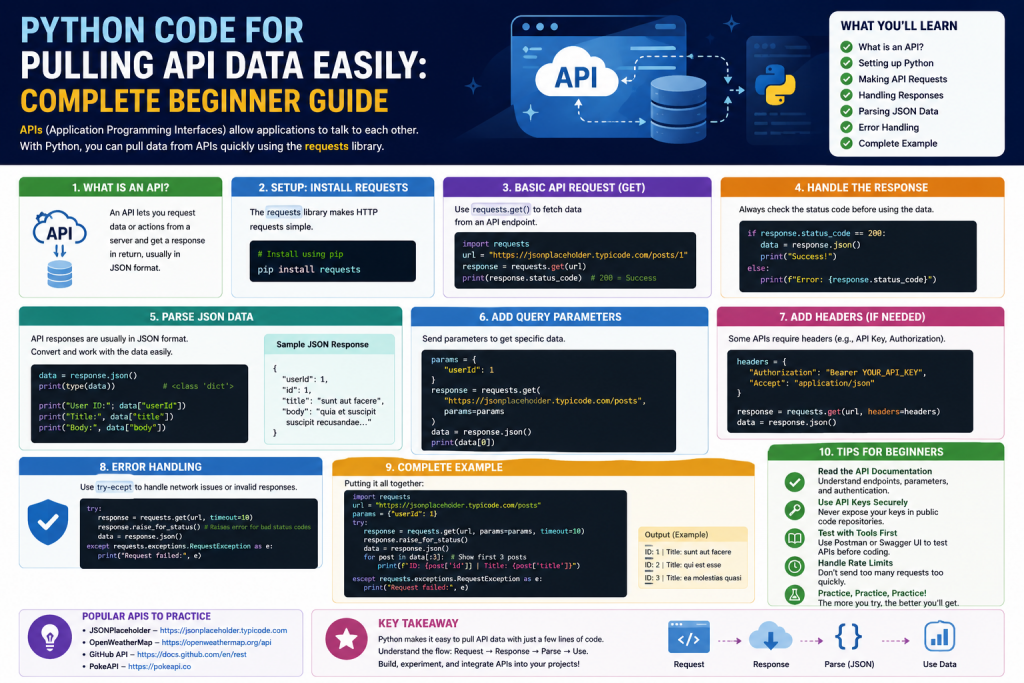
Application Programming Interfaces, commonly known as APIs, are one of the most powerful tools for modern software development and data analysis. They allow applications to communicate with each other and share information in a structured way. Instead of manually collecting data from websites or apps, APIs let you retrieve it automatically using code.
Python is one of the best programming languages for working with APIs because it is simple, readable, and supported by powerful libraries. With just a few lines of code, you can fetch live data, process it, and store it for analysis or reporting. This makes Python extremely useful for automation, dashboards, data science, and business intelligence tasks.
In this guide, you will learn how to request data from APIs, process the response, handle errors, and save the results in different formats. These skills are essential for anyone working with data or building automated systems.
Understanding these concepts allows you to build applications that can interact with real-time data sources instead of relying on static information. For example, you can use APIs to collect weather updates, financial market data, social media statistics, or system performance metrics. Once you know how to request and process this data, you can turn it into meaningful insights for analysis or reporting.
Processing API responses is also an important skill because raw data is not always in a usable format. You often need to filter, transform, or restructure the data before using it in your application. This helps you focus only on the relevant information and improves the efficiency of your code.
Error handling is another key part of working with APIs. Since APIs depend on external servers, there is always a chance of failure due to network issues, invalid requests, or server downtime. Learning how to manage these errors ensures that your program continues to run smoothly without crashing unexpectedly.
Finally, saving results in formats like JSON or CSV allows you to store data for future use, share it with others, or analyze it using other tools. These combined skills form the foundation of modern data-driven development and automation workflows.
Understanding How APIs Work
An API acts as a communication bridge between two systems. When you send a request, the API processes it on the server side and then returns a response back to your program. This response typically contains well-structured data, making it easy for your application to read, interpret, and use.
In most cases, APIs follow a request–response model where the client (your program) asks for specific information, and the server provides only the data that is needed. This helps reduce unnecessary data transfer and improves performance. For example, instead of loading an entire database, an API can return just a single record or a filtered set of results based on your request.
APIs also standardize communication between different systems, even if they are built using different technologies. This means a Python application can easily interact with a web service built in another language, such as Java or JavaScript, without any compatibility issues. The data is usually formatted in JSON or sometimes XML, which ensures consistency and easy parsing.
Another important aspect of APIs is security. Many APIs require authentication through keys or tokens to ensure that only authorized users can access the data. This protects sensitive information and prevents misuse. Additionally, APIs often include rules like rate limits to control how frequently requests can be made.
Overall, APIs simplify complex system interactions, making it possible for developers to build powerful applications that integrate multiple services seamlessly.
Most APIs use a REST structure, which relies on simple web requests. These requests are sent to specific endpoints. Each endpoint provides a different type of data. For example, one endpoint might return a list of users, while another returns detailed information about a specific user.
The data returned by APIs is usually in JSON format. JSON is structured like dictionaries and lists, which makes it easy to use in Python. This compatibility is one of the reasons Python is widely used for API integration.
Setting Up Python for API Requests
Before you start working with APIs, you need a basic Python setup. The most important library for making API requests is the requests module. It allows Python to send HTTP requests and receive responses.
After installing Python, you can prepare your environment by ensuring the requests library is available. Once installed, you are ready to start interacting with APIs.
This setup is simple and does not require advanced configuration. It is suitable even for beginners who are just starting with programming.
Making Your First API Request
The simplest way to interact with an API is by sending a GET request. This type of request is used to retrieve data from a server.
When you send a request, the API returns a response object. This object contains information such as status code, headers, and the actual data.
If the request is successful, the status code will indicate success. You can then print or process the returned data. If something goes wrong, the status code will help you understand the issue.
This basic structure forms the foundation of most API interactions in Python.
Working with JSON Data in Python
Since most APIs return data in JSON format, it is important to understand how to work with it in Python. JSON data can be easily converted into Python dictionaries using built-in methods.
Once converted, you can access values using keys, just like working with a dictionary. This makes it easy to extract specific information such as titles, names, or descriptions.
For example, if an API returns a post with a title and body, you can directly access these values and use them in your program. This flexibility allows you to process and analyze data efficiently.
Extracting and Using API Data
After retrieving data from an API, the next step is extracting useful information. Depending on your project, you may only need certain fields from the response.
You can loop through the data if it contains multiple records. This is useful when working with lists of items such as products, users, or articles.
By selecting only the required fields, you can reduce complexity and make your data easier to manage. This step is important for building clean and efficient applications.
Saving API Data for Later Use
Once you have extracted the data, you may want to store it for future use. Python allows you to save data in multiple formats such as JSON and CSV.
Saving data as JSON keeps its original structure intact. This is useful when you need to preserve all details for later processing.
On the other hand, saving data as CSV is helpful for analysis. CSV files can be opened in spreadsheet applications, making them ideal for reporting and visualization.
By storing API data locally, you can avoid making repeated requests and reduce dependency on live systems.
Handling Errors in API Requests
When working with APIs, errors are common. These can occur due to network issues, incorrect URLs, or server problems. It is important to handle these errors properly to prevent your program from crashing.
Python provides error handling mechanisms using try and except blocks. These allow your program to continue running even if something goes wrong.
Different types of errors can occur, such as connection errors, timeouts, or invalid responses. By handling each case separately, you can make your application more stable and reliable.
Adding timeouts to requests is also important. It ensures that your program does not get stuck waiting for a response that never arrives.
Managing Request Limits and Performance
Many APIs limit the number of requests you can make in a given time period. This is known as rate limiting. If you exceed this limit, your requests may be blocked temporarily.
To handle this, you can add delays between requests. If a request fails due to rate limits, your program can wait and try again after some time.
Using strategies like gradual waiting helps prevent overloading the API. This is especially important when working with large datasets or continuous data streams.
Proper request management ensures that your application runs smoothly without interruptions.
Automating API Data Collection
One of the most powerful uses of APIs is automation. Instead of manually running scripts, you can schedule them to run automatically at specific intervals.
For example, you can create a program that collects weather data every hour and stores it in a file. This allows you to track changes over time without any manual effort.
Automation can also be applied to financial data, social media analytics, or system monitoring. By combining APIs with scheduling tools, you can build fully automated data pipelines.
This approach saves time and improves efficiency in data-driven projects.
Advanced API Integration Techniques
Once you understand the basics, you can move on to more advanced concepts. Many APIs require authentication using keys or tokens. This ensures that only authorized users can access the data.
Another important concept is pagination. Some APIs return large datasets in multiple pages. You need to handle each page separately to collect all the data.
You can also work with real-time data streams using special APIs that send continuous updates. These are useful for applications that require live information.
Additionally, you can build your own APIs using Python frameworks. This allows you to share your data and services with other applications.
Conclusion
Working with APIs in Python is a powerful skill that opens the door to automation, data analysis, and modern application development. With simple tools like requests and JSON handling, you can easily retrieve and process data from different sources.
By learning how to make requests, handle responses, manage errors, and store data, you build a strong foundation for more advanced programming tasks. Whether you are working on dashboards, automation scripts, or data pipelines, API integration will always play an important role.
As you continue practicing, you will discover even more ways to use APIs to simplify complex tasks and improve productivity.
Continue exploring the technologies and certification concepts that matter most to you.