When people try to improve their wireless network performance they often focus on upgrading their internet plan or buying a new router. While those factors do matter there is another setting that quietly plays a major role in how your Wi Fi behaves. That setting is channel width. It controls how much frequency space your wireless signal uses and it can directly affect both speed and stability.
Choosing between 20 MHz 40 MHz and 80 MHz is not always simple. Each option comes with tradeoffs and the best choice depends on your environment, the number of nearby networks and the types of devices connected to your network. A wider channel can deliver higher speeds but it can also introduce interference. A narrower channel may reduce speed but often provides a more stable connection.
Understanding how channel width works requires a basic understanding of Wi Fi bands channels and how signals interact in real world environments. Once you understand these fundamentals it becomes much easier to make smart decisions about your network setup.
What Channel Width Means in Wi Fi
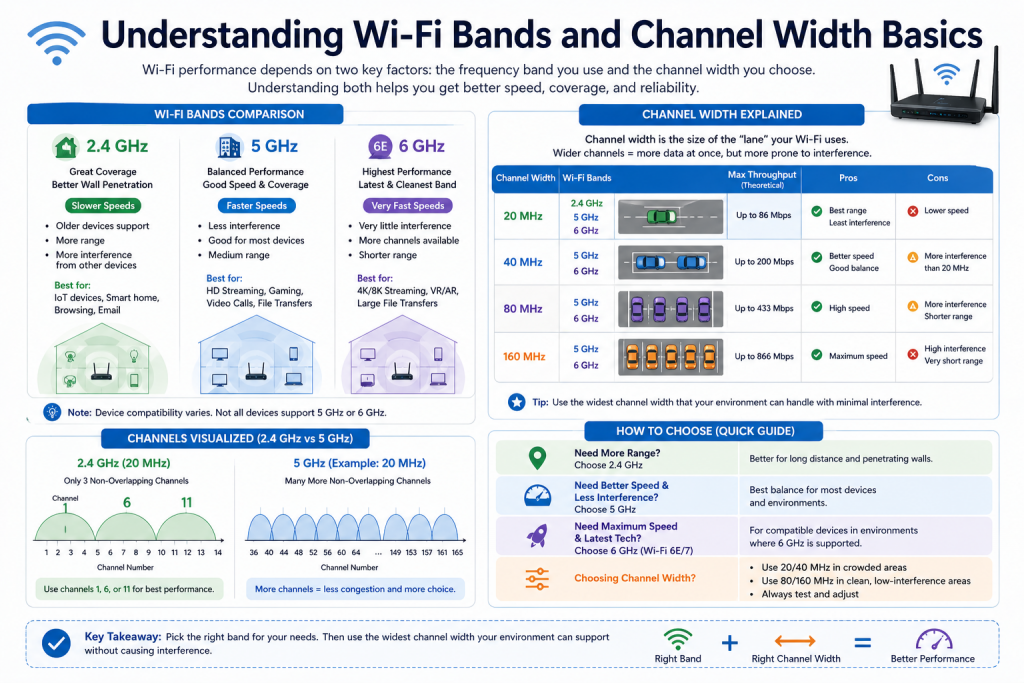
Channel width refers to the amount of frequency space that a wireless channel occupies. It is measured in megahertz and it determines how much data can be transmitted at a given time. A wider channel can carry more data which increases potential throughput. A narrower channel carries less data but is less likely to interfere with other signals.
An easy way to think about this is by comparing it to traffic on a road. A narrow channel is like a single lane where vehicles move steadily but not very quickly. A wider channel is like multiple lanes where more vehicles can move at the same time. However if too many roads overlap or intersect traffic becomes congested and slows down.
This is exactly what happens in wireless networks. If too many wide channels are used in a crowded environment they start to overlap which leads to interference and reduced performance. This is why selecting the right width is not just about choosing the widest option.
The Importance of Frequency Bands
Wi Fi does not operate on a single frequency. Instead it uses different bands which are ranges of frequencies allocated for wireless communication. The three main bands in modern Wi Fi are 2.4 GHz 5 GHz and 6 GHz. Each band has unique characteristics that influence range speed and susceptibility to interference.
These differences are important because the effectiveness of a specific channel width depends heavily on which band is being used. A width that works well in one band may perform poorly in another due to differences in available spectrum and congestion levels.
Understanding how these bands behave is essential for making informed decisions about channel width.
Overview of the 2.4 GHz Band
The 2.4 GHz band is the oldest and most widely used Wi Fi band. It operates over a relatively small frequency range and is divided into multiple channels. One of its biggest advantages is range. Signals in this band travel farther and are better at passing through walls and other obstacles.
Because of this the 2.4 GHz band is commonly used in situations where coverage is more important than speed. It is especially useful in larger homes or areas with many barriers between the router and devices.
However the popularity of this band also creates problems. Many devices use the same frequency range including household electronics such as microwaves, cordless phones and Bluetooth devices. This leads to congestion and interference which can negatively affect performance.
Channel Structure in the 2.4 GHz Band
The channels in the 2.4 GHz band are closely spaced which leads to significant overlap. Even though there are multiple channels available most of them are not completely independent from each other. When two networks operate on overlapping channels they can interfere even if they are not using the exact same channel number.
Only a small number of channels in this band do not overlap with others. This limitation means that using wider channel widths can quickly consume available spectrum and increase the chances of interference.
Because of this structure the 2.4 GHz band is not well suited for wide channels. Attempting to use larger widths often results in reduced performance instead of improvement.
Advantages and Limitations of 2.4 GHz
The main advantage of the 2.4 GHz band is its ability to provide wide coverage. It is reliable for maintaining connections over longer distances and through physical obstacles. This makes it a practical choice for basic connectivity and for devices that are far from the router.
The main limitation is congestion. Because so many devices operate in this band it is often crowded which leads to slower speeds and inconsistent performance. The limited number of non overlapping channels further complicates the situation.
These characteristics make the 2.4 GHz band better suited for narrower channel widths where stability is more important than raw speed.
Overview of the 5 GHz Band
The 5 GHz band provides a significant improvement in performance compared to 2.4 GHz. It operates over a much larger frequency range which allows for more channels and less overlap. This makes it easier for networks to operate without interfering with each other.
One of the biggest advantages of 5 GHz is its ability to deliver higher speeds. This makes it ideal for activities that require fast and reliable connections such as streaming high quality video online gaming and transferring large files.
Another benefit is reduced congestion. Because fewer devices use this band and there are more available channels the chances of interference are lower.
Limitations of the 5 GHz Band
Despite its advantages the 5 GHz band has some limitations. Its higher frequency means that signals do not travel as far as those in the 2.4 GHz band. They are also more easily blocked by walls and other obstacles.
This can result in weaker coverage especially in larger spaces or buildings with thick walls. Devices that are far from the router may experience reduced signal strength and lower performance.
Because of this the 5 GHz band is often used in combination with 2.4 GHz to provide both speed and coverage.
Channel Flexibility in the 5 GHz Band
One of the key strengths of the 5 GHz band is its flexibility in channel width selection. It supports multiple widths including 20 MHz 40 MHz and 80 MHz. This allows users to adjust their network settings based on their specific needs and environment.
In less crowded environments wider channels can be used to achieve higher speeds. In more crowded environments narrower channels can be selected to reduce interference and improve stability.
This flexibility makes the 5 GHz band a versatile option for a wide range of use cases.
Overview of the 6 GHz Band
The 6 GHz band is the newest addition to Wi Fi technology. It provides a large amount of additional spectrum which significantly reduces congestion. This makes it possible to use very wide channels without the same level of interference seen in older bands.
One of the main advantages of 6 GHz is its ability to support high performance applications. It is designed for modern devices that require fast speeds, low latency and reliable connections.
The availability of many non overlapping channels allows multiple networks to operate efficiently within the same area. This makes it an important step forward in wireless networking.
Limitations of the 6 GHz Band
The 6 GHz band also has some challenges. Its higher frequency results in shorter range and weaker signal penetration through obstacles. This means that it is most effective when devices are close to the router.
Another limitation is compatibility. Only newer devices support this band which means that older devices cannot take advantage of its benefits.
Despite these limitations the 6 GHz band is expected to become more widely used as newer devices become more common.
How Channel Width Influences Performance
Channel width directly affects how much data can be transmitted at one time. Wider channels allow more data to flow which increases potential speed. However they also reduce the number of available channels which increases the likelihood of interference.
Narrower channels reduce the risk of interference by occupying less spectrum. This leads to more stable connections especially in crowded environments.
The relationship between channel width and performance is not linear. Increasing width does not always result in better performance. In many cases interference can negate the benefits of higher throughput.
Understanding Throughput and Stability
Throughput refers to the amount of data that can be transmitted over a network in a given period of time. Wider channels improve throughput by allowing more data to be transmitted simultaneously.
Stability refers to how consistent and reliable the connection is. Narrower channels improve stability by reducing interference and maintaining cleaner signals.
Balancing throughput and stability is the key to choosing the right channel width. In environments with high interference stability often becomes more important. In environments with low interference throughput can be prioritized.
The Role of Interference
Interference is one of the most significant factors affecting Wi Fi performance. It occurs when multiple signals compete for the same frequency space. This can come from other Wi Fi networks or from non Wi Fi devices.
When interference occurs devices must retransmit data which reduces efficiency and slows down performance. Wider channels are more susceptible to interference because they cover a larger portion of the spectrum.
Understanding the level of interference in your environment is essential for making the right channel width decision.
Device Compatibility Considerations
Not all devices support all channel widths. Older devices may only work with narrower channels such as 20 MHz. If a network is configured with a wider channel these devices may not perform optimally.
Modern devices are more likely to support wider channels but compatibility can still vary. It is important to consider the capabilities of all devices on your network when selecting channel width.
Ensuring compatibility helps maintain a smooth and consistent user experience across all devices.
Environmental Impact on Channel Width Choice
The environment plays a major role in determining the best channel width. In densely populated areas there are many competing networks which increases interference. In such cases narrower channels are often more effective.
In less crowded areas there is more available spectrum which allows for wider channels without significant interference. This can result in higher speeds and better performance.
Physical obstacles such as walls, furniture and building materials also affect signal strength. Wider channels typically require stronger signals to perform well which makes them more suitable for shorter distances.
Why There Is No Universal Best Setting
There is no single channel width that works best in every situation. The optimal choice depends on multiple factors including the frequency band interference level device compatibility and physical environment.
A setting that performs well in one location may not work as well in another. This is why it is important to understand the underlying principles rather than relying on fixed rules.
Adapting your settings to your specific conditions will always produce better results than using a one size fits all approach.
Preparing for Practical Decisions
Understanding channel width and frequency bands provides the foundation for optimizing your Wi Fi network. By recognizing how different factors interact you can make more informed decisions about your settings.
In the next part the focus will shift to practical guidance on when to use 20 MHz 40 MHz and 80 MHz in different scenarios. This will help translate these concepts into real world configurations that improve both speed and reliability.
Introduction to Choosing the Right Channel Width
After understanding how Wi Fi bands and channel width work, the next step is applying that knowledge in real situations. Choosing between 20 MHz 40 MHz and 80 MHz is not just a technical decision. It depends on your surroundings, the type of devices you use and what you expect from your network.
Some users prioritize stability while others want maximum speed. The correct choice depends on finding the right balance between these goals. A wider channel can improve throughput but may introduce interference. A narrower channel can reduce interference but may limit speed.
This part focuses on when to use each channel width and how to make decisions based on real world conditions.
Understanding 20 MHz Channel Width
The 20 MHz channel width is the narrowest standard option available in most Wi Fi networks. It uses a smaller portion of the frequency spectrum which reduces the chances of interference from other networks.
Because it occupies less space it allows more channels to exist without overlapping. This makes it particularly useful in environments where many networks are operating close to each other.
Although it does not offer the highest possible speeds it often provides the most consistent and reliable performance in challenging conditions.
Advantages of 20 MHz
One of the main benefits of using 20 MHz is stability. Since it uses less spectrum it is less likely to overlap with nearby networks. This reduces interference and improves connection reliability.
Another advantage is compatibility. Almost all Wi Fi devices support 20 MHz channels including older devices. This ensures that every device on your network can connect without issues.
It also allows for better performance in crowded environments where multiple networks are competing for limited spectrum.
Limitations of 20 MHz
The main drawback of 20 MHz is reduced throughput. Because it transmits less data at a time it cannot match the speeds of wider channels.
This may become noticeable when performing bandwidth intensive tasks such as streaming high resolution video downloading large files or playing online games that require fast response times.
However in many cases the improved stability can outweigh the loss in speed especially in congested areas.
When to Use 20 MHz in Practice
The 20 MHz channel width is ideal in situations where interference is a major concern. This includes apartment buildings, office spaces and densely populated neighborhoods where many Wi Fi networks are operating nearby.
It is also the best choice for the 2.4 GHz band. Due to the limited spectrum and overlapping channels in this band using wider channels can lead to poor performance. Keeping the channel width at 20 MHz helps maintain stability.
In addition 20 MHz is suitable when supporting older devices that may not handle wider channels efficiently.
Understanding 40 MHz Channel Width
The 40 MHz channel width combines two 20 MHz channels into a single wider channel. This increases the amount of data that can be transmitted at once which improves throughput.
It represents a middle ground between speed and stability. While it provides better performance than 20 MHz it still maintains a reasonable level of resistance to interference.
Because of this balance 40 MHz is often considered the default choice for many home networks.
Advantages of 40 MHz
The primary advantage of 40 MHz is improved speed compared to 20 MHz. It allows more data to flow which enhances performance for everyday tasks such as streaming browsing and downloading.
At the same time it does not consume as much spectrum as 80 MHz which means it still leaves room for multiple non overlapping channels.
This makes it suitable for environments with moderate levels of interference where both speed and reliability are important.
Limitations of 40 MHz
While 40 MHz offers better performance than 20 MHz it is not as fast as 80 MHz. For users who require maximum throughput it may not be sufficient.
It also increases the risk of interference compared to 20 MHz because it occupies more spectrum. In very crowded environments this can still lead to performance issues.
However these limitations are generally manageable and do not outweigh the benefits in most situations.
When to Use 40 MHz in Practice
The 40 MHz channel width is ideal for typical home networks where there is some level of interference but not extreme congestion. It works well in suburban areas or houses where networks are spaced apart but still present.
It is especially effective on the 5 GHz band where there is more available spectrum. This allows 40 MHz channels to operate without excessive overlap.
For most users who want a balance between speed and stability 40 MHz is the most practical choice.
Understanding 80 MHz Channel Width
The 80 MHz channel width combines four 20 MHz channels into one wide channel. This significantly increases the amount of data that can be transmitted which leads to higher potential speeds.
It is designed for high performance applications where large amounts of data need to be transferred quickly. This includes activities such as streaming high definition video online gaming and transferring large files.
However the benefits of 80 MHz come with important tradeoffs that must be considered.
Advantages of 80 MHz
The main advantage of 80 MHz is high throughput. It allows devices to achieve faster data rates which improves performance for demanding tasks.
When used in the right environment it can provide a noticeable boost in speed and responsiveness. This is particularly beneficial for users with modern devices that support wider channels.
It is also useful in situations where multiple high bandwidth activities are happening at the same time.
Limitations of 80 MHz
The biggest limitation of 80 MHz is its susceptibility to interference. Because it occupies a large portion of the spectrum it reduces the number of available channels and increases the likelihood of overlap with other networks.
It also requires strong signal conditions to perform well. As distance from the router increases or obstacles block the signal performance can drop significantly.
Another limitation is compatibility. Not all devices support 80 MHz channels which can lead to inconsistent performance across different devices.
When to Use 80 MHz in Practice
The 80 MHz channel width is best suited for environments with low interference. This includes single family homes, rural areas or locations where few other networks are present.
It is also ideal when devices are close to the router and can maintain strong signal strength. In such conditions the benefits of higher throughput can be fully realized.
This channel width is particularly useful for high performance setups where speed is the top priority.
Channel Width Recommendations for 2.4 GHz
For the 2.4 GHz band the recommendation is straightforward. The limited spectrum and heavy congestion make wider channels impractical.
Using 20 MHz is the best choice in almost all situations. It minimizes interference and ensures compatibility with a wide range of devices.
Attempting to use 40 MHz in this band often leads to reduced performance due to overlapping channels and increased interference.
Channel Width Recommendations for 5 GHz
The 5 GHz band provides more flexibility in choosing channel width. The larger amount of available spectrum allows for different configurations based on the environment.
In crowded environments 20 MHz can be used to maximize stability. In typical home environments 40 MHz offers a good balance between speed and reliability. In low interference environments 80 MHz can be used to achieve higher performance.
This flexibility makes the 5 GHz band the most versatile option for modern Wi Fi networks.
Impact of Distance on Channel Width Choice
Distance between the router and devices plays an important role in determining the effectiveness of a channel width. Wider channels require stronger signals to perform well.
As distance increases signal strength decreases which can reduce the benefits of wider channels. In such cases narrower channels may provide more consistent performance.
This is why wider channels are most effective when devices are located close to the router.
Impact of Network Density
Network density refers to the number of nearby Wi Fi networks operating in the same area. High density environments increase the likelihood of interference.
In such conditions narrower channels are more effective because they reduce overlap and improve stability. Wider channels may struggle due to increased competition for spectrum.
In low density environments wider channels can be used more effectively because there is less interference.
Balancing Speed and Stability
Choosing the right channel width is ultimately about balancing speed and stability. While it may be tempting to always choose the widest channel for maximum speed this approach can backfire in crowded environments.
A slightly slower but stable connection is often more useful than a faster connection that frequently drops or experiences high latency.
Understanding your priorities and environment will help you make better decisions.
Considering Device Capabilities
The capabilities of your devices should also influence your choice of channel width. Modern devices are more likely to support wider channels and benefit from higher throughput.
Older devices may struggle with wider channels or may not support them at all. This can lead to inconsistent performance across your network.
Ensuring that your settings work well for all devices helps maintain a better overall experience.
Real World Examples
In an apartment building with many networks operating nearby using 20 MHz on both 2.4 GHz and 5 GHz can provide the most stable connection.
In a typical home with moderate interference using 20 MHz on 2.4 GHz and 40 MHz on 5 GHz offers a good balance.
In a large house with minimal interference using 80 MHz on 5 GHz can deliver high speeds especially for devices close to the router.
These examples highlight how different environments require different approaches.
Preparing for Advanced Considerations
Understanding when to use 20 MHz 40 MHz and 80 MHz provides a practical framework for optimizing your network. However there are additional factors that can further influence performance.
These include advanced features such as dynamic channel selection, higher bandwidth options and newer Wi Fi standards.
In the next part these advanced considerations will be explored to help you fine tune your network even further and achieve the best possible performance.
Introduction to Advanced Wi Fi Optimization
After understanding the fundamentals of channel width and learning when to use 20 MHz 40 MHz and 80 MHz in common scenarios, the next step is to look at advanced considerations. These factors go beyond basic configuration and focus on how real networks behave over time in dynamic environments.
Wireless networks are not static. Conditions change depending on how many devices are connected, how much data is being transmitted, and what other networks are operating nearby. Because of this, fine tuning your Wi Fi settings requires an understanding of how different technologies and environmental factors interact.
This part explores advanced topics such as interference management, dynamic channel selection, wider channel options and modern Wi Fi standards. These concepts will help you move from basic setup to a more optimized and reliable network.
Understanding Interference in Depth
Interference is one of the most important factors that affects Wi Fi performance. While it has already been introduced earlier, it is worth exploring in greater detail because it directly influences how effective different channel widths will be.
There are two main types of interference that impact Wi Fi networks. The first type comes from other Wi Fi networks operating on the same or overlapping channels. This is common in densely populated areas where many routers are broadcasting signals within a limited space.
The second type comes from non Wi Fi devices that use similar frequency ranges. Examples include household electronics such as microwaves, cordless phones and Bluetooth devices. These sources can introduce noise into the signal which disrupts communication between the router and connected devices.
When interference occurs devices must retransmit data that was not received correctly. This reduces overall efficiency and can lead to slower speeds, higher latency and unstable connections. Wider channels are more vulnerable to interference because they occupy more of the available spectrum.
Channel Overlap and Its Impact
Channel overlap is a specific type of interference that occurs when two or more networks use frequency ranges that partially overlap. This is especially problematic in bands with limited spectrum such as 2.4 GHz.
When channels overlap the signals interfere with each other which forces devices to wait before transmitting data. This increases delays and reduces throughput. Even if two networks are not on the exact same channel, overlap can still cause performance issues.
Using narrower channels helps reduce overlap because they occupy less spectrum. This is why 20 MHz is often recommended in crowded environments. Wider channels such as 80 MHz can overlap with multiple networks at once which increases the likelihood of interference.
Dynamic Channel Selection
Modern routers often include a feature known as dynamic channel selection. This feature allows the router to automatically choose the best channel based on current network conditions.
Instead of relying on a fixed channel the router scans the environment to detect which channels are least congested. It then switches to those channels to minimize interference and improve performance.
Dynamic channel selection can be especially useful in environments where conditions change frequently. For example in apartment buildings where neighbors may turn their networks on and off at different times.
While this feature can improve performance it is not always perfect. Some routers may not switch channels quickly enough or may choose suboptimal channels. In such cases manual configuration may still provide better results.
Automatic Channel Width Adjustment
In addition to selecting channels automatically many routers also support automatic channel width adjustment. This allows the router to switch between 20 MHz 40 MHz and 80 MHz depending on network conditions.
For example if interference is detected the router may reduce the channel width to improve stability. If conditions are clear it may increase the width to boost performance.
This feature provides a balance between speed and reliability without requiring manual intervention. However its effectiveness depends on the quality of the router and the complexity of the environment.
Users who prefer a hands off approach may benefit from automatic settings while advanced users may choose to fine tune settings manually for optimal performance.
Introduction to 160 MHz Channels
In addition to 20 MHz 40 MHz and 80 MHz there is another option known as 160 MHz. This channel width is available in newer Wi Fi standards and offers extremely high throughput.
A 160 MHz channel combines eight 20 MHz channels into a single wide channel. This allows a large amount of data to be transmitted at once which can significantly increase speed.
However this option comes with important limitations that must be considered carefully.
Benefits of 160 MHz
The main advantage of 160 MHz is its ability to deliver very high data rates. It is particularly useful for demanding applications such as high resolution video streaming, large file transfers and advanced gaming setups.
When used in ideal conditions it can provide performance that is significantly higher than narrower channel widths. This makes it attractive for users who want to maximize the capabilities of modern Wi Fi hardware.
It is also more practical in the 6 GHz band where there is more available spectrum and less interference.
Limitations of 160 MHz
Despite its advantages 160 MHz is not suitable for most environments. It requires a large portion of the spectrum which reduces the number of available channels and increases the risk of interference.
It also requires strong signal conditions. As distance from the router increases performance can drop quickly. Obstacles such as walls further reduce effectiveness.
Another limitation is device support. Only newer devices are capable of using 160 MHz channels. Older devices may not benefit from this setting.
Because of these factors 160 MHz is best reserved for specific scenarios where conditions are ideal.
DFS and Its Role in Channel Selection
Dynamic Frequency Selection is a mechanism used in the 5 GHz band to avoid interference with radar systems. Certain frequency ranges are shared with radar applications such as weather monitoring and aviation systems.
When a router operating on these channels detects a radar signal it must immediately stop using that channel and switch to another one. This process can cause temporary interruptions in the network.
DFS is important for regulatory compliance but it can impact performance. Wider channels such as 80 MHz and 160 MHz are more likely to include DFS channels which increases the chance of disruptions.
Users who experience frequent disconnections may benefit from selecting channels that do not require DFS.
The Role of Modern Wi Fi Standards
Wi Fi standards define how wireless communication works and what features are available. Newer standards support wider channels, higher speeds and improved efficiency.
Older standards were limited to narrower channels and lower data rates. As technology has advanced newer standards have introduced features that allow better use of available spectrum.
Modern standards also include improvements in how data is transmitted and how multiple devices share the network. These enhancements can improve performance even without changing channel width.
Understanding the capabilities of your devices and router can help you take advantage of these improvements.
Multi Device Environments
In many homes and workplaces multiple devices are connected to the same network at the same time. This creates additional challenges because each device competes for bandwidth.
Wider channels can provide more bandwidth but they also increase the risk of interference. In environments with many devices it may be beneficial to use a balanced approach that prioritizes stability.
Managing multiple devices effectively requires careful consideration of both channel width and overall network design.
Signal Strength and Placement
The placement of your router has a significant impact on performance. Even the best channel width settings cannot compensate for poor signal strength.
Placing the router in a central location helps ensure even coverage. Avoid placing it near walls or objects that can block the signal. Elevating the router can also improve performance.
Stronger signals allow wider channels to perform more effectively. If signal strength is weak, narrower channels may provide better results.
Environmental Obstacles
Physical obstacles such as walls, floors and furniture can affect how Wi Fi signals travel. Materials such as concrete metal and glass can weaken signals and reduce performance.
These obstacles are particularly important when using wider channels because they require stronger signals to maintain high throughput.
Understanding the layout of your space can help you choose settings that work best for your environment.
Real World Optimization Strategies
Optimizing your Wi Fi network involves combining all of the concepts discussed so far. This includes selecting the right channel width, choosing appropriate channels and positioning your router effectively.
In crowded environments prioritize stability by using narrower channels. In less congested areas take advantage of wider channels for higher speeds.
Regularly monitoring network performance can help identify issues and guide adjustments. Small changes can have a significant impact on overall performance.
The Role of Automation
Automation features in modern routers can simplify network management. These include automatic channel selection, automatic width adjustment and band steering.
Band steering directs devices to the most appropriate frequency band based on their capabilities and signal strength. This helps balance the load across the network.
While automation can be helpful it is not always perfect. Users who want maximum control may prefer manual configuration.
Conclusion
Choosing the right Wi Fi channel width is not about selecting the widest option available. It is about understanding how different factors interact and making decisions based on your specific environment.
Narrower channels such as 20 MHz provide stability and work well in crowded areas. Medium widths such as 40 MHz offer a balance between speed and reliability. Wider channels such as 80 MHz and 160 MHz deliver higher performance but require ideal conditions to be effective.
Factors such as interference signal strength, device compatibility and physical environment all play a role in determining the best choice. There is no single setting that works for everyone.
By understanding these principles and applying them carefully you can create a Wi Fi network that delivers both reliable connectivity and strong performance.
Continue exploring the technologies and certification concepts that matter most to you.