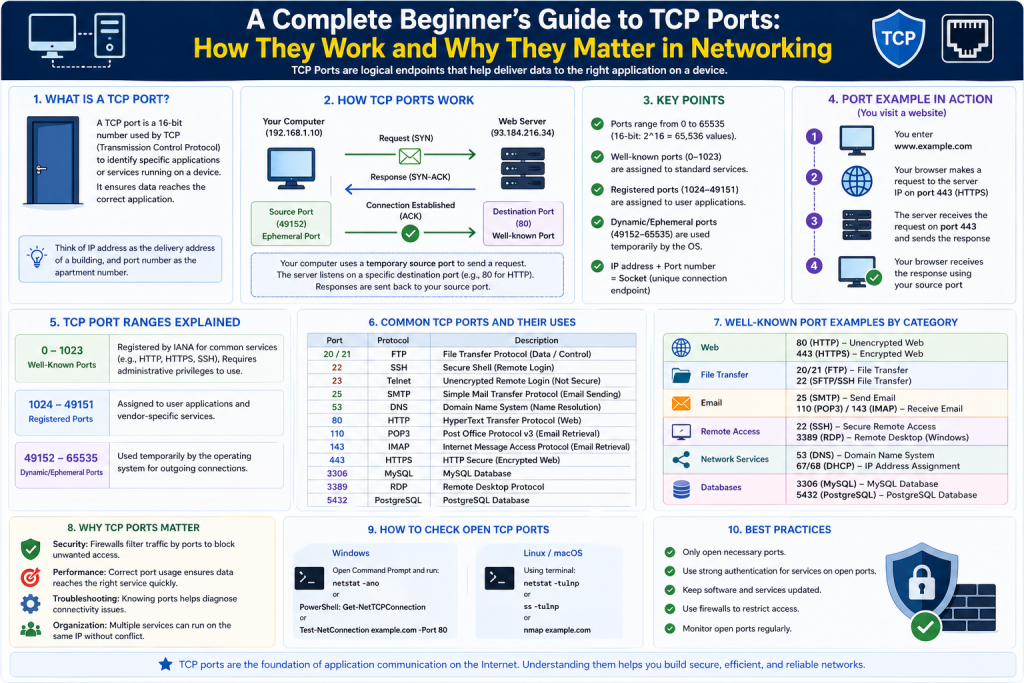
In modern networking, communication between devices happens constantly and at incredible speed. Whether you are browsing a website, sending an email, or streaming a video, data is continuously being transmitted back and forth across networks. For this communication to work efficiently, systems need a way to organize and direct data to the correct destination within a device. This is where TCP ports become essential.
A TCP port is a logical endpoint that allows a computer to differentiate between multiple types of network traffic. Instead of being a physical connection, it acts like a virtual pathway that directs incoming and outgoing data to the appropriate application. Without ports, a device would not be able to determine which program should handle incoming data, leading to confusion and failure in communication.
To better understand this concept, imagine a large office building. The building has a single address, but inside there are multiple departments such as accounting, customer service, and management. If someone sends a package, the address alone is not enough; it must also include the specific department. In this analogy, the building represents the IP address, while the department represents the port number. Together, they ensure the package reaches the correct recipient.
Understanding Transmission Control Protocol
Before exploring TCP ports further, it is important to understand the role of Transmission Control Protocol. TCP is one of the core protocols used in networking and forms a major part of the TCP/IP suite, which underpins the internet.
TCP is known for being a connection-oriented protocol. This means that before any data is sent, a connection must first be established between the sender and the receiver. This process ensures that both sides are ready to communicate and can maintain a reliable exchange of information.
One of the defining characteristics of TCP is its reliability. When data is transmitted using TCP, several mechanisms are in place to ensure accuracy. Data is broken into smaller segments, sent across the network, and then reassembled in the correct order at the destination. If any segment is lost or corrupted during transmission, TCP detects the issue and retransmits the missing data.
This level of reliability makes TCP suitable for applications where accuracy is critical. Activities such as loading web pages, transferring files, and sending emails all depend on TCP to ensure that information arrives intact and in the correct sequence.
The Relationship Between TCP and Ports
While TCP handles the reliable transmission of data, it does not determine which application should receive that data once it reaches a device. This is where ports come into play.
Every TCP connection is defined by a combination of an IP address and a port number. The IP address identifies the device on the network, while the port number identifies the specific application or service running on that device.
For example, when you open a web browser and access a website, your computer sends a request to a remote server. The server receives this request on a specific port that is designated for handling web traffic. Once the server processes the request, it sends the response back to your computer, again using port numbers to ensure the data reaches the correct application.
This system allows multiple applications to operate simultaneously on a single device without interfering with each other. Each application listens on its own port, ensuring that incoming data is routed correctly.
How Ports Enable Multiple Services on One Device
One of the most important functions of TCP ports is their ability to support multiple services on a single system. Modern computers and servers often run several applications at the same time, each requiring access to network communication.
Without TCP ports, it would be extremely difficult for a system to distinguish between different types of incoming and outgoing traffic. Ports act like logical channels that allow the operating system to direct data to the correct application, ensuring smooth and organized communication.
For example, a web server might handle HTTP requests on port 80 while also managing secure HTTPS traffic on port 443. At the same time, the same system could be running an email service using port 25 and a file transfer service on port 21. Each of these services operates independently, but TCP ports make it possible for them to coexist without interference. This separation not only improves efficiency but also enhances system stability and performance.
Additionally, TCP ports play a key role in resource management. By assigning specific ports to specific services, administrators can monitor, control, and troubleshoot network activity more effectively. This structured approach ensures that even as systems grow more complex, communication remains reliable, organized, and scalable across different applications and users.
For instance, a single server might host a website, manage email services, and run a database system simultaneously. Each of these services uses a different port number to handle its network traffic. This separation ensures that requests intended for one service do not get mixed up with another.
Without ports, it would be nearly impossible to manage multiple network services on a single device. All incoming data would arrive at the same location, making it difficult to determine which application should process it. Ports provide the necessary structure to keep these services organized and functioning smoothly.
The Structure and Range of TCP Ports
TCP ports are identified by numerical values, and these values follow a standardized structure. Each port number is a 16-bit unsigned integer, which means there are 65,535 possible port numbers available.
These ports are divided into three main categories based on their purpose and usage.
The first category includes well-known ports, which range from 0 to 1023. These ports are reserved for commonly used services and are standardized across the industry. Because they are universally recognized, applications can rely on them for consistent communication.
The second category consists of registered ports, ranging from 1024 to 49151. These ports are assigned to specific applications or services but are not as strictly regulated as well-known ports. They provide flexibility for developers while still maintaining a level of organization.
The third category includes dynamic or private ports, which range from 49152 to 65535. These ports are typically used temporarily by client applications when establishing connections. Once the communication session ends, these ports are released and can be reused.
This structured approach ensures that port numbers are used efficiently and consistently across different systems and networks.
Why Port Standardization Is Important
Standardization plays a critical role in the effectiveness of TCP ports. Without a consistent system for assigning port numbers, communication between devices would become unreliable and unpredictable.
When applications follow standardized port assignments, they can communicate seamlessly without requiring additional configuration. For example, when you access a website, your browser automatically knows which port to use for the connection. This eliminates the need for users to manually specify port numbers in most cases.
Standardization also ensures compatibility between different systems and software. Devices from different manufacturers and applications developed by different organizations can still communicate effectively because they adhere to the same port conventions.
This global agreement on port usage is one of the key factors that enables the internet to function as a unified network.
Comparing TCP with Other Protocols
Although TCP is widely used, it is not the only protocol available for network communication. Another important protocol is the User Datagram Protocol, commonly known as UDP.
The primary difference between TCP and UDP lies in how they handle data transmission. TCP focuses on reliability and ensures that data is delivered accurately and in the correct order. UDP, on the other hand, is a connectionless protocol that prioritizes speed over reliability.
Because UDP does not establish a connection before sending data, it can transmit information more quickly. However, it does not guarantee that data will arrive intact or in sequence. This makes UDP suitable for applications where speed is more important than accuracy, such as live streaming or online gaming.
Despite these differences, both TCP and UDP use port numbers to direct data to the appropriate applications. Ports remain a fundamental component of network communication regardless of the protocol being used.
Real-World Example of TCP Ports in Action
To understand how TCP ports function in everyday scenarios, consider what happens when you visit a website.
First, you enter a web address into your browser. The browser translates this address into an IP address using a system known as domain name resolution. Once the IP address is identified, your computer sends a request to the server hosting the website.
This request is directed to a specific port on the server that is designated for handling web traffic. The server receives the request, processes it, and sends back the necessary data to display the webpage.
Throughout this process, ports play a crucial role in ensuring that the request and response are handled by the correct applications on both the client and server sides. Without ports, the data would not reach the intended destination within each device.
The Role of Sockets in TCP Communication
Sockets are another important concept closely related to TCP ports. A socket is formed by combining an IP address with a port number, creating a unique identifier for a communication endpoint.
This combination allows devices to establish multiple connections simultaneously. Each connection is identified by its own socket, ensuring that data is transmitted and received correctly.
For example, a server may handle thousands of client connections at the same time. Each connection is associated with a unique socket, allowing the server to manage multiple interactions without confusion.
Sockets are essential for enabling scalable and efficient network communication, particularly in environments where large volumes of data are being exchanged.
Hosting Multiple Applications Using Ports
One of the advantages of TCP ports is their ability to support multiple applications on a single system. By assigning different port numbers to each application, a device can manage multiple services without conflict.
For instance, a server can host several websites on the same IP address by assigning each one a different port. When a request is received, the port number determines which website should handle it.
This flexibility is especially valuable for organizations that want to maximize the use of their resources. Instead of deploying separate servers for each application, they can run multiple services on a single machine, reducing costs and simplifying management.
Ports also allow developers to test and deploy applications in isolated environments. By using different port numbers, they can run multiple versions of an application simultaneously without interference.
The Importance of TCP Ports in Modern Networking
TCP ports are a fundamental component of modern networking. They provide the structure needed to manage complex communication between devices and applications.
By enabling precise routing of data, ports ensure that information reaches the correct destination within a system. This capability is essential for supporting the wide range of services and applications that rely on network communication.
Ports also contribute to the efficiency and scalability of networks. They allow multiple services to operate on a single device, support simultaneous connections, and ensure compatibility across different systems.
Without TCP ports, the internet as we know it would not function effectively. They are a critical element in the architecture of network communication, enabling the seamless exchange of data that powers our digital world.
Practical Uses of TCP Ports in Networking
TCP ports are not just theoretical concepts; they play a direct role in everyday computing and enterprise environments. Every time a network-enabled application runs, it relies on ports to communicate with other systems. These ports allow devices to send and receive data in a structured and organized way, ensuring that each piece of information reaches the correct destination.
In real-world environments, TCP ports are used in web servers, email systems, database platforms, cloud applications, and many other services. For example, when an organization deploys a web application, it must assign a port number so that users can access it. Without this configuration, the application would not be reachable over the network.
Similarly, enterprise systems such as database servers depend on ports to accept queries from client applications. These queries are transmitted over specific port numbers, allowing the database to process requests and send responses back to the requesting system.
Ports also play a crucial role in remote communication. Tools that allow administrators to connect to servers remotely rely on port numbers to establish secure and reliable connections. This is essential for managing infrastructure, especially in large organizations where systems are distributed across multiple locations.
Port Configuration in Server Environments
When setting up a server, one of the key tasks is configuring the ports that each service will use. This process ensures that applications can communicate properly with clients and other systems.
In many cases, applications come with default port assignments. These defaults are widely recognized and make it easier to deploy services without extensive configuration. However, administrators often change port numbers for various reasons, including security, performance optimization, or avoiding conflicts with other applications.
For example, if two applications attempt to use the same port, a conflict occurs, and one of the applications will fail to start. To resolve this, administrators assign a different port number to one of the applications, ensuring both can run simultaneously.
Port configuration also involves defining which ports should be open or closed. An open port allows incoming connections, while a closed port blocks them. Proper configuration is essential for maintaining both functionality and security.
In large-scale environments, port management becomes even more critical. Organizations may run hundreds of services, each requiring its own port. Keeping track of these assignments and ensuring they do not overlap is an important part of network administration.
The Role of Firewalls in Port Management
Firewalls are one of the most important tools for controlling how ports are used. A firewall monitors incoming and outgoing network traffic and enforces rules based on predefined criteria, including port numbers.
By using firewall rules, administrators can allow or block traffic on specific ports. This helps protect systems from unauthorized access and potential security threats. For example, if a service does not need to be accessible from the internet, its port can be blocked to prevent external connections.
Firewalls can also restrict access to certain ports based on IP addresses. This means that only trusted systems are allowed to connect to specific services. This level of control is essential for protecting sensitive data and maintaining secure communication channels.
In addition to security, firewalls help manage network traffic. By controlling which ports are open, administrators can reduce unnecessary traffic and improve overall performance.
Proper firewall configuration requires a clear understanding of which ports are needed for each application. Blocking the wrong port can disrupt services, while leaving unnecessary ports open can create vulnerabilities.
Service Addressing and Port Identification
Another important use of TCP ports is service addressing. When a service is made available on a network, it is typically identified by a combination of a hostname or IP address and a port number.
For example, when accessing a service, the address may include a port number to specify exactly where the request should be directed. This is especially common for applications that do not use standard ports.
If a service uses a well-known port, the port number is often omitted because it is assumed by default. However, when a custom port is used, it must be explicitly included in the address. This ensures that the request reaches the correct application.
Service addressing is particularly important in environments where multiple services run on the same server. By using different port numbers, each service can be uniquely identified and accessed without conflict.
This approach also allows for greater flexibility in application deployment. Developers can run multiple instances of the same application on different ports, enabling testing, scaling, and version management.
Troubleshooting Network Issues Using Ports
TCP ports are an essential tool for diagnosing and resolving network issues. When a problem occurs, examining port activity can provide valuable insights into what is happening within a system.
For example, if a user is unable to access a service, one of the first steps is to check whether the required port is open and listening for connections. If the port is closed or blocked, the service will not be reachable.
Network administrators often use command-line tools to view active connections and port usage. These tools display information about which ports are in use, which applications are using them, and the status of each connection.
By analyzing this data, administrators can identify issues such as:
- Services that are not running
- Ports that are blocked by a firewall
- Conflicts between applications
- Unauthorized or suspicious connections
Troubleshooting with ports also helps detect performance issues. For instance, if a server is experiencing high traffic on a specific port, it may indicate heavy usage or a potential bottleneck.
Understanding how to interpret port information is a valuable skill for anyone working in networking or IT support.
Monitoring TCP Connections on a System
Monitoring TCP connections is an important aspect of maintaining system health and security. By observing active connections, administrators can gain insight into how a system is being used and identify any unusual activity.
One common method for monitoring connections is using command-line utilities. These tools provide a snapshot of all active TCP connections, including local and remote addresses, port numbers, and connection states.
This information helps administrators understand which applications are communicating over the network and how resources are being utilized. It also allows them to detect unexpected connections that may indicate a security issue.
In addition to command-line tools, graphical applications are available that provide a more user-friendly way to view connection data. These tools often include features such as filtering, sorting, and real-time updates, making it easier to analyze network activity.
Monitoring connections is not just about identifying problems; it also helps optimize performance. By understanding how ports are being used, administrators can make informed decisions about resource allocation and system configuration.
Identifying and Managing Processes Through Ports
Every active port on a system is associated with a process. This means that by examining port usage, administrators can identify which programs are running and how they are interacting with the network.
This capability is particularly useful for detecting unwanted or malicious processes. If an unfamiliar application is using a port, it may indicate the presence of malware or unauthorized software.
By identifying the process associated with a port, administrators can take appropriate action, such as terminating the process or investigating further.
Managing processes through ports also helps maintain system stability. If an application is consuming excessive resources or causing conflicts, it can be identified and addressed quickly.
This level of visibility is essential for maintaining control over complex systems where multiple applications are running simultaneously.
Understanding Local and Remote Ports
When examining TCP connections, it is important to distinguish between local and remote ports. The local port is associated with the device initiating or receiving the connection, while the remote port belongs to the other system involved in the communication.
This distinction helps administrators understand the direction and purpose of network traffic. For example, a local port may represent a client application, while the remote port represents a server service.
In TCP communication, both ends of the connection are clearly defined. This is because TCP establishes a connection before transmitting data, allowing both sides to exchange information about their ports.
In contrast, connectionless protocols do not maintain this level of detail, which is one of the reasons TCP is preferred for applications that require reliable communication.
Understanding the relationship between local and remote ports is essential for analyzing network activity and troubleshooting issues.
Security Implications of Open Ports
Open ports can present security risks if not managed properly. Each open port represents a potential entry point for attackers, making it important to minimize unnecessary exposure.
One of the best practices in network security is to keep only the required ports open and close all others. This reduces the attack surface and limits the opportunities for unauthorized access.
Regularly scanning for open ports is an important part of maintaining security. By identifying which ports are open, administrators can ensure that only intended services are accessible.
In addition to closing unused ports, it is important to keep services updated and secure. Even a necessary port can become a vulnerability if the application using it has known weaknesses.
Firewalls, intrusion detection systems, and monitoring tools all play a role in protecting open ports and ensuring that network communication remains secure.
The Importance of Port Awareness in IT Roles
Understanding TCP ports is a fundamental skill for anyone working in information technology. Whether managing networks, developing applications, or providing technical support, knowledge of ports is essential.
For network administrators, ports are a key part of configuring and securing systems. For developers, they are necessary for building applications that communicate over networks. For security professionals, they are critical for identifying and mitigating threats.
Even for general users, having a basic understanding of ports can help in troubleshooting connectivity issues and understanding how applications interact with the network.
As technology continues to evolve, the importance of ports remains constant. They are a foundational element of networking that supports the vast range of services we rely on every day.
Deep Dive into TCP Port Communication
To fully understand the importance of TCP ports, it is necessary to look beyond basic functionality and explore how communication actually takes place at a deeper level. TCP ports are not just labels attached to data; they are part of a structured system that ensures data flows correctly between devices, applications, and services.
When a device initiates communication, it does so by creating a connection between a source port and a destination port. The source port is typically a temporary port assigned by the operating system, while the destination port is associated with a specific service on the receiving system. This pairing forms a complete communication channel that allows data to move reliably between endpoints.
This process begins with a connection setup known as the TCP handshake. During this stage, both the client and server agree on the parameters of the connection, including sequence numbers and acknowledgment rules. Once the connection is established, data is transmitted in segments, each carefully tracked to ensure accuracy.
Ports play a critical role in this process by ensuring that each segment of data is directed to the correct application. Without ports, even a perfectly functioning protocol like TCP would not be able to deliver data to the right destination within a device.
TCP Handshake and Port Involvement
The TCP handshake is a foundational concept that demonstrates how ports are actively used during communication. This process involves three steps, often referred to as a three-way handshake.
First, the client sends a synchronization request to the server. This request includes the client’s source port and the server’s destination port. The server then responds with its own synchronization acknowledgment, confirming that it is ready to establish a connection. Finally, the client sends a confirmation back to the server, completing the handshake.
Once this process is complete, the connection is established, and data can begin to flow. Throughout this exchange, port numbers are used to ensure that both sides of the communication know exactly which applications are involved.
The handshake process highlights the importance of ports in maintaining order and reliability. Each connection is uniquely identified, allowing multiple connections to exist simultaneously without confusion.
Ephemeral Ports and Client-Side Communication
While server-side ports are often fixed and well-known, client-side ports are usually temporary. These temporary ports are known as ephemeral ports and are assigned dynamically by the operating system when a connection is initiated.
Ephemeral ports serve as the source ports for outgoing connections. Once the communication session ends, these ports are released and can be reused for future connections. This dynamic allocation allows a single device to establish multiple connections without requiring a large number of permanently assigned ports.
For example, when a user opens several browser tabs at once, each tab may establish its own connection using a different ephemeral port. This ensures that data from each session remains separate and does not interfere with other connections.
The use of ephemeral ports is essential for scalability, as it allows systems to handle a large number of simultaneous connections efficiently.
Port Forwarding and Network Routing
Port forwarding is a technique used to direct incoming network traffic to a specific device or service within a network. This is commonly used in environments where multiple devices share a single public IP address, such as in home or office networks.
When port forwarding is configured, a request arriving at a particular port on the network’s external interface is redirected to a specific internal device and port. This allows external users to access services hosted داخل a private network.
For example, a user might configure port forwarding to allow access to a web server running on a local machine. Incoming requests on a designated port are forwarded to the internal server, enabling remote access.
Port forwarding is widely used for hosting services, remote access, and online gaming. However, it must be configured carefully to avoid exposing systems to security risks.
Load Balancing and Port Distribution
In high-traffic environments, managing large volumes of network requests is a significant challenge. Load balancing is a technique used to distribute incoming traffic across multiple servers, ensuring that no single system becomes overwhelmed.
Ports play an important role in load balancing by directing traffic to the appropriate server or service. A load balancer listens on a specific port and forwards requests to backend servers based on predefined rules.
This approach improves performance, increases reliability, and enhances scalability. If one server becomes unavailable, the load balancer can redirect traffic to other servers, ensuring continuous service.
Port-based load balancing is commonly used in large-scale applications, such as e-commerce platforms and cloud services, where high availability is essential.
Network Address Translation and Ports
Network Address Translation, often referred to as NAT, is another area where TCP ports are essential. NAT is used to map private IP addresses within a local network to a single public IP address, allowing multiple devices to share a common connection to the internet.
Ports are used in this process to differentiate between multiple connections originating from different devices. When a device sends a request, NAT assigns a unique port number to the connection. This allows the system to track each session and ensure that responses are routed back to the correct device.
For example, if multiple users within a network access the same website at the same time, NAT uses port numbers to keep their connections separate. Without ports, it would not be possible to manage multiple sessions using a single public IP address.
This demonstrates how ports are not only important within individual devices but also play a key role in broader network infrastructure.
TCP Ports and Performance Optimization
Efficient use of TCP ports can have a significant impact on network performance. Poor port management can lead to issues such as congestion, delays, and resource exhaustion.
One common challenge is port exhaustion, which occurs when a system runs out of available ephemeral ports. This can happen in environments with a high number of concurrent connections. When no ports are available, new connections cannot be established, leading to service disruptions.
To address this issue, administrators may adjust system settings to increase the range of available ports or optimize connection handling to reduce resource usage. Techniques such as connection pooling and reuse can also help improve efficiency.
Monitoring port usage is an important part of performance optimization. By analyzing traffic patterns, administrators can identify bottlenecks and make adjustments to improve system performance.
Automation and Port Management
As networks become more complex, manual management of ports becomes increasingly difficult. Automation plays a key role in simplifying this process and ensuring consistency across systems.
Automated tools can be used to configure ports, apply security rules, and monitor activity. These tools reduce the risk of human error and make it easier to manage large-scale environments.
For example, configuration management systems can automatically assign ports to applications based on predefined policies. Similarly, monitoring tools can alert administrators to unusual activity, such as unexpected open ports or abnormal traffic patterns.
Automation also supports scalability by enabling systems to adapt to changing demands. As new services are deployed, ports can be assigned and configured automatically, reducing the time and effort required for manual setup.
Common Mistakes in Port Management
Despite their importance, TCP ports are often mismanaged, leading to a variety of issues. One common mistake is leaving unnecessary ports open, which can create security vulnerabilities.
Another issue is improper documentation. Without clear records of which ports are being used and why, it becomes difficult to manage and troubleshoot systems effectively.
Port conflicts are also a frequent problem, especially in environments where multiple applications are deployed. Failing to properly plan port assignments can lead to conflicts that disrupt services.
Additionally, ignoring monitoring and maintenance can result in undetected issues. Regular checks are essential to ensure that ports are being used correctly and that no unauthorized activity is occurring.
Avoiding these mistakes requires careful planning, consistent monitoring, and a strong understanding of how ports function within a network.
The Evolving Role of TCP Ports
As technology continues to advance, the role of TCP ports is evolving to meet new challenges. The growth of cloud computing, microservices, and distributed systems has increased the complexity of network communication.
In modern architectures, applications are often broken down into smaller components that communicate with each other over the network. Each of these components may use its own set of ports, creating a highly dynamic environment.
This shift has led to the development of new tools and techniques for managing ports, such as service meshes and container orchestration platforms. These technologies provide greater control over communication and help ensure that systems remain secure and efficient.
Despite these changes, the fundamental concept of TCP ports remains the same. They continue to serve as the backbone of network communication, enabling systems to connect and exchange data reliably.
Conclusion
TCP ports are an essential part of how modern networks function. They provide the structure needed to organize communication between devices and ensure that data reaches the correct application.
In this part, the focus has been on advanced concepts, including connection handling, port forwarding, load balancing, and network address translation. These topics highlight the critical role that ports play in managing complex systems and supporting large-scale communication.
Understanding TCP ports at this level allows professionals to design more efficient networks, troubleshoot issues effectively, and implement strong security measures. It also provides the foundation for working with modern technologies such as cloud computing and distributed systems.
As the demand for connectivity continues to grow, TCP ports will remain a key component of network architecture. Their ability to manage multiple services, support reliable communication, and adapt to new technologies ensures their continued relevance in the evolving digital landscape.
By developing a deep understanding of TCP ports, individuals can better navigate the complexities of networking and contribute to the development of robust and secure systems.
Continue exploring the technologies and certification concepts that matter most to you.