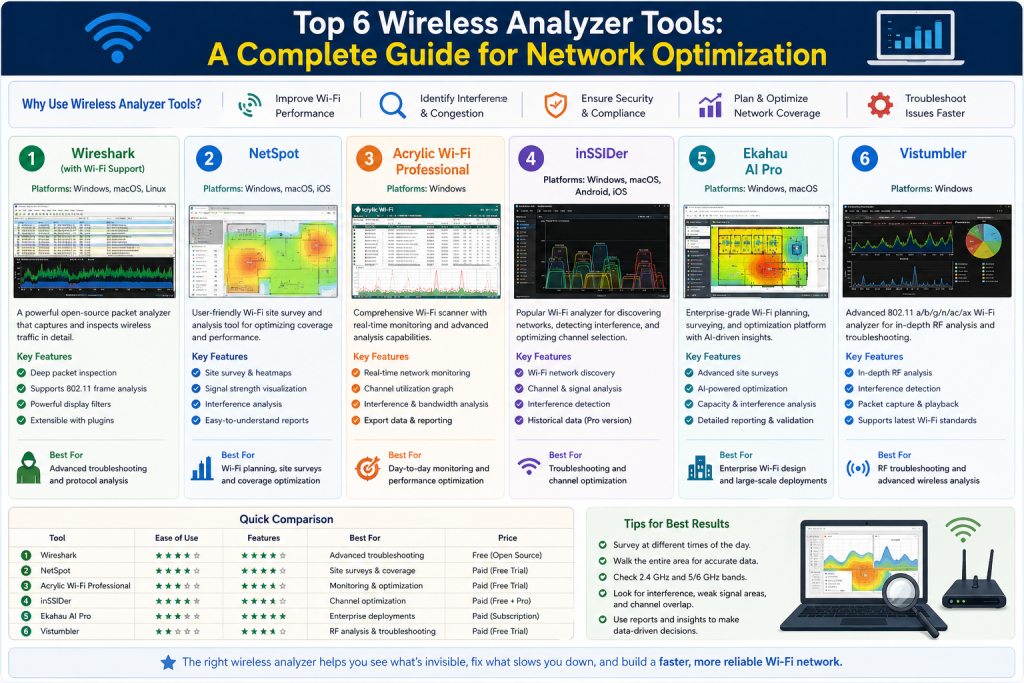
Wireless networking has become an essential part of everyday life. From homes to large enterprises, Wi-Fi enables devices to connect, communicate, and share data without the need for physical cables. Over the past decade, the number of wireless-enabled devices has increased dramatically. Smartphones, laptops, smart TVs, IoT devices, and even household appliances now rely on stable wireless connectivity to function properly.
As the demand for wireless access grows, so does the need for reliable and high-performing networks. Users expect fast speeds, uninterrupted connections, and seamless coverage across different environments. However, achieving this level of performance is not always straightforward. Wireless networks are affected by many factors, including signal interference, physical obstacles, channel congestion, and device limitations.
One of the most common challenges in wireless networking is troubleshooting. Unlike wired networks, where issues can often be traced to a specific cable or port, wireless networks operate in an open environment where signals overlap and compete for bandwidth. This makes it harder to identify the root cause of problems such as slow speeds, dropped connections, or weak signal strength.
This is where wireless analyzer tools become important. These tools are designed to provide visibility into wireless network behavior. They allow users to monitor signal strength, detect interference, analyze traffic, and optimize performance. Whether you are a home user trying to improve Wi-Fi coverage or a network professional managing a complex environment, these tools can help you understand what is happening behind the scenes.
In this section, we focus on the first group of wireless analyzer tools, particularly those designed for packet analysis. These tools provide deep insights into network traffic and are essential for diagnosing complex issues.
Understanding Wireless Network Challenges
Before exploring specific tools, it is important to understand the challenges that wireless networks face. Unlike wired connections, which are stable and predictable, wireless signals are influenced by the surrounding environment. Walls, furniture, electronic devices, and even other Wi-Fi networks can affect signal quality.
One major issue is channel interference. Wi-Fi networks operate on specific frequency bands, and multiple networks in the same area may use overlapping channels. This can lead to congestion, reduced speeds, and unstable connections. Identifying and resolving channel conflicts is a key part of wireless optimization.
Another challenge is signal coverage. In many environments, certain areas may receive weak or no signal due to distance from the access point or physical barriers. These areas, often called dead zones, can significantly impact user experience.
Device limitations also play a role. Different devices have varying capabilities when it comes to wireless connectivity. Older devices may not support newer Wi-Fi standards, while others may struggle to maintain a stable connection in crowded environments.
Security is another important concern. Unauthorized devices or hidden networks can pose risks to the integrity of a wireless network. Detecting and managing these threats requires specialized tools and techniques.
Wireless analyzer tools address these challenges by providing detailed information about network conditions. They allow users to identify problems, understand their causes, and implement effective solutions.
Introduction to Packet Analysis Tools
Packet analysis tools are among the most powerful types of wireless analyzer tools. They focus on capturing and examining the data packets that travel across a network. Each packet contains information about the communication between devices, including source and destination addresses, protocols, and payload data.
By analyzing these packets, users can gain a deep understanding of network activity. This includes identifying bottlenecks, detecting errors, and monitoring performance. Packet analysis is especially useful for diagnosing complex issues that cannot be resolved through basic troubleshooting methods.
These tools are commonly used by network professionals, security analysts, and IT specialists. While they require a certain level of expertise, they provide insights that are not available through simpler tools.
Two of the most well-known packet analysis tools for wireless networks are Wireshark and Kismet. Each tool has its own strengths and is suited for different types of analysis.Wireshark is widely recognized as a comprehensive packet analysis tool that provides deep visibility into network traffic. It allows users to capture data packets in real time and examine every detail, including protocols, headers, and payloads. This level of detail makes it extremely useful for diagnosing complex network issues such as latency, packet loss, or unexpected behavior between devices. Because Wireshark works with both wired and wireless networks, it is often used as a general-purpose tool for network troubleshooting. Its advanced filtering capabilities enable users to isolate specific types of traffic, making it easier to focus on relevant data. However, to fully benefit from Wireshark, users need a strong understanding of networking concepts, as the tool presents a large amount of technical information.
Kismet, on the other hand, is specifically designed for wireless network analysis. It focuses on detecting and monitoring Wi-Fi networks, making it particularly useful for understanding the wireless environment. One of its key strengths is its ability to discover hidden networks that do not broadcast their names. This feature is valuable in both troubleshooting and security scenarios, where identifying unauthorized or unknown networks is important. Kismet operates in a passive mode, meaning it listens to network traffic without actively transmitting data. This allows it to capture information discreetly and analyze wireless activity without interfering with the network.
Another important difference lies in how these tools are typically used. Wireshark is often used for detailed, post-capture analysis. Users can record network traffic and examine it later to identify patterns or issues. Kismet, however, is more focused on real-time monitoring of wireless networks. It provides continuous updates about nearby networks, connected devices, and signal activity, making it ideal for live analysis.
In many cases, these tools complement each other rather than compete. Wireshark provides in-depth insights into packet-level communication, while Kismet offers a broader view of the wireless landscape. By using both tools together, network professionals can gain a more complete understanding of their network, allowing them to identify and resolve issues more effectively.
Wireshark and Its Role in Network Analysis
Wireshark is one of the most widely used network analysis tools in the world. It is known for its ability to capture and inspect data packets in real time. This makes it an invaluable resource for troubleshooting and understanding network behavior.
When used in a wireless environment, Wireshark allows users to monitor traffic on a specific network interface. It captures packets as they are transmitted and provides detailed information about each one. This includes protocol details, timing information, and data content.
One of the key advantages of Wireshark is its flexibility. Users can apply filters to focus on specific types of traffic, making it easier to identify relevant information. For example, a user can filter packets based on protocol type, source address, or destination address.
Wireshark also supports the creation of capture files. These files can be saved and analyzed later, allowing for more in-depth investigation. This is particularly useful when dealing with intermittent issues that are difficult to reproduce.
Despite its powerful capabilities, Wireshark has a steep learning curve. Understanding packet data requires knowledge of networking concepts such as TCP/IP, protocols, and data structures. For beginners, the amount of information displayed can be overwhelming.
Another limitation is related to hardware support. Capturing wireless traffic depends on the capabilities of the network interface card. In some cases, additional configuration may be required to enable full functionality.
Even with these challenges, Wireshark remains a critical tool for network professionals. Its ability to provide detailed insights makes it essential for diagnosing complex problems.
Kismet and Wireless-Specific Analysis
Kismet is a tool designed specifically for wireless network analysis. While it shares some similarities with Wireshark, its focus is on monitoring and analyzing Wi-Fi networks.
One of the unique features of Kismet is its ability to detect hidden networks. These are networks that do not broadcast their names, making them invisible to standard scanning tools. Kismet can identify these networks by analyzing wireless signals, providing valuable information about the network environment.
Kismet operates in passive mode, meaning it does not actively transmit data while monitoring the network. This allows it to capture information without being detected, which is useful for security analysis and monitoring.
The tool also includes a graphical interface that displays real-time information about detected networks and devices. This visualization makes it easier to understand network activity and identify potential issues.
Kismet supports multiple platforms and can be used in various environments. It is particularly effective in scenarios where detailed wireless analysis is required, such as identifying interference sources or monitoring network usage.
Another advantage of Kismet is its ability to function as part of a larger system. Multiple instances can be deployed to collect data from different locations, which is then aggregated for analysis. This makes it suitable for large-scale network monitoring.
Like Wireshark, Kismet requires some technical knowledge to use effectively. Understanding wireless protocols and signal behavior is important for interpreting the data it provides.
Comparing Wireshark and Kismet
While both Wireshark and Kismet are powerful tools, they serve different purposes. Wireshark is a general-purpose packet analyzer that works with both wired and wireless networks. It is best suited for detailed packet inspection and in-depth analysis.
Wireshark’s strength lies in its ability to break down network communication into individual packets and present them in a highly detailed format. Each packet contains valuable information about how devices communicate, including source and destination addresses, protocols used, timing details, and data payloads. This makes Wireshark extremely useful when troubleshooting complex network problems that cannot be identified through basic tools.
Another key advantage of Wireshark is its powerful filtering system. Users can apply filters to isolate specific traffic types, such as HTTP requests, DNS queries, or TCP handshakes. This allows technicians to focus only on the data relevant to their investigation instead of being overwhelmed by the entire stream of network activity. This level of control is especially helpful in large or busy networks where thousands of packets are transmitted every second.
Wireshark is also widely used for post-analysis. Users can capture network traffic and save it for later review, which is particularly useful when dealing with intermittent issues. By analyzing captured data, professionals can identify patterns, detect anomalies, and trace the root cause of problems over time.
However, this level of detail comes with complexity. Wireshark requires a solid understanding of networking concepts to interpret the data correctly. Without proper knowledge, the information can be difficult to understand and may lead to incorrect conclusions.
Overall, Wireshark is an essential tool for deep technical analysis. It provides unmatched visibility into network behavior, making it a preferred choice for professionals who need precise and detailed insights into how their network operates.
Kismet, on the other hand, is focused on wireless environments. It excels at discovering networks, monitoring signal activity, and analyzing wireless-specific data. This makes it more suitable for tasks such as identifying interference and detecting hidden networks.
In many cases, these tools are used together to provide a complete picture of network behavior. Wireshark offers detailed insights into packet-level activity, while Kismet provides a broader view of the wireless landscape.
Choosing between the two depends on the specific needs of the user. For deep analysis of network traffic, Wireshark is often the preferred choice. For wireless monitoring and discovery, Kismet is more suitable.
Practical Applications of Packet Analysis
Packet analysis tools are used in a variety of scenarios. In troubleshooting, they help identify issues such as slow performance, packet loss, and communication errors. By examining the flow of data, users can pinpoint the source of the problem.
In security, these tools are used to detect unauthorized access and suspicious activity. Monitoring network traffic can reveal patterns that indicate potential threats, allowing users to take corrective action.
Packet analysis is also useful for performance optimization. By understanding how data moves through the network, users can identify inefficiencies and make adjustments to improve speed and reliability.
These tools are particularly valuable in complex environments where multiple devices and networks interact. They provide insights that are not available through basic monitoring tools.
Importance of Learning Wireless Analysis Tools
As wireless networks continue to grow in complexity, the ability to analyze and troubleshoot them becomes increasingly important. Learning how to use tools like Wireshark and Kismet provides a significant advantage for anyone working with networks.
These tools not only help resolve issues but also improve overall understanding of network behavior. By gaining insight into how data is transmitted and received, users can make informed decisions about network design and optimization.
For professionals, mastering these tools is an essential skill. It enables them to handle complex, improve performance, and ensure reliable connectivity for users.
Even for home users, basic knowledge of wireless analysis tools can make a difference. Simple tasks such as identifying interference or optimizing channel selection can significantly improve Wi-Fi performance.
Introduction to Wi-Fi Mapping and Visualization Tools
While packet analysis tools provide deep insight into network traffic, they are not always the best choice for understanding physical coverage and signal distribution. Many wireless issues are not related to packets or protocols but instead arise from poor signal strength, interference, or improper access point placement. This is where Wi-Fi mapping and visualization tools become essential.
Wi-Fi mapping tools are designed to show how wireless signals behave in a physical environment. They help users visualize coverage, identify weak spots, and understand how signals interact with obstacles such as walls, furniture, and other structures. These tools are especially useful in offices, large buildings, and multi-floor environments where signal behavior can be complex.
Instead of focusing on data packets, these tools provide graphical representations such as heatmaps. A heatmap displays signal strength across a given area, making it easy to see where the network is strong and where it needs improvement. This visual approach simplifies troubleshooting and helps users make informed decisions about network design.
In this section, we explore tools that specialize in Wi-Fi mapping, planning, and real-time analysis. These tools are essential for optimizing wireless performance and ensuring consistent coverage.
Acrylic Wi-Fi Heatmaps and Network Planning
Acrylic Wi-Fi Heatmaps is a professional tool designed for planning and analyzing wireless networks. It focuses on creating detailed visual representations of Wi-Fi coverage, allowing users to understand how signals are distributed within a specific environment.
The process begins by defining the physical layout of the space. Users can upload floor plans or create custom layouts that represent buildings, rooms, and other. This provides a foundation for mapping the network and analyzing signal behavior.
Once the layout is defined, the user can walk through the area with a device running the software. As they move, the tool collects data about signal strength, interference, and network performance. This data is then used to generate heatmaps that visually represent the network.
These heatmaps highlight areas of strong and weak coverage. They also reveal zones where interference may be affecting performance. By analyzing this information, users can adjust the placement of access points to improve coverage and reduce.
Another important feature of Acrylic Wi-Fi Heatmaps is its ability to support modern Wi-Fi standards. As wireless technology evolves, networks must handle higher speeds and more devices. This tool is designed to work with advanced standards, ensuring that it remains relevant in modern environments.
In addition to visualization, the tool includes reporting features that are useful for documentation and planning. These reports can be shared with stakeholders to explain network performance and justify changes or upgrades.
Acrylic is particularly useful in professional environments where precise planning is required. It allows network designers to simulate different configurations and choose the best setup before implementing it in real life.
Real-Time Analysis with Acrylic Wi-Fi Analyzer
In addition to heatmapping, Acrylic offers a Wi-Fi Analyzer tool that focuses on real-time network analysis. This tool provides immediate feedback about the wireless environment, making it ideal for troubleshooting and optimization.
One of the key features of the analyzer is its ability to display nearby networks. It shows information such as signal strength, channel usage, and security settings. This allows users to understand how their network compares to others in the same area.
Channel overlap is a common issue in wireless networking. When multiple networks use the same or overlapping channels, interference can occur. This leads to slower speeds and unstable connections. The analyzer helps identify these overlaps and suggests less crowded channels.
By switching to a quieter channel, users can improve performance and reduce interference. This is a simple yet effective way to enhance network quality without making major changes to the infrastructure.
The tool also provides insights into hardware and vendor information. This can be useful for identifying devices on the network and understanding their capabilities. It helps users make informed decisions about upgrades and compatibility.
Another advantage of real-time analysis is its immediacy. Users can see the impact of changes as they happen. For example, moving an access point or changing a channel will immediately reflect in the data, allowing for quick adjustments.
This makes Acrylic Wi-Fi Analyzer a practical tool for both beginners and professionals. It offers a balance between simplicity and functionality, making it accessible while still providing valuable insights.
Understanding Channel Interference and Optimization
Channel interference is one of the most common causes of Wi-Fi performance issues. Wireless networks operate within specific frequency bands, and each band is divided into channels. When multiple networks use the same channel, their signals can interfere with each other.
This interference results in reduced, increased latency, and occasional disconnections. In crowded environments such as apartment buildings or offices, channel congestion can become a significant problem.
Wi-Fi analyzer tools help address this issue by identifying which channels are being used and how crowded they are. They provide visual representations of channel usage, making it easier to select the best option.
Choosing the right channel is a critical step in optimizing network performance. A less crowded channel allows signals to travel more efficiently, reducing interference and improving stability.
In addition to channel selection, these tools help users understand signal strength and distribution. By analyzing this information, they can make adjustments to improve coverage and reduce dead zones.
Understanding channel behavior also prepares users for more advanced configurations, such as dual-band and tri-band networks. These setups allow devices to operate on different frequencies, reducing congestion and improving performance.
Introduction to NetSpot for Wi-Fi Surveys
NetSpot is another powerful tool that combines Wi-Fi mapping and troubleshooting capabilities. It is designed to be user-friendly while still offering advanced features for detailed analysis.
One of the main strengths of NetSpot is its simplicity. Users can quickly set up a survey by loading a floor plan and walking through the area with a device. As they move, the software collects data about signal strength and network performance.
This data is used to create heatmaps that show coverage, interference, and dead zones. These visualizations make it easy to understand where improvements are needed.
NetSpot is suitable for both home users and professionals. Its intuitive interface allows beginners to get started, while its advanced features provide enough depth for experienced users.
The tool supports multiple platforms, making it flexible and accessible. This compatibility ensures that users can analyze their networks regardless of the devices they use.
In addition to mapping, NetSpot includes troubleshooting features such as channel analysis and network comparison. These features help users identify problems and implement solutions effectively.
Comparing NetSpot and Acrylic Tools
Both NetSpot and Acrylic tools are designed for Wi-Fi mapping and analysis, but they have different strengths. NetSpot is known for its simplicity and ease of use, making it ideal for beginners and small-scale environments.
Acrylic tools, on the other hand, offer more advanced features for planning and reporting. They are better suited for professional environments where detailed analysis and documentation are required.
NetSpot focuses on providing quick and intuitive insights, while Acrylic emphasizes precision and customization. Choosing between the two depends on the needs of the user.
For simple troubleshooting and coverage analysis, NetSpot is often the preferred choice. For complex network design and planning, Acrylic provides more comprehensive tools.
Both options highlight the importance of visualization in wireless networking. Seeing how signals behave in a physical space is essential for optimizing performance.
Benefits of Wi-Fi Mapping Tools
Wi-Fi mapping tools offer several advantages that go beyond basic troubleshooting. They provide a clear understanding of network coverage, allowing users to identify and resolve issues.
One of the main benefits is improved coverage. By identifying weak areas, users can reposition access points or add additional ones to ensure consistent connectivity.
These tools also help reduce interference by providing insights into channel usage and signal overlap. This leads to better performance and a more stable connection.
Another advantage is better planning. When designing a new network, mapping tools allow users to simulate different configurations and choose the best option before installation.
They also support ongoing maintenance. Regular surveys can detect changes in the environment that may affect performance, such as new devices or structural modifications.
Introduction to Advanced Troubleshooting and Spectrum Analysis
As wireless networks continue to expand in size and complexity, basic troubleshooting methods are often not enough to identify deeper issues. While tools like Wireshark, Kismet, NetSpot, and Acrylic provide valuable insights into traffic, coverage, and channel usage, there are situations where more advanced analysis is required. This is especially true in dense environments such as corporate offices, campuses, and industrial where multiple and of interference coexist.
Advanced wireless troubleshooting tools focus on analyzing the radio frequency environment itself. Instead of just looking at Wi-Fi signals, they examine all activity within the frequency spectrum. This includes non-Wi-Fi interference sources such as electronic equipment, wireless cameras, and even environmental noise. Identifying these hidden sources of interference is critical for achieving optimal network performance.
In this section, we explore professional-grade tools that provide deeper visibility into wireless environments, along with comparisons and practical guidance for choosing the right tool for different scenarios.
Channelizer 6 and Spectrum Analysis
Channelizer 6 is a professional-level spectrum analysis tool designed for advanced wireless troubleshooting. Unlike standard Wi-Fi analyzers, which focus only on Wi-Fi signals, Channelizer examines the entire radio frequency spectrum. This allows users to detect interference that may not be visible through traditional tools.
One of the key features of Channelizer is its ability to provide real-time visualization of RF activity. It displays how signals occupy different parts of the spectrum, helping users identify patterns and anomalies. This level of detail is particularly useful in environments where performance issues persist despite proper channel selection and signal optimization.
To achieve its full functionality, Channelizer requires specialized hardware. This hardware acts as a sensor that captures RF data and feeds it into the software for analysis. While this adds to the cost, it also significantly enhances the accuracy and depth of the analysis.
Another important capability is directional signal detection. With the appropriate hardware, users can locate the physical source of interference. This is especially valuable when dealing with rogue devices or malfunctioning equipment that disrupts network performance.
Channelizer also includes advanced reporting tools. These reports help network professionals communicate findings to stakeholders, making it easier to justify upgrades or in infrastructure. In large organizations, this level of documentation is essential for decision-making.
Because of its complexity and cost, Channelizer is typically used by experienced professionals. However, for environments that require detailed analysis, it provides unmatched insights.
Identifying Non-Wi-Fi Interference
One of the biggest challenges in wireless networking is dealing with interference that does not originate from Wi-Fi networks. Many devices operate within the same frequency bands as Wi-Fi, including Bluetooth devices, microwaves, and wireless peripherals. These sources can create noise that disrupts communication.
Standard Wi-Fi analyzers may not detect these sources because they focus only on Wi-Fi signals. Spectrum analysis tools like Channelizer fill this gap by monitoring all RF activity. This allows users to identify hidden interference that would otherwise go unnoticed.
For example, a network may experience slow speeds or dropped connections even when channels appear to be clear. In such cases, non-Wi-Fi interference could be the cause. By using advanced tools, technicians can locate the source and take corrective action.
Understanding the RF environment is essential for maintaining high الأداء networks. It helps ensure that all potential issues are addressed, not just those related to Wi-Fi.
Comparing Basic and Advanced Tools
Wireless analyzer tools can be divided into different categories based on their functionality. Basic tools focus on signal strength and channel usage, while advanced tools provide deeper insights into network behavior and interference.
Basic tools are ideal for everyday troubleshooting. They are easy to use, require minimal training, and provide quick results. These tools are suitable for home users and small businesses where complexity is limited.
Advanced tools, on the other hand, are designed for complex environments. They require specialized knowledge and equipment but offer a much higher level of detail. These tools are used by network engineers and professionals who need to solve challenging problems.
Choosing between basic and advanced tools depends on the situation. For simple issues, a basic analyzer may be sufficient. For persistent or complex problems, advanced tools provide the necessary depth to identify the root cause.
Practical Comparison of Wireless Analyzer Tools
Each wireless analyzer tool serves a specific purpose, and comparing them helps highlight their strengths and ideal use cases. Wireshark and Kismet are primarily focused on packet analysis, making them suitable for deep investigations into network traffic.
NetSpot and Acrylic tools focus on visualization and mapping. They are ideal for understanding coverage and optimizing access point placement. These tools provide clear and intuitive insights that are easy to interpret.
Channelizer stands out as a specialized tool for spectrum analysis. It goes beyond Wi-Fi to examine the entire RF environment, making it essential for identifying hidden interference.
When comparing these tools, it becomes clear that no single solution can address all aspects of wireless networking. Each tool contributes a piece of the puzzle, and using them together provides a more complete understanding.
Choosing the Right Tool for the Job
Selecting the right wireless analyzer tool depends on the specific needs of the user. Different scenarios require different approaches, and understanding these requirements is key to making the right choice.
For beginners or home users, tools that provide simple visualizations and easy-to-understand data are the best option. These tools help identify common issues such as weak signals or crowded channels without requiring advanced knowledge.
For IT professionals and network administrators, more advanced tools are necessary. These tools provide detailed insights into traffic, performance, and interference, allowing for precise troubleshooting and optimization.
In large organizations, a combination of tools is often used. Basic tools handle routine monitoring, while advanced tools are used for in-depth analysis when issues arise. This layered approach ensures that all aspects of the network are covered.
Budget is another important factor. Some tools are free, while others require licenses or additional hardware. Balancing cost with functionality is essential for choosing the right solution.
The Importance of Continuous Monitoring
Wireless networks are dynamic environments that change over time. New devices are added, layouts may be modified, and external interference can vary. As a result, network performance is not static and requires ongoing monitoring.
Wireless analyzer tools play a crucial role in this process. Regular analysis helps identify changes in the environment and ensures that the network continues to perform optimally. This proactive approach reduces the likelihood of unexpected issues.
Continuous monitoring also supports capacity planning. As the number of users and devices increases, networks must be adjusted to handle the load. Analyzer tools provide the data needed to make informed decisions about upgrades and.
By incorporating regular analysis into network management practices, organizations can maintain high performance and reliability over time.
Developing Expertise in Wireless Analysis
Learning how to interpret data, identify patterns, and appropriate actions is an important skill for anyone working with networks. Over time, users become more comfortable with these tools and can use them more efficiently.
Training and practice are essential for developing this expertise. By experimenting with different tools and scenarios, users can gain a better understanding of how networks behave and how to optimize them.
This knowledge not only improves troubleshooting skills but also contributes to better network design and planning.
In addition to hands-on practice, analyzing real-world network data helps professionals build deeper insights into performance trends and potential issues. Observing how networks respond under different conditions, such as high traffic loads or device failures, strengthens the ability to anticipate problems before they occur. This proactive approach is valuable in maintaining stable and reliable network environments.
Collaboration with other professionals also enhances learning. Sharing experiences, discussing challenges, and reviewing case studies can expose users to a wider range of scenarios and solutions. Over time, this collective knowledge improves decision-making and problem-solving abilities.
Furthermore, staying updated with new tools and technologies is essential, as networking continues to evolve. Regular learning ensures that users remain effective in their roles and can adapt to changing environments. By combining continuous education with practical experience, individuals can develop strong analytical skills and contribute to more efficient and resilient network systems.
The Future of Wireless Analysis Tools
As wireless technology continues to evolve, analyzer tools are also becoming more advanced. New features are being introduced to support emerging standards, higher data speeds, and more complex environments.
Modern wireless analyzer tools are now designed to handle technologies such as Wi-Fi 6 and beyond, which introduce improvements in efficiency, capacity, and performance. These tools can analyze multiple devices simultaneously, helping network professionals understand how bandwidth is shared and where congestion may occur. This level of insight is essential in environments with a high density of connected devices, such as offices, campuses, and public spaces.
In addition to performance analysis, many tools now include advanced visualization features. Heatmaps, real-time graphs, and detailed reports make it easier to interpret data and identify problem areas within a network. These visual tools simplify complex information, allowing both beginners and experienced users to make informed decisions quickly.
Automation is another key development. Many analyzer tools can now detect issues and recommend solutions without requiring extensive manual input. This reduces the time needed for troubleshooting and helps maintain consistent network performance.
As wireless environments grow more complex, these advancements ensure that analyzer tools remain effective. By adapting to new technologies and user demands, they continue to play a crucial role in optimizing wireless networks and maintaining reliable connectivity.
Artificial intelligence and automation are beginning to play a role in network analysis. These technologies can help identify issues automatically and suggest solutions, reducing the need for manual intervention.
Integration with cloud-based systems is another trend. This allows for centralized monitoring and analysis, making it easier to manage large networks across multiple locations.
Despite these advancements, the principles of wireless analysis remain the same. Understanding signal behavior, interference, and network performance will always be essential for maintaining reliable connectivity.
Conclusion
Wireless analyzer tools are essential for understanding, troubleshooting, and optimizing modern Wi-Fi networks. As networks become more complex, relying on simple methods is no longer sufficient. A combination of tools is needed to address different aspects of wireless performance.
Basic tools provide quick insights into signal strength and channel usage, while advanced tools offer deeper analysis of traffic and interference. Channelizer represents the highest level of analysis, enabling professionals to examine the entire RF spectrum and identify hidden issues.
Choosing the right tool depends on the specific needs of the environment. Home users, small businesses, and large enterprises all have different requirements, and selecting the appropriate tool ensures efficient and effective troubleshooting.
Continuous monitoring and ongoing learning are also important. Networks evolve over time, and staying informed about their behavior helps maintain performance and reliability.
In the end, wireless analyzer tools empower users to take control of their network environment. By understanding how these tools work and applying them effectively, it is possible to build and maintain networks that deliver strong, stable, and high-performing wireless connectivity.
Continue exploring the technologies and certification concepts that matter most to you.