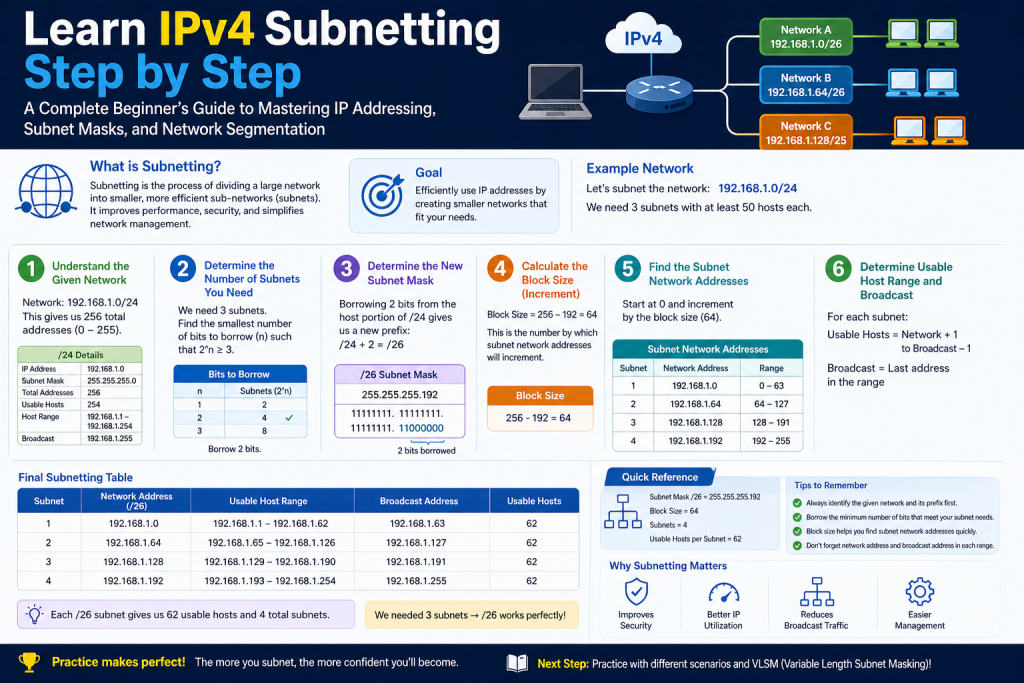
IPv4 subnetting is a core concept in computer networking that allows a single large network to be divided into smaller, more manageable segments known as subnets. This technique is widely used by network engineers and administrators to organize networks efficiently, improve performance, and conserve IP address space.
In the early days of the internet, IP addresses were distributed in large blocks without much consideration for actual usage. Organizations often received far more addresses than they needed, which resulted in significant waste. As the internet grew rapidly, this inefficient allocation led to a shortage of available IPv4 addresses. Subnetting was introduced as a practical solution to address this problem.
By dividing a large network into smaller sub-networks, subnetting ensures that IP addresses are used more effectively. It also enhances security by isolating different parts of a network and reduces unnecessary traffic by limiting broadcast domains. Understanding subnetting requires a strong foundation in how IP addresses are structured and how binary numbers work.
This part focuses on building that foundation so that more advanced subnetting concepts can be understood later.
Understanding the Structure of an IPv4 Address
An IPv4 address is a unique numerical identifier assigned to each device connected to a network. It enables devices to communicate with each other over the internet or within a private network.
An IPv4 address is written in a format called dotted decimal notation, which looks like this:
192.168.1.20
This format is designed for human readability, but internally, computers process IP addresses in binary form.
An IPv4 address consists of 32 bits. These bits are divided into four equal sections called octets. Each octet contains 8 bits, and the four octets are separated by dots in the decimal representation.
Each octet can represent values ranging from 0 to 255. This range exists because 8 bits can represent 256 different combinations, starting from 0 and ending at 255.
The highest possible IPv4 address is:
255.255.255.255
This address represents the maximum value that can be achieved when all bits in all four octets are set to 1.
Binary Representation of IPv4 Addresses
Although IPv4 addresses are written in decimal form for convenience, they are actually stored and processed in binary. Binary is a number system that uses only two digits: 0 and 1.
Each bit in an octet has a specific value depending on its position. These values follow a pattern based on powers of two:
128, 64, 32, 16, 8, 4, 2, 1
When a bit is set to 1, its corresponding value is included in the total. When it is set to 0, it is excluded.
For example, consider the binary number:
10000001
In this case, the first bit and the last bit are set to 1. This means the values 128 and 1 are included. Adding them together gives:
128 + 1 = 129
Another example is:
11111111
Here, all bits are set to 1. Adding all the values results in:
128 + 64 + 32 + 16 + 8 + 4 + 2 + 1 = 255
This is why the maximum value of an octet is 255.
Understanding this relationship between binary and decimal is essential for subnetting because subnet masks and network calculations rely heavily on binary operations.
Why Binary is Important in Networking
Binary plays a crucial role in networking because all data processed by computers is ultimately represented in binary form. When working with IP addresses and subnet masks, network devices use binary calculations to determine how data should be routed.
Subnetting involves manipulating bits within an IP address to define network boundaries. Without understanding binary, it becomes difficult to grasp how subnet masks work or how networks are divided.
Binary also helps in identifying patterns in subnet masks, calculating ranges of IP addresses, and determining the number of hosts that can exist within a subnet.
As you continue learning subnetting, you will rely on binary concepts repeatedly, so it is important to become comfortable with them early on.
Network Portion and Host Portion of an IP Address
Every IPv4 address is divided into two main parts: the network portion and the host portion.
The network portion identifies the specific network to which a device belongs. All devices on the same network share the same network portion.
The host portion identifies a specific device within that network. Each device must have a unique host portion to avoid conflicts.
A useful way to understand this concept is to compare it to a postal address. The network portion is similar to the city, state, and postal code, while the host portion is like the street name and house number. Many houses can exist within the same city, but each house has a unique address within that city.
In networking, devices within the same network must share the same network portion, but their host portions must be different so that each device can be uniquely identified.
Introduction to Subnet Masks
A subnet mask is used to determine which part of an IP address represents the network and which part represents the host.
A subnet mask looks similar to an IP address and is also written in dotted decimal format. For example:
255.255.255.0
Each octet in the subnet mask corresponds to an octet in the IP address. The subnet mask uses binary values to indicate which bits belong to the network.
In binary form, the subnet mask above looks like this:
11111111.11111111.11111111.00000000
The bits set to 1 represent the network portion, while the bits set to 0 represent the host portion.
In this example, the first three octets are part of the network, and the last octet is used for hosts.
CIDR Notation and Its Importance
CIDR, which stands for Classless Inter-Domain Routing, is a more compact way of representing subnet masks. Instead of writing the full subnet mask, CIDR notation uses a slash followed by the number of bits used for the network portion.
For example:
/24
This means that the first 24 bits of the IP address are used for the network, and the remaining bits are used for hosts.
CIDR notation simplifies network configuration and makes it easier to understand how large a network is. It is widely used in modern networking because it is more flexible than traditional class-based addressing.
Some commonly used CIDR values include /8, /16, and /24. These values represent large, medium, and small networks respectively.
Example of Network and Host Division
Consider the following IP address and subnet:
172.16.56.40 with a /24 subnet
In this case, the first 24 bits represent the network portion. This corresponds to the first three octets:
172.16.56
All devices in this network will share these three octets.
The last octet represents the host portion. This is where individual device addresses are assigned. Examples of host addresses in this network might include:
172.16.56.10
172.16.56.55
172.16.56.100
Each device has the same network portion but a different host portion.
Calculating the Number of Hosts
The number of hosts in a network depends on how many bits are available for the host portion.
In a /24 network, there are 8 bits available for hosts. This is because 32 total bits minus 24 network bits leaves 8 host bits.
The total number of possible combinations is calculated using powers of two:
2 raised to the number of host bits
For 8 host bits:
2^8 = 256
However, not all of these addresses can be used for devices. Two addresses are reserved:
The network address, which identifies the network itself
The broadcast address, which is used to send data to all devices on the network
This leaves:
256 minus 2 equals 254 usable host addresses
Benefits of Subnetting
Subnetting provides several important advantages in networking.
One major benefit is efficient use of IP addresses. Instead of assigning large address blocks that may go unused, subnetting allows networks to be divided into appropriately sized segments.
Another benefit is reduced network congestion. By creating smaller networks, broadcast traffic is limited to fewer devices, which improves overall performance.
Subnetting also enhances security. Different departments or groups within an organization can be placed on separate subnets, making it easier to control access between them.
In addition, subnetting improves network management. Smaller networks are easier to monitor, troubleshoot, and maintain.
Borrowing Bits for Subnetting
Subnetting works by taking bits from the host portion and using them as additional network bits. This process is known as borrowing bits.
For example, a /24 network has 8 host bits. If some of these bits are borrowed, the number of network bits increases, creating more subnets.
However, borrowing bits reduces the number of available host addresses in each subnet. This creates a trade-off between the number of subnets and the number of hosts per subnet.
For instance, changing a network from /24 to /26 means that two bits have been borrowed. This results in more subnets but fewer hosts in each subnet.
Understanding this balance is key to designing efficient networks.
Binary Patterns in Subnet Masks
Subnet masks follow predictable patterns in binary. As more bits are borrowed for the network, the number of consecutive 1s increases.
For example:
/24 corresponds to three full octets of 1s and one octet of 0s
/25 adds one more network bit in the fourth octet
/26 adds two network bits in the fourth octet
/27 adds three network bits in the fourth octet
These patterns are important because they determine how IP address ranges are divided into subnets.
Recognizing these patterns makes it easier to calculate subnet ranges and understand how networks are structured.
Introduction to Advanced Subnetting Concepts
After understanding the basic structure of IPv4 addresses, binary representation, and the concept of dividing an address into network and host portions, the next step is to explore how subnetting is applied in real-world networking. This involves learning about subnet masks in greater depth, understanding address classes, and calculating how many subnets and hosts can exist within a network.
Subnetting is not just about splitting networks randomly. It is a structured process that follows specific mathematical and logical rules. These rules allow network engineers to design systems that are efficient, scalable, and organized.
In this part, the focus is on how subnet masks work in detail, how IP address classes influence subnetting, and how to calculate the number of hosts and subnets available.
Understanding Subnet Masks in Detail
A subnet mask determines how an IP address is divided into network and host portions. It acts as a filter that separates these two parts.
A subnet mask is also a 32-bit number, just like an IP address. It is written in dotted decimal format and consists of a sequence of 1s followed by a sequence of 0s in binary form.
The rule is simple:
Bits set to 1 represent the network portion
Bits set to 0 represent the host portion
For example, the subnet mask:
255.255.255.0
In binary form becomes:
11111111.11111111.11111111.00000000
This means that the first 24 bits are used for the network, and the last 8 bits are used for hosts.
Subnet masks always have consecutive 1s followed by consecutive 0s. They never mix randomly. This consistency makes it possible to interpret them quickly.
CIDR Notation and Flexibility
CIDR notation simplifies subnet masks by representing only the number of network bits. Instead of writing the full mask, a slash followed by a number is used.
For example:
/24 means 24 bits are used for the network
/16 means 16 bits are used for the network
/8 means 8 bits are used for the network
CIDR is widely used because it allows flexible allocation of IP addresses. Unlike older class-based systems, CIDR does not restrict networks to fixed sizes. This flexibility is one of the reasons why subnetting is so powerful.
With CIDR, network administrators can design networks that exactly match their requirements without wasting addresses.
Incremental Changes in Subnet Masks
As bits are borrowed from the host portion, the subnet mask changes incrementally. These changes follow a predictable pattern in the last octet.
The values typically increase as follows:
128, 192, 224, 240, 248, 252
Each of these values represents additional network bits in the final octet.
For example:
255.255.255.128 corresponds to /25
255.255.255.192 corresponds to /26
255.255.255.224 corresponds to /27
Each step reduces the number of host bits and increases the number of subnets.
Understanding these increments is important because they determine the size of each subnet and the range of IP addresses within it.
Concept of Block Size
Block size is a key concept in subnetting. It determines how IP addresses are grouped into subnets.
Block size is calculated by subtracting the subnet mask value in the relevant octet from 256.
For example:
If the subnet mask is 255.255.255.224, the block size is:
256 minus 224 equals 32
This means each subnet increases in increments of 32.
So the subnet ranges would be:
0 to 31
32 to 63
64 to 95
96 to 127
128 to 159
160 to 191
192 to 223
224 to 255
Each range represents a separate subnet.
Block size helps quickly identify which subnet a particular IP address belongs to.
Understanding IP Address Classes
Before CIDR became standard, IP addresses were divided into classes. These classes defined how many bits were used for the network and how many were used for hosts.
There are five classes of IP addresses, but only three are commonly used for subnetting:
Class A
Class B
Class C
Each class has a specific range of IP addresses and a default subnet mask.
Class A Addressing
Class A addresses are designed for very large networks. They have a large number of host addresses available.
The range for Class A addresses is:
1.0.0.0 to 127.0.0.0
In Class A, the default subnet mask is:
255.0.0.0 or /8
This means the first 8 bits are used for the network, and the remaining 24 bits are used for hosts.
This allows for a very large number of devices within a single network.
However, because of their size, Class A networks are rarely used in their original form today. Instead, they are often subnetted into smaller networks.
Class B Addressing
Class B addresses are used for medium-sized networks.
The range for Class B addresses is:
128.0.0.0 to 191.255.0.0
The default subnet mask is:
255.255.0.0 or /16
This means the first 16 bits are used for the network, and the remaining 16 bits are used for hosts.
Class B networks provide a balance between the number of networks and the number of hosts per network.
Class C Addressing
Class C addresses are used for smaller networks.
The range for Class C addresses is:
192.0.0.0 to 223.255.255.0
The default subnet mask is:
255.255.255.0 or /24
This means the first 24 bits are used for the network, and the remaining 8 bits are used for hosts.
Class C networks are commonly used in home and small business environments.
Limitations of Class-Based Addressing
Class-based addressing was useful in the early days of networking, but it had several limitations.
One major issue was inefficiency. Organizations often received address blocks that were either too large or too small for their needs.
For example, a company that needed a few hundred IP addresses might receive a Class B network, which provides tens of thousands of addresses. Most of these addresses would go unused.
CIDR was introduced to solve this problem by allowing networks to be divided more precisely.
Subnetting Within Classes
Even though class-based addressing is no longer strictly used, understanding it helps explain how subnetting works.
Subnetting allows you to take a network from any class and divide it into smaller networks.
For example, a Class C network with a /24 mask can be subnetted into smaller networks such as /25, /26, or /27.
Each time bits are borrowed, the number of subnets increases, but the number of hosts per subnet decreases.
This process allows network designers to create multiple smaller networks within a larger one.
Calculating Number of Subnets
The number of subnets depends on how many bits are borrowed from the host portion.
The formula is:
2 raised to the number of borrowed bits
For example:
If 2 bits are borrowed:
2^2 = 4 subnets
If 3 bits are borrowed:
2^3 = 8 subnets
This formula helps determine how many separate networks can be created.
Calculating Number of Hosts
The number of hosts in each subnet depends on the number of remaining host bits.
The formula is:
2 raised to the number of host bits minus 2
The subtraction of 2 accounts for:
The network address
The broadcast address
For example:
If 5 bits are available for hosts:
2^5 = 32 total addresses
32 minus 2 equals 30 usable hosts
This formula is essential for determining how many devices can be placed in each subnet.
Trade-Off Between Subnets and Hosts
Subnetting always involves a trade-off between the number of subnets and the number of hosts per subnet.
When more bits are borrowed:
The number of subnets increases
The number of hosts per subnet decreases
When fewer bits are borrowed:
The number of subnets decreases
The number of hosts per subnet increases
Network designers must balance these factors based on their needs.
Real-World Application of Subnetting
In real networks, subnetting is used to organize devices into logical groups.
For example:
A company may create separate subnets for different departments such as administration, sales, and IT.
Each department operates within its own subnet, reducing traffic and improving security.
Subnetting is also used in large data centers, internet service providers, and cloud environments to efficiently manage large numbers of devices.
Recognizing Subnet Patterns
As you practice subnetting, you will start to recognize patterns in subnet masks and IP ranges.
For example:
A /25 subnet divides a network into two equal parts
A /26 subnet divides it into four parts
A /27 subnet divides it into eight parts
These patterns make it easier to quickly calculate subnet ranges without relying on complex calculations.
Introduction to Practical Subnetting
After learning the structure of IPv4 addresses, binary fundamentals, subnet masks, and address classes, the next step is applying these concepts in real scenarios. Practical subnetting is where theory turns into skill. It involves determining subnet ranges, identifying network and broadcast addresses, and figuring out which subnet a given IP address belongs to.
At first glance, subnetting can seem complicated because it requires both logical thinking and familiarity with binary patterns. However, once you understand the process and practice it a few times, it becomes much faster and more intuitive. Many network professionals can perform subnet calculations in seconds without writing anything down.
This part focuses on breaking down subnetting into simple steps and demonstrating how to solve real examples.
Understanding the Subnetting Process
Subnetting follows a clear and repeatable process. Every problem can be solved by following the same steps:
First, identify the subnet mask or CIDR notation
Second, determine the block size
Third, list the subnet ranges
Fourth, find where the given IP address fits
Fifth, identify the network address, broadcast address, and usable host range
By following this structure, you can solve any subnetting question with consistency and accuracy.
Example IP Address for Practice
Consider the IP address:
43.17.255.71/27
This example will be used to demonstrate the full subnetting process step by step.
Before doing any calculations, you should extract key information from the address.
The first octet is 43, which falls within the Class A range. Although class-based addressing is not strictly required anymore, it still helps provide context.
The CIDR notation /27 indicates that 27 bits are used for the network portion, leaving 5 bits for hosts.
Determining the Subnet Mask
The CIDR value can be converted into a subnet mask.
For /27, the subnet mask is:
255.255.255.224
This means that the first three octets are fully dedicated to the network, and the fourth octet is partially used for the network and partially for hosts.
In binary, the last octet looks like this:
11100000
The first three bits are used for the network, and the remaining five bits are used for hosts.
Calculating the Block Size
The block size is one of the most important values in subnetting. It determines how the IP address range is divided.
The formula for block size is:
256 minus the subnet mask value in the relevant octet
In this case:
256 minus 224 equals 32
This means each subnet increases in increments of 32 in the last octet.
Listing the Subnet Ranges
Using the block size of 32, you can generate all possible subnet ranges in the last octet.
The ranges start at 0 and increase by 32 each time:
0
32
64
96
128
160
192
224
Each of these values represents the starting point of a subnet.
From these starting points, you can determine the full range of each subnet.
For example:
0 to 31
32 to 63
64 to 95
96 to 127
128 to 159
160 to 191
192 to 223
224 to 255
Each range is one subnet.
Identifying the Correct Subnet
Now, determine where the IP address 43.17.255.71 falls within these ranges.
The last octet is 71.
Looking at the ranges:
64 to 95 contains 71
This means the subnet address is:
43.17.255.64
This is the network address for the subnet.
Finding the Broadcast Address
The broadcast address is the last address in the subnet range.
For the range 64 to 95, the broadcast address is:
43.17.255.95
This address is used to send data to all devices within the subnet.
Determining the Usable Host Range
The usable host range lies between the network and broadcast addresses.
The first usable address is one greater than the network address:
43.17.255.65
The last usable address is one less than the broadcast address:
43.17.255.94
These are the addresses that can be assigned to devices.
Calculating Number of Hosts
The number of hosts is determined by the number of host bits.
For a /27 network, there are 5 host bits.
The total number of addresses is:
2 raised to the power of 5 equals 32
Subtracting the network and broadcast addresses:
32 minus 2 equals 30 usable hosts
This means each subnet can support up to 30 devices.
Visualizing Subnetting in Binary
To fully understand subnetting, it helps to visualize what is happening in binary.
The last octet of the subnet mask is:
11100000
This means:
The first three bits are fixed for the network
The last five bits can change for hosts
Each subnet is created by incrementing the network bits.
This is why the block size is 32, because the host bits allow 32 combinations.
Understanding this binary structure helps explain why subnet ranges follow predictable patterns.
Common Subnet Sizes and Patterns
As you practice subnetting, certain patterns become easy to recognize.
A /25 network has a block size of 128
A /26 network has a block size of 64
A /27 network has a block size of 32
A /28 network has a block size of 16
A /29 network has a block size of 8
A /30 network has a block size of 4
These values are commonly used in networking, so memorizing them can significantly speed up calculations.
Avoiding Common Mistakes
Subnetting errors often occur due to small misunderstandings. Some common mistakes include:
Confusing network and broadcast addresses with usable host addresses
Forgetting to subtract 2 when calculating usable hosts
Using the wrong octet for block size calculations
Misidentifying the subnet range
To avoid these mistakes, always follow the step-by-step process and double-check your calculations.
Practical Use Cases of Subnetting
Subnetting is widely used in real-world networking environments.
In a corporate network, different departments may be placed in separate subnets. This helps control traffic and improve security.
In a data center, subnetting allows efficient distribution of IP addresses across servers and services.
Internet service providers use subnetting to allocate address blocks to customers.
Subnetting is also used in cloud environments, where virtual networks are divided into subnets for better organization and control.
Speed Techniques for Subnetting
With practice, subnetting can be performed quickly using mental math.
One effective technique is memorizing block sizes and recognizing patterns in subnet ranges.As you continue working with subnetting problems, you will begin to see that many calculations repeat the same logic, which makes it easier to solve them without writing down every step.
A strong approach is to focus on the commonly used subnet masks and their corresponding block sizes. When you repeatedly use values like 128, 64, 32, 16, and 8, they become familiar, and you can instantly identify subnet ranges. For example, when you see a block size of 32, you automatically know the ranges will increase in steps of 32. This removes the need for detailed calculations and speeds up the process significantly.
Another helpful method is to train your mind to quickly locate where an IP address falls within a subnet range. Instead of calculating all possible subnets, you can estimate and narrow down the correct range by comparing the IP address with known increments. This skill improves with repetition and helps reduce errors.
Practicing mental shortcuts also plays an important role. For instance, knowing that the last address in a subnet is always one less than the next subnet’s starting point allows you to quickly determine broadcast addresses. Similarly, recognizing that the first address in a range is the network address helps you identify usable host ranges faster.
Over time, consistent practice builds confidence and speed. What may seem complex at first gradually becomes simple and automatic. By regularly solving different subnetting problems and reinforcing these techniques, you develop the ability to perform calculations mentally with accuracy and efficiency, which is essential in both academic and professional networking environments.
Another technique is focusing only on the changing octet instead of analyzing the entire IP address.
For example, in a /27 network, only the last octet changes. The first three octets remain constant.
By narrowing your focus, you can solve problems faster and with less effort.
Transition to Advanced Networking Concepts
Once you are comfortable with IPv4 subnetting, you can move on to more advanced topics.
These include variable length subnet masking, which allows different subnet sizes within the same network, and IPv6 addressing, which uses a completely different structure.
Variable length subnet masking, often abbreviated as VLSM, is an advanced subnetting technique that builds on the basic concepts you have already learned. Instead of dividing a network into equal-sized subnets, VLSM allows you to create subnets of different sizes based on actual requirements. This is extremely useful in real-world scenarios where different departments or systems need different numbers of IP addresses. For example, a large department may require hundreds of IP addresses, while a smaller team may only need a few dozen. With traditional subnetting, both would receive the same size subnet, which can lead to wasted address space. VLSM solves this problem by allocating only as many addresses as needed, improving overall efficiency.
Using VLSM requires careful planning. Network administrators must analyze how many hosts each subnet will need and then assign subnet sizes accordingly. Typically, the largest subnet is created first, followed by smaller ones. This ensures that address space is used effectively and prevents fragmentation. Although VLSM introduces more complexity compared to fixed-length subnetting, it provides much greater flexibility and is widely used in modern network design.
Another important concept that builds on subnetting is route summarization. This technique involves combining multiple smaller subnets into a single, larger network representation. Route summarization helps reduce the size of routing tables, which improves the performance of routers and simplifies network management. It works by identifying common bits among multiple network addresses and representing them as a single summarized route. This is particularly useful in large-scale networks where managing individual routes for every subnet would be inefficient.
As networks continue to grow, the limitations of IPv4 become more apparent. The most significant limitation is the shortage of available IP addresses. IPv4 uses a 32-bit address space, which provides approximately 4.3 billion unique addresses. While this may seem like a large number, the rapid expansion of internet-connected devices has nearly exhausted this pool.
To address this issue, IPv6 was introduced. IPv6 uses a 128-bit address space, which provides an almost unlimited number of addresses. This allows for the continued growth of the internet without the risk of running out of IP addresses. IPv6 addresses are written in hexadecimal format and separated by colons, making them look very different from IPv4 addresses. Although the format is more complex, it is designed to be more scalable and efficient.
IPv6 also introduces several improvements beyond just a larger address space. It simplifies address configuration, improves routing efficiency, and enhances security features. For example, IPv6 includes built-in support for IPsec, which provides encryption and authentication for network traffic. These features make IPv6 more suitable for modern networking needs.
Learning these advanced topics expands your understanding of how networks are designed and managed in real-world environments. While IPv4 subnetting provides the foundation, techniques like VLSM and concepts like IPv6 take your knowledge to the next level. As you continue to study networking, you will find that these concepts are interconnected and essential for building efficient, scalable, and secure networks.
Understanding subnetting also prepares you for working with routing protocols, firewalls, and network security systems.
It is a foundational skill that supports many other areas of networking.
Conclusion
IPv4 subnetting is a fundamental skill that every network professional must understand. It begins with learning how IP addresses are structured and how binary numbers work. From there, subnet masks and CIDR notation define how networks are divided.
In practical subnetting, the process involves determining the subnet mask, calculating the block size, identifying subnet ranges, and finding the correct network, broadcast, and host addresses.
Although it may seem complex at first, subnetting becomes much easier with practice. Recognizing patterns, understanding binary logic, and following a structured approach can significantly improve accuracy and speed.
Subnetting plays a critical role in modern networking by enabling efficient use of IP addresses, reducing network congestion, improving security, and simplifying management.
By mastering these concepts, you build a strong foundation for more advanced networking topics and real-world applications.
Continue exploring the technologies and certification concepts that matter most to you.