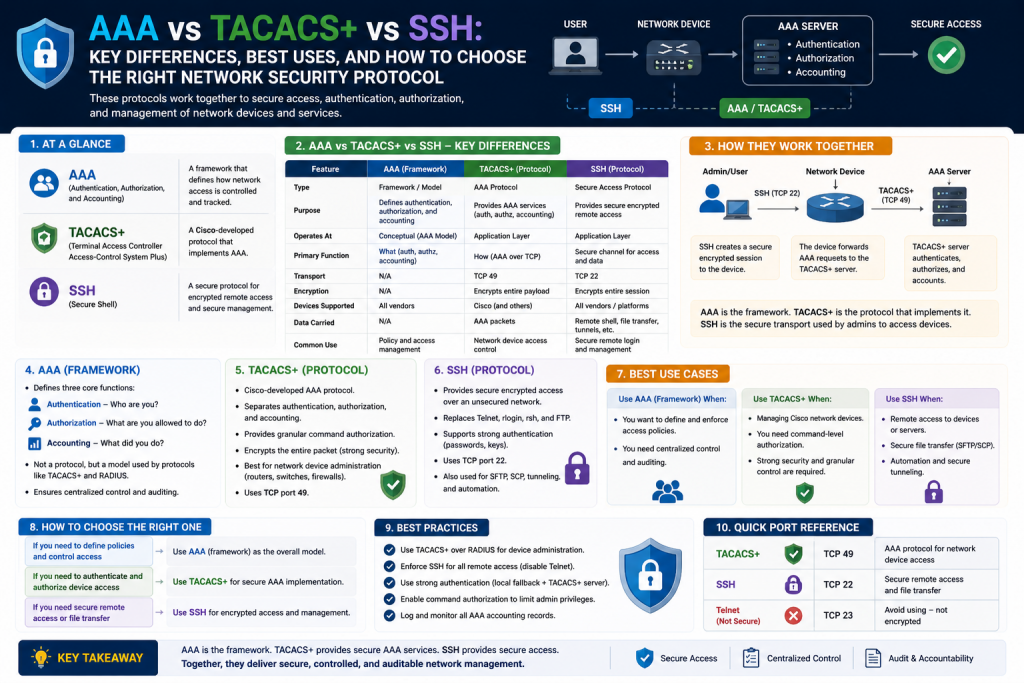
In today’s digital infrastructure, securing access to routers, switches, firewalls, and other network devices is no longer optional. Every enterprise network, whether small or globally distributed, depends on secure administrative control. Unauthorized access to infrastructure can lead to configuration sabotage, data breaches, operational downtime, and compliance failures. Because of this, organizations rely on layered security mechanisms to control who can access devices, what they can do once connected, and how their actions are recorded.
Three foundational technologies dominate this space: Authentication, Authorization, and Accounting (AAA), TACACS+ (Terminal Access Controller Access-Control System Plus), and SSH (Secure Shell). While these terms are often mentioned together, each serves a distinct purpose. Understanding how they interact is critical for network engineers, cybersecurity professionals, and system administrators.
AAA acts as the policy framework. TACACS+ serves as a protocol that delivers centralized AAA services. SSH provides the secure encrypted channel that protects administrative sessions across networks. Together, they create a comprehensive security model for infrastructure management.
A network without these controls is vulnerable. Devices configured with only local passwords, open Telnet access, or inconsistent access policies create operational and security risks. By implementing AAA with TACACS+ over SSH, administrators gain centralized control, encrypted communications, role-based permissions, and detailed audit trails.
This guide explores the foundations of AAA, TACACS+, and SSH, explains how they work individually and together, and establishes when each technology should be used in real-world environments.
What AAA Really Means in Networking
AAA stands for Authentication, Authorization, and Accounting. Although often treated as a single concept, each component addresses a different aspect of access security.
Authentication answers the question: Who are you?
This is the process of verifying identity before access is granted. A user may provide a username and password, digital certificate, token, or multi-factor authentication. Authentication ensures that only verified users can attempt to access network devices.
Authorization answers the question: What are you allowed to do?
After identity is confirmed, authorization determines permissions. For example, one network engineer may have full configuration rights on routers, while a junior technician may only have read-only access. Authorization allows organizations to enforce least privilege access and prevent unauthorized changes.
Accounting answers the question: What did you do?
Accounting logs session activity. It records login times, commands executed, configuration changes, and logout events. This information is essential for audits, troubleshooting, incident response, and compliance.
Together, AAA transforms security from simple password protection into a full access governance system.
Without AAA:
- Passwords may be shared
- User actions may go untracked
- Permissions may be excessive
- Compliance standards may be violated
- Troubleshooting may become difficult
With AAA:
- Identity is verified
- Access is controlled
- Actions are logged
- Policies are centralized
- Security becomes scalable
AAA is not a protocol itself. Rather, it is a framework implemented through protocols such as TACACS+ or RADIUS.
Why Centralized Access Control Matters
In small environments, administrators sometimes configure local usernames and passwords directly on each device. While manageable for a few routers, this approach quickly becomes inefficient and insecure at scale.
Imagine a company with:
- 500 routers
- 300 switches
- Multiple firewalls
- Distributed branch offices
- Rotating IT personnel
If each device stores local credentials independently:
- Password changes become inconsistent
- User removal becomes difficult
- Policy enforcement becomes fragmented
- Insider threats increase
- Audit visibility decreases
Centralized access control solves these problems by moving authentication and authorization decisions to a dedicated server.
Benefits include:
Single Point of Policy Management
Administrators define policies once rather than on every device.
Rapid User Provisioning and Deprovisioning
When employees join or leave, access changes can occur immediately.
Consistent Security Standards
Password complexity, MFA, and privilege levels remain uniform.
Detailed Monitoring
Every login and command can be tracked centrally.
Reduced Human Error
Fewer manual configurations mean fewer mistakes.
This is where TACACS+ becomes especially valuable.
What TACACS+ Is and Why It Was Developed
TACACS+ stands for Terminal Access Controller Access-Control System Plus. It was developed to improve remote administrative security for network infrastructure, especially in enterprise environments.
Its origins trace back to earlier remote access control methods used in large networks. Older TACACS versions provided basic centralized authentication, but they lacked modern encryption, flexibility, and compatibility needs.
TACACS+ introduced major improvements:
- Full packet encryption
- Separate AAA functions
- Command-by-command authorization
- Better administrative control
- Reliable TCP transport
This made TACACS+ particularly effective for managing administrative access to network hardware.
TACACS+ became especially common in environments where:
- Cisco infrastructure dominates
- Administrative command control is critical
- Compliance auditing is required
- Centralized device administration is a priority
Unlike simpler authentication systems, TACACS+ is built specifically for administrative governance rather than general user network access.
Core Functions of TACACS+
TACACS+ operates using a client-server model.
Client:
The router, switch, firewall, or network device requesting authentication.
Server:
The centralized AAA server validating credentials and policies.
The process generally works like this:
- A user attempts to access a router via SSH
- The router sends credentials to the TACACS+ server
- The server verifies identity
- The server checks permissions
- Access is granted or denied
- Commands may be individually authorized
- Session activity is logged
This process provides much stronger security than local passwords alone.
Full Packet Encryption Advantage
One of TACACS+’s biggest security strengths is that it encrypts the full payload of communication between device and server.
This includes:
- Username
- Password
- Authorization requests
- Command execution data
- Accounting details
By encrypting more than just credentials, TACACS+ significantly reduces the chance of administrative data exposure.
This is particularly important in:
- Large enterprise networks
- Financial institutions
- Government systems
- Healthcare organizations
- Regulated industries
Because administrative commands themselves may reveal infrastructure details, encrypting entire exchanges enhances operational secrecy.
Authentication vs Authorization Separation
A major strength of TACACS+ is its separation of AAA functions.
For example:
A user may authenticate successfully with valid credentials but still be restricted from certain commands.
This means:
- Help desk staff can reset ports
- Junior admins can view configs
- Senior engineers can modify routing
- Security teams can audit logs
This granularity is crucial.
Instead of “all or nothing” admin access, TACACS+ supports role-based control.
Example:
A network operator logs in successfully but is denied access to:
- reload
- write erase
- configure terminal
This prevents accidents and insider misuse.
Why SSH Is Essential
AAA and TACACS+ control identity and permissions, but they do not inherently secure the transport session itself. That role belongs to SSH.
SSH, or Secure Shell, is the encrypted communication protocol used to remotely manage devices securely.
Before SSH, Telnet was commonly used.
Telnet problems:
- Plaintext passwords
- Unencrypted sessions
- Packet sniffing risk
- Session hijacking vulnerability
SSH solves this by encrypting:
- Login credentials
- Terminal sessions
- Configuration commands
- Device responses
SSH effectively creates a secure tunnel between administrator and device.
How SSH Works in Administrative Security
When an administrator connects to a router using SSH:
- The client requests a secure session
- RSA or similar cryptographic keys establish trust
- Encryption parameters are negotiated
- Credentials are securely transmitted
- Administrative access begins
SSH commonly uses:
- RSA keys
- Public/private key pairs
- Secure ciphers
- Integrity checks
SSH protects management traffic from interception, especially across insecure networks.
Without SSH, even strong AAA policies could be undermined if credentials travel unencrypted.
AAA, TACACS+, and SSH Working Together
Think of these technologies as layers:
SSH = Secure transport tunnel
AAA = Security policy model
TACACS+ = Centralized protocol implementing AAA
Combined workflow:
- User opens SSH session
- Device encrypts communication
- AAA framework requests validation
- TACACS+ server authenticates user
- TACACS+ server authorizes actions
- TACACS+ server logs activity
This creates:
- Confidentiality
- Identity assurance
- Policy enforcement
- Auditability
This combination is considered best practice for administrative network security.
Real-World Example of Security Without AAA
Consider a branch router with:
- Local admin/admin password
- Telnet enabled
- No command logging
- Shared credentials
Risks:
- Password theft
- No accountability
- Full privilege misuse
- Difficult offboarding
- Regulatory non-compliance
Now compare that with:
- SSH only
- TACACS+ authentication
- AAA command authorization
- Accounting logs
- Backup local admin
Results:
- Secure login
- Central policy
- Role separation
- Full auditing
- Operational resilience
When to Use Local Authentication
Local authentication still has value, but mainly as backup.
Use cases:
- TACACS+ outage fallback
- Emergency recovery
- Isolated branch deployment
- Initial device staging
Best practice:
Always configure at least one local admin account even when using centralized AAA.
This prevents lockout if:
- AAA server fails
- WAN links break
- TACACS+ keys mismatch
- Misconfigurations occur
The local account should be:
- Strongly protected
- Rarely used
- Regularly audited
When TACACS+ Is the Best Choice
TACACS+ is ideal when:
- Device administration is the focus
- Command authorization matters
- Cisco-heavy environments exist
- Compliance logging is required
- Administrative segmentation is necessary
Examples:
- Enterprise networking teams
- Data centers
- Government agencies
- Managed service providers
- Security operations centers
When SSH Alone May Be Enough
SSH by itself may be sufficient in:
- Home labs
- Very small businesses
- Temporary deployments
- Isolated devices
- Training environments
However, SSH alone does not centralize policy or logging. It secures transport but not governance.
Security Best Practices for Deployment
To maximize effectiveness:
- Disable Telnet completely
- Use SSH version 2
- Generate strong RSA keys
- Enable AAA new-model
- Use TACACS+ with fallback local auth
- Restrict management interfaces
- Audit accounting logs
- Use least privilege roles
- Rotate shared secrets
- Test failover regularly
Common Mistakes to Avoid
Frequent implementation errors include:
- No local fallback account
- Weak TACACS+ shared secret
- SSH without AAA
- AAA without accounting
- Overprivileged users
- Telnet left enabled
- No command authorization
- Inconsistent server redundancy
Each of these can weaken otherwise strong architecture.
The Strategic Role of AAA in Cybersecurity
AAA is not merely a networking convenience. It is a cybersecurity control.
It supports:
- Zero Trust principles
- Insider threat reduction
- Compliance frameworks
- Forensic investigations
- Operational governance
Many security incidents are not caused by external hackers alone. Misuse of legitimate credentials is a major threat. AAA helps address this through identity, control, and accountability.
Introduction to Zero-Security Device Deployment
Deploying a brand-new router into an existing enterprise network is one of the most security-sensitive tasks a network administrator can perform. A newly installed device often begins with minimal or no security controls. It may have default settings, open administrative access, no centralized authentication, and no encryption for remote management. In this state, the router represents a vulnerable entry point into the network.
If connected without proper hardening, even briefly, an unsecured router can become an attack vector. Unauthorized users may exploit weak defaults, intercept management traffic, or gain administrative access before enterprise policies are applied. This is why security must be established immediately during deployment.
The objective is straightforward: transform a router from Security Level Zero into a trusted, centrally managed device integrated with organizational AAA infrastructure using TACACS+ and SSH.
This process involves:
- Establishing secure privileged access
- Creating emergency fallback credentials
- Configuring domain identity
- Generating encryption keys
- Enabling SSH
- Activating AAA
- Connecting to TACACS+ servers
- Defining authentication policies
- Restricting management protocols
- Validating functionality
When properly configured, the router becomes:
- Centrally authenticated
- Command-authorized
- Audit logged
- SSH protected
- Operationally resilient
This section explores each stage in detail.
Secure Immediate Administrative Access
The first priority when configuring a new router is securing privileged EXEC mode. This prevents unauthorized users from gaining full administrative control.
The enable secret command establishes an encrypted password for privileged access.
Example:
enable secret [strong_password]
This secret is significantly more secure than older enable password methods because it uses stronger encryption.
Best practices for privileged credentials:
- Minimum 12–16 characters
- Mix uppercase, lowercase, numbers, and symbols
- Avoid dictionary words
- Avoid reuse across systems
- Rotate periodically
This credential serves as foundational protection during initial setup before centralized AAA takes over.
Without this step, anyone with console or remote access may gain unrestricted control.
Why Local Backup Accounts Are Essential
Even in centralized AAA environments, a local administrative account is mandatory for operational resilience.
Why?
Because centralized systems can fail.
Possible failures:
- TACACS+ server outage
- WAN disconnection
- Shared secret mismatch
- Routing issues
- DNS problems
- Firewall blocking
- Misconfigured AAA policy
If no local fallback exists, administrators can lock themselves out of the router completely.
A local user account with privilege level 15 ensures emergency access.
Example:
username [admin_name] privilege 15 secret [strong_password]
This account should:
- Be used only when AAA is unavailable
- Have a highly secure password
- Be documented securely
- Be monitored
- Be tested periodically
This backup strategy prevents outages from becoming full administrative crises.
Configuring Device Identity
To support SSH, the router must establish a domain identity.
This is done using:
ip domain-name [organization_name]
Although simple, this step is critical because the domain name combines with the hostname to generate cryptographic key identity.
For example:
Hostname: R1
Domain: company.local
This creates:
R1.company.local
This identity becomes associated with RSA key generation.
Without domain configuration:
- SSH key generation may fail
- Secure management setup cannot proceed properly
Device identity also improves certificate alignment and naming consistency across infrastructure.
Hostname Standardization and Administrative Clarity
Before broader deployment, routers should also receive standardized hostnames.
Example:
hostname Branch-RTR-01
Strong naming conventions improve:
- Monitoring visibility
- Log clarity
- Troubleshooting
- Automation
- Inventory management
Poor naming leads to confusion, especially in large infrastructures.
Recommended naming patterns may include:
- Site code
- Function
- Sequence number
Examples:
- NYC-CORE-01
- LHR-EDGE-02
- BRANCH-FW-03
Administrative clarity is a security feature because confusion often creates mistakes.
Generating RSA Keys for SSH
SSH depends on asymmetric cryptography.
The router generates public/private RSA keys:
crypto key generate rsa
Administrators are often prompted to define modulus size.
Recommended:
2048 bits minimum
While smaller sizes like 1024 may function, they are less secure by modern standards.
RSA keys serve several purposes:
- Session encryption
- Identity validation
- Secure negotiation
- Key exchange
The private key remains on the router.
The public key supports encrypted communication.
Without RSA keys:
- SSH cannot function
- Telnet may remain the only remote option
- Security posture remains weak
Key generation is a major transition point from unsecured management to encrypted administration.
Enabling SSH Properly
Once RSA keys are created, SSH can be activated.
Security best practices:
- Use SSH version 2 only
- Disable SSH version 1
- Restrict idle sessions
- Limit retries
- Configure timeouts
SSH version 2 offers:
- Better encryption
- Improved integrity
- More secure key exchange
SSH secures:
- Usernames
- Passwords
- Commands
- Responses
- Session data
Without SSH, remote management traffic could be intercepted using packet sniffing tools.
Why Telnet Must Be Disabled
Telnet is fundamentally insecure because it transmits data in plaintext.
Risks include:
- Password theft
- Credential replay
- Session hijacking
- Network sniffing
- Insider surveillance
Even on internal networks, Telnet creates avoidable exposure.
Best practice:
transport input ssh
This ensures only SSH connections are permitted.
Disabling Telnet is one of the most important hardening actions for any network device.
Activating AAA on the Router
AAA is not active by default on many devices.
The command:
aaa new-model
This fundamentally changes how authentication is handled.
Enabling AAA allows:
- External authentication
- Authorization controls
- Accounting logs
- Method lists
- Policy centralization
Once AAA is active, the router can integrate with centralized TACACS+ infrastructure.
This is a pivotal step because it transitions security from isolated local control to enterprise governance.
Understanding TACACS+ Server Integration
After AAA is enabled, the router must know:
- Where the TACACS+ server is
- What shared secret to use
Configuration typically includes:
- TACACS+ server IP
- Shared key
The shared key is critical.
It:
- Encrypts communication
- Establishes trust
- Prevents unauthorized server impersonation
Weak shared secrets create risk.
Best practices:
- Long random strings
- Rotation schedules
- Restricted knowledge
- Secure storage
In enterprise environments, multiple TACACS+ servers are often configured for redundancy.
Benefits:
- High availability
- Failover support
- Geographic resilience
Creating Method Lists
Method lists define how authentication should occur.
Example logic:
- Try TACACS+
- If unavailable, use local credentials
This design balances:
- Centralized control
- Reliability
- Business continuity
Without fallback:
AAA outages may cause total lockout.
Without TACACS+ priority:
Local-only access undermines governance.
Method lists can also be customized for:
- Console access
- VTY lines
- Enable mode
- Specific user groups
This flexibility allows security architecture tailored to operational requirements.
Applying AAA to Administrative Lines
Defining AAA policies is not enough. They must be applied to access points.
Administrative access paths include:
- Console
- VTY (virtual terminal)
- AUX ports
VTY lines are especially important for SSH.
Applying authentication policies ensures every login request follows AAA standards.
This prevents inconsistent security between access channels.
Restricting Management Access to Approved Interfaces
Enterprise security often requires management traffic to enter only through designated interfaces.
For example:
- Dedicated management VLAN
- Secure admin subnet
- Out-of-band network
Restricting management access reduces attack surface.
Benefits:
- Fewer exposed pathways
- Better firewall control
- Easier monitoring
- Reduced unauthorized attempts
Control plane protection helps ensure:
Only approved protocols on approved interfaces.
Control Plane Security
The control plane governs administrative and management traffic.
By hardening it, administrators protect:
- SSH
- Routing protocols
- Management services
Control plane restrictions may:
- Deny Telnet
- Deny HTTP
- Permit SSH only
- Limit source networks
This creates a smaller, more defensible management footprint.
Testing TACACS+ Connectivity Before Full Deployment
Before relying fully on centralized AAA, test server communication.
Validation ensures:
- Reachability
- Shared secret accuracy
- Username functionality
- Authentication policy success
Testing before deployment prevents accidental lockout.
Areas to verify:
- IP reachability
- Routing path
- Server response
- Credential validity
- Failover logic
This proactive approach reduces implementation risk.
SSH Client Validation
After AAA is functioning, real-world testing should occur from an administrative workstation.
Common checks:
- Ping gateway
- Confirm routing
- Launch SSH client
- Accept fingerprint
- Enter TACACS+ credentials
- Confirm access level
- Test authorization
This confirms:
- Encryption
- Authentication
- Authorization
- Usability
First-login fingerprint verification is important because it helps validate host identity and detect potential interception.
Role-Based Access Verification
Testing should include multiple user roles.
Examples:
- Read-only user
- Limited operator
- Full admin
This ensures TACACS+ authorization policies work correctly.
If all users have full access, role segmentation has failed.
Least privilege is a security necessity.
Common Deployment Mistakes
Frequent errors include:
- No local backup
- Wrong shared secret
- DNS mistakes
- RSA too weak
- Telnet enabled
- AAA enabled before local backup
- Method list misapplied
- No testing
- Overprivileged accounts
Each can create security gaps or operational lockouts.
Importance of Documentation
Every deployment should document:
- Local backup procedures
- TACACS+ server details
- Naming conventions
- Access restrictions
- Recovery methods
- Change history
Documentation supports:
- Troubleshooting
- Team transitions
- Compliance
- Disaster recovery
Undocumented security often becomes fragile security.
Scaling the Deployment Model
Once a secure deployment process is standardized, organizations can template configurations for:
- Branch routers
- Distribution switches
- Firewalls
- Edge appliances
Automation tools can further improve:
- Speed
- Consistency
- Compliance
Standardization reduces:
- Human error
- Configuration drift
- Security inconsistency
Security Philosophy Behind Deployment
The true goal is not simply “make the router work.”
The goal is:
- Secure by default
- Centrally governed
- Least privilege enforced
- Auditable
- Resilient
This philosophy separates enterprise security from ad hoc administration.
Introduction to Validation and Long-Term Security Management
Deploying AAA, TACACS+, and SSH on a network device is only the beginning. Even a perfectly configured router can become a liability if its authentication systems are not tested, monitored, debugged, and maintained properly. Security architecture must function reliably not only during deployment but throughout daily operations, outages, upgrades, and security incidents.
Many administrators make the mistake of assuming that once AAA is enabled and TACACS+ responds successfully, the implementation is complete. In reality, deployment is merely phase one. Real security maturity comes from validation, troubleshooting, policy refinement, redundancy planning, and strategic protocol decisions.
A secure network requires confidence in the following:
- Can users authenticate successfully?
- Are authorization levels correct?
- Is SSH functioning securely?
- Are logs accurate?
- Does fallback work during TACACS+ outages?
- Are unauthorized protocols blocked?
- Can suspicious activity be traced?
- Is the chosen protocol appropriate for the environment?
This phase of operational maturity determines whether your AAA deployment becomes an enterprise-grade security framework or simply a configuration checklist.
This section explores testing methods, debugging strategies, TACACS+ vs RADIUS decisions, common operational failures, auditing, scalability, optimization, and future-proofing.
Why Testing Is Critical After Deployment
A configuration that appears correct may still fail under real-world conditions.
Potential hidden failures:
- Incorrect shared secret
- Routing path issues
- Firewall blocking TACACS+
- User database mismatch
- SSH version inconsistency
- Authorization misconfiguration
- Accounting failures
- Broken fallback logic
Testing verifies security assumptions before production incidents expose weaknesses.
Testing should never be optional because:
- Lockouts can disrupt business
- Misconfigurations can create vulnerabilities
- Logging gaps can break compliance
- Incorrect privilege levels can increase insider risk
Security without testing is assumption-based security.
Core AAA Validation Process
The first step in validation is confirming the router can communicate with the TACACS+ server and successfully authenticate a known user.
Key goals:
- Reachability
- Shared secret verification
- Credential verification
- Authentication response
- Authorization level confirmation
A successful test demonstrates:
- Device-to-server communication
- Policy alignment
- Identity recognition
- Protocol functionality
Testing should include:
- Valid credentials
- Invalid credentials
- Role-restricted accounts
- Admin accounts
- Fallback scenarios
Each test validates a different part of the security model.
Authentication Success vs Authorization Success
A major misconception is that successful login equals proper security.
Authentication success only proves identity verification.
Authorization determines actual control.
For example:
A user may log in successfully but should only have limited rights.
Security testing must verify:
- Can a junior user view configuration?
- Can they enter configuration mode?
- Can they reboot the router?
- Can they alter interfaces?
- Can they clear logs?
If authorization is not tested, privilege escalation may go unnoticed.
True validation requires role-based scenario testing.
Testing Fallback to Local Authentication
One of the most important tests is TACACS+ failure simulation.
Purpose:
Ensure business continuity if centralized authentication becomes unavailable.
Testing process:
- Disconnect TACACS+ reachability
- Simulate server outage
- Attempt login with TACACS+ account
- Verify failure
- Attempt login with local backup account
- Confirm administrative continuity
This confirms:
- Local fallback works
- AAA method lists are correct
- Outage resilience exists
Organizations that skip this step risk total lockout during outages.
SSH Validation and Security Assurance
SSH must also be tested thoroughly.
Key checks:
- SSH version
- RSA key strength
- Cipher negotiation
- Login prompts
- Session timeout
- Access restrictions
SSH should:
- Reject Telnet
- Reject insecure versions
- Prompt securely
- Encrypt consistently
Common SSH weaknesses:
- SSHv1 enabled
- Weak key sizes
- Broad source access
- Poor timeout settings
SSH is the transport foundation. If weak, AAA security can still be undermined.
Using Debugging Tools Effectively
Debugging is essential when deployment does not behave as expected.
AAA debugging reveals:
- Authentication attempts
- Server communication
- Success/failure points
- Method list selection
- Fallback logic
TACACS+ debugging reveals:
- Packet exchanges
- Secret mismatches
- Authorization failures
- Accounting behavior
Debugging should be used strategically because excessive debugging on production devices can impact performance.
Best practices:
- Enable during maintenance windows
- Capture relevant events
- Disable after troubleshooting
- Correlate timestamps
- Protect log confidentiality
Debugging transforms vague failures into actionable insights.
Reading Authentication Failure Patterns
Common failure categories include:
Invalid Username
Usually directory mismatch or typo.
Invalid Password
Credential issue or policy mismatch.
No Server Response
Connectivity, routing, firewall, or outage.
Shared Secret Failure
Key mismatch between client and server.
Authorization Denied
User authenticated but lacks permissions.
Fallback Failure
Method list or local user issue.
Understanding these patterns dramatically speeds troubleshooting.
Accounting Logs and Security Auditing
Accounting is often underutilized, yet it is one of AAA’s strongest capabilities.
Accounting logs provide:
- Login times
- Logout times
- Command history
- Failed attempts
- Configuration changes
- Session duration
These logs support:
- Incident investigations
- Insider threat detection
- Compliance standards
- Forensics
- Operational reviews
Example:
If a router configuration changes unexpectedly, accounting can reveal:
- Which user logged in
- What command was executed
- When it happened
- From where
Without accounting, organizations lose historical accountability.
Compliance Benefits of AAA Logging
Many frameworks require access traceability:
- PCI-DSS
- HIPAA
- SOX
- ISO 27001
- NIST
AAA accounting supports:
- User attribution
- Least privilege validation
- Change control
- Security governance
For regulated industries, accounting is not just useful—it is often mandatory.
TACACS+ vs RADIUS: Strategic Comparison
Although TACACS+ is powerful, it is not always the only choice.
RADIUS is another major AAA protocol.
TACACS+ Strengths
- Full packet encryption
- Command-by-command authorization
- Administrative device focus
- AAA separation
- Fine-grained control
RADIUS Strengths
- Broad vendor support
- Wireless authentication
- VPN integration
- User network access
- Multifactor ecosystem compatibility
TACACS+ Best For
- Router administration
- Switch administration
- Cisco-centric environments
- Security operations
- Detailed command governance
RADIUS Best For
- Wi-Fi access
- VPN users
- Network access control
- End-user authentication
- Cross-platform access ecosystems
In many enterprises:
TACACS+ secures administrators
RADIUS secures users
Choosing the Right Protocol for Your Environment
Protocol choice depends on:
- Device types
- Vendor diversity
- Administrative granularity
- Compliance requirements
- Wireless infrastructure
- Operational complexity
Questions to ask:
- Do I need command-level control?
- Is this for administrators or end users?
- Is encryption scope critical?
- Do I require broad compatibility?
- Are audit requirements strict?
Choosing incorrectly can create unnecessary complexity or insufficient control.
Scaling AAA Across Large Enterprises
As organizations grow, AAA architecture must scale.
Considerations:
- Multiple TACACS+ servers
- Geographic redundancy
- Load balancing
- Identity federation
- Logging centralization
- Directory integration
Large-scale deployments often integrate TACACS+ with:
- Active Directory
- LDAP
- SIEM systems
- MFA platforms
This creates unified identity governance across infrastructure.
Redundancy and High Availability
A single TACACS+ server creates a dangerous single point of failure within an organization’s authentication infrastructure. If that server becomes unavailable due to hardware failure, software corruption, network outages, cyberattacks, maintenance errors, or power disruptions, administrators may lose centralized authentication capabilities across critical network devices. In severe cases, this can delay incident response, disrupt infrastructure management, and increase operational risk during emergencies. For this reason, enterprise best practice is to deploy multiple TACACS+ servers distributed across geographically separated locations.
Geographic separation strengthens resilience by protecting authentication services from localized disasters such as power grid failures, natural disasters, regional ISP outages, or data center incidents. If one site becomes unavailable, another can continue servicing authentication requests without major interruption. This approach supports disaster recovery, business continuity, and operational stability.
Benefits include:
- Greater resilience
- Disaster recovery readiness
- Maintenance flexibility
- Reduced downtime
- Regional fault tolerance
- Improved scalability
- Load distribution
- Business continuity assurance
Redundancy planning should include:
- Primary and secondary server priority
- Failover timing thresholds
- Health monitoring systems
- Routine failover testing schedules
- DNS considerations
- Shared secret consistency
- Policy database synchronization
- Geographic diversity
- Backup power infrastructure
- Secure replication methods
Organizations should also consider whether TACACS+ servers are active-active or active-passive, depending on architecture needs. Active-active designs can distribute authentication loads efficiently, while active-passive models simplify failover logic.
High availability is not simply about uptime—it is about preserving administrative control during crisis scenarios. Without redundancy, centralized AAA can become a vulnerability rather than a strength. Proper TACACS+ redundancy ensures secure access governance remains dependable, scalable, and continuously operational even under adverse conditions, making it essential for enterprise-grade reliability.
Common Security Mistakes After Deployment
Even well-designed systems degrade if poorly maintained.
Frequent mistakes:
- Shared secret never rotated
- Disabled logging
- Overuse of privilege 15
- Forgotten local accounts
- No backup testing
- SSH key stagnation
- Legacy protocol re-enablement
- Weak audit review
Security is not static. Maintenance matters.
Lifecycle Management and Policy Review
AAA policies should evolve with:
- Staffing changes
- Threat models
- Compliance updates
- Mergers
- Device growth
- Technology shifts
Periodic reviews should assess:
- User roles
- Server health
- Command permissions
- Logging completeness
- Authentication methods
- Backup readiness
A secure deployment from two years ago may no longer be secure today.
Incident Response Integration
AAA logs are critical during incidents.
They can reveal:
- Unauthorized access attempts
- Brute-force patterns
- Privilege abuse
- Suspicious commands
- Configuration sabotage
Integrating AAA with SIEM tools improves:
- Alerting
- Correlation
- Threat hunting
- Automated response
This transforms AAA from passive control into active defense intelligence.
The Human Factor in AAA Security
Technology alone cannot secure infrastructure.
Administrators must:
- Follow least privilege
- Protect credentials
- Review logs
- Test backups
- Document changes
- Rotate secrets
- Avoid shortcut practices
Many breaches occur due to:
- Shared accounts
- Poor passwords
- Forgotten access
- Excessive permissions
Operational discipline is as important as protocol design.
Future Trends in Access Security
AAA continues evolving through:
- Zero Trust architecture
- MFA integration
- Behavioral analytics
- Just-in-time privilege
- Passwordless authentication
- AI-driven anomaly detection
TACACS+ remains valuable, but modern environments increasingly integrate it with broader identity ecosystems.
The future is identity-centric, context-aware, and continuously validated.
Building a Mature Security Model
A mature AAA deployment includes far more than simply enabling centralized login authentication. True enterprise-grade AAA architecture is a comprehensive security governance framework that combines identity assurance, administrative control, resilience, compliance, and operational discipline. While SSH-only management, TACACS+ centralization, local fallback, command authorization, accounting logs, MFA, redundancy, SIEM integration, policy reviews, and continuous testing form the core foundation, a truly mature deployment expands beyond these essentials into broader strategic controls.
A well-developed AAA environment should also include role-based access control (RBAC), ensuring users receive permissions aligned strictly with job responsibilities rather than broad administrative rights. Least privilege principles should be enforced consistently so that no user has more access than operationally necessary. Privileged access management (PAM) solutions can further strengthen security by controlling, monitoring, and even time-limiting elevated access sessions.
Credential lifecycle management is another critical maturity factor. This includes password complexity policies, credential rotation schedules, shared secret rotation for TACACS+, certificate renewal processes, and immediate deprovisioning of departed personnel. Dormant account reviews should be conducted regularly to identify forgotten or abandoned access paths.
Network segmentation for management traffic is equally important. Administrative access should ideally traverse dedicated management VLANs, out-of-band networks, or zero-trust administrative pathways rather than production user segments. Access control lists and firewall policies should restrict which systems can even attempt device administration.
Comprehensive logging maturity means not only collecting accounting logs but also correlating them with:
- Change management systems
- Ticketing platforms
- Threat intelligence tools
- Endpoint detection platforms
- Security orchestration workflows
This transforms AAA from a passive security record into an active operational intelligence system.
High-maturity deployments also implement:
- Break-glass emergency access procedures
- Geographic server diversity
- Disaster recovery testing
- Automated configuration compliance audits
- Just-in-time privileged access
- Session recording for sensitive administrative actions
- Behavioral analytics for anomaly detection
- Zero Trust identity validation
Administrative training is another often-overlooked component. Even the strongest AAA design can fail if engineers misuse privileged accounts, bypass controls, or neglect policy standards. Regular staff education, tabletop exercises, and incident simulations help reinforce governance.
Vendor interoperability planning also matters. Mature organizations often operate hybrid environments, requiring TACACS+, RADIUS, LDAP, Active Directory, cloud IAM, and MFA systems to work cohesively. Integration planning prevents identity silos and inconsistent enforcement.
Security baselining and continuous improvement programs should also be embedded into AAA governance. Organizations should establish measurable benchmarks for authentication success rates, failed login trends, privilege escalation attempts, and policy violations. These metrics help leadership evaluate the health of access control systems over time. Routine penetration testing, red team exercises, and internal audits can expose overlooked weaknesses before attackers do. Change approval workflows should require validation that AAA controls remain intact after infrastructure modifications.
Third-party vendor access deserves special governance as well. Contractors, managed service providers, and temporary administrators should receive tightly scoped permissions, monitored sessions, and automatic expiration dates. Supply chain security increasingly depends on controlling outside access as rigorously as internal accounts.
At the strategic level, AAA should align with broader governance frameworks such as Zero Trust, cybersecurity insurance requirements, and enterprise risk management programs. This ensures identity security is not isolated from business objectives.
Ultimately, mature AAA is not a static technical configuration—it is an evolving security ecosystem built around governance, accountability, resilience, and strategic risk reduction. It aligns technology, policy, people, and process into a unified control model.
At its highest level, AAA maturity means:
- Every identity is verified
- Every privilege is justified
- Every action is recorded
- Every anomaly is investigated
- Every control is tested
- Every policy is continuously improved
This is not merely technical security—it is organizational governance, operational maturity, and long-term cyber resilience.
Conclusion
AAA, TACACS+, and SSH form a foundational framework for secure network administration, but true security comes from ongoing validation, optimization, and governance.
Testing ensures that authentication, authorization, fallback, and encryption function correctly. Debugging identifies and resolves hidden failures. Accounting creates accountability and compliance support. Strategic protocol selection ensures the right tools are used for the right environments. Continuous maintenance keeps the architecture resilient as threats evolve.
TACACS+ excels in administrative control where command precision and centralized governance are priorities. SSH secures every management session. AAA provides the policy backbone. Together, they establish a layered defense system that protects infrastructure from unauthorized access, insider misuse, and operational risk.
In modern enterprise networking, deployment is only the start. Long-term security depends on disciplined testing, strategic planning, and continuous improvement. Organizations that treat AAA, TACACS+, and SSH as living security systems—not one-time configurations—build stronger, safer, and more resilient networks.
Continue exploring the technologies and certification concepts that matter most to you.