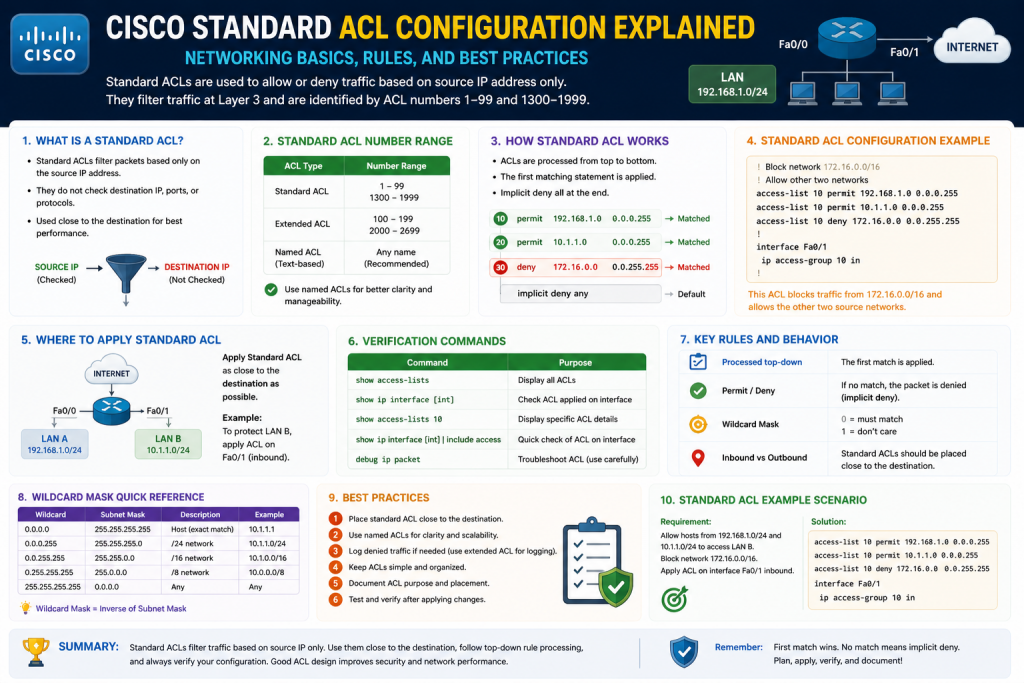
In modern networking, routers do much more than simply forward packets between networks. They also serve as decision-making devices that determine which traffic should be allowed to pass and which traffic should be blocked. One of the most fundamental tools Cisco routers use to control traffic flow is the Access Control List, commonly known as an ACL.
A Standard ACL is one of the oldest and most essential traffic-filtering tools in Cisco IOS. It provides administrators with the ability to permit or deny traffic based solely on the source IP address of incoming packets. Although simple compared to more advanced filtering technologies, Standard ACLs remain highly relevant because they teach foundational packet-filtering logic and are still useful in many network environments.
Understanding how Standard ACLs work is critical for anyone pursuing networking, cybersecurity, or systems administration. Whether you are protecting internal resources, restricting departmental access, or preparing for Cisco certification exams, mastering ACLs builds the groundwork for deeper network security skills.
This guide explains what ACLs are, why they matter, how they process traffic, and the core principles behind configuring Standard ACLs on Cisco routers.
What Is an Access Control List?
An Access Control List is an ordered set of rules that a router uses to evaluate network traffic. Each rule contains conditions that either permit or deny packets based on matching criteria.
When traffic reaches a router interface where an ACL is applied, the router examines the packet and compares it against the ACL statements from top to bottom. The router stops processing as soon as it finds the first matching rule.
If the packet matches a permit statement, it is allowed through.
If the packet matches a deny statement, it is blocked immediately.
If the packet does not match any configured statement, it is denied automatically because of the implicit deny rule that exists at the end of every ACL.
This sequential top-down process makes rule order one of the most important aspects of ACL configuration.
For example:
- Rule 1: Permit 10.1.1.1
- Rule 2: Deny 10.1.1.1
In this case, traffic from 10.1.1.1 will always be permitted because the first match wins. The second rule will never be evaluated.
ACLs are not firewalls in the traditional sense, but they act as packet filters that provide basic security and traffic management.
Why ACLs Are Important in Networking
ACLs are essential because they provide administrative control over network accessibility.
Without ACLs, routers generally forward traffic based solely on routing tables, meaning any reachable destination can often be accessed unless another security control blocks it.
By implementing ACLs, administrators can:
- Restrict unauthorized users
- Limit access to sensitive subnets
- Reduce unnecessary traffic
- Improve security segmentation
- Control management access to devices
- Filter specific hosts or entire networks
- Prevent certain traffic from crossing interfaces
For example, a company may want accounting systems accessible only by finance department devices. Standard ACLs can block all non-finance source IPs from accessing specific paths.
This simple functionality becomes highly valuable when enforcing basic policy controls.
Understanding Packet Evaluation
To understand ACLs, you first need to understand how routers process packets.
Every IP packet contains important addressing information:
- Source IP address
- Destination IP address
Standard ACLs only examine the source IP address.
This means the router asks:
“Where did this packet come from?”
It does not evaluate:
“Where is this packet going?”
That distinction is what separates Standard ACLs from Extended ACLs.
For example:
If Host A (192.168.1.10) sends traffic to Server B (172.16.1.50), a Standard ACL can permit or deny traffic from 192.168.1.10, but it cannot specifically block traffic only to Server B while allowing traffic elsewhere.
Because of this limitation, Standard ACLs should generally be placed as close to the destination as possible.
This minimizes unintended blocking.
The Sequential Logic of ACL Processing
ACLs process statements line by line in order.
This is called top-down sequential processing.
Steps:
- Packet enters or exits interface
- Router checks first ACL rule
- If match occurs, action is taken
- If no match, move to next line
- Continue until match or end of list
- If no match exists, implicit deny drops packet
This process highlights two major principles:
Rule Order Matters
Specific rules should usually come before broader ones.
Every ACL Has an Invisible Final Rule
This rule is:
deny any
This hidden statement blocks all unmatched traffic.
What Is Implicit Deny?
Implicit denial is one of the most important ACL concepts.
Even if you never type it, every ACL ends with:
deny any
This means any traffic not explicitly permitted is automatically denied.
Example:
access-list 1 permit 192.168.1.0 0.0.0.255
This permits only the 192.168.1.0/24 network.
Everything else is blocked automatically.
This behavior can cause major outages if administrators forget to include required permit statements.
For instance, if remote management traffic is not explicitly permitted, administrators may lock themselves out.
Because of this, ACL planning must be deliberate.
Standard ACL Number Ranges
Cisco originally identified Standard ACLs by number.
Traditional Standard ACL ranges:
- 1–99
- 1300–1999 (expanded range)
Example:
access-list 10 permit 192.168.1.0 0.0.0.255
The number identifies the ACL itself.
Multiple statements using the same number belong to the same ACL.
Example:
access-list 10 permit 192.168.1.10
access-list 10 deny 192.168.1.20
Both are part of ACL 10.
Standard ACLs vs Extended ACLs
A common beginner mistake is confusing Standard and Extended ACLs.
Standard ACL:
Filters only by source IP
Extended ACL:
Filters by:
- Source IP
- Destination IP
- Protocol
- Port number
Because Standard ACLs are less specific, they are simpler but less flexible.
Example:
Standard ACL:
Block all traffic from HR department
Extended ACL:
Block HR department only from accessing payroll server on HTTP
Standard ACLs are ideal for simpler policies but can over-block traffic if poorly placed.
Where Standard ACLs Should Be Placed
A core best practice is:
Place Standard ACLs close to the destination.
Why?
Because Standard ACLs only filter by source, placing them too close to the source may unintentionally block that source from reaching multiple destinations.
Example:
If you block Host A near its source router, Host A may lose access to every destination beyond that point.
If you block Host A near one destination, only that path is affected.
This strategic placement reduces collateral damage.
Placing Standard ACLs near the destination allows administrators to apply more precise control while preserving broader network functionality. Since these ACLs cannot evaluate destination addresses, protocols, or ports, they lack the granularity needed for early source-side filtering in many environments. If a source device requires access to several legitimate services but should be blocked from only one sensitive network, placing the ACL near the protected destination prevents unnecessary disruption.
For example, an employee workstation may need access to email, cloud services, file servers, and internet resources but should not access payroll systems. If the ACL is placed near the employee’s source network, all downstream communication may be denied. If placed near payroll resources, only payroll access is restricted while other services remain operational.
This approach also simplifies troubleshooting. Destination-side placement makes policy intent easier to understand because restrictions are tied directly to protected resources. It improves network design clarity, reduces accidental overblocking, and aligns security controls with business objectives. In larger infrastructures, this placement strategy supports scalability by ensuring security boundaries are enforced where protection is actually needed, rather than broadly disrupting source traffic.
Inbound vs Outbound ACLs
ACLs can be applied in two directions:
Inbound
Filters packets as they enter the router interface before routing decisions occur.
Outbound
Filters packets as they leave the router interface after routing decisions occur.
Inbound Benefits:
- Stops unwanted traffic early
- Saves router resources
- More efficient
Outbound Benefits:
- Controls traffic leaving toward specific destinations
- Useful for destination-side restrictions
Example:
Inbound on Fa0/0:
Traffic checked immediately upon arrival
Outbound on Fa0/0:
Traffic checked before exiting Fa0/0
Choosing direction depends on policy design.
Basic Standard ACL Syntax
To configure a numbered Standard ACL:
Router(config)# access-list [number] [permit|deny] [source] [wildcard-mask]
Examples:
Router(config)# access-list 1 permit 10.1.5.1
Router(config)# access-list 1 deny 192.168.1.53
This creates ACL 1 with two rules.
Traffic from 10.1.5.1 is permitted.
Traffic from 192.168.1.53 is denied unless matched earlier.
Using the host Keyword
Instead of typing a wildcard mask for a single device:
access-list 1 permit host 10.1.5.1
Equivalent to:
access-list 1 permit 10.1.5.1 0.0.0.0
This improves readability.
Using the any Keyword
To match all addresses:
access-list 1 deny any
Equivalent to:
access-list 1 deny 0.0.0.0 255.255.255.255
This explicitly defines broad filtering.
Subnet Masks vs Wildcard Masks
Wildcard masks often confuse beginners.
Subnet mask:
Defines network portion
Wildcard mask:
Defines which bits can vary
Formula:
255.255.255.255 – subnet mask = wildcard mask
Example:
Subnet:
/24 = 255.255.255.0
Wildcard:
0.0.0.255
Common Wildcard Examples
Single host:
0.0.0.0
/24:
0.0.0.255
/16:
0.0.255.255
/8:
0.255.255.255
Practical Example
Permit entire 172.30.0.0/16 network:
access-list 1 permit 172.30.0.0 0.0.255.255
This allows all source addresses from 172.30.x.x.
Applying ACLs to Interfaces
Creating an ACL alone does nothing.
It must be applied:
Router(config)# interface fa0/0
Router(config-if)# ip access-group 1 in
or
Router(config-if)# ip access-group 1 out
Without interface assignment, ACL rules are inactive.
How Traffic Flows After Application
Once applied:
- Matching permit = forwarded
- Matching deny = dropped
- No match = implicit deny
This is why testing is essential.
Verification Basics
Useful commands:
show access-lists
show running-config
show ip interface
These help confirm:
- ACL contents
- Interface assignment
- Direction
Common Beginner Mistakes
Incorrect Rule Order
Broader deny before specific permit
Forgetting Implicit Deny
Permitting one subnet but forgetting others
Wrong Interface
Applying ACL to wrong router port
Wrong Direction
Inbound instead of outbound
Wildcard Errors
Using subnet mask instead of wildcard
Real-World Security Value
Standard ACLs remain useful for:
- VTY management restrictions
- Branch office source filtering
- Temporary traffic blocks
- Legacy environments
- Simple segmentation
Though basic, they teach policy logic foundational to advanced security.
Planning Before Configuration
Before writing ACLs:
- Identify source devices
- Define policy goals
- Determine placement
- Choose direction
- Calculate wildcard masks
- Predict implicit deny effects
- Test safely
A rushed ACL can disrupt production traffic.
Building Standard ACLs from the Ground Up
Once you understand what Standard Access Control Lists are and how they function conceptually, the next step is learning how to configure them correctly in Cisco IOS. Configuration is where theory becomes operational. A well-designed ACL can strengthen security, control traffic flow, and enforce organizational policy. A poorly designed ACL can unintentionally block critical services, disrupt communication, or create troubleshooting nightmares.
Standard ACLs are relatively simple compared to extended ACLs because they filter traffic using only the source IP address. However, this simplicity does not mean configuration should be careless. Every line matters, every wildcard mask affects scope, and every placement decision can determine whether your network remains functional.
Because ACLs directly influence whether traffic is permitted or denied, even small mistakes can have major consequences. A single incorrect wildcard mask can expand access far beyond intended limits, while an improperly placed deny statement can block legitimate users from critical business systems. This is why successful ACL configuration requires more than memorizing commands. Administrators must understand packet flow, rule order, network topology, and business objectives before implementation.
In Cisco IOS, configuration also involves understanding how numbered ACLs differ from named ACLs, how interface direction changes behavior, and how verification tools help confirm policy accuracy after deployment. Practical skill includes not just writing ACL entries, but testing them safely, documenting their purpose, and maintaining them as infrastructure evolves. As networks grow more complex, structured ACL management becomes increasingly important to avoid policy sprawl and operational risk.
This section explores Cisco IOS command syntax, numbered and named ACLs, wildcard mask calculations, interface assignments, verification, and deployment strategies.
.Entering Global Configuration Mode
To begin configuring ACLs on a Cisco router, you must first enter privileged EXEC mode and then global configuration mode.
Router> enable
Router# configure terminal
Router(config)#
Global configuration mode allows administrators to create ACLs, configure interfaces, assign policies, and make system-wide changes.
ACL definitions are created here before being attached to interfaces.
Creating a Numbered Standard ACL
A numbered Standard ACL uses a numeric identifier from:
- 1–99
- 1300–1999
Basic syntax:
access-list [number] [permit|deny] [source-address] [wildcard-mask]
Example:
Router(config)# access-list 10 permit 192.168.10.0 0.0.0.255
This command permits all devices from the 192.168.10.0/24 network.
Understanding the Logic Behind the Statement
Let’s break this command down:
access-list 10
Identifies ACL number 10
permit
Allows matching traffic
192.168.10.0
Source network address
0.0.0.255
Wildcard mask
Together, this rule says:
“Allow all packets originating from the 192.168.10.0/24 network.”
Denying Specific Hosts
You can deny one device explicitly:
Router(config)# access-list 10 deny host 192.168.10.50
This blocks traffic from that exact IP.
Equivalent command:
Router(config)# access-list 10 deny 192.168.10.50 0.0.0.0
The host keyword simplifies readability.
Combining Multiple Statements
ACLs often contain multiple rules:
Router(config)# access-list 10 deny host 192.168.10.50
Router(config)# access-list 10 permit 192.168.10.0 0.0.0.255
This means:
- Deny 192.168.10.50
- Permit everyone else in 192.168.10.0/24
Order matters.
If the permit came first, the denial would never be processed.
The First-Match Rule in Practice
Consider:
access-list 10 permit 192.168.10.0 0.0.0.255
access-list 10 deny host 192.168.10.50
Here, 192.168.10.50 is allowed because it matches the broader permit first.
This demonstrates why ACL logic requires precision.
Wildcard Masks Explained in Depth
Wildcard masks are essential for ACL configuration.
They tell Cisco which bits of the IP address must match and which bits can vary.
Rule:
- 0 = Must match
- 1 = Ignore
Calculating Wildcard Masks
Formula:
255.255.255.255 – subnet mask
Example for /24:
Subnet mask:
255.255.255.0
Wildcard:
0.0.0.255
Example for /16:
Subnet:
255.255.0.0
Wildcard:
0.0.255.255
Example for /8:
Subnet:
255.0.0.0
Wildcard:
0.255.255.255
Wildcard Mask Use Cases
Single host:
access-list 10 permit host 10.1.1.1
Entire subnet:
access-list 10 permit 10.1.1.0 0.0.0.255
Large network:
access-list 10 permit 172.16.0.0 0.0.255.255
Using the any Keyword
To match all addresses:
access-list 10 permit any
Equivalent:
access-list 10 permit 0.0.0.0 255.255.255.255
This is often used as a final permit statement if you do not want implicit denial to block remaining traffic.
Applying ACLs to Interfaces
Creating an ACL does not activate it.
It must be attached to an interface:
Router(config)# interface fastethernet 0/0
Router(config-if)# ip access-group 10 in
Inbound Application
Inbound means packets are checked before routing.
Advantages:
- Saves processing power
- Stops traffic early
- Reduces unnecessary routing
Example:
ip access-group 10 in
Outbound Application
Outbound means packets are checked after routing.
Advantages:
- Better destination-based policy placement
- More strategic for Standard ACLs
Example:
ip access-group 10 out
Choosing Inbound vs Outbound
Use inbound when:
- Blocking obvious unwanted traffic early
- Protecting router resources
Use outbound when:
- Standard ACL is near destination
- Preventing overblocking
Since Standard ACLs only use source IPs, outbound near destination is often preferred.
Named Standard ACLs
Numbered ACLs work, but names improve readability.
Syntax:
Router(config)# ip access-list standard OFFICE-FILTER
Inside ACL mode:
Router(config-std-nacl)# deny host 192.168.1.10
Router(config-std-nacl)# permit 192.168.1.0 0.0.0.255
Benefits of Named ACLs
Better readability
Names describe purpose
Easier management
More intuitive than numbers
Supports sequence editing
Useful in modern IOS
Applying Named ACLs
Router(config)# interface fa0/1
Router(config-if)# ip access-group OFFICE-FILTER out
Practical Scenario: Restricting a Single Department
Imagine:
HR network:
192.168.20.0/24
Goal:
Allow HR except one device
Configuration:
access-list 15 deny host 192.168.20.25
access-list 15 permit 192.168.20.0 0.0.0.255
Apply:
interface fa0/1
ip access-group 15 out
Result:
All HR users allowed except one host.
Verifying ACL Configuration
View ACL:
show access-lists
View interface:
show ip interface fastethernet 0/1
View running config:
show running-config
Reading ACL Hit Counts
Cisco tracks matches:
access-list 15 deny 192.168.20.25 (5 matches)
This confirms rule activity.
Useful for troubleshooting.
Editing ACLs Carefully
Older IOS:
Delete and recreate ACL
no access-list 15
Then rebuild.
Modern IOS with named ACL:
Edit sequence lines directly.
Common Configuration Mistakes
Wrong wildcard
Using subnet mask instead
Misordered rules
Permit before deny
Interface mismatch
Applying to wrong port
Wrong direction
Inbound instead of outbound
No final permit
Implicit deny blocks too much
Example of a Lockout Error
If you apply:
access-list 1 deny any
To remote management interface:
ip access-group 1 in
You may block all access, including your own.
Always test carefully.
Best Practice: Use a Permit for Administrative Access First
access-list 1 permit host 10.10.10.5
access-list 1 deny any
This protects management access.
Standard ACL Placement Strategy
Remember:
Close to destination.
Example:
If Sales should not access the Accounting server, place ACL near Accounting—not Sales.
This avoids unnecessary disruption.
Documenting ACLs
Use remarks:
access-list 10 remark Block unauthorized finance workstation
Benefits:
- Easier troubleshooting
- Better team communication
- Compliance support
Testing ACL Deployment
Before production:
Lab validation
Simulate traffic
Ping tests
Basic connectivity
Traceroute
Path visibility
Show commands
Confirm matches
Security Considerations
ACLs are not substitutes for:
- Firewalls
- IDS/IPS
- Zero Trust
But they are excellent for:
- Traffic segmentation
- Basic source filtering
- Router hardening
- Management control
VTY Access Control Example
Restrict Telnet/SSH:
access-list 50 permit 192.168.100.0 0.0.0.255
line vty 0 4
access-class 50 in
Only approved subnets can manage the router remotely.
Performance Impact
ACLs are efficient but large lists can:
- Increase processing
- Complicate troubleshooting
- Raise admin overhead
Keep ACLs:
- Organized
- Specific
- Documented
Migration Toward Advanced Security
Standard ACLs teach logic used later in:
- Extended ACLs
- NAT filtering
- Firewall rules
- SDN policy
- Zero Trust architecture
Learning Standard ACLs strengthens long-term networking expertise.
Troubleshooting Workflow
When ACL fails:
- Check interface
- Check direction
- Check wildcard
- Check order
- Check implicit deny
- Use show commands
- Test traffic
Configuration Example: Full Workflow
enable
configure terminal
access-list 25 deny host 172.16.1.100
access-list 25 permit 172.16.1.0 0.0.0.255
interface fa0/0
ip access-group 25 out
end
show access-lists
Moving Beyond Basic ACL Configuration
Once you understand how to create and apply Standard Access Control Lists on Cisco routers, the next step is mastering how to optimize, troubleshoot, and strategically deploy them in real-world network environments. Many networking beginners learn ACL syntax but struggle when configurations become more complex, when networks scale, or when traffic behaves unexpectedly.
In production environments, ACLs are not just lists of permit and deny statements. They become part of larger security architecture, operational policy, compliance planning, performance management, risk reduction, audit readiness, and long-term infrastructure governance. Standard ACLs may be limited to source-based filtering, but their proper implementation still requires thoughtful design.
As organizations grow, ACLs often evolve from simple traffic filters into critical policy enforcement tools that support business continuity and infrastructure resilience. A single ACL may influence how departments communicate, how branch offices access centralized systems, or how administrators remotely manage essential devices. Poorly planned ACLs can create bottlenecks, introduce security gaps, or accidentally block mission-critical applications. This is why advanced ACL management requires not just technical command knowledge, but also strategic thinking about network behavior, user roles, compliance obligations, and organizational priorities.
Administrators must also understand how ACL decisions interact with routing paths, VPN traffic, cloud connectivity, and hybrid infrastructure models. What works in a small environment may become inefficient or risky in a large enterprise. Effective ACL strategy therefore includes planning for future expansion, policy consistency, and easier troubleshooting under pressure.
This section explores advanced placement strategy, security logic, troubleshooting methodology, optimization techniques, management control, common enterprise use cases, scalability concerns, and the role Standard ACLs play in broader network governance.
Why Advanced ACL Strategy Matters
A Standard ACL can be technically correct yet operationally harmful if placed poorly.
For example, an ACL that blocks one unauthorized subnet may also disrupt business applications, remote support tools, software updates, or administrative access if it is positioned incorrectly.
This is why ACL strategy matters as much as syntax.
Advanced ACL implementation focuses on:
Policy accuracy
Minimal business disruption
Predictable traffic control
Scalability
Administrative clarity
Troubleshooting efficiency
Compliance support
Risk reduction
An experienced network administrator thinks beyond “Does this command work?” and instead asks, “Does this policy achieve the right security outcome without unintended consequences?”
Designing ACLs Around Business Intent
Every ACL should be based on a specific objective. Randomly creating rules without a clearly defined purpose often leads to unnecessary complexity, unintended outages, and long-term administrative confusion. ACLs function best when they are aligned with business policy, security goals, and operational requirements.
Examples include:
Restricting branch office management traffic
Blocking unauthorized guest devices
Allowing only approved internal networks
Preventing access to sensitive servers
Limiting router administrative access
Enforcing segmentation boundaries
Temporary threat containment
Before configuring any ACL, define:
Who should have access?
Who should not?
What is the business reason?
Where should filtering happen?
What traffic must remain functional?
What are failure risks?
This design-first approach prevents ACL sprawl and policy confusion.
It also helps administrators avoid reactive configurations created under pressure, which often result in overlapping or contradictory rules. When ACL objectives are documented in advance, each rule can be traced back to a legitimate business or security need. This makes future troubleshooting, audits, and policy updates significantly easier. For example, if an ACL exists solely to protect finance systems, administrators can quickly evaluate whether a requested exception supports or violates that objective.
Defining goals beforehand also improves communication between networking teams, security departments, and business leadership. Technical controls should reflect organizational priorities, not just technical preferences. ACL planning should include both current requirements and future scalability, ensuring that growth, mergers, new departments, or infrastructure changes do not immediately break policy design.
By focusing on intentional design, organizations create cleaner, more efficient ACL structures that are easier to maintain, easier to secure, and less likely to disrupt critical business operations.
The Principle of Least Privilege in ACLs
One of the strongest security concepts is least privilege.
This means allowing only the minimum access necessary.
In ACL design:
Permit only required source networks
Deny unnecessary or unknown traffic
Avoid broad “permit any” statements unless intentional
Document every exception
For example:
Instead of:
access-list 10 permit any
Use:
access-list 10 permit 192.168.10.0 0.0.0.255
This narrows access and reduces exposure.
Least privilege reduces attack surface and aligns ACLs with security best practices.
Strategic Placement in Multi-Router Environments
In small labs, ACL placement may seem simple. In enterprise networks, placement can dramatically affect performance and usability.
Consider:
Branch routers
WAN links
Core routers
Distribution layers
Internet edge
VPN concentrators
Because Standard ACLs only inspect source addresses, they are often best placed near destinations.
Example:
If branch users should not access payroll servers, applying the ACL near payroll is safer than blocking branch traffic at source, which might affect unrelated services.
Strategic placement goals:
Avoid unnecessary traffic blocking
Protect critical assets
Preserve operational flexibility
Reduce troubleshooting complexity
Control only intended paths
Standard ACLs and Administrative Access Security
One of the most practical uses of Standard ACLs is protecting router management interfaces.
Cisco devices support remote administration through:
SSH
Telnet
VTY lines
SNMP
Without restrictions, any reachable IP may attempt access.
Example:
access-list 50 permit 10.10.10.0 0.0.0.255
line vty 0 4
access-class 50 in
This limits remote login to approved management hosts.
This approach is especially valuable for:
Network operations centers
Managed service providers
Branch administration
Security hardening
Even if passwords are strong, reducing who can even attempt connection is an additional security layer.
Protecting Against Human Error
ACL mistakes often come from administrators, not attackers.
Examples:
Wrong wildcard mask
Wrong interface
Wrong direction
Missing permit statement
Overly broad deny
Forgetting implicit deny
To reduce error:
Use remarks
Plan offline first
Test in maintenance windows
Back up configs
Verify line-by-line
Apply incrementally
Use out-of-band management when possible
One typo can disconnect entire departments.
ACL Documentation as a Security Practice
As environments grow, undocumented ACLs become dangerous.
Good documentation should explain:
Purpose
Affected networks
Date added
Administrator
Business owner
Expiration if temporary
Example remark:
access-list 20 remark Block guest VLAN from finance subnet
Benefits:
Easier audits
Faster troubleshooting
Better team collaboration
Regulatory support
Reduced accidental deletion
Documentation transforms ACLs from isolated commands into maintainable policy assets.
Temporary ACLs for Incident Response
Standard ACLs can be valuable during emergencies.
Example scenarios:
Malware outbreak from one subnet
Compromised host
Rogue branch traffic
Unauthorized scanning
DDoS source suppression
If 192.168.55.0/24 is compromised:
access-list 99 deny 192.168.55.0 0.0.0.255
access-list 99 permit any
Applied appropriately, this can contain spread quickly.
While not a replacement for advanced security tools, ACLs provide immediate router-level response.
ACLs and Change Management
In enterprise IT, ACL modifications should follow change management.
Key steps:
Request
Risk review
Stakeholder approval
Testing
Scheduled deployment
Verification
Rollback planning
Because ACLs directly affect communication, unscheduled changes can cause outages.
A proper rollback plan might include:
Saved config
Remote console backup
Pre-change show commands
Alternate management path
Operational maturity includes not only technical ability but process discipline.
Performance Considerations
ACLs are efficient, but design still matters.
Factors impacting performance:
Very large ACLs
Poor rule ordering
Frequent updates
Complex policy overlap
Older hardware limitations
Optimization strategies:
Place frequently matched rules earlier
Remove obsolete entries
Use summaries when safe
Separate functions logically
Avoid unnecessary duplication
For example:
If 90% of traffic is from approved subnet, permit it early.
This reduces processing load.
Rule Order Optimization
Because ACLs process top-down, order affects both function and efficiency.
Best practice:
Specific denies first
Specific permits second
Broader permits later
Avoid unreachable rules
Bad example:
permit 192.168.1.0 0.0.0.255
deny host 192.168.1.25
Good example:
deny host 192.168.1.25
permit 192.168.1.0 0.0.0.255
Optimization improves both accuracy and router efficiency.
Using ACL Hit Counters for Analysis
Cisco ACLs often display match counts.
Example:
deny host 192.168.1.25 (45 matches)
This reveals:
Blocked threats
Unused rules
Policy effectiveness
Unexpected traffic
Troubleshooting clues
Regular review of counters helps administrators refine security posture.
Troubleshooting Standard ACL Problems
When traffic fails unexpectedly:
Check ACL existence
Check interface assignment
Check inbound/outbound direction
Check source IP
Check wildcard mask
Check order
Check implicit deny
Check routing
Check NAT interactions if relevant
Useful commands:
show access-lists
show ip interface
show running-config
ping
traceroute
Real troubleshooting often requires verifying assumptions.
Common Real-World Mistakes
Blocking all traffic accidentally
Applying ACL backward
Using subnet mask instead of wildcard
Forgetting permit for management host
Overlapping policies
Ignoring cloud/VPN traffic paths
Leaving outdated temporary blocks
Poor naming
No comments
These mistakes often stem from speed over planning.
Standard ACLs in Layered Security
ACLs should support broader defense, not act alone.
Layered security includes:
ACLs
Firewalls
VPNs
IDS/IPS
Endpoint protection
Segmentation
Identity controls
Monitoring
Standard ACLs are strongest when used as foundational controls.
Example:
Restrict source subnet with ACL
Then inspect traffic deeper with firewall
This layered model improves resilience.
Named ACLs for Long-Term Manageability
As environments grow, named ACLs become more practical.
Examples:
HR_FILTER
MGMT_ONLY
BRANCH_DENY
Benefits:
Immediate clarity
Reduced confusion
Faster audits
Better troubleshooting
More intuitive than numbers like ACL 17
Naming should reflect function, not person or temporary context.
Migration to Advanced Policy Models
Standard ACLs teach principles that extend into:
Extended ACLs
Zone-based firewalls
SD-WAN policy
Cloud security groups
Zero Trust segmentation
Software-defined networking
The logic remains similar:
Define source
Define policy
Control path
Protect assets
This is why ACL mastery remains foundational.
Operational Best Practices
Use least privilege
Place near destination
Protect management interfaces
Document thoroughly
Test before deployment
Use remarks
Monitor hit counts
Review regularly
Remove obsolete rules
Align with policy
These habits separate reactive administration from professional network engineering.
Branch Office Restriction
Scenario:
Branch office:
172.16.50.0/24
Goal:
Prevent branch from reaching finance systems
Config:
access-list 70 deny 172.16.50.0 0.0.0.255
access-list 70 permit any
Applied outbound near finance router interface.
Result:
Branch blocked from finance
Other access preserved
This demonstrates strategic destination placement.
Management Plane Security
Goal:
Only IT subnet can SSH to routers
Config:
access-list 12 permit 10.20.30.0 0.0.0.255
line vty 0 4
access-class 12 in
Outcome:
Reduced attack surface
Controlled administration
Policy clarity
Preparing for Enterprise Scale
As networks grow:
More subnets
More routers
More admins
More policy overlap
Success depends on:
Naming standards
Documentation
Review cycles
Template deployment
Security governance
Without governance, ACLs become chaotic.
Auditing and Reviewing ACLs
Periodic ACL audits should identify:
Unused entries
Overly broad permits
Legacy exceptions
Temporary entries
Security gaps
Compliance issues
Regular audits improve security maturity.
Future-Proofing ACL Knowledge
Even as cloud and automation evolve, ACL principles remain deeply relevant.
Cloud security groups
Firewall rule sets
Microsegmentation
Container networking
Identity-aware policy
All build on similar traffic-filtering logic.
Learning Standard ACLs is not outdated—it is foundational.
Conclusion
Standard ACLs on Cisco routers are far more than beginner configuration exercises. They represent a critical entry point into traffic governance, security architecture, operational discipline, and network policy design. While technically simple, their real-world effectiveness depends on thoughtful planning, correct placement, strong documentation, optimization, and continuous review.
From securing router management interfaces to enforcing business segmentation and responding to security incidents, Standard ACLs remain practical and powerful when used intelligently. Their greatest value lies not just in filtering source IPs, but in teaching administrators how policy decisions shape network behavior.
Mastering Standard ACLs develops deeper technical judgment, sharper troubleshooting skills, and stronger security awareness. These capabilities scale into advanced technologies and enterprise architectures, making ACL expertise a lasting skill for networking professionals.
In Cisco networking, the command syntax is only the beginning. True expertise comes from understanding why, where, and how ACLs should be used to create secure, reliable, and manageable networks.
Continue exploring the technologies and certification concepts that matter most to you.