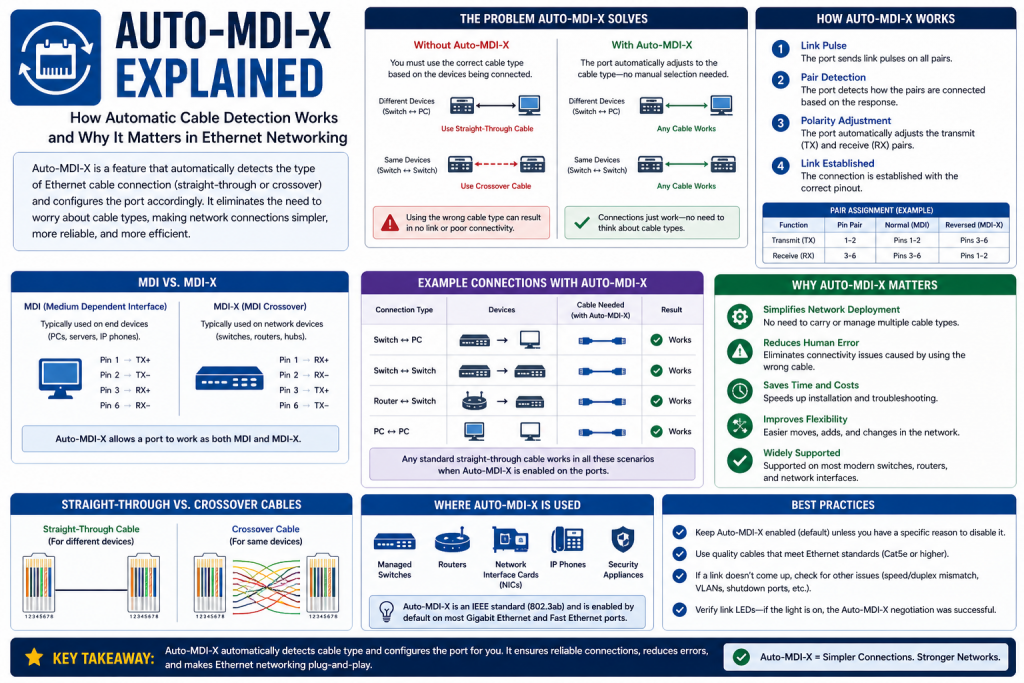
Auto-Medium-Dependent Interface Crossover, more commonly known as Auto-MDI-X, is a networking feature designed to make Ethernet connections easier and more flexible. It allows network devices to automatically detect how they should communicate with each other without requiring the user to select a specific type of cable. This capability removes a layer of complexity that once existed in network setup and helps ensure that connections are established quickly and correctly.
In earlier networking environments, users had to understand how devices transmitted and received data in order to choose the correct cable. Using the wrong type of cable often resulted in failed connections, leading to wasted time and troubleshooting efforts. Auto-MDI-X eliminates that requirement by allowing devices to adjust internally, making the process of connecting devices far more intuitive.
This feature is now standard in most modern networking equipment, including switches, routers, and network interface cards. Its widespread adoption reflects the broader trend in technology toward automation and ease of use, reducing the need for manual configuration and specialized knowledge.
Understanding the Basics of Ethernet Communication
Ethernet is the foundation of most wired networks, enabling devices to communicate by transmitting data in the form of electrical signals through cables. These cables typically contain multiple pairs of wires, each responsible for carrying signals between devices.
In a traditional Ethernet setup, communication relies on a clear distinction between transmitting and receiving signals. Each device has designated pins for sending data and others for receiving it. For communication to occur successfully, the transmitting pins on one device must connect to the receiving pins on the other device.
This arrangement works well when connecting different types of devices, such as a computer and a switch. However, when connecting similar devices, such as two computers or two switches, the transmit and receive pins do not align correctly. This mismatch is what originally necessitated the use of different cable types.
The Role of Cable Types in Early Networking
Before the introduction of Auto-MDI-X, Ethernet networks relied heavily on two main types of cables: straight-through cables and crossover cables. Each served a specific purpose based on the devices being connected.
Straight-through cables were used to connect devices of different types. In these cables, the wiring configuration remains consistent from one end to the other, allowing transmit and receive pins to align correctly between devices.
Crossover cables, on the other hand, were used to connect similar devices. These cables swap the transmit and receive wires internally, enabling proper communication between devices that would otherwise have incompatible pin configurations.
While this system worked, it introduced complexity. Users needed to understand which cable to use in each scenario, and mistakes were common. In larger networks, managing and labeling cables added another layer of difficulty.
What Are MDI and MDI-X?
To better understand Auto-MDI-X, it is essential to explore the concepts of MDI and MDI-X. These terms refer to the way Ethernet ports are wired internally.
MDI, or Medium-Dependent Interface, is the standard configuration used by many end devices such as computers. In this setup, specific pins are designated for transmitting data, while others are used for receiving data.
MDI-X, or Medium-Dependent Interface Crossover, reverses this configuration. The transmit and receive pins are swapped, allowing devices with the same wiring scheme to communicate without requiring a special cable.
Traditionally, network devices were designed so that one would use MDI and the other MDI-X. This ensured compatibility when using straight-through cables. However, when two devices with the same configuration needed to be connected, a crossover cable was required.
Challenges in Traditional Network Setup
The reliance on specific cable types created several challenges in traditional networking environments. One of the most common issues was incorrect cable selection. Users who were unfamiliar with networking principles often struggled to determine which cable to use, leading to connectivity problems.
Another challenge was the need to maintain an inventory of both straight-through and crossover cables. This added cost and complexity, especially in large organizations with extensive network infrastructure.
Troubleshooting was also more difficult. When a connection failed, one of the first steps was to check whether the correct cable was being used. This process could be time-consuming and frustrating, particularly in situations where multiple devices and connections were involved.
These challenges highlighted the need for a more flexible and user-friendly solution.
The Development of Auto-MDI-X Technology
Auto-MDI-X was developed as a response to the limitations of traditional Ethernet connectivity. Engineers sought to create a system that would eliminate the need for manual cable selection and simplify the process of connecting devices.
The result was a feature that allows network interfaces to automatically detect the type of connection required and adjust their configuration accordingly. Instead of relying on specific cable types, devices equipped with Auto-MDI-X can adapt to whatever cable is used.
This innovation marked a significant step forward in networking technology. It reduced the potential for errors and made network setup more accessible to users with varying levels of expertise.
How Auto-MDI-X Works in Practice
When two devices with Auto-MDI-X are connected, they begin by analyzing the signals on the Ethernet cable. Each device determines whether it should operate in MDI or MDI-X mode based on the signals it detects.
This process involves monitoring the electrical characteristics of the connection and identifying which wires are being used for transmitting and receiving data. Once the appropriate configuration is determined, the device adjusts its internal wiring to ensure proper communication.
The entire process happens automatically and typically takes only a fraction of a second. Users are usually unaware that any adjustment has taken place, as the connection appears to work instantly.
Benefits of Using Auto-MDI-X
Auto-MDI-X offers several important benefits that have contributed to its widespread adoption. One of the most significant advantages is simplicity. Users no longer need to worry about selecting the correct cable type, as the devices handle this automatically.
Another benefit is flexibility. Devices can be connected in any combination without requiring special cables. This makes it easier to set up networks, especially in dynamic environments where connections frequently change.
Cost savings is another advantage. Since there is no longer a need to maintain separate types of cables, organizations can reduce their inventory and simplify cable management.
Auto-MDI-X also improves reliability by reducing the likelihood of connection errors. This leads to more stable network performance and less time spent troubleshooting.
Impact on Network Installation and Deployment
The introduction of Auto-MDI-X has had a profound impact on how networks are installed and deployed. In the past, setting up a network required careful planning and attention to detail, particularly when it came to cabling.
With Auto-MDI-X, much of that complexity has been removed. Installers can focus on connecting devices without worrying about cable types, which speeds up the deployment process.
This is especially beneficial in large-scale installations, where time and efficiency are critical. It also reduces the need for specialized training, as even users with limited networking knowledge can successfully set up connections.
Importance in Modern Networking Environments
In today’s networking landscape, ease of use and efficiency are key priorities. Auto-MDI-X aligns perfectly with these goals by simplifying one of the most fundamental aspects of network setup.
Modern networks often involve a wide range of devices, from personal computers and printers to servers and advanced networking equipment. Auto-MDI-X ensures that these devices can be connected بسهولة and reliably, regardless of their configuration.
Even in environments where wireless connectivity is prevalent, Ethernet remains essential for high-performance applications. Data centers, enterprise networks, and critical systems rely on wired connections for their speed and stability.
Auto-MDI-X enhances these environments by making physical connectivity straightforward and dependable.
The Shift Toward Automation in Networking
Auto-MDI-X is part of a broader trend toward automation in networking. As networks become more complex, there is an increasing need for technologies that can simplify management and reduce the potential for human error.
Automation allows devices to configure themselves, adapt to changing conditions, and optimize performance without requiring constant manual intervention. This not only improves efficiency but also frees up time for network administrators to focus on more strategic tasks.
Auto-MDI-X exemplifies this shift by addressing a common source of complexity and providing a seamless solution.
Real-World Relevance of Auto-MDI-X
In real-world scenarios, Auto-MDI-X proves invaluable in a variety of situations. For example, when setting up a small office network, users can connect devices quickly without needing to understand the underlying technical details.
In larger organizations, IT teams benefit from reduced setup times and fewer connectivity issues. This leads to improved productivity and lower operational costs.
Auto-MDI-X is also useful in temporary setups, such as events or testing environments, where devices need to be connected and reconfigured بسرعة. Its ability to adapt automatically makes it ideal for these dynamic situations.
Automatic Versus Manual MDI-X Configuration
Auto-MDI-X can function in two primary modes: automatic and manual. In automatic mode, the device takes full responsibility for detecting the signal configuration and adjusting its transmit and receive pairs accordingly. This is the default behavior in most modern networking hardware and is designed to provide a seamless plug-and-play experience.
Manual MDI-X, by contrast, allows a network administrator to explicitly define how a port should behave. Instead of relying on automatic detection, the administrator configures the port to operate in either MDI or MDI-X mode. This approach requires a deeper understanding of Ethernet signaling and is generally used in specialized or controlled environments.
The automatic mode is widely preferred because it reduces setup time and minimizes the risk of human error. Manual configuration is typically reserved for situations where precise control over port behavior is required, such as in troubleshooting scenarios or when working with legacy equipment.
Why Automation Became Essential in Networking
As networks grew in size and complexity, the limitations of manual configuration became increasingly apparent. Managing hundreds or even thousands of connections made it impractical to rely on manual decisions for each cable and port configuration.
Automation emerged as a solution to these challenges. By allowing devices to configure themselves, network administrators could reduce the time spent on repetitive tasks and focus on higher-level responsibilities such as security, optimization, and scalability.
Auto-MDI-X is a clear example of how automation improves efficiency. It removes one of the most common points of failure in network setup and ensures that devices can communicate without requiring detailed configuration.
Advantages of Auto-MDI-X in Everyday Use
One of the most noticeable advantages of Auto-MDI-X is its convenience. Users can connect devices using any standard Ethernet cable without worrying about compatibility. This is especially helpful for individuals who do not have a technical background in networking.
Another benefit is consistency. Because the configuration process is handled automatically, connections are established in a uniform manner across the network. This reduces variability and makes it easier to maintain a stable environment.
Auto-MDI-X also enhances scalability. As new devices are added to a network, they can be connected quickly without requiring additional planning. This is particularly valuable in growing organizations where infrastructure is constantly evolving.
Situations Where Manual MDI-X May Be Preferred
Although Auto-MDI-X is highly effective, there are cases where manual configuration may be advantageous. In highly controlled environments, administrators may want to enforce specific configurations to ensure predictability.
For example, in certain testing or laboratory scenarios, engineers may need to replicate specific network conditions. Manual MDI-X allows them to control exactly how devices interact, which can be useful for diagnosing issues or validating configurations.
Manual settings can also be helpful when dealing with older hardware that may not fully support automatic detection. In such cases, configuring ports manually ensures compatibility and reliable communication.
Connecting Devices of the Same Type
One of the most important use cases for Auto-MDI-X is connecting devices of the same type. Traditionally, this required a crossover cable because both devices would use the same pin configuration.
With Auto-MDI-X, this limitation no longer exists. Devices can automatically adjust their internal wiring to accommodate the connection, allowing a standard Ethernet cable to be used instead.
This capability simplifies network setup and reduces the need for specialized equipment. It also makes it easier to troubleshoot connections, as the cable type is no longer a variable.
Role in Home and Small Office Networks
In home and small office environments, ease of use is a top priority. Users often lack the technical expertise required to manage complex networking configurations, making simplicity essential.
Auto-MDI-X plays a key role in these settings by enabling straightforward connectivity. Users can connect computers, routers, and other devices without needing to understand the differences between cable types.
This reduces frustration and ensures that networks can be set up quickly and efficiently. It also minimizes the likelihood of errors, leading to a more reliable experience.
Importance in Enterprise Infrastructure
In large enterprise networks, Auto-MDI-X contributes to operational efficiency. Organizations often manage extensive infrastructures with numerous interconnected devices.
By eliminating the need for manual cable selection, Auto-MDI-X reduces the workload on IT teams. This allows administrators to focus on more critical tasks such as monitoring performance, managing security, and planning future expansions.
The feature also supports rapid deployment of new equipment. When devices can be connected without additional configuration, installation processes become faster and more streamlined.
Integration with Auto-Negotiation
Auto-MDI-X often works alongside another important feature known as auto-negotiation. Auto-negotiation allows devices to determine the optimal speed and duplex settings for a connection.
Together, these features create a highly automated environment where devices can configure themselves for optimal performance. Auto-MDI-X ensures that the physical connection is correct, while auto-negotiation fine-tunes the communication parameters.
This combination enhances overall network efficiency and reduces the need for manual intervention.
Application in Data Centers
Data centers represent some of the most demanding networking environments. They require high levels of reliability, scalability, and performance.
Auto-MDI-X contributes to these goals by simplifying the process of connecting servers, switches, and other equipment. In environments where thousands of connections may exist, even small efficiencies can have a significant impact.
The ability to use standard cables for all connections also reduces complexity in cable management, which is a critical aspect of data center operations.
Flexibility in Temporary and Dynamic Networks
Auto-MDI-X is particularly useful in environments where network configurations change frequently. This includes temporary setups such as events, testing labs, and training environments.
In these scenarios, devices are often connected and disconnected multiple times. Auto-MDI-X ensures that each connection works without requiring adjustments or specialized cables.
This flexibility makes it easier to adapt to changing requirements and reduces the time needed to reconfigure networks.
Reducing Human Error in Network Setup
Human error is one of the most common causes of network issues. Incorrect cable selection, improper configuration, and misunderstandings about device compatibility can all lead to connectivity problems.
Auto-MDI-X addresses this issue by removing the need for manual decisions related to cable types. By automating the process, it ensures that connections are established correctly regardless of user input.
This leads to fewer errors and more reliable network performance.
Supporting Modern Networking Standards
Modern networking standards emphasize interoperability and ease of use. Devices from different manufacturers are expected to work together seamlessly, and users expect simple setup processes.
Auto-MDI-X supports these expectations by providing a consistent and reliable method for establishing connections. It ensures that devices can communicate effectively without requiring detailed knowledge of their internal configurations.
This compatibility is essential in today’s diverse networking environments.
Cost Efficiency and Resource Optimization
From a financial perspective, Auto-MDI-X offers several advantages. By eliminating the need for multiple cable types, organizations can reduce their inventory and associated costs.
It also minimizes the time spent on troubleshooting and setup, which translates to lower labor costs. Faster deployment and fewer errors contribute to overall efficiency, making Auto-MDI-X a cost-effective solution.
Additionally, the reduced complexity in cable management helps optimize physical space and resources.
Limitations and Edge Cases
While Auto-MDI-X is highly effective, there are some limitations to consider. Older devices that do not support the feature may still require traditional cabling methods.
In rare cases, compatibility issues may arise when connecting devices with different capabilities. However, these situations are becoming increasingly uncommon as newer hardware continues to adopt standardized features.
Another consideration is the brief delay that occurs during the initial connection process. While typically negligible, it may be noticeable in environments where immediate connectivity is critical.
Preparing for Advanced Networking Concepts
Understanding Auto-MDI-X provides a foundation for exploring more advanced networking concepts. It highlights the importance of automation and adaptability in modern systems.
As networks continue to evolve, similar technologies will play a role in simplifying configuration and improving performance. Learning how these features work prepares individuals for more complex topics such as network optimization, virtualization, and software-defined networking.
This knowledge is valuable for both beginners and experienced professionals looking to expand their expertise.
Implementing Auto-MDI-X in Modern Network Environments
Implementing Auto-MDI-X in a network is generally straightforward because most modern networking devices come with this feature enabled by default. Network switches, routers, and even many network interface cards automatically support Auto-MDI-X without requiring any manual configuration. This means that in most cases, setting up a connection is as simple as plugging in an Ethernet cable.
However, in environments where administrators require more control, Auto-MDI-X can often be configured through device settings. Accessing the management interface of a switch or router allows administrators to enable or disable Auto-MDI-X on specific ports. This level of control can be useful in scenarios where precise behavior is required, such as testing environments or networks with legacy hardware.
Proper implementation also involves understanding the capabilities of the devices being used. While most modern equipment supports Auto-MDI-X, verifying compatibility ensures that connections function as expected. Reviewing device documentation and specifications is a good practice before deployment.
Verifying Device Compatibility and Network Readiness
Before relying fully on Auto-MDI-X, it is important to confirm that all devices in the network support the feature. While it is widely available, some older devices may not include it, which can lead to connectivity issues if not accounted for.
Compatibility checks typically involve reviewing technical specifications or consulting manufacturer documentation. In mixed environments where both modern and legacy devices are present, administrators may need to plan for situations where Auto-MDI-X is not available.
Network readiness also includes ensuring that cables are in good condition and meet the required standards. Even with Auto-MDI-X, faulty or low-quality cables can disrupt communication. Regular inspections and proper cable management practices help maintain a reliable network.
Step-by-Step Approach to Deployment
Deploying Auto-MDI-X within a network can follow a simple process. First, ensure that all devices are powered on and properly configured. Next, connect devices using standard Ethernet cables without worrying about whether they are straight-through or crossover.
Once connected, devices automatically detect the signal configuration and adjust accordingly. It is helpful to observe status indicators, such as link lights on ports, to confirm that a connection has been established successfully.
If manual configuration is required, administrators can access the device’s configuration interface and enable Auto-MDI-X on the desired ports. After configuration, testing the connection ensures that everything is functioning correctly.
Understanding the Role of Firmware and Updates
Firmware plays an important role in how networking devices operate, including their support for features like Auto-MDI-X. Manufacturers often release firmware updates that improve performance, fix bugs, and enhance compatibility.
Keeping devices updated ensures that Auto-MDI-X functions reliably and efficiently. Outdated firmware can sometimes lead to unexpected behavior or reduced performance.
Regular maintenance routines should include checking for firmware updates and applying them as needed. This helps maintain a stable and secure network environment while ensuring that all features operate as intended.
Troubleshooting Auto-MDI-X Connectivity Issues
Although Auto-MDI-X reduces many common networking problems, issues can still occur. Troubleshooting begins with basic checks, such as ensuring that devices are powered on and cables are securely connected.
Inspecting cables for physical damage is another important step. Even with automatic configuration, damaged cables can prevent proper communication.
If the issue persists, checking device settings can help identify configuration problems. Ensuring that Auto-MDI-X is enabled and that ports are set to auto mode can resolve many issues.
In more complex situations, restarting devices or reconnecting cables can help reset the connection and allow the Auto-MDI-X process to run again.
Using Diagnostic Tools for Deeper Analysis
When basic troubleshooting does not resolve an issue, more advanced tools may be required. Network diagnostic tools can provide insights into how data is being transmitted and where problems may be occurring.
These tools allow network administrators to move beyond simple checks and gain a deeper understanding of what is happening within the network at a technical level.
One of the most commonly used advanced tools is a packet analyzer. This type of tool captures data packets as they travel across the network and presents detailed information about their structure, source, destination, and behavior. By examining these packets, administrators can identify whether data is being transmitted correctly or if there are interruptions, delays, or errors. Packet analysis is especially useful for detecting misconfigurations, protocol mismatches, or unexpected traffic patterns that may not be visible through basic troubleshooting methods.
Another important category of diagnostic tools includes cable testers and network certifiers. These tools are used to verify the physical integrity of Ethernet cables. Even if a cable appears to be in good condition externally, internal faults such as broken wires, poor terminations, or interference can disrupt communication. Cable testers can quickly identify these issues by checking continuity, signal strength, and proper pin alignment. This is particularly valuable in environments where large numbers of cables are deployed and manual inspection is not practical.
Network monitoring tools also play a significant role in advanced troubleshooting. These tools continuously observe network performance and collect data on metrics such as bandwidth usage, latency, packet loss, and error rates. By analyzing this data, administrators can identify trends and pinpoint areas where performance is degraded. Monitoring tools often include alerting systems that notify administrators of unusual activity, allowing for faster response times and proactive issue resolution.
In addition to these tools, command-line utilities built into operating systems can provide valuable diagnostic information. Tools such as ping, traceroute, and ipconfig help administrators test connectivity, trace the path of data across the network, and verify configuration settings. While these tools are considered basic compared to full-featured monitoring systems, they can still provide critical insights when used effectively in combination with other diagnostic methods.
Another advanced approach involves using protocol analyzers to examine how different network protocols are functioning. This can help identify issues related to communication standards, such as mismatched duplex settings or speed negotiation problems. In environments where Auto-MDI-X is involved, these tools can confirm whether the automatic configuration process is working correctly or if manual intervention is needed.
Log analysis is also an essential part of advanced troubleshooting. Network devices such as switches and routers maintain logs that record events, errors, and status changes. Reviewing these logs can reveal patterns or specific incidents that contributed to a problem. For example, repeated link failures or negotiation errors may indicate an underlying issue with a port or cable.
Combining multiple diagnostic tools often provides the most accurate results. Each tool offers a different perspective on the network, and together they create a comprehensive view of its operation. By systematically analyzing data from these tools, administrators can isolate the root cause of an issue and implement effective solutions.
Ultimately, advanced diagnostic tools are essential for maintaining reliable network performance. They enable administrators to go beyond surface-level symptoms and address problems at their source. In complex or high-demand environments, the ability to use these tools effectively can make a significant difference in minimizing downtime and ensuring consistent connectivity.
Packet analysis tools allow administrators to monitor network traffic and identify disruptions in communication. These tools are especially useful in large or complex networks where issues may not be immediately apparent.
Cable testers can also be used to verify the integrity of Ethernet cables. These devices check for proper wiring and signal transmission, helping to identify faults that may affect connectivity.
Using these tools provides a deeper understanding of network behavior and supports more effective troubleshooting.
Common Problems and Practical Solutions
One common issue in networks is compatibility with older devices that do not support Auto-MDI-X. In such cases, using the correct cable type becomes necessary to establish a connection.
This typically means identifying whether the devices require a straight-through cable or a crossover cable based on their roles and internal wiring configurations. For example, connecting two similar legacy devices, such as older switches or computers, may still require a crossover cable to properly align transmit and receive signals.
This situation can create confusion, especially in mixed environments where newer devices with Auto-MDI-X are used alongside older hardware. Network administrators must be aware of which devices support automatic configuration and which do not, as incorrect assumptions can lead to failed connections and unnecessary troubleshooting.
Maintaining a small inventory of both cable types can help address these challenges. Proper labeling of cables and documentation of network setups also make it easier to identify the correct connection method when working with legacy equipment. In some cases, replacing outdated devices with newer, Auto-MDI-X-capable hardware may be a more efficient long-term solution.
Understanding these compatibility limitations ensures smoother network operation and helps prevent avoidable connectivity issues in environments that include older technology.
Another potential problem is incorrect port configuration. If a port is set to a fixed mode rather than auto, it may not properly adjust to the connected device. Ensuring that ports are configured for automatic operation can resolve this issue.
Interference and environmental factors can also affect network performance. Keeping cables organized and away from sources of electrical interference helps maintain reliable connections.
By addressing these common issues, administrators can ensure that Auto-MDI-X functions effectively.
Best Practices for Reliable Network Performance
To get the most out of Auto-MDI-X, following best practices is essential. One of the most important practices is using high-quality Ethernet cables that meet industry standards. This ensures consistent signal transmission and reduces the likelihood of connectivity problems.
Another best practice is maintaining proper cable management. Organized cabling not only improves aesthetics but also makes troubleshooting easier and reduces the risk of accidental damage.
Standardizing network equipment across the organization can also improve compatibility and performance. Using devices from reputable manufacturers ensures consistent behavior and support for features like Auto-MDI-X.
Regular monitoring and maintenance help identify potential issues before they become serious problems. This proactive approach contributes to a stable and efficient network.
Performance Considerations and Latency
Auto-MDI-X introduces a very small delay during the initial connection process. This delay occurs while the device determines the correct configuration for transmitting and receiving data.
During this brief moment, the network interface analyzes the electrical signals on the cable to identify how the connected device is sending and expecting to receive data. Based on this analysis, it automatically switches its internal wiring to ensure proper alignment between transmit and receive pairs.
In most cases, this delay lasts only a fraction of a second and is rarely noticeable to users. For everyday activities such as browsing the internet, transferring files, or accessing network resources, the connection appears almost instantaneous. Even in professional environments, the delay is generally insignificant and does not impact overall productivity.
It is also important to note that this delay only occurs when the connection is first established or when a cable is reconnected. Once the devices have successfully negotiated the correct configuration, communication continues at normal speeds without any additional interruptions. This makes Auto-MDI-X highly efficient despite the initial detection process.
In high-performance environments, such as data centers or enterprise networks, this minimal delay is considered an acceptable trade-off for the convenience and reliability that Auto-MDI-X provides. Overall, the slight delay is a small price to pay for the significant reduction in complexity and improved ease of network setup.
In most cases, this delay is only a fraction of a second and is not noticeable to users. Once the connection is established, data transmission proceeds at normal speeds without any additional latency.
Understanding this behavior is important for network administrators, particularly in environments where immediate connectivity is critical. However, for the vast majority of applications, the delay is insignificant.
Security Implications of Automated Connectivity
While Auto-MDI-X is primarily a convenience feature, it also has implications for network security. By simplifying connections, it becomes easier to add devices to a network, which can be both an advantage and a potential risk.
Organizations should implement proper access controls to ensure that only authorized devices can connect to the network. Features such as port security and authentication protocols help mitigate risks associated with unauthorized access.
Regular monitoring of network activity also helps detect unusual behavior and prevent security breaches. Combining Auto-MDI-X with strong security practices ensures both convenience and protection.
Adapting to Future Networking Technologies
As networking technology continues to evolve, automation will play an increasingly important role. Features like Auto-MDI-X represent a shift toward systems that can configure themselves and adapt to changing conditions.
This trend is driven by the growing complexity of modern networks, where manual configuration is no longer practical or efficient. Automation helps reduce human error, improves consistency, and allows networks to respond more quickly to changes in demand. It also supports scalability, enabling organizations to expand their infrastructure without significantly increasing management overhead. As intelligent networking technologies continue to develop, automation will become even more integrated, creating systems that are not only self-configuring but also capable of optimizing performance and enhancing security with minimal human intervention.
Future advancements may further reduce the need for manual intervention, making networks even more efficient and user-friendly. Technologies such as software-defined networking and intelligent network management systems are already building on these principles.
Understanding Auto-MDI-X provides a foundation for adapting to these future developments. It highlights the importance of flexibility and automation in modern network design.
Real-World Applications Across Different Environments
Auto-MDI-X is used in a wide range of environments, from small home networks to large enterprise infrastructures. In each case, it simplifies the process of connecting devices and ensures reliable communication.
In home settings, this feature allows users to connect routers, computers, gaming consoles, and smart devices without needing to understand cable differences or networking concepts. This ease of use reduces setup time and minimizes frustration, especially for non-technical users.
In small and medium-sized businesses, Auto-MDI-X plays an important role in improving efficiency. Employees and IT staff can quickly expand the network by adding new devices without worrying about compatibility issues. This flexibility supports business growth and helps maintain productivity, as network changes can be made with minimal disruption.
In large enterprise environments, where hundreds or even thousands of devices are interconnected, Auto-MDI-X significantly reduces complexity. It streamlines installation, simplifies cable management, and lowers the risk of configuration errors. Additionally, in dynamic environments such as testing labs, training centers, and temporary setups, Auto-MDI-X allows rapid deployment and reconfiguration, making it an essential feature for modern networking.
In educational settings, it allows students and instructors to set up networks without needing extensive technical knowledge. In business environments, it supports efficient deployment and reduces downtime.
Data centers benefit from streamlined cabling and easier management, while temporary setups such as events and testing labs rely on its flexibility.
These real-world applications demonstrate the versatility and importance of Auto-MDI-X in modern networking.
Maintaining Long-Term Network Stability
Long-term network stability depends on consistent maintenance and adherence to best practices. Regularly checking cables, updating firmware, and monitoring performance helps ensure that Auto-MDI-X continues to function effectively.
Documentation is also important. Keeping records of network configurations and device capabilities makes it easier to troubleshoot issues and plan future upgrades.
Training staff on basic networking concepts, including Auto-MDI-X, can further enhance reliability. When users understand how the network operates, they are better equipped to identify and address potential problems.
Conclusion
Auto-MDI-X has transformed the way Ethernet connections are established by removing the need to manually select cable types. Its ability to automatically detect and adjust to different configurations simplifies network setup and reduces the potential for errors.
From implementation and troubleshooting to best practices and future trends, Auto-MDI-X plays a vital role in modern networking. It supports efficiency, flexibility, and reliability across a wide range of environments.
By embracing this technology and following proper network management practices, organizations and individuals can create robust and user-friendly networks that meet the demands of today’s connected world.
Continue exploring the technologies and certification concepts that matter most to you.