The movement of data from one system to another has been a foundational requirement since the earliest days of computer networking. Whether transferring configuration files to routers, moving enterprise backups between servers, sharing business documents, distributing software updates, or exchanging sensitive records, the ability to reliably and securely transport files across networks remains essential. File transfer protocols were developed to address this need, but as technology evolved, so did the complexity of transferring data safely, efficiently, and across increasingly diverse infrastructures.
At the core, a file transfer protocol is a standardized communication method that enables digital systems to send and receive files over a network. These protocols establish rules governing authentication, session management, packet structure, reliability, error handling, and security. While the earliest implementations focused mainly on functionality, modern file transfer solutions must also address encryption, firewall compatibility, authentication strength, compliance requirements, and operational efficiency.
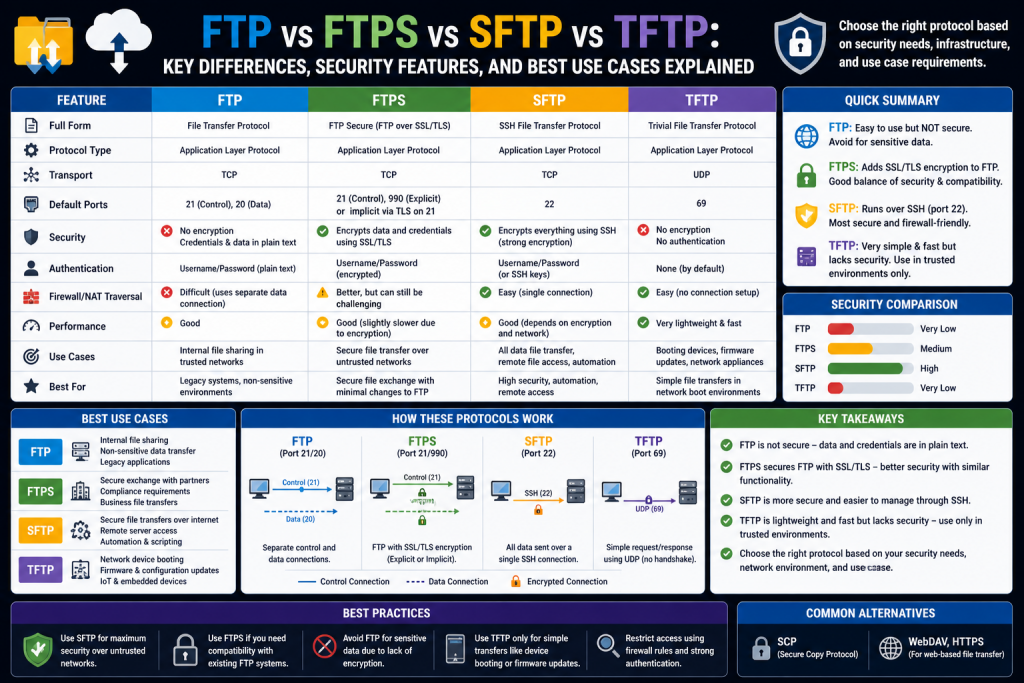
Four major protocols frequently discussed in networking, systems administration, and cybersecurity are FTP, FTPS, SFTP, and TFTP. Though similar in purpose, they differ dramatically in architecture, security, performance, and ideal use cases. Understanding these differences is crucial not only for certification exams but also for real-world infrastructure design, enterprise operations, and cybersecurity defense.
The significance of these protocols becomes clearer when considering today’s environment. Organizations regularly transfer proprietary information, legal documents, intellectual property, healthcare records, cloud backups, and system images. A poor protocol choice can expose data to interception, corruption, or unauthorized access. Conversely, selecting the right protocol can improve operational speed, maintain regulatory compliance, and reduce infrastructure complexity.
The Evolution of File Transfer Needs
In the early stages of networking, data transfer requirements were relatively simple. Internal systems often communicated over trusted networks, and encryption was not always considered essential. The primary objective was basic functionality: move a file from one machine to another accurately enough for practical use.
As networks expanded beyond isolated local systems into global interconnected environments, this simplicity disappeared. Public internet exposure introduced eavesdropping, session hijacking, credential theft, and data manipulation risks. The growth of e-commerce, remote administration, cloud computing, and hybrid enterprise environments transformed file transfer from a convenience into a security-critical operation.
Several new demands emerged:
- Confidentiality of transmitted information
- Authentication of both sender and receiver
- Protection against data tampering
- Compatibility with firewalls and NAT
- Automation for enterprise-scale workflows
- Scalability for thousands of simultaneous users
- Regulatory compliance for sensitive industries
These growing requirements pushed older protocols to evolve while also encouraging the creation of newer alternatives designed with stronger security frameworks.
What Makes a Transfer Protocol Effective?
A useful transfer protocol is more than a file-moving utility. It must balance multiple operational priorities:
Reliability
Files must arrive intact and complete. Corruption during transfer can render firmware unusable, destroy databases, or compromise backups.
Security
Modern protocols must protect credentials and data through encryption, secure authentication, and resistance to interception.
Efficiency
Large files, system images, and enterprise backups require throughput optimization.
Compatibility
The protocol must function across operating systems, legacy devices, and diverse network architectures.
Administrative Simplicity
Protocols that are too difficult to configure or maintain may increase operational risk.
Each protocol emphasizes these characteristics differently, which is why no single solution is ideal for every scenario.
HTTP, HTTPS, SSL, and TLS: Foundational Security Concepts
Before exploring dedicated file transfer protocols, it is important to understand broader transport security concepts because many file transfer methods build upon them.
Hypertext Transfer Protocol was initially developed to move web documents between servers and browsers. Though not originally intended as a secure file transfer system, its role in content delivery made security enhancements necessary.
Secure Sockets Layer, later replaced by Transport Layer Security, introduced encrypted communication channels that protect data in transit. These technologies secure sessions by encrypting data, validating server identities, and reducing interception risks.
When encryption is applied to HTTP, the result is HTTPS. This framework became a model for adding security layers to other protocols, including FTP. FTPS essentially applies TLS encryption to FTP, much like HTTPS secures HTTP.
Understanding TLS is critical because encryption itself does not replace protocol design. A protocol may become encrypted while still retaining architectural complexities that affect firewalls, NAT, and administration.
The Original File Transfer Standard
File Transfer Protocol is one of the oldest and most recognized methods for transferring files across networks. It emerged during a time when interoperability and functionality were prioritized over security. FTP became widely adopted because it offered a dependable, standardized way to upload, download, rename, delete, and organize remote files.
FTP’s architecture is built on a client-server model:
- The server hosts files and services
- The client connects to access those resources
This design allowed organizations to centralize file distribution while enabling many clients to retrieve or upload data.
FTP became particularly valuable because it supported:
- User authentication
- Directory navigation
- File uploads
- File downloads
- Batch transfers
- Session commands
Its flexibility contributed to decades of widespread use.
How FTP Actually Works
One of FTP’s defining technical characteristics is its dual-channel communication structure.
Command Channel
The command channel handles:
- Authentication
- Login credentials
- Directory requests
- Session instructions
- File operation requests
Data Channel
The data channel handles:
- File uploads
- File downloads
- Directory listings
This separation improves operational organization but introduces complexity. Firewalls and NAT devices must track multiple sessions, and improper configurations can disrupt transfers.
FTP commonly uses:
- Port 21 for command communication
- Additional dynamically negotiated ports for data
This creates administrative challenges, particularly in secured enterprise environments.
Active vs Passive FTP
FTP has two operational modes that influence connectivity:
Active Mode
In active mode, the server initiates the data connection back to the client. While functional in early networking, this often conflicts with firewalls because inbound connections to clients may be blocked.
Passive Mode
In passive mode, the client initiates both command and data connections. This is generally easier for modern firewall environments.
Passive mode significantly improved FTP’s practicality in NAT-heavy infrastructures, but complexity still remains compared to newer protocols.
Advantages of FTP
FTP has remained relevant because of several strengths:
Broad Compatibility
Most networking devices, server platforms, and legacy systems support FTP.
Efficiency
FTP can be fast, especially on stable networks with optimized configurations.
Low Overhead
FTP servers can often handle many simultaneous users efficiently.
Administrative Familiarity
Because of its age, many administrators understand it well.
Automation
FTP scripts are widely used for scheduled transfers and maintenance tasks.
Limitations of FTP
Despite its strengths, FTP has serious weaknesses.
Lack of Native Encryption
Traditional FTP transmits usernames, passwords, and data in plain text.
Credential Exposure
Attackers monitoring traffic can potentially capture login information.
Firewall Complexity
Multiple channels and dynamic ports complicate security controls.
NAT Issues
Address translation can break certain FTP configurations.
Compliance Risks
Industries handling regulated data often consider plain FTP inadequate.
As cybersecurity matured, these limitations became increasingly unacceptable.
FTPS: Extending FTP with Encryption
FTPS was developed to preserve FTP’s familiar framework while adding transport security through SSL/TLS encryption. Rather than replacing FTP, it enhances it.
FTPS addresses FTP’s biggest weakness by encrypting:
- Credentials
- Session commands
- File content
This dramatically improves confidentiality.
Explicit FTPS
Explicit FTPS begins as a normal FTP connection, then upgrades to encryption through a negotiation command. This approach offers flexibility and compatibility.
Implicit FTPS
Implicit FTPS assumes encryption from the start, requiring secure communication immediately upon connection.
Benefits of FTPS
Improved Security
Data is encrypted, reducing interception risks.
Certificate-Based Validation
TLS certificates can validate server authenticity.
Legacy Compatibility
Organizations can adapt existing FTP systems.
Widespread Support
Many enterprise file transfer platforms support FTPS.
Operational Challenges with FTPS
Although encrypted, FTPS retains FTP’s dual-channel design. This means:
- Firewall rules remain more complex than SFTP
- NAT considerations persist
- Passive/active mode decisions still matter
- TLS inspection can be complicated
Thus, FTPS improves security but not architectural simplicity.
Authentication in FTP and FTPS
Authentication methods commonly include:
Username and Password
Basic and common, though password strength matters greatly.
Anonymous Access
Useful for public downloads but dangerous if misconfigured.
Certificates
FTPS may leverage certificate trust chains.
Directory Permissions
Administrative controls limit file exposure.
Authentication strength often determines whether FTP-family protocols remain secure in practice.
Common Real-World FTP/FTPS Use Cases
FTP and FTPS remain practical in several scenarios:
Website Content Management
Uploading web assets to hosting servers.
Enterprise File Distribution
Sharing large datasets internally.
Software Repositories
Providing firmware or patch downloads.
Automated Backups
Legacy systems often rely on FTP workflows.
Business Partner Data Exchange
FTPS is often preferred when encryption is mandatory.
Why FTP Still Appears in Certification Exams
FTP persists in certification content because it teaches core networking concepts:
- Ports
- Client-server communication
- Authentication
- Encryption gaps
- Firewall interaction
- Legacy protocol relevance
Understanding FTP provides foundational insight into protocol evolution.
Security Lessons from FTP’s History
FTP’s continued existence demonstrates an important reality in networking: technologies are rarely abandoned immediately, even when superior options emerge. Legacy systems, cost considerations, and operational familiarity often preserve older technologies.
This teaches several cybersecurity lessons:
Backward Compatibility Matters
Organizations cannot always modernize instantly.
Security Must Evolve
Protocols must adapt or be replaced.
Configuration Matters as Much as Design
Even secure-capable systems can be deployed insecurely.
Legacy Systems Increase Risk
Older protocols often remain attack surfaces.
Choosing Between FTP and FTPS
When selecting between these two, organizations often consider:
Use FTP When:
- Legacy device support is required
- Security is not a major concern on isolated networks
- Internal-only transfers are temporary
Use FTPS When:
- Encryption is mandatory
- Existing FTP infrastructure exists
- Compliance requires TLS
- Broad client compatibility is needed
The Bigger Picture
FTP and FTPS represent an important stage in networking history. FTP established standardized file movement. FTPS responded to modern security pressures by layering encryption on top of that structure.
However, even with these improvements, newer approaches would emerge to address not just encryption, but also architectural simplification, firewall friendliness, and operational security. This is where the Secure File Transfer Protocol would become increasingly important. Understanding FTP and FTPS first is essential because it reveals both the strengths and limitations that shaped future protocol development.
Introduction to the Next Generation of File Transfer Evolution
As networking matured and security became a central priority, organizations increasingly recognized that simply adding encryption to older technologies was not always enough. File transfer systems needed stronger confidentiality, simpler firewall compatibility, easier administration, and better adaptability to modern enterprise environments. At the same time, certain specialized devices still required minimalistic transfer solutions because of hardware limitations or operational simplicity.
This divergence in needs gave rise to two significantly different protocols: Secure File Transfer Protocol (SFTP) and Trivial File Transfer Protocol (TFTP). While both move files between systems, they were designed with entirely different philosophies. SFTP prioritizes security, authentication, and administrative control. TFTP prioritizes simplicity, lightweight implementation, and minimal resource requirements.
Understanding both protocols is critical because they illustrate how networking solutions evolve based on practical use cases. One protocol addresses modern encrypted communications, while the other continues to serve niche operational functions where simplicity outweighs security.
These protocols are often covered in networking and cybersecurity education because they demonstrate broader design principles:
- Security versus simplicity
- Resource usage versus functionality
- Enterprise scalability versus device-specific utility
- TCP reliability versus UDP speed
By examining SFTP and TFTP in depth, networking professionals gain a clearer understanding of protocol selection, infrastructure design, and security implications.
What Is SFTP?
Secure File Transfer Protocol is a file transfer method built on Secure Shell (SSH). Unlike FTPS, which modifies FTP by adding encryption layers, SFTP was designed within the SSH ecosystem. This architectural distinction is significant because it avoids many of the complexities associated with FTP’s original design.
SFTP provides secure remote file management capabilities over an encrypted SSH connection. It allows users not only to transfer files but often to:
- Upload files
- Download files
- Rename files
- Delete files
- Create directories
- Browse remote systems
- Modify permissions
This broader administrative functionality makes SFTP particularly attractive in secure enterprise environments.
SFTP is commonly associated with TCP port 22, the same port used by SSH, though administrators may change it for security or policy reasons.
Why SFTP Was Developed
Traditional FTP’s major security weakness was the transmission of credentials and data in cleartext. Even FTPS, while encrypted, still retained architectural complications due to FTP’s dual-channel communication.
SFTP emerged to address these issues by offering:
Unified Communication
SFTP operates over a single encrypted channel rather than separate command and data channels.
Strong Encryption
Because it uses SSH, all traffic is encrypted by default.
Firewall Simplicity
Single-port communication is easier to manage.
Authentication Flexibility
Password authentication can be replaced or supplemented by cryptographic key pairs.
Administrative Integration
Organizations already using SSH could expand into file transfers without introducing entirely separate systems.
This made SFTP particularly appealing for UNIX and Linux-heavy infrastructures, cloud administration, and security-conscious organizations.
How SFTP Works
SFTP establishes a secure session by leveraging SSH’s connection process.
Session Initiation
The client contacts the server over TCP.
Cryptographic Negotiation
Encryption algorithms, key exchange methods, and security parameters are negotiated.
Authentication
The client authenticates using:
- Username/password
- Public/private key pairs
- Multi-factor methods in advanced deployments
Secure File Operations
Once authenticated, the client performs file-related commands through the encrypted session.
Because all commands and data travel through one encrypted tunnel, visibility to outside observers is significantly reduced.
SFTP Security Strengths
One of SFTP’s biggest advantages is its comprehensive security model.
End-to-End Encryption
Files, credentials, and commands are protected throughout transmission.
Key-Based Authentication
SSH keys are often more secure than passwords.
Reduced Credential Theft
Passwords are not exposed in plaintext.
Session Integrity
Data tampering becomes far more difficult.
Administrative Logging
SSH systems often provide robust logging for audits.
These strengths make SFTP a preferred choice for transferring:
- Financial records
- Legal documentation
- Healthcare information
- Intellectual property
- Cloud backups
- Administrative configurations
Public Key Authentication Explained
A major strength of SFTP is support for public key cryptography.
Private Key
Stored securely by the client.
Public Key
Installed on the server.
When connecting, the server verifies that the client possesses the corresponding private key without transmitting it. This dramatically reduces password attack surfaces.
Benefits include:
- Resistance to brute-force password attacks
- Easier automation without plaintext credentials
- Better enterprise security posture
- Reduced phishing exposure
SFTP and Firewall Compatibility
Because SFTP uses one encrypted stream, it generally integrates more smoothly with modern security controls than FTP/FTPS.
Advantages Include:
- Fewer open ports
- Easier NAT traversal
- Reduced firewall complexity
- Lower risk of misconfiguration
This simplicity often reduces administrative overhead while improving security consistency.
Potential Limitations of SFTP
Despite its strengths, SFTP is not perfect.
Performance Overhead
Encryption requires processing power.
Compatibility Constraints
Some older embedded systems may not support SFTP.
Licensing or Add-On Costs
Certain enterprise platforms may require additional modules.
Operational Learning Curve
SSH key management may be unfamiliar to some teams.
Inspection Challenges
Encrypted traffic can reduce deep packet inspection visibility.
Still, for most modern environments, these limitations are outweighed by security benefits.
Common Real-World SFTP Use Cases
Managed Service Providers
Securely exchanging customer backups.
Financial Institutions
Moving reports and transaction data.
Cloud Administration
Secure file deployment to remote servers.
DevOps Pipelines
Automating secure artifact transfers.
Government Operations
Protecting classified or regulated information.
SFTP’s combination of encryption and administrative simplicity makes it especially valuable where confidentiality is mandatory.
What Is TFTP?
Trivial File Transfer Protocol represents the opposite design philosophy. It is intentionally lightweight, simple, and minimalistic.
TFTP was designed for environments where:
- Device resources are limited
- Full FTP implementations are impractical
- Security is not a primary requirement
- Simplicity is critical
TFTP commonly uses UDP port 69 and is fundamentally less complex than FTP or SFTP.
Why TFTP Was Important
Early networking devices such as routers, switches, and firewalls often lacked the storage or processing capacity for full-featured transfer software. Administrators still needed a way to:
- Upload firmware
- Download configurations
- Boot systems remotely
- Restore images
TFTP filled this gap by offering a stripped-down transfer mechanism requiring minimal computational overhead.
How TFTP Works
TFTP uses User Datagram Protocol rather than Transmission Control Protocol.
UDP Characteristics
- Connectionless
- Lower overhead
- Faster setup
- No guaranteed delivery
This design reduces complexity but sacrifices reliability mechanisms built into TCP.
Basic TFTP Process
- Client requests file read or write
- Server responds
- Data blocks are exchanged
- Acknowledgments occur per block
Though acknowledgments exist, TFTP remains less robust than TCP-based alternatives.
Advantages of TFTP
Minimal Resource Consumption
Ideal for embedded systems.
Simple Deployment
Easy to configure.
Firmware Distribution
Widely used for network appliance updates.
PXE Boot Support
Common in network boot environments.
Low Administrative Complexity
Useful in isolated internal networks.
Major Security Weaknesses of TFTP
TFTP’s simplicity comes at a major cost.
No Encryption
Data is transmitted openly.
No Native Authentication
Unauthorized access risks increase.
No Advanced Access Control
Limited security granularity.
UDP Risks
Potential packet loss or corruption.
Internet Exposure Danger
TFTP should rarely be exposed publicly.
These limitations mean TFTP is generally reserved for trusted internal environments.
TFTP in Network Booting and Infrastructure
Despite its age, TFTP remains important in several niche areas.
PXE Boot
Devices retrieve startup images from network servers.
Router and Switch Firmware
Legacy and specialized hardware may still depend on TFTP.
Configuration Backups
Quick internal transfers.
Disaster Recovery
Emergency firmware restoration.
Its relevance persists because not all systems require enterprise-grade security frameworks.
Reliability Concerns with TFTP
Since TFTP uses UDP:
- Packets may be dropped
- Congestion can affect delivery
- Corruption risks exist
- Large transfers may struggle
For small firmware files on stable local networks, these weaknesses are often acceptable. For sensitive or mission-critical data, they are not.
SFTP vs TFTP: Philosophical Contrast
SFTP and TFTP differ dramatically.
SFTP Focuses On:
- Security
- Encryption
- Authentication
- Enterprise deployment
- Remote administration
TFTP Focuses On:
- Simplicity
- Lightweight implementation
- Embedded systems
- Minimal resources
- Internal operational convenience
This contrast highlights a broader networking principle: protocols are tools designed for specific contexts, not universal solutions.
Choosing Between SFTP and TFTP
Use SFTP When:
- Security matters
- Compliance matters
- Internet or WAN exposure exists
- Sensitive files are transferred
- SSH infrastructure already exists
Use TFTP When:
- Working with legacy devices
- Performing PXE boot
- Internal firmware deployment
- Resource-constrained hardware is involved
- Security controls exist elsewhere through isolation
Operational Best Practices
For SFTP
- Use key-based authentication
- Disable weak ciphers
- Restrict root access
- Monitor logs
- Use MFA where possible
For TFTP
- Restrict to internal networks
- Limit file directories
- Disable when unused
- Monitor access
- Segment traffic
Certification and Practical Relevance
Networking certifications emphasize these protocols because they test more than memorization. They require understanding of:
- Security architecture
- TCP vs UDP
- Administrative design
- Device limitations
- Protocol evolution
Real-world professionals benefit from this knowledge because protocol misuse can create vulnerabilities or operational failures.
Introduction to Protocol Decision-Making in Modern Networks
Understanding what FTP, FTPS, SFTP, and TFTP are is only the beginning. The true value for networking professionals, systems administrators, cybersecurity analysts, and infrastructure architects lies in knowing when each protocol should be used, why one protocol may be preferable over another in a specific environment, and how protocol choice impacts security, compliance, performance, and long-term operational stability.
Impacts security, compliance, performance, and long-term operational stability. In real-world networking, choosing a file transfer protocol is rarely a matter of technical preference alone. It often involves balancing security requirements, system compatibility, user accessibility, infrastructure constraints, administrative overhead, and business continuity. A protocol that is technically superior in one category may create unnecessary complexity in another. For example, while SFTP may offer stronger security than FTP, a legacy network appliance may only support TFTP. Similarly, FTPS may satisfy compliance standards while preserving compatibility with older workflows. These decisions become even more complex when organizations operate hybrid environments that combine cloud platforms, on-premises infrastructure, third-party vendors, remote employees, and legacy operational technology. In such ecosystems, protocol choice can directly influence not only file transfer success but also security architecture, troubleshooting complexity, and regulatory alignment.
For example, industries handling financial records, healthcare information, or legal documentation may prioritize encrypted protocols because regulatory frameworks often require data confidentiality both in transit and at rest. In these scenarios, selecting an insecure protocol could introduce audit failures, legal exposure, or reputational damage. However, implementing highly secure protocols may also require additional staff expertise, certificate management, SSH key governance, or firewall reconfiguration. This introduces operational costs that smaller organizations or legacy-heavy enterprises must carefully evaluate.
Performance is another important factor. High-volume environments transferring large backups, system images, or software distributions may prioritize throughput efficiency, while lower-powered embedded systems may require lightweight protocols despite security trade-offs. Administrative familiarity also matters significantly. A technically strong protocol can still create vulnerabilities if internal teams do not understand how to configure, monitor, or secure it properly. Human error, misconfigured permissions, weak credentials, or poor certificate practices can undermine even advanced protocols.
Ultimately, protocol selection is a strategic infrastructure decision that reflects organizational priorities, risk tolerance, budget, technical maturity, and future scalability. The most effective networking professionals evaluate protocols not simply by technical specifications, but by how well they align with operational realities, business goals, and evolving security demands.
This is why protocol selection is best viewed as a strategic operational decision rather than a purely technical checkbox. Organizations must align protocol choice with practical realities.
Key considerations often include:
- Sensitivity of transferred data
- Internal versus external network exposure
- Device capability
- Firewall and NAT complexity
- Compliance mandates
- Automation needs
- Administrative familiarity
- Performance requirements
- Legacy system dependencies
Choosing the wrong protocol can expose credentials, create firewall bottlenecks, break automation, or increase support costs. Choosing correctly can streamline operations while protecting critical assets.
Understanding Security as the Primary Decision Factor
In modern infrastructure, security is often the first and most important question.
When Security Is Minimal or Controlled
If the transfer occurs inside a tightly isolated internal lab, air-gapped environment, or legacy maintenance network, older protocols such as FTP or TFTP may still be acceptable depending on the operational need.
When Security Is Essential
If data crosses public networks, includes customer records, involves financial reporting, legal documentation, intellectual property, or healthcare data, encrypted protocols become mandatory.
Security considerations should include:
Confidentiality
Can attackers read the file contents?
Credential Protection
Are usernames and passwords encrypted?
Integrity
Can data be altered in transit?
Authentication Strength
Can identity be reliably verified?
Compliance
Does the protocol meet regulatory requirements?
From this perspective:
- FTP offers minimal native security
- TFTP offers almost none
- FTPS offers strong transport encryption
- SFTP offers integrated encrypted architecture
This makes FTP and TFTP increasingly niche for secure enterprise operations.
When FTP Still Makes Sense
Despite security concerns, FTP is not entirely obsolete. It remains useful in certain scenarios.
Legacy Infrastructure
Some systems were designed decades ago and may only support FTP without expensive upgrades.
Public File Distribution
Anonymous FTP can still be used for distributing non-sensitive public files.
Internal Transfers on Trusted Networks
In segmented environments where exposure is tightly controlled, FTP may remain operationally efficient.
High Compatibility Requirements
FTP’s universal support across platforms can simplify interoperability.
Examples Include:
- Legacy industrial systems
- Internal media repositories
- Temporary migration environments
- Controlled software mirrors
Risks
Even in these environments, administrators must consider:
- Password interception
- Misconfiguration
- Internal threats
- Compliance limitations
FTP should generally be avoided when secure alternatives are practical.
When FTPS Becomes the Best Option
FTPS often serves as a compromise between modernization and backward compatibility.
Existing FTP Infrastructure
Organizations with established FTP workflows can add encryption without completely redesigning systems.
Business-to-Business File Exchanges
Partners may require encrypted transfers while maintaining broad compatibility.
Certificate-Based Compliance
FTPS can satisfy certain encrypted transport mandates.
Cross-Platform Support
Many enterprise systems already support FTPS.
Ideal Scenarios Include:
- Vendor file submissions
- Secure hosting environments
- Enterprise data feeds
- Large-scale compatibility needs
Challenges
- Firewall complexity remains
- Passive mode configuration may be necessary
- Certificate management introduces overhead
- NAT complications may persist
FTPS is often best when organizations need secure FTP without abandoning existing operational familiarity.
When SFTP Is the Strongest Choice
For many modern infrastructures, SFTP has become the preferred file transfer solution.
Secure Remote Administration
Because it integrates with SSH, SFTP aligns naturally with remote systems management.
Sensitive Data Transfers
Healthcare, finance, and legal sectors often prioritize SFTP.
Cloud and Hybrid Environments
SFTP’s firewall simplicity makes it ideal.
Automation and Scripting
SSH keys support secure automation without plaintext credentials.
Operational Simplicity
Single-port architecture reduces network troubleshooting.
Common SFTP Use Cases
- Cloud server deployment
- Secure backups
- Automated enterprise workflows
- Confidential document exchange
- Secure DevOps pipelines
Potential Drawbacks
While SFTP offers significant advantages in security and operational efficiency, organizations must also recognize several practical limitations before implementation. Some legacy systems may lack native support for SFTP, especially older network appliances, proprietary industrial control systems, or outdated enterprise software built around traditional FTP workflows.
In such cases, businesses may need software upgrades, middleware, or protocol translation services to bridge compatibility gaps, potentially increasing deployment costs and administrative complexity. SSH key management also requires discipline and structured governance. Unlike password-only systems, SFTP often relies on public/private key pairs, which improve security but demand careful handling. Keys must be securely generated, distributed, stored, rotated, and revoked when personnel changes occur or devices are decommissioned. Without proper oversight, orphaned or poorly protected keys can create hidden vulnerabilities. Encryption overhead is another consideration. While modern servers generally handle encryption efficiently, lower-powered systems, embedded devices, or high-volume transfer environments may experience increased CPU utilization, memory consumption, or reduced throughput.
This can become especially relevant when transferring very large datasets, running multiple simultaneous sessions, or operating in bandwidth-constrained environments. Troubleshooting encrypted sessions may also be more complex, as security controls can reduce packet visibility for traditional monitoring tools. Despite these challenges, SFTP remains one of the strongest choices for modern secure file transfers. Its robust encryption, secure authentication methods, firewall-friendly architecture, and broad enterprise adoption make it highly practical for organizations prioritizing confidentiality, integrity, and streamlined administration. When deployed with proper planning and governance, SFTP often delivers an exceptional balance of security, reliability, scalability, and long-term operational value.
When TFTP Is Still Necessary
TFTP is largely specialized today, but “specialized” does not mean irrelevant.
Firmware Deployment
Many routers, switches, and embedded systems still rely on TFTP.
PXE Network Boot
Bootstrapping devices often uses TFTP.
Disaster Recovery
Minimal systems may depend on TFTP for emergency restoration.
Resource-Constrained Devices
Low-power hardware may require TFTP.
Appropriate Conditions
- Internal-only use
- Isolated management VLANs
- Temporary provisioning
- Controlled maintenance windows
Serious Limitations
- No encryption
- No authentication
- Packet loss risks
- Dangerous on public networks
TFTP should generally be viewed as a utility protocol, not a secure enterprise transfer method.
Firewall and NAT Considerations Across Protocols
Modern networks often rely heavily on firewalls, segmentation, and address translation.
FTP
Complex because of dual channels.
FTPS
Still complex, plus encrypted inspection challenges.
SFTP
Simpler due to single encrypted channel.
TFTP
Simple structurally, but insecure.
This often means security teams prefer SFTP not only for encryption but also because operational simplicity reduces misconfiguration opportunities.
Compliance and Regulatory Pressures
Regulated industries often require encryption standards.
Examples
- Healthcare privacy
- Financial security
- Government standards
- Legal confidentiality
Protocols without encryption may fail audits. In such sectors:
Preferred
- SFTP
- FTPS
Rarely Acceptable
- FTP
- TFTP
Compliance decisions often override convenience.
Performance vs Security Trade-Offs
Encryption introduces processing overhead. While modern hardware often minimizes this impact, certain scenarios may prioritize speed.
FTP
Fast, lightweight, less secure.
FTPS
Secure, moderate complexity.
SFTP
Secure, often slightly heavier due to SSH processing.
TFTP
Very lightweight, limited and insecure.
Organizations must decide whether performance gains justify security sacrifices.
Administrative Complexity and Human Error
Technology design matters, but human operation matters just as much.
FTP
Simple but risky.
FTPS
More secure, but certificates and firewall rules increase complexity.
SFTP
Secure and often cleaner, but SSH key management requires expertise.
TFTP
Simple but dangerous if exposed.
A protocol that is theoretically secure but poorly managed may become less safe than a simpler well-controlled alternative.
Moving from Legacy to Secure Systems
Many organizations still operate legacy FTP or TFTP systems. Migration often follows stages:
Stage 1
Assess current device compatibility.
Stage 2
Segment insecure protocols internally.
Stage 3
Introduce FTPS for transitional compatibility.
Stage 4
Shift toward SFTP for modern workflows.
Stage 5
Retain TFTP only where unavoidable.
This gradual approach reduces disruption while improving security posture.
Protocol Selection by Common Scenario
Scenario: Public Website File Uploads
Best Choice: FTPS or SFTP
Scenario: Internal Legacy Router Firmware
Best Choice: TFTP
Scenario: Secure Financial Reporting
Best Choice: SFTP
Scenario: Broad Partner Compatibility
Best Choice: FTPS
Scenario: Temporary Internal Legacy Application
Best Choice: FTP only if isolated
Certification and Career Relevance
Networking and security certifications emphasize these protocols because they teach broader concepts:
- Encryption models
- Legacy risk
- TCP vs UDP
- Operational trade-offs
- Firewall behavior
- Real-world troubleshooting
Professionals who understand not just definitions, but strategic use, are better prepared for architecture, security, and administration roles.
The Future of File Transfer
Modern enterprise trends increasingly emphasize:
Zero Trust Security
Verification over assumption.
Cloud-Native Transfers
Secure API and SSH integrations.
Automation
Secure machine-to-machine workflows.
Identity-Centric Security
Key-based and certificate-based controls.
Reduced Legacy Exposure
Phasing out insecure systems.
While FTP and TFTP may persist in niche contexts, long-term momentum strongly favors secure, encrypted, and manageable protocols.
Operational Best Practices Regardless of Protocol
No matter which protocol is chosen:
Use Least Privilege
Limit account permissions.
Monitor Logs
Track transfers and anomalies.
Segment Networks
Isolate risky protocols.
Update Software
Patch vulnerabilities.
Audit Regularly
Review configurations.
Disable Unused Services
Reduce attack surfaces.
Protocol choice is only one layer of security.
Conclusion
FTP, FTPS, SFTP, and TFTP each represent different eras, priorities, and operational philosophies within networking. FTP introduced foundational file transfer capabilities but struggles to meet modern security expectations. FTPS enhanced FTP with encryption, preserving compatibility while addressing confidentiality concerns. SFTP emerged as a streamlined, security-first solution, aligning strongly with modern enterprise, cloud, and compliance requirements. TFTP, while highly limited from a security perspective, continues to serve specialized roles in firmware deployment, network booting, and resource-constrained environments.
There is no universally “best” protocol—only the best protocol for a specific operational context. The right choice depends on balancing security, compatibility, simplicity, infrastructure maturity, and business needs.
For modern organizations, SFTP and FTPS increasingly dominate where secure transfer is required. FTP and TFTP remain relevant primarily through legacy systems and specialized scenarios. The true expertise lies not in memorizing ports or acronyms, but in understanding protocol architecture, security implications, deployment realities, and strategic application.
For networking professionals, mastering these distinctions provides more than exam success—it builds the practical judgment necessary to design secure, efficient, and resilient systems in an increasingly complex digital world.
Continue exploring the technologies and certification concepts that matter most to you.