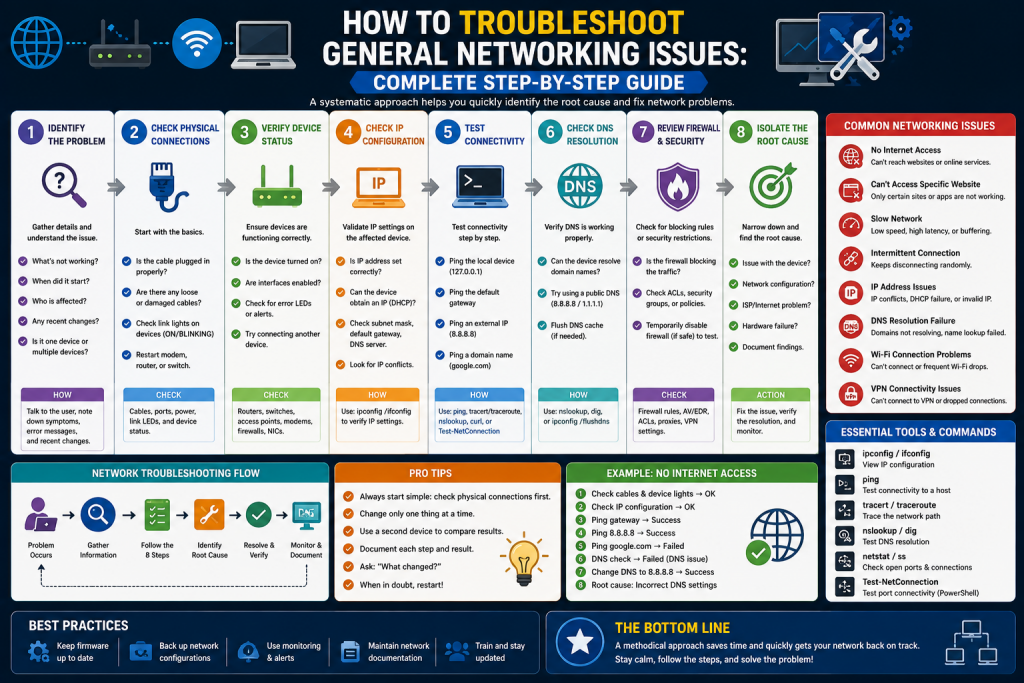
Network troubleshooting is the systematic process of identifying, diagnosing, and resolving problems within a computer network. These issues can range from simple connectivity failures to complex routing, switching, or configuration errors. Common network problems include collisions, broadcast storms, duplicate IP addresses, and misconfigured devices. A structured troubleshooting approach helps network engineers quickly isolate faults and restore normal operation.
In real-world environments, network troubleshooting is not just about fixing issues but also about understanding why the issue occurred in the first place. This requires a clear understanding of network layers, protocols, and device behavior. Engineers often start by checking physical connectivity, then move to data link and network layer configurations to narrow down the problem.
Modern networks are highly dependent on services like DNS, DHCP, and routing protocols, which means even a small misconfiguration can cause widespread disruption. For example, a wrong subnet mask or default gateway can prevent entire departments from accessing external resources. Similarly, a single faulty switch or router can create cascading failures across multiple network segments.
Effective troubleshooting also relies on tools such as ping, traceroute, packet analyzers, and network monitoring systems. These tools help engineers visualize traffic flow and identify bottlenecks or failures. Documentation and baseline performance metrics are also essential, as they provide a reference point for normal network behavior.
Why Network Troubleshooting Is Important
Network troubleshooting is one of the most critical skills for IT professionals and network engineers. Modern organizations depend heavily on uninterrupted connectivity for communication, cloud services, security systems, and business operations. Even a short network outage can cause productivity loss, financial damage, and service disruption.
A network is a complex system where multiple components interact simultaneously, including routers, switches, firewalls, servers, and end-user devices. Because of this complexity, failures are inevitable. The goal of troubleshooting is not to prevent every failure but to respond efficiently when issues occur.
A structured troubleshooting process ensures consistency, reduces downtime, and improves long-term network stability. It also helps engineers document issues, which is valuable for auditing and future prevention.
Key Principles of Network Troubleshooting
Before diving into specific problems, it is important to follow a logical troubleshooting mindset. Most professionals use a step-by-step approach:
First, identify the problem clearly. Determine what is not working and which users or systems are affected. Next, gather information such as error messages, logs, and symptoms. After that, isolate the cause by testing different network layers or components. Finally, apply a fix and verify whether the issue is resolved.
This structured approach avoids random guessing and saves time during diagnosis.
Common Considerations in Network Troubleshooting
One of the most frequent causes of network problems is incorrect device configuration. This includes firewall rules, router settings, switch ports, and access control lists. A single incorrect rule can block traffic entirely.
Administrators should verify that required ports are open and that firewall policies are not overly restrictive. It is also important to check port forwarding settings and ensure that devices are correctly placed within the network topology. Documentation of network design helps in identifying misconfigurations quickly.
Routing Table Problems
Routing tables determine how data moves across networks. If routing information is incorrect or incomplete, packets may never reach their destination. Missing routes, incorrect next hops, or conflicting routes are common issues. Dynamic routing protocols may also fail to advertise networks properly, leading to communication breakdowns. Engineers should regularly inspect routing tables and verify that all expected networks are present and reachable.
In addition to basic verification, network engineers must also understand how routing decisions are made using metrics such as hop count, cost, bandwidth, and administrative distance. These factors influence which path a router selects when multiple routes exist to the same destination. If these metrics are misconfigured, traffic may take inefficient paths or fail entirely.
Routing issues can also occur during network changes, such as when new subnets are added or when failover paths are introduced. In such cases, outdated routing entries may remain in the table, causing confusion or packet loss. Clearing or updating routing tables can often resolve these inconsistencies.
Another important aspect is route convergence, which refers to the time it takes for all routers in a network to agree on the current topology. During this period, temporary routing loops or black holes may occur. Engineers should monitor convergence behavior, especially in large networks using dynamic protocols like OSPF or EIGRP, to ensure stable and reliable data flow.
Missing Routes
A missing route is one of the simplest yet most damaging network issues. If a router does not have a defined path to a destination network, it will drop packets. This often happens when new subnets are added but not properly configured in routing tables.
Verifying route propagation in dynamic environments is essential to ensure full connectivity.
Interface Status Problems
Network interfaces are the physical or logical connection points of devices. If an interface is down, disabled, or misconfigured, communication will fail.
Checking interface status is often the first step in troubleshooting. Tools like ping tests, system logs, and command-line utilities such as ipconfig or ifconfig help determine whether interfaces are active. Physical inspection of cables and ports is also important.
IP Configuration Issues
Incorrect IP settings can prevent devices from communicating even if the physical network is working properly. Common problems include wrong subnet masks, incorrect default gateways, and duplicate IP addresses.
Static IP conflicts with DHCP assignments are also frequent causes of network instability. A duplicate IP address can cause intermittent connectivity for multiple devices. Proper IP management and DHCP configuration are essential for stable networking.
VLAN Misconfiguration
Virtual Local Area Networks (VLANs) are used to divide networks into smaller logical segments. However, incorrect VLAN assignments can isolate devices or prevent communication between them.
Node overlap occurs when a device is assigned to multiple VLANs incorrectly. This leads to unpredictable network behavior. Proper VLAN planning and consistent configuration are essential to avoid segmentation issues.
Network Performance Baselines
A performance baseline represents normal network behavior under standard conditions. It includes metrics such as bandwidth usage, latency, and packet loss.
By comparing current performance to baseline data, engineers can quickly detect anomalies. Deviations often indicate underlying problems such as congestion, hardware failure, or misconfiguration.
Common Network Issues and Their Causes
Collisions
Collisions occur when multiple devices transmit data simultaneously on the same network segment. While rare in modern switched networks, they can still occur in poorly designed or legacy systems. Collisions reduce performance and increase retransmissions.
Broadcast Storms
Broadcast storms happen when excessive broadcast traffic overwhelms the network. This usually occurs due to loops or misconfigured devices. In severe cases, broadcast storms can bring down an entire network.
Duplicate IP and MAC Addresses
Duplicate addressing causes serious connectivity issues. If two devices share the same IP address, both may experience intermittent or complete network failure. This often results from DHCP misconfiguration or manual IP assignment errors.
MAC address conflicts are less common but can still occur in virtualized environments.
Multicast Flooding
Multicast traffic is intended for specific groups of devices. However, when switches are not properly configured, multicast traffic can be sent to all devices, causing unnecessary load and network congestion.
Asymmetric Routing
Asymmetric routing occurs when data packets take one path to a destination and a different path back. While sometimes intentional, it can create issues with security policies and firewalls that expect symmetrical traffic flow.
Switching and Routing Loops
Loops occur when data packets circulate continuously within the network due to misconfiguration. This can cause severe congestion and downtime. Spanning Tree Protocol is commonly used to prevent such loops.
Rogue DHCP Servers
A rogue DHCP server assigns incorrect IP configurations to devices. This can lead to IP conflicts, connectivity loss, and security risks. Unauthorized DHCP servers must be identified and removed immediately.
DHCP Scope Exhaustion
When a DHCP server runs out of available IP addresses, new devices cannot join the network. This often happens in growing networks with insufficient address pools or poorly managed lease times.
Certificate Issues
Expired or invalid security certificates can block secure connections. This is common in HTTPS environments where certificates are not renewed on time. Automated certificate management helps prevent such issues.
NTP Synchronization Problems
Network Time Protocol ensures all devices share the same time. If time synchronization fails, it can lead to authentication errors, logging issues, and certificate validation failures.
Hardware Failures
Hardware failures include malfunctioning routers, switches, cables, or power supplies. These issues can completely disrupt network operations. Regular maintenance and monitoring help reduce hardware-related downtime.
Firewall Misconfigurations
Firewalls are a common source of network issues. Overly strict rules may block legitimate traffic, while misconfigured rules may expose the network to security risks. Careful rule management is essential.
BYOD (Bring Your Own Device) Challenges
Personal devices connected to corporate networks can introduce security risks and performance issues. These devices may bypass security controls or consume excessive bandwidth. Proper segmentation and access control help manage BYOD environments.
Licensed Feature Issues
Some network devices require valid software licenses to function fully. Expired licenses may disable critical features or reduce performance. Regular license tracking is necessary in enterprise environments.
Step-by-Step Troubleshooting Approach
A structured approach improves efficiency in resolving network issues. First, verify physical connectivity and device status. Next, check IP configuration and routing tables. After that, analyze logs and error messages. Then test connectivity using tools like ping and traceroute.
Once the problem is identified, apply a fix and monitor the system to ensure stability. Finally, document the issue and resolution for future reference.
Conclusion
Network troubleshooting is an essential skill for maintaining reliable and efficient communication systems. Since network environments are complex and constantly evolving, issues are inevitable. However, most problems stem from a limited set of causes such as misconfigurations, routing errors, IP conflicts, hardware failures, or security restrictions.
By following a structured troubleshooting process, network engineers can quickly identify root causes and restore normal operations. Understanding common issues, maintaining performance baselines, and applying systematic diagnostic techniques not only improves uptime but also builds long-term expertise.
A well-prepared troubleshooting strategy ensures that when problems occur, they are resolved quickly, minimizing downtime and maintaining network stability across all environments.
Continue exploring the technologies and certification concepts that matter most to you.