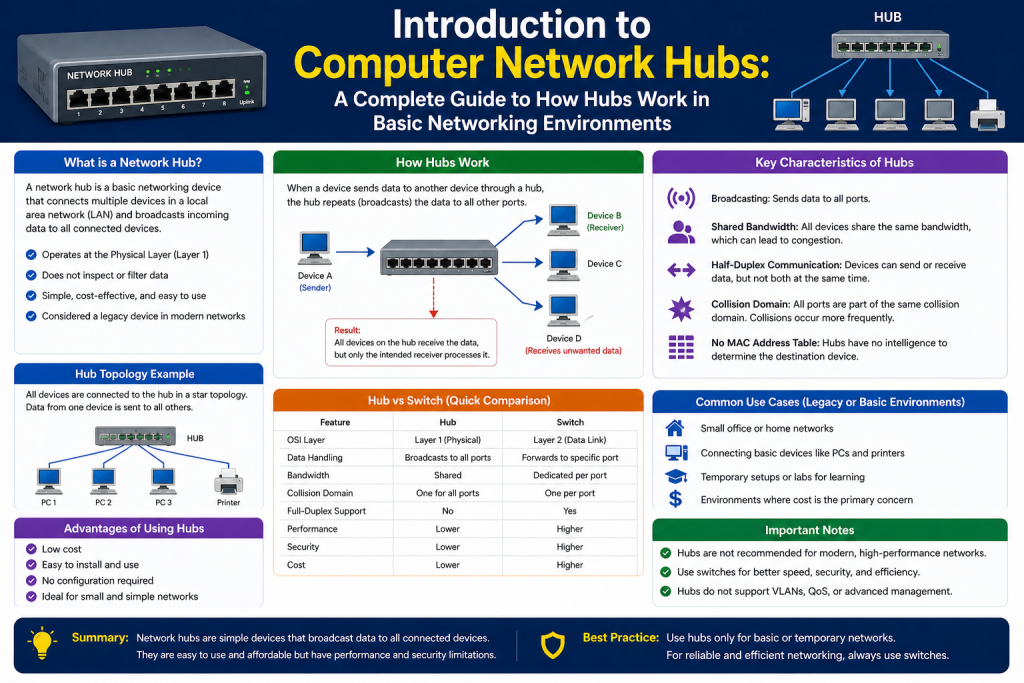
A computer network hub is one of the simplest devices used in networking. It belongs to the physical layer of the networking model, which means it deals only with the transmission of raw data signals. It does not analyze, filter, or make decisions about the data it handles. Instead, it acts as a central connection point where multiple devices can communicate with each other.
In earlier days of networking, hubs were widely used to build local area networks. They provided a straightforward and cost-effective way to connect multiple computers in a shared environment. Even though they are rarely used in modern networks today, understanding how hubs work is still important. Many foundational networking concepts are easier to grasp when studied through the behavior of hubs.
A hub operates by receiving a signal from one connected device and then sending that signal to all other connected devices. This means every device connected to the hub receives the same data, regardless of whether it is the intended recipient. Because of this behavior, hubs are often referred to as broadcasting devices.
Basic Working Principle of a Hub
The operation of a hub is simple and does not involve any intelligence. When a device sends data into the hub, the hub does not inspect the data packet or check its destination address. Instead, it copies the incoming signal and forwards it to every port on the device.
This process can be understood in a step-by-step manner. A computer sends data through an Ethernet cable into the hub. The hub receives the electrical signal and immediately replicates it. Then, it sends that replicated signal out through all the other ports. Every connected device receives the data, but only the device with the matching address processes it. The rest simply ignore it.
This behavior creates a shared communication environment. All devices connected to the hub share the same transmission medium. As a result, they must take turns sending data. If two devices attempt to send data at the same time, their signals interfere with each other.
The hub does not have the ability to manage or prevent this interference. It simply continues to forward signals without any awareness of network conditions.
Role of the Physical Layer
A hub operates at the physical layer of networking. This layer is responsible for the transmission and reception of raw bit streams over a physical medium such as cables. It deals with electrical signals, connectors, and data transmission methods.
Since hubs operate at this layer, they do not understand higher-level concepts such as IP addresses or MAC addresses. They do not store any information about connected devices and do not make decisions based on network traffic. Their function is limited to signal transmission.
This lack of intelligence is what differentiates hubs from more advanced devices. Devices that operate at higher layers can inspect data, make forwarding decisions, and optimize network performance. A hub, however, remains a basic signal repeater.
Because it operates at the physical layer, a hub is often compared to a multiport repeater. It simply regenerates incoming signals and sends them out again, ensuring that data can travel across multiple devices.
Shared Communication Environment
One of the defining characteristics of a hub is that it creates a shared communication environment. All connected devices use the same bandwidth and compete for access to the network. This means that only one device can successfully transmit data at a time.
When multiple devices attempt to transmit simultaneously, collisions occur. A collision happens when two signals overlap on the network medium, causing the data to become corrupted. When this happens, the devices involved must resend their data.
As more devices are added to the hub, the chances of collisions increase. This leads to reduced network performance and increased delays. The shared environment becomes less efficient as network traffic grows.
This limitation makes hubs unsuitable for large or high-performance networks. However, it also provides a clear example of how early networks functioned and why more advanced technologies were developed.
Understanding Collision Domains
A collision domain is a network segment where data collisions can occur. In a hub-based network, all connected devices belong to the same collision domain. This means that any transmission from one device can potentially interfere with transmissions from another device.
The concept of a collision domain is important for understanding network efficiency. In a single collision domain, devices must coordinate their transmissions to avoid interference. This coordination is typically handled by protocols that detect collisions and manage retransmissions.
In a hub environment, collisions are common because all devices share the same communication path. As network activity increases, collisions become more frequent. This results in more retransmissions, which further increases congestion.
The presence of a single collision domain is one of the main drawbacks of using a hub. It limits scalability and reduces overall network performance. Modern networking devices address this issue by separating collision domains and allowing multiple devices to communicate simultaneously.
Half-Duplex Communication
Hubs operate using half-duplex communication. This means that a device can either send data or receive data at any given time, but it cannot do both simultaneously. This limitation is directly related to the shared nature of the network.
In a half-duplex system, devices must wait for the network to be free before transmitting. If two devices attempt to send data at the same time, a collision occurs. The devices then stop transmitting, wait for a random period, and attempt to resend the data.
This process introduces delays and reduces efficiency. As more devices are added to the network, the likelihood of collisions increases, further impacting performance.
Half-duplex communication is another reason why hubs are no longer suitable for modern networks. Full-duplex communication, which allows simultaneous sending and receiving, is now the standard in most networking environments.
Historical Importance of Hubs
Hubs played a significant role in the early development of computer networks. They were widely used in small office and home networks because they were affordable and easy to deploy. At a time when networking technology was still evolving, hubs provided a practical solution for connecting multiple devices.
In early Ethernet networks, hubs were commonly used with twisted-pair cables and standard connectors. They served as the central point of communication, allowing devices to share data and resources.
As networking demands grew, the limitations of hubs became more apparent. Increased traffic led to higher collision rates, reduced performance, and greater inefficiency. This prompted the development of more advanced devices that could manage network traffic more effectively.
Despite being largely replaced, hubs remain an important part of networking history. They provide insight into how early networks operated and help explain the evolution of modern networking technologies.
Types of Network Hubs
There are several types of hubs, each with slightly different capabilities. Passive hubs are the simplest form. They do not amplify or regenerate signals. Instead, they simply pass incoming signals to all connected devices. Because they do not improve signal strength, they are limited in their effectiveness.
Active hubs, on the other hand, include signal amplification. They regenerate incoming signals before forwarding them. This allows data to travel longer distances without losing quality. Active hubs function similarly to repeaters, extending the reach of the network.
Another category often mentioned is intelligent hubs. These devices include basic management or monitoring features. They may provide information about network activity or allow limited configuration. However, their functionality is still far less advanced than modern networking devices.
Each type of hub reflects a different level of capability, but all share the same fundamental behavior of broadcasting data to all connected ports.
Simplicity and Ease of Use
One of the main advantages of hubs is their simplicity. They require no configuration and can be used immediately after being connected. This makes them easy to deploy, even for users with limited technical knowledge.
There are no settings to adjust and no software interfaces to manage. Devices can simply be plugged into the hub, and communication begins automatically. This plug-and-play nature made hubs popular in early networking environments.
However, this simplicity also comes with limitations. The lack of control and intelligence means that hubs cannot optimize network performance or handle complex traffic patterns. They are limited to basic signal transmission.
Limitations of Hubs
While hubs are easy to use, they have several significant limitations. The most notable limitation is their inability to manage network traffic. By broadcasting all data to all devices, they create unnecessary network load.
The shared bandwidth also reduces efficiency. As more devices are added, each device receives a smaller portion of the available bandwidth. This leads to slower data transmission and increased delays.
Collisions further reduce performance. Frequent retransmissions consume additional bandwidth and create congestion. The network becomes less reliable as traffic increases.
Another limitation is the lack of security. Since all data is broadcast to all devices, it is possible for any connected device to capture and analyze network traffic. This makes hubs unsuitable for environments where data privacy is important.
These limitations have led to the decline of hubs in modern networking.
Continued Relevance in Learning
Even though hubs are no longer widely used, they remain relevant in educational contexts. They provide a simple way to demonstrate fundamental networking concepts. Topics such as collision domains, signal transmission, and half-duplex communication are easier to understand when studied through the behavior of hubs.
Hubs are also occasionally referenced in certification exams. Understanding how they work can help learners build a strong foundation in networking principles. This foundational knowledge is valuable when studying more advanced technologies.
In some cases, hubs may still be found in legacy systems or used for specific testing purposes. Their ability to broadcast traffic to all ports can be useful for monitoring and analysis.
Core Functions of a Network Hub
A computer network hub performs a very limited set of functions, but those functions are essential to understanding how early networks operated. At its most basic level, a hub is responsible for receiving signals and transmitting them to all connected devices. It does not process, analyze, or filter the data. Instead, it acts as a simple intermediary that ensures signals are distributed across the network.
When a device sends data, the hub captures the incoming electrical signal and immediately repeats it. This repeated signal is then sent out through all other ports. Every connected device receives the same signal at the same time. The hub does not attempt to identify the intended recipient or control the flow of traffic.
This behavior defines the hub as a broadcast device. Unlike modern networking equipment, which can selectively send data to specific destinations, a hub treats all transmissions equally. Every device is exposed to all traffic, which creates both simplicity and inefficiency.
In addition to receiving and transmitting data, some hubs also perform signal regeneration. This function ensures that signals remain strong enough to travel across the network without degradation. Signal regeneration is especially important in environments where cable lengths approach or exceed their typical limits.
Receiving and Transmitting Data
The fundamental operation of a hub revolves around two actions: receiving data and transmitting data. These actions are often referred to as Rx and Tx. While these terms may seem technical, they simply represent the process of taking in data and sending it out again.
When a device transmits data, it sends electrical signals through a network cable. These signals enter the hub through one of its ports. The hub detects the incoming signal and immediately prepares to forward it. It does not store the data or examine its contents. Instead, it duplicates the signal and sends it out through all other ports.
This process happens very quickly and continuously as data flows through the network. The hub acts as a central point where all signals converge and are redistributed. Because of this, it plays a critical role in maintaining connectivity between devices.
However, the lack of filtering means that every device must process incoming data to determine whether it is relevant. Devices use their own addressing mechanisms to decide whether to accept or ignore the data. This adds extra workload to each device and contributes to overall network inefficiency.
Signal Flow and Electrical Transmission
Hubs operate using electrical signals transmitted over physical media such as twisted-pair cables. Each cable contains multiple wires that carry signals between devices. In traditional Ethernet configurations, specific wires are designated for transmitting and receiving data.
When a device sends data, it uses designated transmit wires to carry the signal. The hub receives this signal through its corresponding receive wires. Once the signal is received, the hub regenerates and forwards it through the transmit wires of all other ports.
This process involves converting and maintaining electrical signals so they can travel effectively across the network. The hub ensures that the signal strength remains sufficient for all connected devices to detect and interpret the data.
Because hubs operate at the physical level, they do not interact with data in a logical sense. They do not understand packets, frames, or addresses. Their role is purely to handle the physical transmission of signals.
Pin Configuration and Data Direction
In early Ethernet networks, data transmission relied on specific pin configurations within network connectors. These pins determined how data was sent and received. Typically, one set of pins was used for transmitting data, while another set was used for receiving data.
When connecting devices directly, special cables were sometimes required to ensure that transmit and receive signals aligned correctly. These cables would swap the transmit and receive pins, allowing devices to communicate effectively.
Hubs simplified this process by internally managing the direction of data flow. They were designed to receive signals on specific pins and transmit them on others. This eliminated the need for special cables in many cases, making network setup easier.
Modern networking equipment often includes automatic detection features that adjust pin configurations as needed. However, understanding how hubs handled this process provides insight into the evolution of network connectivity.
Signal Amplification and Regeneration
Some hubs include the ability to amplify and regenerate signals. These are known as active hubs. When a signal enters an active hub, it is not only repeated but also strengthened. This ensures that the signal can travel longer distances without losing quality.
Signal degradation is a common issue in network communication. As signals travel through cables, they gradually weaken due to resistance and interference. If a signal becomes too weak, it may not be correctly interpreted by receiving devices.
Active hubs address this issue by restoring the signal to its original strength before forwarding it. This process helps maintain reliable communication across the network, especially in larger setups.
Passive hubs, in contrast, do not provide amplification. They simply pass along signals as they are received. This limits their effectiveness in environments where signal strength is a concern.
Bandwidth Sharing Among Devices
In a hub-based network, all connected devices share the same bandwidth. This means that the total available data capacity is divided among all devices. If multiple devices are active at the same time, each one receives a smaller portion of the bandwidth.
This shared bandwidth model can lead to congestion. As more devices attempt to transmit data, the network becomes crowded. Devices must wait for their turn to send data, which increases delays.
Bandwidth sharing is directly related to the concept of a shared communication medium. Since all devices use the same pathway for data transmission, they must coordinate their access to avoid conflicts.
This limitation is one of the reasons hubs are not suitable for modern networks. High-speed applications require dedicated bandwidth and efficient traffic management, which hubs cannot provide.
Collision Detection and Handling
Collisions are a natural consequence of shared communication environments. When two devices transmit data at the same time, their signals overlap and interfere with each other. This results in corrupted data that cannot be properly interpreted.
In networks that use hubs, collision detection is handled by the devices themselves rather than the hub. When a device detects a collision, it stops transmitting and waits for a random period before attempting to resend the data.
This process is part of a broader mechanism that helps manage network traffic. While it allows communication to continue, it also introduces delays and reduces efficiency.
Frequent collisions can significantly impact network performance. As the number of devices increases, the likelihood of collisions grows. This leads to more retransmissions and greater congestion.
The inability of hubs to prevent collisions is a major drawback. Modern networking devices address this issue by isolating communication paths and reducing the chances of interference.
Half-Duplex Data Flow in Practice
Half-duplex communication plays a central role in how hubs operate. Since devices cannot send and receive data simultaneously, they must alternate between these actions. This requires careful coordination to avoid conflicts.
In practice, this means that a device must wait until the network is idle before transmitting data. If another device is already transmitting, it must wait until the transmission is complete. This waiting period can introduce delays, especially in busy networks.
The half-duplex model also affects overall throughput. Since communication is not continuous in both directions, the effective data rate is lower compared to full-duplex systems.
This limitation becomes more pronounced as network activity increases. In high-traffic environments, the delays caused by half-duplex communication can significantly reduce performance.
Lack of Traffic Management
One of the defining limitations of a hub is its inability to manage network traffic. It does not prioritize data, control congestion, or optimize transmission paths. All data is treated equally and broadcast to all devices.
This lack of management leads to inefficiencies. Devices receive large amounts of unnecessary data, which they must process and discard. This consumes resources and reduces overall performance.
In contrast, modern networking devices use advanced techniques to manage traffic. They can direct data to specific destinations, reduce congestion, and improve efficiency. Hubs lack these capabilities entirely.
The absence of traffic management also affects scalability. As networks grow larger, the limitations of hubs become more apparent. They are not designed to handle complex or high-demand environments.
Security Implications of Broadcasting
The broadcasting nature of hubs has important security implications. Since all data is sent to all devices, any connected device can potentially capture and analyze network traffic. This makes it easier for unauthorized users to access sensitive information.
In environments where data security is important, this behavior is a significant concern. Hubs do not provide any form of isolation or protection. All communications are exposed to all participants.
This limitation has contributed to the decline of hubs in modern networks. Security is a critical consideration in network design, and devices that cannot protect data are no longer suitable for most applications.
Efficiency and Performance Challenges
The combination of shared bandwidth, collisions, and lack of traffic management leads to significant performance challenges. As network activity increases, these issues become more pronounced.
Devices must spend time waiting for access to the network, retransmitting data after collisions, and processing unnecessary traffic. This reduces overall efficiency and increases latency.
In small networks with limited activity, these issues may not be noticeable. However, in larger or more demanding environments, they can severely impact performance.
These challenges highlight the limitations of hubs and explain why they have been replaced by more advanced technologies.
Setting Up a Computer Network Hub
Setting up a computer network hub is a straightforward process because hubs are designed to be simple and require minimal configuration. Unlike modern networking devices, hubs do not include complex interfaces or management systems. Their purpose is limited to connecting devices and transmitting signals, which makes installation relatively easy.
The first step in setting up a hub is ensuring that it has a proper power source. Some hubs, especially active ones, require external power to operate. This is typically provided through a standard electrical outlet using a power adapter. Once connected to power, the hub usually indicates its status through LED lights. These lights confirm whether the device is receiving power and is ready to function.
After powering the hub, the next step is to connect network devices. Devices such as computers, printers, or other network-enabled equipment are connected using Ethernet cables. These cables are inserted into the available ports on the hub. Each port acts as a connection point that allows the device to communicate with others on the network.
Some hubs include a special port known as an uplink port. This port is used to connect the hub to another hub or networking device. In earlier networking setups, this allowed networks to expand by linking multiple hubs together. The uplink port often had a different internal configuration that eliminated the need for special crossover cables.
Once all devices are connected, the hub begins operating automatically. There is no need for configuration or software setup. Devices connected to the hub can immediately start sending and receiving data. LED indicators on the hub often provide visual feedback about network activity, showing which ports are active and whether data is being transmitted.
Understanding Physical Connectivity
Physical connectivity is an essential aspect of how hubs operate. Since hubs function at the physical layer, they rely entirely on cables, connectors, and electrical signals. The quality and condition of these components directly affect network performance.
Ethernet cables are the most common medium used with hubs. These cables contain multiple wires that carry signals between devices. Proper connection is critical to ensure reliable communication. Loose or damaged cables can lead to connectivity issues or signal loss.
The arrangement of cables can also impact performance. In early networking environments, cable length and placement were important considerations. Signals weaken as they travel through cables, so maintaining appropriate distances was necessary to prevent degradation.
Hubs do not have the ability to compensate for poor physical connections. They simply transmit whatever signals they receive. This means that any issues at the physical level can affect the entire network.
Expanding Networks Using Multiple Hubs
In earlier network designs, it was common to expand networks by connecting multiple hubs together. This allowed more devices to be added beyond the capacity of a single hub. While this approach increased the number of available connections, it also introduced additional challenges.
When multiple hubs are connected, they still form a single shared communication environment. All devices across all hubs remain part of the same collision domain. This means that collisions can occur between devices connected to different hubs.
As more hubs are added, the network becomes more complex and less efficient. The increased number of devices leads to higher traffic levels and more frequent collisions. This can significantly reduce performance.
To manage these limitations, certain design guidelines were followed in early networking. These guidelines helped control the size and complexity of hub-based networks. However, even with careful design, the inherent limitations of hubs made large networks difficult to manage.
Common Issues in Hub-Based Networks
Hub-based networks are prone to several types of issues, most of which are related to their simplicity and lack of traffic management. Understanding these issues is important for troubleshooting and maintaining network functionality.
One common problem is the complete absence of network connectivity. This can occur if the hub is not receiving power or if there is a failure in the power supply. Checking the power connection and ensuring that the hub is properly powered is often the first step in resolving this issue.
Another common issue is partial connectivity, where some devices can communicate while others cannot. This may be caused by faulty cables, incorrect connections, or incompatible network settings. Verifying that all devices are properly connected and configured can help identify the problem.
Performance issues are also frequent in hub-based networks. Slow data transfer, delays, and interruptions are often the result of collisions and shared bandwidth. As network activity increases, these issues become more noticeable.
Troubleshooting Connectivity Problems
Troubleshooting a hub-based network requires a systematic approach. Since hubs do not provide diagnostic tools or detailed feedback, identifying problems often involves checking each component individually.
The first step is to confirm that the hub is powered and functioning. LED indicators can provide basic information about the status of the device. If the hub is not powered, resolving the power issue is necessary before proceeding.
Next, the physical connections should be examined. All cables should be securely connected, and any damaged cables should be replaced. Testing with known working cables can help isolate the problem.
Device configuration is another important factor. Each connected device must have proper network settings. Incorrect configurations can prevent communication even if the physical connections are correct.
If connectivity issues persist, testing devices individually can help determine whether the problem is with a specific device or the network as a whole. By isolating components, it becomes easier to identify the source of the issue.
Dealing with Performance Degradation
Performance degradation is a common challenge in hub-based networks. As more devices are added and network activity increases, the limitations of hubs become more apparent.
One of the primary causes of performance issues is collisions. When multiple devices attempt to transmit data simultaneously, collisions occur and data must be retransmitted. This process consumes bandwidth and increases delays.
Another factor is shared bandwidth. Since all devices use the same communication medium, the available bandwidth is divided among them. This reduces the data rate for each device and can lead to congestion.
Addressing performance issues often involves reducing network load. This can be done by limiting the number of connected devices or reducing unnecessary traffic. However, these solutions are temporary and do not address the underlying limitations of hubs.
In many cases, replacing the hub with a more advanced networking device is the most effective solution. This allows for better traffic management and improved performance.
Practical Use Cases in Modern Contexts
Although hubs are largely outdated, they still have a few niche applications. One such use case is network monitoring. Because hubs broadcast all traffic to all ports, they can be used to capture and analyze network data.
In testing environments, hubs may be used to observe how data flows through a network. This can be useful for learning purposes or for diagnosing specific issues. By connecting a monitoring device, it is possible to view all communications passing through the hub.
Hubs may also be used in temporary setups where simplicity is more important than performance. For example, in a small or short-term network, a hub can provide basic connectivity without the need for configuration.
In legacy systems, hubs may still be present due to older infrastructure. In such cases, understanding how they work is important for maintaining and troubleshooting the network.
Limitations in Modern Networking Environments
The limitations of hubs become more significant in modern networking environments. Today’s networks require high speed, reliability, and efficient traffic management. Hubs are not designed to meet these requirements.
One major limitation is their inability to support high data rates. Modern applications demand fast and consistent communication, which hubs cannot provide. Their reliance on half-duplex communication further reduces efficiency.
Another limitation is the lack of scalability. As networks grow, the shared communication model becomes increasingly inefficient. Large networks require devices that can handle multiple simultaneous transmissions without interference.
Security is also a concern. The broadcasting nature of hubs makes it difficult to protect data. In modern networks, security is a critical consideration, and devices must provide mechanisms to safeguard information.
These limitations have led to the widespread replacement of hubs with more advanced networking technologies.
Transition to Advanced Networking Devices
The decline of hubs is closely tied to the development of more advanced networking devices. These devices address the limitations of hubs by providing better performance, efficiency, and security.
Modern devices are capable of directing data to specific destinations rather than broadcasting it to all devices. This reduces unnecessary traffic and improves overall efficiency. They also support full-duplex communication, allowing simultaneous sending and receiving of data.
In addition, advanced devices can manage network traffic, prioritize data, and reduce congestion. These capabilities make them suitable for complex and high-demand environments.
The transition from hubs to modern devices represents a significant step forward in networking technology. It reflects the growing need for efficient and reliable communication systems.
Educational Value of Studying Hubs
Despite their decline, hubs remain an important topic in networking education. They provide a simple and clear example of how data transmission works at the physical level. By studying hubs, learners can better understand fundamental concepts such as signal transmission, collision domains, and shared media.
These concepts form the foundation for more advanced networking topics. Understanding how hubs operate makes it easier to grasp the behavior of more complex devices. It also helps explain why certain technologies were developed and how they improve upon earlier designs.
In certification exams and academic settings, hubs are often used to illustrate basic networking principles. Their simplicity makes them an effective teaching tool.
Conclusion
Computer network hubs represent an early stage in the evolution of networking technology. They are simple devices that connect multiple systems and broadcast data to all connected ports. While this approach provides basic connectivity, it also introduces significant limitations, including collisions, shared bandwidth, and lack of traffic management.Because every connected device receives all transmitted data, hubs create an environment where efficiency is naturally limited. Each device must examine incoming data and determine whether it is relevant, which adds unnecessary processing overhead. As the number of connected devices increases, this inefficiency becomes more noticeable, leading to slower communication and reduced overall performance.
Another important limitation is the inability of hubs to prioritize or organize traffic. In modern networks, different types of data may require different levels of importance, such as real-time communication versus background data transfers. Hubs do not have the capability to differentiate between these types of traffic, so all data is treated equally. This can result in delays for critical communications, especially in busy network environments.
Hubs also lack any form of intelligence when it comes to learning or adapting to network conditions. They do not store information about connected devices, nor do they make decisions based on past activity. This means they cannot optimize data flow or reduce unnecessary transmissions. As a result, network resources are often used inefficiently.
In addition, the reliance on half-duplex communication further restricts performance. Devices must wait for the network to become idle before transmitting data, which can create bottlenecks. In networks with high activity, this waiting time increases, contributing to noticeable delays.
These limitations highlight why hubs are no longer suitable for modern networking needs. As technology advanced, more sophisticated devices were developed to address these challenges, offering improved speed, reliability, and efficiency.
The setup and operation of hubs are straightforward, making them easy to use but also limiting their functionality. Troubleshooting hub-based networks often involves addressing physical connections and managing performance issues caused by collisions and congestion.
In modern networking environments, hubs are largely obsolete. Their inability to meet the demands of high-speed, secure, and efficient communication has led to their replacement by more advanced devices. However, they continue to hold value as educational tools and may still appear in legacy systems or specialized use cases.
Understanding hubs provides insight into the fundamental principles of networking and highlights the importance of innovation in addressing technological limitations. By studying how hubs work and why they were replaced, it becomes easier to appreciate the capabilities of modern networking solutions and the progress that has been made in this field.
Continue exploring the technologies and certification concepts that matter most to you.