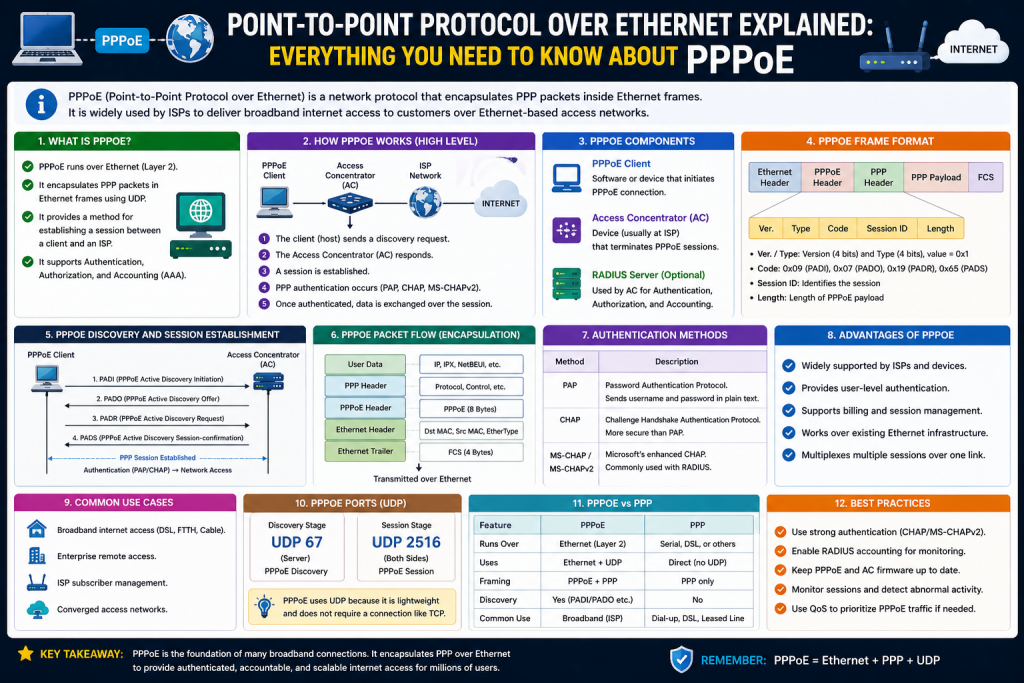
A fast and reliable internet connection feels effortless when everything is working properly. People open their devices, connect to a network, and begin browsing, streaming, or working without thinking about what happens behind the scenes. However, the process that allows a device to connect to the internet involves several layers of communication, protocols, and authentication mechanisms working together.
One of the key technologies that enables this process is PPPoE, which stands for Point-to-Point Protocol over Ethernet. This protocol has played a major role in broadband internet access for both home users and businesses. It provides a structured way for multiple users to connect to an internet service provider using shared network infrastructure while still maintaining individual connections.
Understanding PPPoE helps explain how internet sessions are created, how users are authenticated, and how service providers manage connections efficiently.
What PPPoE Means
PPPoE is a networking protocol that combines two important technologies: Point-to-Point Protocol and Ethernet. Point-to-Point Protocol, often referred to as PPP, was originally designed for direct communication between two systems. It was widely used in older dial-up connections, where a user’s computer would establish a direct link with the service provider.
Ethernet, on the other hand, is the most common technology used in local area networks. It allows multiple devices to communicate within the same network using shared infrastructure such as cables and switches.
PPPoE merges these two approaches by allowing PPP to operate over Ethernet. This means that even though many users share the same physical network, each user can still have a dedicated and controlled session with the service provider.
Why PPPoE Is Important
The importance of PPPoE lies in its ability to make efficient use of network resources while still maintaining control and security. Without PPPoE, service providers would need separate physical connections for each user, which would be expensive and difficult to manage.
In addition to reducing infrastructure costs, PPPoE allows providers to scale their networks more effectively as the number of users grows. Instead of redesigning or expanding physical connections for every new customer, providers can simply accommodate more users within the existing Ethernet framework. This scalability is essential in today’s world, where internet demand continues to increase rapidly due to streaming, cloud services, and remote work.
Another key advantage is the level of control it gives service providers over individual connections. Each user session can be monitored, managed, and configured independently. This makes it easier to apply policies such as speed limits, data caps, or access restrictions based on the user’s subscription plan. It also allows providers to quickly identify and isolate issues without affecting other users on the same network.
Security is further enhanced because PPPoE requires authentication before granting access. This ensures that only authorized users can connect, reducing the risk of unauthorized usage and potential network abuse. It also provides a structured way to track user activity, which can be important for maintaining service quality and addressing technical issues.
Overall, PPPoE creates a balance between efficiency and control. It allows multiple users to share the same infrastructure while still maintaining separate, secure, and manageable connections. This combination of benefits is what makes PPPoE a practical and widely used solution in modern networking environments.
With PPPoE, multiple users can share a single network while still having separate sessions. This allows providers to authenticate each user, assign IP addresses, and manage bandwidth individually.
This approach makes it possible to deliver broadband internet services to large numbers of users without requiring complex infrastructure for each connection.
How PPPoE Works at a Basic Level
At its core, PPPoE works by wrapping PPP data inside Ethernet frames. This process is known as encapsulation. Encapsulation allows one type of data to be transported inside another format so it can travel across a network that would not normally support it.
When a user attempts to connect to the internet using PPPoE, their device begins a discovery process. During this phase, the device searches for available servers provided by the internet service provider.
Once a server responds, the device selects it and requests to establish a session. After the session is confirmed, the two sides negotiate connection parameters such as authentication methods and communication settings.
After successful authentication, the provider assigns an IP address to the user’s device. At this point, the connection is fully established and data can begin to flow between the user and the internet.
The Discovery Phase Explained
The discovery phase is the first step in creating a PPPoE connection. During this stage, the client device sends out a broadcast message to locate available PPPoE servers. This message is received by network devices that are capable of handling PPPoE connections.
Once the broadcast is sent, any access concentrator or PPPoE server within the network that can provide service responds with an offer. This response indicates that the server is available and ready to establish a connection. In environments where multiple servers are present, the client device may receive more than one response, giving it the option to choose the most suitable server.
After receiving these responses, the client selects one of the available servers and sends a request to initiate a session. This step confirms the client’s intention to connect using that specific server. The server then replies with a confirmation, completing the discovery phase and allowing the connection process to move forward.
This phase is essential because it ensures that the client connects to a valid and available service provider. It also helps establish the initial communication path that will be used for the rest of the connection. Although this process happens very quickly, it plays a crucial role in ensuring a successful and stable PPPoE session.
The provider’s equipment responds with an offer, indicating that it can establish a session. The client then chooses one of the available offers and sends a request to initiate the connection.
Finally, the server confirms the session, allowing the process to move to the next stage. This entire sequence happens very quickly and is usually invisible to the user.
The Session and Authentication Phase
Once the discovery phase is complete, the session phase begins. During this stage, the client and server establish a logical connection. This connection behaves like a direct link, even though it is actually running over a shared network.
Authentication is a critical part of this phase. The user must provide valid credentials, typically a username and password, which are verified by the service provider. This ensures that only authorized users can access the network.
After authentication is successful, the connection parameters are finalized and the user is assigned an IP address.
Dynamic IP Address Assignment
One of the key features of PPPoE is dynamic IP address assignment. Instead of giving each user a permanent IP address, the service provider assigns one temporarily from a shared pool.
This approach helps conserve IP address space and allows providers to serve more users efficiently. When a user disconnects, their IP address is returned to the pool and can be assigned to another user.
This system is similar to how older dial-up connections operated, but it has been adapted for modern high-speed networks.
Role of Routers in PPPoE Connections
In many cases, users do not interact directly with PPPoE settings on their computers. Instead, a router handles the entire process. The router stores the login credentials and automatically establishes the PPPoE connection when it starts
.This setup greatly simplifies the user experience because there is no need to manually enter credentials each time a device connects to the internet. Once the router is configured correctly, it maintains the connection continuously in the background. This allows all connected devices, such as smartphones, laptops, and smart TVs, to access the internet without any additional setup.
The router also manages important networking tasks alongside the PPPoE connection. It assigns local IP addresses to devices within the network and directs traffic between those devices and the internet. This process ensures that multiple devices can share a single internet connection efficiently without conflicts.
Another advantage of using a router for PPPoE is improved stability. Routers often include features such as automatic reconnection, which helps restore the connection if it drops unexpectedly. This reduces downtime and ensures a more consistent browsing experience.
Overall, having the router manage PPPoE makes the connection more reliable, easier to use, and better suited for environments where multiple devices need seamless internet access.
Once the connection is established, the router shares the internet connection with all devices on the local network. This means that multiple devices can access the internet without needing to configure PPPoE individually.
The router acts as a bridge between the local network and the service provider, managing the connection and ensuring that data flows smoothly.
Benefits of Using PPPoE
PPPoE offers several important benefits that make it a popular choice for internet service providers. One of the main advantages is improved security. Because each connection requires authentication, unauthorized users cannot easily access the network.
This authentication process ensures that every user must provide valid credentials before being granted access, which significantly reduces the chances of misuse or unauthorized connections. It also allows service providers to keep better control over who is using their network at any given time. If suspicious activity is detected, access can be quickly restricted or monitored more closely.
Another layer of security comes from the fact that PPPoE creates individual sessions for each user. Even though multiple users share the same physical network, their connections remain logically separate. This separation helps protect user data and prevents interference between different sessions. It also improves privacy, as one user cannot directly access another user’s connection.
In addition to security, PPPoE supports features that help maintain stable and reliable connections. Providers can enforce policies such as session time limits or automatic disconnection after inactivity, which helps prevent unnecessary network usage. These controls not only improve efficiency but also contribute to a more secure and well-managed networking environment for both providers and users.
Another benefit is centralized management. Service providers can control user access, assign IP addresses, and monitor usage from a central system. This simplifies network administration and improves efficiency.
PPPoE also supports flexible service plans. Providers can offer different speeds and data limits based on user subscriptions. This allows them to cater to a wide range of customers with different needs.
Compatibility Across Devices
Another reason PPPoE is widely used is its compatibility with different devices and operating systems. It can be configured on computers, routers, and other network equipment without requiring specialized hardware.
This flexibility makes it easy for users to connect to the internet regardless of the type of device they are using.
Common Use Cases
PPPoE is commonly used in digital subscriber line connections and other broadband services. It is particularly useful in environments where multiple users share the same network infrastructure.
In such environments, PPPoE allows each user to establish an individual session with the service provider while still using a shared physical network. This makes it possible for providers to manage multiple connections efficiently without requiring separate lines for each user. As a result, it reduces infrastructure costs and simplifies network deployment.
PPPoE is also widely used in residential settings, where families often connect multiple devices through a single internet connection. By using a router configured with PPPoE, all devices in the home can access the internet seamlessly while the router handles authentication and session management in the background.
In business environments, PPPoE provides additional benefits such as better control over user access and the ability to enforce network policies. Organizations can monitor usage, manage bandwidth allocation, and ensure secure connections for employees.
Its flexibility makes it suitable for a variety of scenarios, from small home networks to larger enterprise systems. By enabling efficient sharing of network resources while maintaining individual control, PPPoE continues to be a practical solution in modern broadband connectivity.
In residential settings, PPPoE allows households to connect multiple devices through a single internet connection. In business environments, it enables organizations to manage multiple users and maintain secure access.
Challenges and Limitations
While PPPoE provides many advantages, it also has some limitations. One of the main drawbacks is the additional overhead caused by encapsulation. Because PPP data is wrapped inside Ethernet frames, extra information is added to each packet.
This can slightly reduce the efficiency of data transmission. However, in most cases, the impact is minimal and does not significantly affect performance.
Another potential issue is configuration complexity. Users may need to enter credentials and adjust settings, which can be confusing for those who are not familiar with networking.
Why Understanding PPPoE Matters
Learning about PPPoE is valuable for anyone who wants to understand how internet connections work. It provides insight into the processes that occur when a device connects to the network and helps explain common issues that may arise.
For example, problems such as authentication failures or connection drops can often be traced back to PPPoE settings. Understanding how the protocol works makes it easier to diagnose and resolve these issues.
Introduction to PPPoE Advantages
PPPoE continues to be widely used in modern networking because it offers a balanced combination of efficiency, control, and flexibility. Internet service providers rely on it to deliver structured and manageable access to thousands or even millions of users. At the same time, it allows individual users to enjoy stable and consistent internet connectivity without needing complex configurations.
The strength of PPPoE lies in its ability to bridge the gap between shared network infrastructure and individual user sessions. Even though multiple users are connected through the same physical network, each user gets a logically separate connection. This allows providers to monitor, control, and optimize network usage effectively.
Understanding the advantages and features of PPPoE helps explain why it remains relevant, even as newer technologies emerge. It also helps users better understand how their internet connection is managed and how they can improve performance.
Centralized Authentication and Access Control
One of the most important features of PPPoE is centralized authentication. Instead of storing user credentials on individual devices or local systems, authentication is handled by a central server managed by the service provider.
When a user attempts to connect, their credentials are sent securely to this central system. The system verifies the username and password and determines whether the user is authorized to access the network. If the credentials are valid, the connection is allowed. If not, access is denied.
This centralized approach provides several advantages. It simplifies user management for service providers, as they can control access from a single point. It also enhances security, since unauthorized users cannot easily gain access without valid credentials.
For users, this system ensures that their connection is protected. It also allows providers to quickly update account details, reset passwords, or disable access when necessary.
Dynamic IP Address Allocation
Another key feature of PPPoE is the ability to assign IP addresses dynamically. Instead of giving each user a fixed IP address, providers maintain a pool of available addresses that can be assigned as needed.
When a user connects, they are temporarily assigned an IP address from this pool. When they disconnect, the address is returned and can be reused by another user. This efficient use of resources allows providers to serve more users without requiring a large number of IP addresses.
Dynamic IP allocation also simplifies the user experience. There is no need for manual configuration, as the process happens automatically during connection. This reduces the chances of errors and makes it easier for users to get online.
In addition, dynamic addressing can improve security in some cases, as changing IP addresses make it harder to track a user over long periods.
Bandwidth Management and Service Customization
PPPoE enables service providers to manage bandwidth usage on a per-user basis. This is essential for offering different service plans with varying speeds and data limits.
Each PPPoE session can be configured with specific parameters that define how much bandwidth the user can consume. For example, a premium user may receive higher speeds, while a basic user may have lower limits.
This level of control allows providers to ensure fair distribution of network resources. It prevents a single user from consuming excessive bandwidth and affecting the performance of others.
Bandwidth management also helps maintain network stability during peak usage times. By controlling traffic flow, providers can reduce congestion and deliver a more consistent experience to all users.
Accounting and Usage Monitoring
PPPoE includes built-in mechanisms for tracking user activity. Service providers can monitor connection duration, data usage, and session details for each user.
This information is essential for billing and reporting purposes. In cases where users are charged based on usage, accurate tracking ensures fair billing. It also allows providers to generate reports and analyze trends in network usage.
Monitoring is also useful for troubleshooting. If a user experiences issues, providers can review session logs to identify potential problems. This helps reduce downtime and improve overall service quality.
For users, this means that their activity may be recorded for operational purposes. While this is standard practice, it highlights the importance of understanding how internet services are managed.
Ease of Setup and User Convenience
Despite its technical complexity, PPPoE is relatively easy to set up for most users. Typically, the service provider supplies a username and password, which must be entered into a device or router.
Once the credentials are configured, the connection process becomes automatic. The device handles discovery, authentication, and session establishment without requiring further input.
This simplicity makes PPPoE accessible to a wide range of users, including those with limited technical knowledge. It also reduces the need for manual configuration, minimizing the chances of errors.
Router-Based PPPoE Implementation
In most modern networks, PPPoE is configured on a router rather than on individual devices. This approach offers significant advantages in terms of convenience and efficiency.
The router stores the login credentials and automatically establishes the PPPoE session when it is powered on. Once connected, it shares the internet connection with all devices on the local network.
This eliminates the need for each device to authenticate separately. It also ensures that the connection remains active as long as the router is running.
Router-based implementation is especially useful in homes and small offices, where multiple devices need to access the internet simultaneously.
Advantages of Using PPPoE with Routers
Using PPPoE on a router simplifies network management. Instead of configuring each device individually, users only need to set up the router once.
The router acts as a central gateway, managing traffic between the local network and the internet. It handles tasks such as IP address assignment, network address translation, and data routing.
This setup also improves security, as the router can include additional features such as firewalls and access controls. These features help protect the network from external threats.
Another advantage is stability. Routers can maintain persistent connections and automatically reconnect if the session is interrupted. This ensures a more reliable internet experience.
Security Features and Protection
Security is a critical aspect of PPPoE. The protocol includes several mechanisms that help protect both users and service providers.
Authentication is the first line of defense. By requiring valid credentials, PPPoE ensures that only authorized users can access the network. This reduces the risk of unauthorized usage.
In addition, PPPoE can support encryption and secure communication methods. While the level of security depends on the implementation, the protocol provides a framework for protecting data.
Session isolation is another important feature. Each user’s connection is independent, which helps prevent interference and improves privacy. Even though users share the same physical network, their data remains separate.
Compatibility Across Systems and Devices
PPPoE is designed to work across a wide range of platforms and devices. It is supported by most operating systems, including those used on personal computers and networking equipment.
This compatibility makes it easy for service providers to deploy and maintain. It also ensures that users can connect using standard devices without needing specialized hardware.
The protocol’s flexibility allows it to be used in various environments, from small home networks to large enterprise systems.
Performance Considerations and Optimization
While PPPoE offers many benefits, it introduces some overhead due to encapsulation. Each data packet includes additional information, which slightly reduces the available payload size.
In most cases, this has little impact on performance. However, in high-speed networks, it may be necessary to adjust settings such as the maximum transmission unit to achieve optimal results.
Proper configuration can help minimize any performance impact. Users and administrators should ensure that their devices are set up correctly to handle PPPoE traffic efficiently.
Best Practices for Stable PPPoE Connections
Maintaining a stable PPPoE connection requires following certain best practices. One of the most important is using strong passwords to protect access.
Regularly updating firmware is also essential. Updates often include security improvements and bug fixes that enhance performance and reliability.
Enabling automatic reconnection features helps ensure that the connection is restored quickly if it drops. This is particularly useful in environments where continuous connectivity is important.
Users should also ensure that their physical connections are secure. High-quality cables and proper installation can prevent many common issues.
Managing Network Load and Devices
Modern households and workplaces often have multiple devices connected to the same network. PPPoE allows these devices to share a single connection through a router.
However, it is important to manage network usage to avoid congestion. Too many devices using the connection simultaneously can reduce performance.
Monitoring usage and limiting unnecessary connections can help maintain a smooth and consistent experience. This is especially important for activities that require high bandwidth, such as streaming or online gaming.
Real-World Applications of PPPoE
PPPoE is commonly used in broadband services such as DSL and fiber connections. It is also used in enterprise networks where controlled access is required.
In residential environments, it allows families to connect multiple devices through a single internet connection. In business settings, it provides a structured way to manage employee access and enforce network policies.
Its versatility makes it suitable for a wide range of applications, from simple home networks to complex organizational systems.
Introduction to PPPoE Troubleshooting
Even though PPPoE is a reliable and widely used protocol, it is not completely free from problems. Like any networking technology, it can experience issues that interrupt connectivity or reduce performance. These issues can be caused by incorrect configurations, hardware problems, or network conditions.
Understanding how to troubleshoot PPPoE connections is essential for maintaining a smooth internet experience. When users know how the protocol works and what can go wrong, they are better equipped to identify problems and apply the right solutions.
Troubleshooting does not always require advanced technical knowledge. Many common issues can be resolved by following simple steps and checking basic settings. However, having a deeper understanding of PPPoE behavior can make the process faster and more effective.
Common PPPoE Connection Problems
There are several types of problems that users may encounter when using PPPoE. These issues can affect the ability to connect, maintain a stable session, or achieve expected performance levels.
One of the most common problems is the inability to establish a connection. In this case, the device fails to complete the PPPoE discovery or authentication process. Another frequent issue is intermittent disconnection, where the connection drops unexpectedly and must be reestablished.
Users may also experience slow speeds, which can be frustrating when performing tasks that require high bandwidth. In some cases, the connection may be active, but websites fail to load, indicating a deeper network issue.
Identifying the type of problem is the first step in troubleshooting. Once the issue is understood, it becomes easier to apply the correct solution.
Authentication Failure Issues
Authentication failure is one of the most common PPPoE problems. This occurs when the username or password entered by the user does not match the records stored by the service provider.
When authentication fails, the connection cannot be established. The device may display an error message indicating incorrect credentials or access denial.
To resolve this issue, users should carefully check the username and password provided by their service provider. It is important to ensure that there are no typing errors, extra spaces, or incorrect characters.
If the problem persists, contacting the service provider may be necessary. They can verify the credentials and reset them if needed.
No IP Address Assigned
Another common issue is the failure to obtain an IP address. In this situation, the PPPoE session may appear to be connected, but the device does not receive a valid IP address from the provider.
Without an IP address, the device cannot communicate with the internet. This problem often indicates a failure during the negotiation phase of the connection process.
Restarting the modem or router can often resolve this issue. This forces the device to restart the PPPoE session and attempt the negotiation process again.
If restarting does not work, users should check their network settings and ensure that the PPPoE configuration is correct.
Intermittent Disconnections
Intermittent disconnections can be particularly frustrating because they disrupt ongoing activities such as streaming, gaming, or video calls. These issues can be caused by unstable network conditions, faulty hardware, or configuration problems.
One possible cause is poor line quality. Damaged cables, loose connections, or interference can affect signal stability. Checking and replacing cables can help resolve this issue.
Another cause may be incorrect router settings. Ensuring that keepalive or auto-reconnect features are enabled can help maintain a stable connection.
In some cases, the issue may be on the provider’s side. If disconnections continue despite troubleshooting, contacting the service provider is recommended.
Slow Internet Speeds
Slow speeds are another common complaint among PPPoE users. This issue can be caused by various factors, including network congestion, incorrect configuration, or hardware limitations.
Users should first verify that they are receiving the speed specified in their service plan. Running a speed test can help determine whether the connection is performing as expected.
If speeds are lower than expected, checking router settings and ensuring proper configuration is important. Updating firmware can also improve performance.
Network congestion caused by multiple devices using the connection simultaneously can also reduce speeds. Limiting unnecessary usage can help improve performance.
Websites Not Loading
In some cases, the PPPoE connection may appear to be active, but websites fail to load. This issue is often related to domain name system settings rather than the PPPoE connection itself.
DNS is responsible for translating website names into IP addresses. If DNS settings are incorrect or not functioning properly, users may not be able to access websites.
To resolve this issue, users can check their DNS settings and ensure they are correctly configured. Switching to a different DNS server may also help.
Restarting the router can refresh network settings and resolve temporary issues.
Hardware and Physical Layer Issues
Not all PPPoE problems are related to software or configuration. Physical components such as cables, modems, and routers play a critical role in maintaining a stable connection.
Damaged or low-quality cables can cause signal loss and instability. Ensuring that all connections are secure and using high-quality cables can prevent many issues.
Faulty hardware can also lead to problems. If a modem or router is malfunctioning, replacing it may be necessary to restore proper connectivity.
Regular inspection of physical components can help identify potential issues before they become serious.
Importance of Logs and Diagnostics
Modern networking devices often provide diagnostic tools and logs that can help identify problems. These logs record information about connection attempts, errors, and session activity.
Reviewing logs can provide valuable insights into what is causing a PPPoE issue. For example, repeated authentication failures or session drops can indicate specific problems.
While interpreting logs may require some technical knowledge, they are a powerful tool for troubleshooting. In many cases, service providers may request log information to assist with diagnosis.
Best Practices for Stable PPPoE Connections
Maintaining a reliable PPPoE connection requires following certain best practices. These practices help prevent issues and ensure consistent performance.
One of the most important practices is using strong passwords. This protects the connection from unauthorized access and improves overall security.
Keeping firmware updated is also essential. Manufacturers release updates to fix bugs and improve performance, so installing updates regularly is important.
Enabling keepalive or auto-reconnect features helps maintain a stable connection. These features automatically restore the connection if it is interrupted.
Regular Maintenance and Monitoring
Regular maintenance is key to preventing PPPoE issues. This includes restarting devices periodically to clear temporary errors and refresh connections.
Monitoring network usage can also help identify potential problems. High usage levels may indicate congestion or unauthorized access.
By keeping an eye on network performance, users can take action before issues become serious.
Managing Network Devices Effectively
In environments with multiple devices, proper management is essential. Too many devices using the network simultaneously can lead to congestion and reduced performance.
Users should prioritize important devices and limit unnecessary connections. This ensures that critical tasks receive sufficient bandwidth.
Using a quality router with good performance capabilities can also improve network stability.
When to Contact the Service Provider
While many PPPoE issues can be resolved locally, some problems require assistance from the service provider. Issues related to network infrastructure, account settings, or service outages are beyond the user’s control.
If troubleshooting steps do not resolve the problem, contacting the provider is the best course of action. Providing detailed information about the issue can help them diagnose and resolve it more quickly.
Automated PPPoE Connections
In many modern setups, users do not need to manually enter PPPoE credentials each time they connect. The router handles the connection automatically.
Once configured, the router establishes the PPPoE session and maintains it continuously. This provides a seamless experience where users can access the internet without additional steps.
This automation simplifies the process and reduces the likelihood of errors.
Long-Term Reliability Strategies
For long-term reliability, users should focus on maintaining both hardware and software components. Investing in quality networking equipment can improve performance and reduce issues.
Regular updates, proper configuration, and good network practices all contribute to a stable connection.
Understanding how PPPoE works also helps users make informed decisions about their network setup.
Conclusion
PPPoE remains a critical technology for delivering internet access in modern networks. While it is generally reliable, understanding how to troubleshoot common issues is essential for maintaining a smooth and consistent connection.
By identifying problems such as authentication failures, disconnections, or slow speeds, users can apply targeted solutions and restore connectivity quickly. Paying attention to physical components, configuration settings, and network usage further improves stability.
Following best practices such as using strong passwords, keeping firmware updated, and enabling automatic reconnection ensures long-term performance. Regular maintenance and monitoring help prevent issues before they arise.
In the end, a solid understanding of PPPoE not only helps resolve problems but also enhances overall network performance. With the right approach, users can enjoy a stable, secure, and efficient internet connection that meets their needs in both personal and professional environments.
Continue exploring the technologies and certification concepts that matter most to you.