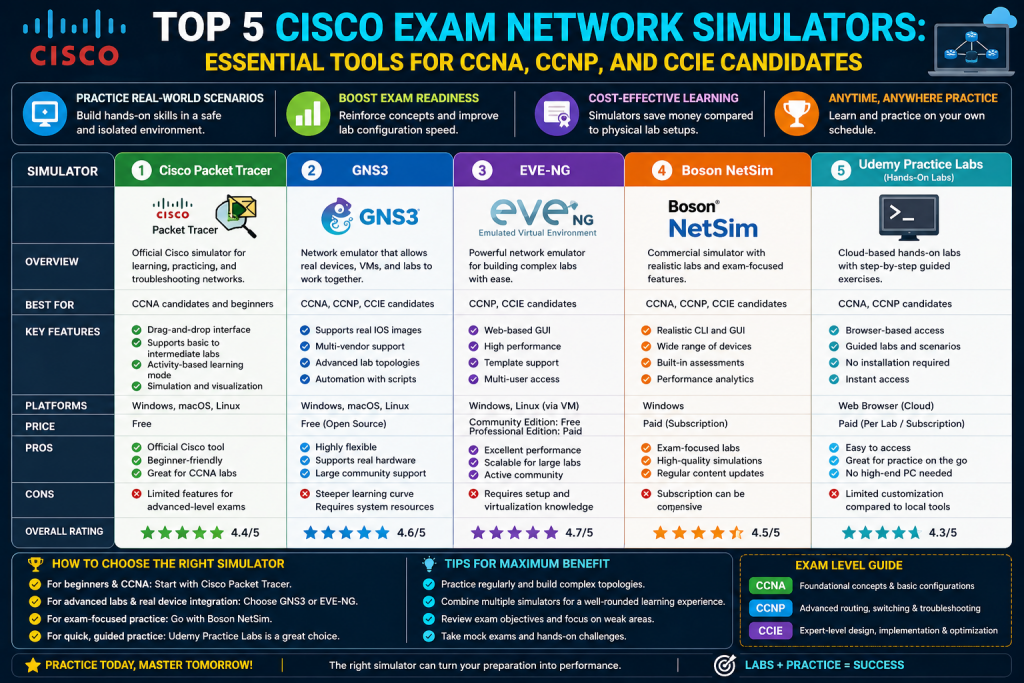
Preparing for Cisco certifications such as CCNA, CCNP, and CCIE requires more than just reading books or watching lectures. These certifications test your practical understanding of networking concepts, which means hands-on experience is essential. Since not everyone has access to physical networking equipment like routers and switches, software-based solutions such as simulators and emulators have become the standard approach for learning and practice.
Choosing the right tool can be confusing because there are multiple options available, and each has its own strengths and weaknesses. Some tools are lightweight and beginner-friendly, while others are more advanced and closer to real-world environments. Instead of focusing on which tool is better, it is more helpful to understand how each one works and what it offers.
This part focuses on network simulators and explores two widely used tools: Packet Tracer and Boson NetSim. These tools are especially useful for beginners and intermediate learners who want to build a strong foundation in networking.
What are Network Simulators
A network simulator is a software application that mimics the behavior of networking devices such as routers, switches, firewalls, and access points. These devices are not real hardware, and they do not run actual operating systems from vendors like Cisco. Instead, they are programmed to behave like real devices based on predefined logic.
Because simulators are based on programmed behavior, they have certain limitations. Not all features available on real devices are included. Advanced technologies and configurations may not be supported, especially those used in enterprise-level environments. However, for learning basic to intermediate networking concepts, simulators are more than sufficient.
One of the biggest advantages of simulators is their low resource usage. They do not require powerful computers, large amounts of memory, or advanced configurations. This makes them ideal for students and beginners who are just starting their networking journey.
Simulators also provide a safe environment where users can experiment without the risk of damaging real equipment or affecting live networks. You can try different configurations, make mistakes, and learn from them without any consequences.
Why Simulators are Important for Cisco Exams
Cisco certification exams, especially at the entry and intermediate levels, focus heavily on understanding networking fundamentals. Topics such as IP addressing, routing protocols, switching concepts, and basic security configurations are essential.
Simulators help bridge the gap between theory and practice. Instead of just reading about commands, you can actually type them into a virtual device and see how the network behaves. This hands-on experience improves retention and builds confidence.
For exams like CCNA, simulators are often more than enough to cover the required topics. They allow you to practice configuration, troubleshooting, and network design in a controlled environment.
Overview of Packet Tracer
Packet Tracer is one of the most popular network simulators used by students preparing for Cisco certifications. It was originally developed as an educational tool for Cisco’s networking courses, but it has become widely used by learners around the world.
The software allows users to create network topologies by placing virtual devices on a workspace and connecting them using different types of cables. Once the topology is created, users can configure devices using a command-line interface or graphical tools.
Packet Tracer combines visual simulation with command-line interaction, making it a powerful learning tool for beginners.
Key Features of Packet Tracer
One of the main reasons Packet Tracer is so widely used is its rich set of features. Despite being free, it offers a comprehensive environment for learning networking concepts.
Free Access
Packet Tracer is completely free to use. You only need to create an account to download it. This makes it accessible to anyone who wants to learn networking without spending money.
Cross Platform Support
The software runs on multiple operating systems, including Windows, macOS, and Linux. This ensures that users can run it regardless of their preferred platform.
Variety of Devices
Packet Tracer includes a wide range of devices such as routers, switches, firewalls, wireless controllers, and end devices like computers and servers. This allows users to build different types of network topologies and explore various scenarios.
Multiple Connection Types
Users can connect devices using different cable types, including Ethernet, fiber, and serial connections. This helps in understanding how physical connections work in real networks.
Realistic Lab Environment
Packet Tracer allows users to configure devices in multiple ways. You can use the command-line interface directly or simulate real-world scenarios by connecting a computer to a device using a console cable.
This flexibility makes the learning experience more realistic and practical.
Simulation Mode
One of the most powerful features of Packet Tracer is simulation mode. In this mode, users can observe how data packets move through the network step by step.
This helps in understanding how protocols work and makes troubleshooting easier. Instead of guessing where a problem is, you can visually track the path of a packet and identify where it fails.
Command Line Interface Experience
The command-line interface in Packet Tracer closely resembles real Cisco devices. It supports many common commands and keyboard shortcuts, allowing users to develop skills that can be applied in real environments.
Practicing commands in this environment helps build confidence and familiarity with networking tasks.
Custom Lab Creation
Packet Tracer allows users to create their own lab exercises. These labs can include instructions, tasks, and even grading systems. This is useful for both self-learning and teaching purposes.
Users can design simple or complex scenarios depending on their learning goals.
Advantages of Packet Tracer
Packet Tracer offers several advantages that make it ideal for beginners.
It is easy to install and use, even for those with no prior experience. The graphical interface makes it simple to create and modify network topologies. The combination of visual and command-line interaction helps in understanding concepts more effectively.
It is also lightweight, meaning it can run on most computers without performance issues. This makes it accessible to a wide range of users.
Another major advantage is its ability to simulate real-world scenarios in a simplified manner. While it may not support every advanced feature, it provides enough functionality to learn the fundamentals of networking.
Limitations of Packet Tracer
Despite its many advantages, Packet Tracer has some limitations.
One of the main drawbacks is the lack of advanced features. Since it is a simulator, it cannot replicate all the capabilities of real networking devices. This can be a limitation for users preparing for advanced certifications.
Another issue is occasional bugs. Sometimes configurations may not work as expected, even if they are correct. Restarting the simulation usually resolves these issues, but it can interrupt the learning process.
Packet Tracer also does not include built-in labs by default. Beginners may find it difficult to know where to start without structured exercises.
Additionally, sharing custom labs can be inconvenient since they need to be distributed as files.
Why Packet Tracer is Ideal for Beginners
Packet Tracer is often considered the best starting point for anyone new to networking. It provides a simple and user-friendly environment where learners can explore concepts without feeling overwhelmed.
It allows users to focus on understanding how networks work rather than dealing with complex setup processes or hardware limitations.
For CCNA preparation, Packet Tracer is usually sufficient to cover most topics. It helps build a strong foundation that can later be expanded using more advanced tools.
Introduction to Boson NetSim
Boson NetSim is another network simulator designed specifically for Cisco certification preparation. Unlike Packet Tracer, it is a paid tool that focuses on structured learning through guided labs.
NetSim is known for its high-quality lab exercises that are aligned with certification exam topics. It provides a more organized approach to learning, making it suitable for users who prefer a structured study plan.
Key Features of Boson NetSim
NetSim offers several features that make it a strong choice for exam preparation.
Structured Labs
One of the biggest advantages of NetSim is its collection of built-in labs. These labs are designed to match certification objectives and provide step-by-step instructions.
This helps users focus on relevant topics and ensures that they are practicing what is needed for the exam.
Progress Tracking
NetSim tracks your progress and shows which labs you have completed. This helps in managing your study plan and identifying areas that need improvement.
Integrated Lab Environment
All labs are available the application. There is no need to download or import files, which simplifies the learning process.
Realistic Terminal
The terminal environment in NetSim closely mimics real-world systems. It supports features like easy copy and paste, which improves usability.
Device Customization
Users can customize devices by adding modules and interfaces. This allows for more flexibility when designing network topologies.
Advantages of Boson NetSim
NetSim provides a structured and guided learning experience. This is especially helpful for users who prefer clear instructions and organized content.
The quality of labs is another major advantage. Each lab is carefully designed to reinforce learning and test understanding.
The integrated environment saves time and effort, allowing users to focus on learning instead of setup.
Limitations of Boson NetSim
The main disadvantage of NetSim is its cost. Since it is a paid tool, it may not be accessible to everyone.
It also offers less flexibility compared to Packet Tracer. The sandbox environment is not as intuitive, and customization options are limited.
Another limitation is the lack of visual feedback in network topologies. Users may not see detailed information about link activity or data flow.
Additionally, changes cannot be made to a running topology, which can interrupt the workflow.
Packet Tracer vs NetSim
Packet Tracer and NetSim serve different purposes.
Packet Tracer is more flexible and encourages experimentation. It is ideal for beginners who want to explore networking concepts freely.
NetSim, on the other hand, provides a structured learning path with guided labs. It is better suited for users who want a focused approach to exam preparation.
Choosing between them depends on your learning style and goals.
Network Emulators and Advanced Tools for Cisco Exam Preparation
As learners progress beyond the basics of networking, the limitations of simulators become more noticeable. While simulators are excellent for learning foundational concepts, they cannot fully replicate the behavior of real networking devices. This is where network emulators come into play.
Emulators provide a more realistic environment by running actual network operating systems or close equivalents. This makes them especially useful for advanced certifications like CCNP and CCIE, where deeper technical understanding and real-world behavior are required.
In this part, the focus shifts to network emulators and advanced lab tools. These include GNS3, Cisco Modeling Labs (CML), and EVE-NG. Each of these tools offers unique capabilities, and understanding their differences is essential for choosing the right one.
What are Network Emulators
A network emulator is a software platform that allows users to run virtual instances of real networking devices. Unlike simulators, which mimic device behavior through programmed logic, emulators use actual system images or very close replicas.
This means that the commands, features, and behaviors seen in an emulator are much closer to what you would experience on real hardware. As a result, emulators support a wider range of technologies, including advanced routing protocols, security features, and automation tools.
However, this realism comes at a cost. Emulators require more system resources, including CPU power, memory, and storage. They may also require additional setup, such as obtaining software images and configuring virtual machines.
Despite these challenges, emulators are essential for advanced learning and professional-level practice.
Key Differences Between Simulators and Emulators
Understanding the difference between simulators and emulators is important when deciding which tool to use.
Simulators are lightweight and easy to use. They are ideal for beginners and for learning basic concepts. However, they are limited in terms of features and realism.
Emulators, on the other hand, provide a more accurate representation of real networks. They allow users to work with actual system images and support advanced configurations. This makes them more suitable for experienced learners and those preparing for higher-level certifications.
In simple terms, simulators are best for learning, while emulators are best for mastering.
Introduction to GNS3
GNS3 is one of the most popular network emulators available today. It is an open-source platform that allows users to create complex network topologies using real device images.
GNS3 operates using a client-server model. The server runs the virtual devices, while the client provides a graphical interface for designing and managing the network. This setup allows users to run powerful simulations even on modest hardware by offloading processing to a virtual machine or remote server.
Over time, GNS3 has evolved to support devices from multiple vendors, making it a versatile tool for learning not just Cisco technologies but also other networking platforms.
Features of GNS3
GNS3 offers a wide range of features that make it a powerful tool for network emulation.
Open Source Platform
GNS3 is free and open source. This means that users can access its code, contribute to its development, and benefit from a large community of users and developers.
The open-source nature also ensures continuous improvement and frequent updates.
Support for Real Device Images
One of the most important features of GNS3 is its ability to run real network operating system images. This allows users to practice configurations exactly as they would on physical devices.
Multi Vendor Support
GNS3 supports devices from multiple vendors, including Cisco, Juniper, and others. This makes it useful for learning a wide range of technologies and preparing for different certification paths.
Flexible Topology Design
Users can create complex network topologies with multiple devices and connections. Devices can be added, removed, or modified even while the network is running.
This flexibility saves time and allows for dynamic experimentation.
Multiple Connection Types
GNS3 supports various connection types, including Ethernet and serial links. This is important for learning technologies that rely on specific types of connections.
Strong Community Support
The GNS3 community is active and helpful. Users can find tutorials, documentation, and shared labs that make learning easier.
Advantages of GNS3
GNS3 provides a realistic lab environment that closely mirrors real-world networks. This makes it ideal for advanced learners who want to gain practical experience.
It is highly flexible, allowing users to build and modify networks without restrictions. The ability to use real device images ensures that the skills learned are directly applicable to real environments.
The strong community support is another major advantage. Users can find help, resources, and inspiration from others.
Limitations of GNS3
Despite its strengths, GNS3 has some challenges.
One of the main issues is the need for device images. These images are not included with the software and must be obtained separately through legal means. This can be a barrier for some users.
The setup process can also be complex, especially for beginners. Configuring the virtual machine, connecting the client and server, and importing images requires some technical knowledge.
Additionally, GNS3 can be resource-intensive. Running multiple devices may require a powerful computer or dedicated server.
Introduction to Cisco Modeling Labs
Cisco Modeling Labs, often referred to as CML, is an official network emulation platform developed by Cisco. It is designed for both individuals and organizations who want to model and test network environments.
CML provides access to licensed Cisco images, making it a reliable and legal option for emulation. It is particularly useful for learners who do not have access to these images through other means.
The platform has evolved over time, improving its interface, performance, and usability.
Features of Cisco Modeling Labs
CML offers several features that make it a strong choice for Cisco-focused learning.
Access to Official Images
CML includes a variety of Cisco images, such as IOS, IOS XR, and NX OS. This eliminates the need to search for and manage images separately.
User Friendly Interface
The interface is designed to be intuitive and easy to use. Users can create and manage network topologies through a web-based interface.
Automation Capabilities
CML includes tools for automating configurations. This allows users to quickly set up networks and test specific scenarios.
Topology Sharing
Users can export and share network topologies. This is useful for collaboration and learning.
Advantages of Cisco Modeling Labs
e biggest advantage of CML is access to official Cisco images. This ensures compatibility and reliability.
The platform is also well-supported and regularly updated. The user interface is clean and easy to navigate, making it accessible to a wide range of users.
Automation features can save time and help users focus on specific learning objectives.Th
Limitations of Cisco Modeling Labs
CML is a paid tool, which may not be suitable for all users.
It also requires significant system resources. Running multiple devices can consume a large amount of memory and CPU power.
Another limitation is the inability to modify a running topology. Changes can only be made when the network is stopped, which can interrupt workflow.
Additionally, some connection types, such as serial interfaces, may not be supported.
Introduction to EVE NG
EVE NG is another powerful network emulator that supports multiple vendors and advanced configurations. It is available in both free and paid versions.
One of the key features of EVE NG is its clientless design. Users can access and manage their network labs through a web browser without installing additional software.
This makes it convenient and accessible from different devices.
Features of EVE NG
EVE NG includes several features that make it a popular choice among network engineers.
Web Based Interface
The entire platform can be accessed through a browser. This eliminates the need for a separate client application.
Multi Vendor Support
EVE NG supports devices from various vendors, allowing users to create diverse network environments.
Flexible Topology Management
Users can modify network topologies while they are running. This improves efficiency and reduces downtime.
Support for Multiple Connection Types
Like GNS3, EVE NG supports both Ethernet and serial connections.
Advantages of EVE NG
The clientless design is one of the biggest advantages. It simplifies setup and allows users to work from different devices.
EVE NG is highly flexible and supports complex network configurations. It is suitable for both learning and professional use.
The ability to modify active topologies saves time and improves productivity.
Limitations of EVE NG
EVE NG does not include device images. Users must obtain them separately, which can be a challenge.
The documentation can be difficult to navigate, especially for beginners. While it is comprehensive, it may not always be easy to follow.
Setting up the environment and importing images requires some technical knowledge.
GNS3 vs CML vs EVE NG
Each emulator has its own strengths and is suited for different types of users.
GNS3 is ideal for those who prefer open-source tools and want flexibility. It is powerful but may require more setup.
CML is best for users who want official Cisco support and easy access to images. It is reliable but comes at a cost.
EVE NG offers a balance between flexibility and usability. Its web-based interface makes it convenient, but it still requires external images.
Modern Network Lab Tools and Final Guidance for Cisco Exam Preparation
As networking technologies continue to evolve, so do the tools used to learn and practice them. Traditional simulators and emulators remain highly relevant, but newer approaches such as container-based networking labs are becoming increasingly popular. These tools focus on speed, scalability, and flexibility, offering a different way to build and test network environments.
For learners preparing for Cisco certifications like CCNA, CCNP, and CCIE, understanding these modern tools is important. While they may not fully replace traditional simulators or emulators, they provide additional options for experimentation and advanced learning.
This part explores container-based tools such as Containerlab, compares all major solutions discussed earlier, and provides guidance on choosing the right tool based on your goals.
Introduction to Container Based Networking Labs
Container-based networking is a newer approach that uses lightweight containers instead of full virtual machines. Containers share the host system’s kernel, which makes them faster to start and more efficient in terms of resource usage.
Containerlab is one of the most well-known tools in this category. It allows users to deploy and manage network devices using container technology. Instead of emulating full hardware, it focuses on running network operating systems in a containerized environment.
This approach is particularly useful for testing, automation, and large-scale network simulations.
What is Containerlab
Containerlab is an open-source tool designed to simplify the creation and management of container-based network labs. It works with Docker and allows users to define network topologies using simple configuration files.
Once a topology is defined, Containerlab can quickly deploy all required nodes and connections. This makes it ideal for rapid testing and experimentation.
It supports multiple vendors and allows users to create complex network environments with minimal effort.
Key Features of Containerlab
Containerlab introduces several modern features that differentiate it from traditional simulators and emulators.
Lightweight and Fast
Containers are much lighter than virtual machines. They start quickly and consume fewer resources. This allows users to run larger topologies on the same hardware.
Scalability
Containerlab can handle large-scale network environments. Users can simulate many devices without requiring extremely powerful systems.
It can also integrate with orchestration platforms, making it suitable for enterprise-level testing.
Flexibility
The tool supports a wide range of network operating systems. Users can mix devices from different vendors in a single topology.
This flexibility is useful for testing interoperability and multi-vendor environments.
Automation Friendly
Containerlab works well with automation tools. Users can integrate it with scripts and automation frameworks to deploy and manage networks efficiently.
This makes it valuable for modern network engineers who work with automation and DevOps practices.
Advantages of Containerlab
Containerlab offers several advantages for advanced users.
It is fast and efficient, allowing for rapid deployment of network labs. This is especially useful when testing multiple scenarios or configurations.
It is highly scalable, making it possible to simulate large networks without requiring enterprise-grade hardware.
The flexibility to use different vendors and integrate with automation tools makes it suitable for modern networking environments.
It is also open source, which means it benefits from community contributions and continuous improvements.
Limitations of Containerlab
Despite its advantages, Containerlab has some limitations, especially for certification preparation.
One of the main challenges is its dependency on container technology. Users need to understand tools like Docker, which can add complexity for beginners.
Another limitation is that it does not fully emulate hardware behavior. Some features that are important for Cisco exams may not be available or may behave differently.
Layer 2 features, which are important for certifications like CCNA, may not be as comprehensive as those in traditional simulators or emulators.
Additionally, setting up complex environments can require advanced knowledge of networking and containerization.
Comparing All Tools
At this point, it is helpful to compare all the tools discussed across the three parts.
Simulators like Packet Tracer are ideal for beginners. They are easy to use, require minimal resources, and provide a good introduction to networking concepts.
Structured simulators like Boson NetSim are better for learners who prefer guided practice. They offer high-quality labs and help users stay focused on exam objectives.
Emulators like GNS3, CML, and EVE NG provide a more realistic environment. They allow users to work with real device images and support advanced features.
Container-based tools like Containerlab focus on speed, scalability, and modern networking practices. They are more suitable for advanced users and real-world testing.
Each tool serves a different purpose, and no single tool can meet all needs.
Choosing the Right Tool for CCNA
For CCNA preparation, simplicity and clarity are most important.
Packet Tracer is usually the best starting point. It covers most exam topics and provides a user-friendly environment.
Boson NetSim can be a good addition if you prefer structured labs and guided learning.
Using advanced emulators or container-based tools at this stage may not be necessary and can add unnecessary complexity.
Choosing the Right Tool for CCNP
For CCNP, the requirements become more advanced.
While Packet Tracer can still be useful, it may not support all required features.
GNS3 and EVE NG are better choices because they allow for more realistic configurations and support advanced technologies.
CML is also a strong option, especially if you want access to official Cisco images.
At this level, using an emulator becomes more important.
Choosing the Right Tool for CCIE
For CCIE preparation, realism is critical.
Emulators like GNS3, CML, and EVE NG are essential because they provide the closest experience to real hardware.
Large and complex topologies are required, so system resources and scalability become important factors.
Containerlab can also be useful for testing and automation, but it should not replace traditional emulators for exam preparation.
Combining Multiple Tools
In many cases, the best approach is to use a combination of tools.
You can start with Packet Tracer to learn the basics, then move to GNS3 or EVE NG for advanced practice.
CML can be used for access to official images, while Containerlab can be used for testing modern networking scenarios.
Using multiple tools allows you to benefit from their strengths and overcome their limitations.
Practical Tips for Effective Lab Practice
Choosing the right tool is only part of the process. How you use the tool is equally important.
Start with simple topologies and gradually increase complexity. Focus on understanding concepts rather than memorizing commands.
Practice troubleshooting regularly. Try to identify and fix issues without relying on guides.
Repeat labs multiple times to reinforce learning. Consistency is key to mastering networking skills.
Experiment with different scenarios. Change configurations and observe how the network behaves.
Document your work. Keeping notes helps in revision and improves understanding.
Common Mistakes to Avoid
Many learners make mistakes that slow down their progress.
One common mistake is trying to learn everything at once. It is better to focus on one topic at a time.
Another mistake is relying too much on theory without practice. Hands-on experience is essential for understanding networking concepts. Reading about protocols, commands, and configurations can give you a basic idea, but it does not build the confidence needed to apply that knowledge in real scenarios. Networking is a practical field, and concepts only become clear when you actually implement them in a lab environment.
When learners skip hands-on practice, they often struggle to remember commands or understand how different components interact within a network. For example, configuring routing protocols or troubleshooting connectivity issues requires more than theoretical understanding. You need to see how devices respond, how errors appear, and how changes affect the network.
Practical experience also helps in developing problem-solving skills. In real exams and job environments, you are often required to identify and fix issues quickly. Without prior lab practice, this can be difficult and time-consuming. Working through labs allows you to encounter common problems and learn how to resolve them efficiently.
Another benefit of hands-on learning is that it improves retention. When you actively perform tasks, your brain processes the information more deeply compared to passive reading. This makes it easier to recall concepts during exams or real-world situations.
To avoid this mistake, learners should balance theory with regular lab practice. Even simple exercises can make a big difference in building strong networking skills.
Some learners also choose tools that are too advanced for their level. This can lead to frustration and confusion.
Ignoring troubleshooting practice is another mistake. Being able to fix problems is just as important as configuring networks.
Future of Network Simulation and Emulation
The field of network simulation and emulation is constantly evolving. New technologies and methodologies are continuously being introduced to make learning and testing networks more efficient, realistic, and accessible. As networking itself becomes more complex with advancements in cloud computing, virtualization, and software-defined networking, the tools used for practice must also adapt to keep up with these changes.
One of the most noticeable trends is the shift toward more realistic environments. Modern tools are focusing on replicating real-world behavior as closely as possible, allowing learners and professionals to test configurations in conditions that closely match production networks. This helps bridge the gap between lab practice and real job scenarios.
Another important development is the integration of automation and programmability. Networking is no longer limited to manual configuration through command-line interfaces. Many modern environments support scripting, APIs, and automation frameworks, allowing users to deploy and manage networks more efficiently. This shift is influencing lab tools as well, encouraging learners to develop skills beyond traditional networking.
Cloud-based lab environments are also gaining popularity. Instead of relying entirely on local hardware, users can now access powerful lab setups through the internet. This reduces the need for high-end personal systems and makes advanced practice more accessible to a wider audience.
Additionally, container-based technologies are becoming more common. These tools offer faster deployment times, better scalability, and improved resource efficiency compared to traditional virtual machines. They allow users to spin up complex network environments in seconds, making experimentation quicker and more flexible.
Another emerging trend is the emphasis on multi-vendor environments. Modern networks often include devices from different vendors, so simulation and emulation tools are expanding their support to include a wider range of platforms. This helps learners gain a broader understanding of networking beyond a single ecosystem.
User experience is also improving. New interfaces are more intuitive, web-based, and easier to navigate, reducing the learning curve for beginners. Enhanced visualization tools make it easier to understand network behavior and troubleshoot issues effectively.
Overall, these advancements are making network simulation and emulation more powerful and accessible, helping learners and professionals stay aligned with the rapidly changing networking landscape.
New tools and technologies are being developed to improve performance, usability, and realism.
Container-based solutions are becoming more popular due to their efficiency and scalability.
Automation and integration with other technologies are also becoming more important.
As networking continues to evolve, learning tools will continue to adapt to meet new demands.
Conclusion
Network simulators, emulators, and modern lab tools each play an important role in Cisco certification preparation.
Simulators like Packet Tracer provide an easy and accessible way to learn the basics. They are ideal for beginners and help build a strong foundation.
Structured tools like Boson NetSim offer guided learning and high-quality labs, making them useful for focused exam preparation.
Emulators such as GNS3, CML, and EVE NG provide a realistic environment that is essential for advanced learning and professional-level practice.
Container-based tools like Containerlab represent the future of networking labs, offering speed, scalability, and flexibility for modern use cases.
There is no single best tool for everyone. The right choice depends on your experience level, goals, and available resources.
By understanding the strengths and limitations of each tool, you can create an effective learning strategy and gain the hands-on experience needed to succeed in Cisco certifications.
The key is to start simple, stay consistent, and gradually move to more advanced tools as your skills improve.
Continue exploring the technologies and certification concepts that matter most to you.