Virtualization has become a cornerstone of modern IT infrastructure, allowing organizations to maximize hardware utilization while reducing operational costs. Instead of running a single operating system on one physical server, virtualization enables multiple operating systems to run simultaneously on the same hardware. This is made possible through a specialized software layer known as a hypervisor.
VMware ESXi stands out as one of the most widely used hypervisors in the world. It is trusted by enterprises, small businesses, and individual learners alike. Its efficiency, reliability, and performance have made it a preferred choice for building virtual environments. Over the years, VMware offered both free and paid versions of ESXi, making it accessible to a wide audience with different needs and budgets.
Understanding the differences between these versions begins with a clear grasp of how ESXi works and why it has become so influential in the virtualization landscape.
What Makes ESXi a Bare-Metal Hypervisor
A key characteristic of VMware ESXi is that it is a bare-metal hypervisor. This means it installs directly onto the physical server hardware rather than running on top of a traditional operating system. This design provides several important advantages.
First, it eliminates the need for a host operating system, reducing overhead and improving performance. Because there is no intermediate software layer, ESXi can allocate system resources more efficiently to virtual machines. This leads to better CPU utilization, faster memory access, and improved overall system responsiveness.
Second, a bare-metal approach enhances security. With fewer components involved, there are fewer potential vulnerabilities. ESXi is purpose-built for virtualization, so its streamlined architecture reduces the attack surface compared to traditional operating systems.
Finally, this design contributes to stability. ESXi is optimized specifically for managing virtual machines, which makes it more reliable in handling workloads compared to general-purpose operating systems.
Core Components of ESXi Architecture
To understand ESXi more deeply, it is helpful to explore its internal structure. ESXi consists of several key components that work together to manage virtual environments.
At the heart of ESXi is the VMkernel. This is the core of the hypervisor, responsible for scheduling CPU resources, managing memory, and handling input and output operations. The VMkernel ensures that each virtual machine receives the resources it needs while maintaining isolation between workloads.
Another important component is the virtual machine monitor. This layer abstracts the physical hardware and presents it to virtual machines as virtual hardware. Each virtual machine interacts with this layer as if it were running on its own dedicated system.
There are also management interfaces that allow administrators to configure and monitor the environment. These include both command-line tools and graphical interfaces. While the free version provides basic management capabilities, the paid versions expand significantly in this area.
Together, these components form a powerful platform capable of supporting a wide range of workloads, from simple applications to complex enterprise systems.
The Role of ESXi in Modern Data Centers
In modern data centers, ESXi plays a critical role in enabling flexibility and scalability. Instead of deploying separate physical servers for each application, organizations can consolidate workloads onto fewer machines. This reduces hardware costs, energy consumption, and physical space requirements.
ESXi also supports rapid provisioning of virtual machines. New servers can be created in minutes rather than hours or days. This agility is especially valuable in environments where demand changes frequently.
Another important benefit is workload isolation. Each virtual machine operates independently, which means that issues in one system do not affect others. This improves reliability and simplifies troubleshooting.
As organizations adopt cloud computing and hybrid environments, ESXi continues to serve as a foundational technology. It integrates with various tools and platforms, allowing seamless movement of workloads between on-premises and cloud environments.
Availability of Free and Paid ESXi Versions
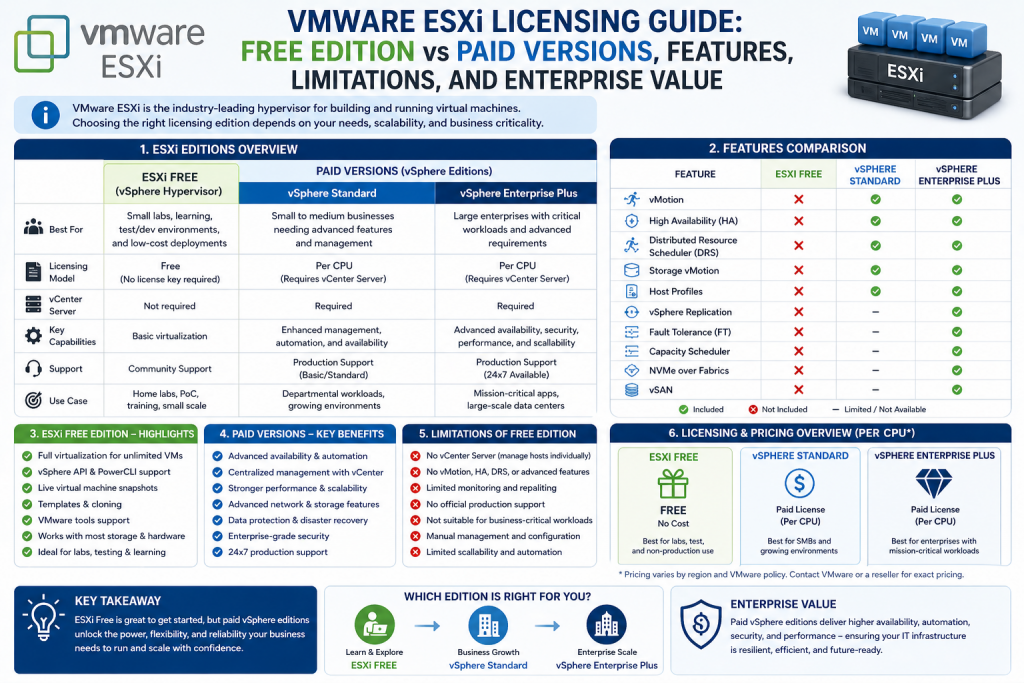
For many years, VMware provided a free version of ESXi alongside its paid offerings. This free version allowed users to install the hypervisor and run virtual machines without purchasing a license. It was especially popular among students, hobbyists, and small businesses.
The free version included the same core hypervisor as the paid editions, which meant users could experience the same installation process and basic functionality. However, several advanced features were restricted or unavailable.
Paid versions of ESXi, on the other hand, were designed for professional use. They included a wide range of capabilities that supported large-scale deployments, high availability, and advanced management.
In 2024, VMware discontinued the free version, marking a significant shift in its licensing strategy. While evaluation licenses are still available for testing, long-term use now requires a paid subscription.
Understanding Licensing Models
Licensing is a crucial aspect of using ESXi, especially in enterprise environments. The free version used a simple licensing model, allowing unlimited use without time restrictions. However, it came with strict feature limitations.
Paid versions use more complex licensing structures. These may include per-CPU licensing, subscription-based models, or bundled packages that include additional tools and services. The exact model depends on the edition and the specific needs of the organization.
One important consideration is scalability. Paid licenses are designed to support large environments with multiple hosts and thousands of virtual machines. They also include access to updates, patches, and official support.
Understanding these licensing models helps organizations plan their infrastructure and budget effectively. It also ensures compliance with vendor requirements.
Feature Restrictions in the Free Version
While the free version of ESXi provided access to the core hypervisor, it lacked many features that are essential for enterprise use. These restrictions were intentionally designed to encourage upgrades to paid versions.
One major limitation was the absence of centralized management. Users of the free version had to manage each host individually, which could become time-consuming and inefficient in larger environments.
Another restriction involved automation. Many advanced features that simplify administration, such as automated load balancing and resource scheduling, were not available in the free version.
Backup and recovery capabilities were also limited. Without access to certain APIs, it was difficult to implement comprehensive data protection strategies. This made the free version less suitable for environments where data integrity is critical.
These limitations highlight the trade-offs between cost and functionality when choosing between free and paid solutions.
Performance and Resource Allocation Differences
Performance is a key consideration when evaluating ESXi versions. While the core hypervisor is the same, the free version imposes restrictions that can impact performance.
For example, there are limits on the number of virtual CPUs that can be assigned to a single virtual machine. This restricts the ability to run resource-intensive applications.
In contrast, paid versions allow significantly higher resource allocation. This enables organizations to run demanding workloads such as large databases, enterprise applications, and high-performance computing tasks.
Memory management is another area where differences can be observed. Paid versions include advanced features that optimize memory usage and improve efficiency.
These enhancements make the paid versions better suited for production environments where performance is critical.
Management Capabilities and Their Importance
Management is one of the most significant areas where free and paid versions differ. In small environments, basic management tools may be sufficient. However, as infrastructure grows, more advanced capabilities become necessary.
The free version provides limited management options, often requiring manual configuration and monitoring. This can lead to inconsistencies and increased administrative effort.
Paid versions introduce centralized management tools that allow administrators to control multiple hosts from a single interface. This simplifies tasks such as deploying virtual machines, applying updates, and monitoring performance.
Centralized management also improves visibility. Administrators can gain insights into resource usage, identify potential issues, and make informed decisions about capacity planning.
These capabilities are essential for maintaining efficiency and reliability in larger environments.
Support and Maintenance Considerations
Support is another critical factor when comparing ESXi versions. The free version does not include official support, leaving users to rely on community forums and online resources.
While community support can be helpful, it does not provide the same level of assurance as professional services. In production environments, delays in resolving issues can lead to downtime and financial losses.
Paid versions include access to official support, with various service levels available. These may range from basic assistance during business hours to 24/7 support with rapid response times.
Maintenance is also easier with paid versions. Regular updates and patches can be applied more efficiently, ensuring that systems remain secure and up to date.
These benefits make paid versions more suitable for organizations that require reliability and peace of mind.
Practical Implications for Different Users
The choice between free and paid ESXi depends largely on the user’s needs and objectives. For individuals and learners, the free version provided an excellent opportunity to gain experience with virtualization.
It allowed users to build home labs, test configurations, and develop skills without financial investment. This made it a valuable tool for education and professional development.
For small businesses, the free version offered a low-cost way to explore virtualization. However, its limitations often became apparent as the business grew and required more advanced capabilities.
Large organizations typically rely on paid versions from the outset. The need for scalability, reliability, and support makes enterprise features essential.
Understanding these practical implications helps users choose the right solution for their specific situation.
Transition Toward Modern Licensing Approaches
The discontinuation of the free version reflects a broader trend in the software industry. Many vendors are moving toward subscription-based models that provide continuous updates and integrated services.
This approach allows for more predictable revenue streams and enables vendors to deliver new features more frequently. It also aligns with the growing adoption of cloud computing and hybrid environments.
For users, this shift means adapting to new licensing models and considering long-term costs. While the initial investment may be higher, the benefits of advanced features and support can outweigh the expense.
This transition marks an important evolution in how virtualization solutions are delivered and consumed.
Closing Perspective on Foundations and Differences
VMware ESXi remains a powerful and versatile hypervisor that plays a central role in modern IT infrastructure. Its ability to run multiple virtual machines on a single physical server has transformed how organizations deploy and manage applications.
The free version provided a valuable entry point for many users, offering access to core virtualization capabilities. However, its limitations in management, performance, and support made it less suitable for production environments.
Paid versions address these limitations by providing a comprehensive set of features designed for scalability, reliability, and efficiency. As virtualization continues to evolve, understanding these differences becomes increasingly important for making informed decisions.
This foundational knowledge sets the stage for exploring deeper comparisons, advanced features, and real-world applications in the next part.
Deeper Look at Feature Gaps Between Free and Paid ESXi
While the foundational hypervisor technology remains consistent across both free and paid versions of VMware ESXi, the real differences become clear when examining the feature set in practical scenarios. The free version was intentionally limited to provide basic virtualization capabilities without enabling advanced enterprise functionality.
One of the most notable gaps lies in operational efficiency. In a production environment, administrators need tools that automate repetitive tasks, provide insights into system health, and ensure workloads are balanced effectively. The free version lacks these enhancements, which means administrators must rely on manual processes.
Paid versions, in contrast, are designed to reduce administrative burden. They include automation features that handle resource allocation dynamically. This ensures that workloads receive the resources they need without constant human intervention. Over time, this difference significantly impacts productivity and operational consistency.
Centralized Management and Its Absence in the Free Version
Centralized management is one of the defining features of enterprise virtualization, and its absence in the free version of ESXi represents a major limitation. Without centralized control, each ESXi host must be configured and managed independently.
In small environments with only one or two hosts, this might not pose a serious problem. However, as soon as the infrastructure begins to scale, the lack of a unified interface becomes a bottleneck. Tasks such as provisioning virtual machines, applying updates, and monitoring performance must be repeated on each host.
Paid versions introduce centralized management capabilities through integrated tools that provide a single pane of glass for the entire environment. This allows administrators to perform tasks across multiple hosts simultaneously, ensuring consistency and saving time.
Centralized management also enables better visibility into the environment. Administrators can track resource usage, identify performance issues, and make informed decisions about scaling and optimization.
Live Migration and Workload Mobility
Another critical feature missing from the free version is live migration. In modern IT environments, the ability to move virtual machines between hosts without downtime is essential for maintaining service availability.
Without live migration, any maintenance activity on a host requires shutting down or pausing virtual machines. This leads to service interruptions, which may not be acceptable in production environments.
Paid versions include live migration capabilities that allow virtual machines to be transferred seamlessly from one host to another. This ensures that applications remain available even during maintenance or hardware upgrades.
Workload mobility also plays a role in resource optimization. If one host becomes overloaded while another is underutilized, workloads can be redistributed dynamically. This improves performance and prevents resource bottlenecks.
High Availability and Fault Tolerance
High availability is a cornerstone of enterprise virtualization, and it is another feature absent from the free version of ESXi. In environments where uptime is critical, the ability to recover quickly from hardware failures is essential.
The free version does not provide automated failover mechanisms. If a host fails, virtual machines running on that host remain offline until manual intervention is performed. This can result in extended downtime and potential data loss.
Paid versions offer high availability features that automatically restart virtual machines on other hosts within a cluster in the event of a failure. This significantly reduces downtime and ensures continuity of operations.
Some editions also include fault tolerance capabilities, which provide even higher levels of protection by running duplicate instances of virtual machines. This ensures that there is no interruption even if a host fails completely.
These features are particularly important for mission-critical applications such as databases, financial systems, and customer-facing services.
Backup and Recovery Limitations
Data protection is a critical aspect of any IT environment, and the limitations of the free ESXi version in this area are significant. The free version does not support the APIs required for advanced backup solutions.
This means that administrators cannot use many third-party backup tools that rely on these APIs to perform efficient, agentless backups. Instead, they must rely on less efficient methods, such as installing backup agents داخل each virtual machine.
These approaches can increase complexity and reduce performance. They also make it more difficult to implement consistent backup policies across the environment.
Paid versions unlock access to these APIs, enabling integration with a wide range of backup and recovery solutions. This allows for centralized, automated backups that minimize downtime and ensure data integrity.
In addition, advanced features such as snapshot management and replication are more robust in paid editions, providing additional layers of protection.
Resource Scheduling and Load Balancing
Efficient resource utilization is essential for maximizing the benefits of virtualization. In environments with multiple hosts, workloads must be distributed evenly to avoid performance issues.
The free version of ESXi does not include automated resource scheduling or load balancing capabilities. This means administrators must manually monitor resource usage and adjust workloads as needed.
Paid versions introduce intelligent scheduling features that automatically balance workloads across hosts. These systems analyze resource usage in real time and move virtual machines as needed to maintain optimal performance.
This automation reduces the risk of human error and ensures that resources are used efficiently. It also allows administrators to focus on higher-level tasks rather than routine maintenance.
Load balancing is particularly important in dynamic environments where workloads change frequently. Without it, some hosts may become overloaded while others remain underutilized.
Scalability Constraints in Real Environments
Scalability is another area where the differences between free and paid ESXi become evident. While the free version can support basic virtualization needs, it is not designed for large-scale deployments.
Limitations on virtual CPU allocation and other resource constraints restrict the size and complexity of virtual machines. This makes it difficult to run enterprise applications that require significant processing power.
Paid versions remove these limitations, allowing organizations to scale their infrastructure as needed. They support larger virtual machines, more hosts, and greater overall capacity.
Scalability is not just about hardware. It also involves the ability to manage growth effectively. Paid versions provide the tools needed to handle expanding environments without sacrificing performance or reliability.
This makes them a better choice for organizations that anticipate growth or need to support a wide range of applications.
Patch Management and System Updates
Keeping systems up to date is essential for security and performance. In the free version of ESXi, patch management is largely a manual process.
Administrators must download updates, apply them individually to each host, and ensure that systems remain consistent. This process can be time-consuming and prone to errors.
Paid versions streamline patch management through centralized tools that automate the update process. Administrators can apply patches across multiple hosts from a single interface, reducing effort and improving consistency.
Automated patch management also reduces downtime by coordinating updates with other features such as live migration. Virtual machines can be moved to other hosts while updates are applied, ensuring continuous operation.
This level of efficiency is critical in environments where uptime and security are top priorities.
Security Features and Compliance Considerations
Security is a major concern for any IT infrastructure, and the differences between free and paid ESXi versions extend into this area as well.
While the free version includes basic security features, it lacks some of the advanced capabilities required for compliance with industry standards. These may include enhanced access controls, auditing, and integration with security tools.
Paid versions provide a more comprehensive security framework. This includes features that help organizations meet regulatory requirements and protect sensitive data.
In addition, centralized management allows for consistent enforcement of security policies across the entire environment. This reduces the risk of misconfigurations and vulnerabilities.
As cyber threats continue to evolve, having access to advanced security features becomes increasingly important.
Real-World Use Cases for Paid ESXi
In real-world scenarios, the advantages of paid ESXi become clear. Large enterprises rely on these features to maintain high levels of performance, availability, and security.
For example, a financial institution may use high availability and fault tolerance to ensure that critical systems remain operational at all times. Any downtime could result in significant financial losses and reputational damage.
Similarly, an e-commerce platform may rely on load balancing and scalability to handle fluctuations in traffic. During peak periods, the ability to distribute workloads efficiently ensures a smooth user experience.
Healthcare organizations also benefit from advanced features, particularly in areas such as data protection and compliance. Ensuring the availability and security of patient data is essential.
These examples highlight how paid ESXi supports a wide range of industries and applications.
Continued Relevance of Free ESXi Use Cases
Although the free version has been discontinued, its use cases remain relevant for understanding its role in the virtualization ecosystem. It was widely used for learning, testing, and small-scale deployments.
Students and IT professionals often used it to build home labs and gain hands-on experience. This allowed them to develop skills that could be applied in professional environments.
Small businesses also benefited from the free version, particularly when budgets were limited. It provided a way to explore virtualization without significant investment.
However, as needs grew, many users transitioned to paid versions to take advantage of advanced features and support.
Operational Challenges Without Enterprise Features
Operating without enterprise features introduces several challenges. Manual processes increase the likelihood of errors, while limited visibility makes it difficult to identify and resolve issues .
Downtime becomes more difficult to manage without high availability and live migration. Maintenance activities may require service interruptions, which can impact users and customers.
Resource inefficiencies also become more pronounced. Without automated scheduling, workloads may not be distributed optimally, leading to performance issues.
These challenges highlight the importance of advanced features in maintaining a reliable and efficient environment.
The Cost Versus Capability Trade-Off
Choosing between free and paid ESXi ultimately comes down to balancing cost and capability. The free version offered a low-cost entry point but came with significant limitations.
Paid versions require an investment, but they provide the tools needed to support complex and demanding environments. This includes automation, scalability, and support services.
For many organizations, the cost of downtime, inefficiency, and manual labor outweighs the cost of licensing. Investing in a paid solution can lead to long-term savings and improved performance.
Understanding this trade-off is essential for making informed decisions about virtualization strategies.
Preparing for Advanced Features and Integration
As organizations adopt more advanced technologies, integration becomes increasingly important. Paid ESXi versions are designed to work seamlessly with other tools and platforms.
This includes integration with cloud services, automation frameworks, and monitoring solutions. These capabilities enable organizations to build comprehensive IT ecosystems that support modern workloads.
Preparing for these integrations requires a solid understanding of the available features and how they can be applied. Paid versions provide the flexibility needed to adapt to changing requirements.
This forward-looking approach ensures that infrastructure remains relevant and capable of supporting future growth.
The Shift Away from Free ESXi
The discontinuation of the free version of VMware ESXi in 2024 marked a significant turning point in the virtualization landscape. For many years, the availability of a no-cost hypervisor allowed individuals and organizations to experiment with virtualization technology without financial commitment. It also served as an entry point for those who later transitioned into enterprise environments.
However, VMware’s decision to phase out the free offering reflects broader changes in the software industry. Vendors are increasingly moving toward subscription-based models that emphasize continuous updates, integrated services, and cloud connectivity. This shift aligns with the growing demand for hybrid and multi-cloud environments, where virtualization is just one component of a larger ecosystem.
The removal of the free version does not diminish the importance of ESXi itself. Instead, it highlights a strategic repositioning toward more comprehensive solutions that combine virtualization, automation, and cloud integration.
Evaluating Long-Term Value of Paid ESXi
When assessing virtualization platforms, organizations must consider long-term value rather than just upfront cost. Paid versions of ESXi offer a wide range of features that contribute to operational efficiency, reliability, and scalability.
One of the key advantages is the ability to manage infrastructure proactively. With advanced monitoring and analytics tools, administrators can identify potential issues before they become critical. This reduces downtime and improves overall system performance.
Another important factor is automation. Tasks that would otherwise require manual effort can be handled automatically, freeing up IT staff to focus on strategic initiatives. Over time, this leads to significant cost savings and improved productivity.
Paid ESXi also supports integration with other enterprise tools, enabling organizations to build cohesive and flexible IT environments. This adaptability is essential in a rapidly changing technological landscape.
The Role of ESXi in Hybrid and Cloud Environments
As organizations increasingly adopt cloud computing, the role of ESXi continues to evolve. Rather than being confined to on-premises data centers, ESXi now plays a key role in hybrid environments that combine local infrastructure with cloud services.
Paid versions of ESXi are designed to integrate seamlessly with cloud platforms, allowing workloads to move between environments as needed. This flexibility enables organizations to optimize resource usage and respond quickly to changing demands.
Hybrid environments also provide opportunities for disaster recovery and business continuity. Virtual machines can be replicated across different locations, ensuring that services remain available even in the event of a failure.
The ability to extend virtualization into the cloud is a major advantage of paid ESXi, making it a valuable component of modern IT strategies.
Enterprise Use Cases and Industry Adoption
Paid ESXi is widely used across various industries, each with its own unique requirements and challenges. In enterprise settings, the need for reliability, scalability, and security drives the adoption of advanced virtualization features.
In the financial sector, for example, systems must operate with minimal downtime. High availability and fault tolerance features ensure that critical applications remain accessible at all times. These capabilities are essential for maintaining customer trust and meeting regulatory requirements.
In the healthcare industry, data protection and compliance are top priorities. Paid ESXi provides the tools needed to secure sensitive information and maintain audit trails. This helps organizations meet strict regulatory standards while delivering reliable services.
Educational institutions also benefit from virtualization. They can create flexible learning environments, deploy virtual labs, and manage resources efficiently. Paid ESXi enables these institutions to scale their infrastructure as needed.
These examples demonstrate how advanced virtualization features support a wide range of real-world applications.
Cost Considerations and Budget Planning
While paid ESXi offers significant advantages, cost remains an important consideration. Organizations must evaluate their budget and determine whether the benefits justify the investment.
The cost of licensing can vary depending on the edition and the number of hosts or CPUs. In addition to licensing fees, organizations should consider the cost of support, training, and infrastructure.
However, it is important to look beyond initial expenses. The efficiency gains provided by automation, centralized management, and advanced features can lead to long-term savings. Reduced downtime, improved performance, and streamlined operations all contribute to a positive return on investment.
Budget planning should also account for future growth. Investing in a scalable solution can prevent the need for costly upgrades later on.
Skills Development and Professional Growth
Even though the free version of ESXi is no longer available, the importance of learning virtualization technology remains unchanged. ESXi continues to be a key skill for IT professionals, particularly those working in data center and cloud environments.
Paid versions and evaluation licenses provide opportunities for hands-on experience. Professionals can build lab environments, experiment with configurations, and develop expertise in managing virtual infrastructure.
Understanding ESXi also opens the door to broader career opportunities. Many organizations seek professionals with virtualization skills, as these are essential for modern IT operations.
Continuous learning is important in this field, as technologies evolve rapidly. Staying up to date with new features and best practices ensures that professionals remain competitive in the job market.
Comparing ESXi with Alternative Hypervisors
While ESXi is a leading hypervisor, it is not the only option available. Organizations often compare it with other virtualization platforms to determine the best fit for their needs.
Some alternatives offer open-source solutions with no licensing costs, while others provide integrated cloud services. Each platform has its own strengths and limitations.
ESXi’s main advantage lies in its maturity and comprehensive feature set. It has been refined over many years and is supported by a large ecosystem of tools and partners.
Paid versions of ESXi also provide a level of reliability and support that is difficult to match. This makes it a preferred choice for organizations that require stability and performance.
However, evaluating alternatives can help organizations make informed decisions and ensure that they choose the most suitable platform.
Operational Efficiency and Business Impact
The impact of virtualization extends beyond technical considerations. It also affects overall business operations and efficiency.
Paid ESXi enables organizations to optimize resource usage, reduce hardware costs, and streamline management processes. These improvements translate into tangible business benefits.
For example, faster provisioning of virtual machines allows organizations to respond quickly to new opportunities. Improved reliability reduces the risk of downtime, which can have financial and reputational consequences.
Automation also plays a key role in improving efficiency. By reducing manual tasks, organizations can allocate resources more effectively and focus on innovation.
These factors demonstrate how virtualization contributes to broader business objectives.
Challenges in Transitioning to Paid ESXi
Transitioning from a free or limited environment to a paid ESXi solution can present challenges. Organizations must plan carefully to ensure a smooth migration.
One challenge is understanding the licensing model and selecting the appropriate edition. This requires a clear assessment of current and future needs.
Another challenge is training staff to use advanced features. While these features provide significant benefits, they also require a certain level of expertise.
Migration itself can also be complex, particularly in environments with existing workloads. Proper planning and testing are essential to minimize disruption.
Despite these challenges, the long-term benefits of paid ESXi often outweigh the initial difficulties.
The Importance of Vendor Support
Vendor support is a critical aspect of enterprise IT solutions. Paid ESXi includes access to professional support services, which can be invaluable in resolving issues and maintaining system stability.
Support services may include troubleshooting assistance, software updates, and access to knowledge bases. These resources help organizations address problems quickly and effectively.
In contrast, the free version relied on community support, which may not always provide timely or accurate solutions. For mission-critical environments, this level of uncertainty is not acceptable.
Having access to reliable support enhances confidence in the platform and ensures that systems remain operational.
Future Trends in Virtualization
The virtualization landscape continues to evolve, driven by advances in technology and changing business requirements. Trends such as containerization, automation, and cloud-native applications are shaping the future of IT infrastructure.
ESXi is adapting to these trends by integrating with modern tools and platforms. Paid versions are designed to support emerging technologies while maintaining compatibility with existing systems.
Automation and artificial intelligence are also playing a growing role. These technologies can optimize resource allocation, predict failures, and improve overall efficiency.
As these trends continue to develop, virtualization will remain a key component of IT strategies, with ESXi playing a central role.
Balancing Simplicity and Advanced Capabilities
One of the challenges in virtualization is finding the right balance between simplicity and advanced capabilities. While basic features may be sufficient for small environments, larger deployments require more sophisticated tools.
Paid ESXi provides this balance by offering a wide range of features that can be tailored to specific needs. Organizations can start with basic functionality and gradually adopt more advanced capabilities as their requirements evolve.
This flexibility makes ESXi suitable for a variety of use cases, from small businesses to large enterprises.
Strategic Decision-Making for Organizations
Choosing the right virtualization solution is a strategic decision that can have long-term implications. Organizations must consider factors such as scalability, reliability, cost, and support.
Paid ESXi offers a comprehensive solution that addresses these considerations. Its advanced features and integration capabilities make it a strong choice for modern IT environments.
However, each organization has unique requirements, and decisions should be based on careful analysis. Evaluating current needs and future goals is essential for selecting the most appropriate solution.
Conclusion
VMware ESXi has established itself as a leading hypervisor, providing the foundation for modern virtualization. The availability of both free and paid versions allowed users to explore its capabilities and choose the level of functionality that suited their needs.
The discontinuation of the free version marks a shift toward more integrated and subscription-based solutions. While this change removes a popular entry point, it also reflects the evolving demands of the industry.
Paid ESXi offers significant advantages, including advanced features, centralized management, automation, and professional support. These capabilities are essential for organizations that rely on virtualization to support critical workloads.
Although the cost of paid solutions may be a consideration, the long-term benefits in terms of efficiency, reliability, and scalability often outweigh the investment. By understanding the differences between free and paid ESXi, organizations can make informed decisions and build infrastructure that meets their current and future needs.
As virtualization continues to evolve, ESXi remains a powerful and relevant tool, enabling organizations to adapt to changing technologies and maintain a competitive edge in the digital landscape.
Continue exploring the technologies and certification concepts that matter most to you.