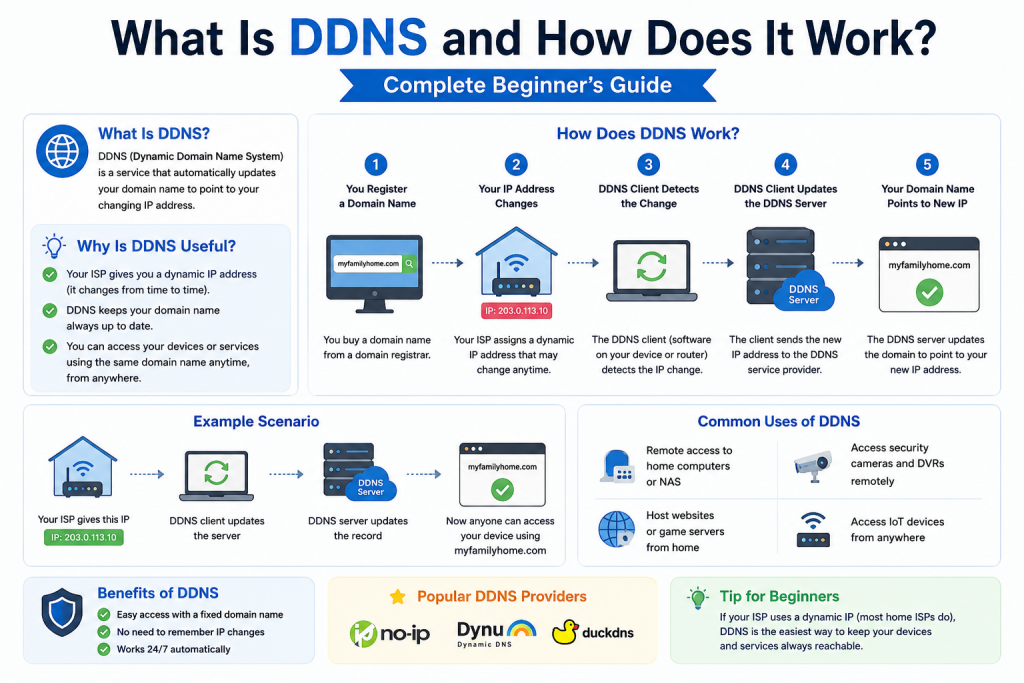
Dynamic DNS, commonly known as DDNS, is a networking service designed to solve a very practical problem in modern internet communication: changing IP addresses. In today’s connected world, almost every device that connects to the internet requires an IP address. This address works like a digital location label, allowing other devices and systems to find and communicate with it. However, unlike physical addresses, IP addresses are not always fixed. In many cases, they change frequently, especially for home users and small office networks. DDNS exists to bridge this gap and make changing addresses easier to manage.
At its core, DDNS allows a constantly changing IP address to be linked with a fixed and easy-to-remember hostname. This means that instead of trying to track a changing number, users can simply use a consistent name to reach their device or network. This simple idea has a major impact on remote access, home networking, and small-scale hosting environments.
By removing the need to repeatedly check and update IP addresses, DDNS significantly reduces complexity for everyday users. It transforms what would otherwise be a technical and time-consuming task into a seamless experience. For example, instead of logging into a router to find the current IP address, a user can directly type a familiar hostname into a browser or application and instantly connect. This consistency improves usability and reduces the chances of connection errors caused by outdated information.
Additionally, DDNS enhances reliability in situations where uninterrupted access is important. Services such as remote desktops, personal cloud storage, and home automation systems benefit greatly from a stable point of access. Even if the underlying network changes, the connection method remains the same. This creates a more dependable environment for both personal and professional use, allowing users to focus on their tasks rather than network management.
To understand why DDNS is important, it is necessary to first understand how traditional DNS and IP addressing work, and why dynamic addressing creates challenges in real-world usage.
Understanding IP Addresses and Their Role in Networking
Every device connected to the internet must have an IP address. This address serves two main purposes: identification and location. It identifies the device on a network and also indicates where that device is located in terms of network routing.
There are two main types of IP addressing systems in use today. The first is static IP addressing, where the IP address remains the same over time. The second is dynamic IP addressing, where the IP address can change periodically.
Static IP addresses are commonly used in business environments, servers, and services that require constant availability. However, they often come at an additional cost from internet service providers. On the other hand, dynamic IP addresses are widely used in residential connections because they are more efficient for providers to manage. These addresses are assigned temporarily and can change whenever the connection resets or when the provider updates its allocation system.
This dynamic nature creates a challenge for users who want to access their home systems remotely. If the IP address keeps changing, it becomes difficult to maintain a stable connection without constantly checking and updating the address manually.
The Problem DDNS Was Designed to Solve
Before DDNS, users who wanted remote access to their home networks or devices had to rely on manually tracking their IP address. This created several issues. First, it was inconvenient because users had to regularly check their current IP address. Second, it was unreliable because any change in the IP address would break existing connections. Third, it was impractical for non-technical users who may not understand networking concepts.
For example, imagine someone running a home security camera system that they want to access while traveling. If their internet service provider changes their IP address, the connection would stop working. The user would then need to find the new IP address and update their settings manually. This process is not only frustrating but also error-prone.
DDNS was created to eliminate this dependency on manual updates. It automates the process of tracking and updating IP address changes so that users can always connect using the same hostname.
How DNS and DDNS Are Connected
To understand DDNS, it is important to first understand DNS, which stands for Domain Name System. DNS is the system that translates human-readable domain names into IP addresses. When a user enters a website name into a browser, DNS servers translate that name into the correct IP address so that the browser can connect to the correct server.
Traditional DNS works well for systems with static IP addresses. Once a domain name is linked to an IP address, it usually stays the same for a long time. However, this system does not work efficiently when IP addresses change frequently.
In environments where dynamic IP addressing is used, the connection between a domain name and its associated IP can quickly become outdated. This creates a mismatch, where the domain still points to an old address that is no longer valid. As a result, users attempting to access a service may experience connection failures, delays, or be directed to the wrong destination. This issue becomes more noticeable in home networks and small setups where IP changes can occur regularly due to router restarts or ISP policies.
Additionally, traditional DNS lacks the ability to automatically update records in real time without manual intervention. This means that every time an IP address changes, the DNS records must be updated manually, which is not practical for most users. It also introduces downtime, as the update process may take time to propagate across the network. These limitations highlight why a more flexible system like DDNS is necessary for dynamic environments where consistency and accessibility are essential.
DDNS extends the functionality of DNS by adding dynamic updates. Instead of maintaining a fixed mapping, DDNS continuously updates the relationship between the hostname and the IP address whenever a change occurs. This makes it suitable for environments where IP addresses are not stable.
In simple terms, DNS provides the foundation for name-based addressing, while DDNS adds the ability to keep that naming system updated in real time.
How Dynamic IP Addresses Work in Real Networks
Most home internet connections use dynamic IP addressing. Internet service providers manage large pools of IP addresses and assign them to users temporarily. When a user connects to the internet, they are given an available IP address from this pool.
This assignment is not permanent. When the router restarts, disconnects, or when the provider refreshes its allocation system, the user may receive a different IP address. This process is efficient for providers because it allows them to reuse addresses across many users.
However, from the user’s perspective, this creates inconsistency. Any service that depends on knowing the IP address becomes difficult to manage. This is especially true for remote access systems, file servers, and home automation devices.
DDNS solves this problem by constantly updating the mapping between the hostname and the changing IP address.
The Core Idea Behind DDNS
The central idea of DDNS is simple: always keep a hostname pointing to the correct current IP address, even when that IP address changes.
To achieve this, a small software component or router feature monitors the current IP address. When it detects a change, it sends an update request to a DDNS provider. The provider then updates its records so that the hostname always points to the correct location.
This process happens automatically and continuously in the background, requiring little to no user interaction once it is properly configured. The monitoring component regularly checks the external IP address assigned to the network, either at fixed intervals or whenever a network event occurs, such as a reconnection. When a difference is detected between the current IP and the previously recorded one, the system immediately prepares an update request.
This request is securely transmitted to the DDNS provider using authentication credentials to ensure that only authorized devices can make changes. Once the provider verifies the request, it replaces the old IP address with the new one in its database. This update is then reflected in DNS lookups, allowing users to reach the correct destination using the same hostname.
Because of this automated update cycle, users experience minimal disruption. Even if the IP address changes unexpectedly, the system quickly adapts, ensuring that connectivity remains stable and reliable for remote access and hosted services.
This process happens automatically without requiring user intervention. Once configured, the system continues working in the background.
The user only needs to remember the hostname, not the IP address. This makes access much simpler and more reliable.
Key Components Involved in DDNS Operation
DDNS relies on a few important components working together. The first is the client system, which can be a computer, router, or embedded device. This system is responsible for detecting IP address changes.
The second component is the DDNS service provider. This provider maintains the database that links hostnames to IP addresses. It receives updates from client systems and ensures that the correct mapping is always stored.
The third component is the user or external device trying to access the system. This could be someone connecting through a phone, laptop, or another network.
These components work together to ensure that even when the underlying IP address changes, the connection remains stable from the user’s perspective.
Why DDNS Became Necessary in Modern Networking
As internet usage expanded, more people began hosting services from their homes. These services include personal websites, media servers, remote desktop access, gaming servers, and smart home systems. All of these require consistent access from outside the local network.
As these use cases became more common, the limitations of traditional home networking setups started to become more apparent. Users wanted the same level of accessibility and reliability that large organizations enjoy, but without the cost and complexity of enterprise infrastructure. This shift created a growing demand for solutions that could provide stable external access even in environments where IP addresses were not fixed.
At the same time, improvements in hardware and internet speeds made it easier for individuals to run powerful services directly from their homes. A regular home computer could function as a server, a storage hub, or even a streaming platform. However, without a consistent way to reach these systems, their usefulness was limited.
DDNS plays a crucial role in enabling this new wave of home-based services. It removes the barrier of changing IP addresses and allows users to maintain a reliable connection point. This makes it possible to share resources, manage systems remotely, and build personalized network solutions without requiring advanced networking expertise or expensive upgrades.
At the same time, internet service providers continued to use dynamic IP addressing for most residential users. This created a mismatch between user needs and provider infrastructure.
DDNS emerged as a practical solution to this mismatch. It allowed users to host services without requiring expensive static IP addresses. It also simplified remote access for non-technical users.
Over time, DDNS became a standard feature in many routers and networking devices, making it more accessible than ever before.
Real-World Scenarios Where DDNS Is Useful
DDNS is widely used in home networking environments. For example, someone may want to access their home computer while traveling. Instead of checking their IP address every time, they can simply use a hostname that always points to their home network.
It is also commonly used for surveillance systems. Many security cameras are installed in homes and small offices. These cameras need to be accessed remotely, and DDNS ensures that users can always reach them.
In practical terms, this means a homeowner or business operator can check live video feeds from anywhere using a smartphone, tablet, or computer. Whether traveling, at work, or simply away from the property, users can monitor activity in real time without needing to know the current IP address of their network. This level of accessibility significantly improves convenience and peace of mind.
Additionally, surveillance systems often rely on continuous availability for recording and alerts. If the connection becomes inconsistent due to changing IP addresses, important footage or notifications could be missed. DDNS helps maintain a stable connection point, ensuring that alerts such as motion detection or security breaches can still be delivered without interruption.
It also simplifies the setup process for many modern camera systems, as manufacturers frequently include built-in DDNS support. This allows users to configure remote access quickly without advanced networking knowledge. Overall, DDNS enhances the reliability, usability, and effectiveness of surveillance systems in both residential and small business environments.
Another common use case is file sharing. Users who host personal file servers can use DDNS to allow friends or colleagues to access files without needing complex configuration.
Gamers also use DDNS to host private game servers. This allows friends to connect easily without worrying about changing network details.
Even small businesses benefit from DDNS when they need remote access to internal systems without investing in dedicated networking infrastructure.
Limitations of Traditional Access Methods Without DDNS
Without DDNS, users must rely on direct IP addressing. This method is unreliable in dynamic environments. Every time the IP address changes, the connection breaks.
This creates a frustrating experience, especially for users who depend on consistent remote access. Each time the connection fails, the user must manually check the new IP address and update it in their applications or connection settings. This process is not only time-consuming but also increases the chances of mistakes, such as entering incorrect addresses or using outdated information.
In addition, frequent IP changes can lead to service interruptions. For example, if someone is hosting a file server or remote desktop service, users trying to connect may suddenly lose access without warning. This makes it difficult to maintain reliability, particularly in situations where continuous availability is important.
Another issue is that direct IP addressing is not user-friendly. Numeric IP addresses are harder to remember compared to simple hostnames. This makes sharing access details with others more complicated.
Overall, relying on direct IP addressing in dynamic networks leads to inefficiency, inconsistency, and unnecessary complexity, which is why solutions like DDNS are essential for maintaining stable and convenient connectivity.
Manual updates are not scalable. As the number of devices increases, managing IP changes becomes more complex. It also increases the chance of errors.
In addition, users who are not technically experienced may find it difficult to track and update IP information regularly. This creates a barrier to remote access and reduces usability.
DDNS eliminates these limitations by automating the entire process.
How DDNS Works in Real Network Environments
Dynamic DNS operates through a continuous cycle of detection, communication, and update. Once it is configured, it runs quietly in the background and ensures that a changing IP address is always linked to a stable hostname. The entire process is automatic, but understanding how it works internally helps make sense of its reliability and usefulness.
When a device or router connects to the internet, it is assigned a public IP address by the internet service provider. This address can remain the same for hours, days, or sometimes only a few minutes depending on the provider’s system. DDNS is designed to track this address and respond immediately when it changes.
The system begins by checking the current IP address at regular intervals. This check can be performed by a router, a software client installed on a device, or an embedded service built into networking hardware. Once the current IP is identified, it is compared with the previously stored value. If there is no change, the system does nothing. If a difference is detected, an update process is triggered.
This update process is the core function of DDNS. It ensures that the hostname associated with the system always points to the correct and most recent IP address.
Role of the DDNS Client in the System
The DDNS client is the component responsible for monitoring and reporting IP address changes. It acts as a bridge between the local network and the external DDNS service provider.
In many modern setups, the client is built directly into the router. This means the router itself performs all monitoring tasks without requiring any additional software. In other cases, a separate application is installed on a computer or server inside the network.
The client regularly checks the public IP address assigned to the network. It then stores this value temporarily and compares it with previous readings. When a change is detected, it prepares an update request.
This request typically includes authentication details, the hostname being used, and the new IP address. The request is then sent over the internet to the DDNS provider’s servers.
The efficiency of the client is important because delays in detection can result in temporary connection issues. However, most systems are designed to check frequently enough to ensure minimal disruption.
How DDNS Providers Handle Updates
Once the update request reaches the DDNS provider, it is processed and verified. The provider checks whether the request is valid and whether the authentication details match an active account.
After verification, the provider updates its internal database. This database contains mappings between hostnames and IP addresses. When the update is complete, the new IP address replaces the old one.
This change is then propagated across the internet’s DNS infrastructure. This process ensures that when someone tries to access the hostname, they are directed to the correct IP address.
The speed of this propagation depends on caching and network conditions. In most cases, the update becomes active within a short period of time, allowing near real-time connectivity.
The provider’s role is critical because it ensures accuracy and consistency. Without this centralized update system, maintaining dynamic mappings would be impossible.
The Importance of DNS Resolution in DDNS
DNS resolution is the process of converting a hostname into an IP address. When DDNS is in use, this process becomes dynamic rather than static.
When a user enters a hostname into a browser or application, a DNS request is sent. This request travels through DNS servers until it reaches the DDNS provider’s system. The provider then returns the most recent IP address associated with that hostname.
If the IP address has recently changed and the update has already been processed, the correct value is returned immediately. If there is a delay in update propagation, the system may temporarily return the old address.
This is why timing plays an important role in DDNS performance. The coordination between updates and DNS resolution determines how smoothly the system functions.
Despite these timing considerations, the system is generally reliable and designed to minimize disruption.
Router-Based DDNS Configuration
One of the most common ways to use DDNS is through router-based configuration. Many modern routers include built-in support for DDNS services, making setup easier for users.
In this configuration, the router takes full responsibility for monitoring the internet connection. Since the router is always connected, it is the most reliable point for detecting IP changes.
Once configured, the router logs into the DDNS provider using account credentials. It then registers a hostname and begins monitoring the connection.
Whenever the IP address changes, the router immediately sends an update request. This eliminates the need for additional software or manual intervention.
Router-based DDNS is especially useful in environments where computers may be turned off or not always active. Because the router remains powered on continuously, it ensures consistent updates.
Software-Based DDNS Clients
In some setups, DDNS is managed by software installed on a computer or server. This approach is common in environments where router support is limited or when more control is needed.
The software runs in the background and performs similar functions to a router-based system. It checks the current IP address and sends updates when changes occur.
However, there is one limitation. If the computer running the client is turned off or disconnected, updates will stop. This can lead to temporary mismatches between the hostname and the actual IP address.
For this reason, software-based DDNS is often used in combination with always-on systems such as servers or dedicated machines.
Despite this limitation, software clients can offer advanced configuration options and more detailed monitoring features.
Understanding Update Frequency and Timing
Update frequency is an important aspect of DDNS performance. It determines how quickly changes in IP address are detected and reported.
Some systems check for changes every few minutes, while others rely on event-based triggers. An event-based trigger occurs immediately when a network change is detected, such as a router reconnecting to the internet.
Frequent checks improve accuracy but may slightly increase network activity. Less frequent checks reduce system load but may introduce short delays in updates.
Most DDNS systems are designed to balance these factors automatically, ensuring efficient performance without unnecessary overhead.
Timing also plays a role in how quickly changes appear across the internet. Even after an update is processed, DNS caching systems may temporarily store old values. This can cause brief inconsistencies during transitions.
The Role of Port Forwarding in DDNS Usage
DDNS only solves one part of the remote access problem. It ensures that a hostname always points to the correct IP address. However, it does not control how traffic enters a network.
This is where port forwarding becomes important. Port forwarding allows external traffic to reach specific devices inside a private network.
For example, if a user wants to access a home computer remotely, the router must be configured to forward incoming requests to that computer’s internal address.
Without port forwarding, even a correctly configured DDNS system will not allow access to internal devices.
The combination of DDNS and port forwarding creates a complete remote access solution. DDNS provides consistent addressing, while port forwarding ensures proper traffic routing.
Security Considerations in DDNS Systems
Although DDNS is not a security feature by itself, it is often used alongside secure connections. Because it provides a consistent entry point into a network, it must be configured carefully.
One important consideration is authentication. DDNS services require login credentials to prevent unauthorized updates. If these credentials are compromised, someone could potentially redirect traffic to a different location.
Another consideration is exposure of services. When devices are made accessible through DDNS, they become reachable from the internet. This means they must be properly secured using passwords, encryption, and firewall rules.
It is also important to limit which services are exposed. Not all internal devices should be accessible externally. Careful configuration ensures that only necessary services are available.
When used correctly, DDNS does not introduce additional risk. Instead, it simply provides a stable access method for existing secure systems.
Common Use Cases in Home and Business Networks
DDNS is widely used in both personal and professional environments. In home networks, it is commonly used for accessing personal computers, surveillance systems, and smart devices.
Many users rely on DDNS to check security cameras while traveling. This allows them to monitor their property from anywhere using a simple hostname.
In business environments, DDNS can be used to support remote employees. It allows access to internal systems without requiring complex infrastructure.
Small businesses often use DDNS to host lightweight services such as file sharing systems or internal applications. This provides flexibility without requiring dedicated static addressing.
Developers also use DDNS for testing and development purposes. It allows them to expose local systems to external networks temporarily.
Challenges and Limitations of DDNS
Although DDNS is highly useful, it does have some limitations. One challenge is dependency on external services. If the DDNS provider experiences downtime, updates may be delayed.
Another limitation is propagation delay. Even after an update is made, DNS caching systems may take time to reflect the change globally.
Network instability can also affect performance. If the connection is frequently interrupted, update requests may fail or be delayed.
Additionally, incorrect configuration can lead to connectivity issues. Mistakes in router settings or authentication details can prevent updates from working correctly.
Despite these challenges, DDNS remains reliable when properly configured and maintained.
Real-World Importance of DDNS in Modern Networking
Dynamic DNS has become an essential part of modern networking because it solves a problem that affects millions of internet users: unstable IP addressing. In today’s digital environment, many services depend on constant availability and remote access. DDNS makes this possible even when the underlying network address keeps changing.
In real-world usage, DDNS is not just a technical convenience. It is a practical solution that supports communication, remote management, security systems, and small-scale hosting. Many users do not even realize they are using DDNS because it is often built into routers, cameras, and network devices.
For home users, DDNS allows access to personal systems from anywhere in the world. For small businesses, it provides a way to manage internal systems without expensive infrastructure. For developers and IT professionals, it offers a flexible way to test and deploy services in dynamic environments.
The importance of DDNS increases as more devices become connected to the internet. With smart homes, remote work, and cloud-based systems becoming more common, the need for stable remote access continues to grow.
Remote Access and Connectivity Benefits
One of the most important advantages of DDNS is remote access. Without DDNS, connecting to a home or office network from outside would require knowledge of the current IP address. Since this address changes frequently, maintaining access becomes difficult.
With DDNS, users can simply use a hostname to connect to their network. This hostname always points to the correct IP address, even when it changes. This makes remote access simple and reliable.
Remote desktop connections are a common example. Users can access their home or office computer from another location using a stable address. Similarly, file servers can be accessed remotely without worrying about network changes.
This level of convenience has made DDNS an important tool for remote workers and digital professionals. It allows them to stay connected to their systems regardless of location.
Use of DDNS in Security and Surveillance Systems
Security systems are one of the most common use cases for DDNS. Many modern surveillance cameras are designed to be accessed remotely. These cameras are often installed in homes, offices, and commercial properties.
Without DDNS, accessing these cameras would require constant updates to the IP address. Since security systems need to be reliable, this would create a major limitation.
DDNS solves this issue by providing a stable access point. Users can view live camera feeds using a hostname that never changes. Even if the internet connection is reset or the IP address changes, access remains uninterrupted.
This is especially useful for property owners who travel frequently. They can monitor their homes or businesses in real time without worrying about network changes.
DDNS in Small Business Environments
Small businesses benefit greatly from DDNS because it allows them to operate efficiently without investing in expensive networking solutions. Many small offices rely on shared resources such as file servers, internal applications, and communication systems.
Instead of purchasing a static IP address, which can be costly, businesses can use DDNS to maintain consistent access to their systems.
For example, employees working remotely can connect to the office network using a hostname. This allows them to access files, applications, and internal tools without interruption.
DDNS also helps businesses maintain flexibility. If the internet connection changes or the network is reconfigured, the DDNS system automatically updates the access point.
This reduces downtime and improves productivity.
DDNS in Smart Home Technology
Smart home systems rely heavily on stable connectivity. Devices such as smart locks, thermostats, lighting systems, and cameras often need to be controlled remotely.
DDNS allows homeowners to access these devices using a consistent address. This means they can control their home systems from anywhere without needing to track changing IP addresses.
As smart homes become more advanced, the role of DDNS becomes even more important. It ensures that all connected devices remain accessible regardless of network changes.
This creates a more reliable and user-friendly smart home experience.
Gaming and Personal Server Hosting
DDNS is also widely used in gaming environments. Many users host private game servers for friends or communities. These servers need to be accessible from outside the local network.
Since most home internet connections use dynamic IP addresses, the server’s address may change frequently. Without DDNS, players would need to constantly update connection details.
With DDNS, a stable hostname is used instead. Players can join the server using this name, and the system automatically directs them to the correct IP address.
This makes multiplayer gaming more convenient and accessible for small communities.
Common Problems in DDNS Usage
Although DDNS is reliable, users may occasionally face issues. One common problem is incorrect configuration. If the system is not set up properly, updates may not work as expected.
Another issue is delayed updates. Sometimes, there may be a short delay between an IP address change and the update being reflected in the system. This can cause temporary connection issues.
Authentication errors are also common. If login credentials are incorrect, the DDNS client will not be able to communicate with the provider.
Network instability can also affect performance. If the internet connection is weak or frequently disconnects, update requests may fail.
In some cases, firewall settings may block DDNS communication. This prevents updates from reaching the provider.
Troubleshooting DDNS Issues
When problems occur, there are several steps that can help resolve them.
The first step is to check the DDNS configuration. Ensuring that the correct hostname, username, and password are entered is essential.
The next step is to verify internet connectivity. A stable connection is required for DDNS to function properly.
Restarting the router or client device can also resolve temporary issues. This refreshes the connection and forces a new update request.
Checking router logs can provide useful information about update failures or authentication problems.
If issues persist, switching to a different DDNS provider may help, especially if the current provider is experiencing downtime.
Security Considerations When Using DDNS
Security is an important factor when using DDNS. Since it provides a direct way to access devices over the internet, proper protection is necessary.
Strong passwords should always be used for DDNS accounts. This prevents unauthorized access to update settings.
It is also important to secure the devices being accessed. Services exposed through DDNS should be protected with encryption and authentication.
Firewalls should be configured to limit access only to necessary services. This reduces the risk of unauthorized entry.
Using secure protocols such as encrypted connections adds an additional layer of protection.
When properly configured, DDNS does not reduce security. Instead, it simply provides a stable access method for secure systems.
Advantages of Using DDNS
DDNS offers several important advantages. The most significant benefit is convenience. Users do not need to track changing IP addresses manually.
It also improves accessibility by allowing remote connections using a consistent hostname.
Cost efficiency is another major advantage. Users can avoid paying for static IP addresses by using DDNS instead.
Automation is also a key benefit. Once configured, DDNS works continuously without user intervention.
It also improves flexibility in networking environments, especially where changes are frequent.
Limitations of DDNS
Despite its advantages, DDNS has some limitations. It depends on external service providers, which means downtime can affect performance.
There may also be delays in updating DNS records due to caching systems.
It is not a complete security solution and must be combined with proper network protection.
In some cases, internet service providers may restrict certain types of traffic, affecting performance.
Understanding these limitations helps users configure DDNS more effectively.
Future of DDNS in Networking
As technology continues to evolve, DDNS remains relevant. With increasing numbers of connected devices, the need for dynamic addressing solutions is growing.
Cloud computing, remote work, and smart home systems all rely on stable connectivity. DDNS supports these technologies by providing consistent access points.
In the future, DDNS may become even more automated and integrated into networking systems. It may also work more closely with cloud-based services to improve performance and reliability.
Conclusion
Dynamic DNS is a powerful and practical solution for managing changing IP addresses in modern networks. It allows users to maintain stable access to devices and services even when underlying network details change frequently.
By connecting dynamic IP addresses with consistent hostnames, DDNS simplifies remote access, improves convenience, and supports a wide range of applications including home networking, business systems, security devices, and personal servers.
Although it has some limitations, its benefits make it an essential tool in today’s connected world. With proper setup and configuration, DDNS provides a reliable foundation for remote communication and network accessibility, making it an important part of modern internet infrastructure.
Continue exploring the technologies and certification concepts that matter most to you.